key Seat Alhambra 2016 Owner's Guide
[x] Cancel search | Manufacturer: SEAT, Model Year: 2016, Model line: Alhambra, Model: Seat Alhambra 2016Pages: 324, PDF Size: 5.93 MB
Page 119 of 324
Opening and closing
Locking and unlocking the vehicle
w ith K
eyl
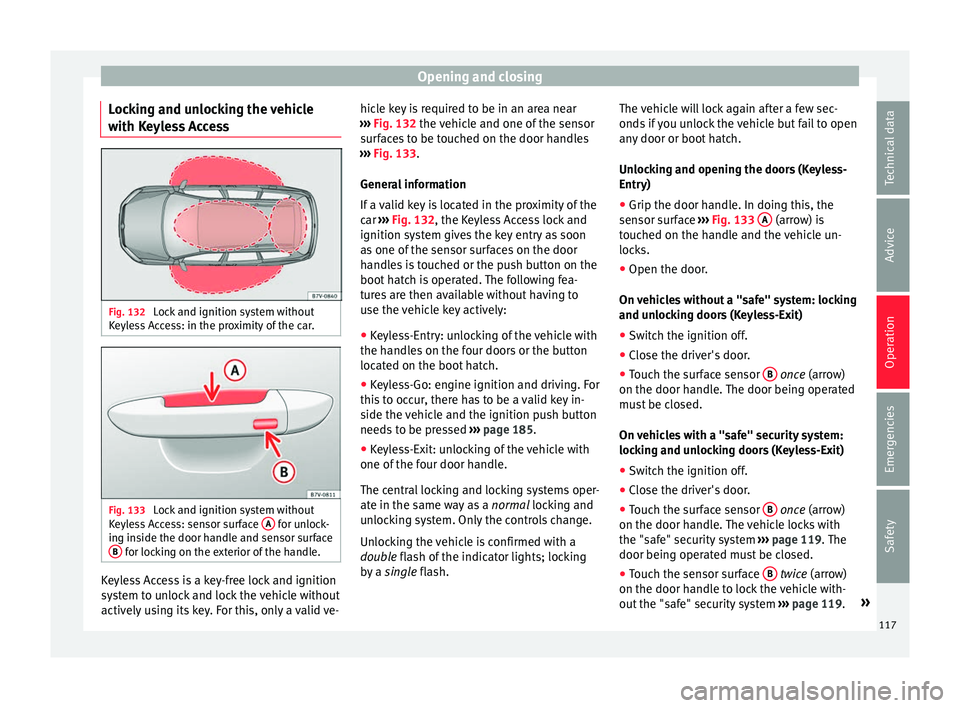
ess Access Fig. 132
Lock and ignition system without
K eyl
e
ss Access: in the proximity of the car. Fig. 133
Lock and ignition system without
K eyl
e
ss Access: sensor surface A for unlock-
in g in
s
ide the door handle and sensor surface
B for locking on the exterior of the handle.
Keyless Access is a key-free lock and ignition
sy
s
t
em to unlock and lock the vehicle without
actively using its key. For this, only a valid ve- hicle key is required to be in an area near
›››
Fig. 132 the vehicle and one of the sensor
surfaces to be touched on the door handles
››› Fig. 133.
General information
If a valid key is located in the proximity of the
car ››› Fig. 132, the Keyless Access lock and
ignition system gives the key entry as soon
as one of the sensor surfaces on the door
handles is touched or the push button on the
boot hatch is operated. The following fea-
tures are then available without having to
use the vehicle key actively:
● Keyless-Entry: unlocking of the vehicle with
the handle
s on the four doors or the button
located on the boot hatch.
● Keyless-Go: engine ignition and driving. For
this t
o occur, there has to be a valid key in-
side the vehicle and the ignition push button
needs to be pressed ››› page 185.
● Keyless-Exit: unlocking of the vehicle with
one of the four door h
andle.
The central locking and locking systems oper-
ate in the same way as a normal locking and
unlocking system. Only the controls change.
Unlocking the vehicle is confirmed with a
double flash of the indicator lights; locking
by a single flash. The vehicle will lock again after a few sec-
onds if
you unlock the vehicle but fail to open
any door or boot hatch.
Unlocking and opening the doors (Keyless-
Entry)
● Grip the door handle. In doing this, the
sensor sur
face ››› Fig. 133 A (arrow) is
t ouc
hed on the h
andle and the vehicle un-
locks.
● Open the door.
On vehic
les without a "safe" system: locking
and unlocking doors (Keyless-Exit)
● Switch the ignition off.
● Close the driver's door.
● Touch the surface sensor B onc
e (arrow)
on the door h andl
e. The door being operated
must be closed.
On vehicles with a "safe" security system:
locking and unlocking doors (Keyless-Exit)
● Switch the ignition off.
● Close the driver's door.
● Touch the surface sensor B onc
e (arrow)
on the door h andl
e. The vehicle locks with
the "safe" security system ››› page 119. The
door being operated must be closed.
● Touch the sensor surface B twic
e (arrow)
on the door h andl
e to lock the vehicle with-
out the "safe" security system ››› page 119. »
117
Technical data
Advice
Operation
Emergencies
Safety
Page 120 of 324
Operation
Unlocking and locking the boot hatch
When the v
ehic
le is locked, the hatch auto-
matically unlocks on opening if ››› Fig. 132
there is a valid vehicle key in the proximity.
Open or close the hatch normally
››› page 124.
After closing, the hatch locks automatically.
In the following instances, the rear lid does
not lock automatically after closing:
● If the entire vehicle is unlocked.
● If the key used last is inside the vehicle. All
vehicl
e indicator lights flash four times. The
vehicle will lock again after a few seconds if
no door or boot hatch are opened.
Locking the vehicle with a second key
If there is a vehicle key inside the vehicle and
it is locked from the outside with a second
vehicle key, the key inside the vehicle is
blocked for engine ignition ››› page 185. In
order to enable engine ignition, the button on the key inside the vehicle needs to be
pr
e
s
sed ››› Fig. 130.
Automatically disabling sensors
If the vehicle is not locked or unlocked for a
long period of time, the proximity sensor on
the passenger door is automatically disa-
bled.
If the exterior sensor on the door handle is
often activated unusually with the vehicle locked (e.g. by the branches of a bush rub-
bing ag
ainst it), all proximity sensors are dis-
abled for a time. If this only happens with the
exterior sensor on the driver's door, only this
sensor is disabled.
Sensors will again be enabled:
● After a time.
● OR: if the vehicle is unlocked with the but-
ton on the key.
● OR: if the boot is opened.
C on
venience functions
To close all electric windows, the sun roof
and electric tilting panoramic roof with the
convenience feature, keep your finger for a
few seconds on the lock sensor surface
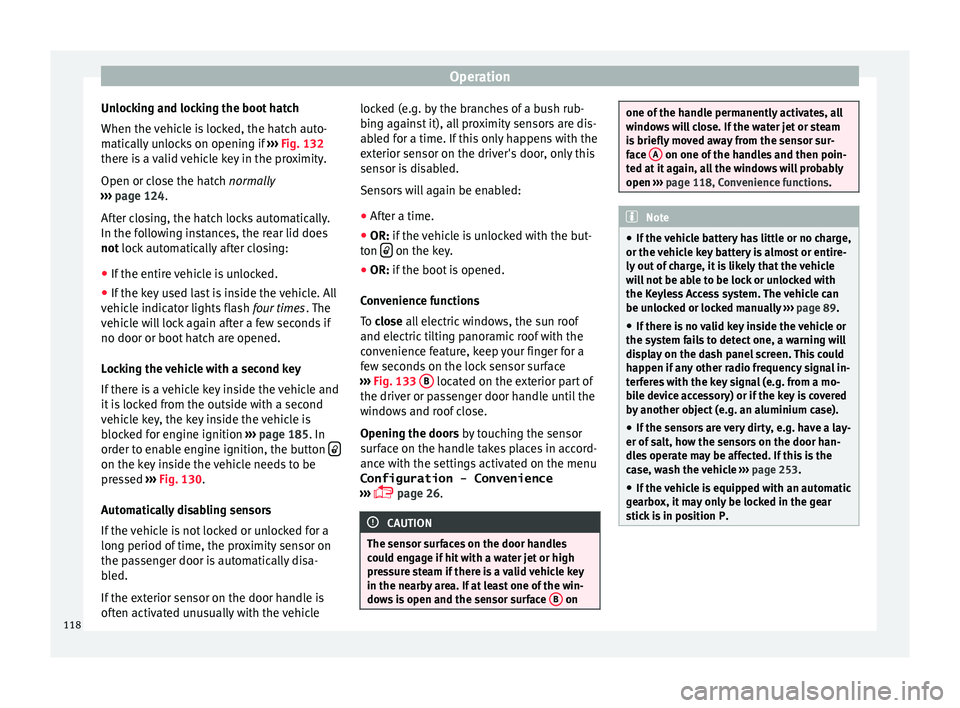
››› Fig. 133 B located on the exterior part of
the driv er or p
a
ssenger door handle until the
windows and roof close.
Opening the doors by touching the sensor
surface on the handle takes places in accord-
ance with the settings activated on the menu
Configuration - Convenience
››› page 26. CAUTION
The sensor surfaces on the door handles
cou l
d engage if hit with a water jet or high
pressure steam if there is a valid vehicle key
in the nearby area. If at least one of the win-
dows is open and the sensor surface B on one of the handle permanently activates, all
windo
w
s will close. If the water jet or steam
is briefly moved away from the sensor sur-
face A on one of the handles and then poin-
ted at it
again, all the windows will probably
open ››› page 118, Convenience functions. Note
● If the v
ehicle battery has little or no charge,
or the vehicle key battery is almost or entire-
ly out of charge, it is likely that the vehicle
will not be able to be lock or unlocked with
the Keyless Access system. The vehicle can
be unlocked or locked manually ››› page 89.
● If there is no valid key inside the vehicle or
the syst
em fails to detect one, a warning will
display on the dash panel screen. This could
happen if any other radio frequency signal in-
terferes with the key signal (e.g. from a mo-
bile device accessory) or if the key is covered
by another object (e.g. an aluminium case).
● If the sensors are very dirty, e.g. have a lay-
er of sa
lt, how the sensors on the door han-
dles operate may be affected. If this is the
case, wash the vehicle ››› page 253.
● If the vehicle is equipped with an automatic
gearbo
x, it may only be locked in the gear
stick is in position P. 118
Page 121 of 324
Opening and closing
"Safe" security systemFunctionNecessary operations
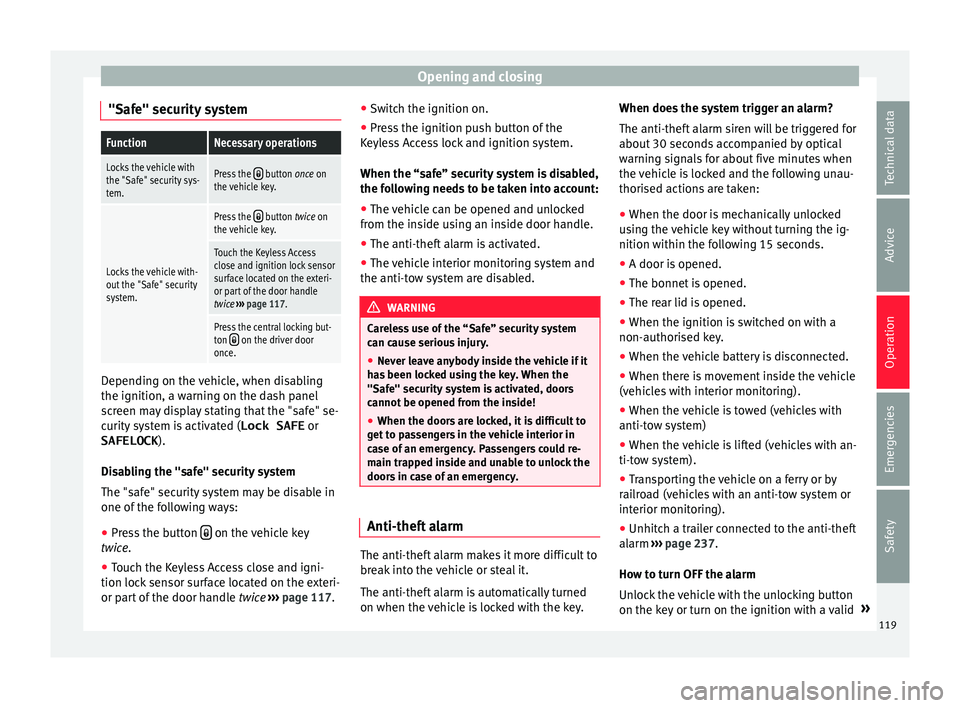
Locks the vehicle with
the "Safe" security sys-
tem.Press the button once on
the vehicle key.
Locks the vehicle with-
out the "Safe" security
system.
Press the button twice on
the vehicle key.
Touch the Keyless Access
close and ignition lock sensor
surface located on the exteri-
or part of the door handle
twice ››› page 117.
Press the central locking but-
ton on the driver door
once. Depending on the vehicle, when disabling
the ignition, a w
arnin
g on the d
ash panel
screen may display stating that the "safe" se-
curity system is activated ( Lock SAFE or
SAFELOCK ).
Disabling the "safe" security system
The "safe" security system may be disable in
one of the following ways:
● Press the button on the vehicle key
twic e
.
● T
ouch the Keyless Access close and igni-
tion lock sen
sor surface located on the exteri-
or part of the door handle twice ››› page 117. ●
Switc
h the ignition on.
● Press the ignition push button of the
Keyle
ss Access lock and ignition system.
When the “safe” security system is disabled,
the following needs to be taken into account:
● The vehicle can be opened and unlocked
from the ins
ide using an inside door handle.
● The anti-theft alarm is activated.
● The vehicle interior monitoring system and
the anti-tow sy
stem are disabled. WARNING
Careless use of the “Safe” security system
can c au
se serious injury.
● Never leave anybody inside the vehicle if it
has
been locked using the key. When the
"Safe" security system is activated, doors
cannot be opened from the inside!
● When the doors are locked, it is difficult to
get t
o passengers in the vehicle interior in
case of an emergency. Passengers could re-
main trapped inside and unable to unlock the
doors in case of an emergency. Anti-theft alarm
The anti-theft alarm makes it more difficult to
br
e
ak
into the vehicle or steal it.
The anti-theft alarm is automatically turned
on when the vehicle is locked with the key. When does the system trigger an alarm?
The anti-theft al
arm siren will be triggered for
about 30 seconds accompanied by optical
warning signals for about five minutes when
the vehicle is locked and the following unau-
thorised actions are taken:
● When the door is mechanically unlocked
usin
g the vehicle key without turning the ig-
nition within the following 15 seconds.
● A door is opened.
● The bonnet is opened.
● The rear lid is opened.
● When the ignition is switched on with a
non-authorised k
ey.
● When the vehicle battery is disconnected.
● When there is movement inside the vehicle
(vehicl
es with interior monitoring).
● When the vehicle is towed (vehicles with
anti-tow sy
stem)
● When the vehicle is lifted (vehicles with an-
ti-tow sy
stem).
● Transporting the vehicle on a ferry or by
railr
oad (vehicles with an anti-tow system or
interior monitoring).
● Unhitch a trailer connected to the anti-theft
alarm ››
› page 237.
How to turn OFF the alarm
Unlock the vehicle with the unlocking button
on the key or turn on the ignition with a valid »
119
Technical data
Advice
Operation
Emergencies
Safety
Page 122 of 324
Operation
key. On vehicles with the Keyless Access sys-
t em, the al
arm c
an also be disabled by grasp-
ing the door handle ››› page 117. Note
● The al arm w
ill be triggered once more when
anybody enters the same zone of surveillance
or any other zone. If, for example, after open-
ing a door, the rear lid is also opened.
● The anti-theft alarm is not activated when
the vehic
le is locked from within using the
central locking button .
● If the driver door is unlocked mechanically
with the k ey
, only the driver door is unlocked,
the rest of the doors remain locked. Only
when the ignition has been turned on will the
other doors be available - but not unlocked -
and the central lock button will be activated.
● If the vehicle battery is run down or flat
then the anti-theft a
larm will not operate cor-
rectly. Interior monitoring system and anti-
t
o
w sy
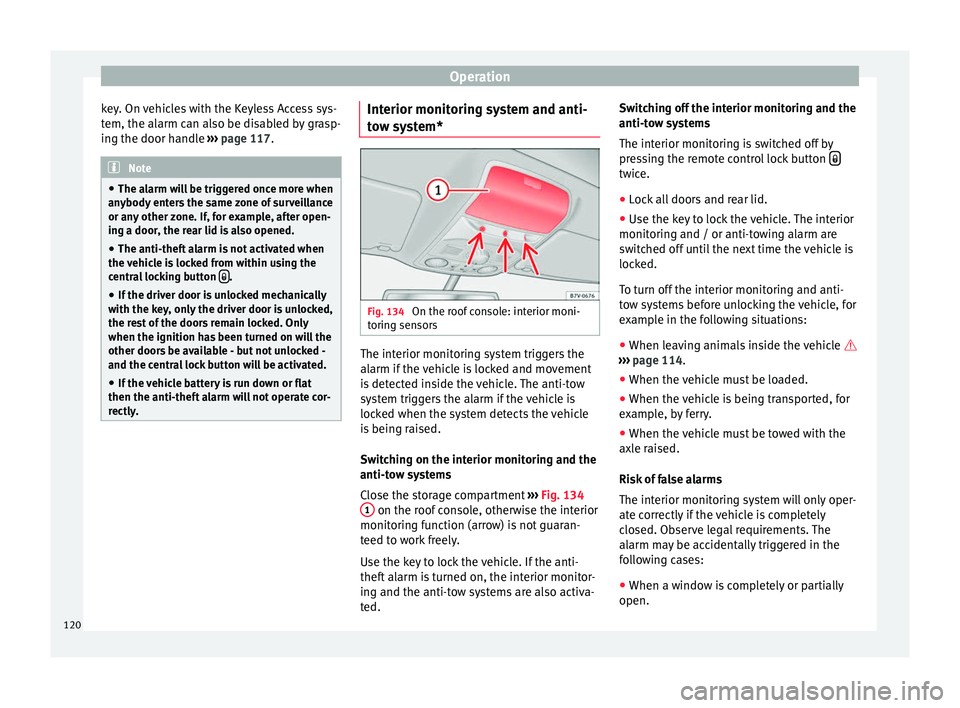
stem* Fig. 134
On the roof console: interior moni-
t orin
g sen
sors The interior monitoring system triggers the
al
arm if
the
vehicle is locked and movement
is detected inside the vehicle. The anti-tow
system triggers the alarm if the vehicle is
locked when the system detects the vehicle
is being raised.
Switching on the interior monitoring and the
anti-tow systems
Close the storage compartment ››› Fig. 134
1 on the roof console, otherwise the interior
monit orin
g f
unction (arrow) is not guaran-
teed to work freely.
Use the key to lock the vehicle. If the anti-
theft alarm is turned on, the interior monitor-
ing and the anti-tow systems are also activa-
ted. Switching off the interior monitoring and the
anti-tow sy
stems
The interior monitoring is switched off by
pressing the remote control lock button twice.
● Lock all doors and rear lid.
● Use the key to lock the vehicle. The interior
monit orin
g and / or anti-t
owing alarm are
switched off until the next time the vehicle is
locked.
To turn off the interior monitoring and anti-
tow systems before unlocking the vehicle, for
example in the following situations:
● When leaving animals inside the vehicle
›››
page 114.
● When the vehicle must be loaded.
● When the vehicle is being transported, for
examp
le, by ferry.
● When the vehicle must be towed with the
axle r
aised.
Risk of false alarms
The interior monitoring system will only oper-
ate correctly if the vehicle is completely
closed. Observe legal requirements. The
alarm may be accidentally triggered in the
following cases:
● When a window is completely or partially
open.
120
Page 124 of 324
Operation
WARNING
Opening sliding doors while driving is dan-
ger ou
s. These doors may be pushed open or
closed when the vehicle accelerates or brakes
and cause serious injuries.
● Never open the sliding doors when the ve-
hicle i
s in movement. Manually opening and closing the
slidin
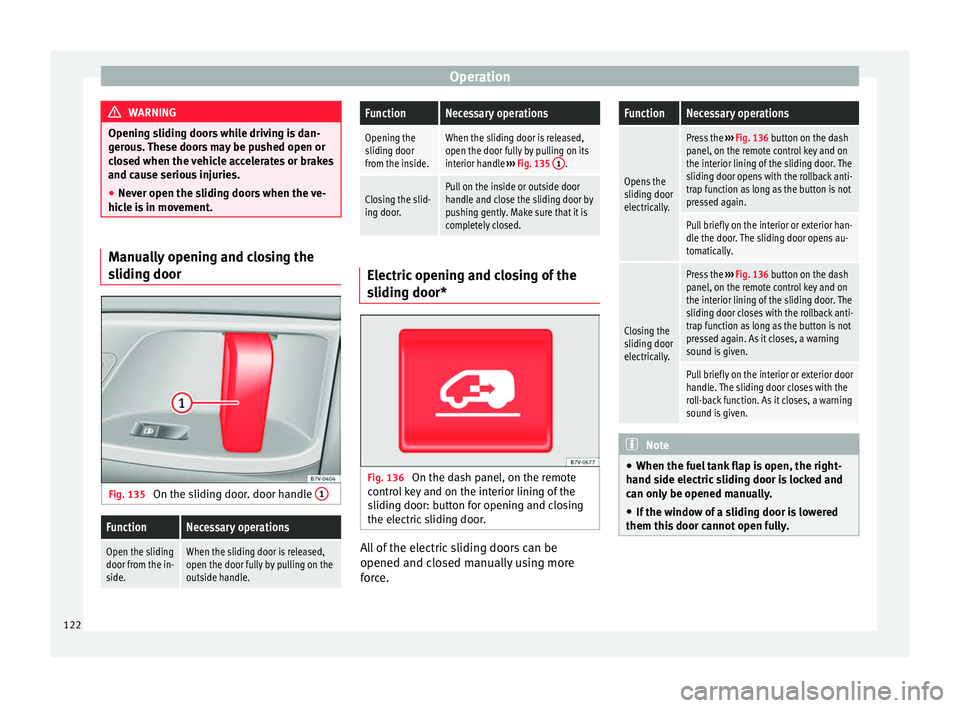
g door Fig. 135
On the sliding door. door handle 1
FunctionNecessary operations
Open the sliding
door from the in-
side.When the sliding door is released,
open the door fully by pulling on the
outside handle.
FunctionNecessary operations
Opening the
sliding door
from the inside.When the sliding door is released,
open the door fully by pulling on its
interior handle
››› Fig. 135 1
.
Closing the slid-
ing door.Pull on the inside or outside door
handle and close the sliding door by
pushing gently. Make sure that it is
completely closed. Electric opening and closing of the
slidin
g door* Fig. 136
On the dash panel, on the remote
c ontr
o
l key and on the interior lining of the
sliding door: button for opening and closing
the electric sliding door. All of the electric sliding doors can be
opened and c
lo
sed m
anually using more
force.
FunctionNecessary operations
Opens the
sliding door
electrically.
Press the ››› Fig. 136 button on the dash
panel, on the remote control key and on
the interior lining of the sliding door. The
sliding door opens with the rollback anti-
trap function as long as the button is not
pressed again.
Pull briefly on the interior or exterior han-
dle the door. The sliding door opens au-
tomatically.
Closing the
sliding door
electrically.
Press the ››› Fig. 136 button on the dash
panel, on the remote control key and on
the interior lining of the sliding door. The
sliding door closes with the rollback anti-
trap function as long as the button is not
pressed again. As it closes, a warning
sound is given.
Pull briefly on the interior or exterior door
handle. The sliding door closes with the
roll-back function. As it closes, a warning
sound is given. Note
● When the fuel t
ank flap is open, the right-
hand side electric sliding door is locked and
can only be opened manually.
● If the window of a sliding door is lowered
them this door c
annot open fully.122
Page 126 of 324
Operation
Rear lid Intr oduction Read the additional information carefully
›› ›
page 10 WARNING
Careless and unsuitable locking, opening and
clo s
ing of the rear lid can cause accidents
and serious injury.
● Open and close the rear lid only when no-
body is
in the way.
● Do not close the rear lid by pushing it down
with y
our hand on the rear window. This
could break and cause injury.
● Ensure the rear lid is locked after closing,
otherwi
se, it may open unexpectedly while
driving. A closed rear lid should be flush with
the corresponding parts of the bodywork.
● Always keep the rear lid closed while driv-
ing to av
oid toxic gases entering the vehicle
interior.
● Do not open the rear lid when there is a
load c
arrier installed. Likewise, the boot
hatch cannot be opened when a load is at-
tached to it, for example bicycles. An open
rear lid could close itself if there is an addi-
tional weight on it. If necessary, press down
on the rear lid and remove the load.
● Close and lock both the rear lid and all the
other doors when
you are not using the vehi- cle. Ensure that nobody remains inside the
vehic
l
e.
● Never allow children to play inside or
around the
vehicle without supervision, espe-
cially if the rear lid is open. Children could
enter the luggage compartment, close the
rear lid and become trapped. Depending on
the time of the year, temperatures inside a
locked and closed vehicle can be extremely
high or extremely low resulting in serious in-
juries and illness or even death, particularly
for young children.
● Never leave children or disabled people
alone in the v
ehicle. If the vehicle key or the
central locking button is used, they may be
locked in the vehicle. WARNING
Unsuitable or careless unlocking and opening
of the r e
ar lid could cause serious injuries.
● If there is a loaded luggage carrier on the
rear lid, it
could be unlocked or open but not
recognised as such. An unlocked or open rear
lid could open unexpectedly while driving. CAUTION
Before opening the rear lid, ensure that there
is s
ufficient free space to open and close it,
for example if you are towing a trailer or in a
garage. Warning lamp
It lights up
The rear lid is open
or not correctly
shut.
Stop driving immediately!
Open the rear lid and close it
again. Several warning and indication lamps light
up for a f
ew sec
onds when the ignition is
switched on, signalling that the function is
being verified. They will switch off after a few
seconds.
A warning lamp appears on the dash panel
if the boot hatch is open or not properly
closed.
Depending on the vehicle equipment, a sym-
bol may be displayed on the dash panel
screen instead of the warning lamp. The indi-
cation is also visible when the ignition is
switched off. The indication disappears
around 15 seconds after the vehicle has
been locked. WARNING
If the rear lid is not correctly closed, it could
open une xpect
edly when driving and cause
serious injuries.
● Always stop immediately and close the rear
lid.
● Ensure that the rear lid has been locked in-
to pl
ace by the element on the lock carrier
when you close it. 124
Page 127 of 324
Opening and closing
Note
At outside temperatures of less than 0°C
(+32°F), the pre s
surised gas struts cannot al-
ways automatically lift the rear lid. In this
case, open the rear lid manually. Closing the rear lid
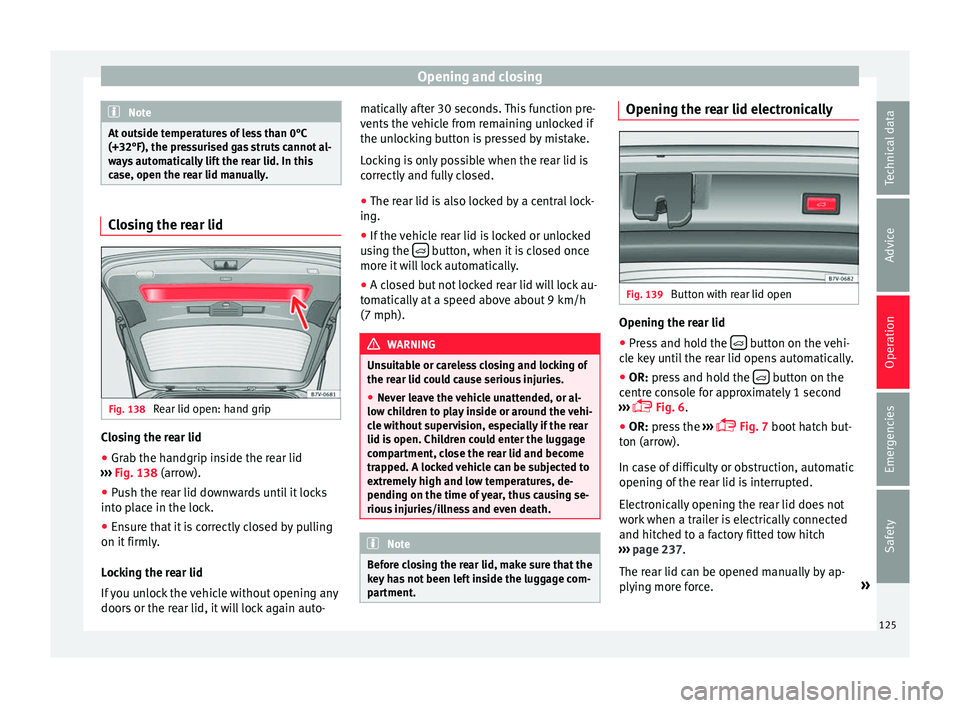
Fig. 138
Rear lid open: hand grip Closing the rear lid
● Grab the handgrip inside the rear lid
› ›
›
Fig. 138 (arrow).
● Push the rear lid downwards until it locks
into pl
ace in the lock.
● Ensure that it is correctly closed by pulling
on it firmly
.
Locking the rear lid
If you unlock the vehicle without opening any
doors or the rear lid, it will lock again auto- matically after 30 seconds. This function pre-
vents the
vehicle from remaining unlocked if
the unlocking button is pressed by mistake.
Locking is only possible when the rear lid is
correctly and fully closed.
● The rear lid is also locked by a central lock-
ing.
● If the
vehicle rear lid is locked or unlocked
usin
g the button, when it is closed once
mor e it
w
ill lock automatically.
● A closed but not locked rear lid will lock au-
tomatic
ally at a speed above about 9 km/h
(7 mph). WARNING
Unsuitable or careless closing and locking of
the re ar lid c
ould cause serious injuries.
● Never leave the vehicle unattended, or al-
low chi
ldren to play inside or around the vehi-
cle without supervision, especially if the rear
lid is open. Children could enter the luggage
compartment, close the rear lid and become
trapped. A locked vehicle can be subjected to
extremely high and low temperatures, de-
pending on the time of year, thus causing se-
rious injuries/illness and even death. Note
Before closing the rear lid, make sure that the
key h
as not been left inside the luggage com-
partment. Opening the rear lid electronically
Fig. 139
Button with rear lid open Opening the rear lid
● Press and hold the button on the vehi-
c l
e k
ey until the rear lid opens automatically.
● OR: press and hold the button on the
c entr
e c
onsole for approximately 1 second
››› Fig. 6.
● OR: press the ››
›
Fig. 7 boot hatch but-
ton (arrow).
In case of difficulty or obstruction, automatic
opening of the rear lid is interrupted.
Electronically opening the rear lid does not
work when a trailer is electrically connected
and hitched to a factory fitted tow hitch
››› page 237.
The rear lid can be opened manually by ap-
plying more force. »
125
Technical data
Advice
Operation
Emergencies
Safety
Page 129 of 324
Opening and closing
Note
Before closing the rear lid, make sure that the
key h
as not been left inside the luggage com-
partment. Electric windows
Electric w
indows: functionsRead the additional information carefully
›› ›
page 11
After turning off the ignition, the windows
can be opened and closed for a short time
using the buttons on the door as long as the
driver door or passenger side door is not
open. When the key is removed from the igni-
tion and the driver door is open, all of the
electric windows can be opened or closed at
the same time keeping the button on the
driver’s door pressed down. After a few sec-
onds, the convenience opening or closing
function will begin ›››
page 127.
One-touch opening and closing
The one-touch automatic opening and clos-
ing is used to open or close the windows
completely. It will not be necessary to hold
the button of the corresponding electric win-
dow. For the one-touch closing function: p
u
l
l the
button for the corresponding window up-
wards until it reaches the second position.
For the one-touch opening function: push the
button for the corresponding window down-
wards until it reaches the second position.
To stop the one touch function: push or pull
on the button of the corresponding window.
Restoring one-touch opening and closing
The one-touch opening and closing function
is not active after the vehicle battery has
been disconnected or is flat and will have to
be reset.
● Close all windows and doors.
● Pull the button of the corresponding win-
dow and hol
d it for one second in this posi-
tion.
● Release the button and pull upwards and
hold ag
ain. The one-touch function is now
ready for operation.
The automatic one-touch electric windows
can be reinitialised individually or several at
a time.
Convenience opening/closing
The electric windows can be opened or
closed from outside using the vehicle key: ●
Keep the v
ehicle unlocking or locking but-
ton pressed. All windows which function elec-
trically will be either opened or closed.
● To interrupt the function, release the lock-
ing or un
locking button.
During convenience closing, first the win-
dows and then the sliding sunroof will be
closed.
In the Configuration - convenience
menu, there are different settings for operat-
ing the windows ›››
page 26. WARNING
Careless use of the electric windows can
cau se seriou
s injury.
● Only operate the electric windows when
nobody i
s in the way.
● Never leave children or disabled people
alone in the v
ehicle if the doors are to be
locked. The windows cannot be opened in
case of an emergency.
● Always take all the keys with you whenever
you le
ave the vehicle. After turning off the ig-
nition, the windows can be opened and
closed for a short time using the buttons on
the door as long as the driver door or passen-
ger side door is not open.
● When transporting children in the rear
seats, a
lways deactivate the rear electric win-
dows with the child safety lock so that they
cannot be opened and closed. » 127
Technical data
Advice
Operation
Emergencies
Safety
Page 130 of 324
Operation
Note
The one-touch function and roll-back function
wi l
l not work if there is a malfunction in the
electric windows. Visit an authorised work-
shop. Roll-back function on electric win-
dow
s The anti-trap function of the electric windows
can r
educ
e the risk of injury when opening
and closing the electric windows ››› . If a
w indo
w i
s not able to close because it is stiff
or because of an obstruction, it will automati-
cally open again.
● Check why the window does not close.
● Attempt to close the window again.
● If you try within the following 10 seconds
and the window c
loses with difficulty or there
is an obstruction once again, the one-touch
closing will stop working for 10 seconds.
● If the window is still obstructed, it will stop
at the corr
esponding position. When the but-
ton is operated within 10 seconds, the win-
dow will close without the anti-trap function
››› . To close windows without the anti-trap func-
tion
●
Attempt to close the corresponding electric
w indo
w w
ithin 10 seconds after by holding
the button. The window is closed without the
anti-trap function, deactivated for a short
time.
● After more than 10 seconds, the anti-trap
function i
s reactivated. The window will stop
once again if there is another difficulty or ob-
stacle.
● If the window will still not close, visit a spe-
ciali
sed workshop. WARNING
Closing the electric windows without the an-
ti-trap f u
nction can cause serious injury.
● Always close the electric windows careful-
ly.
● Nobody
should be in the way of the electric
window
s, especially when the anti-trap func-
tion is deactivated.
● The anti-trap function does not prevent fin-
gers
or other parts of the body getting
pinched against the window frame and caus-
ing injury. Note
The anti-trap function also operates if the
windo w
s are closed from the outside of the
vehicle using the ignition key for convenience
closing ››› page 127. Panoramic sliding sunroof*
P anor
amic
sliding sunroof: operating Read the additional information carefully
›› ›
page 12
The panoramic sliding sunroof will only work
with the ignition on. It can be opened or
closed for a few minutes after the ignition
has been switched off, provided the driver
door and the front passenger door are not
opened.
Convenience open/close function
The panoramic sliding sunroof can be
opened or closed from outside the vehicle
using the vehicle key:
● Keep the vehicle unlocking or locking but-
ton pr e
ssed. The panoramic sliding sunroof
is adjusted or closes.
● Release the unlock or lock button to stop
the function.
D
uring convenience closing, first the win-
dows and then the panoramic sliding sunroof
will be closed. WARNING
Careless or uncontrolled use of the panoram-
ic s lidin
g sunroof can cause serious injuries.128
Page 131 of 324
Opening and closing
●
Only c
lose the panoramic sliding sunroof
and the sun blind when nobody is in the way.
● Always take all the keys with you whenever
you le
ave the vehicle.
● Never leave children or disabled persons in
the vehic
le, particularly if they have access to
the keys. Uncontrolled use of the key could
lock the vehicle, start the engine, turn on the
ignition and operate the panoramic sliding
sunroof.
● The panoramic sliding sunroof can be oper-
ated for up t
o about ten minutes after the ig-
nition has been switched off, provided the
driver door and the front passenger door are
not opened. Note
● In ca se of
a fault in the operation of the
panoramic sliding sunroof, the anti-trap func-
tion will not operate correctly. Visit a special-
ised workshop.
● The rotary button of the panoramic sliding
sunr
oof remains in the last position selected
if the roof is closed using convenience clos-
ing from outside the vehicle, and will have to
be re-positioned the next time you drive. Opening or closing the sun blind
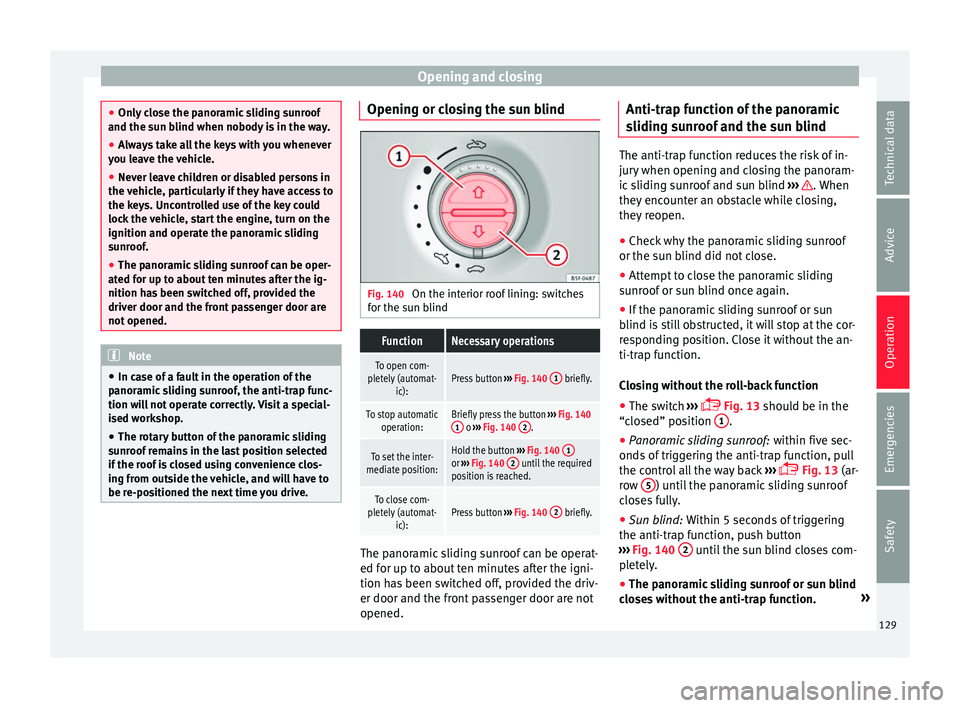
Fig. 140
On the interior roof lining: switches
f or the s
u
n blind
FunctionNecessary operations
To open com-
pletely (automat- ic):Press button ››› Fig. 140 1 briefly.
To stop automatic
operation:Briefly press the button ››› Fig. 140
1 o ››› Fig. 140 2.
To set the inter-
mediate position:Hold the button ››› Fig. 140 1or
››› Fig. 140 2 until the required
position is reached.
To close com-
pletely (automat- ic):Press button ››› Fig. 140 2 briefly. The panoramic sliding sunroof can be operat-
ed f
or up t
o about
ten minutes after the igni-
tion has been switched off, provided the driv-
er door and the front passenger door are not
opened. Anti-trap function of the panoramic
sliding s
unroof and the sun blind The anti-trap function reduces the risk of in-
jury
when openin
g and closing the panoram-
ic sliding sunroof and sun blind ››› . When
they enc ou
nter an obstacle while closing,
they reopen.
● Check why the panoramic sliding sunroof
or the sun b
lind did not close.
● Attempt to close the panoramic sliding
sunr
oof or sun blind once again.
● If the panoramic sliding sunroof or sun
blind i s
still obstructed, it will stop at the cor-
responding position. Close it without the an-
ti-trap function.
Closing without the roll-back function
● The switch ›››
Fig. 13 should be in the
“closed” position 1 .
● Panoramic sliding sunroof: within fiv
e sec
-
onds of triggering the anti-trap function, pull
the control all the way back ›››
Fig. 13 (ar-
row 5 ) until the panoramic sliding sunroof
c lo
se
s fully.
● Sun blind: Within 5 second
s of triggering
the anti-trap function, push button
››› Fig. 140 2 until the sun blind closes com-
p l
et
ely.
● The panoramic sliding sunroof or sun blind
close
s without the anti-trap function. »
129
Technical data
Advice
Operation
Emergencies
Safety