brake fluid Seat Alhambra 2016 Owner's Manual
[x] Cancel search | Manufacturer: SEAT, Model Year: 2016, Model line: Alhambra, Model: Seat Alhambra 2016Pages: 324, PDF Size: 5.93 MB
Page 6 of 324
Table of Contents
Parking distance warning system* . . . . . . . . . . 211
Park Assist system* (Park Assist) . . . . . . . . . . . 214
Rear assist* (Rear View Camera) . . . . . . . . . . . . 217
Cruise control* (Cruise control system -
C C
S)
. . . . . . . . . . . . . . . . . . . . . . . . . . . . . . . . . . . 221
Lane Assist system* . . . . . . . . . . . . . . . . . . . . . . 222
Blind spot detector (BSD) with parking assis-
tant (R
TA) . . . . . . . . . . . . . . . . . . . . . . . . . . . . . . 225
Traffic signal detection (Sign Assist)* . . . . . . . . 230
Tiredness detection (recommendation to take
a break)
. . . . . . . . . . . . . . . . . . . . . . . . . . . . . . . . 232
Dynamic Chassis control (DCC)* . . . . . . . . . . . . 233
Tyre monitoring systems . . . . . . . . . . . . . . . . . . 234
Towing bracket device . . . . . . . . . . . . . . . . . . . . 237
Driving with a trailer . . . . . . . . . . . . . . . . . . . . . . 237
Advice . . . . . . . . . . . . . . . . . . . . . . . . . . . . . . . . 247
Care and maintenance . . . . . . . . . . . . . . . . . . . . 247
Accessories, replacement of parts and modifi-
cations
. . . . . . . . . . . . . . . . . . . . . . . . . . . . . . . . 247
Caring for and cleaning the vehicle interior . . . 253
Caring for and cleaning the vehicle interior . . . 258
Notes for the user . . . . . . . . . . . . . . . . . . . . . . . . 263
Checking and refilling levels . . . . . . . . . . . . . . . 264
Filling the tank . . . . . . . . . . . . . . . . . . . . . . . . . . 264
Fuel . . . . . . . . . . . . . . . . . . . . . . . . . . . . . . . . . . . 267
Selective catalytic reduction* (AdBlue) . . . . . . 270
Working in the engine compartment . . . . . . . . 272
Engine oil . . . . . . . . . . . . . . . . . . . . . . . . . . . . . . 276
Engine coolant . . . . . . . . . . . . . . . . . . . . . . . . . . 279
Brake fluid . . . . . . . . . . . . . . . . . . . . . . . . . . . . . 282
Windscreen washer reservoir . . . . . . . . . . . . . . 284
Vehicle battery . . . . . . . . . . . . . . . . . . . . . . . . . . 284
Wheels and tyres . . . . . . . . . . . . . . . . . . . . . . . . 288
Tyres . . . . . . . . . . . . . . . . . . . . . . . . . . . . . . . . . . 288
Winter service . . . . . . . . . . . . . . . . . . . . . . . . . . . 296 Technical data
. . . . . . . . . . . . . . . . . . . . . . . . 298
Technical features . . . . . . . . . . . . . . . . . . . . . . . 298
Important information . . . . . . . . . . . . . . . . . . . . 298
Towing a trailer . . . . . . . . . . . . . . . . . . . . . . . . . . 300
Wheels . . . . . . . . . . . . . . . . . . . . . . . . . . . . . . . . 300
Engine data . . . . . . . . . . . . . . . . . . . . . . . . . . . . . 301
Dimensions . . . . . . . . . . . . . . . . . . . . . . . . . . . . . 306
Index . . . . . . . . . . . . . . . . . . . . . . . . . . . . . . . . . 307
4
Page 34 of 324
The essentials
Cruise control Oper atin
g the c
ruise control system
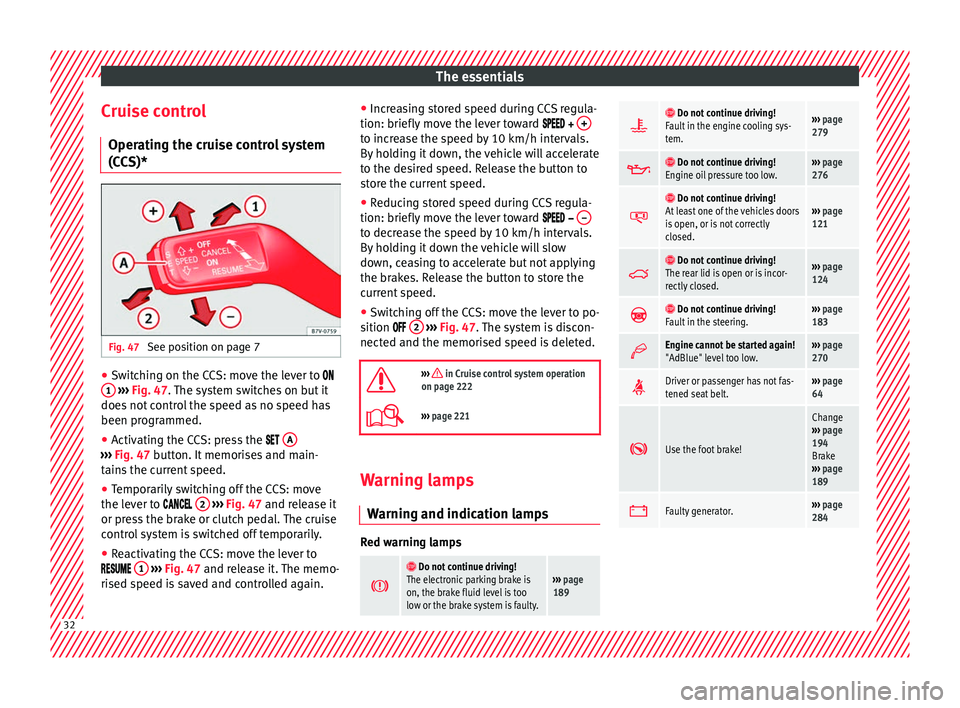
(CCS)* Fig. 47
See position on page 7 ●
Switching on the CCS: move the lever to
1
› ›
› Fig. 47
. The system switches on but it
does not control the speed as no speed has
been programmed.
● Activating the CCS: press the A ›››
Fig. 47 butt on. It
memorises and main-
tains the current speed.
● Temporarily switching off the CCS: move
the lev er t
o 2
› ›
› Fig. 47 and release it
or press the brake or clutch pedal. The cruise
control system is switched off temporarily.
● Reactivating the CCS: move the lever to
1
›
› ›
Fig. 47
and release it. The memo-
rised speed is saved and controlled again. ●
Incre
asing stored speed during CCS regula-
tion: briefly move the lever toward + to increase the speed by 10 km/h intervals.
B
y
ho
lding it down, the vehicle will accelerate
to the desired speed. Release the button to
store the current speed.
● Reducing stored speed during CCS regula-
tion: briefly mov
e the lever toward – to decrease the speed by 10 km/h intervals.
B
y
ho
lding it down the vehicle will slow
down, ceasing to accelerate but not applying
the brakes. Release the button to store the
current speed.
● Switching off the CCS: move the lever to po-
sition 2
› ›
› Fig. 47
. The system is discon-
nected and the memorised speed is deleted.
››› in Cruise control system operation
on page 222
››› page 221 Warning lamps
W arnin
g and indic
ation lamps Red warning lamps
Do not continue driving!
The electronic parking brake is
on, the brake fluid level is too
low or the brake system is faulty.››› page
189
Do not continue driving!
Fault in the engine cooling sys-
tem.››› page
279
Do not continue driving!
Engine oil pressure too low.››› page
276
Do not continue driving!
At least one of the vehicles doors
is open, or is not correctly
closed.››› page
121
Do not continue driving!
The rear lid is open or is incor-
rectly closed.››› page
124
Do not continue driving!
Fault in the steering.››› page
183
Engine cannot be started again!
"AdBlue" level too low.›››
page
270
Driver or passenger has not fas-
tened seat belt.›››
page
64
Use the foot brake!
Change
››› page
194
Brake
››› page
189
Faulty generator.›››
page
284 32
Page 35 of 324
The essentials
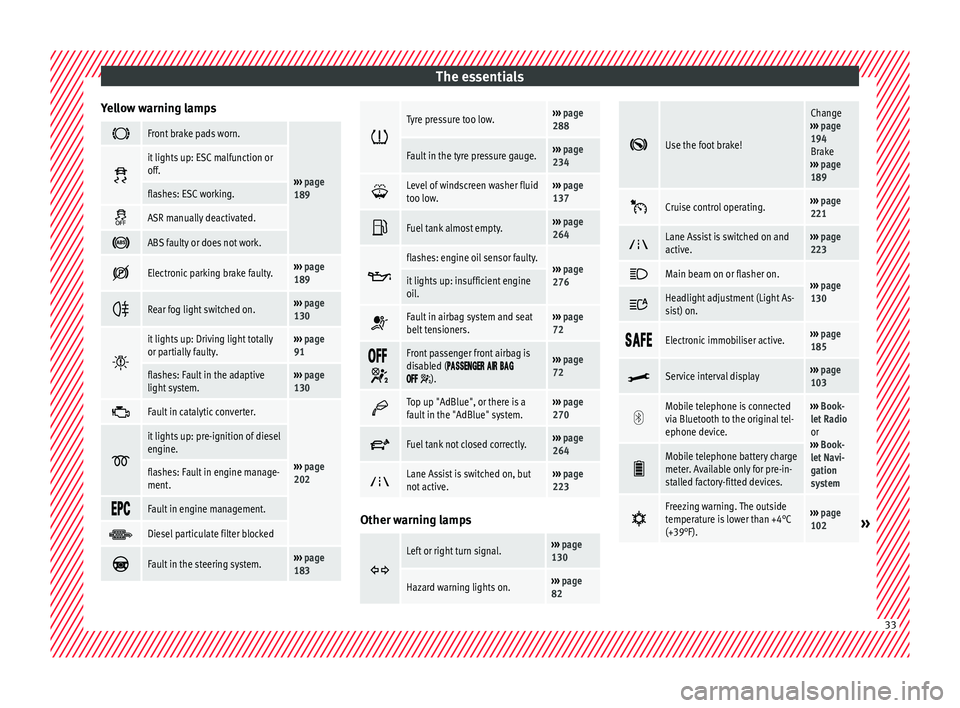
Yellow warning lamps Front brake pads worn.
›››
page
189
it lights up: ESC malfunction or
off.
flashes: ESC working.
ASR manually deactivated.
ABS faulty or does not work.
Electronic parking brake faulty.›››
page
189
Rear fog light switched on.›››
page
130
it lights up: Driving light totally
or partially faulty.›››
page
91
flashes: Fault in the adaptive
light system.››› page
130
Fault in catalytic converter.
›››
page
202
it lights up: pre-ignition of diesel
engine.
flashes: Fault in engine manage-
ment.
Fault in engine management.
Diesel particulate filter blocked
Fault in the steering system.›››
page
183
Tyre pressure too low.›››
page
288
Fault in the tyre pressure gauge.››› page
234
Level of windscreen washer fluid
too low.›››
page
137
Fuel tank almost empty.›››
page
264
flashes: engine oil sensor faulty.›››
page
276it lights up: insufficient engine
oil.
Fault in airbag system and seat
belt tensioners.›››
page
72
Front passenger front airbag is
disabled (
).
››› page
72
Top up "AdBlue", or there is a
fault in the "AdBlue" system.›››
page
270
Fuel tank not closed correctly.›››
page
264
Lane Assist is switched on, but
not active.›››
page
223 Other warning lamps
Left or right turn signal.›››
page
130
Hazard warning lights on.››› page
82
Use the foot brake!
Change
››› page
194
Brake
››› page
189
Cruise control operating.›››
page
221
Lane Assist is switched on and
active.›››
page
223
Main beam on or flasher on.›››
page
130 Headlight adjustment (Light As-
sist) on.
Electronic immobiliser active.›››
page
185
Service interval display›››
page
103
Mobile telephone is connected
via Bluetooth to the original tel-
ephone device.›››
Book-
let Radio
or
››› Book-
let Navi-
gation
system
Mobile telephone battery charge
meter. Available only for pre-in-
stalled factory-fitted devices.
Freezing warning. The outside
temperature is lower than +4°C
(+39°F).›››
page
102» 33
Page 43 of 324
The essentials
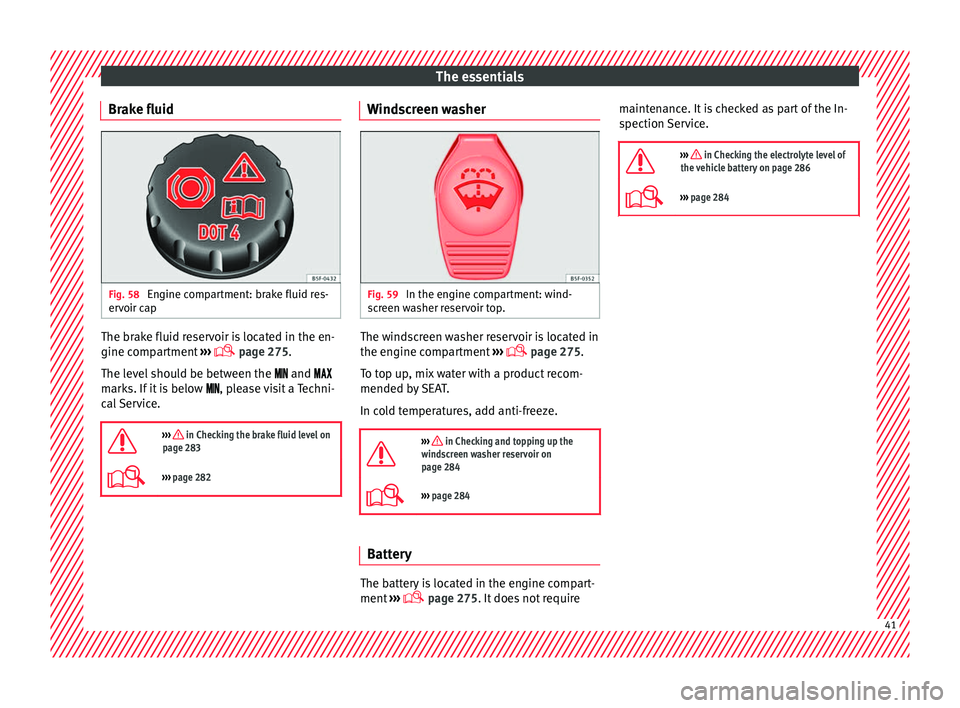
Brake fluid Fig. 58
Engine compartment: brake fluid res-
er v
oir c
ap The brake fluid reservoir is located in the en-
gine c
omp
ar
tment ›››
page 275.
The level should be between the and
marks. If it is below , please visit a Techni-
cal Service.
››› in Checking the brake fluid level on
page 283
››› page 282 Windscreen washer
Fig. 59
In the engine compartment: wind-
s c
r
een washer reservoir top. The windscreen washer reservoir is located in
the en
gine c
omp
artment ›››
page 275.
To top up, mix water with a product recom-
mended by SEAT.
In cold temperatures, add anti-freeze.
››› in Checking and topping up the
windscreen washer reservoir on
page 284
››› page 284 Battery
The battery is located in the engine compart-
ment
›
›
› page 275. It does not require maintenance. It is checked as part of the In-
spection Ser
vice.
››› in Checking the electrolyte level of
the vehicle battery on page 286
››› page 284 41
Page 106 of 324
Operation
other services (e.g. the next Inspection Serv-
ic e or c
h
ange of brake fluid) are listed on the
label attached to the door strut, or in the
Maintenance Programme.
In vehicles with Services established by time
or mileage, the service intervals are already
pre-defined.
In vehicles with LongLife Service , the inter-
vals are determined individually. Technical
progress has made it possible to considera-
bly reduce servicing requirements. The tech-
nology used by SEAT ensures that your vehi-
cle only has an Interval Service when it is
necessary. To establish when the Interval
Service is due (max. 2 years), the vehicle's
conditions of use and individual driving
styles are considered. The service pre-warn-
ing first appears 20 days before the date es-
tablished for the corresponding service. The
kilometres (miles) remaining until the next
service are always rounded up to the nearest
100 km (miles) and the time is given in com-
plete days. The current service message can-
not be viewed until 500 km after the last
service. Prior to this only lines are visible on
the display.
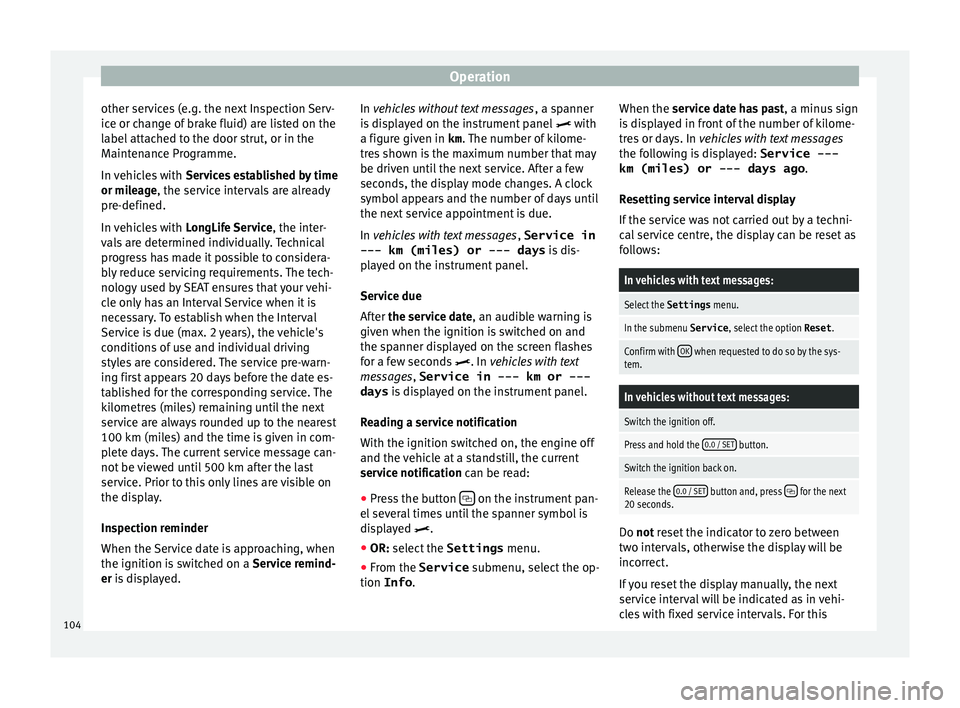
Inspection reminder
When the Service date is approaching, when
the ignition is switched on a Service remind-
er is displayed. In vehicles without text messages
, a sp anner
is displayed on the instrument panel with
a figure given in km . The number of kilome-
tres shown is the maximum number that may
be driven until the next service. After a few
seconds, the display mode changes. A clock
symbol appears and the number of days until
the next service appointment is due.
In vehicles with text messages , Service in
--- km (miles) or --- days is dis-
played on the instrument panel.
Service due
After the service date, an audible warning is
given when the ignition is switched on and
the spanner displayed on the screen flashes
for a few seconds . In vehicles with text
messages, Service in --- km or --- days is displayed on the instrument panel.
Reading a service notification
With the ignition switched on, the engine off
and the vehicle at a standstill, the current
service notification can be read: ● Press the button on the instrument pan-
el sev
er
al times until the spanner symbol is
displayed .
● OR: select the Settings menu.
● From the
Service submenu, sel ect
the op-
tion Info . When the serv
ic
e date has past, a minus sign
is displayed in front of the number of kilome-
tres or days. In vehicles with text messages
the following is displayed: Service ---
km (miles) or --- days ago .
Resetting service interval display
If the service was not carried out by a techni-
cal service centre, the display can be reset as
follows:
In vehicles with text messages:
Select the Settings menu.
In the submenu Service , select the option Reset.
Confirm with OK when requested to do so by the sys-
tem.
In vehicles without text messages:
Switch the ignition off.
Press and hold the 0.0 / SET button.
Switch the ignition back on.
Release the 0.0 / SET button and, press for the next
20 seconds. Do not r
eset the indicator to zero between
tw o int
ervals, otherwise the display will be
incorrect.
If you reset the display manually, the next
service interval will be indicated as in vehi-
cles with fixed service intervals. For this
104
Page 192 of 324
Operation
●
Never l e
ave children or disabled people
alone in the car. They could be trapped in the
car in an emergency and will not be able to
get themselves to safety. For example, de-
pending on the time of the year, tempera-
tures inside a locked and closed vehicle can
be extremely high or extremely low resulting
in serious injuries and illness or even death,
particularly for young children. CAUTION
● Spec i
al care should be taken when parking
in areas with high kerbs or fixed barriers. Ob-
jects protruding from the ground may dam-
age the bumper or other parts of the vehicle
during manoeuvres. To avoid damage, stop
before the wheels touch the barrier or kerb.
● Special attention is required when driving
through entranc
es, over ramps, kerbs or oth-
er objects. The vehicle underbody, bumpers,
mudguards and running gear, and the engine
and exhaust system could be damaged as
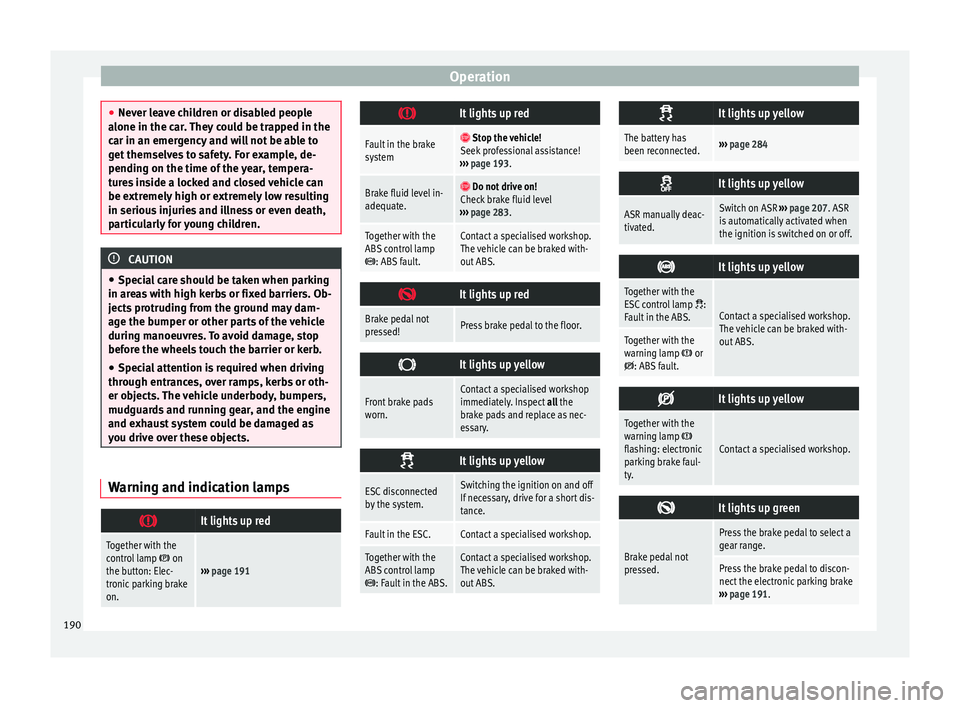
you drive over these objects. Warning and indication lamps
It lights up red
Together with the
control lamp on
the button: Elec-
tronic parking brake
on.››› page 191
It lights up red
Fault in the brake
system
Stop the vehicle!
Seek professional assistance!
››› page 193.
Brake fluid level in-
adequate. Do not drive on!
Check brake fluid level
››› page 283.
Together with the
ABS control lamp
: ABS fault.
Contact a specialised workshop.
The vehicle can be braked with-
out ABS.
It lights up red
Brake pedal not
pressed!Press brake pedal to the floor.
It lights up yellow
Front brake pads
worn.Contact a specialised workshop
immediately. Inspect
all the
brake pads and replace as nec-
essary.
It lights up yellow
ESC disconnected
by the system.Switching the ignition on and off
If necessary, drive for a short dis-
tance.
Fault in the ESC.Contact a specialised workshop.
Together with the
ABS control lamp
: Fault in the ABS.
Contact a specialised workshop.
The vehicle can be braked with-
out ABS.
It lights up yellow
The battery has
been reconnected.›››
page 284
It lights up yellow
ASR manually deac-
tivated.Switch on ASR
››› page 207. ASR
is automatically activated when
the ignition is switched on or off.
It lights up yellow
Together with the
ESC control lamp :
Fault in the ABS.Contact a specialised workshop.
The vehicle can be braked with-
out ABS.
Together with the
warning lamp or: ABS fault.
It lights up yellow
Together with the
warning lamp flashing: electronic
parking brake faul-
ty.Contact a specialised workshop.
It lights up green
Brake pedal not
pressed.
Press the brake pedal to select a
gear range.
Press the brake pedal to discon-
nect the electronic parking brake
››› page 191. 190
Page 193 of 324
Driving
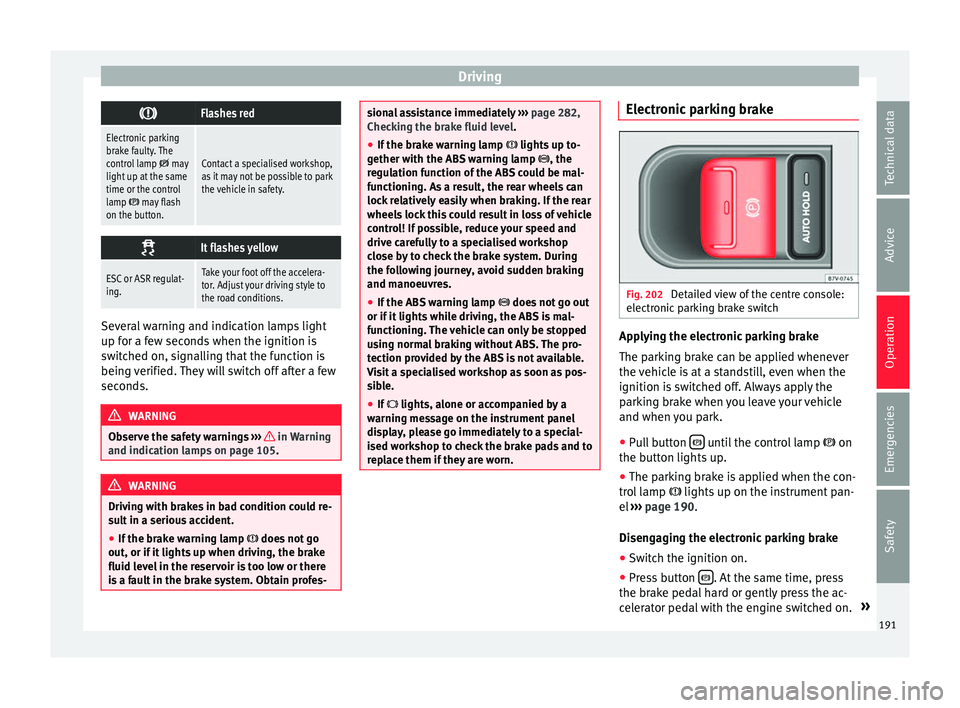
Flashes red
Electronic parking
brake faulty. The
control lamp
may
light up at the same
time or the control
lamp
may flash
on the button.
Contact a specialised workshop,
as it may not be possible to park
the vehicle in safety.
It flashes yellow
ESC or ASR regulat-
ing.Take your foot off the accelera-
tor. Adjust your driving style to
the road conditions.
Several warning and indication lamps light
up f
or a f
ew sec
onds when the ignition is
switched on, signalling that the function is
being verified. They will switch off after a few
seconds. WARNING
Observe the safety warnings ›››
in Warning
and indication l amp
s on page 105. WARNING
Driving with brakes in bad condition could re-
su lt
in a serious accident.
● If the brake warning lamp does not
go
out, or if it lights up when driving, the brake
fluid level in the reservoir is too low or there
is a fault in the brake system. Obtain profes- sional assistance immediately
›››
page 282,
Checking the brake fluid level.
● If the brake warning lamp lights up t
o-
gether with the ABS warning lamp , the
regulation function of the ABS could be mal-
functioning. As a result, the rear wheels can
lock relatively easily when braking. If the rear
wheels lock this could result in loss of vehicle
control! If possible, reduce your speed and
drive carefully to a specialised workshop
close by to check the brake system. During
the following journey, avoid sudden braking
and manoeuvres.
● If the ABS warning lamp does not
go out
or if it lights while driving, the ABS is mal-
functioning. The vehicle can only be stopped
using normal braking without ABS. The pro-
tection provided by the ABS is not available.
Visit a specialised workshop as soon as pos-
sible.
● If lights, alone or accompanied by a
warnin
g message on the instrument panel
display, please go immediately to a special-
ised workshop to check the brake pads and to
replace them if they are worn. Electronic parking brake
Fig. 202
Detailed view of the centre console:
el ectr
onic
parking brake switch Applying the electronic parking brake
The p
ark
in
g brake can be applied whenever
the vehicle is at a standstill, even when the
ignition is switched off. Always apply the
parking brake when you leave your vehicle
and when you park.
● Pull button until the control lamp
on
the b utt
on lights
up.
● The parking brake is applied when the con-
trol
lamp lights up on the instrument pan-
el ››› page 190.
Disengaging the electronic parking brake ● Switch the ignition on.
● Press button . At the same time, press
the br ak
e ped
al hard or gently press the ac-
celerator pedal with the engine switched on. »
191
Technical data
Advice
Operation
Emergencies
Safety
Page 257 of 324
Care and maintenance
Washing the vehicle with a high pres-
s ur
e c
leaner When cleaning the vehicle with a high-pres-
sur
e c
leaner, always follow the operating in-
structions for the equipment. Pay special at-
tention to the required pressure of the jet
and the distance between the jet and the ve-
hicle ››› .
Keep a s uit
able distance from soft materials,
such as rubber hoses or insulating material,
and from the parking distance warning sys-
tem sensors. The parking distance sensors
are fitted in the rear bumpers and, where ap-
plicable, in the front bumpers ››› .
Do not u
se a no
zzle that sprays the water out
in a direct stream or one that has a rotating
jet for forcing off dirt ››› .
WARNING
The incorrect use of high pressure cleaning
equipment c ou
ld result in permanent dam-
age, visible or invisible, to the tyres or other
materials. This could result in a serious acci-
dent.
● Ensure there is a suitable distance between
the nozzl
e and the tyres.
● Never wash tyres with a concentrated jet or
so-cal
led “dirt blasters”. Even at large spray-
ing distances and short cleaning times, you
may damage the tyres. WARNING
After the vehicle has been washed, the brak-
ing eff ect
will be reduced (and the braking
distance increased) due to moisture (and ice
in winter) on the brakes.
● “Dry the brakes and remove ice” by braking
caref
ully. Ensure that you are not endanger-
ing other road-users or breaking traffic regu-
lations in the process. CAUTION
● The wat er t
emperature should not exceed
+60°C (+140°F).
● To avoid damage to the paintwork, do not
wash the
vehicle in full sun.
● The sensors on the bumpers should be kept
cle
an and free of ice at all times to ensure the
parking distance warning system and the
park assist system operate correctly. When
cleaning with pressure hoses and steam
cleaners, the sensors should be sprayed only
briefly. A distance of 10 cm between the sen-
sors and the steam / hose nozzle must be ob-
served.
● Do not use a high pressure cleaner to re-
move ic
e or snow from windows
● Washing the vehicle in low temperatures:
When washin
g the vehicle with a hose, do
not direct water into the lock cylinders or the
gaps around the doors or roof. Locks and
seals could freeze! Cleaning windows and exterior mir-
r
or
s Cleaning windows and exterior mirrors
Spr
a
y windows and exterior windows with a
standard window cleaner containing alcohol.
Dry the windows with a clean chamois leath-
er or a lint-free cloth. The chamois leathers
used on painted surfaces are not suitable for
cleaning windows because they are soiled
with wax deposits which could smear the
windows.
Use window cleaner or a silicone remover to
clean rubber, oil, grease and silicone depos-
its off ››› .
R emo
v
ing wax residue
Automatic car washes and certain car care
products may leave wax deposits on the win-
dows. These deposits can only be removed
with a special product or cleaning cloths.
Wax deposits on the windscreen could cause
the wiper blades to judder. SEAT recom-
mends you wipe the wax deposits off the
windscreen with a soft cloth each time after
you have washed the vehicle.
A window cleaning detergent which helps to
dissolve the wax may be added to the wind-
screen washer fluid to prevent the wiper
blades from scratching the windscreen.
Please ensure you add the cleaning product
in the correct proportions. Products for »
255
Technical data
Advice
Operation
Emergencies
Safety
Page 276 of 324
Advice
risk from rotating parts, such as the drive
belts, a
lt
ernator, radiator fan, etc., as well as
from the high-voltage ignition system. Al-
ways work with the utmost caution.
– Always make sure that no parts of your
body, jewellery, ties, loose clothing and
long hair can be trapped by the rotating
parts of the engine. Before any work, re-
move ties and jewellery (necklaces, etc),
tie long hair back and tie all items of
loose clothing to your body to make sure
that they cannot be trapped by engine
components.
– Take extreme caution when operating the
accelerator and remain attentive. The ve-
hicle could move, even with the electron-
ic parking brake activated.
● Always make sure you have not left any ob-
jects, s
uch as cleaning cloths and tools, in
the engine compartment. If any object is left
in the engine compartment, this could cause
malfunctions, engine faults and even a fire. WARNING
Refill liquids and certain materials can catch
fire e a
sily in the engine compartment, caus-
ing a fire and serious injury!
● Never smoke.
● Never work close to places exposed to
flames
or sparks.
● Never pour service fluids over the engine.
These fluid ma
y ignite hot engine parts and
cause injuries. ●
If it i
s necessary to work on the fuel system
or the electrical system, please follow the in-
structions below:
–Always disconnect the vehicle battery.
When disconnecting the battery, ensure
that the vehicle is unlocked otherwise
the anti-theft alarm will be triggered.
– Never work close to heaters, heat sources
or places exposed to flames or sparks.
● Always keep a recently serviced and per-
fectly w
orking fire extinguisher close by.
● Never cover the engine with additional in-
sul
ating materials such as a blanket. Risk of
fire! CAUTION
When refilling or changing service liquids,
ens ur
e that you put the liquids into the right
tank. Making a mistake when refilling could
cause serious malfunctions and damage the
engine! For the sake of the environment
Service fluids leaks are harmful to the envi-
ronment . F
or this reason you should make
regular checks on the ground underneath
your vehicle. Take the vehicle to a specialised
workshop to be checked if you see stains, oil
or other fluids on the ground. Collect any
spilt service fluids and allow a professional to
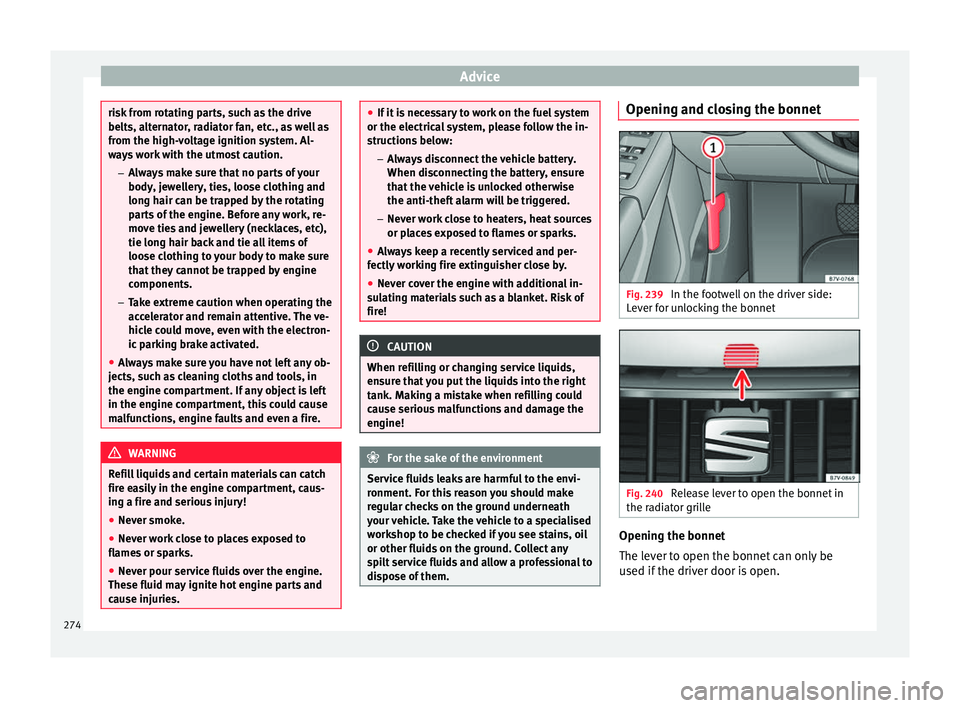
dispose of them. Opening and closing the bonnet
Fig. 239
In the footwell on the driver side:
L ev
er f
or unlocking the bonnet Fig. 240
Release lever to open the bonnet in
the r a
di
ator grille Opening the bonnet
The l
ev
er t
o open the bonnet can only be
used if the driver door is open.
274
Page 277 of 324
Checking and refilling levels
● Bef
or
e opening the bonnet, make sure that
the windscreen wiper arms are in place
against the windscreen ››› .
● Open the driver door.
● Pull the release lever ››
›
Fig. 239 in the di-
rection of the arrow. The bonnet is released
from the lock carrier by a spring mechanism
››› .
● Lift the bonnet using the release lever
› ›
›
Fig. 240 (arrow) and open the bonnet fully.
The bonnet is held open thanks to the gas
strut.
Closing the bonnet
● To close the bonnet, pull it down to over-
come the ga
s strut pressure ››› .
● Allow the bonnet to fall into the lock carrier.
Do not pr
e
ss down.
If the bonnet is not correctly closed, open it
once again and close it correctly.
The bonnet is correctly closed when it is flush
with the corresponding parts on the body-
work. WARNING
If the bonnet is not correctly closed, it could
sud den
ly open while driving leaving the driv-
er without visibility. This could result in a se-
rious accident.
● After closing the bonnet, always check that
it is
properly secured by the locking mecha- nism in the lock carrier. The bonnet must be
flush w
ith the s
urrounding body panels.
● While driving, if you notice that the bonnet
is not
correctly closed then stop immediately
and close it correctly.
● Only open and close the bonnet when there
is no
body within its range. CAUTION
● To av oid d
amage to the bonnet and to the
windscreen wiper arms, only open it when
the windscreen wipers are in place against
the windscreen.
● Before driving, always lower the wiper
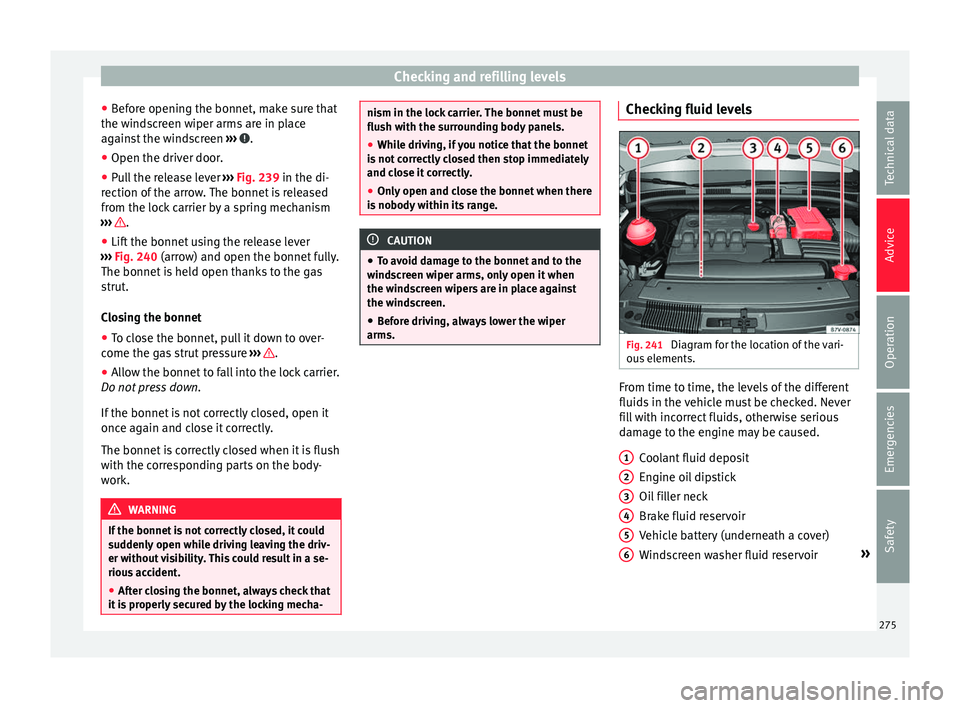
arms. Checking fluid levels
Fig. 241
Diagram for the location of the vari-
ou s
el
ements. From time to time, the levels of the different
fluid
s
in the
vehicle must be checked. Never
fill with incorrect fluids, otherwise serious
damage to the engine may be caused.
Coolant fluid deposit
Engine oil dipstick
Oil filler neck
Brake fluid reservoir
Vehicle battery (underneath a cover)
Windscreen washer fluid reservoir »
1 2
3
4
5
6
275
Technical data
Advice
Operation
Emergencies
Safety