oil Seat Alhambra 2016 Owner's Manual
[x] Cancel search | Manufacturer: SEAT, Model Year: 2016, Model line: Alhambra, Model: Seat Alhambra 2016Pages: 324, PDF Size: 5.93 MB
Page 1 of 324
OWNER’S
MANUAL
Alhambra
7N5012720BE
Inglés
7N5012720BE (11.15)
Alhambra
Inglés (11.15)
SEAT recommends
SEAT GENUINE OIL
SEAT recommends
Castrol EDGE Professional
Page 6 of 324
Table of Contents
Parking distance warning system* . . . . . . . . . . 211
Park Assist system* (Park Assist) . . . . . . . . . . . 214
Rear assist* (Rear View Camera) . . . . . . . . . . . . 217
Cruise control* (Cruise control system -
C C
S)
. . . . . . . . . . . . . . . . . . . . . . . . . . . . . . . . . . . 221
Lane Assist system* . . . . . . . . . . . . . . . . . . . . . . 222
Blind spot detector (BSD) with parking assis-
tant (R
TA) . . . . . . . . . . . . . . . . . . . . . . . . . . . . . . 225
Traffic signal detection (Sign Assist)* . . . . . . . . 230
Tiredness detection (recommendation to take
a break)
. . . . . . . . . . . . . . . . . . . . . . . . . . . . . . . . 232
Dynamic Chassis control (DCC)* . . . . . . . . . . . . 233
Tyre monitoring systems . . . . . . . . . . . . . . . . . . 234
Towing bracket device . . . . . . . . . . . . . . . . . . . . 237
Driving with a trailer . . . . . . . . . . . . . . . . . . . . . . 237
Advice . . . . . . . . . . . . . . . . . . . . . . . . . . . . . . . . 247
Care and maintenance . . . . . . . . . . . . . . . . . . . . 247
Accessories, replacement of parts and modifi-
cations
. . . . . . . . . . . . . . . . . . . . . . . . . . . . . . . . 247
Caring for and cleaning the vehicle interior . . . 253
Caring for and cleaning the vehicle interior . . . 258
Notes for the user . . . . . . . . . . . . . . . . . . . . . . . . 263
Checking and refilling levels . . . . . . . . . . . . . . . 264
Filling the tank . . . . . . . . . . . . . . . . . . . . . . . . . . 264
Fuel . . . . . . . . . . . . . . . . . . . . . . . . . . . . . . . . . . . 267
Selective catalytic reduction* (AdBlue) . . . . . . 270
Working in the engine compartment . . . . . . . . 272
Engine oil . . . . . . . . . . . . . . . . . . . . . . . . . . . . . . 276
Engine coolant . . . . . . . . . . . . . . . . . . . . . . . . . . 279
Brake fluid . . . . . . . . . . . . . . . . . . . . . . . . . . . . . 282
Windscreen washer reservoir . . . . . . . . . . . . . . 284
Vehicle battery . . . . . . . . . . . . . . . . . . . . . . . . . . 284
Wheels and tyres . . . . . . . . . . . . . . . . . . . . . . . . 288
Tyres . . . . . . . . . . . . . . . . . . . . . . . . . . . . . . . . . . 288
Winter service . . . . . . . . . . . . . . . . . . . . . . . . . . . 296 Technical data
. . . . . . . . . . . . . . . . . . . . . . . . 298
Technical features . . . . . . . . . . . . . . . . . . . . . . . 298
Important information . . . . . . . . . . . . . . . . . . . . 298
Towing a trailer . . . . . . . . . . . . . . . . . . . . . . . . . . 300
Wheels . . . . . . . . . . . . . . . . . . . . . . . . . . . . . . . . 300
Engine data . . . . . . . . . . . . . . . . . . . . . . . . . . . . . 301
Dimensions . . . . . . . . . . . . . . . . . . . . . . . . . . . . . 306
Index . . . . . . . . . . . . . . . . . . . . . . . . . . . . . . . . . 307
4
Page 28 of 324
The essentials
Windscreen wipers and window wiper
b l
a
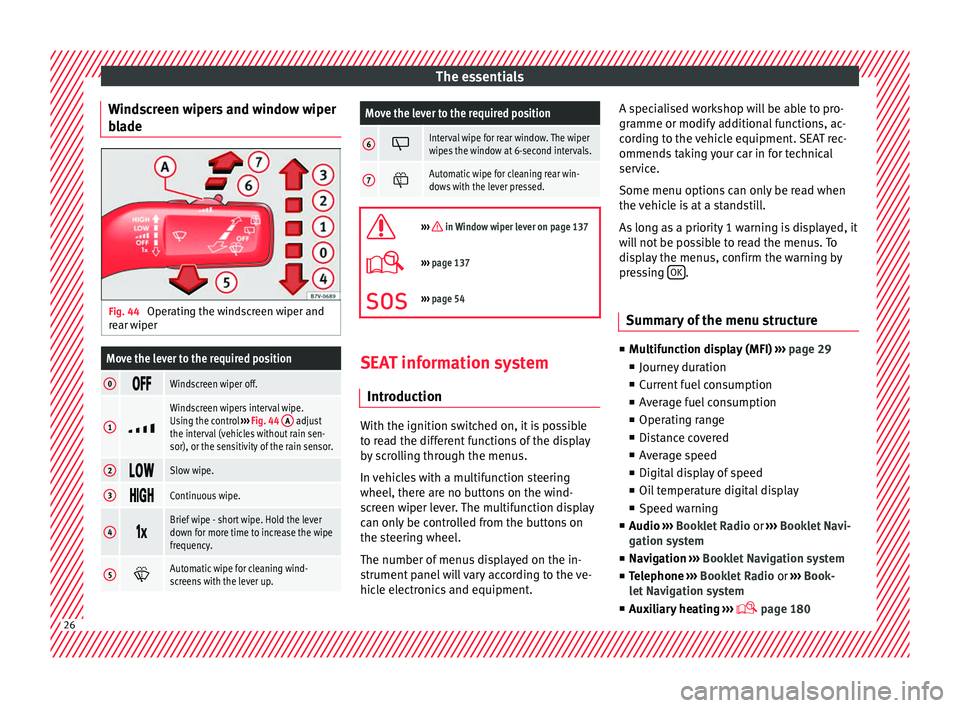
de Fig. 44
Operating the windscreen wiper and
r e
ar w
iper
Move the lever to the required position
0 Windscreen wiper off.
1
Windscreen wipers interval wipe.
Using the control
››› Fig. 44 A adjust
the interval (vehicles without rain sen-
sor), or the sensitivity of the rain sensor.
2 Slow wipe.
3
Continuous wipe.
4
Brief wipe - short wipe. Hold the lever
down for more time to increase the wipe
frequency.
5
Automatic wipe for cleaning wind-
screens with the lever up.
Move the lever to the required position
6 Interval wipe for rear window. The wiper
wipes the window at 6-second intervals.
7
Automatic wipe for cleaning rear win-
dows with the lever pressed.
››› in Window wiper lever on page 137
›››
page 137
››› page 54 SEAT information system
Intr oduction With the ignition switched on, it is possible
t
o r
e
ad the different functions of the display
by scrolling through the menus.
In vehicles with a multifunction steering
wheel, there are no buttons on the wind-
screen wiper lever. The multifunction display
can only be controlled from the buttons on
the steering wheel.
The number of menus displayed on the in-
strument panel will vary according to the ve-
hicle electronics and equipment. A specialised workshop will be able to pro-
gramme or modify
additional functions, ac-
cording to the vehicle equipment. SEAT rec-
ommends taking your car in for technical
service.
Some menu options can only be read when
the vehicle is at a standstill.
As long as a priority 1 warning is displayed, it
will not be possible to read the menus. To
display the menus, confirm the warning by
pressing OK .
Summary of the menu structure ■
Mu ltif
unction display (MFI) ››› page 29
■ Journey duration
■ Current fuel consumption
■ Average fuel consumption
■ Operating range
■ Distance covered
■ Average speed
■ Digital display of speed
■ Oil temperature digital display
■ Speed warning
■ Audio ›››
Booklet Radio or ›››
Booklet Navi-
gation system
■ Navigation ›››
Booklet Navigation system
■ Telephone ›››
Booklet Radio or ›››
Book-
let Navigation system
■ Auxiliary heating ›››
page 18026
Page 31 of 324
The essentialsVehicle condi-
tion
Current warning or information texts.
This option only appears when one of
the following texts is available. The
number of available messages is dis-
played. Example 1/1 or 2/2.
››› page 100
Configuration
Different setting options, for example,
the Convenience, Lighting & Visibility
menus, and the time, speed warning
with winter tyres, language, units of
measurement, or “Display off”.
››› page 30 MFI menu
(multif
u
nction display)The multifunction display (MFI) has two auto-
m
atic
memorie
s: 1 - Partial memory and 2 -
Total memory . The selected memory will be
shown in the upper right-hand corner of the
display.
With the ignition switched on, and memory 1
or 2 displayed, briefly press OK to change
fr om one memor
y
to another
1
Trip memo-
ry (for a sin-
gle jour-
ney).
The memory stores the values for the
journey and the consumption from the
moment the ignition is switched on until
it is switched off again.
If the journey is broken for more than 2
hours, the memory is automatically
erased. If the journey is continued in less
than 2 hours after the ignition is switch-
ed off, the new data is added to the data
already stored in the memory.
2 Total mem-
ory (for all
journeys).
The memory records the values for a spe-
cific number of partial trips, up to a total
of 19 hours and 59 minutes or 99 hours
and 59 minutes, or 1999.9 km (or miles)
for 9999 km (or miles), depending on the
model of instrument panel. On reaching
either of these limits, the memory is au-
tomatically erased and starts to count
from 0 again. Possible displays
Journey dura-
tionThis indicates the hours (h) and mi-
nutes (min) since the ignition was
switched on.
Current fuel
consumption
The current fuel consumption while
driving is displayed in l/100 km (or
miles per gallon, mpg); when the en-
gine is running but the vehicle is not
moving, in l/h (or gallons per hour).
Average fuel
consumption
When the ignition is switched on, the
average consumption (in l/100 km or
in mpg) is displayed after the vehicle
has moved approximately 100 metres
(328 feet). Otherwise horizontal lines
are displayed. The value shown is up-
dated approximately every 5 seconds.
Operating
range
Approximate distance in km (or miles)
that can still be travelled with the fuel
remaining in the tank, assuming the
same style of driving is maintained.
This is calculated using the current
fuel consumption.
Distance cov-
eredDistance travelled, after ignition is
switched on, in km (or miles).
Average speed
After the ignition is switched on, the
average speed will be shown after a
distance of approximately 100 metres
(328 feet) has been travelled. Other-
wise horizontal lines are displayed.
The value shown is updated approxi-
mately every 5 seconds.
Digital display
of speedCurrent speed displayed digitally.
Oil tempera-
ture digital
displayUpdated engine oil temperature digi-
tal display
Speed warn-
ing at --- km/hIf the stored speed is exceeded (be-
tween 30 - 250 km/h, or 18 -
155 mph), an audible warning is given
together with a visual warning.
Changing between display modes
● In vehicles without multifunction steering
whe e
l:
press the lever.
● Vehicles with a multifunction steering
wheel:
press or
.
St orin
g a s
peed for the speed warning
● Select the display Speed warning at
--- km/h .
● Pre
ss OK to store the current speed and
sw it
c
h off the warning.
● In addition, set the required speed by
pres
sing the rocker switch on the windscreen
wiper lever or
buttons on the multifunc-
tion s t
eerin
g wheel for 5 seconds. Next, » 29
Page 34 of 324
The essentials
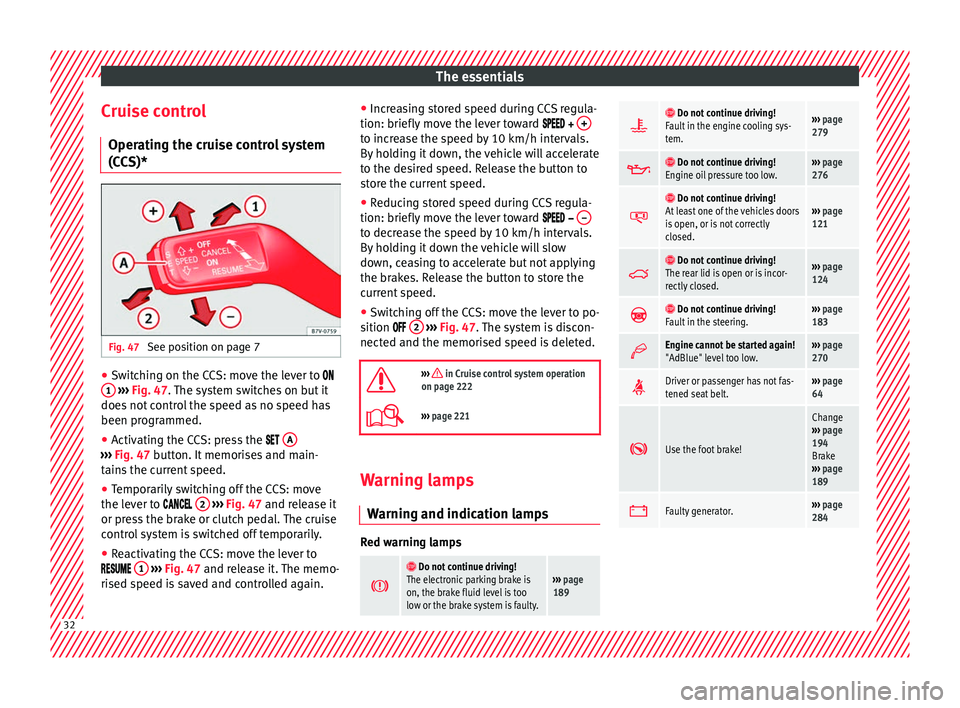
Cruise control Oper atin
g the c
ruise control system
(CCS)* Fig. 47
See position on page 7 ●
Switching on the CCS: move the lever to
1
› ›
› Fig. 47
. The system switches on but it
does not control the speed as no speed has
been programmed.
● Activating the CCS: press the A ›››
Fig. 47 butt on. It
memorises and main-
tains the current speed.
● Temporarily switching off the CCS: move
the lev er t
o 2
› ›
› Fig. 47 and release it
or press the brake or clutch pedal. The cruise
control system is switched off temporarily.
● Reactivating the CCS: move the lever to
1
›
› ›
Fig. 47
and release it. The memo-
rised speed is saved and controlled again. ●
Incre
asing stored speed during CCS regula-
tion: briefly move the lever toward + to increase the speed by 10 km/h intervals.
B
y
ho
lding it down, the vehicle will accelerate
to the desired speed. Release the button to
store the current speed.
● Reducing stored speed during CCS regula-
tion: briefly mov
e the lever toward – to decrease the speed by 10 km/h intervals.
B
y
ho
lding it down the vehicle will slow
down, ceasing to accelerate but not applying
the brakes. Release the button to store the
current speed.
● Switching off the CCS: move the lever to po-
sition 2
› ›
› Fig. 47
. The system is discon-
nected and the memorised speed is deleted.
››› in Cruise control system operation
on page 222
››› page 221 Warning lamps
W arnin
g and indic
ation lamps Red warning lamps
Do not continue driving!
The electronic parking brake is
on, the brake fluid level is too
low or the brake system is faulty.››› page
189
Do not continue driving!
Fault in the engine cooling sys-
tem.››› page
279
Do not continue driving!
Engine oil pressure too low.››› page
276
Do not continue driving!
At least one of the vehicles doors
is open, or is not correctly
closed.››› page
121
Do not continue driving!
The rear lid is open or is incor-
rectly closed.››› page
124
Do not continue driving!
Fault in the steering.››› page
183
Engine cannot be started again!
"AdBlue" level too low.›››
page
270
Driver or passenger has not fas-
tened seat belt.›››
page
64
Use the foot brake!
Change
››› page
194
Brake
››› page
189
Faulty generator.›››
page
284 32
Page 35 of 324
The essentials
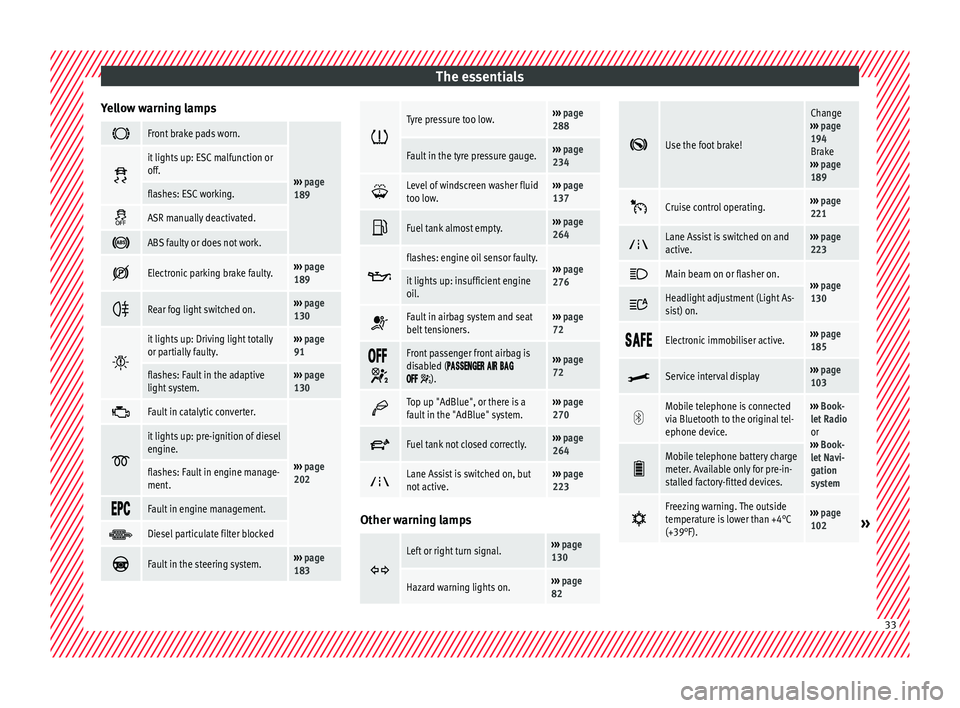
Yellow warning lamps Front brake pads worn.
›››
page
189
it lights up: ESC malfunction or
off.
flashes: ESC working.
ASR manually deactivated.
ABS faulty or does not work.
Electronic parking brake faulty.›››
page
189
Rear fog light switched on.›››
page
130
it lights up: Driving light totally
or partially faulty.›››
page
91
flashes: Fault in the adaptive
light system.››› page
130
Fault in catalytic converter.
›››
page
202
it lights up: pre-ignition of diesel
engine.
flashes: Fault in engine manage-
ment.
Fault in engine management.
Diesel particulate filter blocked
Fault in the steering system.›››
page
183
Tyre pressure too low.›››
page
288
Fault in the tyre pressure gauge.››› page
234
Level of windscreen washer fluid
too low.›››
page
137
Fuel tank almost empty.›››
page
264
flashes: engine oil sensor faulty.›››
page
276it lights up: insufficient engine
oil.
Fault in airbag system and seat
belt tensioners.›››
page
72
Front passenger front airbag is
disabled (
).
››› page
72
Top up "AdBlue", or there is a
fault in the "AdBlue" system.›››
page
270
Fuel tank not closed correctly.›››
page
264
Lane Assist is switched on, but
not active.›››
page
223 Other warning lamps
Left or right turn signal.›››
page
130
Hazard warning lights on.››› page
82
Use the foot brake!
Change
››› page
194
Brake
››› page
189
Cruise control operating.›››
page
221
Lane Assist is switched on and
active.›››
page
223
Main beam on or flasher on.›››
page
130 Headlight adjustment (Light As-
sist) on.
Electronic immobiliser active.›››
page
185
Service interval display›››
page
103
Mobile telephone is connected
via Bluetooth to the original tel-
ephone device.›››
Book-
let Radio
or
››› Book-
let Navi-
gation
system
Mobile telephone battery charge
meter. Available only for pre-in-
stalled factory-fitted devices.
Freezing warning. The outside
temperature is lower than +4°C
(+39°F).›››
page
102» 33
Page 41 of 324
The essentials
Level control Fi l
lin
g capacities
Tank level
70 litres. 8 litre reserve
Capacity of the windscreen washer fluid con-
tainer
Versions without head-
light washer system3.5 litres
Versions with headlight
washer system6 litres Fuel
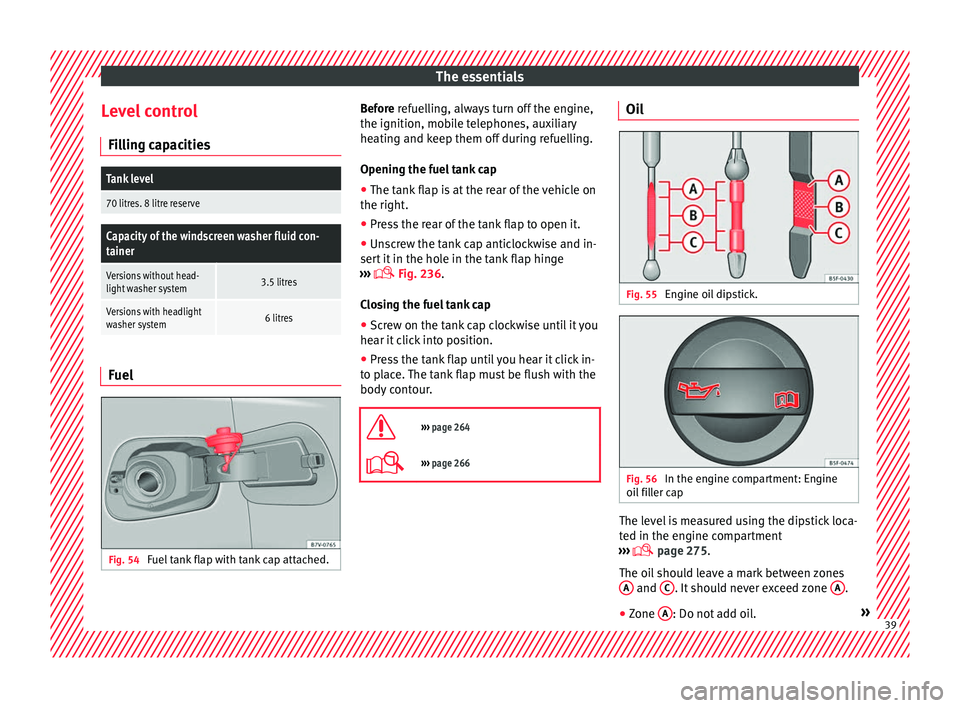
Fig. 54
Fuel tank flap with tank cap attached. Before r
efuelling, always turn off the engine,
the ignition, mo b
ile telephones, auxiliary
heating and keep them off during refuelling.
Opening the fuel tank cap
● The tank flap is at the rear of the vehicle on
the right.
● Pre
ss the rear of the tank flap to open it.
● Unscrew the tank cap anticlockwise and in-
sert it
in the hole in the tank flap hinge
››› Fig. 236.
Closing the fuel tank cap ● Screw on the tank cap clockwise until it you
hear it c
lick into position.
● Press the tank flap until you hear it click in-
to pl
ace. The tank flap must be flush with the
body contour.
››› page 264
››› page 266 Oil
Fig. 55
Engine oil dipstick. Fig. 56
In the engine compartment: Engine
oi l
fi
ller cap The level is measured using the dipstick loca-
t
ed in the en
gine c
ompartment
››› page 275.
The oil should leave a mark between zones A and
C . It should never exceed zone
A .
● Zone A : Do not add oil.
» 39
Page 42 of 324
The essentials
● Zone B : You can add oil but keep the level
in th at
zone.
● Zone C : Add oil up to zone
B .
T op
pin
g up engine oil
● Unscrew cap from oil filler opening.
● Add oil slowly.
● At the same time, check the level to ensure
you do not a
dd too much.
● When the oil level reaches at least zone B ,
u n
s
crew the engine oil filler cap carefully.
Motor oil specifications
Petrol engines
With LongLife serviceVW 504 00
Without LongLife serviceVW 504 00, VW 502 00
Diesel engines
With LongLife serviceVW 507 00
Without LongLife serviceVW 507 00 Engine oil additives
No type of
a
d
ditive should be mixed with the
engine oil. The deterioration caused by these
additives is not covered by the warranty.
››› in Topping up engine oil on
page 278
››› page 276 Coolant
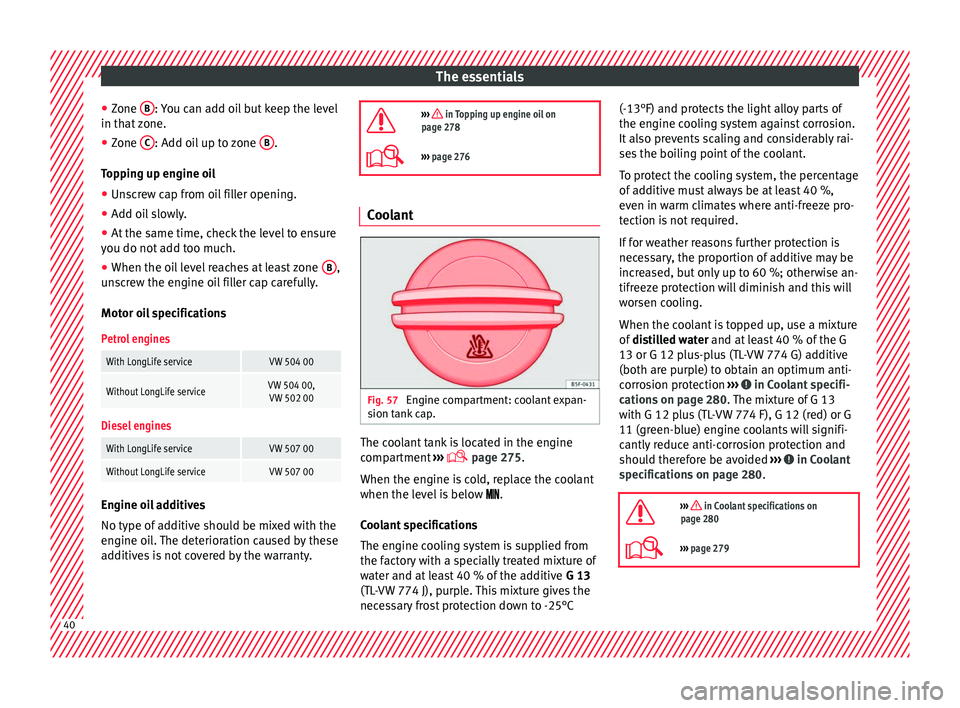
Fig. 57
Engine compartment: coolant expan-
s ion t
ank
cap. The coolant tank is located in the engine
c
omp
ar
tment ›››
page 275.
When the engine is cold, replace the coolant
when the level is below .
Coolant specifications
The engine cooling system is supplied from
the factory with a specially treated mixture of
water and at least 40 % of the additive G 13
(TL-VW 774 J), purple. This mixture gives the
necessary frost protection down to -25°C (-13°F) and protects the light alloy parts of
the engine coo
ling system against corrosion.
It also prevents scaling and considerably rai-
ses the boiling point of the coolant.
To protect the cooling system, the percentage
of additive must always be at least 40 %,
even in warm climates where anti-freeze pro-
tection is not required.
If for weather reasons further protection is
necessary, the proportion of additive may be
increased, but only up to 60 %; otherwise an-
tifreeze protection will diminish and this will
worsen cooling.
When the coolant is topped up, use a mixture
of distilled water and at least 40 % of the G
13 or G 12 plus-plus (TL-VW 774 G) additive
(both are purple) to obtain an optimum anti-
corrosion protection ››› in Coolant specifi-
c ation
s on p
age 280. The mixture of G 13
with G 12 plus (TL-VW 774 F), G 12 (red) or G
11 (green-blue) engine coolants will signifi-
cantly reduce anti-corrosion protection and
should therefore be avoided ››› in Coolant
s pec
ific
ations on page 280.
››› in Coolant specifications on
page 280
››› page 279 40
Page 49 of 324
The essentials
Important information about wheel bolts
The wheel rims
and bo
lts have been de-
signed to be fitted to factory options. If differ-
ent rims are fitted, the correct wheel bolts
with the right length and correctly shaped
bolt heads must be used. This ensures that
wheels are fitted securely and that the brake
system functions correctly.
In some circumstances, wheel bolts from the
same model vehicle should not be used.
Wheel bolt tightening torque
The prescribed tightening torque for wheel
bolts for steel and alloy wheels is 140 Nm.
Have the tightening torque of the wheel bolts
checked as soon as possible with a reliable
torque wrench.
If wheel bolts are rusty and it is difficult to
tighten them, the threads should be replaced
and cleaned before checking the tightening
torque.
Never grease or lubricate wheel bolts or the
wheel hub threads. Although they have been
tightened to the prescribed torque, they
could come loose while driving. WARNING
If the wheel bolts are not fitted correctly they
cou l
d be released while driving leading to
loss of vehicle control and serious damage. ●
Only u
se wheel bolts which correspond to
the wheel rims in question.
● Never use different wheel bolts.
● The bolts and threads should be clean, free
of oil
and grease and easy to thread.
● To loosen and tighten the wheel bolts, al-
way
s use the wheel brace supplied with the
vehicle.
● Loosen the wheel bolts only about one turn
before r
aising the vehicle with the jack.
● Never grease or lubricate wheel bolts or the
wheel hub thre
ads. Although they have been
tightened to the prescribed torque, they
could come loose while driving.
● Never loosen the bolted joints of wheel
rims with bo
lted ring trims.
● If the wheel bolts are not tightened to the
correct
torque, they may come loose while
driving, and the bolts and rims may come
out. If the tightening torque is too high, the
wheel bolts and threads can be damaged. Raising the vehicle with the jack
Fig. 70
Jack position points Fig. 71
Jack mounted on the left rear part of
the v
ehic
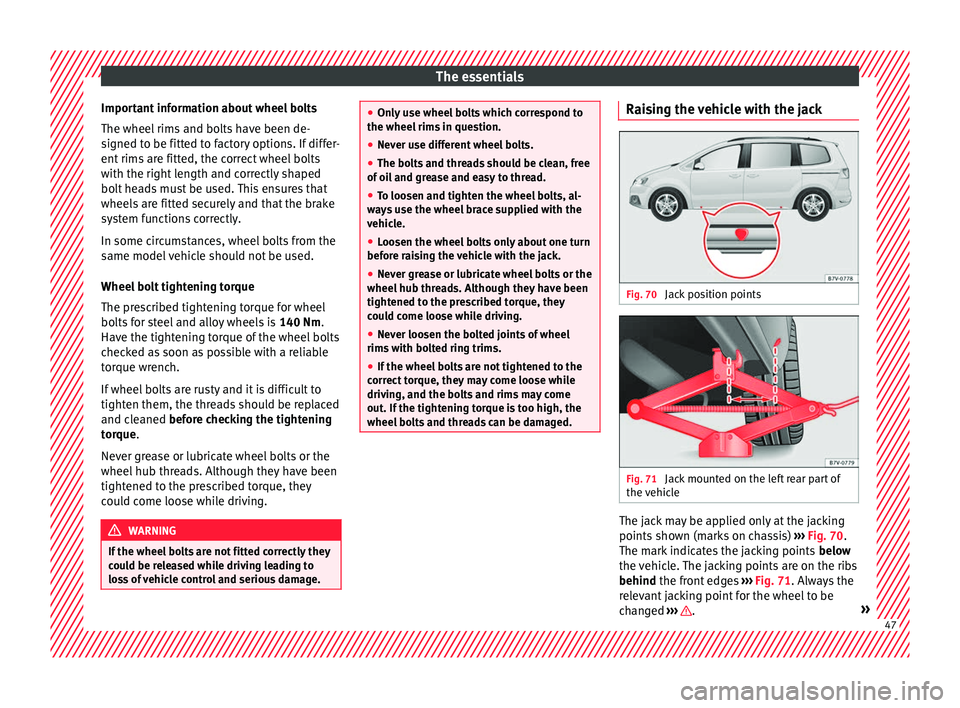
le The jack may be applied only at the jacking
points
sho
wn (m
arks on chassis) ››› Fig. 70.
The mark indicates the jacking points below
the vehicle. The jacking points are on the ribs
behind the front edges ››› Fig. 71. Always the
relevant jacking point for the wheel to be
changed ››› .
» 47
Page 51 of 324
The essentials
Putting on the spare wheel
Chec k
the dir
ection of rotation of the tyre
››› page 49.
● Fit the wheel.
● Screw on the anti-theft locking bolt with
the adapt
er in position ››› Fig. 69 2 or
3 clockwise and tighten gently.
●
Replace the other wheel bolts and tighten
s ligh
tl
y using the hexagonal socket on the
end of the wheel brace.
● Lower the car with the jack.
● Tighten all of the wheel bolts clockwise
›››
. Tighten the bolts in diagonal pairs (not
in a c ir
c
le).
● Put the caps, trim or full hubcap back on
›››
page 45. WARNING
If the wheel bolts are not treated suitably or
not tight ened t
o the correct torque then this
could lead to loss of vehicle control and to a
serious accident.
● All the wheel bolts and hub threads should
be cle
an and free of oil and grease. The wheel
bolts should be easily tightened to the cor-
rect torque.
● The hexagonal socket in the wheel brace
should be u
sed for turning wheel bolts only.
Do not use it to loosen or tighten the wheel
bolts. Tyres with directional tread pattern
Tyres with directional tread pattern have
been des
igned t
o operate best when rotating
in only one direction. An arrow on the tyre
sidewall indicates the direction of rotation on
tyres with directional tread ›››
page 295.
Always observe the indicated direction of ro-
tation in order to guarantee optimum grip
and help avoid aquaplaning, excessive noise
and wear.
If the tyre is mounted in the opposite direc-
tion of rotation, drive with extreme caution,
as the tyre is no longer being used correctly.
This is of particular importance when the
road surface is wet. Change the tyre as soon
as possible or remount it with the correct di-
rection of rotation.
Subsequent work ●
On alloy wheels: rep
l
ace the wheel bolt
caps.
● On plate wheels: repl
ace the wheel hubcap.
● Return all tools to their proper storing loca-
tion ›››
page 82.
● Check the tyre pressure of the newly moun-
ted tyr
e as soon as possible.
● If the vehicle is fitted with a tyre monitoring
syst
em, this should be “reprogrammed” if necessary whenever a tyre is changed
›››
page 234.
● Have the tightening torque of the wheel
bolts c
hecked as soon as possible with a tor-
que wrench ››› page 47. Meanwhile, drive
carefully.
Snow chains
Action When using snow chains, applicable local
l
e
gi
slation and maximum permitted speed
limits must be observed.
In winter weather, snow chains not only help
to improve grip but also improve the braking
capacity.
Snow chains must only be mounted on the
front wheels , even on all-wheel drive vehi-
cles, and only with the tyre and rim combina-
tions listed below:
Tyre sizeWheel rim
205/60 R166 1/2 J x 16 ET 33 SEAT recommends you ask a technical serv-
ic
e f
or f
urther information on wheel, tyre and
chain sizes. » 49