service interval Seat Alhambra 2016 Owner's Manual
[x] Cancel search | Manufacturer: SEAT, Model Year: 2016, Model line: Alhambra, Model: Seat Alhambra 2016Pages: 324, PDF Size: 5.93 MB
Page 28 of 324
The essentials
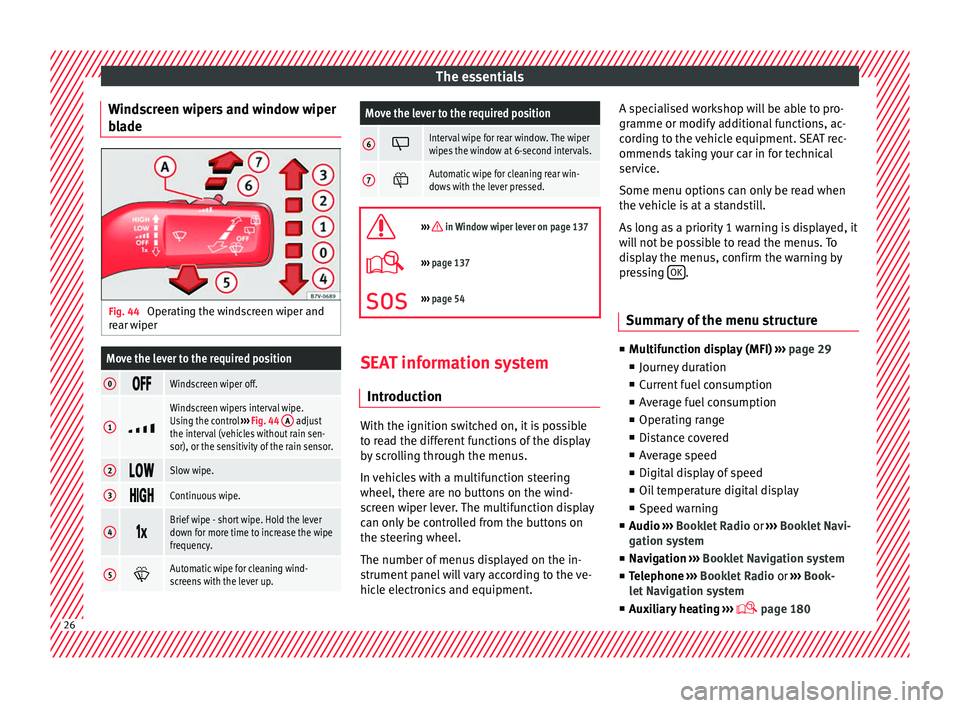
Windscreen wipers and window wiper
b l
a
de Fig. 44
Operating the windscreen wiper and
r e
ar w
iper
Move the lever to the required position
0 Windscreen wiper off.
1
Windscreen wipers interval wipe.
Using the control
››› Fig. 44 A adjust
the interval (vehicles without rain sen-
sor), or the sensitivity of the rain sensor.
2 Slow wipe.
3
Continuous wipe.
4
Brief wipe - short wipe. Hold the lever
down for more time to increase the wipe
frequency.
5
Automatic wipe for cleaning wind-
screens with the lever up.
Move the lever to the required position
6 Interval wipe for rear window. The wiper
wipes the window at 6-second intervals.
7
Automatic wipe for cleaning rear win-
dows with the lever pressed.
››› in Window wiper lever on page 137
›››
page 137
››› page 54 SEAT information system
Intr oduction With the ignition switched on, it is possible
t
o r
e
ad the different functions of the display
by scrolling through the menus.
In vehicles with a multifunction steering
wheel, there are no buttons on the wind-
screen wiper lever. The multifunction display
can only be controlled from the buttons on
the steering wheel.
The number of menus displayed on the in-
strument panel will vary according to the ve-
hicle electronics and equipment. A specialised workshop will be able to pro-
gramme or modify
additional functions, ac-
cording to the vehicle equipment. SEAT rec-
ommends taking your car in for technical
service.
Some menu options can only be read when
the vehicle is at a standstill.
As long as a priority 1 warning is displayed, it
will not be possible to read the menus. To
display the menus, confirm the warning by
pressing OK .
Summary of the menu structure ■
Mu ltif
unction display (MFI) ››› page 29
■ Journey duration
■ Current fuel consumption
■ Average fuel consumption
■ Operating range
■ Distance covered
■ Average speed
■ Digital display of speed
■ Oil temperature digital display
■ Speed warning
■ Audio ›››
Booklet Radio or ›››
Booklet Navi-
gation system
■ Navigation ›››
Booklet Navigation system
■ Telephone ›››
Booklet Radio or ›››
Book-
let Navigation system
■ Auxiliary heating ›››
page 18026
Page 32 of 324
The essentials
press OK again or wait a few seconds. The
s peed i
s
stored and the warning activated.
● To switch off , pres
s OK . The stored speed is
del et
ed.
M
anually erasing memory 1 or 2
● Select the memory that you wish to erase.
● Hold down OK for approximately 2 sec-
ond s.
P er
sonalising the displays
It is possible to select which of the displays
in the multifunction display you wish to see
on the instrument panel in the settings
menu. The units of measurement can also be
modified ››› page 30.
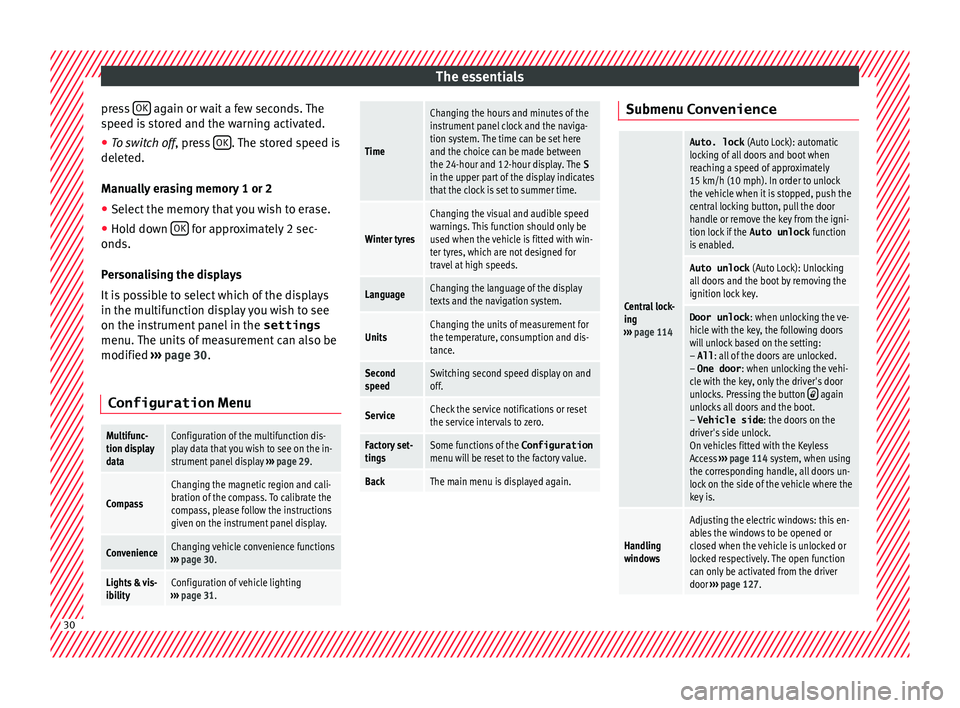
Configuration Menu
Multifunc-
tion display
dataConfiguration of the multifunction dis-
play data that you wish to see on the in-
strument panel display ››› page 29.
Compass
Changing the magnetic region and cali-
bration of the compass. To calibrate the
compass, please follow the instructions
given on the instrument panel display.
ConvenienceChanging vehicle convenience functions
››› page 30.
Lights & vis-
ibilityConfiguration of vehicle lighting
››› page 31.
Time
Changing the hours and minutes of the
instrument panel clock and the naviga-
tion system. The time can be set here
and the choice can be made between
the 24-hour and 12-hour display. The S
in the upper part of the display indicates
that the clock is set to summer time.
Winter tyres
Changing the visual and audible speed
warnings. This function should only be
used when the vehicle is fitted with win-
ter tyres, which are not designed for
travel at high speeds.
LanguageChanging the language of the display
texts and the navigation system.
UnitsChanging the units of measurement for
the temperature, consumption and dis-
tance.
Second
speedSwitching second speed display on and
off.
ServiceCheck the service notifications or reset
the service intervals to zero.
Factory set-
tingsSome functions of the Configuration
menu will be reset to the factory value.
BackThe main menu is displayed again. Submenu Convenience
Central lock-
ing
››› page 114
Auto. lock (Auto Lock): automatic
locking of all doors and boot when
reaching a speed of approximately
15 km/h (10 mph). In order to unlock
the vehicle when it is stopped, push the
central locking button, pull the door
handle or remove the key from the igni-
tion lock if the Auto unlock function
is enabled.
Auto unlock (Auto Lock): Unlocking
all doors and the boot by removing the
ignition lock key.
Door unlock : when unlocking the ve-
hicle with the key, the following doors
will unlock based on the setting:
– All : all of the doors are unlocked.
– One door : when unlocking the vehi-
cle with the key, only the driver's door
unlocks. Pressing the button
again
unlocks all doors and the boot.
– Vehicle side : the doors on the
driver's side unlock.
On vehicles fitted with the Keyless
Access ››› page 114 system, when using
the corresponding handle, all doors un-
lock on the side of the vehicle where the
key is.
Handling
windows
Adjusting the electric windows: this en-
ables the windows to be opened or
closed when the vehicle is unlocked or
locked respectively. The open function
can only be activated from the driver
door ››› page 127. 30
Page 35 of 324
The essentials
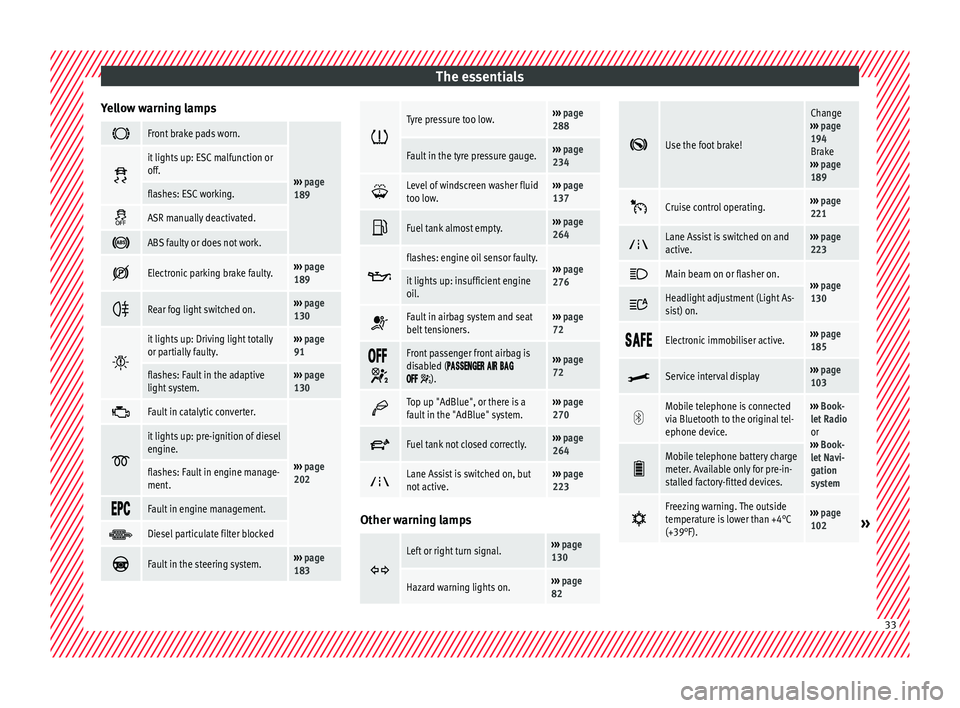
Yellow warning lamps Front brake pads worn.
›››
page
189
it lights up: ESC malfunction or
off.
flashes: ESC working.
ASR manually deactivated.
ABS faulty or does not work.
Electronic parking brake faulty.›››
page
189
Rear fog light switched on.›››
page
130
it lights up: Driving light totally
or partially faulty.›››
page
91
flashes: Fault in the adaptive
light system.››› page
130
Fault in catalytic converter.
›››
page
202
it lights up: pre-ignition of diesel
engine.
flashes: Fault in engine manage-
ment.
Fault in engine management.
Diesel particulate filter blocked
Fault in the steering system.›››
page
183
Tyre pressure too low.›››
page
288
Fault in the tyre pressure gauge.››› page
234
Level of windscreen washer fluid
too low.›››
page
137
Fuel tank almost empty.›››
page
264
flashes: engine oil sensor faulty.›››
page
276it lights up: insufficient engine
oil.
Fault in airbag system and seat
belt tensioners.›››
page
72
Front passenger front airbag is
disabled (
).
››› page
72
Top up "AdBlue", or there is a
fault in the "AdBlue" system.›››
page
270
Fuel tank not closed correctly.›››
page
264
Lane Assist is switched on, but
not active.›››
page
223 Other warning lamps
Left or right turn signal.›››
page
130
Hazard warning lights on.››› page
82
Use the foot brake!
Change
››› page
194
Brake
››› page
189
Cruise control operating.›››
page
221
Lane Assist is switched on and
active.›››
page
223
Main beam on or flasher on.›››
page
130 Headlight adjustment (Light As-
sist) on.
Electronic immobiliser active.›››
page
185
Service interval display›››
page
103
Mobile telephone is connected
via Bluetooth to the original tel-
ephone device.›››
Book-
let Radio
or
››› Book-
let Navi-
gation
system
Mobile telephone battery charge
meter. Available only for pre-in-
stalled factory-fitted devices.
Freezing warning. The outside
temperature is lower than +4°C
(+39°F).›››
page
102» 33
Page 103 of 324
General instrument panel
– To c
ontinue settin
g, press 0.0 / SET ›››
Fig. 119 7 . Hold button down to
s c
r
oll through the numbers quickly.
– Press button again to end the clock
settin g.
R ev
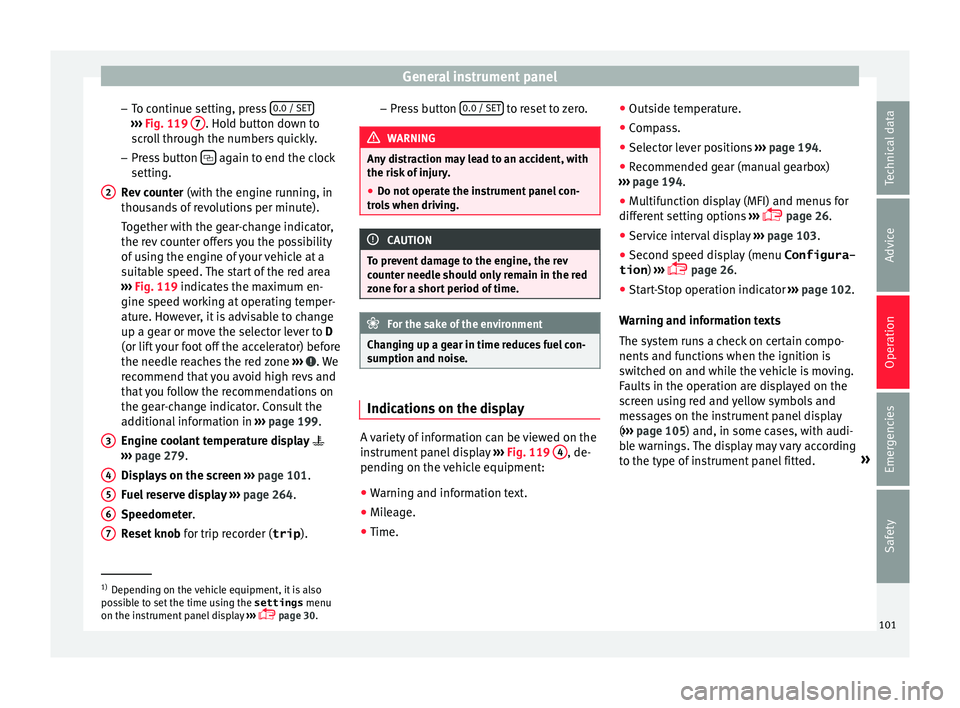
counter (with the engine running, in
thousands of revolutions per minute).
Together with the gear-change indicator,
the rev counter offers you the possibility
of using the engine of your vehicle at a
suitable speed. The start of the red area
››› Fig. 119 indicates the maximum en-
gine speed working at operating temper-
ature. However, it is advisable to change
up a gear or move the selector lever to D
(or lift your foot off the accelerator) before
the needle reaches the red zone ››› . We
r ec
ommend th
at you avoid high revs and
that you follow the recommendations on
the gear-change indicator. Consult the
additional information in ››› page 199.
Engine coolant temperature display
››› page 279.
Displays on the screen ››› page 101.
Fuel reserve display ››› page 264.
Speedometer.
Reset knob for trip recorder (trip ).
2
3
4
5
6
7 –
Pr e
s
s button 0.0 / SET to reset to zero.
WARNING
Any distraction may lead to an accident, with
the risk of
injury.
● Do not operate the instrument panel con-
trol
s when driving. CAUTION
To prevent damage to the engine, the rev
cou nt
er needle should only remain in the red
zone for a short period of time. For the sake of the environment
Changing up a gear in time reduces fuel con-
sumption and noi se. Indications on the display
A variety of information can be viewed on the
in
s
trument
panel display ›››
Fig. 119 4 , de-
pendin g on the
v
ehicle equipment:
● Warning and information text.
● Mileage.
● Time. ●
Outside temper
ature.
● Compass.
● Selector lever positions ›››
page 194.
● Recommended gear (manual gearbox)
›››
page 194.
● Multifunction display (MFI) and menus for
different
setting options ›››
page 26.
● Service interval display ›››
page 103 .
● Second speed display (menu Configura-
tion ) ›››
page 26.
● Start-Stop operation indicator ›››
page 102.
Warning and information texts
The system runs a check on certain compo-
nents and functions when the ignition is
switched on and while the vehicle is moving.
Faults in the operation are displayed on the
screen using red and yellow symbols and
messages on the instrument panel display
( ››› page 105) and, in some cases, with audi-
ble warnings. The display may vary according
to the type of instrument panel fitted. »1)
Depending on the vehicle equipment, it is also
pos s
ible to set the time using the settings menu
on the instrument panel display ›››
page 30.
101
Technical data
Advice
Operation
Emergencies
Safety
Page 105 of 324
General instrument panel
WARNING
Even though outside temperatures are above
freez in
g, some roads and bridges may be icy.
● At outside temperatures above +4°C
(+39°F), even when the “ice c
rystal symbol”
is not visible, there may still be patches of ice
on the road.
● Never rely on the outside temperature indi-
cator! Note
● Differ ent
versions of the instrument panel
are available and therefore the versions and
instructions on the display may vary. In the
case of displays without warning or informa-
tion texts, faults are indicated exclusively by
the warning lamps.
● When several warnings are active at the
same time, the symbol
s are shown succes-
sively for a few seconds and will stay on until
the fault is rectified. Compass*
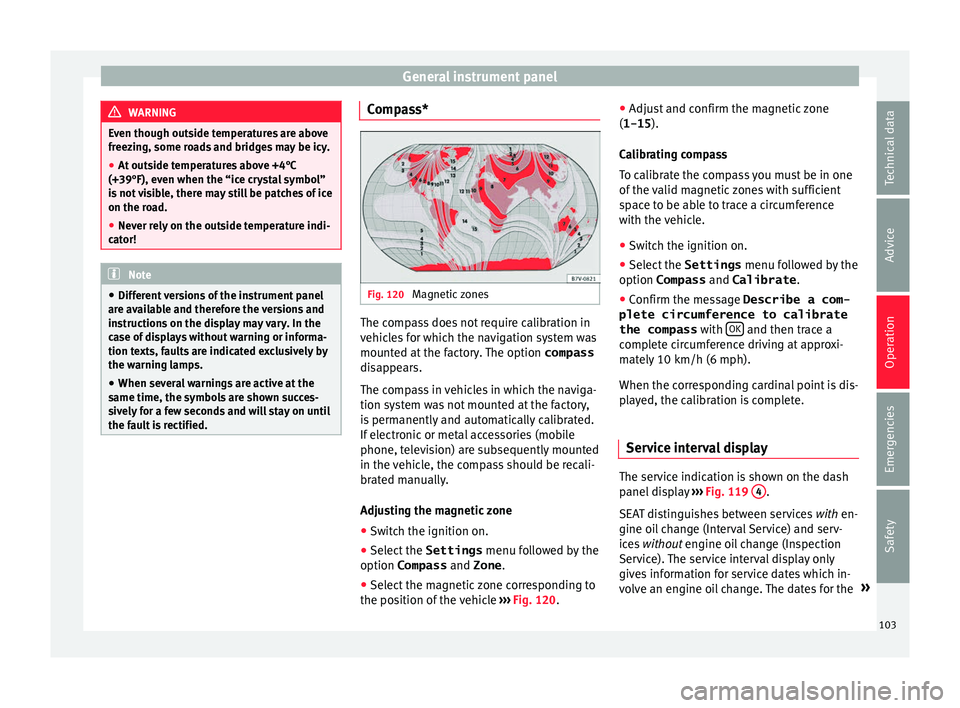
Fig. 120
Magnetic zones The compass does not require calibration in
v
ehic
l
es for which the navigation system was
mounted at the factory. The option compass
disappears.
The compass in vehicles in which the naviga-
tion system was not mounted at the factory,
is permanently and automatically calibrated.
If electronic or metal accessories (mobile
phone, television) are subsequently mounted
in the vehicle, the compass should be recali-
brated manually.
Adjusting the magnetic zone
● Switch the ignition on.
● Select the Settings menu fol
lowed by the
option Compass and Zone.
● Select the magnetic zone corresponding to
the position of
the vehicle ››› Fig. 120. ●
Adjust
and confirm the magnetic zone
(1-15 ).
Calibrating compass
To calibrate the compass you must be in one
of the valid magnetic zones with sufficient
space to be able to trace a circumference
with the vehicle.
● Switch the ignition on.
● Select the Settings menu fol
lowed by the
option Compass and Calibrate .
● Confirm the message Describe a com-
plete circumference to calibrate
the compass with OK and then trace a
c omp
l
ete circumference driving at approxi-
mately 10 km/h (6 mph).
When the corresponding cardinal point is dis-
played, the calibration is complete.
Service interval display The service indication is shown on the dash
p
anel
di
splay ›››
Fig. 119 4 .
S EA
T di
stinguishes between services with en-
gine oil change (Interval Service) and serv-
ices without engine oil change (Inspection
Service). The service interval display only
gives information for service dates which in-
volve an engine oil change. The dates for the »
103
Technical data
Advice
Operation
Emergencies
Safety
Page 106 of 324
Operation
other services (e.g. the next Inspection Serv-
ic e or c
h
ange of brake fluid) are listed on the
label attached to the door strut, or in the
Maintenance Programme.
In vehicles with Services established by time
or mileage, the service intervals are already
pre-defined.
In vehicles with LongLife Service , the inter-
vals are determined individually. Technical
progress has made it possible to considera-
bly reduce servicing requirements. The tech-
nology used by SEAT ensures that your vehi-
cle only has an Interval Service when it is
necessary. To establish when the Interval
Service is due (max. 2 years), the vehicle's
conditions of use and individual driving
styles are considered. The service pre-warn-
ing first appears 20 days before the date es-
tablished for the corresponding service. The
kilometres (miles) remaining until the next
service are always rounded up to the nearest
100 km (miles) and the time is given in com-
plete days. The current service message can-
not be viewed until 500 km after the last
service. Prior to this only lines are visible on
the display.
Inspection reminder
When the Service date is approaching, when
the ignition is switched on a Service remind-
er is displayed. In vehicles without text messages
, a sp anner
is displayed on the instrument panel with
a figure given in km . The number of kilome-
tres shown is the maximum number that may
be driven until the next service. After a few
seconds, the display mode changes. A clock
symbol appears and the number of days until
the next service appointment is due.
In vehicles with text messages , Service in
--- km (miles) or --- days is dis-
played on the instrument panel.
Service due
After the service date, an audible warning is
given when the ignition is switched on and
the spanner displayed on the screen flashes
for a few seconds . In vehicles with text
messages, Service in --- km or --- days is displayed on the instrument panel.
Reading a service notification
With the ignition switched on, the engine off
and the vehicle at a standstill, the current
service notification can be read: ● Press the button on the instrument pan-
el sev
er
al times until the spanner symbol is
displayed .
● OR: select the Settings menu.
● From the
Service submenu, sel ect
the op-
tion Info . When the serv
ic
e date has past, a minus sign
is displayed in front of the number of kilome-
tres or days. In vehicles with text messages
the following is displayed: Service ---
km (miles) or --- days ago .
Resetting service interval display
If the service was not carried out by a techni-
cal service centre, the display can be reset as
follows:
In vehicles with text messages:
Select the Settings menu.
In the submenu Service , select the option Reset.
Confirm with OK when requested to do so by the sys-
tem.
In vehicles without text messages:
Switch the ignition off.
Press and hold the 0.0 / SET button.
Switch the ignition back on.
Release the 0.0 / SET button and, press for the next
20 seconds. Do not r
eset the indicator to zero between
tw o int
ervals, otherwise the display will be
incorrect.
If you reset the display manually, the next
service interval will be indicated as in vehi-
cles with fixed service intervals. For this
104
Page 107 of 324
General instrument panel
reason we recommend that the service inter-
v al
di
splay be reset by a SEAT authorised
service ››› Booklet Maintenance schedule. Note
● The serv ic
e message disappears after a few
seconds, when the engine is started or when OK is pressed.
● In vehicles with the LongLife system in
which the b att
ery has been disconnected for
a long period of time, it is not possible to cal-
culate the date of the next service. Therefore
the service interval display may not be cor-
rect. In this case, bear in mind the maximum
service intervals permitted in the ››› Book-
let Maintenance Programme. Control lamps
W arnin
g and indic
ation lampsRead the additional information carefully
› ›
›
page 32
The control and warning lamps are indicators
of warnings, ››› , faults
››
›
or certain func-
tion s.
Some c
ontrol and warning lamps come
on when the ignition is switched on, and
switch off when the engine starts running, or
while driving.
Depending on the model, additional text
messages may be viewed on the instrument panel display. These may be purely informa-
tive or they m
ay be advising of the need for
action ››› page 100, Instruments.
Depending upon the equipment fitted in the
vehicle, instead of a warning lamp, some-
times a symbol may be displayed on the in-
strument panel.
When certain control and warning lamps are
lit, an audible warning is also heard. WARNING
If the warning lamps and messages are ignor-
ed, the v ehic
le may stall in traffic, or may
cause accidents and severe injuries.
● Never ignore the warning lamps or text
mess
ages.
● Stop the vehicle safely as soon as possible.
● Park the vehicle away from traffic and en-
sure th
at there are no highly flammable ma-
terials under the vehicle that could come into
contact with the exhaust system (e.g. dry
grass, fuel).
● A faulty vehicle represents a risk of acci-
dent for the driv
er and for other road users. If
necessary, switch on the hazard warning
lamps and put out the warning triangle to ad-
vise other drivers.
● Before opening the bonnet, switch off the
engine and al
low it to cool.
● In any vehicle, the engine compartment is a
hazar
dous area and could cause severe inju-
ries ››› page 272. CAUTION
Failure to heed the control lamps and text
mes s
ages when they appear may result in
faults in the vehicle. 105
Technical data
Advice
Operation
Emergencies
Safety
Page 167 of 324
Transport and practical equipment
roof. All these system components are
av ai
l
able from a technical service centre.
Securing the base supports and roof carrier
system
Always secure the base supports and roof
carrier system correctly.
The roof carrier system must always be instal-
led exactly according to the instructions pro-
vided.
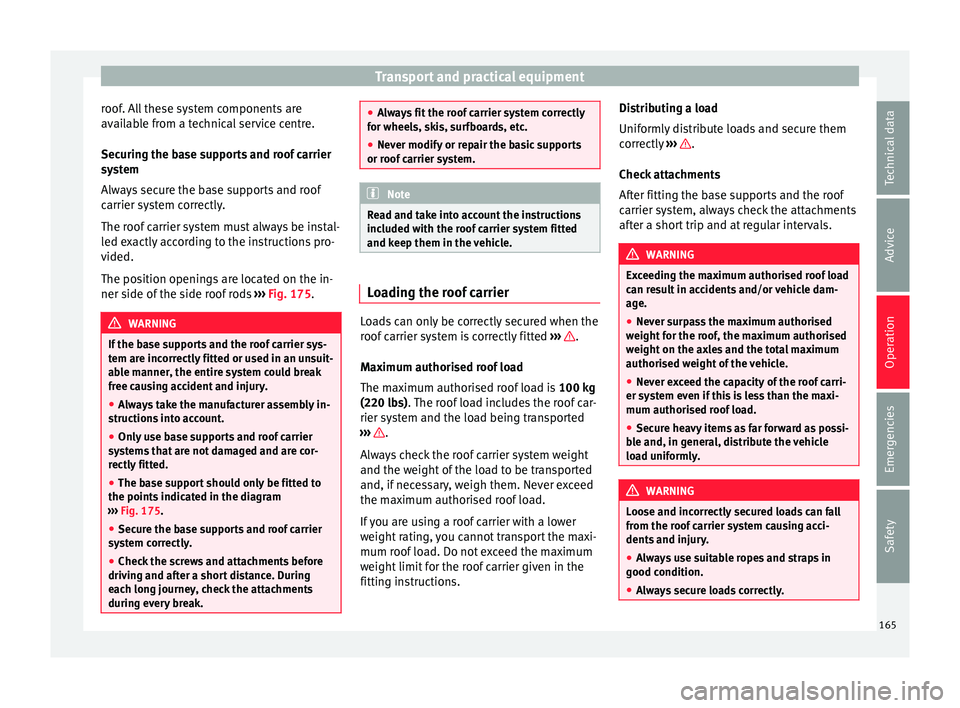
The position openings are located on the in-
ner side of the side roof rods ››› Fig. 175. WARNING
If the base supports and the roof carrier sys-
tem ar e inc
orrectly fitted or used in an unsuit-
able manner, the entire system could break
free causing accident and injury.
● Always take the manufacturer assembly in-
structions
into account.
● Only use base supports and roof carrier
syst
ems that are not damaged and are cor-
rectly fitted.
● The base support should only be fitted to
the points indic
ated in the diagram
››› Fig. 175.
● Secure the base supports and roof carrier
syst
em correctly.
● Check the screws and attachments before
driving and af
ter a short distance. During
each long journey, check the attachments
during every break. ●
Alw a
ys fit the roof carrier system correctly
for wheels, skis, surfboards, etc.
● Never modify or repair the basic supports
or roof c
arrier system. Note
Read and take into account the instructions
inc luded w ith the r
oof carrier system fitted
and keep them in the vehicle. Loading the roof carrier
Loads can only be correctly secured when the
r
oof
c
arrier system is correctly fitted ››› .
M ax
imum authori
sed roof load
The maximum authorised roof load is 100 kg
(220 lbs). The roof load includes the roof car-
rier system and the load being transported
››› .
A lw
a
ys check the roof carrier system weight
and the weight of the load to be transported
and, if necessary, weigh them. Never exceed
the maximum authorised roof load.
If you are using a roof carrier with a lower
weight rating, you cannot transport the maxi-
mum roof load. Do not exceed the maximum
weight limit for the roof carrier given in the
fitting instructions. Distributing a load
Uniformly
distribute loads and secure them
correctly ››› .
Chec k
att
achments
After fitting the base supports and the roof
carrier system, always check the attachments
after a short trip and at regular intervals. WARNING
Exceeding the maximum authorised roof load
can r e
sult in accidents and/or vehicle dam-
age.
● Never surpass the maximum authorised
weight f
or the roof, the maximum authorised
weight on the axles and the total maximum
authorised weight of the vehicle.
● Never exceed the capacity of the roof carri-
er syst
em even if this is less than the maxi-
mum authorised roof load.
● Secure heavy items as far forward as possi-
ble and, in g
eneral, distribute the vehicle
load uniformly. WARNING
Loose and incorrectly secured loads can fall
from the r oof
carrier system causing acci-
dents and injury.
● Always use suitable ropes and straps in
good condition.
● A
lways secure loads correctly. 165
Technical data
Advice
Operation
Emergencies
Safety
Page 214 of 324
Operation
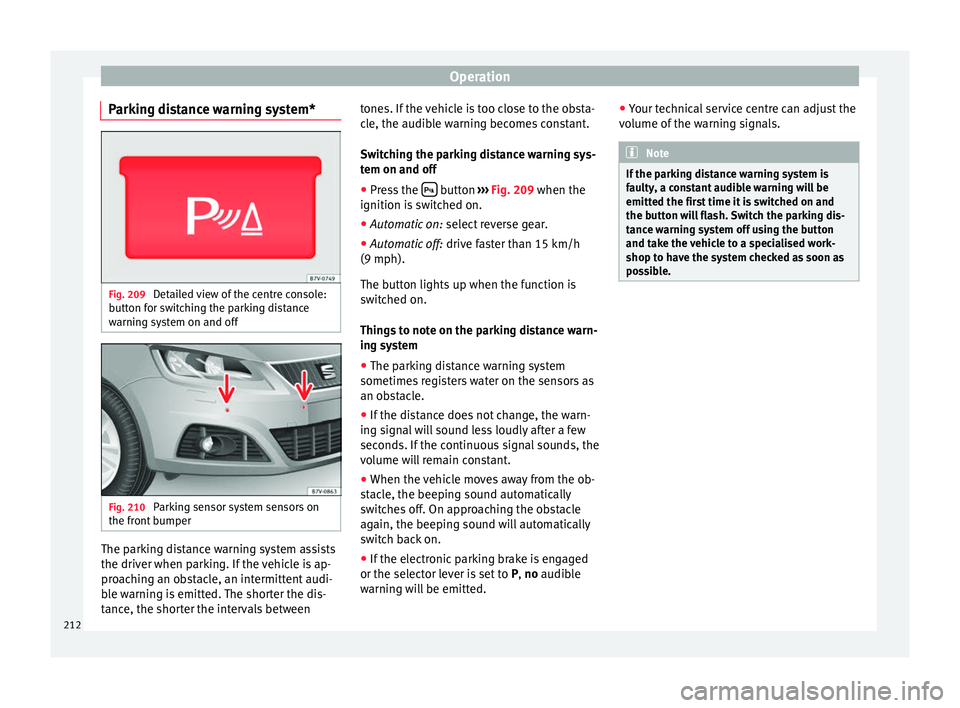
Parking distance warning system* Fig. 209
Detailed view of the centre console:
b utt
on f
or switching the parking distance
warning system on and off Fig. 210
Parking sensor system sensors on
the fr ont
b
umper The parking distance warning system assists
the driv
er when p
ark
ing. If the vehicle is ap-
proaching an obstacle, an intermittent audi-
ble warning is emitted. The shorter the dis-
tance, the shorter the intervals between tones. If the vehicle is too close to the obsta-
cle, the audib
le warning becomes constant.
Switching the parking distance warning sys-
tem on and off ● Press the button
›››
Fig. 209
when the
ignition i
s switched on.
● Automatic on: select r
everse gear.
● Automatic off: drive fa
ster than 15 km/h
(9 mph).
The button lights up when the function is
switched on.
Things to note on the parking distance warn-
ing system
● The parking distance warning system
sometimes r
egisters water on the sensors as
an obstacle.
● If the distance does not change, the warn-
ing sign
al will sound less loudly after a few
seconds. If the continuous signal sounds, the
volume will remain constant.
● When the vehicle moves away from the ob-
stac
le, the beeping sound automatically
switches off. On approaching the obstacle
again, the beeping sound will automatically
switch back on.
● If the electronic parking brake is engaged
or the selector l
ever is set to P, no audible
warning will be emitted. ●
Your tec
hnical service centre can adjust the
volume of the warning signals. Note
If the parking distance warning system is
fau lty
, a constant audible warning will be
emitted the first time it is switched on and
the button will flash. Switch the parking dis-
tance warning system off using the button
and take the vehicle to a specialised work-
shop to have the system checked as soon as
possible. 212
Page 239 of 324
Towing bracket device
Towing bracket device
Driv in
g w
ith a trailer
Introduction Always be aware of the legal requirements for
eac
h c
ountry to drive with a trailer and to use
a tow hitch.
Your car is intended mainly for transporting
passengers however, it can also be used to
tow a trailer provided that it is fitted with the
necessary equipment. The additional load
has an effect on the useful life, fuel con-
sumption and the vehicle performance and,
in some cases, reduce the service intervals.
Driving with a trailer requires more force from
the vehicle and, thus, more concentration
from the driver.
For wintertime temperatures, fit winter tyres
to the vehicle and the trailer.
Drawbar load
The maximum permitted Drawbar load exer-
ted by the trailer drawbar on the ball joint of
the tow hitch must not exceed 100 kg (ap-
proximately 220 lbs).
Vehicles with the Start-Stop function
With a SEAT factory fitted or retrofitted tow
hitch, the Start-Stop function is automatically deactivated when a trailer is connected. For
to
w hit
ches not installed by SEAT, the Start-
Stop function must be deactivated manually
using a button located on the dash panel be-
fore driving with a trailer and it must remain
off for the entire journey ››› .
WARNING
Never transport people in a trailer: this will
endan g
er in their life and is against the law. WARNING
The incorrect use of the tow hitch can cause
acc ident
s and injury.
● Only use a tow hitch in perfect condition
and correctly
installed.
● Never change or repair a tow hitch.
● To reduce the risk of injury in case of a re-
vers
ing collision, injury to pedestrians and
cyclists when parking, always keep the ball
joint in when a trailer is not being used.
● Never fit a trailer tow hitch “that distrib-
utes
the load” or “balances the load”. Your
vehicle has not been designed for this type of
tow hitch. The tow hitch may fail and the
trailer will separate from the vehicle. WARNING
Driving with a trailer and transporting heavy
or lar g
e objects can affect vehicle handling
and even cause an accident. ●
Alw a
ys secure loads correctly with suitable
and undamaged attachment rope or straps.
● Adjust your speed and driving style to visi-
bility
, road, traffic and weather conditions.
● Trailers with a high centre of gravity can
over
turn more easily than those with a low
centre of gravity.
● Avoid brusque manoeuvres and sudden
brakin
g.
● Always take the following precautions seri-
ously
.
● Reduce your speed immediately if you ob-
serve the tr
ailer rocking from side to side.
● Never drive at more than 80 km/h (50 mph)
when tow
ing a trailer (or 100 km/h [62 mph]
in exceptional circumstances). This also ap-
plies in countries where higher speeds are
permitted. Always take the speed limits for
vehicles with and without trailers in each
country into account.
● Never try to stop the “snaking” by increas-
ing speed. WARNING
When driving with a trailer and using a tow
hitc h th
at was not installed by SEAT, the
Start-Stop function must be manually deacti-
vated. Otherwise, this could cause a braking
anomaly that could result in an accident with
serious consequences.
● Always manually deactivate the Start-Stop
function when a tr
ailer is being used on a tow
hitch that has not been installed by SEAT. » 237
Technical data
Advice
Operation
Emergencies
Safety