stop start Seat Alhambra 2016 Owner's Manual
[x] Cancel search | Manufacturer: SEAT, Model Year: 2016, Model line: Alhambra, Model: Seat Alhambra 2016Pages: 324, PDF Size: 5.93 MB
Page 5 of 324
Table of Contents
Table of Contents
The e s
senti
als . . . . . . . . . . . . . . . . . . . . . . . . 5
Exterior view . . . . . . . . . . . . . . . . . . . . . . . . . . . . 5
Exterior view . . . . . . . . . . . . . . . . . . . . . . . . . . . . 6
Interior view (left guide) . . . . . . . . . . . . . . . . . . 7
How it works . . . . . . . . . . . . . . . . . . . . . . . . . . . . 8
Unlocking and locking . . . . . . . . . . . . . . . . . . . . 8
Before driving . . . . . . . . . . . . . . . . . . . . . . . . . . . 13
Airbags . . . . . . . . . . . . . . . . . . . . . . . . . . . . . . . . 17
Child seats . . . . . . . . . . . . . . . . . . . . . . . . . . . . . 20
Starting the vehicle . . . . . . . . . . . . . . . . . . . . . . 23
Lights and visibility . . . . . . . . . . . . . . . . . . . . . . 24
SEAT information system . . . . . . . . . . . . . . . . . . 26
Cruise control . . . . . . . . . . . . . . . . . . . . . . . . . . . 32
Warning lamps . . . . . . . . . . . . . . . . . . . . . . . . . . 32
Gearbox lever . . . . . . . . . . . . . . . . . . . . . . . . . . . 34
Air conditioning . . . . . . . . . . . . . . . . . . . . . . . . . 36
Level control . . . . . . . . . . . . . . . . . . . . . . . . . . . . 39
Emergencies . . . . . . . . . . . . . . . . . . . . . . . . . . . . 42
Fuses . . . . . . . . . . . . . . . . . . . . . . . . . . . . . . . . . . 42
Bulbs . . . . . . . . . . . . . . . . . . . . . . . . . . . . . . . . . . 43
Action in the event of a puncture . . . . . . . . . . . 44
Changing a wheel . . . . . . . . . . . . . . . . . . . . . . . 45
Snow chains . . . . . . . . . . . . . . . . . . . . . . . . . . . . 49
Emergency towing of the vehicle . . . . . . . . . . . 50
How to jump start . . . . . . . . . . . . . . . . . . . . . . . . 51
Changing windscreen wipers . . . . . . . . . . . . . . 54
Safety . . . . . . . . . . . . . . . . . . . . . . . . . . . . . . . . 56
Safe driving . . . . . . . . . . . . . . . . . . . . . . . . . . . . 56
Safety first! . . . . . . . . . . . . . . . . . . . . . . . . . . . . . 56
Advice about driving . . . . . . . . . . . . . . . . . . . . . 56
Correct position of the vehicle occupants . . . . 57
Pedal area . . . . . . . . . . . . . . . . . . . . . . . . . . . . . . 60 Seat belts
. . . . . . . . . . . . . . . . . . . . . . . . . . . . . . 61
Why wear a seat belt? . . . . . . . . . . . . . . . . . . . . 61
How to properly adjust your seatbelt . . . . . . . . 64
Seat belt tensioners . . . . . . . . . . . . . . . . . . . . . . 67
Airbag system . . . . . . . . . . . . . . . . . . . . . . . . . . 68
Brief introduction . . . . . . . . . . . . . . . . . . . . . . . . 68
Airbag safety instructions . . . . . . . . . . . . . . . . . 71
Deactivating airbags . . . . . . . . . . . . . . . . . . . . . 72
Transporting children safely . . . . . . . . . . . . . . . 74
Safety for children . . . . . . . . . . . . . . . . . . . . . . . 74
Child seats . . . . . . . . . . . . . . . . . . . . . . . . . . . . . 75
Integrated child seat . . . . . . . . . . . . . . . . . . . . . 78
Emergencies . . . . . . . . . . . . . . . . . . . . . . . . . . 82
Self-help . . . . . . . . . . . . . . . . . . . . . . . . . . . . . . . 82
In case of emergency . . . . . . . . . . . . . . . . . . . . . 82
Vehicle tool kit* . . . . . . . . . . . . . . . . . . . . . . . . . 82
Changing a wheel* . . . . . . . . . . . . . . . . . . . . . . . 84
Tyre repair . . . . . . . . . . . . . . . . . . . . . . . . . . . . . . 85
Changing the windscreen wiper blades . . . . . . 87
Tow-starting and towing . . . . . . . . . . . . . . . . . . 87
Emergency locking and unlocking . . . . . . . . . . 89
Fuses and bulbs . . . . . . . . . . . . . . . . . . . . . . . . . 90
Fuses . . . . . . . . . . . . . . . . . . . . . . . . . . . . . . . . . . 90
Changing bulbs . . . . . . . . . . . . . . . . . . . . . . . . . 91
Operation . . . . . . . . . . . . . . . . . . . . . . . . . . . . . 99
General instrument panel . . . . . . . . . . . . . . . . . 99
Instrument panel . . . . . . . . . . . . . . . . . . . . . . . . 98
Instruments . . . . . . . . . . . . . . . . . . . . . . . . . . . . 100
Control lamps . . . . . . . . . . . . . . . . . . . . . . . . . . . 105
Communications and multimedia . . . . . . . . . . . 106
Steering wheel controls* . . . . . . . . . . . . . . . . . . 106
Multimedia . . . . . . . . . . . . . . . . . . . . . . . . . . . . . 110
Three button unit in headliner . . . . . . . . . . . . . . 110
Opening and closing . . . . . . . . . . . . . . . . . . . . . 112
Vehicle key set . . . . . . . . . . . . . . . . . . . . . . . . . . 112
Central locking and locking system . . . . . . . . . 114 Doors . . . . . . . . . . . . . . . . . . . . . . . . . . . . . . . . . . 121
Sliding doors . . . . . . . . . . . . . . . . . . . . . . . . . . . 121
Rear lid . . . . . . . . . . . . . . . . . . . . . . . . . . . . . . . . 124
Electric windows . . . . . . . . . . . . . . . . . . . . . . . . . 127
Panoramic sliding sunroof* . . . . . . . . . . . . . . . . 128
Lights and visibility
. . . . . . . . . . . . . . . . . . . . . . 130
Lights . . . . . . . . . . . . . . . . . . . . . . . . . . . . . . . . . 130
Visibility . . . . . . . . . . . . . . . . . . . . . . . . . . . . . . . 136
Windscreen wiper and window wiper sys-
tems . . . . . . . . . . . . . . . . . . . . . . . . . . . . . . . . . . 137
R
ear vision mirror . . . . . . . . . . . . . . . . . . . . . . . . 139
Seats and head restraints . . . . . . . . . . . . . . . . . 142
Adjusting the seats and head restraints . . . . . . 142
Seat functions . . . . . . . . . . . . . . . . . . . . . . . . . . 146
Transport and practical equipment . . . . . . . . . 152
Transporting objects . . . . . . . . . . . . . . . . . . . . . 152
Luggage compartment . . . . . . . . . . . . . . . . . . . . 154
Roof carrier* . . . . . . . . . . . . . . . . . . . . . . . . . . . . 164
Storage compartments . . . . . . . . . . . . . . . . . . . 166
Drink holders . . . . . . . . . . . . . . . . . . . . . . . . . . . 171
Ashtray and cigarette lighter* . . . . . . . . . . . . . . 172
Power sockets . . . . . . . . . . . . . . . . . . . . . . . . . . . 173
Air conditioning . . . . . . . . . . . . . . . . . . . . . . . . . 176
Air conditioning . . . . . . . . . . . . . . . . . . . . . . . . . 176
Auxiliary heater* (additional heater) . . . . . . . . 180
Driving . . . . . . . . . . . . . . . . . . . . . . . . . . . . . . . . 183
Address . . . . . . . . . . . . . . . . . . . . . . . . . . . . . . . . 183
Stopping and starting the engine . . . . . . . . . . . 185
Braking and parking . . . . . . . . . . . . . . . . . . . . . 189
Gearbox . . . . . . . . . . . . . . . . . . . . . . . . . . . . . . . . 194
Run-in and economical driving . . . . . . . . . . . . . 199
Engine management and exhaust gas purifica-
tion syst
em . . . . . . . . . . . . . . . . . . . . . . . . . . . . . 202
Driving abroad . . . . . . . . . . . . . . . . . . . . . . . . . . 204
Driving along flooded roadways . . . . . . . . . . . . 204
Driver assistance systems . . . . . . . . . . . . . . . . . 205
Braking and stability systems . . . . . . . . . . . . . . 205
Start assist systems . . . . . . . . . . . . . . . . . . . . . . 208 3
Page 26 of 324
The essentials
Turning on/switching off the ignition, glow
p lug
s
reheating
● Switch ignition on: Turn the key to the 2position.
●
Switch ignition off. Turn the key to the 1position.
●
Diesel vehicles : The glo
w p
lugs reheat
when the ignition is switched on
Starting the engine
● Manual gearbox: press the clutch pedal all
the way
down and move the gearbox lever in-
to neutral.
● Automatic gearbox: Press the brake pedal
and move the sel
ector lever to the P position
or into N.
● Turn the key to the 3 position. The key au-
t om
atic
ally returns to the 2 position. Do not
pr e
s
s the accelerator.
Start-Stop System*
When you stop and release the clutch pedal,
the Start-Stop system* turns off the engine.
The ignition remains switched on.
››› in Ignition lock on page 186
››› page 185 Lights and visibility
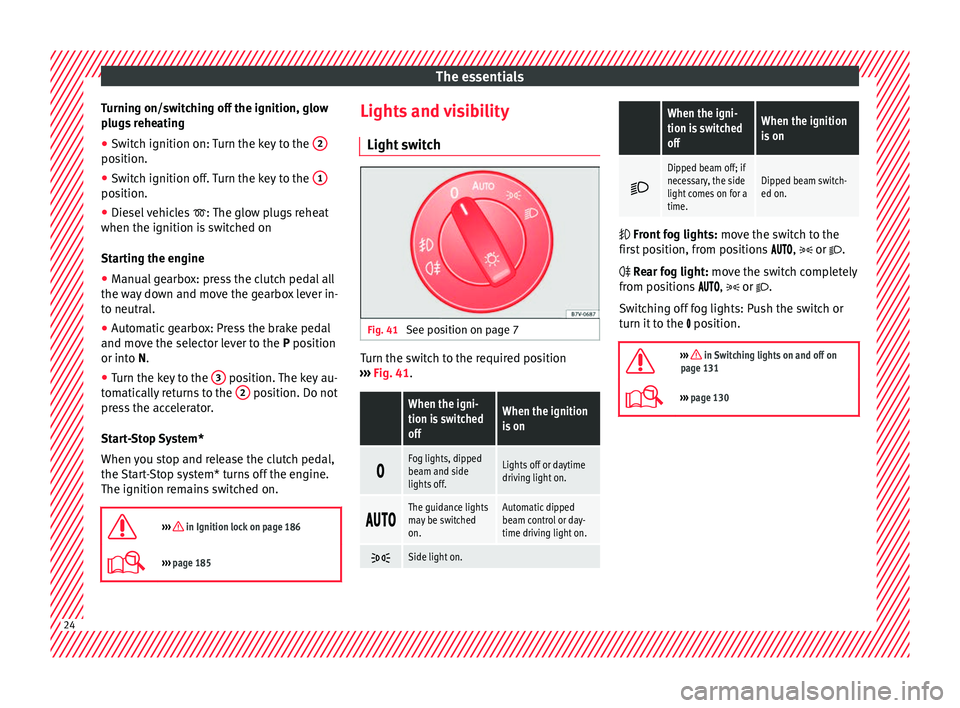
Light sw
it
ch Fig. 41
See position on page 7 Turn the switch to the required position
› ›
›
Fig. 41.
When the igni-
tion is switched
offWhen the ignition
is on
Fog lights, dipped
beam and side
lights off.Lights off or daytime
driving light on.
The guidance lights
may be switched
on.Automatic dipped
beam control or day-
time driving light on.
Side light on.
When the igni-
tion is switched
offWhen the ignition
is on
Dipped beam off; if
necessary, the side
light comes on for a
time.Dipped beam switch-
ed on.
Front fog lights:
mov
e the switch to the
first position, from positions , or .
Rear fog light: move the switch completely
from positions , or .
Switching off fog lights: Push the switch or
turn it to the position.
››› in Switching lights on and off on
page 131
››› page 130 24
Page 54 of 324
The essentials
WARNING
Incorrect use of jump leads and incorrectly
jump st ar
ting could cause the battery to ex-
plode resulting in serious injury. Please ob-
serve the following rules to minimise the risk
of a battery explosion:
● The battery providing current must have
the same v
oltage (12V) and approximately
the same capacity (see markings on battery)
as the flat battery.
● Never charge a frozen or recently thawed
batter
y. A flat battery can also freeze at tem-
peratures close to 0°C (+32°F).
● If a battery is frozen and/or has been frozen
then it mus
t be replaced.
● A highly explosive mixture of gases is re-
lea
sed when the battery is being charged. Al-
ways keep lit cigarettes, flames, sparks and
fire far from the battery. Never use a mobile
telephone when connecting and removing the
jump leads.
● Charge the battery only in well ventilated
area
s given that when the battery is charged
by outside assistance, it creates a mix of
highly explosive gases.
● Jump leads should never enter into contact
with mov
ing parts in the engine compart-
ment.
● Never switch the positive and negative
pole
s or connect the jump leads incorrectly.
● Note the instruction manual provided by
the manufact
urer of the jump leads. CAUTION
To avoid considerable damage to the vehicle
electric a
l system, note the following careful-
ly:
● If the jump leads are incorrectly connected,
this c
ould result in a short circuit.
● The vehicles must not touch each other,
otherwi
se electricity could flow as soon as
the positive terminals are connected. Positive pole on the jump lead con-
nection point
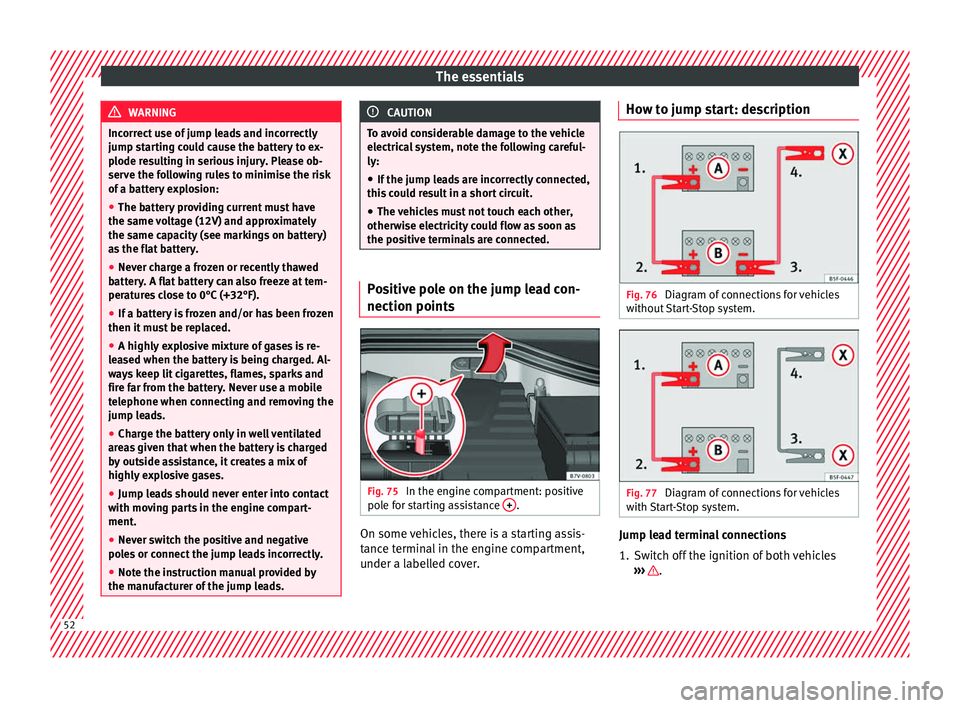
s Fig. 75
In the engine compartment: positive
po l
e f
or starting assistance + .
On some vehicles, there is a starting assis-
t
anc
e t
erminal in the engine compartment,
under a labelled cover. How to jump start: description
Fig. 76
Diagram of connections for vehicles
w ithout
Start-Stop system. Fig. 77
Diagram of connections for vehicles
w ith
St
art-Stop system. Jump lead terminal connections
1. Switch off the ignition of both vehicles
››
›
.
52
Page 55 of 324
The essentials
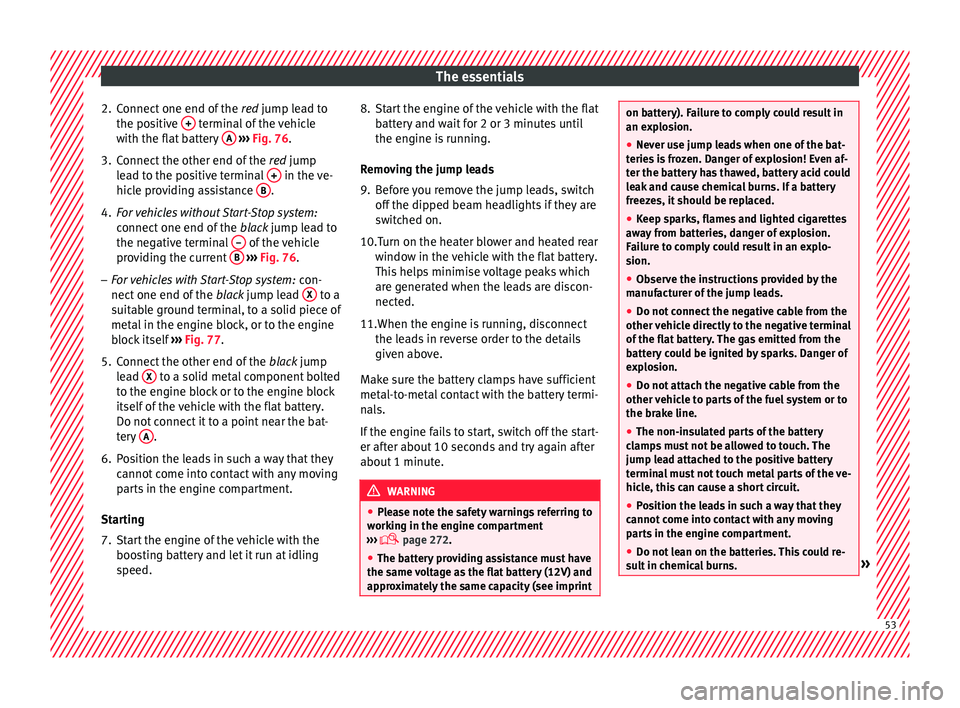
2. Connect one end of the re
d jump lead to
the positive + terminal of the vehicle
w ith the fl
at
battery A
› ››
Fig. 76
.
3.
Connect the other end of the red
jump
lead to the positive terminal + in the ve-
hic l
e pr
oviding assistance B .
4. For vehicles without Start-Stop system:
connect
one end of
the black jump lead to
the negative terminal – of the vehicle
pr o
v
iding the current B
› ››
Fig. 76
.
– F
or vehicles with Start-Stop system: con-
nect one end of
the black jump lead X to a
s uit
ab
le ground terminal, to a solid piece of
metal in the engine block, or to the engine
block itself ››› Fig. 77.
5. Connect the other end of the black
jump
lead X to a solid metal component bolted
t o the en
gine b
lock or to the engine block
itself of the vehicle with the flat battery.
Do not connect it to a point near the bat-
tery A .
6. Position the leads in such a way that they cannot
c
ome into contact with any moving
parts in the engine compartment.
Starting
7. Start the engine of the vehicle with the boostin
g battery and let it run at idling
speed. 8. Start the engine of the vehicle with the flat
batter
y and wait for 2 or 3 minutes until
the engine is running.
Removing the jump leads
9. Before you remove the jump leads, switch off the dipped be
am headlights if they are
switched on.
10.Turn on the heater blower and heated rear window in the
vehicle with the flat battery.
This helps minimise voltage peaks which
are generated when the leads are discon-
nected.
11.When the engine is running, disconnect the lea
ds in reverse order to the details
given above.
Make sure the battery clamps have sufficient
metal-to-metal contact with the battery termi-
nals.
If the engine fails to start, switch off the start-
er after about 10 seconds and try again after
about 1 minute. WARNING
● Ple a
se note the safety warnings referring to
working in the engine compartment
››› page 272.
● The battery providing assistance must have
the same v
oltage as the flat battery (12V) and
approximately the same capacity (see imprint on battery). Failure to comply could result in
an exp
lo
sion.
● Never use jump leads when one of the bat-
teries
is frozen. Danger of explosion! Even af-
ter the battery has thawed, battery acid could
leak and cause chemical burns. If a battery
freezes, it should be replaced.
● Keep sparks, flames and lighted cigarettes
awa
y from batteries, danger of explosion.
Failure to comply could result in an explo-
sion.
● Observe the instructions provided by the
manufact
urer of the jump leads.
● Do not connect the negative cable from the
other vehic
le directly to the negative terminal
of the flat battery. The gas emitted from the
battery could be ignited by sparks. Danger of
explosion.
● Do not attach the negative cable from the
other vehic
le to parts of the fuel system or to
the brake line.
● The non-insulated parts of the battery
clamp
s must not be allowed to touch. The
jump lead attached to the positive battery
terminal must not touch metal parts of the ve-
hicle, this can cause a short circuit.
● Position the leads in such a way that they
cannot c
ome into contact with any moving
parts in the engine compartment.
● Do not lean on the batteries. This could re-
sult
in chemical burns. » 53
Page 101 of 324
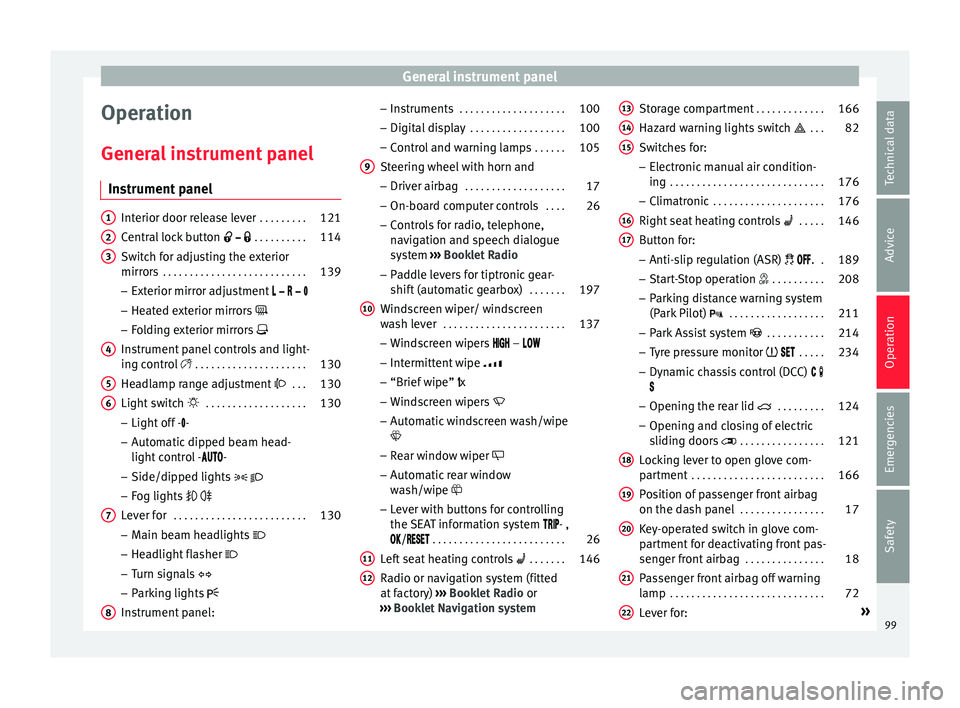
General instrument panel
Operation
Gener a
l
instrument panel
Instrument panel Interior door release lever
. . . . . . . . .121
Central lock button . . . . . . . . . . 114
Switch for adjusting the exterior
mirror s . . . . . . . . . . . . . . . . . . . . . . . . . . . 139
– Exterior mirr or a
djustment
– Heated exterior mirrors
– Folding exterior mirrors
Instrument panel controls and light-
ing control . . . . . . . . . . . . . . . . . . . . . 130
Headlamp range adjustment . . . 130
Light switch . . . . . . . . . . . . . . . . . . . 130
– Light off - -
– Aut
omatic dipped beam head-
light control - -
– Side/dipped lights
– Fog lights
Lever for . . . . . . . . . . . . . . . . . . . . . . . . . 130
– Main beam he
adlights
– Headlight flasher
– Turn signals
– Parking lights
Instrument panel:
1 2
3
4
5
6
7
8 –
Ins
truments . . . . . . . . . . . . . . . . . . . . 100
– Digit
al di
splay . . . . . . . . . . . . . . . . . . 100
– Contro
l and warning lamps . . . . . .105
Steering wheel with horn and
– Driver airbag . . . . . . . . . . . . . . . . . . . 17
– On-bo
ard c
omputer controls . . . .26
– Contro
ls for radio, telephone,
navigation and speech dialogue
system ››› Booklet Radio
– Paddle levers for tiptronic gear-
shift (automatic gearbox) . . . . . . .197
Windscreen wiper/ windscreen
wash l
ever . . . . . . . . . . . . . . . . . . . . . . . 137
– Wind s
creen wipers –
– Intermittent wipe
– “Brief wipe” x
– Windscreen wipers
– Automatic windscreen wash/wipe
– Rear window wiper
– Automatic rear window
wash/wipe
– Lever with buttons for controlling
the SEAT information system - ,
/ . . . . . . . . . . . . . . . . . . . . . . . . . 26
Left seat heating controls . . . . . . . 146
Radio or navigation system (fitted
at fact
ory) ››› Booklet Radio or
››› Booklet Navigation system
9
10
11
12 Storage compartment
. . . . . . . . . . . . .166
Hazard warning lights switch . . . 82
Switches for:
– Electr
onic
manual air condition-
ing . . . . . . . . . . . . . . . . . . . . . . . . . . . . . 176
– Climatr
onic . . . . . . . . . . . . . . . . . . . . . 176
Right seat heating controls . . . . . 146
Button for:
– Anti-slip r
egulation (ASR) . .189
– Start
-Stop operation . . . . . . . . . .208
– Park in
g distance warning system
(Park Pilot) . . . . . . . . . . . . . . . . . . 211
– Park As
sist system . . . . . . . . . . . 214
– Tyr
e pressure monitor . . . . .234
– Dyn
amic chassis control (DCC)
– Opening the rear lid . . . . . . . . .124
– Opening and clo
sing of electric
sliding doors . . . . . . . . . . . . . . . . 121
Locking lever to open glove com-
par tment . . . . . . . . . . . . . . . . . . . . . . . . . 166
P
osition of passenger front airbag
on the dash p
anel . . . . . . . . . . . . . . . . 17
Key-operated switch in glove com-
partment
for deactivating front pas-
senger front airbag . . . . . . . . . . . . . . .18
Passenger front airbag off warning
lamp . . . . . . . . . . . . . . . . . . . . . . . . . . . . . 72
L ev
er for: »
13 14
15
16
17
18
19
20
21
22
99
Technical data
Advice
Operation
Emergencies
Safety
Page 103 of 324
General instrument panel
– To c
ontinue settin
g, press 0.0 / SET ›››
Fig. 119 7 . Hold button down to
s c
r
oll through the numbers quickly.
– Press button again to end the clock
settin g.
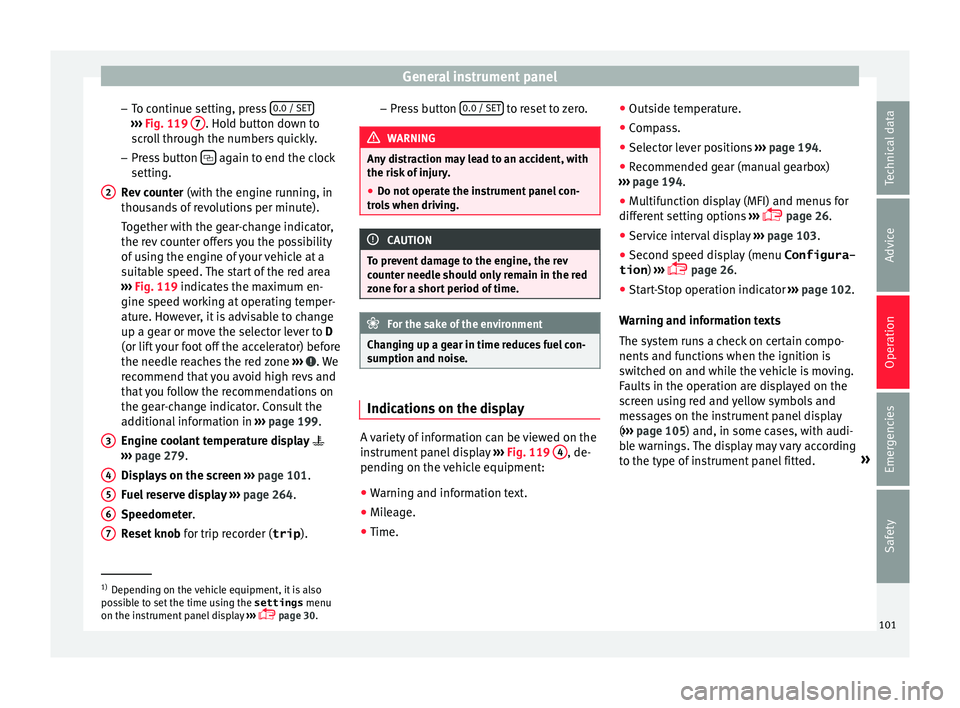
R ev
counter (with the engine running, in
thousands of revolutions per minute).
Together with the gear-change indicator,
the rev counter offers you the possibility
of using the engine of your vehicle at a
suitable speed. The start of the red area
››› Fig. 119 indicates the maximum en-
gine speed working at operating temper-
ature. However, it is advisable to change
up a gear or move the selector lever to D
(or lift your foot off the accelerator) before
the needle reaches the red zone ››› . We
r ec
ommend th
at you avoid high revs and
that you follow the recommendations on
the gear-change indicator. Consult the
additional information in ››› page 199.
Engine coolant temperature display
››› page 279.
Displays on the screen ››› page 101.
Fuel reserve display ››› page 264.
Speedometer.
Reset knob for trip recorder (trip ).
2
3
4
5
6
7 –
Pr e
s
s button 0.0 / SET to reset to zero.
WARNING
Any distraction may lead to an accident, with
the risk of
injury.
● Do not operate the instrument panel con-
trol
s when driving. CAUTION
To prevent damage to the engine, the rev
cou nt
er needle should only remain in the red
zone for a short period of time. For the sake of the environment
Changing up a gear in time reduces fuel con-
sumption and noi se. Indications on the display
A variety of information can be viewed on the
in
s
trument
panel display ›››
Fig. 119 4 , de-
pendin g on the
v
ehicle equipment:
● Warning and information text.
● Mileage.
● Time. ●
Outside temper
ature.
● Compass.
● Selector lever positions ›››
page 194.
● Recommended gear (manual gearbox)
›››
page 194.
● Multifunction display (MFI) and menus for
different
setting options ›››
page 26.
● Service interval display ›››
page 103 .
● Second speed display (menu Configura-
tion ) ›››
page 26.
● Start-Stop operation indicator ›››
page 102.
Warning and information texts
The system runs a check on certain compo-
nents and functions when the ignition is
switched on and while the vehicle is moving.
Faults in the operation are displayed on the
screen using red and yellow symbols and
messages on the instrument panel display
( ››› page 105) and, in some cases, with audi-
ble warnings. The display may vary according
to the type of instrument panel fitted. »1)
Depending on the vehicle equipment, it is also
pos s
ible to set the time using the settings menu
on the instrument panel display ›››
page 30.
101
Technical data
Advice
Operation
Emergencies
Safety
Page 104 of 324
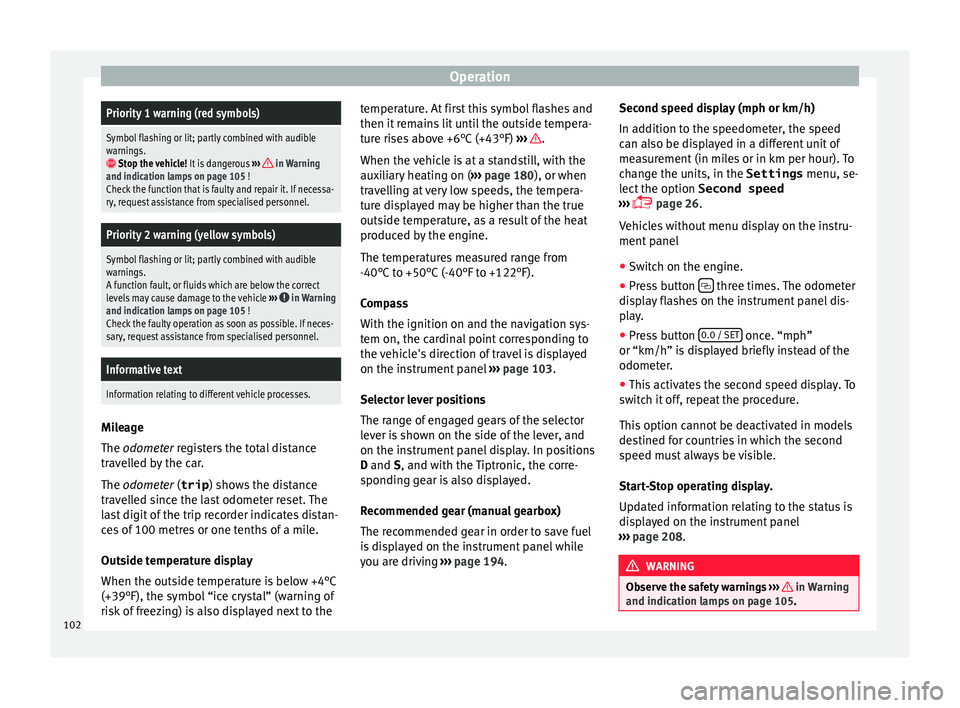
OperationPriority 1 warning (red symbols)
Symbol flashing or lit; partly combined with audible
warnings.
Stop the vehicle!
It is dangerous ››› in Warning
and indication lamps on page 105 !
Check the function that is faulty and repair it. If necessa-
ry, request assistance from specialised personnel.
Priority 2 warning (yellow symbols)
Symbol flashing or lit; partly combined with audible
warnings.
A function fault, or fluids which are below the correct
levels may cause damage to the vehicle ›››
in Warning
and indication lamps on page 105 !
Check the faulty operation as soon as possible. If neces-
sary, request assistance from specialised personnel.
Informative text
Information relating to different vehicle processes. Mileage
The odomet
er
r
egisters the total distance
travelled by the car.
The odometer (trip ) shows the distance
travelled since the last odometer reset. The
last digit of the trip recorder indicates distan-
ces of 100 metres or one tenths of a mile.
Outside temperature display
When the outside temperature is below +4°C
(+39°F), the symbol “ice crystal” (warning of
risk of freezing) is also displayed next to the temperature. At first this symbol flashes and
then it rem
ains lit until the outside tempera-
ture rises above +6°C (+43°F) ››› .
When the v
ehic
le is at a standstill, with the
auxiliary heating on ( ››› page 180), or when
travelling at very low speeds, the tempera-
ture displayed may be higher than the true
outside temperature, as a result of the heat
produced by the engine.
The temperatures measured range from
-40°C to +50°C (-40°F to +122°F).
Compass
With the ignition on and the navigation sys-
tem on, the cardinal point corresponding to
the vehicle's direction of travel is displayed
on the instrument panel ››› page 103.
Selector lever positions
The range of engaged gears of the selector
lever is shown on the side of the lever, and
on the instrument panel display. In positions
D and S, and with the Tiptronic, the corre-
sponding gear is also displayed.
Recommended gear (manual gearbox)
The recommended gear in order to save fuel
is displayed on the instrument panel while
you are driving ›››
page 194. Second speed display (mph or km/h)
In addition t
o the speedometer, the speed
can also be displayed in a different unit of
measurement (in miles or in km per hour). To
change the units, in the Settings menu, se-
lect the option Second speed
››› page 26.
Vehicles without menu display on the instru-
ment panel
● Switch on the engine.
● Press button three times. The odometer
di s
p
lay flashes on the instrument panel dis-
play.
● Press button 0.0 / SET once. “mph”
or “km/h” i s
di
splayed briefly instead of the
odometer.
● This activates the second speed display. To
switc
h it off, repeat the procedure.
This option cannot be deactivated in models
destined for countries in which the second
speed must always be visible.
Start-Stop operating display.
Updated information relating to the status is
displayed on the instrument panel
››› page 208. WARNING
Observe the safety warnings ›››
in Warning
and indication l amp
s on page 105. 102
Page 107 of 324
General instrument panel
reason we recommend that the service inter-
v al
di
splay be reset by a SEAT authorised
service ››› Booklet Maintenance schedule. Note
● The serv ic
e message disappears after a few
seconds, when the engine is started or when OK is pressed.
● In vehicles with the LongLife system in
which the b att
ery has been disconnected for
a long period of time, it is not possible to cal-
culate the date of the next service. Therefore
the service interval display may not be cor-
rect. In this case, bear in mind the maximum
service intervals permitted in the ››› Book-
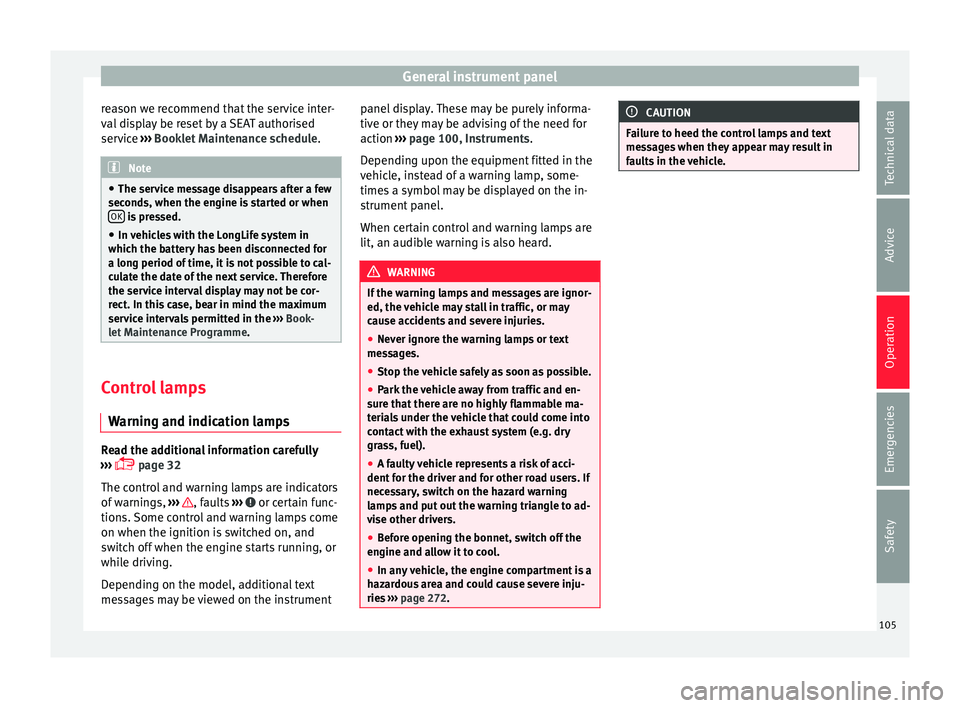
let Maintenance Programme. Control lamps
W arnin
g and indic
ation lampsRead the additional information carefully
› ›
›
page 32
The control and warning lamps are indicators
of warnings, ››› , faults
››
›
or certain func-
tion s.
Some c
ontrol and warning lamps come
on when the ignition is switched on, and
switch off when the engine starts running, or
while driving.
Depending on the model, additional text
messages may be viewed on the instrument panel display. These may be purely informa-
tive or they m
ay be advising of the need for
action ››› page 100, Instruments.
Depending upon the equipment fitted in the
vehicle, instead of a warning lamp, some-
times a symbol may be displayed on the in-
strument panel.
When certain control and warning lamps are
lit, an audible warning is also heard. WARNING
If the warning lamps and messages are ignor-
ed, the v ehic
le may stall in traffic, or may
cause accidents and severe injuries.
● Never ignore the warning lamps or text
mess
ages.
● Stop the vehicle safely as soon as possible.
● Park the vehicle away from traffic and en-
sure th
at there are no highly flammable ma-
terials under the vehicle that could come into
contact with the exhaust system (e.g. dry
grass, fuel).
● A faulty vehicle represents a risk of acci-
dent for the driv
er and for other road users. If
necessary, switch on the hazard warning
lamps and put out the warning triangle to ad-
vise other drivers.
● Before opening the bonnet, switch off the
engine and al
low it to cool.
● In any vehicle, the engine compartment is a
hazar
dous area and could cause severe inju-
ries ››› page 272. CAUTION
Failure to heed the control lamps and text
mes s
ages when they appear may result in
faults in the vehicle. 105
Technical data
Advice
Operation
Emergencies
Safety
Page 112 of 324
Operation
Multimedia USB/A UX
-IN inp
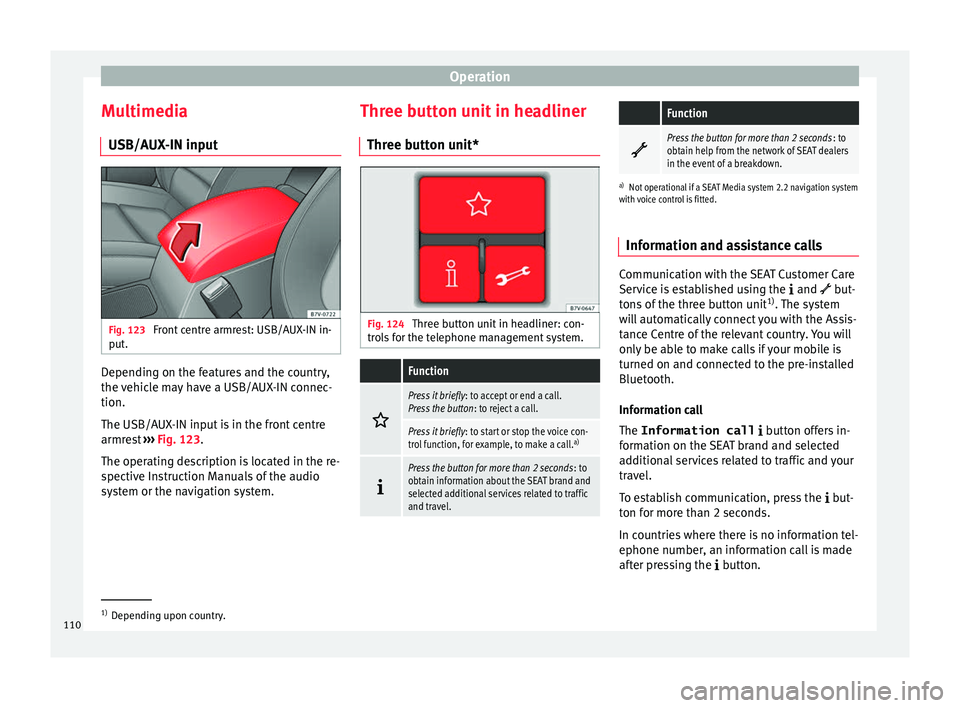
utFig. 123
Front centre armrest: USB/AUX-IN in-
p ut
. Depending on the features and the country,
the
v
ehic
le may have a USB/AUX-IN connec-
tion.
The USB/AUX-IN input is in the front centre
armrest ››› Fig. 123.
The operating description is located in the re-
spective Instruction Manuals of the audio
system or the navigation system. Three button unit in headliner
Three butt
on unit* Fig. 124
Three button unit in headliner: con-
tr o
l
s for the telephone management system.
Function
Press it briefly
: to accept or end a call.
Press the button : to reject a call.
Press it briefly: to start or stop the voice con-
trol function, for example, to make a call. a)
Press the button for more than 2 seconds
: to
obtain information about the SEAT brand and
selected additional services related to traffic
and travel.
Function
Press the button for more than 2 seconds
: to
obtain help from the network of SEAT dealers
in the event of a breakdown.
a) Not operational if a SEAT Media system 2.2 navigation system
with voice control is fitted.
Information and assistance calls Communication with the SEAT Customer Care
Serv
ic
e is established using the and but-
tons of the three button unit 1)
. The system
will automatically connect you with the Assis-
tance Centre of the relevant country. You will
only be able to make calls if your mobile is
turned on and connected to the pre-installed
Bluetooth.
Information call
The Information call button offers in-
formation on the SEAT brand and selected
additional services related to traffic and your
travel.
To establish communication, press the but-
ton for more than 2 seconds.
In countries where there is no information tel-
ephone number, an information call is made
after pressing the button. 1)
Depending upon country.
110
Page 131 of 324
Opening and closing
●
Only c
lose the panoramic sliding sunroof
and the sun blind when nobody is in the way.
● Always take all the keys with you whenever
you le
ave the vehicle.
● Never leave children or disabled persons in
the vehic
le, particularly if they have access to
the keys. Uncontrolled use of the key could
lock the vehicle, start the engine, turn on the
ignition and operate the panoramic sliding
sunroof.
● The panoramic sliding sunroof can be oper-
ated for up t
o about ten minutes after the ig-
nition has been switched off, provided the
driver door and the front passenger door are
not opened. Note
● In ca se of
a fault in the operation of the
panoramic sliding sunroof, the anti-trap func-
tion will not operate correctly. Visit a special-
ised workshop.
● The rotary button of the panoramic sliding
sunr
oof remains in the last position selected
if the roof is closed using convenience clos-
ing from outside the vehicle, and will have to
be re-positioned the next time you drive. Opening or closing the sun blind
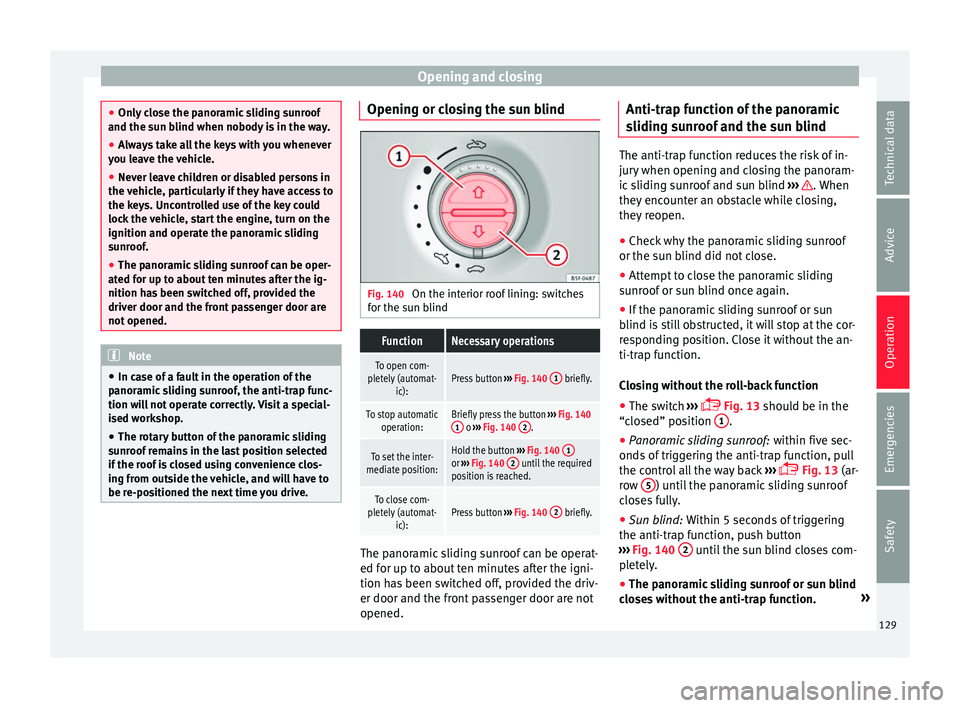
Fig. 140
On the interior roof lining: switches
f or the s
u
n blind
FunctionNecessary operations
To open com-
pletely (automat- ic):Press button ››› Fig. 140 1 briefly.
To stop automatic
operation:Briefly press the button ››› Fig. 140
1 o ››› Fig. 140 2.
To set the inter-
mediate position:Hold the button ››› Fig. 140 1or
››› Fig. 140 2 until the required
position is reached.
To close com-
pletely (automat- ic):Press button ››› Fig. 140 2 briefly. The panoramic sliding sunroof can be operat-
ed f
or up t
o about
ten minutes after the igni-
tion has been switched off, provided the driv-
er door and the front passenger door are not
opened. Anti-trap function of the panoramic
sliding s
unroof and the sun blind The anti-trap function reduces the risk of in-
jury
when openin
g and closing the panoram-
ic sliding sunroof and sun blind ››› . When
they enc ou
nter an obstacle while closing,
they reopen.
● Check why the panoramic sliding sunroof
or the sun b
lind did not close.
● Attempt to close the panoramic sliding
sunr
oof or sun blind once again.
● If the panoramic sliding sunroof or sun
blind i s
still obstructed, it will stop at the cor-
responding position. Close it without the an-
ti-trap function.
Closing without the roll-back function
● The switch ›››
Fig. 13 should be in the
“closed” position 1 .
● Panoramic sliding sunroof: within fiv
e sec
-
onds of triggering the anti-trap function, pull
the control all the way back ›››
Fig. 13 (ar-
row 5 ) until the panoramic sliding sunroof
c lo
se
s fully.
● Sun blind: Within 5 second
s of triggering
the anti-trap function, push button
››› Fig. 140 2 until the sun blind closes com-
p l
et
ely.
● The panoramic sliding sunroof or sun blind
close
s without the anti-trap function. »
129
Technical data
Advice
Operation
Emergencies
Safety