brake Seat Alhambra 2017 Owner's Guide
[x] Cancel search | Manufacturer: SEAT, Model Year: 2017, Model line: Alhambra, Model: Seat Alhambra 2017Pages: 320, PDF Size: 6.88 MB
Page 91 of 320
Self-help
Note the instructions for towing
› ›
›
page 50.
Fitting the towline anchorage to the rear for
vehicles without factory fitted tow hitch
● Take the towline anchorage from the vehi-
cle t
ool kit in the luggage compartment
››› page 82.
● Press on the upper cover and carefully re-
move it
back. This may require some
strength. Allow the cover to hang.
● Screw in the towline anchorage into its po-
sition antic
lockwise as far as it will go ››› .
U se a s
uit
able tool to firmly tighten the tow-
line anchorage in its location.
● After towing, remove the towline anchorage
by t
urning it clockwise and put the cover
back in place. CAUTION
● The to wline anc
horage must always be
completely and firmly tightened. Otherwise,
it could be released while towing and tow-
starting.
● Vehicles with a factory fitted towing brack-
et, can only
be used for towing with a tow
bar, specially designed to fit on a tow hitch
ball. Otherwise, the tow hitch ball and the ve-
hicle may be damaged. Otherwise, a tow rope
should be used. Towing advice
Towing requires some expertise and experi-
ence, e
s
pecially when using a tow rope. Both
drivers should be familiar with the technique
required for towing. For this reason, inexper-
ienced drivers should abstain.
While driving, avoid excessive traction forces
and jerking. When towing on an unpaved
road, there is always a risk of overloading
and damaging the anchorage points.
If the vehicle is towed, with the hazard warn-
ing lights on and the ignition switched on,
the turn signal may be used to indicate
changes of direction. Simply operate the turn
signal lever as usual. Meanwhile, the hazard
warning lights will go off. When the turn sig-
nal lever is returned to the rest position, the
hazard warning lights will be turned on auto-
matically.
Notes for the driver of the towed vehicle
● Leave the ignition on to avoid locking the
st eerin
g wheel, to release the electronic
parking brake and to activate the turn sig-
nals, the horn as well as the window wipers
and window washers.
● As the power assisted steering does not
work if
the engine is not running, you will
need more strength to steer than normally. ●
The brake mu
st be depressed must harder
as the brake servo does not operate. Avoid
hitting the towing vehicle.
● Note the instructions and information con-
tained in the Ins
truction Manual for the vehi-
cle to be towed.
Notes for the driver of the towing vehicle
● Accelerate gently and carefully. Avoid sud-
den manoeuvr
es.
● Brake well in advance than usual and brake
gently.
● Not
e the instructions and information con-
tained in the Ins
truction Manual for the vehi-
cle to be towed.
Emergency locking and unlock-
ing
Introduction Read the additional information carefully
› ›
›
page 8,
›››
page 10,
››› page 13
The doors, rear lid and panoramic sliding
sunroof can be locked manually and partially
opened, for example if the key or the central
locking is damaged. »
89
Technical data
Advice
Operation
Emergencies
Safety
Page 94 of 320
Emergencies
Control lamp It lights up
A vehicle exterior
lighting bulb is not
working.Replace the faulty bulb.
Several warning and control lamps light up
for a f
ew sec
onds when the ignition is switch-
ed on, signalling that the function is being
verified. They will switch off after a few sec-
onds.
Checking the bulbs of a trailer
For vehicles with the factory fitted towing
bracket, certain trailer lights are also control-
led if the power socket is correctly connected.
A fault on a trailer turn signal is indicated on
the instrument panel by the turn signal blink-
ing twice as fast ( or ) ›››
page 128.
● General fault of all turn signals on one side.
● Fault in one rear light (on some models, al-
so the re gi
stration light).
● Fault in two brake lights. WARNING
Observe the safety warnings ›››
in Control
and warnin g l
amps on page 105. Note
A fault in the LED on the rear lights will not be
indicat ed. Ho
wever, if the fault affects all the
LEDs then this will be indicated by the control
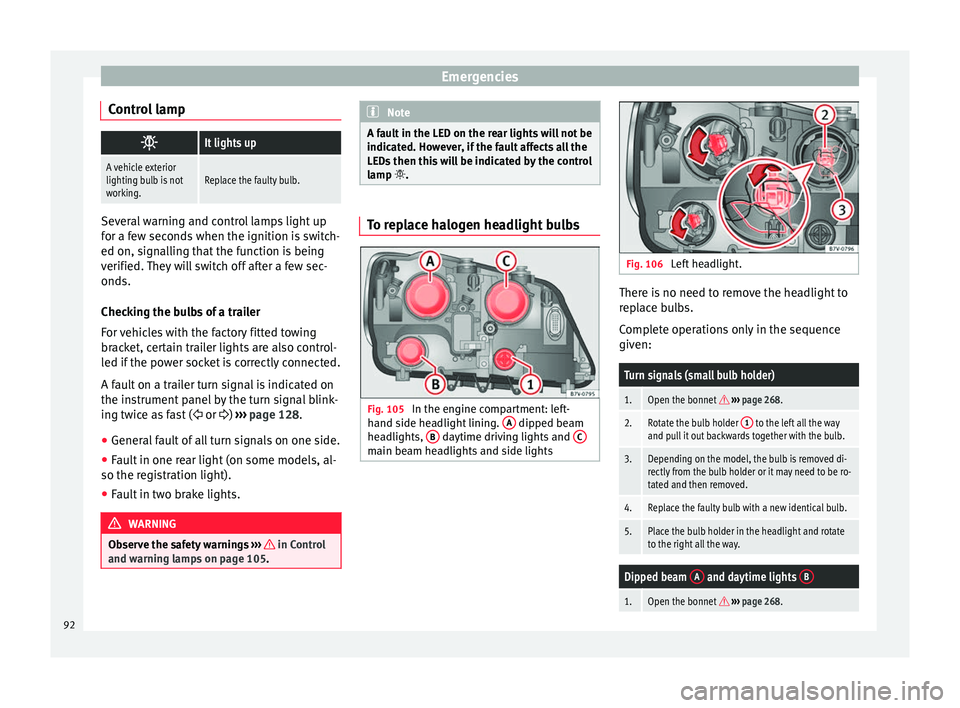
lamp . To replace halogen headlight bulbs
Fig. 105
In the engine compartment: left-
h and s
ide he
adlight lining. A dipped beam
he a
dlights, B daytime driving lights and
C main beam headlights and side lights Fig. 106
Left headlight. There is no need to remove the headlight to
r
ep
l
ace bulbs.
Complete operations only in the sequence
given:
Turn signals (small bulb holder)
1.Open the bonnet ››› page 268.
2.Rotate the bulb holder 1 to the left all the way
and pull it out backwards together with the bulb.
3.Depending on the model, the bulb is removed di-
rectly from the bulb holder or it may need to be ro-
tated and then removed.
4.Replace the faulty bulb with a new identical bulb.
5.Place the bulb holder in the headlight and rotate
to the right all the way.
Dipped beam A and daytime lights B
1.Open the bonnet
››› page 268. 92
Page 102 of 320
Operation
– Manual
g
earbox . . . . . . . . . . . . . . . . 192
– Automatic
gearbox . . . . . . . . . . . . . 192
12 volt power socket . . . . . . . . . . . . . .170
Auto Hold Switch -
. . . . . . . . 205
Electronic parking brake switch
. . . . . . . . . . . . . . . . . . . . . . . . . . . . . . . 187
Start-up push button (Keyless Ac-
ces
s closing and start-up system)
Ignition lock . . . . . . . . . . . . . . . . . . . . . . 182
Pedals . . . . . . . . . . . . . . . . . . . . . . . . . . . 192
23 24
25
26
27
28 Steering column adjustment lev-
er
. . . . . . . . . . . . . . . . . . . . . . . . . . . . . . . . 57
Fuse box cover . . . . . . . . . . . . . . . . . . . 90
Lever for:
– Crui
se C
ontrol System (CCS) –
– – – – . .219
Open bonnet lever . . . . . . . . . . . . . . . . 268
Controls for: – Electric w
indows . . . . . . . . . . . . . 125
– Child
proof locks . . . . . . . . . . . . . 119
29 30
31
32
33 Note
● Some of the it ems
of equipment listed here
are fitted only on certain model versions or
are optional extras.
● In versions with the steering wheel on the
right, the lay
out of the control elements is
somewhat different. But the symbols as-
signed to the controls correspond to the sym-
bols used in the versions with the steering
wheel on the left Instruments
V iew of
in
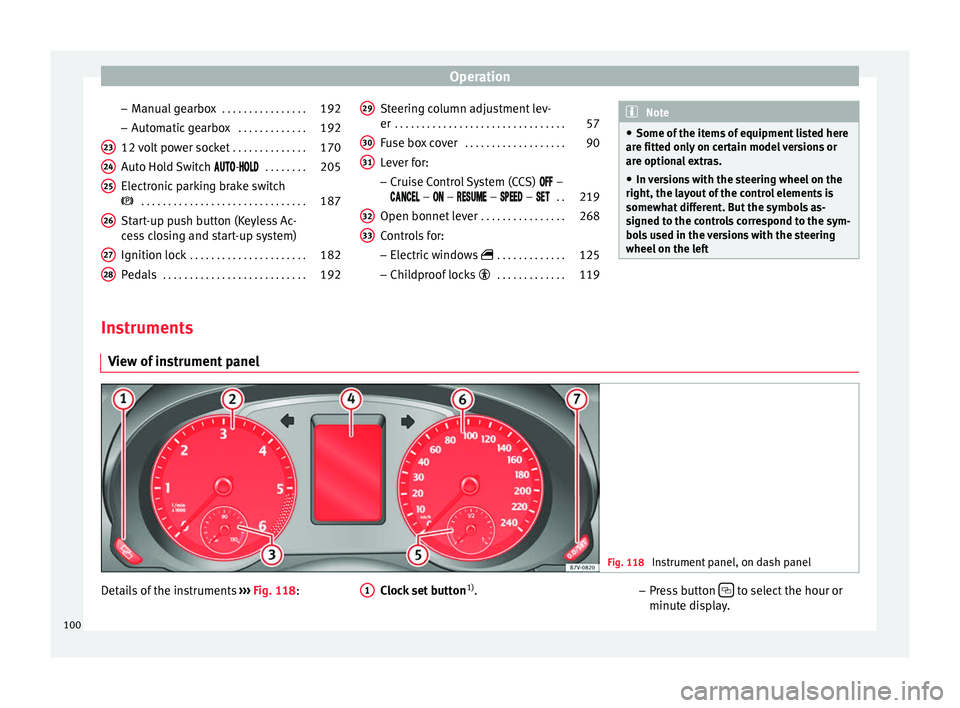
strument panel Fig. 118
Instrument panel, on dash panel Details of the instruments
››
›
Fig. 118: Clock set button1)
.
1 –
Pr e
s
s button to select the hour or
minut e di
s
play.
100
Page 106 of 320
Operation
other services (e.g. the next Inspection Serv-
ic e or c
h
ange of brake fluid) are listed on the
label attached to the door strut, or in the
Maintenance Programme.
In vehicles with Services established by time
or mileage, the service intervals are already
pre-defined.
In vehicles with LongLife Service , the inter-
vals are determined individually. Technical
progress has made it possible to considera-
bly reduce servicing requirements. The tech-
nology used by SEAT ensures that your vehi-
cle only has an Interval Service when it is
necessary. To establish when the Interval
Service is due (max. 2 years), the vehicle's
conditions of use and individual driving
styles are considered. The service pre-warn-
ing first appears 20 days before the date es-
tablished for the corresponding service. The
kilometres (miles) remaining until the next
service are always rounded up to the nearest
100 km (miles) and the time is given in com-
plete days. The current service message can-
not be viewed until 500 km after the last
service. Prior to this only lines are visible on
the display.
Inspection reminder
When the Service date is approaching, when
the ignition is switched on a Service remind-
er is displayed. In vehicles without text messages
, a sp anner
is displayed on the instrument panel with
a figure given in km . The number of kilome-
tres shown is the maximum number that may
be driven until the next service. After a few
seconds, the display mode changes. A clock
symbol appears and the number of days until
the next service appointment is due.
In vehicles with text messages , Service in
--- km (miles) or --- days is dis-
played on the instrument panel.
Service due
After the service date, an audible warning is
given when the ignition is switched on and
the spanner displayed on the screen flashes
for a few seconds . In vehicles with text
messages, Service in --- km or --- days is displayed on the instrument panel.
Reading a service notification
With the ignition switched on, the engine off
and the vehicle at a standstill, the current
service notification can be read: ● Press the button on the instrument pan-
el sev
er
al times until the spanner symbol is
displayed .
● OR: select the Settings menu.
● From the
Service submenu, sel ect
the op-
tion Info . When the serv
ic
e date has past, a minus sign
is displayed in front of the number of kilome-
tres or days. In vehicles with text messages
the following is displayed: Service ---
km (miles) or --- days ago .
Resetting service interval display
If the service was not carried out by a techni-
cal service centre, the display can be reset as
follows:
In vehicles with text messages:
Select the Settings menu.
In the submenu Service , select the option Reset.
Confirm with OK when requested to do so by the sys-
tem.
In vehicles without text messages:
Switch the ignition off.
Press and hold the 0.0 / SET button.
Switch the ignition back on.
Release the 0.0 / SET button and, press for the next
20 seconds. Do not r
eset the indicator to zero between
tw o int
ervals, otherwise the display will be
incorrect.
If you reset the display manually, the next
service interval will be indicated as in vehi-
cles with fixed service intervals. For this
104
Page 122 of 320
Operation
WARNING
Opening sliding doors while driving is dan-
ger ou
s. These doors may be pushed open or
closed when the vehicle accelerates or brakes
and cause serious injuries.
● Never open the sliding doors when the ve-
hicle i
s in movement. Manually opening and closing the
slidin
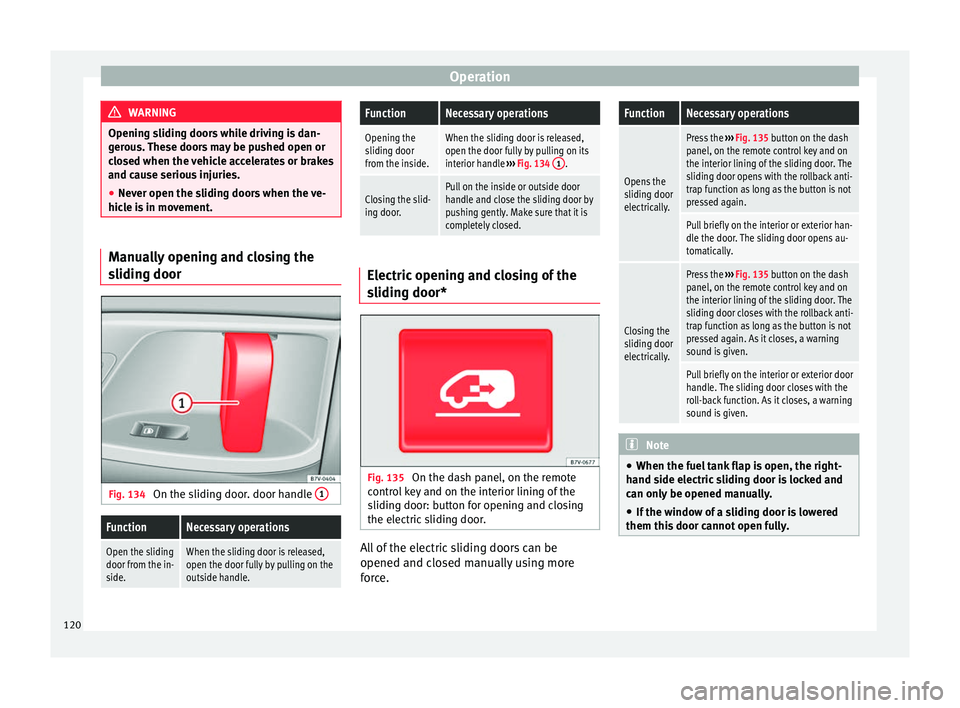
g door Fig. 134
On the sliding door. door handle 1
FunctionNecessary operations
Open the sliding
door from the in-
side.When the sliding door is released,
open the door fully by pulling on the
outside handle.
FunctionNecessary operations
Opening the
sliding door
from the inside.When the sliding door is released,
open the door fully by pulling on its
interior handle
››› Fig. 134 1
.
Closing the slid-
ing door.Pull on the inside or outside door
handle and close the sliding door by
pushing gently. Make sure that it is
completely closed. Electric opening and closing of the
slidin
g door* Fig. 135
On the dash panel, on the remote
c ontr
o
l key and on the interior lining of the
sliding door: button for opening and closing
the electric sliding door. All of the electric sliding doors can be
opened and c
lo
sed m
anually using more
force.
FunctionNecessary operations
Opens the
sliding door
electrically.
Press the ››› Fig. 135 button on the dash
panel, on the remote control key and on
the interior lining of the sliding door. The
sliding door opens with the rollback anti-
trap function as long as the button is not
pressed again.
Pull briefly on the interior or exterior han-
dle the door. The sliding door opens au-
tomatically.
Closing the
sliding door
electrically.
Press the ››› Fig. 135 button on the dash
panel, on the remote control key and on
the interior lining of the sliding door. The
sliding door closes with the rollback anti-
trap function as long as the button is not
pressed again. As it closes, a warning
sound is given.
Pull briefly on the interior or exterior door
handle. The sliding door closes with the
roll-back function. As it closes, a warning
sound is given. Note
● When the fuel t
ank flap is open, the right-
hand side electric sliding door is locked and
can only be opened manually.
● If the window of a sliding door is lowered
them this door c
annot open fully.120
Page 134 of 320
Operation
opened and when the “Coming home” or
“L e
av
ing home” function is switched on. If
the equipment includes the light sensor, the
lighting around the exterior mirrors only
comes when it is dark. Note
● The time tak en f
or the headlights to go off
can be changed in the Lights & Visibil- ity menu and the function can be switched
on or off ›››
page 26.
● When the “Coming home” function is on, if
the vehic
le door is opened there is no audible
warning signal to advise that the light is still
on. Hazard warning lights
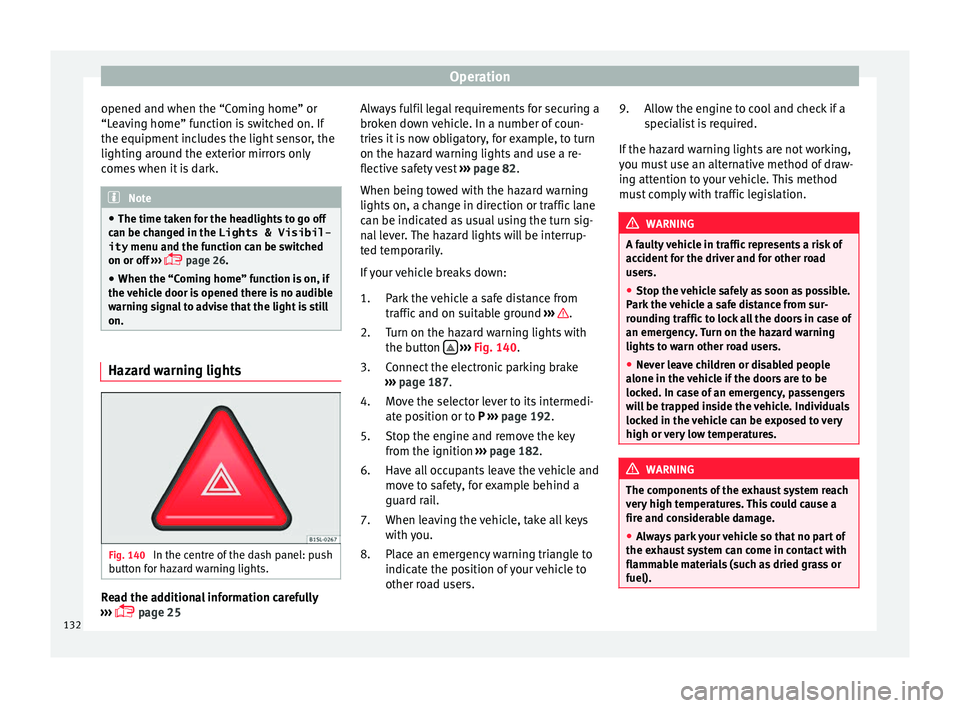
Fig. 140
In the centre of the dash panel: push
b utt
on f
or hazard warning lights. Read the additional information carefully
› ›
›
page 25 Always fulfil legal requirements for securing a
broken do
wn vehicle. In a number of coun-
tries it is now obligatory, for example, to turn
on the hazard warning lights and use a re-
flective safety vest ››› page 82.
When being towed with the hazard warning
lights on, a change in direction or traffic lane
can be indicated as usual using the turn sig-
nal lever. The hazard lights will be interrup-
ted temporarily.
If your vehicle breaks down:
Park the vehicle a safe distance from
traffic and on suitable ground ››› .
T urn on the h
az
ard warning lights with
the button
› ›
› Fig. 140
.
Connect the electronic parking brake
››› page 187.
Move the selector lever to its intermedi-
ate position or to P ››› page 192.
Stop the engine and remove the key
from the ignition ››› page 182.
Have all occupants leave the vehicle and
move to safety, for example behind a
guard rail.
When leaving the vehicle, take all keys
with you.
Place an emergency warning triangle to
indicate the position of your vehicle to
other road users.
1.
2.
3.
4.
5.
6.
7.
8. Allow the engine to cool and check if a
speci
alist is required.
If the hazard warning lights are not working,
you must use an alternative method of draw-
ing attention to your vehicle. This method
must comply with traffic legislation. WARNING
A faulty vehicle in traffic represents a risk of
acc ident
for the driver and for other road
users.
● Stop the vehicle safely as soon as possible.
Park the
vehicle a safe distance from sur-
rounding traffic to lock all the doors in case of
an emergency. Turn on the hazard warning
lights to warn other road users.
● Never leave children or disabled people
alone in the v
ehicle if the doors are to be
locked. In case of an emergency, passengers
will be trapped inside the vehicle. Individuals
locked in the vehicle can be exposed to very
high or very low temperatures. WARNING
The components of the exhaust system reach
ver y
high temperatures. This could cause a
fire and considerable damage.
● Always park your vehicle so that no part of
the exhau
st system can come in contact with
flammable materials (such as dried grass or
fuel). 9.
132
Page 135 of 320

Lights and visibility
Note
● The v ehic
le battery will discharge and run
down if the hazard warning lights remain on
for too long (even with the ignition turned
off).
● In some vehicles, the brake lights will flash
when brakin
g abruptly at speeds of approxi-
mately 80 km/h (50 mph) to warn vehicles
travelling behind. If braking continues, the
hazard warning lights system will automati-
cally be turned on at a speed of less than ap-
proximately 10 km/h (6 mph). The brake
lights remain lit. Upon accelerating, the haz-
ard warning lights will be automatically
turned off. Adhesive strips for headlights or ad-
ju
s
tin
g headlights In those countries where vehicles drive on
the other s
ide of
the r
oad to the home coun-
try, the asymmetric dipped beam may dazzle
drivers of oncoming vehicles. Therefore,
when driving abroad, adhesive strips should
be attached to the headlights or the head-
lights should be adjusted accordingly.
The direction of the headlights can be adjus-
ted from the instrument panel, in the Tou-
rist light submenu of the Configura-
tion menu ›››
page 30.
For those vehicles in which it is not possible
to adjust the headlights from the menu, ad- hesive strips are used to cover certain parts
of the hea
dlamp cover or the headlights may
be adjusted at a specialised workshop. For
further information, please refer to a special-
ised workshop. SEAT recommends visiting a
technical service. Note
Use of the Tourist light option and the
adhe s
ives on the headlights is only allowed if
they are to be used for a short period of time.
To modify the direction of the headlights per-
manently, please take the vehicle to a speci-
alised workshop. SEAT recommends visiting a
technical service centre. Headlight range control, lighting of
the in
s
trument
panel and controls Fig. 141
Next to the steering wheel: instru-
ment and sw it
ch lighting control 1 and
he a
dlight
range control 2 1
Instrument and switch lighting
When the he a
dlights
are switched on, the
brightness of the instruments and switch
lighting can be regulated by turning the
switch ››› Fig. 141 1 .
2 Headlight range control
The he a
dlight
range control ››› Fig. 141 2 is
modified ac c
or
ding to the value of the head-
light beam and the vehicle load status. This
offers the driver optimum visibility and the
headlights do not dazzle oncoming drivers
››› .
The he a
dlights
can only be adjusted when
the dipped beam is switched on.
To reset, turn switch ››› Fig. 141 2 :
ValueVehicle load status
a)
–Two front occupants, luggage compart-
ment empty
1All seats occupied, luggage compartment
empty
2All seats occupied, luggage compartment
full With trailer and minimum drawbar load
3Driver only, luggage compartment full With
trailer and maximum drawbar load
a)
If the vehicle load does not correspond to those shown in the
table, it is possible to select intermediary positions.»
133
Technical data
Advice
Operation
Emergencies
Safety
Page 141 of 320

Lights and visibility
Exterior mirrors Fig. 148
In the driver door: exterior mirror
c ontr
o
ls Read the additional information carefully
› ›
›
page 16
Turn the knob to the required position:
Electric folding exterior mirrors
››› .
Switch on the exterior mirror heating This only
heats up if the ambient temperature is less
than +20°C (+68°F).
Adjust the left-hand exterior mirror by turning
the knob forward, backward, to the right or to
the left.
Adjust the right-hand exterior mirror by turning
the knob forward, backward, to the right or to
the left .
Zero position. Exterior mirror unfolded, exterior
mirror heating off, adjustment of exterior mir-
ror not possible. Synchronised mirror adjustment
●
In the Settings - Convenience menu,
sel ect
whether or not
the mirrors should
move in synchronisation ›››
page 26.
● Turn the knob to position L.
● Adjust the left-hand exterior mirror. The
right ext
erior mirror will be adjusted at the
same time (synchronised).
● If necessary the right exterior mirror adjust-
ment ma
y need correcting. turn the control to
position R.
Automatic anti-dazzle exterior mirror, driver
side
The automatic anti-dazzle exterior mirror is
controlled in the same way as the automatic
anti-dazzle rear vision mirror ››› page 138.
Store the reverse settings for the passenger
exterior mirror ● Select the vehicle key in which the setting
is t
o be stored.
● Use this key to unlock the vehicle.
● Connect the automatic parking brake.
● Turn the exterior mirror knob to position R
(pas
senger side).
● Switch the ignition on.
● Move the gear lever to neutral.
● Access the Settings menu on the instru-
ment
panel display using the multifunction steering wheel buttons and select
Conven-
ience .
● Select the Rear vision mirror ad-
justment function (if
it is already checked,
uncheck it and check the option again).
● Select reverse gear.
● Adjust the front passenger side exterior
mirror so that
you can see, for example, the
kerb area.
● The new position of the mirror will be stor-
ed automatic
ally and allocated to the vehicle
key that was used to unlock the vehicle. For
vehicles with seat memory, please see
››› page 144.
Activating the passenger exterior mirror set-
tings
● Turn the exterior mirror knob to position R.
● With the ignition switched on, select re-
verse g
ear.
● The stored position of the passenger exteri-
or mirror for r
everse gear is deleted when
driving forwards at 15 km/h (9 mph), or if the
knob is turned from position R to another po-
sition. WARNING
Fold and unfold the exterior mirror, taking
car e t
o avoid injuries.
● Only fold or unfold the exterior mirror when
there is
no-one in the way of the mirror. » 139
Technical data
Advice
Operation
Emergencies
Safety
Page 148 of 320

Operation
Automatic off
● The lumbar massage will disconnect auto-
m atic
al
ly after approx. 10 minutes.
Seat with position memory* Fig. 157
Memory buttons on the outside of
the driv er se
at Memory buttons
Indiv
idual
settin
gs for the driver seat and the
exterior mirror can be assigned to each mem-
ory button.
Storing exterior mirror settings for driving
forwards
● Connect the automatic parking brake.
● Move the gear lever to neutral.
● Switch the ignition on.
● Adjust the front seat and the exterior mir-
rors. ●
K
eep the
SET button held down for more
th an one sec
ond ›
›› Fig. 157.
● Press the required memory button for the
fol
lowing 10 seconds. An audible warning
confirms the settings have been stored.
Storing front passenger exterior mirror set-
tings for driving in reverse gear
● Connect the automatic parking brake.
● Move the gear lever to neutral.
● Switch the ignition on.
● Press the required memory button.
● Select reverse gear.
● Adjust the front passenger side exterior
mirror so that
you can see, for example, the
kerb area.
● The new position of the mirror will be stor-
ed automatic
ally and allocated to the vehicle
key that was used to unlock the vehicle.
Activating exterior mirror settings
● With the driver door open and the ignition
turned off, p
ush the memory button of the
corresponding door briefly.
● OR: with the ignition switched on, hold in
the corr
esponding memory button until the
memorised position is reached. To activate the memory function of the vehi-
cle k
ey
Important: a position must be memorised in
the memory.
● Open the driver-side door.
● Press and hold any memory button.
● Within the following three seconds, push
the button to open the vehicle on the vehi-
c l
e k
ey. An audible warning confirms the set-
tings have been activated.
Adjusting the wing mirrors for driving and
assigning driver seat settings to a vehicle
key
● Activate the memory function of the vehicle
key
● Adjus
t the front seat and the exterior mir-
rors.
● L
ock the vehicle. The settings are assigned
to the v
ehicle key.
To deactivate the memory function of the ve-
hicle key
Important: a position must be memorised in
the memory.
● Press and hold the SET button.
● Within the following 10 seconds, push the
open b utt
on on the vehicle key. An audi-
b l
e w
arning confirms the settings have been
deactivated.
146
Page 152 of 320
Operation
WARNING
The centre armrest may limit the freedom of
mov ement
of the driver's arm and cause a se-
rious accident.
● Keep the centre armrest compartments
closed whi
le the vehicle is in motion.
● The centre armrest is not designed for chil-
dren to s
it on! Sitting in this incorrect posi-
tion can cause severe injuries. Transport and practical
equipment
T r
an
sporting objects
Introduction Always transport heavy loads in the luggage
comp
ar
tment and place the seat backs in a
vertical position. Always use the anchors pro-
vided with suitable rope to secure heavy ob-
jects. Never overload the vehicle. Both the
carrying capacity as well as the distribution
of the load in the vehicle affect driving be-
haviour and braking ability ››› .
WARNING
Unsecured or incorrectly secured objects can
cau se seriou
s injury in case of a sudden ma-
noeuvring or breaking or in case of an acci-
dent. This is especially true when objects are
struck by a detonating airbag and fired
through the vehicle interior. To reduce the
risks, please note the following:
● Secure all objects in the vehicle. Always
keep equipment and he
avy objects in the lug-
gage compartment.
● Always secure objects with suitable rope or
sling
s so that they cannot enter the areas
around the front or side airbags in case of
sudden braking or an accident. ●
Alw a
ys ensure that objects inside the vehi-
cle cannot move into the area of the airbags
while driving.
● While driving, always keep object compart-
ments c
losed.
● Remove all objects from the front passen-
ger seat
when it is folded down. When the
seat backrest is folded down, it presses on
small and light objects and these are detec-
ted by the weight sensor on the seat; this
sends false information to the airbag control
unit.
● While the backrest of the front passenger
seat i
s folded, the front airbag must remain
disabled and the PASSENGER AIRBAG OFF light on.
● Objects secured in the vehicle should never
be plac
ed in such a way as to make passen-
gers sit in an incorrect position.
● If secured objects occupy a seat, this seat
should not
be occupied or used by anyone. WARNING
The driving behaviour and braking ability
ch an
ge when transporting heavy and large
objects.
● Adjust your speed and driving style to visi-
bility
, road, traffic and weather conditions.
● Accelerate gently and carefully.
● Avoid sudden braking and manoeuvres.
● Brake early. 150