brake fluid Seat Alhambra 2017 Owner's Manual
[x] Cancel search | Manufacturer: SEAT, Model Year: 2017, Model line: Alhambra, Model: Seat Alhambra 2017Pages: 320, PDF Size: 6.88 MB
Page 6 of 320
Table of Contents
Park Assist system* (Park Assist) . . . . . . . . . . . 211
Rear assist* (Rear View Camera) . . . . . . . . . . . . 215
Cruise control* (Cruise control system -
C C
S)
. . . . . . . . . . . . . . . . . . . . . . . . . . . . . . . . . . . 219
Lane Assist system* . . . . . . . . . . . . . . . . . . . . . . 220
Blind spot detector (BSD) with rear cross traffic
alert
(RTA) . . . . . . . . . . . . . . . . . . . . . . . . . . . . . . 222
Traffic signal detection (Sign Assist)* . . . . . . . . 227
Tiredness detection (recommendation to take
a break)
. . . . . . . . . . . . . . . . . . . . . . . . . . . . . . . . 229
Dynamic Chassis control (DCC)* . . . . . . . . . . . . 230
Tyre monitoring systems . . . . . . . . . . . . . . . . . . 231
Towing bracket device . . . . . . . . . . . . . . . . . . . . 234
Driving with a trailer . . . . . . . . . . . . . . . . . . . . . . 234
Advice . . . . . . . . . . . . . . . . . . . . . . . . . . . . . . . . 244
Care and maintenance . . . . . . . . . . . . . . . . . . . . 244
Accessories, replacement of parts and modifi-
cations
. . . . . . . . . . . . . . . . . . . . . . . . . . . . . . . . 244
Caring for and cleaning the vehicle exterior . . . 250
Caring for and cleaning the vehicle interior . . . 256
Notes for the user . . . . . . . . . . . . . . . . . . . . . . . . 260
Checking and refilling levels . . . . . . . . . . . . . . . 261
Filling the tank . . . . . . . . . . . . . . . . . . . . . . . . . . 261
Fuel . . . . . . . . . . . . . . . . . . . . . . . . . . . . . . . . . . . 264
Selective catalytic reduction* (AdBlue) . . . . . . 265
Working in the engine compartment . . . . . . . . 268
Engine oil . . . . . . . . . . . . . . . . . . . . . . . . . . . . . . 271
Engine coolant . . . . . . . . . . . . . . . . . . . . . . . . . . 274
Brake fluid . . . . . . . . . . . . . . . . . . . . . . . . . . . . . 278
Windscreen washer reservoir . . . . . . . . . . . . . . 280
Vehicle battery . . . . . . . . . . . . . . . . . . . . . . . . . . 280
Wheels and tyres . . . . . . . . . . . . . . . . . . . . . . . . 284
Tyres . . . . . . . . . . . . . . . . . . . . . . . . . . . . . . . . . . 284
Winter service . . . . . . . . . . . . . . . . . . . . . . . . . . . 292 Technical data
. . . . . . . . . . . . . . . . . . . . . . . . 294
Technical features . . . . . . . . . . . . . . . . . . . . . . . 294
Important information . . . . . . . . . . . . . . . . . . . . 294
Towing a trailer . . . . . . . . . . . . . . . . . . . . . . . . . . 295
Wheels . . . . . . . . . . . . . . . . . . . . . . . . . . . . . . . . 296
Engine data . . . . . . . . . . . . . . . . . . . . . . . . . . . . . 297
Dimensions . . . . . . . . . . . . . . . . . . . . . . . . . . . . . 302
Index . . . . . . . . . . . . . . . . . . . . . . . . . . . . . . . . . 303
4
Page 34 of 320
The essentials
■ Door u n
loc
k (individual opening, Auto
Lock)
■ Convenience handling of windows
■ Rear vision mirror adjustment
■ Lights & visibility settings
menu
■ Coming home and leaving home
■ Footwell light
■ Convenience turn signals
The stored settings are automatically activa-
ted, at the latest when the ignition is switch-
ed on. Please refer to the information and
tips relating to the seat memory
››› page 144. Cruise control
Operating the c ruise control system
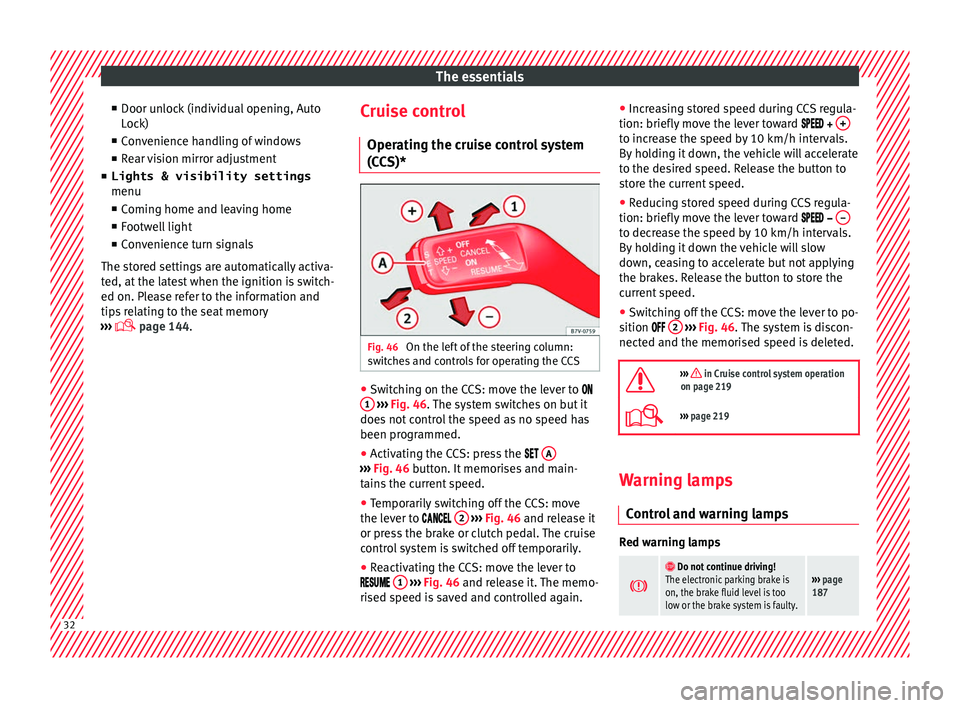
(CCS)* Fig. 46
On the left of the steering column:
sw it
c
hes and controls for operating the CCS ●
Switching on the CCS: move the lever to
1
› ›
› Fig. 46
. The system switches on but it
does not control the speed as no speed has
been programmed.
● Activating the CCS: press the A ›››
Fig. 46 butt on. It
memorises and main-
tains the current speed.
● Temporarily switching off the CCS: move
the lev er t
o 2
› ›
› Fig. 46 and release it
or press the brake or clutch pedal. The cruise
control system is switched off temporarily.
● Reactivating the CCS: move the lever to
1
› ›
› Fig. 46
and release it. The memo-
rised speed is saved and controlled again. ●
Incre
asing stored speed during CCS regula-
tion: briefly move the lever toward + to increase the speed by 10 km/h intervals.
B
y
ho
lding it down, the vehicle will accelerate
to the desired speed. Release the button to
store the current speed.
● Reducing stored speed during CCS regula-
tion: briefly mov
e the lever toward – to decrease the speed by 10 km/h intervals.
B
y
ho
lding it down the vehicle will slow
down, ceasing to accelerate but not applying
the brakes. Release the button to store the
current speed.
● Switching off the CCS: move the lever to po-
sition 2
› ›
› Fig. 46
. The system is discon-
nected and the memorised speed is deleted.
››› in Cruise control system operation
on page 219
››› page 219 Warning lamps
C ontr
o
l and warning lamps Red warning lamps
Do not continue driving!
The electronic parking brake is
on, the brake fluid level is too
low or the brake system is faulty.››› page
187 32
Page 35 of 320
The essentials
Do not continue driving!
Fault in the engine cooling sys-
tem.››› page
274
Do not continue driving!
Engine oil pressure too low.››› page
271
Do not continue driving!
At least one of the vehicles doors
is open, or is not correctly
closed.››› page
119
Do not continue driving!
The rear lid is open or is incor-
rectly closed.››› page
122
Do not continue driving!
Fault in the steering.››› page
181
Engine cannot be started again!
"AdBlue" level too low.›››
page
265
Driver or passenger has not fas-
tened seat belt.›››
page
64
Use the foot brake!
Change
››› page
192
Brake
››› page
187
Faulty generator.›››
page
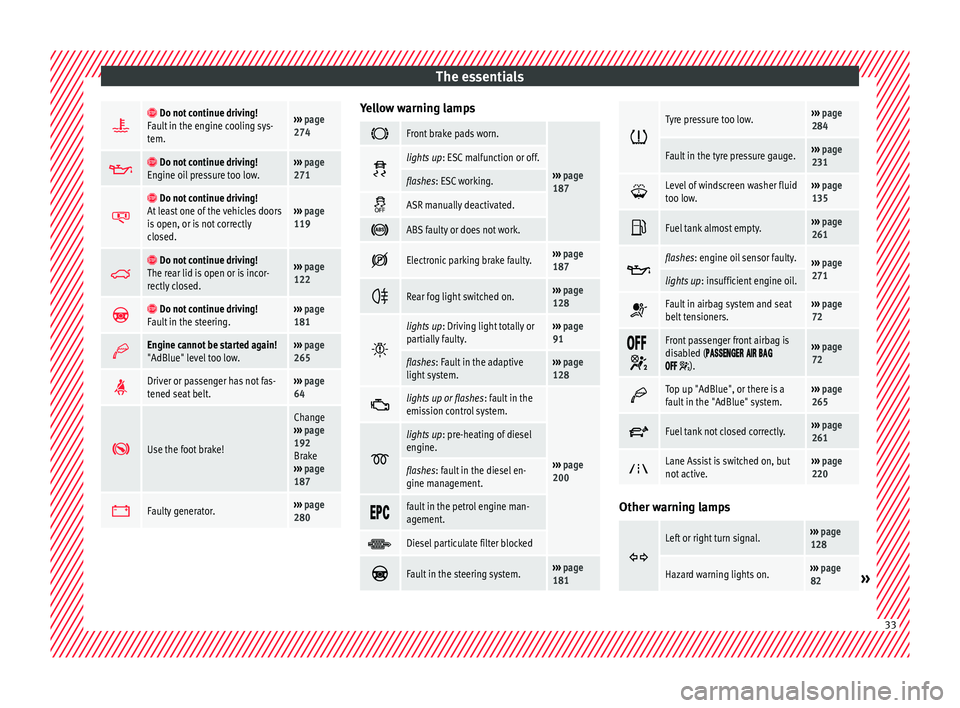
280 Yellow warning lamps
Front brake pads worn.
›››
page
187 lights up
: ESC malfunction or off.
flashes: ESC working.
ASR manually deactivated.
ABS faulty or does not work.
Electronic parking brake faulty.›››
page
187
Rear fog light switched on.›››
page
128
lights up
: Driving light totally or
partially faulty.››› page
91
flashes: Fault in the adaptive
light system.››› page
128
lights up or flashes
: fault in the
emission control system.
››› page
200
lights up
: pre-heating of diesel
engine.
flashes: fault in the diesel en-
gine management.
fault in the petrol engine man-
agement.
Diesel particulate filter blocked
Fault in the steering system.›››
page
181
Tyre pressure too low.›››
page
284
Fault in the tyre pressure gauge.››› page
231
Level of windscreen washer fluid
too low.›››
page
135
Fuel tank almost empty.›››
page
261
flashes: engine oil sensor faulty.›››
page
271
lights up : insufficient engine oil.
Fault in airbag system and seat
belt tensioners.›››
page
72
Front passenger front airbag is
disabled (
).
››› page
72
Top up "AdBlue", or there is a
fault in the "AdBlue" system.›››
page
265
Fuel tank not closed correctly.›››
page
261
Lane Assist is switched on, but
not active.›››
page
220 Other warning lamps
Left or right turn signal.›››
page
128
Hazard warning lights on.››› page
82» 33
Page 43 of 320
The essentials
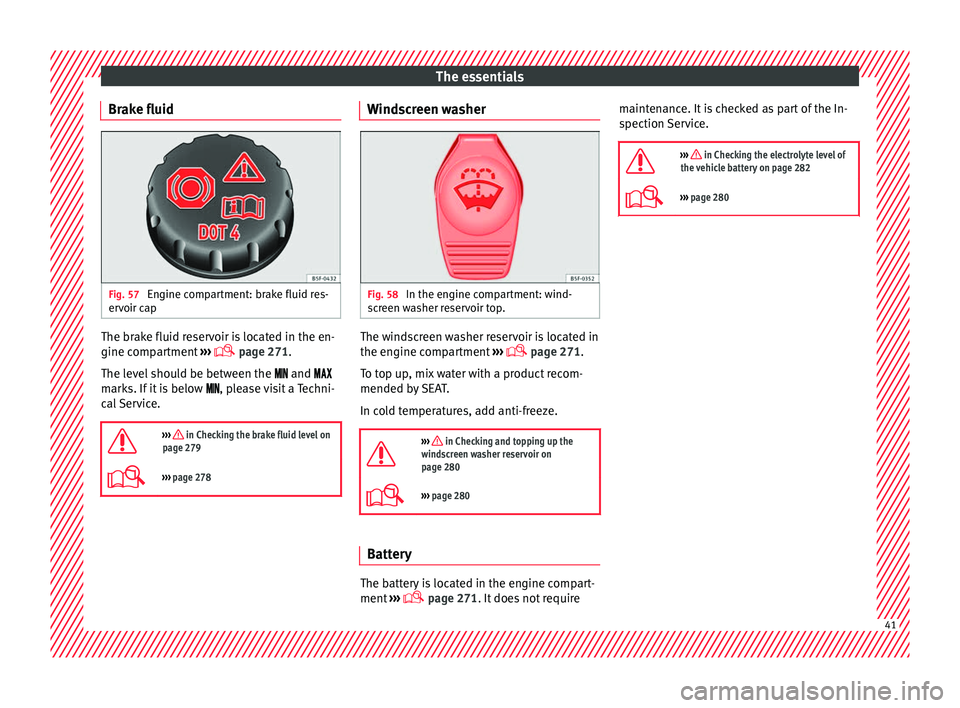
Brake fluid Fig. 57
Engine compartment: brake fluid res-
er v
oir c
ap The brake fluid reservoir is located in the en-
gine c
omp
ar
tment ›››
page 271.
The level should be between the and
marks. If it is below , please visit a Techni-
cal Service.
››› in Checking the brake fluid level on
page 279
››› page 278 Windscreen washer
Fig. 58
In the engine compartment: wind-
s c
r
een washer reservoir top. The windscreen washer reservoir is located in
the en
gine c
omp
artment ›››
page 271.
To top up, mix water with a product recom-
mended by SEAT.
In cold temperatures, add anti-freeze.
››› in Checking and topping up the
windscreen washer reservoir on
page 280
››› page 280 Battery
The battery is located in the engine compart-
ment
›
›
› page 271. It does not require maintenance. It is checked as part of the In-
spection Ser
vice.
››› in Checking the electrolyte level of
the vehicle battery on page 282
››› page 280 41
Page 106 of 320
Operation
other services (e.g. the next Inspection Serv-
ic e or c
h
ange of brake fluid) are listed on the
label attached to the door strut, or in the
Maintenance Programme.
In vehicles with Services established by time
or mileage, the service intervals are already
pre-defined.
In vehicles with LongLife Service , the inter-
vals are determined individually. Technical
progress has made it possible to considera-
bly reduce servicing requirements. The tech-
nology used by SEAT ensures that your vehi-
cle only has an Interval Service when it is
necessary. To establish when the Interval
Service is due (max. 2 years), the vehicle's
conditions of use and individual driving
styles are considered. The service pre-warn-
ing first appears 20 days before the date es-
tablished for the corresponding service. The
kilometres (miles) remaining until the next
service are always rounded up to the nearest
100 km (miles) and the time is given in com-
plete days. The current service message can-
not be viewed until 500 km after the last
service. Prior to this only lines are visible on
the display.
Inspection reminder
When the Service date is approaching, when
the ignition is switched on a Service remind-
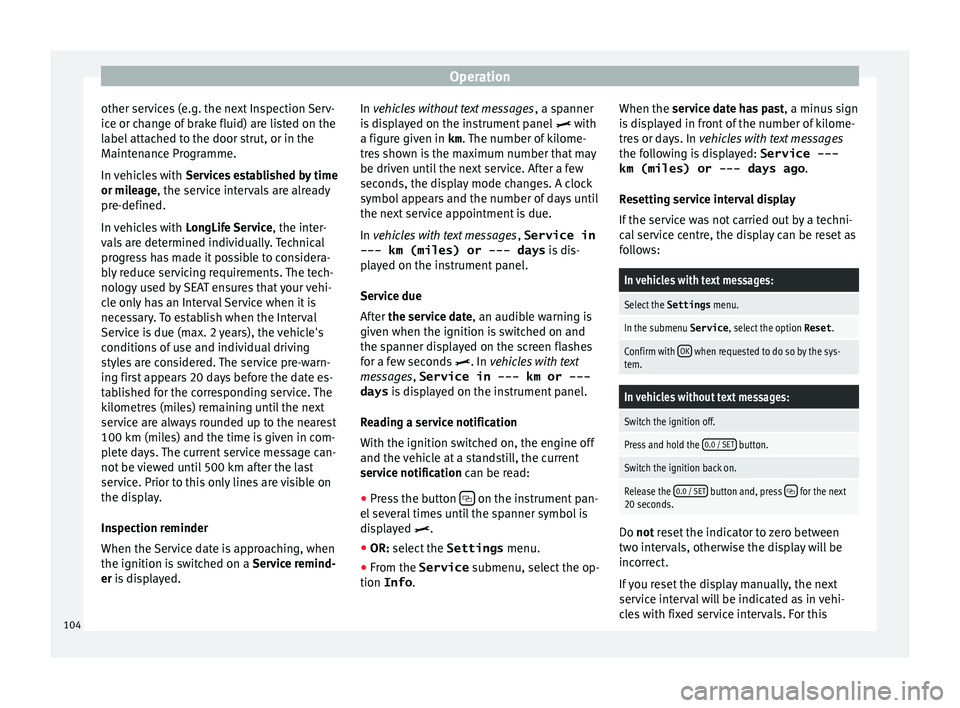
er is displayed. In vehicles without text messages
, a sp anner
is displayed on the instrument panel with
a figure given in km . The number of kilome-
tres shown is the maximum number that may
be driven until the next service. After a few
seconds, the display mode changes. A clock
symbol appears and the number of days until
the next service appointment is due.
In vehicles with text messages , Service in
--- km (miles) or --- days is dis-
played on the instrument panel.
Service due
After the service date, an audible warning is
given when the ignition is switched on and
the spanner displayed on the screen flashes
for a few seconds . In vehicles with text
messages, Service in --- km or --- days is displayed on the instrument panel.
Reading a service notification
With the ignition switched on, the engine off
and the vehicle at a standstill, the current
service notification can be read: ● Press the button on the instrument pan-
el sev
er
al times until the spanner symbol is
displayed .
● OR: select the Settings menu.
● From the
Service submenu, sel ect
the op-
tion Info . When the serv
ic
e date has past, a minus sign
is displayed in front of the number of kilome-
tres or days. In vehicles with text messages
the following is displayed: Service ---
km (miles) or --- days ago .
Resetting service interval display
If the service was not carried out by a techni-
cal service centre, the display can be reset as
follows:
In vehicles with text messages:
Select the Settings menu.
In the submenu Service , select the option Reset.
Confirm with OK when requested to do so by the sys-
tem.
In vehicles without text messages:
Switch the ignition off.
Press and hold the 0.0 / SET button.
Switch the ignition back on.
Release the 0.0 / SET button and, press for the next
20 seconds. Do not r
eset the indicator to zero between
tw o int
ervals, otherwise the display will be
incorrect.
If you reset the display manually, the next
service interval will be indicated as in vehi-
cles with fixed service intervals. For this
104
Page 190 of 320
Operation
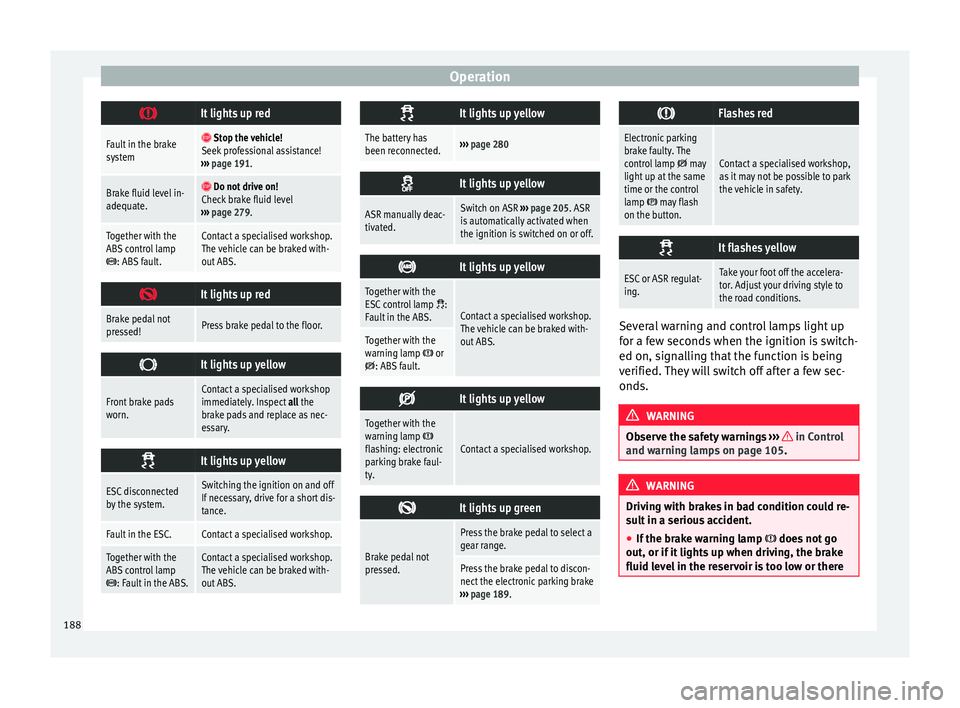
It lights up red
Fault in the brake
system
Stop the vehicle!
Seek professional assistance!
››› page 191.
Brake fluid level in-
adequate. Do not drive on!
Check brake fluid level
››› page 279.
Together with the
ABS control lamp
: ABS fault.
Contact a specialised workshop.
The vehicle can be braked with-
out ABS.
It lights up red
Brake pedal not
pressed!Press brake pedal to the floor.
It lights up yellow
Front brake pads
worn.Contact a specialised workshop
immediately. Inspect
all the
brake pads and replace as nec-
essary.
It lights up yellow
ESC disconnected
by the system.Switching the ignition on and off
If necessary, drive for a short dis-
tance.
Fault in the ESC.Contact a specialised workshop.
Together with the
ABS control lamp
: Fault in the ABS.
Contact a specialised workshop.
The vehicle can be braked with-
out ABS.
It lights up yellow
The battery has
been reconnected.›››
page 280
It lights up yellow
ASR manually deac-
tivated.Switch on ASR
››› page 205. ASR
is automatically activated when
the ignition is switched on or off.
It lights up yellow
Together with the
ESC control lamp :
Fault in the ABS.Contact a specialised workshop.
The vehicle can be braked with-
out ABS.
Together with the
warning lamp or: ABS fault.
It lights up yellow
Together with the
warning lamp flashing: electronic
parking brake faul-
ty.Contact a specialised workshop.
It lights up green
Brake pedal not
pressed.
Press the brake pedal to select a
gear range.
Press the brake pedal to discon-
nect the electronic parking brake
››› page 189.
Flashes red
Electronic parking
brake faulty. The
control lamp
may
light up at the same
time or the control
lamp
may flash
on the button.
Contact a specialised workshop,
as it may not be possible to park
the vehicle in safety.
It flashes yellow
ESC or ASR regulat-
ing.Take your foot off the accelera-
tor. Adjust your driving style to
the road conditions.
Several warning and control lamps light up
f
or a f
ew sec
onds when the ignition is switch-
ed on, signalling that the function is being
verified. They will switch off after a few sec-
onds. WARNING
Observe the safety warnings ›››
in Control
and warnin g l
amps on page 105. WARNING
Driving with brakes in bad condition could re-
su lt
in a serious accident.
● If the brake warning lamp does not
go
out, or if it lights up when driving, the brake
fluid level in the reservoir is too low or there 188
Page 191 of 320
Driving
is a fault in the brake system. Obtain profes-
sion
a
l assistance immediately ››› page 278,
Checking the brake fluid level.
● If the brake warning lamp lights up t
o-
gether with the ABS warning lamp , the
regulation function of the ABS could be mal-
functioning. As a result, the rear wheels can
lock relatively easily when braking. If the rear
wheels lock this could result in loss of vehicle
control! If possible, reduce your speed and
drive carefully to a specialised workshop
close by to check the brake system. During
the following journey, avoid sudden braking
and manoeuvres.
● If the ABS warning lamp does not
go out
or if it lights while driving, the ABS is mal-
functioning. The vehicle can only be stopped
using normal braking without ABS. The pro-
tection provided by the ABS is not available.
Visit a specialised workshop as soon as pos-
sible.
● If lights, alone or accompanied by a
warnin
g message on the instrument panel
display, please go immediately to a special-
ised workshop to check the brake pads and to
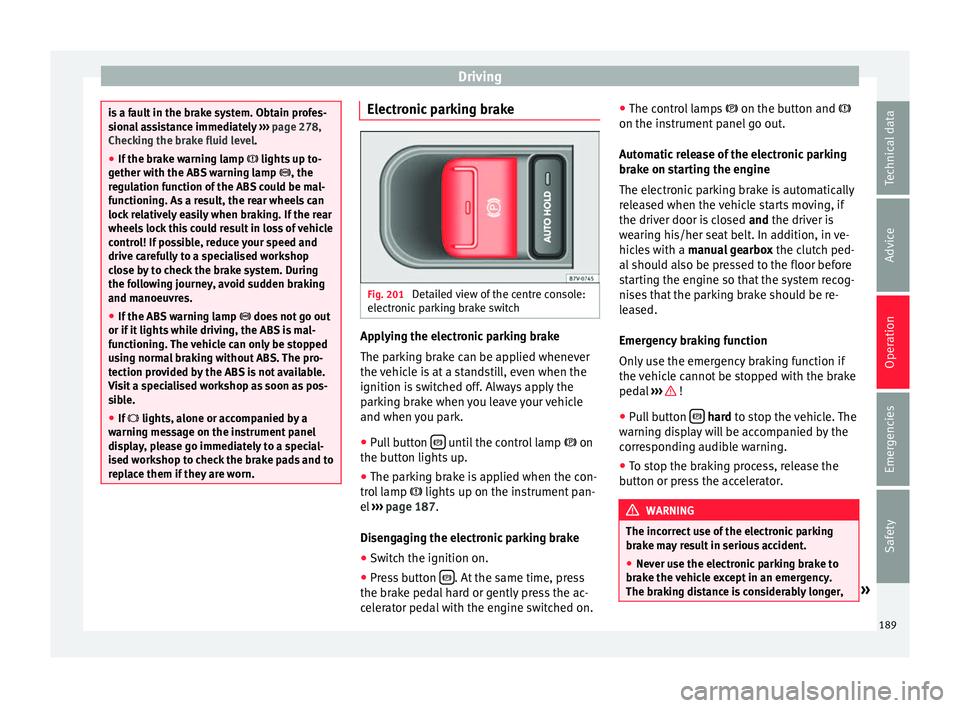
replace them if they are worn. Electronic parking brake
Fig. 201
Detailed view of the centre console:
el ectr
onic
parking brake switch Applying the electronic parking brake
The p
ark
in
g brake can be applied whenever
the vehicle is at a standstill, even when the
ignition is switched off. Always apply the
parking brake when you leave your vehicle
and when you park.
● Pull button until the control lamp
on
the b utt
on lights
up.
● The parking brake is applied when the con-
trol
lamp lights up on the instrument pan-
el ››› page 187.
Disengaging the electronic parking brake ● Switch the ignition on.
● Press button . At the same time, press
the br ak
e ped
al hard or gently press the ac-
celerator pedal with the engine switched on. ●
The contro
l lamps on the button and
on the instrument panel go out.
Automatic release of the electronic parking
brake on starting the engine
The electronic parking brake is automatically
released when the vehicle starts moving, if
the driver door is closed and the driver is
wearing his/her seat belt. In addition, in ve-
hicles with a manual gearbox the clutch ped-
al should also be pressed to the floor before
starting the engine so that the system recog-
nises that the parking brake should be re-
leased.
Emergency braking function
Only use the emergency braking function if
the vehicle cannot be stopped with the brake
pedal ››› !
● Pull button h
ard to stop the vehicle. The
w arnin
g display will be accompanied by the
corresponding audible warning.
● To stop the braking process, release the
button or pr
ess the accelerator. WARNING
The incorrect use of the electronic parking
brak e m
ay result in serious accident.
● Never use the electronic parking brake to
brake the
vehicle except in an emergency.
The braking distance is considerably longer, » 189
Technical data
Advice
Operation
Emergencies
Safety
Page 204 of 320
Operation
WARNING
● Alw a
ys drive according to the road weather
conditions, the terrain and traffic. Driving rec-
ommendations should never lead to illegal
manoeuvres in surrounding traffic. For the sake of the environment
Even when the emission control system is
work in
g perfectly, there may be a smell of
sulphur under certain conditions. This de-
pends on the sulphur content of the fuel be-
ing used. Driving tips
Driv ing abr
oadIn some countries, certain safety regulations
and r
equir
ements
are in force relating to ex-
haust gas emissions, which differ from the
technical characteristics of the vehicle. Be-
fore travelling abroad, SEAT recommends you
consult a technical service about the legal re-
quirements and the following points:
● Does the vehicle need technical modifica-
tions f
or driving abroad, for example, adjust-
ment of the headlamps?
● Does the vehicle have all the tools, diag-
nostic
s equipment and spare parts required
for inspections and repairs? ●
Are there an
y SEAT dealers in the destina-
tion country?
● For petrol vehicles: Is unleaded petrol avail-
able at
the right octane rating?
● For diesel engines: Is diesel fuel available
with a low s
ulphur content?
● Are a suitable engine oil ( ›››
page 271) and
other engine fluids complying with SEAT
specifications available in the destination
country?
● Will the navigation system fitted at the fac-
tory
operate correctly in the destination coun-
try with the available navigation data?
● Are special tyres required in the destination
countr
y? CAUTION
SEAT does not accept liability for any damage
to the v
ehicle due to the use of a lower quali-
ty fuel, an inadequate service or the non-
availability of genuine spare parts. Driving along flooded roadways
To prevent damage to the vehicle when driv-
in
g thr
ough w
ater, for example, along a floo-
ded road, please observe the following:
● Check the depth of the water before enter-
ing the flooded z
one. The water should never
come above the lower edge of the bodywork
››› .●
Do not driv
e f
aster than a pedestrian.
● Do not stop in the water, use reverse gear
or switc
h off the engine.
● Oncoming traffic will cause waves which
raise the l
evel of the water, making it difficult
to cross the water.
The Start/Stop system must be deactivated
when driving through flooded areas WARNING
When driving through water, mud, melted
sno w
, etc., please remember that due to
damp or frozen brake discs and shoes in win-
ter, the braking effect may be delayed, there-
fore the required braking distance is greater.
● “Dry the brakes and remove ice” by braking
caref
ully. Ensure that you are not endanger-
ing other road-users or breaking traffic regu-
lations in the process.
● After driving through water, avoid sudden
sharp manoeu
vres. CAUTION
● Drivin g thr
ough flooded areas may severely
damage vehicle components such as the en-
gine, transmission, drive train or electrical
system.
● Never drive through salt water as salt cau-
ses c
orrosion. Always rinse any parts of the
vehicle which have been in contact with salt
water. 202
Page 271 of 320
Checking and refilling levels
Working incorrectly can cause serious
injuries.
● Nev er open the bonnet
if you see steam or
cool
ant escaping from the engine compart-
ment. This may cause serious burns. Always
wait until you cannot see or hear the sound of
steam or coolant coming from the engine
compartment.
● Always allow the engine to cool down be-
fore openin
g the bonnet.
● Contact with hot elements of the engine
and the exhau
st system can cause burns.
● Once the engine has cooled, follow the in-
structions
below before opening the bonnet:
– Turn on the electronic parking brake and
place the gear selector lever in P or the
gearbox lever in neutral.
– Remove the key from the ignition.
– Keep children away from the engine com-
partment and never leave them unsuper-
vised.
● When the engine is warm or hot, the cool-
ing sys
tem is pressurised. Do not unscrew
the cap on the expansion tank when the en-
gine is hot. Otherwise, coolant may spray out
under pressure causing burns and serious in-
jury.
– Carefully and slowly unscrew the cap an-
ticlockwise, gently pressing down on it.
– Always protect your face, hands and arms
from hot coolant and steam using a large,
thick cloth. ●
When refi l
ling liquids, avoid spilling them
on parts of the engine and the exhaust sys-
tem. Spilled liquids could cause a fire. WARNING
The high voltages of the electrical system can
giv e el ectric
shocks as well as causing burns
and serious injury and possibly even death!
● Never cause short circuits in the electrical
syst
em. The battery could explode.
● To minimise the risk of electric shock and
serious c
onsequences while the engine is
running or starting the engine, note the fol-
lowing:
– Never touch the electrical wiring of the
ignition system.
– Never touch electric cables or the gas dis-
charge lamps. WARNING
In the engine compartment, there are rotat-
ing p ar
ts that could cause serious injury.
● Never place your hands on or near the radi-
ator fan.
Touching the rotor blades could seri-
ously harm you. The ventilator works accord-
ing to the engine temperature and could start
suddenly even when the ignition is turned off
and the key is removed.
● If any work has to be performed when the
engine is
started or with the engine running,
there is an additional, potentially fatal, safety
risk from rotating parts, such as the drive belts, alternator, radiator fan, etc., as well as
from the high-
v
oltage ignition system. Al-
ways work with the utmost caution.
– Always make sure that no parts of your
body, jewellery, ties, loose clothing and
long hair can be trapped by the rotating
parts of the engine. Before any work, re-
move ties and jewellery (necklaces, etc),
tie long hair back and tie all items of
loose clothing to your body to make sure
that they cannot be trapped by engine
components.
– Take extreme caution when operating the
accelerator and remain attentive. The ve-
hicle could move, even with the electron-
ic parking brake activated.
● Always make sure you have not left any ob-
jects, s
uch as cleaning cloths and tools, in
the engine compartment. If any object is left
in the engine compartment, this could cause
malfunctions, engine faults and even a fire. WARNING
Refill liquids and certain materials can catch
fire e a
sily in the engine compartment, caus-
ing a fire and serious injury!
● Never smoke.
● Never work close to places exposed to
flames
or sparks.
● Never pour service fluids over the engine.
These fluid ma
y ignite hot engine parts and
cause injuries. » 269
Technical data
Advice
Operation
Emergencies
Safety
Page 273 of 320
Checking and refilling levels
●
Aft er c
losing the bonnet, always check that
it is properly secured by the locking mecha-
nism in the lock carrier. The bonnet must be
flush with the surrounding body panels.
● While driving, if you notice that the bonnet
is not
correctly closed then stop immediately
and close it correctly.
● Only open and close the bonnet when there
is no
body within its range. CAUTION
● To av oid d
amage to the bonnet and to the
windscreen wiper arms, only open it when
the windscreen wipers are in place against
the windscreen.
● Before driving, always lower the wiper
arms. Checking fluid levels
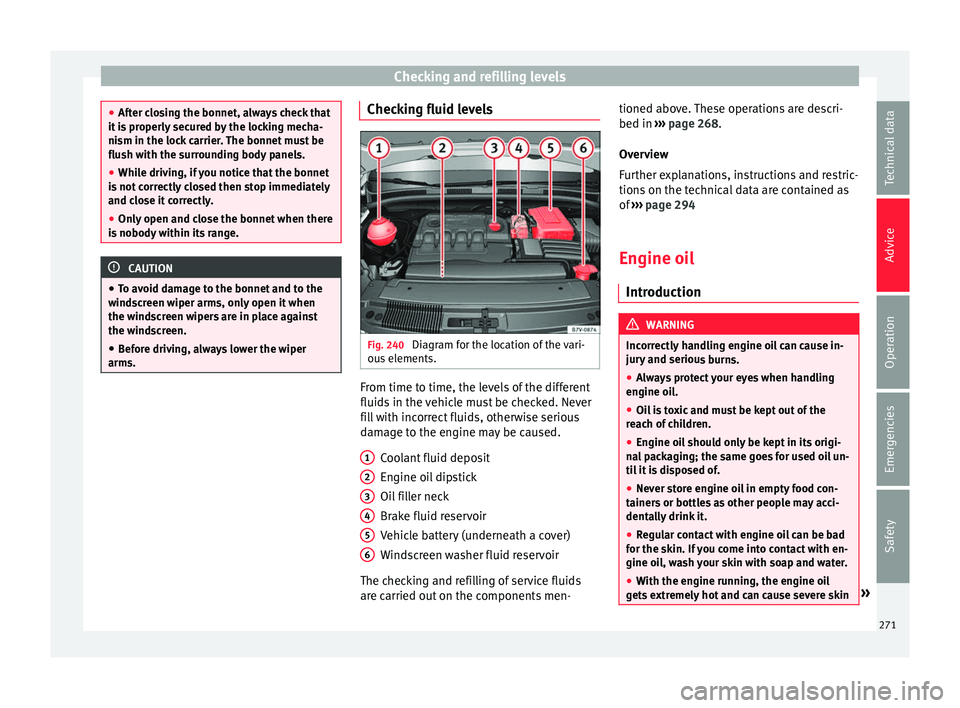
Fig. 240
Diagram for the location of the vari-
ou s
el
ements. From time to time, the levels of the different
fluid
s
in the
vehicle must be checked. Never
fill with incorrect fluids, otherwise serious
damage to the engine may be caused.
Coolant fluid deposit
Engine oil dipstick
Oil filler neck
Brake fluid reservoir
Vehicle battery (underneath a cover)
Windscreen washer fluid reservoir
The checking and refilling of service fluids
are carried out on the components men- 1 2
3
4
5
6 tioned above. These operations are descri-
bed in
››
›
page 268.
Overview
Further explanations, instructions and restric-
tions on the technical data are contained as
of ››› page 294
Engine oil Introduction WARNING
Incorrectly handling engine oil can cause in-
jury and seriou
s burns.
● Always protect your eyes when handling
engine oil
.
● Oil is toxic and must be kept out of the
reac
h of children.
● Engine oil should only be kept in its origi-
nal
packaging; the same goes for used oil un-
til it is disposed of.
● Never store engine oil in empty food con-
tainers
or bottles as other people may acci-
dentally drink it.
● Regular contact with engine oil can be bad
for the skin. If
you come into contact with en-
gine oil, wash your skin with soap and water.
● With the engine running, the engine oil
gets
extremely hot and can cause severe skin » 271
Technical data
Advice
Operation
Emergencies
Safety