fuel Seat Alhambra 2018 User Guide
[x] Cancel search | Manufacturer: SEAT, Model Year: 2018, Model line: Alhambra, Model: Seat Alhambra 2018Pages: 324, PDF Size: 7.04 MB
Page 91 of 324
Self-help
Always remain aware to avoid collision
with the t
o
wing vehicle.
– More strength is required at the steering
wheel as the power steering does not op-
erate when the engine is switched off.
● As the driver of the towing vehicle:
– Acc
elerate gently and carefully.
– Avoid sudden braking and manoeuvres.
– Brake well in advance than usual and
brake gently. CAUTION
● Car ef
ully fit and remove the towline anchor-
age and its cover to avoid damage to the ve-
hicle (e.g. paintwork).
● When towing, fuel could enter the catalytic
conv
erter and cause damage! Note
● The v ehic
le can only be towed if the elec-
tronic parking brake and steering lock are de-
activated. If the vehicle has no power supply
or there is an electric system fault, the en-
gine must be started using jump leads to de-
activate the electronic parking brake and
electronic steering lock.
● Vehicles with the Keyless Access locking
and ignition syst
em should only be towed
with the ignition connected since, otherwise,
the electronic steering lock will not unlock. Fitting the front towline anchorage
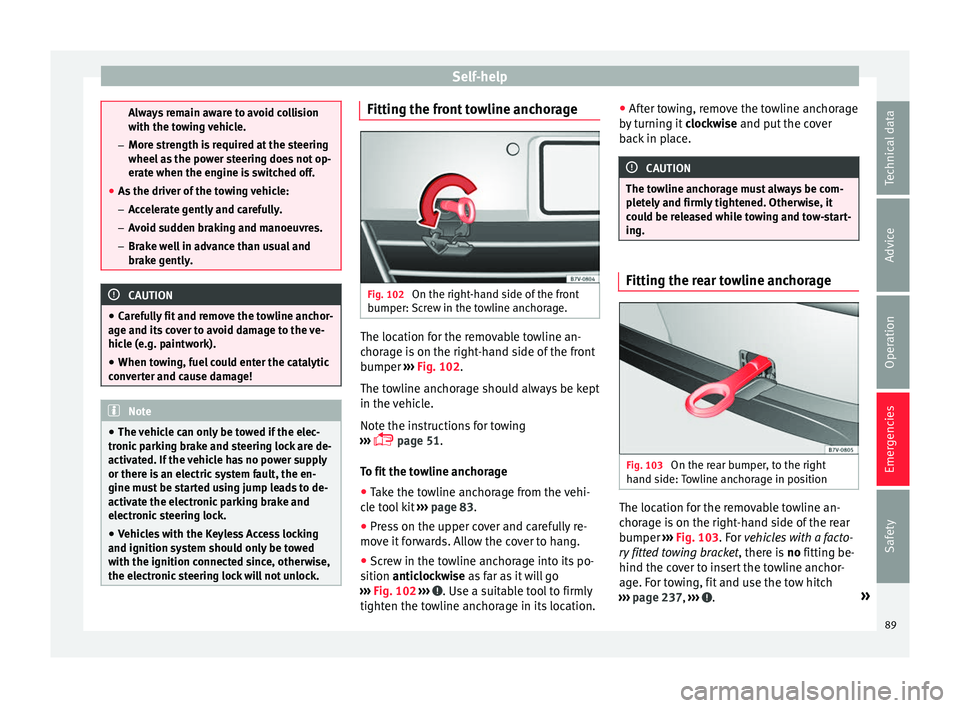
Fig. 102
On the right-hand side of the front
b umper:
Sc
rew in the towline anchorage. The location for the removable towline an-
c
hor
ag
e is on the right-hand side of the front
bumper ››› Fig. 102.
The towline anchorage should always be kept
in the vehicle.
Note the instructions for towing
››› page 51.
To fit the towline anchorage
● Take the towline anchorage from the vehi-
cle t
ool kit ››› page 83.
● Press on the upper cover and carefully re-
move it
forwards. Allow the cover to hang.
● Screw in the towline anchorage into its po-
sition antic
lockwise as far as it will go
››› Fig. 102 ››› . Use a suitable tool to firmly
tight en the t o
wline anchorage in its location. ●
After t
owing, remove the towline anchorage
by turning it clockwise and put the cover
back in place. CAUTION
The towline anchorage must always be com-
pl et
ely and firmly tightened. Otherwise, it
could be released while towing and tow-start-
ing. Fitting the rear towline anchorage
Fig. 103
On the rear bumper, to the right
h and s ide:
Towline anchorage in position The location for the removable towline an-
c
hor
ag
e is on the right-hand side of the rear
bumper ››› Fig. 103. For vehicles with a facto-
ry fitted towing bracket , there is no fitting be-
hind the cover to insert the towline anchor-
age. For towing, fit and use the tow hitch
››› page 237, ››› .
»
89
Technical data
Advice
Operation
Emergencies
Safety
Page 105 of 324
General instrument panel
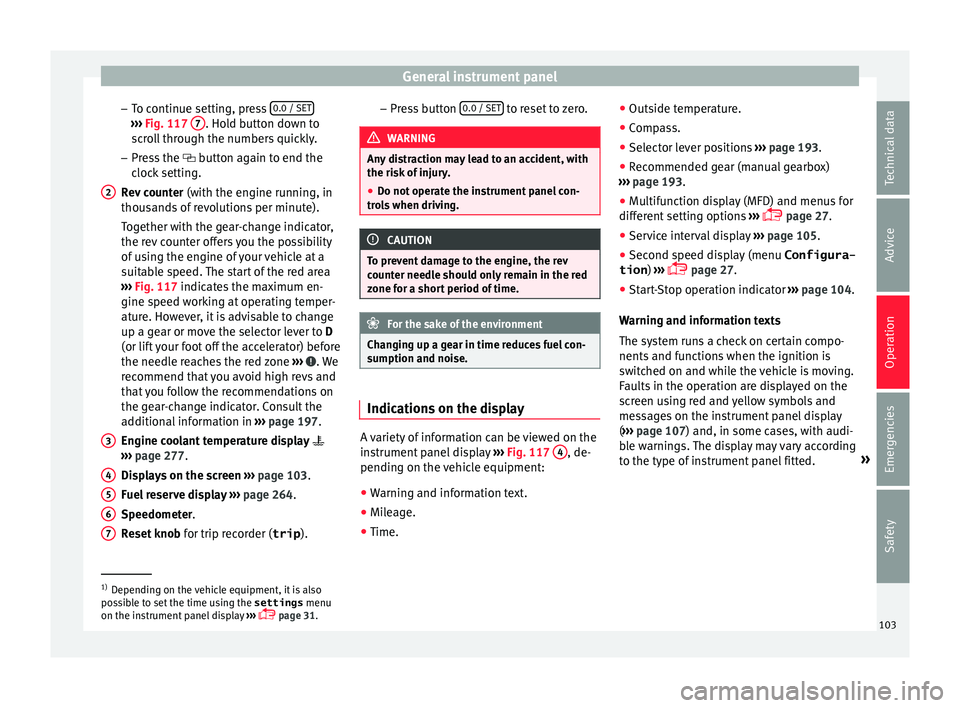
– To c
ontinue settin
g, press 0.0 / SET ›››
Fig. 117 7 . Hold button down to
s c
r
oll through the numbers quickly.
– Press the button again to end the
clock setting.
Rev counter (with the engine running, in
thousands of revolutions per minute).
Together with the gear-change indicator,
the rev counter offers you the possibility
of using the engine of your vehicle at a
suitable speed. The start of the red area
››› Fig. 117 indicates the maximum en-
gine speed working at operating temper-
ature. However, it is advisable to change
up a gear or move the selector lever to D
(or lift your foot off the accelerator) before
the needle reaches the red zone ››› . We
r ec
ommend th
at you avoid high revs and
that you follow the recommendations on
the gear-change indicator. Consult the
additional information in ››› page 197.
Engine coolant temperature display
››› page 277.
Displays on the screen ››› page 103.
Fuel reserve display ››› page 264.
Speedometer.
Reset knob for trip recorder (trip ).
2
3
4
5
6
7 –
Pr e
s
s button 0.0 / SET to reset to zero.
WARNING
Any distraction may lead to an accident, with
the risk of
injury.
● Do not operate the instrument panel con-
trol
s when driving. CAUTION
To prevent damage to the engine, the rev
cou nt
er needle should only remain in the red
zone for a short period of time. For the sake of the environment
Changing up a gear in time reduces fuel con-
sumption and noi se. Indications on the display
A variety of information can be viewed on the
in
s
trument
panel display ›››
Fig. 117 4 , de-
pendin g on the
v
ehicle equipment:
● Warning and information text.
● Mileage.
● Time. ●
Outside temper
ature.
● Compass.
● Selector lever positions ›››
page 193.
● Recommended gear (manual gearbox)
›››
page 193.
● Multifunction display (MFD) and menus for
different
setting options ›››
page 27.
● Service interval display ›››
page 105 .
● Second speed display (menu Configura-
tion ) ›››
page 27.
● Start-Stop operation indicator ›››
page 104.
Warning and information texts
The system runs a check on certain compo-
nents and functions when the ignition is
switched on and while the vehicle is moving.
Faults in the operation are displayed on the
screen using red and yellow symbols and
messages on the instrument panel display
( ››› page 107) and, in some cases, with audi-
ble warnings. The display may vary according
to the type of instrument panel fitted. »1)
Depending on the vehicle equipment, it is also
pos s
ible to set the time using the settings menu
on the instrument panel display ›››
page 31.
103
Technical data
Advice
Operation
Emergencies
Safety
Page 106 of 324
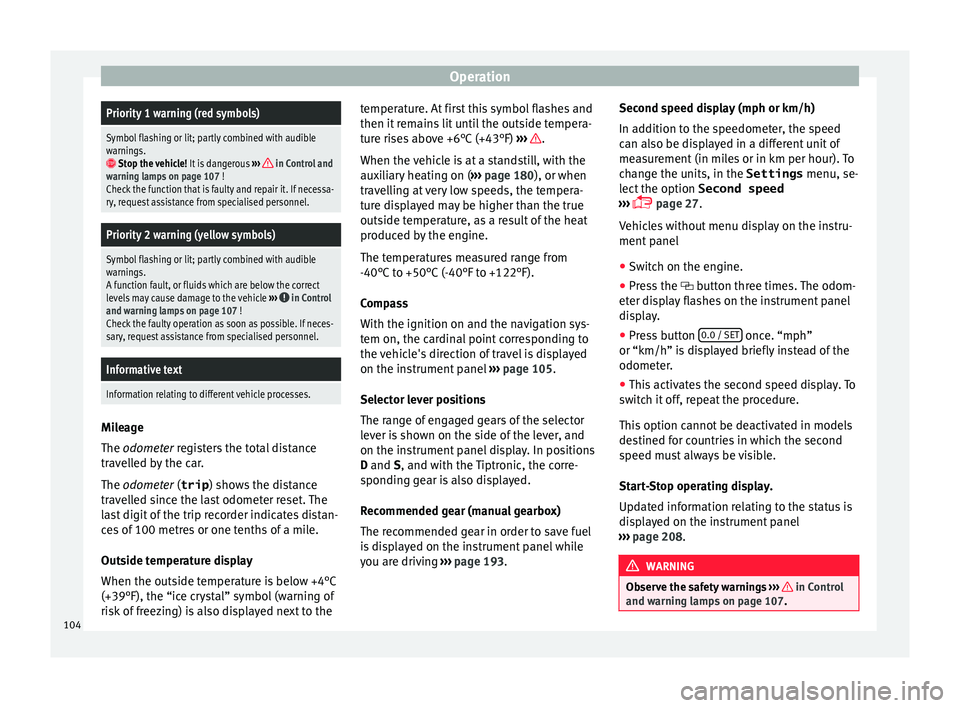
OperationPriority 1 warning (red symbols)
Symbol flashing or lit; partly combined with audible
warnings.
Stop the vehicle!
It is dangerous ››› in Control and
warning lamps on page 107 !
Check the function that is faulty and repair it. If necessa-
ry, request assistance from specialised personnel.
Priority 2 warning (yellow symbols)
Symbol flashing or lit; partly combined with audible
warnings.
A function fault, or fluids which are below the correct
levels may cause damage to the vehicle ›››
in Control
and warning lamps on page 107 !
Check the faulty operation as soon as possible. If neces-
sary, request assistance from specialised personnel.
Informative text
Information relating to different vehicle processes. Mileage
The odomet
er
r
egisters the total distance
travelled by the car.
The odometer (trip ) shows the distance
travelled since the last odometer reset. The
last digit of the trip recorder indicates distan-
ces of 100 metres or one tenths of a mile.
Outside temperature display
When the outside temperature is below +4°C
(+39°F), the “ice crystal” symbol (warning of
risk of freezing) is also displayed next to the temperature. At first this symbol flashes and
then it rem
ains lit until the outside tempera-
ture rises above +6°C (+43°F) ››› .
When the v
ehic
le is at a standstill, with the
auxiliary heating on ( ››› page 180), or when
travelling at very low speeds, the tempera-
ture displayed may be higher than the true
outside temperature, as a result of the heat
produced by the engine.
The temperatures measured range from
-40°C to +50°C (-40°F to +122°F).
Compass
With the ignition on and the navigation sys-
tem on, the cardinal point corresponding to
the vehicle's direction of travel is displayed
on the instrument panel ››› page 105.
Selector lever positions
The range of engaged gears of the selector
lever is shown on the side of the lever, and
on the instrument panel display. In positions
D and S, and with the Tiptronic, the corre-
sponding gear is also displayed.
Recommended gear (manual gearbox)
The recommended gear in order to save fuel
is displayed on the instrument panel while
you are driving ›››
page 193. Second speed display (mph or km/h)
In addition t
o the speedometer, the speed
can also be displayed in a different unit of
measurement (in miles or in km per hour). To
change the units, in the Settings menu, se-
lect the option Second speed
››› page 27.
Vehicles without menu display on the instru-
ment panel
● Switch on the engine.
● Press the button thr
ee times. The odom-
eter display flashes on the instrument panel
display.
● Press button 0.0 / SET once. “mph”
or “km/h” i s
di
splayed briefly instead of the
odometer.
● This activates the second speed display. To
switc
h it off, repeat the procedure.
This option cannot be deactivated in models
destined for countries in which the second
speed must always be visible.
Start-Stop operating display.
Updated information relating to the status is
displayed on the instrument panel
››› page 208. WARNING
Observe the safety warnings ›››
in Control
and warnin g l
amps on page 107. 104
Page 109 of 324
General instrument panel
reason we recommend that the service inter-
v al
di
splay be reset by a SEAT authorised
service ››› Booklet Maintenance schedule. Note
● The serv ic
e message disappears after a few
seconds, when the engine is started or when OK is pressed.
● In vehicles with the LongLife system in
which the b att
ery has been disconnected for
a long period of time, it is not possible to cal-
culate the date of the next service. Therefore
the service interval display may not be cor-
rect. In this case, bear in mind the maximum
service intervals permitted in the ››› Booklet
Maintenance Programme. Control lamps
C ontr
o
l and warning lamps Read the additional information carefully
› ›
›
page 34
The control and warning lamps are indicators
of warnings, ››› , faults
››
›
or certain func-
tion s.
Some c
ontrol and warning lamps come
on when the ignition is switched on, and
switch off when the engine starts running, or
while driving.
Depending on the model, additional text
messages may be viewed on the instrument panel display. These may be purely informa-
tive or they m
ay be advising of the need for
action ››› page 102, Instruments.
Depending upon the equipment fitted in the
vehicle, instead of a warning lamp, some-
times a symbol may be displayed on the in-
strument panel.
When certain control and warning lamps are
lit, an audible warning is also heard. WARNING
If the warning lamps and messages are ignor-
ed, the v ehic
le may stall in traffic, or may
cause accidents and severe injuries.
● Never ignore the warning lamps or text
mess
ages.
● Stop the vehicle safely as soon as possible.
● Park the vehicle away from traffic and en-
sure th
at there are no highly flammable ma-
terials under the vehicle that could come into
contact with the exhaust system (e.g. dry
grass, fuel).
● A faulty vehicle represents a risk of acci-
dent for the driv
er and for other road users. If
necessary, switch on the hazard warning
lamps and put out the warning triangle to ad-
vise other drivers.
● Before opening the bonnet, switch off the
engine and al
low it to cool.
● In any vehicle, the engine compartment is a
hazar
dous area and could cause severe inju-
ries ››› page 271. CAUTION
Failure to heed the control lamps and text
mes s
ages when they appear may result in
faults in the vehicle. 107
Technical data
Advice
Operation
Emergencies
Safety
Page 125 of 324
Opening and closingFunctionNecessary operations
Opens the slid-
ing door elec-
trically.
Press the
››› Fig. 134 button on the
dash panel, on the remote control key
and on the interior lining of the slid-
ing door. The sliding door opens with
the rollback anti-trap function as long
as the button is not pressed again.
Pull briefly on the interior or exterior
door handle. The sliding door opens
automatically.
Closing the
sliding door
electrically.
Press the ››› Fig. 134 button on the
dash panel, on the remote control key
and on the interior lining of the slid-
ing door. The sliding door closes with
the rollback anti-trap function as long
as the button is not pressed again. As
it closes, a warning sound is given.
Pull briefly on the interior or exterior
door handle. The sliding door closes
with the roll-back function. As it
closes, a warning sound is given. Note
● When the fuel t
ank flap is open, the right-
hand side electric sliding door is locked and
can only be opened manually.
● If the window of a sliding door is lowered
them this door c
annot open fully. Rollback anti-trap function of the elec-
tric
s
lidin
g doors The rollback anti-trap function of the electric
slidin
g door
s can reduce the risk of injury
when opening and closing the sliding doors
››› .
If an o b
ject gets in the way of the sliding
door while it is closing, it will open again.
If an object gets in the way of the sliding
door while it is opening, the door will be im-
mobilised at this point.
● Check the reason for which the sliding door
does not
open or close.
● Try to open or close the sliding door again.
To clo
se the sliding door without the rollback
anti-trap function
● Turn off the ignition and turn it on again.
● Press and hold the button ›
››
Fig. 134.
The sliding door closes with full force. WARNING
Closing the electric windows without the an-
ti-trap f u
nction can cause serious injury.
● Always close the sliding doors carefully.
● Nobody should ever get in the way of the
electric s
liding doors, especially when clos-
ing without the anti-trap function. ●
The anti-trap f u
nction does not prevent fin-
gers or other parts of the body getting
pinched against the window frame and caus-
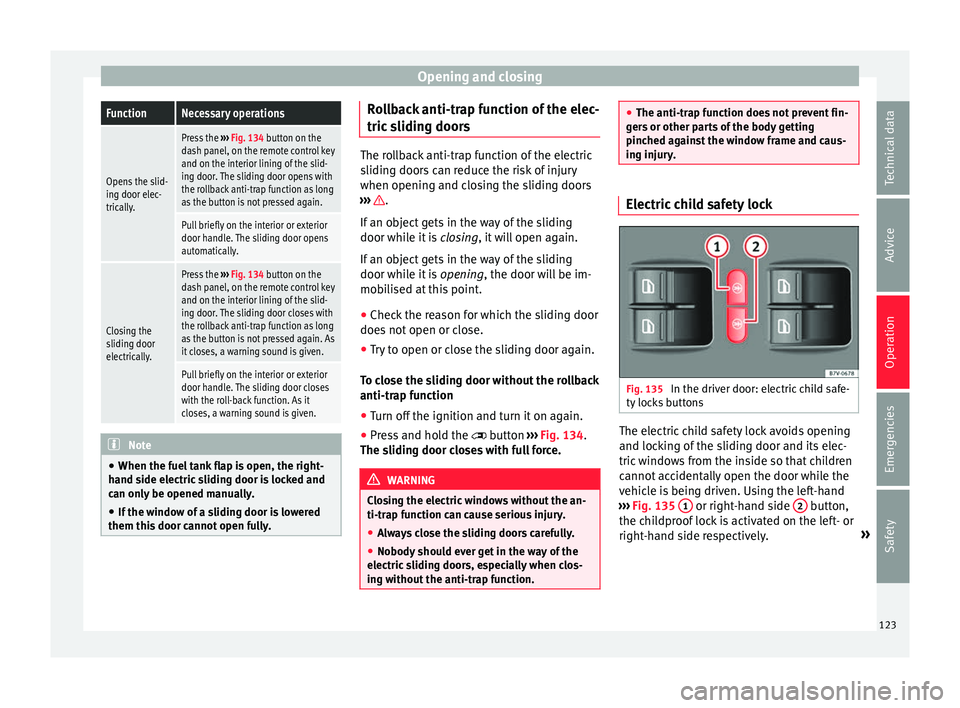
ing injury. Electric child safety lock
Fig. 135
In the driver door: electric child safe-
ty loc
k
s buttons The electric child safety lock avoids opening
and loc
k
in
g of the sliding door and its elec-
tric windows from the inside so that children
cannot accidentally open the door while the
vehicle is being driven. Using the left-hand
››› Fig. 135 1 or right-hand side
2 button,
the c hi
l
dproof lock is activated on the left- or
right-hand side respectively. »
123
Technical data
Advice
Operation
Emergencies
Safety
Page 137 of 324
Lights and visibility
Allow the engine to cool and check if a
s pec
i
alist is required.
If the hazard warning lights are not working,
you must use an alternative method of draw-
ing attention to your vehicle. This method
must comply with traffic legislation. WARNING
A faulty vehicle in traffic represents a risk of
acc ident
for the driver and for other road
users.
● Stop the vehicle safely as soon as possible.
Park the
vehicle a safe distance from sur-
rounding traffic to lock all the doors in case of
an emergency. Turn on the hazard warning
lights to warn other road users.
● Never leave children or disabled people
alone in the v
ehicle if the doors are to be
locked. In case of an emergency, passengers
will be trapped inside the vehicle. Individuals
locked in the vehicle can be exposed to very
high or very low temperatures. WARNING
The components of the exhaust system reach
ver y
high temperatures. This could cause a
fire and considerable damage.
● Always park your vehicle so that no part of
the exhau
st system can come in contact with
flammable materials (such as dried grass or
fuel). 9.
Note
● The v ehic
le battery will discharge and run
down if the hazard warning lights remain on
for too long (even with the ignition turned
off).
● In some vehicles, the brake lights will flash
when brakin
g abruptly at speeds of approxi-
mately 80 km/h (50 mph) to warn vehicles
travelling behind. If braking continues, the
hazard warning lights system will automati-
cally be turned on at a speed of less than ap-
proximately 10 km/h (6 mph). The brake
lights remain lit. Upon accelerating, the haz-
ard warning lights will be automatically
turned off. Adhesive strips for headlights or ad-
ju
s
tin
g headlights In those countries where vehicles drive on
the other s
ide of
the r
oad to the home coun-
try, the asymmetric dipped beam may dazzle
drivers of oncoming vehicles. Therefore,
when driving abroad, adhesive strips should
be attached to the headlights or the head-
lights should be adjusted accordingly.
The direction of the headlights can be adjus-
ted from the instrument panel, in the Tou-
rist light submenu of the Configura-
tion menu ›››
page 31.
For those vehicles in which it is not possible
to adjust the headlights from the menu, ad- hesive strips are used to cover certain parts
of the hea
dlamp cover or the headlights may
be adjusted at a specialised workshop. For
further information, please refer to a special-
ised workshop. SEAT recommends visiting a
technical service. Note
Use of the Tourist light option and the
adhe s
ives on the headlights is only allowed if
they are to be used for a short period of time.
To modify the direction of the headlights per-
manently, please take the vehicle to a speci-
alised workshop. SEAT recommends visiting a
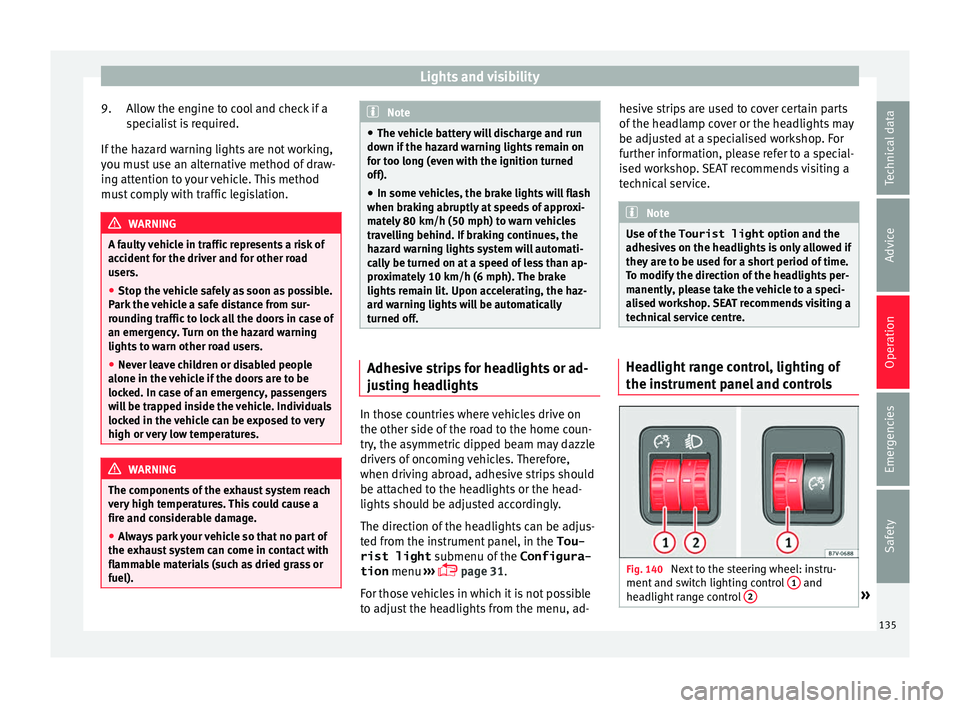
technical service centre. Headlight range control, lighting of
the in
s
trument
panel and controls Fig. 140
Next to the steering wheel: instru-
ment and sw it
ch lighting control 1 and
he a
dlight
range control 2 »
135
Technical data
Advice
Operation
Emergencies
Safety
Page 140 of 324
Operation
the windscreen with the ventilation system.
The antifreez
e c
ould freeze on the windscreen
and reduce visibility. WARNING
Worn or dirty wiper blades reduce visibility
and inc re
ase the risk of accident and serious
injury.
● Always replace damaged or worn blades or
bla
des which do not clean the windscreen
correctly. CAUTION
In icy conditions, always check that the wiper
bl a
des are not frozen to the glass before us-
ing the wipers for the first time. In cold
weather, it may help to leave the vehicle
parked with the wipers in service position
››› page 55. CAUTION
If the ignition is switched off while the wind-
sc r
een wipers are on, the windscreen wipers
carry on wiping at the same level when the
ignition is switched back on. Ice, snow and
other obstacles may damage the windscreen
wiper and the respective motor. Note
● The wind s
creen wipers will only function
when the ignition is switched on and the re-
spective bonnet or rear lid are closed. ●
The inter v
al wipe speed varies according to
the vehicle speed. The faster the vehicle is
moving, the more often the windscreen is
cleaned.
● The rear wiper is automatically switched on
when the winds
creen wiper is on and the car
is in reverse gear. Windscreen wiper functions
Windscreen wiper performance in different sit-
uations
If the vehicle
is at a stand-
stillThe activated position provisionally
changes to the previous position.
During auto-
matic wipe
The air conditioner comes on for ap-
proximately 30 seconds in air recircula-
tion mode to prevent the smell of the
windscreen washer fluid entering the
inside the vehicle.
For the inter-
val wipeIntervals between wipes depend on the
vehicle's speed. The higher the vehicle
speed the shorter the intervals.
Heated windscreen washer jets
The he
atin
g on
ly thaws the frozen jets, it
does not thaw the water in the washer hoses.
The heated windscreen washer jets automati-
cally adjust the heat depending on the ambi-
ent temperature when the ignition is switch-
ed on. Headlight wash/wipe system
The headlight
washers/wipers clean the
headlight lenses.
After the ignition is switched on, the first and
every fifth time the windscreen washer is
switched on, the headlights are also washed.
Therefore, the windscreen wiper lever should
be pulled towards the steering wheel when
the dipped beam or main beam are on. Any
incrusted dirt (such as insects) should be
cleaned regularly (e.g. when refuelling).
To ensure the headlight washers work cor-
rectly in winter, any snow which has got into
the bumper jet supports should be cleaned
away. If necessary, remove snow with an anti-
icing spray. Note
The wiper will try to wipe away any obstacles
that ar
e on the windscreen. The wiper will
stop moving if the obstacle blocks its path.
Remove the obstacle and switch the wiper
back on again. 138
Page 144 of 324
Operation
steering wheel buttons and select Conven-
ience .
● Select the Rear vision mirror ad-
justment fu
nction (if
it is already checked,
uncheck it and check the option again).
● Select reverse gear.
● Adjust the front passenger side exterior
mirror so that
you can see, for example, the
kerb area.
● The new position of the mirror will be stor-
ed automatic
ally and allocated to the vehicle
key that was used to unlock the vehicle. For
vehicles with seat memory, please see
››› page 147.
Activating the passenger exterior mirror set-
tings
● Turn the exterior mirror knob to position R.
● With the ignition switched on, select re-
verse g
ear.
● The stored position of the passenger exteri-
or mirror for r
everse gear is deleted when
driving forwards at 15 km/h (9 mph), or if the
knob is turned from position R to another po-
sition. WARNING
Fold and unfold the exterior mirror, taking
car e t
o avoid injuries.
● Only fold or unfold the exterior mirror when
there is
no-one in the way of the mirror. ●
When mov in
g the mirror, take care not to
trap fingers between the mirror and the mir-
ror bracket. WARNING
Failure to correctly estimate the distance of
the vehic
le behind could lead to serious acci-
dent.
● Rear-view convex or aspheric mirrors in-
cre
ase the field of vision, however objects ap-
pear smaller and further away in the mirrors.
● The use of these mirrors to estimate the
dist
ance to the next vehicle when changing
lane is imprecise and could result in serious
accident.
● If possible, use the rear vision mirror to es-
timate di
stances to vehicles behind you or in
other circumstances.
● Make sure that the rear visibility is ade-
quate. CAUTION
● Bef or
e entering a car wash, always ensure
that the exterior mirrors are correctly folded
in.
● Electrically-folding exterior mirrors should
not be fo
lded and unfolded mechanically as
this may damage the electrical operation. For the sake of the environment
The exterior mirror heating should be switch-
ed off when it i
s no longer needed. Other-
wise, it is an unnecessary fuel waste. Note
● The ext erior mirr
or heating initially heats
up with a high power, after two minutes the
heat will depend upon the ambient tempera-
ture.
● In the event of a fault, the electric exterior
mirrors
can be adjusted manually by pressing
the edge of the mirror surface. 142
Page 149 of 324
Seats and head restraints
Seat functions Se at
he
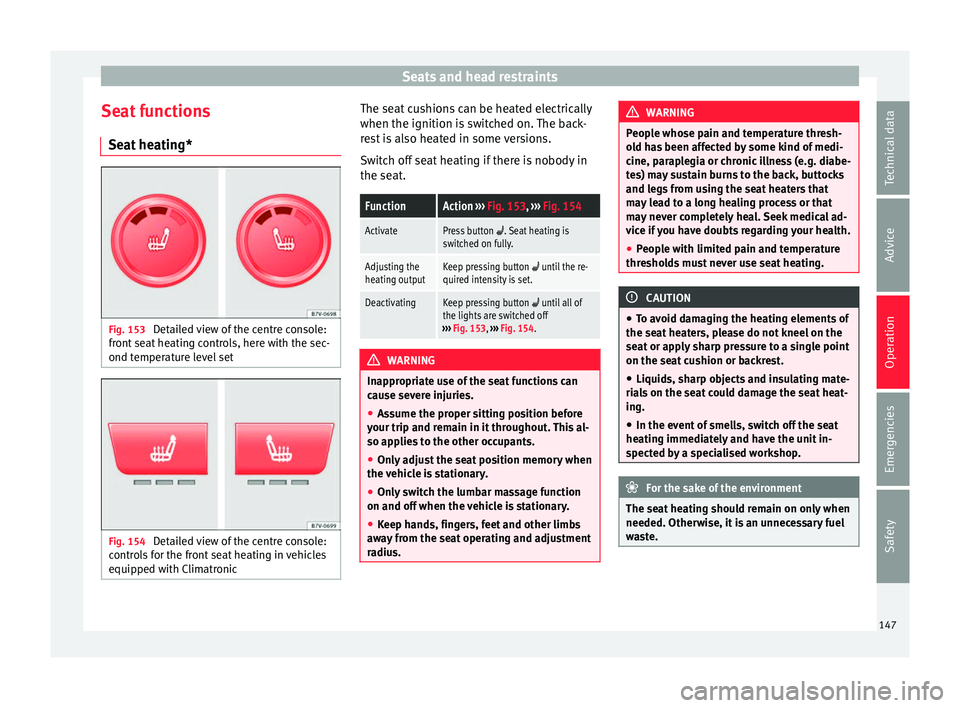
ating* Fig. 153
Detailed view of the centre console:
fr ont
se
at heating controls, here with the sec-
ond temperature level set Fig. 154
Detailed view of the centre console:
c ontr o
ls for the front seat heating in vehicles
equipped with Climatronic The seat cushions can be heated electrically
when the ignition i
s
sw
itched on. The back-
rest is also heated in some versions.
Switch off seat heating if there is nobody in
the seat.
FunctionAction ››› Fig. 153, ››› Fig. 154
ActivatePress button . Seat heating is
switched on fully.
Adjusting the
heating outputKeep pressing button until the re-
quired intensity is set.
DeactivatingKeep pressing button until all of
the lights are switched off
››› Fig. 153, ››› Fig. 154. WARNING
Inappropriate use of the seat functions can
cau se sev
ere injuries.
● Assume the proper sitting position before
your trip and rem
ain in it throughout. This al-
so applies to the other occupants.
● Only adjust the seat position memory when
the vehic
le is stationary.
● Only switch the lumbar massage function
on and off when the v
ehicle is stationary.
● Keep hands, fingers, feet and other limbs
awa
y from the seat operating and adjustment
radius. WARNING
People whose pain and temperature thresh-
ol d h
as been affected by some kind of medi-
cine, paraplegia or chronic illness (e.g. diabe-
tes) may sustain burns to the back, buttocks
and legs from using the seat heaters that
may lead to a long healing process or that
may never completely heal. Seek medical ad-
vice if you have doubts regarding your health.
● People with limited pain and temperature
thresho
lds must never use seat heating. CAUTION
● To av oid d
amaging the heating elements of
the seat heaters, please do not kneel on the
seat or apply sharp pressure to a single point
on the seat cushion or backrest.
● Liquids, sharp objects and insulating mate-
rial
s on the seat could damage the seat heat-
ing.
● In the event of smells, switch off the seat
heating immedi
ately and have the unit in-
spected by a specialised workshop. For the sake of the environment
The seat heating should remain on only when
needed. Otherw i
se, it is an unnecessary fuel
waste. 147
Technical data
Advice
Operation
Emergencies
Safety
Page 166 of 324
Operation
● Car
ef
ully unhook the baggage net hooks
from the fastening rings ››› Fig. 172 2 .
WARNING
The elastic baggage net stretches when it is
secur ed t
o the luggage compartment fasten-
ing rings. The secured baggage net is taut.
The hooks on the net can cause injury if the
net is incorrectly hooked or unhooked.
● Always ensure that the hooks do not sud-
denly r
elease from the fastening rings when
hooking or un-hooking.
● Always keep your face and eyes protected
at a saf
e distance to avoid injury should a
hook slip while hooking or unhooking.
● Always engage the hooks in the order giv-
en. If a bag
gage net hook springs back this
can cause injury. Roof carrier*
Intr oduction The vehicle roof has been designed to opti-
mi
se aer
ody
namics. For this reason, conven-
tional roof carrier systems cannot be secured
to the roof water drain channel.
Given that the water drains have been incor-
porated into the roof for aerodynamic rea-
sons, only the SEAT approved basic supports
and roof carrier systems can be used. When should the roof carrier system be re-
moved?
● When it
is not being used.
● When the vehicle is being washed in a car
wash.
● When the
vehicle height exceeds the maxi-
mum height (e.g. in a g
arage). WARNING
The risk of an accident is increased by trans-
portin g he
avy or bulky loads on the roof,
which affects the car's handling by shifting
the centre of gravity and increasing suscepti-
bility to cross winds.
● Always secure loads correctly with suitable
and undam
aged attachment rope or straps.
● Large, heavy, wide and flat loads negatively
affect the
vehicle aerodynamics, centre of
gravity and handling.
● Avoid brusque manoeuvres and sudden
brakin
g.
● Adjust your speed and driving style to visi-
bility
, road, traffic and weather conditions. CAUTION
● Alw a
ys remove the roof carrier system from
the roof before entering a car wash.
● The height of your vehicle is changed by
the inst
allation of the roof carrier and the
load secured on it. Compare the vehicle
height with the passage height, for example
in underground car parks or for garage doors. ●
The roof ant
enna, the range of the panor-
amic sliding sunroof and the boot hatch
should not be affected by the roof carrier sys-
tem and the load being transported.
● Take extra care not to let the hatch strike
the roof lo
ad when opening. For the sake of the environment
The vehicle uses more fuel when the roof car-
rier sy st
em is fitted. Fastening the base supports and the
r
oof
c
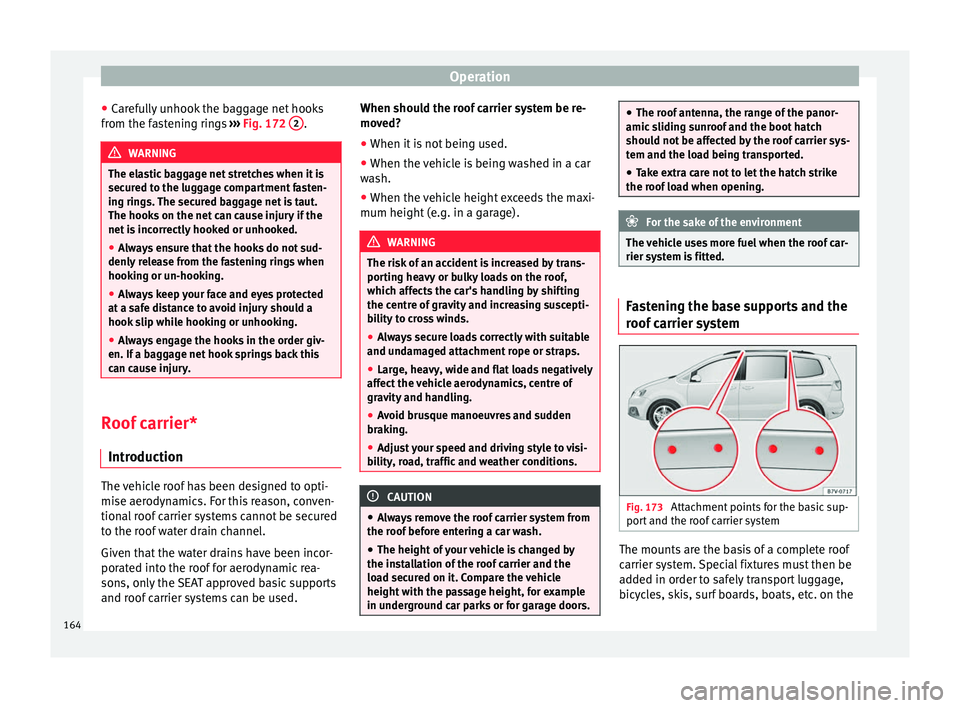
arrier system Fig. 173
Attachment points for the basic sup-
por t and the r
oof carrier system The mounts are the basis of a complete roof
c
arrier sy
s
tem. Special fixtures must then be
added in order to safely transport luggage,
bicycles, skis, surf boards, boats, etc. on the
164