phone Seat Alhambra 2018 User Guide
[x] Cancel search | Manufacturer: SEAT, Model Year: 2018, Model line: Alhambra, Model: Seat Alhambra 2018Pages: 324, PDF Size: 7.04 MB
Page 110 of 324
Operation
Communications and multimedia
St eerin
g wheel
controls*
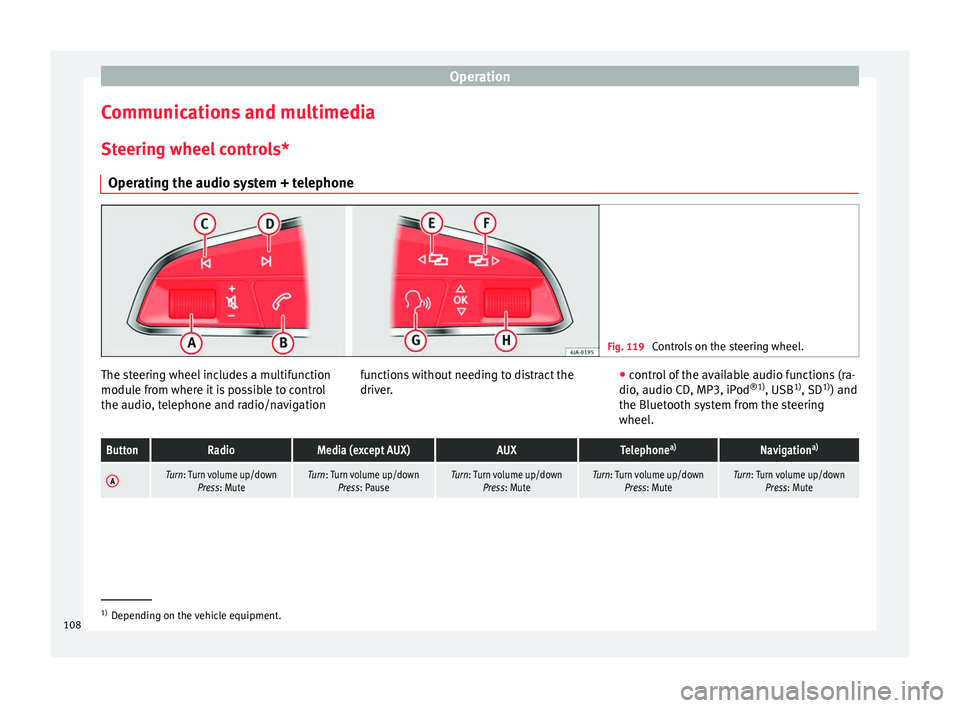
Operating the audio system + telephone Fig. 119
Controls on the steering wheel. The steering wheel includes a multifunction
modu
l
e fr
om where it is possible to control
the audio, telephone and radio/navigation functions without needing to distract the
driver.
●
c ontro
l of the available audio functions (ra-
dio, audio CD, MP3, iPod ®1)
, USB 1)
, SD 1)
) and
the Bluetooth system from the steering
wheel.
ButtonRadioMedia (except AUX)AUXTelephone a)Navigation a)
ATurn: Turn volume up/down
Press: MuteTurn: Turn volume up/downPress: PauseTurn: Turn volume up/down Press: MuteTurn: Turn volume up/downPress: MuteTurn: Turn volume up/downPress: Mute 1)
Depending on the vehicle equipment.
108
Page 111 of 324
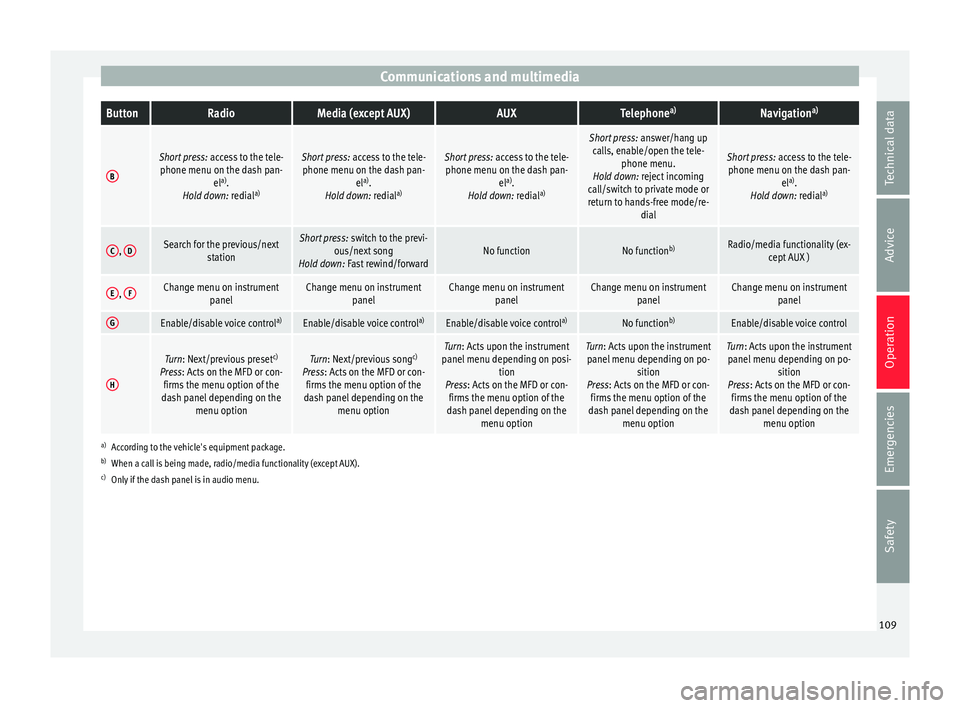
Communications and multimediaButtonRadioMedia (except AUX)AUXTelephone
a)Navigation a)
B
Short press:
access to the tele-
phone menu on the dash pan- ela)
.
Hold down: redial a)Short press:
access to the tele-
phone menu on the dash pan- ela)
.
Hold down: redial a)Short press:
access to the tele-
phone menu on the dash pan- ela)
.
Hold down: redial a)
Short press:
answer/hang up
calls, enable/open the tele- phone menu.
Hold down: reject incoming
call/switch to private mode or
return to hands-free mode/re- dial
Short press: access to the tele-
phone menu on the dash pan- ela)
.
Hold down: redial a)
C,
DSearch for the previous/next
stationShort press: switch to the previ-
ous/next song
Hold down: Fast rewind/forwardNo functionNo function b)Radio/media functionality (ex-
cept AUX )
E, FChange menu on instrument
panelChange menu on instrumentpanelChange menu on instrumentpanelChange menu on instrumentpanelChange menu on instrumentpanel
GEnable/disable voice control a)Enable/disable voice controla)Enable/disable voice controla)No functionb)Enable/disable voice control
H
Turn: Next/previous preset c)
Press: Acts on the MFD or con- firms the menu option of the
dash panel depending on the menu optionTurn: Next/previous song c)
Press: Acts on the MFD or con- firms the menu option of the
dash panel depending on the menu optionTurn: Acts upon the instrument
panel menu depending on posi- tion
Press: Acts on the MFD or con- firms the menu option of the
dash panel depending on the menu optionTurn: Acts upon the instrumentpanel menu depending on po- sition
Press: Acts on the MFD or con- firms the menu option of the
dash panel depending on the menu optionTurn: Acts upon the instrumentpanel menu depending on po- sition
Press: Acts on the MFD or con- firms the menu option of the
dash panel depending on the menu option
a)According to the vehicle's equipment package.
b) When a call is being made, radio/media functionality (except AUX).
c) Only if the dash panel is in audio menu.
109
Technical data
Advice
Operation
Emergencies
Safety
Page 112 of 324
Operation
Multimedia USB/A UX
-IN inp
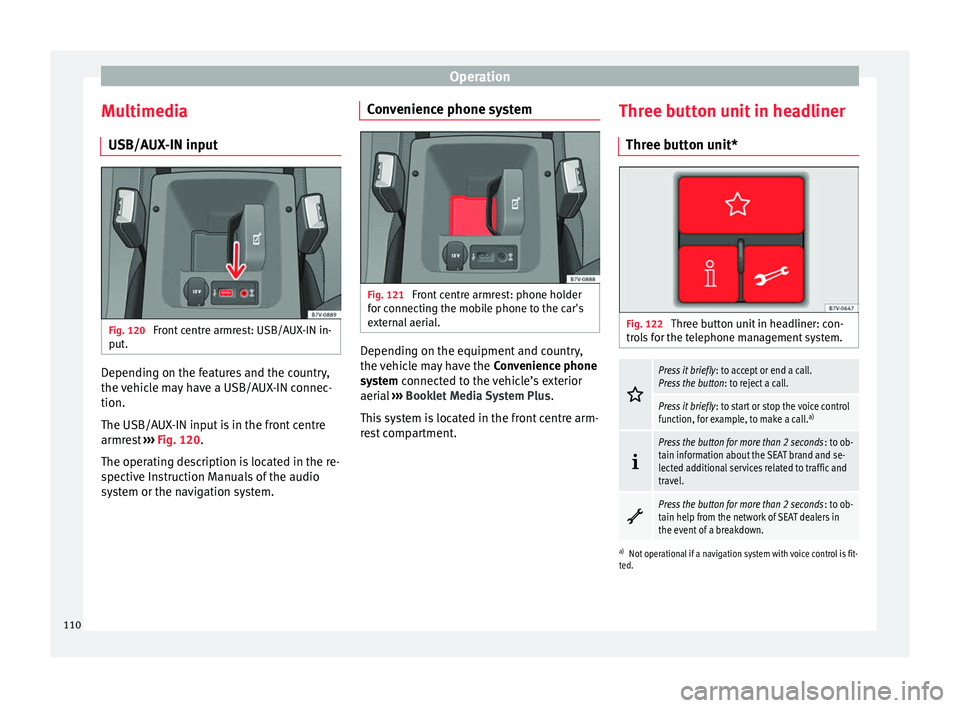
utFig. 120
Front centre armrest: USB/AUX-IN in-
p ut
. Depending on the features and the country,
the
v
ehic
le may have a USB/AUX-IN connec-
tion.
The USB/AUX-IN input is in the front centre
armrest ››› Fig. 120.
The operating description is located in the re-
spective Instruction Manuals of the audio
system or the navigation system. Convenience phone system
Fig. 121
Front centre armrest: phone holder
f or c
onnectin
g the mobile phone to the car's
external aerial. Depending on the equipment and country,
the
v
ehic
le may have the Convenience phone
system connected to the vehicle’s exterior
aerial ››› Booklet Media System Plus .
This system is located in the front centre arm-
rest compartment. Three button unit in headliner
Three butt
on unit* Fig. 122
Three button unit in headliner: con-
tr o
l
s for the telephone management system.
Press it briefly
: to accept or end a call.
Press the button : to reject a call.
Press it briefly: to start or stop the voice control
function, for example, to make a call. a)
Press the button for more than 2 seconds
: to ob-
tain information about the SEAT brand and se-
lected additional services related to traffic and
travel.
Press the button for more than 2 seconds
: to ob-
tain help from the network of SEAT dealers in
the event of a breakdown.
a) Not operational if a navigation system with voice control is fit-
ted.
110
Page 113 of 324
Communications and multimedia
Information and assistance calls Communication with the SEAT Customer Care
Service is established using the
and but-
t
ons of the three-button unit 1)
. The system
will automatically connect you with the Assis-
tance Centre of the relevant country. You will
only be able to make calls if your mobile is
turned on and connected to the pre-installed
Bluetooth.
Information call
The Information call button offers in-
formation on the SEAT brand and selected
additional services related to traffic and your
travel.
To establish communication, press the but-
ton for more than 2 seconds.
In countries where there is no information tel-
ephone number, an information call is made
by pressing the button.
Assistance call
The assistance call button gives im-
mediate help in case of a breakdown. To this
end, the SEAT dealer network, with its mobile
assistance vehicles, is at your disposal.
To establish communication, press the
button for more than 2 seconds. Note
● Calls made with the and buttons take
priority over normal calls. If the or button
i
s pressed during a normal telephone call,
this call will be cut off and an information call
or assistance call will be made.
● If the assistance call button is pressed
during an information call, the information
call will be interrupted to make the assis-
tance call (and vice versa).
● Mobile phone coverage must be available
to place a call to the information and assis-
tance services. This service might not be
available in some countries. Activating and deactivating
Switching on the speech control system
● Press the button on the multi-function
steering wheel.
● OR: on the three-button unit, press
.
● Wait
for the acoustic signal.
● Give the command.
● Follow the dialogue instructions (extended
dialogue). Ending voice control
●
Press the
button on the multi-function
steering wheel.
● OR:
on the three-button unit, press .
Interrupting the instructions
● During the instructions, press the
button
on the multi-function steering wheel.
● OR:
on the three-button unit, press .
● You will be able to give a command imme-
diately afterwards. 1)
Depending upon country.
111
Technical data
Advice
Operation
Emergencies
Safety
Page 115 of 324
Opening and closing
CAUTION
All of the vehicle keys contain electronic com-
ponents. Pr ot
ect them from damage, impacts
and humidity. Note
● Only u
se the key button when you require
the corresponding function. Pushing the but-
ton unnecessarily could accidentally unlock
the vehicle or trigger the alarm. It is also pos-
sible even when you are outside the radius of
action.
● Key operation can be greatly influenced by
overl
apping radio signals around the vehicle
working in the same range of frequencies
(e.g. radio transmitters, mobile telephones).
● Obstacles between the remote control and
the vehic
le, bad weather conditions and
draining batteries can considerably reduce
the range of the remote control. Control lamp on the vehicle key
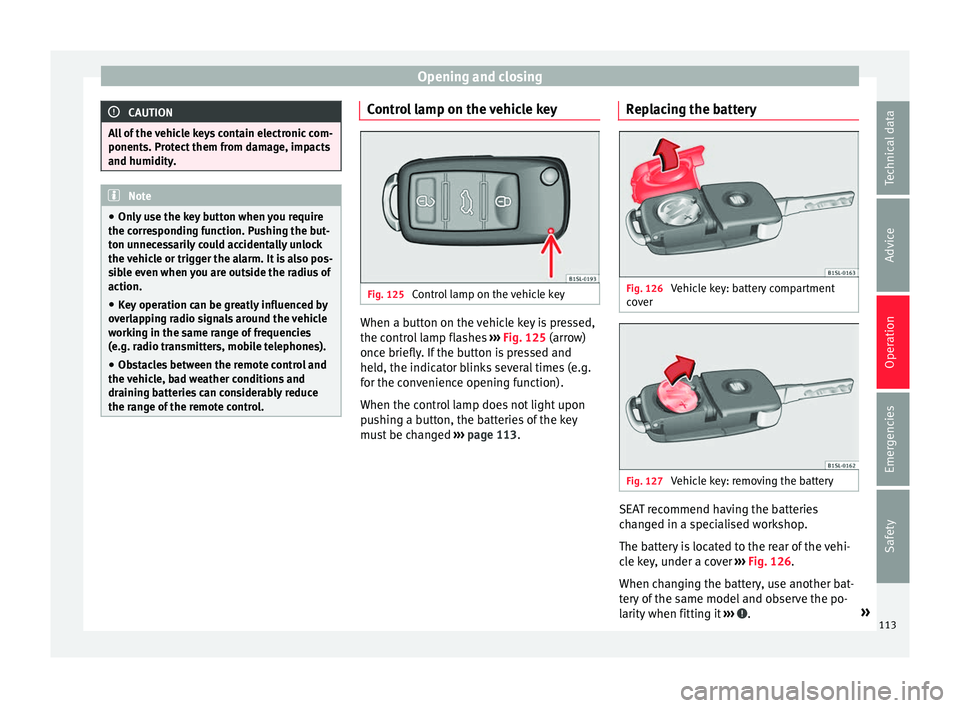
Fig. 125
Control lamp on the vehicle key When a button on the vehicle key is pressed,
the c ontr
o
l lamp flashes ››› Fig. 125 (arrow)
once briefly. If the button is pressed and
held, the indicator blinks several times (e.g.
for the convenience opening function).
When the control lamp does not light upon
pushing a button, the batteries of the key
must be changed ››› page 113. Replacing the battery Fig. 126
Vehicle key: battery compartment
c o
v
er Fig. 127
Vehicle key: removing the battery SEAT recommend having the batteries
c
h
an
ged in a specialised workshop.
The battery is located to the rear of the vehi-
cle key, under a cover ››› Fig. 126.
When changing the battery, use another bat-
tery of the same model and observe the po-
larity when fitting it ››› .
»
113
Technical data
Advice
Operation
Emergencies
Safety
Page 123 of 324
Opening and closing
Switching off the interior monitoring and the
anti-t o
w sy
stems
The vehicle interior monitoring is switched off
by pressing the remote control lock button
twice.
● Lock all doors and rear lid.
● Use the key to lock the vehicle. The interior
monitoring and / or anti-t
owing alarm are
switched off until the next time the vehicle is
locked.
To turn off the interior monitoring and anti-
tow systems before unlocking the vehicle, for
example in the following situations:
● When leaving animals inside the vehicle
›››
page 114.
● When the vehicle must be loaded.
● When the vehicle is being transported, for
examp
le, by ferry.
● When the vehicle must be towed with the
axle r
aised.
Risk of false alarms
The interior monitoring system will only oper-
ate correctly if the vehicle is completely
closed. Observe legal requirements. The
alarm may be accidentally triggered in the
following cases:
● When a window is completely or partially
open. ●
If the su
nglasses storage compartment in
the roof console is open.
● When the panoramic sliding sunroof is
compl
etely or partially open.
● When suspended objects are hung from
the interior mirror (air fr
eshener) or there are
loose papers in the vehicle.
● If the separation net is fitted and moves
(due to heatin
g).
● Due to a vibrating mobile telephone inside
the vehic
le. Note
Upon activating the alarm, if any door or the
re ar lid i
s open, only the anti-theft alarm will
be activated. The interior monitoring and an-
ti-tow systems will only be activated when
the doors and rear lid are fully closed. Doors
Intr oduction WARNING
If a door is not correctly closed, it could open
une xpect
edly when driving and cause serious
injuries.
● Always stop immediately and close the
door. ●
When clo s
ing, ensure that the door has
closed correctly. A closed door should be
flush with the corresponding parts of the
bodywork.
● Open and close doors only when nobody is
in the way
of the door. WARNING
A door held open by its retainer could be
b lo wn c
losed by the wind or close if the vehi-
cle is on a hill, causing injury.
● When opening and closing doors, always
use the door handl
e. Warning lamp
It lights up
At least one vehicle
door is open or not
correctly shut.
Stop driving immediately!
Open the corresponding door
and close it immediately. Several warning and control lamps light up
f
or a f
ew sec
onds when the ignition is switch-
ed on, signalling that the function is being
verified. They will switch off after a few sec-
onds.
If a door is open or not properly closed, the
warning lamp or will light up on the in-
strument panel.
Depending on the vehicle equipment, a sym-
bol may be displayed on the dash panel »
121
Technical data
Advice
Operation
Emergencies
Safety
Page 249 of 324
Care and maintenance
Advice
C ar
e and m
aintenance
Accessories, replacement of
parts and modifications Introduction WARNING
The use of spare parts and accessories, or in-
corr ectly
performed modifications or repairs
may result in damage to the vehicle, acci-
dents and serious injury.
● SEAT strongly recommends you to only use
SEAT ap
proved accessories and SEAT ®
origi-
nal spare parts. These parts and accessories
have been specially tested by SEAT for suita-
bility, reliability and safety.
● Have any repairs or modifications carried
out at a s
pecialised workshop. These work-
shops have the necessary tools, diagnostics
equipment, repair information and qualified
personnel.
● Only mount parts with the same specifica-
tions a
s the parts fitted at factory.
● Never mount, fasten or fit objects such as
drink hol
ders or telephone cradles over the
covers of the airbag modules or within their
radius of action. ●
Only u
se wheels and tyre combinations
which have been approved by SEAT for your
vehicle type. Accessories and spare parts
SEAT recommends you consult an Official
Serv
ic
e before purchasing accessories and
spare parts or consumables. For example,
when fitting accessories at a later date, or
when replacing a component. A technical
service centre will advise you as to the legal
requirements and manufacturer's recommen-
dations regarding accessories, spare parts
and other components.
SEAT recommend you use only approved
SEAT accessories and genuine SEAT spare
parts ®
. These parts and accessories have
been specially tested by SEAT for suitability,
reliability and safety. In addition the techni-
cal service centre will guarantee that the as-
sembly is carried out professionally.
Although we continually monitor the market,
SEAT cannot guarantee that products not ap-
proved by SEAT are reliable, safe and suita-
ble for the vehicle. Therefore, SEAT cannot ac-
cept liability, even in those cases authorised
by an officially recognised technical inspec-
tion office or other official body.
Any retro-fitted equipment which has a direct
effect on the vehicle and/or the way it is driv- en must be approved by SEAT for use in your
vehic
l
e and bear the e mark (the European
Union's authorisation symbol). This includes
cruise control systems or electronically con-
trolled suspension.
If any additional electrical devices are fitted
which do not serve to control the vehicle it-
self, these must bear the mark (European
Union manufacturer conformity declaration).
This includes refrigerator boxes, laptops or
ventilator fans. WARNING
Unprofessional repairs or modifications to
the v ehic
le may affect the performance of the
airbags, and may cause operating faults or fa-
tal accidents.
● Never mount, fasten or fit objects such as
drink hol
ders or telephone cradles over the
covers of the airbag modules or within their
radius of action.
● Objects placed over the airbag covers, or
within their ra
dius of action, could lead to se-
rious injury or loss of life if the airbags are
triggered. Service fluids and components
All vehicle fluids and consumables
, s
uc h a
s
notched belts, tyres, coolant fluids, engine
oils, spark plugs and batteries are continual-
ly being developed. Therefore all fluids and »
247
Technical data
Advice
Operation
Emergencies
Safety
Page 251 of 324
Care and maintenance
●
All
repairs and modifications to the vehicle
should only be performed by a specialised
workshop. Repairs and malfunctions in the air-
bag sy
s
tem When performing repairs and technical mod-
ification
s,
SEAT's directives must be ob-
served! ››› Modifications and repairs to the front bump-
er
, door
s, fr
ont seats, and repairs to the roof
or chassis should only be carried out in a
specialised workshop. These components
may contain parts or sensors belonging to
the airbag system.
If work is carried out on the airbag system or
parts have to be removed and fitted on the
system when performing other repair work,
parts of the airbag system may be damaged.
The consequence may be that, in the event of
an accident, the airbag inflates incorrectly or
does not inflate at all.
So that the effectiveness of the airbag is not
reduced and that removed parts do not cause
any injuries or environmental pollution, regu-
lations must be observed. These require-
ments are known to specialised workshops.
Modifications to the vehicle suspension may
affect the operation of the airbag system in
the event of collision. For example, if wheel and tyre combinations not approved by SEAT
are used, or if
the vehicle height is lowered,
the suspension is stiffened or the suspension
springs, telescopic arms, dampers, etc., are
modified, the results received by the airbag
sensors and sent to the control unit may not
be accurate. For example, some modifica-
tions to the suspension could increase the
force measured by the sensors and result in
the triggering of the airbag systems in colli-
sions. Under normal conditions, the meas-
ured values would be lower and the airbag
would not have been triggered. Other modifi-
cations may reduce the forces measured by
the sensors and prevent the airbags from be-
ing triggered when they should. WARNING
Repairs or modifications which are not per-
formed c orr
ectly may result in damage or er-
rors in the vehicle operation, affecting the ef-
fectiveness of the airbag systems. This could
result in serious or fatal accidents.
● All repairs and modifications to the vehicle
should on
ly be performed by a specialised
workshop.
● Airbag modules must never be repaired: if
damag
ed, they must be replaced.
● Never fit recycled or reused airbag compo-
nents in
your vehicle. WARNING
Modifications to the vehicle suspension, in-
cludin g the u
se of unauthorised wheel and
tyre combinations, may affect the perform-
ance of the airbags and increase the risk of
serious or fatal injury in the event of acci-
dent.
● Never fit suspension components which are
not identica
l to the original parts in the vehi-
cle.
● Never use wheel and tyre combinations not
appro
ved by SEAT. Retrofitting of mobile phones
An exterior aerial is required for the use of
tw
o-w
a
y radios in the vehicle.
The retro-fitting of electrical or electronic ap-
pliances in the vehicle is subject to their ap-
proval for use in your vehicle. Under certain
circumstances, this could mean that your ve-
hicle registration documents are no longer
valid.
SEAT has approved your vehicle for use with
two-way radios providing the following condi-
tions are observed:
● The exterior aerial must be mounted pro-
fes
sionally.
● The maximum transmitting power is 10
watts. »
249
Technical data
Advice
Operation
Emergencies
Safety
Page 252 of 324
Advice
The optimal reach of the equipment is only
ac hiev
ed w
ith an external aerial.
Check first with a specialised workshop that
understands the technical possibilities of in-
stallation if you wish to use a two-way radio
with a transmitting power of over 10 watts.
SEAT recommends taking your car in for tech-
nical service.
All legal requirements, together with the in-
structions for the use of two-way radios must
be observed. WARNING
If the two-way radio is not securely fastened
in pos ition, it
could be sent flying around the
vehicle in the event of sharp braking, sudden
manoeuvres or accident, causing injury.
● While driving, two-way radios must be se-
curely
fastened in position, outside the radi-
us of action of the airbags, or safely stowed
away. WARNING
When using a two-way radio without a con-
nection to an e xt
erior aerial, the maximum
permitted levels of electromagnetic radiation
may be exceeded. This is also the case if the
aerial has not been correctly installed.
● You should only use a two-way radio inside
the vehic
le if it has first been correctly con-
nected to an exterior aerial. Information stored by the control
u
nit
s Your vehicle is fitted at the factory with a ser-
ies
of
electronic control units responsible for
the engine and gearbox management. In ad-
dition, the control units supervise the per-
formance of the exhaust gas system and the
airbag systems.
Therefore, while the vehicle is being driven,
these electronic control units are continuous-
ly analysing the vehicle data. In the event of
faults or deviations from the theoretical val-
ues, only this data is stored. Normally, the
warning lamps on the instrument panel light
up in the event of faults.
This data can only be read and analysed us-
ing special equipment.
The storing of the data allows specialised
workshops to detect and repair faults. Stored
data may include:
● Data relating to the engine or the gearbox
● Speed
● Direction of travel
● Braking force
● Detection of seat belt
The v ehic
le control units never record conver-
sations held by passengers in the vehicle.
In vehicles equipped with an emergency call
function via the mobile phone or other appli- ances connected in the vehicle, it is possible
to send the v
ehicle position. If the control
unit records an accident with airbag activa-
tion, the system may automatically send a
signal. This will depend on the network oper-
ator. Normally, transmission is only possible
in areas with good coverage.
Event Data Recorder
The vehicle is not fitted with an event data re-
corder.
An event data recorder temporarily stores the
vehicle information. Therefore, in the event of
an accident, it is possible to obtain detailed
information about how the accident occur-
red. For example, in vehicles with airbag sys-
tems, data relating to speed of impact, seat
belt status, seat positions and airbag activa-
tion times may be stored. The volume of data
depends on the manufacturer.
Event data recorders can only be mounted
with authorisation from the vehicle owner
and, in some countries, they are governed by
local legislation.
Reprogramming control units
On the whole, all the data required for the
component management is stored in the con-
trol units. The programming of certain con-
venience functions, such as the turn signals,
individual door opening and instructions on
the display can be modified using special
250
Page 253 of 324
Care and maintenance
equipment at the workshop. If this is the
c a
se, the inf
ormation and descriptions given
in the Instruction Manual will not match the
original functions. Therefore, SEAT recom-
mends that any modifications be recorded in
the section “Other workshop notes” in the
Maintenance Programme.
The technical service centre must have a re-
cord of any modification to the programming.
Reading the vehicle fault memory
There is a diagnostics connector in the vehi-
cle interior for reading the vehicle fault mem-
ory. The fault memory documents errors and
deviations from the theoretical values of the
electronic control units.
The diagnostics connector is in the driver
side footwell area, next to the lever for open-
ing the bonnet, below a cover.
The fault memory should only be read and re-
set by a specialised workshop.
Using a mobile telephone in a vehicle
without c
onnection to an exterior aer-
ial Mobile telephones transmit and receive radio
w
av
e
s, both when in use and when on stand-
by. Scientific studies state that radio waves
exceeding certain values may be harmful to
the human body. International committees and authorities have established limits and
directive
s in order to ensure electromagnetic
radiation from mobile phones remains within
certain limits that do not endanger health.
Nevertheless, there is no conclusive scientif-
ic evidence that wireless telephones are to-
tally safe.
Therefore, some experts recommend that use
of mobile phone be kept to a minimum until
the results of current research are published.
When a mobile phone not connected to an
exterior aerial is used inside the vehicle, the
electromagnetic radiation may be greater
than if the mobile phone were connected to a
built-in aerial or to another exterior aerial.
If the vehicle is fitted with a suitable hands-
free device, it will comply with the legislation
in many countries which only permits the use
of mobile phones inside vehicles using a
hands-free device.
The hands-free system mounted at the facto-
ry has been designed for use with conven-
tional mobile phones and phones with Blue-
tooth technology. Mobile phones should be
placed on a suitable phone cradle. In addi-
tion, the cradle should always be correctly fit-
ted into the base plate. This ensures that the
mobile phone is securely attached to the
dash panel, it is always within reach of the
driver and is connected to the vehicle exterior
aerial. If the mobile phone is connected to an aerial
incorporat
ed into the vehicle or an exterior
aerial connected to the vehicle, it will help re-
duce the electromagnetic radiation transmit-
ted and the risk to human health. It will also
improve the quality of the connection.
If the phone is used inside the vehicle with-
out the hands-free system, it will not be se-
curely fastened and will not be connected to
the exterior aerial of the vehicle telephone.
Nor will the telephone charge if it is not on
the support. In addition, some calls may
break off and the quality of the connection
will be affected.
Mobile phones should only be used inside
the vehicle if they are connected to a hands-
free system with an exterior aerial. WARNING
If the mobile phone is not securely fastened
in pos ition, it
could be sent flying around the
vehicle in the event of sharp braking, sudden
manoeuvres or accident, causing injury.
● While driving, mobile phones must be se-
curely
fastened in position, outside the radi-
us of action of the airbags, or safely stowed
away. WARNING
When using a mobile phone without a con-
nection to an e xt
erior aerial, the maximum
permitted levels of electromagnetic radiation » 251
Technical data
Advice
Operation
Emergencies
Safety