radio Seat Alhambra 2018 User Guide
[x] Cancel search | Manufacturer: SEAT, Model Year: 2018, Model line: Alhambra, Model: Seat Alhambra 2018Pages: 324, PDF Size: 7.04 MB
Page 178 of 324
Operation
Air conditioning
Air c onditionin
g
Intr
oduction Viewing Climatronic information
The fact
or
y-fitted radio or navigation system
screen briefly displays information relating to
Climatronic.
The units of temperature measurement is dis-
played on the factory-installed radio or navi-
gation system and, depending on the vehicle
equipment, can be set using the Configu-
ration menu on the instrument panel. WARNING
Reduced visibility through the windows in-
cr e
ases the risk of serious accidents.
● Ensure that all windows are free of ice and
snow and th
at they are not fogged up pre-
venting a clear view of everything outside.
● The maximum heat output required to de-
fros
t windows quickly is only available when
the engine has reached its normal running
temperature. Only drive when you have good
visibility.
● Always ensure that you use the air condi-
tioner and heated r
ear window to maintain
good visibility.
● Never leave the air recirculation on for a
long period of time. If
the cooling system is switched off and air recirculation mode
swit
c
hed on, the windows can mist over very
quickly, considerably limiting visibility.
● Switch air recirculation mode off when it is
not requir
ed. WARNING
Stuffy or used air will increase fatigue and re-
duc e driv er c
oncentration possibly resulting
in a serious accident.
● Never leave the fresh air fan turned off or
use the air rec
irculation for long periods of
time; the air in the vehicle interior will not be
refreshed. CAUTION
● Swit c
h the air conditioner off if you think it
may be broken. This will avoid additional
damage. Have the air conditioner checked by
a specialised workshop.
● Repairs to the air conditioner require spe-
cia
list knowledge and special tools. SEAT rec-
ommends taking your car in for technical
service.
● Do not smoke when air recirculation is
switc
hed on in vehicles with an air condition-
er. The smoke taken in could lie on the cool-
ing system vaporiser and on the activated
charcoal cartridge of the dust and pollen fil-
ter, leading to a permanently unpleasant
smell. Note
● When the coo lin
g system is turned off, air
coming from the outside will not be dried. To
avoid fogging up the windows, SEAT recom-
mends leaving the cooler (compressor) on. To
do this, press the A/C button. The button
lamp shou l
d light up.
● If the humidity and temperature outside the
vehicl
e are high, condensation can drip off
the evaporator in the cooling system and
form a pool underneath the vehicle, this is
completely normal and there is no need to
suspect a leak.
● Keep the air intake slots in front of the
winds
creen free of snow, ice and leaves to en-
sure heating and cooling are not impaired,
and to prevent the windows from misting
over. Controls
Read the additional information carefully
› ›
›
page 37
To switch a function on or off, press the ap-
propriate button. Press the button again to
switch off the function.
The LED on each control lights up to indicate
that the respective function of a control has
been switched on.
Some Climatronic controls may also be on
the air conditioner control panel located in
176
Page 179 of 324
Air conditioning
the rear centre console. These controls are
u sed t
o m
ake the appropriate settings for the
rear seats. Note
● Not a l
l Climatronic buttons are operational
in mode.
● The button is locked in defrost mode.
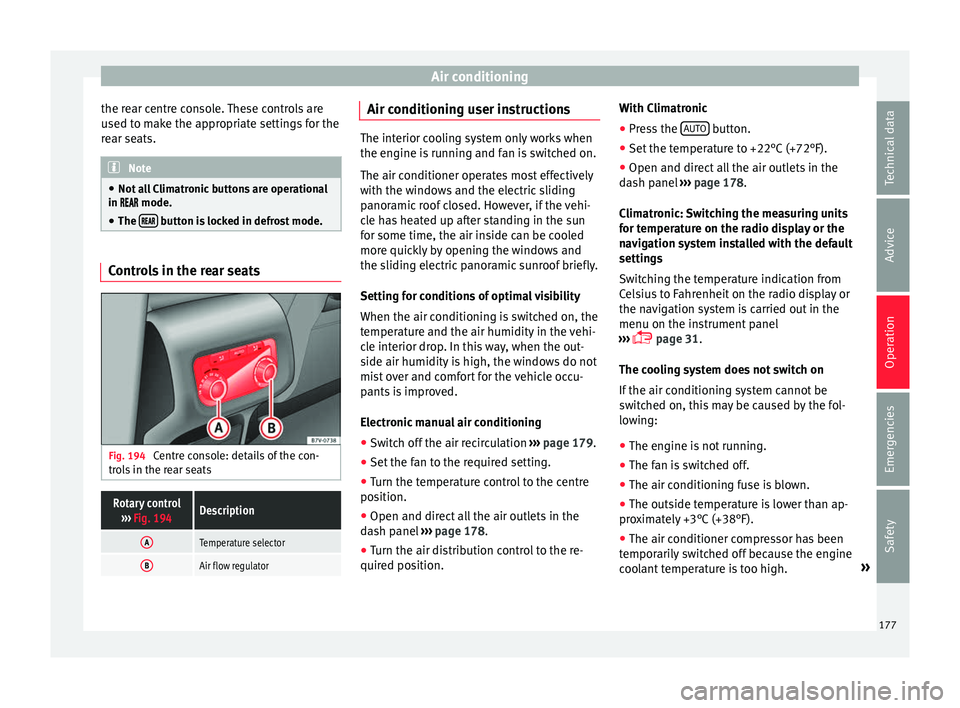
Controls in the rear seats
Fig. 194
Centre console: details of the con-
tr o
l
s in the rear seats
Rotary control
››› Fig. 194Description
ATemperature selector
BAir flow regulator Air conditioning user instructions
The interior cooling system only works when
the engine i
s
running and fan is switched on.
The air conditioner operates most effectively
with the windows and the electric sliding
panoramic roof closed. However, if the vehi-
cle has heated up after standing in the sun
for some time, the air inside can be cooled
more quickly by opening the windows and
the sliding electric panoramic sunroof briefly.
Setting for conditions of optimal visibility
When the air conditioning is switched on, the
temperature and the air humidity in the vehi-
cle interior drop. In this way, when the out-
side air humidity is high, the windows do not
mist over and comfort for the vehicle occu-
pants is improved.
Electronic manual air conditioning
● Switch off the air recirculation ››
›
page 179.
● Set the fan to the required setting.
● Turn the temperature control to the centre
position.
● Open and dir
ect all the air outlets in the
dash p
anel ›››
page 178.
● Turn the air distribution control to the re-
quired pos
ition. With Climatronic
●
Press the AUTO button.
● Set the temperature to +22°C (+72°F).
● Open and direct all the air outlets in the
d a
sh p
anel ››› page 178.
Climatronic: Switching the measuring units
for temperature on the radio display or the
navigation system installed with the default
settings
Switching the temperature indication from
Celsius to Fahrenheit on the radio display or
the navigation system is carried out in the
menu on the instrument panel
››› page 31.
The cooling system does not switch on
If the air conditioning system cannot be
switched on, this may be caused by the fol-
lowing:
● The engine is not running.
● The fan is switched off.
● The air conditioning fuse is blown.
● The outside temperature is lower than ap-
prox
imately +3°C (+38°F).
● The air conditioner compressor has been
temporari
ly switched off because the engine
coolant temperature is too high. »
177
Technical data
Advice
Operation
Emergencies
Safety
Page 215 of 324
Driver assistance systems
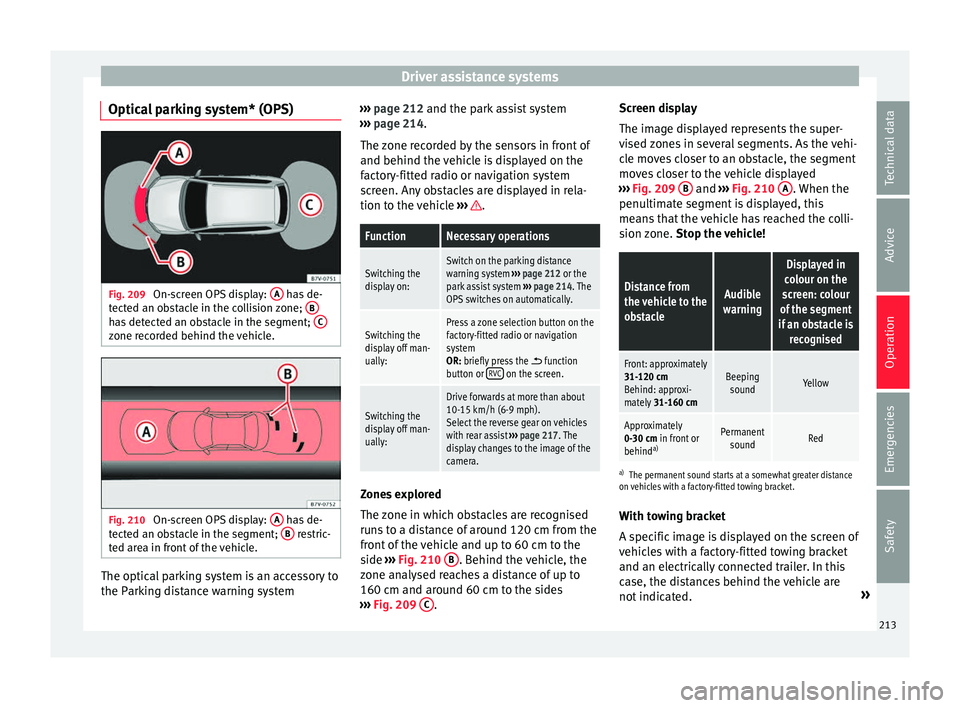
Optical parking system* (OPS) Fig. 209
On-screen OPS display: A has de-
t ect
ed an o
bstacle in the collision zone; Bhas detected an obstacle in the segment;
Czone recorded behind the vehicle.
Fig. 210
On-screen OPS display: A has de-
t ect
ed an o
bstacle in the segment; B restric-
t ed ar e
a in front of the vehicle. The optical parking system is an accessory to
the P
ark
in
g distance warning system ›››
page 212 and the park assist system
››
› page 214.
The zone recorded by the sensors in front of
and behind the vehicle is displayed on the
factory-fitted radio or navigation system
screen. Any obstacles are displayed in rela-
tion to the vehicle ››› .
FunctionNecessary operations
Switching the
display on:Switch on the parking distance
warning system
››› page 212 or the
park assist system ››› page 214. The
OPS switches on automatically.
Switching the
display off man-
ually:Press a zone selection button on the
factory-fitted radio or navigation
system
OR: briefly press the
function
button or RVC on the screen.
Switching the
display off man-
ually:
Drive forwards at more than about
10-15 km/h (6-9 mph).
Select the reverse gear on vehicles
with rear assist
››› page 217. The
display changes to the image of the
camera. Zones explored
The
z
one in whic
h obstacles are recognised
runs to a distance of around 120 cm from the
front of the vehicle and up to 60 cm to the
side ›››
Fig. 210 B . Behind the vehicle, the
z one an
aly
sed reaches a distance of up to
160 cm and around 60 cm to the sides
››› Fig. 209 C .Screen display
The im
ag
e di
splayed represents the super-
vised zones in several segments. As the vehi-
cle moves closer to an obstacle, the segment
moves closer to the vehicle displayed
››› Fig. 209 B and
›››
Fig. 210
A . When the
penu ltim
at
e segment is displayed, this
means that the vehicle has reached the colli-
sion zone. Stop the vehicle!
Distance from
the vehicle to the
obstacleAudible
warning
Displayed in
colour on the
screen: colour
of the segment
if an obstacle is recognised
Front: approximately
31-120 cmBehind: approxi-
mately 31-160 cmBeeping
soundYellow
Approximately
0-30 cm in front or
behind a)Permanent
soundRed
a) The permanent sound starts at a somewhat greater distance
on vehicles with a factory-fitted towing bracket.
With towing bracket
A specific image is displayed on the screen of
vehicles with a factory-fitted towing bracket
and an electrically connected trailer. In this
case, the distances behind the vehicle are
not indicated. »
213
Technical data
Advice
Operation
Emergencies
Safety
Page 216 of 324
Operation
Switching the parking sensor system sound
on and off
If the
b
utton on the radio or navigation
system screen is pressed briefly, it may mute
the sound of OPS warnings. To switch the
warnings back on, press the button again
briefly.
When the OPS is switched off and back on
again, muting is cancelled. Error messages
cannot be switched off. WARNING
Do not be distracted from the traffic when
lookin g at
the screen. Park Assist system* (Park As-
s
i
s
t)
Related video Fig. 211
Park Assist Introduction
The Park Assist system helps the driver to
find a suit
ab
le place to park, to insert the ve-
hicle into parallel and perpendicular parking
places and to leave parallel parking places.
The Park Assist system is limited to the sys-
tem abilities and requires that the driver is
especially attentive ››› .
The park in
g sensor system is a component of
the Park Assist system that helps to park the
vehicle.
For vehicles with the optical parking system
(OPS), the radio navigation systems screen
displays the detected zones in front of and
behind the vehicle, indicating - within the
limits of the system - the position of obsta-
cles in relation to the vehicle.
The park assist system cannot be switched
on if the factory-fitted towing bracket is elec-
trically connected to a trailer. WARNING
Despite the assistance provided by the park
as s
ist system, do not run any risks when
parking. The system is not a replacement for
driver awareness.
● Unintentional movements of the vehicle
coul
d cause serious injury.
● Adjust your speed and driving style to visi-
bility
, road, traffic and weather conditions. ●
The sur f
ace of certain objects and items of
clothing and external sound sources may
have a negative affect on the park assist sig-
nals or on the system sensors or may not re-
flect its signals.
● The sensors have blind spots in which ob-
stac
les and people are not registered.
● Always observe the area around the vehi-
cle, a
s the sensors do not always detect
small children, animals or objects. CAUTION
● The p ark a
ssist system aims exclusively at
other parked vehicles, without taking curbs
or other circumstances into account. Make
sure you do not damage the tyres and wheel
rims when parking. Where necessary, stop
manoeuvring to avoid damaging the vehicle.
● The sensors may not always be able to de-
tect o
bjects such as trailer draw bars, thin
rails, fences, posts and trees, etc. This could
result in damage to your car.
● Although the parking distance warning sys-
tem detect
s and warns of the presence of an
obstacle, the obstacle could disappear from
the angle of measurement of the sensors if it
is too high or low and the system would no
longer show it. Therefore, it will not warn you
of these objects. Ignoring the warnings of the
parking sensor system could cause consider-
able damage to the vehicle. This is also valid
when using the park assist (e.g. to park be-
hind a truck or motorcycle). Therefore, always
keep a close watch on the area in front of and 214
Page 219 of 324
Driver assistance systems
● Fo
l
low the instructions given by the park
assist system.
● When the next indication appears, release
the steerin
g wheel ››› in Parking using the
p ark
a
ssist system on page 216: The sys-
tem will move the steering wheel!
Observe the surrounding area.
● Observe the surrounding area and acceler-
ate car
efully at a maximum of 7 km/h
(4 mph).
● The park assist system is only r
esponsible
for moving the steering wheel during the ma-
noeuvre. The driver applies the accelerator,
the clutch, the gears and the brake.
● When it is possible to leave the parking
spac
e, the Park Assist system will stop. Take
control of the steering and when traffic condi-
tions permit, leave the parking space.
Automatic stoppage of the manoeuvre
The park assist system stops the manoeuvre
in the event of one of the following:
● Driving faster than 7 km/h (4 mph).
● The driver moves the steering wheel.
● A sliding door is opened. To restart the ma-
noeuvre, c
lose the sliding door and press the
button again.
● There is a system malfunction (system tem-
porarily
unavailable).
● The ASR system is switched off or the ASR
or ESC i
s working. WARNING
The steering wheel turns quickly automatical-
ly when l e
aving a parking space using the
park assist system. Placing your hand be-
tween the steering wheel spokes could lead
to injuries. Park Assist brake operation
The Park Assist system helps the driver by
brak
in
g automatically. Automatic braking
does not relieve the driver of responsibility
for controlling the accelerator, brake and
clutch ››› .
Br ak
in
g to avoid damage at excess speed
It is possible that the system operates the
brakes to reduce excess speed. The parking
manoeuvre can then continue. The brakes
will intervene during each parking process.
Braking to minimise damage
When approaching an obstacle, the vehicle
may brake automatically. In certain circum-
stances (e.g. storm, detection of ultrasounds,
vehicle status, load, inclination), the Park As-
sist system may stop the vehicle completely
before an object.
● Press the foot brake ››
›
!Following the intervention of the brakes, the
P
ark
As
sist will stop. WARNING
Despite the assistance provided by the park
as s
ist system, do not run any risks when
parking. The system is not a replacement for
driver awareness.
● Always be ready to brake.
● Automatic brake intervention will end after
1.5 seconds
approximately. Following auto-
matic intervention of the brakes, stop the ve-
hicle yourself. Rear assist* (Rear View Cam-
er
a)
Intr oduction The camera fitted to the rear lid helps drivers
durin
g p
ark
ing or reversing manoeuvres. The
camera image and certain orientation points
generated by the system are indicated on the
factory-fitted radio or navigation system
screen.
Two types of location point (modes) can be
selected:
● Mode 1: reverse parking perpendicular to
the ro
ad (e.g. in a car park). »
217
Technical data
Advice
Operation
Emergencies
Safety
Page 220 of 324
Operation
● Mode 2: r ev
er
se parking parallel to the
curb.
The mode can be changed by pressing the
button on the radio or navigation system
screen. Only the mode to which the points
can be changed will be displayed. WARNING
Use of the camera to calculate the distance
from o b
stacles (people, vehicles, etc.) is inac-
curate and may cause accidents and severe
injuries.
● The camera lens expands and distorts the
field of
vision and displays the objects on the
screen in a different, vague manner.
● Some objects may not be displayed or may
not be v
ery clear (e.g. very thin posts or fen-
ces), due to the resolution of the monitor or if
the light is dim.
● The camera has blind spots in which obsta-
cle
s and people are not detected.
● Keep the camera lens clean and clear of
snow and ic
e. Do not cover it. WARNING
The intelligent technology in the rear assist
sys t
em cannot change the limits imposed by
the laws of physics and by the system itself.
Careless or uncontrolled use of the rear assist
system may result in severe injuries and acci-
dents. The system is not a replacement for
driver awareness. ●
Adjus t
your speed and driving style to visi-
bility, road, traffic and weather conditions.
● Always keep a close eye on the area around
the vehic
le and always look towards where
you are parking. The display shows the path
of the rear end of the vehicle using the cur-
rent steering angle. The front of the vehicle
turns more in comparison with the rear.
● Do not be distracted from the traffic when
looking at
the screen.
● Always observe the area around the vehi-
cle, a
s the cameras do not always detect chil-
dren, animals or objects.
● The system might not show all areas clear-
ly.
● Only
use the rear assist system when the
boot hat
ch is completely closed. CAUTION
● The camer a on
ly displays 2D images on the
screen. Due to the lack of depth, it might be
difficult or impossible to recognise protrud-
ing objects or cracks in the road.
● The cameras may not always be able to de-
tect o
bjects such as thin rails, fences, posts
and trees, etc. This could result in damage to
your car. Instructions for use
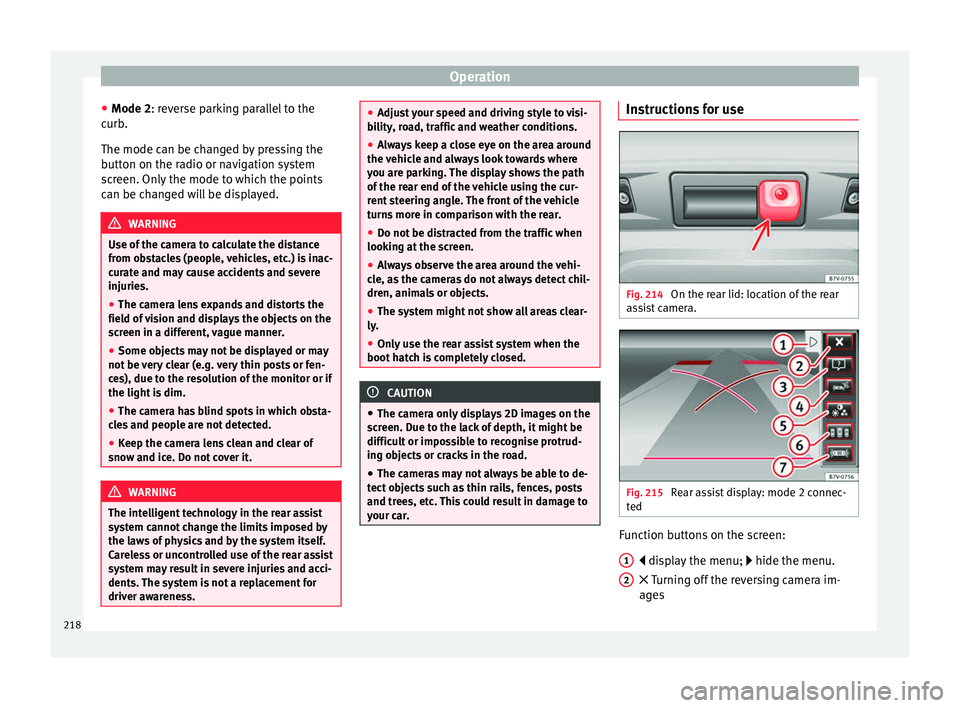
Fig. 214
On the rear lid: location of the rear
a s
s
ist camera. Fig. 215
Rear assist display: mode 2 connec-
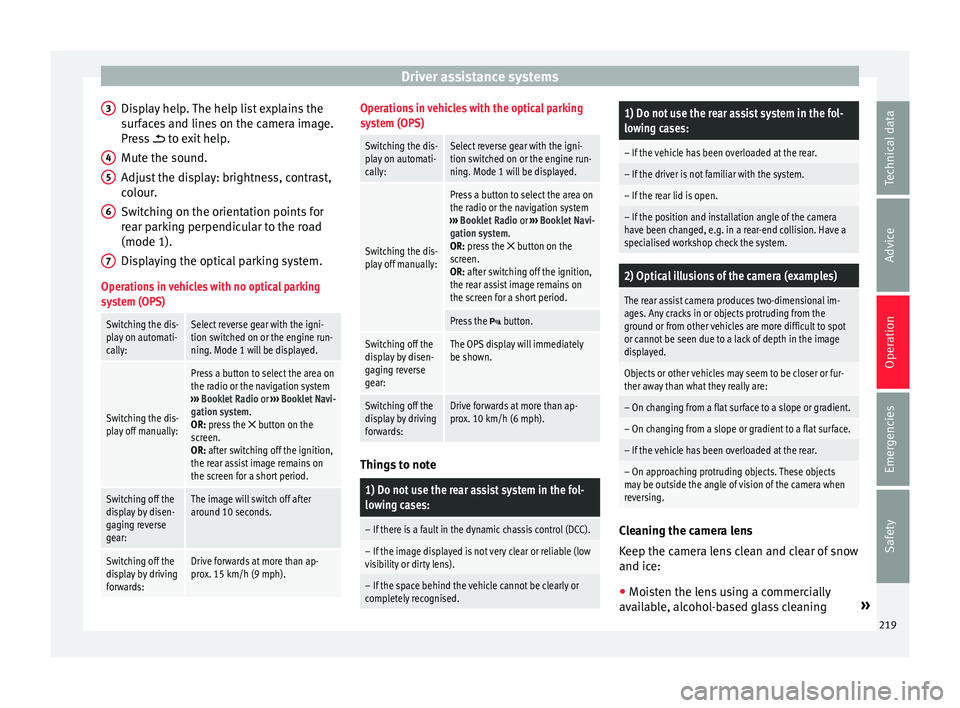
t ed Function buttons on the screen:
di s
p
lay the menu; hide the menu.
Turning off the reversing camera im-
ages
1 2
218
Page 221 of 324
Driver assistance systems
Display help. The help list explains the
s ur
f
aces and lines on the camera image.
Press to exit help.
Mute the sound.
Adjust the display: brightness, contrast,
colour.
Switching on the orientation points for
rear parking perpendicular to the road
(mode 1).
Displaying the optical parking system.
Operations in vehicles with no optical parking
system (OPS)
Switching the dis-
play on automati-
cally:Select reverse gear with the igni-
tion switched on or the engine run-
ning. Mode 1 will be displayed.
Switching the dis-
play off manually:
Press a button to select the area on
the radio or the navigation system
››› Booklet Radio or ››› Booklet Navi-
gation system.
OR: press the
button on the
screen.
OR: after switching off the ignition,
the rear assist image remains on
the screen for a short period.
Switching off the
display by disen-
gaging reverse
gear:The image will switch off after
around 10 seconds.
Switching off the
display by driving
forwards:Drive forwards at more than ap-
prox. 15 km/h (9 mph). 3
4
5
6
7
Operations in vehicles with the optical parking
system (OPS)
Switching the dis-
play on automati-
cally:Select reverse gear with the igni-
tion switched on or the engine run-
ning. Mode 1 will be displayed.
Switching the dis-
play off manually:
Press a button to select the area on
the radio or the navigation system
››› Booklet Radio or ››› Booklet Navi-
gation system.
OR: press the
button on the
screen.
OR: after switching off the ignition,
the rear assist image remains on
the screen for a short period.
Press the button.
Switching off the
display by disen-
gaging reverse
gear:The OPS display will immediately
be shown.
Switching off the
display by driving
forwards:Drive forwards at more than ap-
prox. 10 km/h (6 mph). Things to note
1) Do not use the rear assist system in the fol-
lowing cases:
– If there is a fault in the dynamic chassis control (DCC).
– If the image displayed is not very clear or reliable (low
visibility or dirty lens).
– If the space behind the vehicle cannot be clearly or
completely recognised.
1) Do not use the rear assist system in the fol-
lowing cases:
– If the vehicle has been overloaded at the rear.
– If the driver is not familiar with the system.
– If the rear lid is open.
– If the position and installation angle of the camera
have been changed, e.g. in a rear-end collision. Have a
specialised workshop check the system.
2) Optical illusions of the camera (examples)
The rear assist camera produces two-dimensional im-
ages. Any cracks in or objects protruding from the
ground or from other vehicles are more difficult to spot
or cannot be seen due to a lack of depth in the image
displayed.
Objects or other vehicles may seem to be closer or fur-
ther away than what they really are:
– On changing from a flat surface to a slope or gradient.
– On changing from a slope or gradient to a flat surface.
– If the vehicle has been overloaded at the rear.
– On approaching protruding objects. These objects
may be outside the angle of vision of the camera when
reversing.
Cleaning the camera lens
K
eep the c
amer
a lens clean and clear of snow
and ice:
● Moisten the lens using a commercially
avail
able, alcohol-based glass cleaning »
219
Technical data
Advice
Operation
Emergencies
Safety
Page 251 of 324
Care and maintenance
●
All
repairs and modifications to the vehicle
should only be performed by a specialised
workshop. Repairs and malfunctions in the air-
bag sy
s
tem When performing repairs and technical mod-
ification
s,
SEAT's directives must be ob-
served! ››› Modifications and repairs to the front bump-
er
, door
s, fr
ont seats, and repairs to the roof
or chassis should only be carried out in a
specialised workshop. These components
may contain parts or sensors belonging to
the airbag system.
If work is carried out on the airbag system or
parts have to be removed and fitted on the
system when performing other repair work,
parts of the airbag system may be damaged.
The consequence may be that, in the event of
an accident, the airbag inflates incorrectly or
does not inflate at all.
So that the effectiveness of the airbag is not
reduced and that removed parts do not cause
any injuries or environmental pollution, regu-
lations must be observed. These require-
ments are known to specialised workshops.
Modifications to the vehicle suspension may
affect the operation of the airbag system in
the event of collision. For example, if wheel and tyre combinations not approved by SEAT
are used, or if
the vehicle height is lowered,
the suspension is stiffened or the suspension
springs, telescopic arms, dampers, etc., are
modified, the results received by the airbag
sensors and sent to the control unit may not
be accurate. For example, some modifica-
tions to the suspension could increase the
force measured by the sensors and result in
the triggering of the airbag systems in colli-
sions. Under normal conditions, the meas-
ured values would be lower and the airbag
would not have been triggered. Other modifi-
cations may reduce the forces measured by
the sensors and prevent the airbags from be-
ing triggered when they should. WARNING
Repairs or modifications which are not per-
formed c orr
ectly may result in damage or er-
rors in the vehicle operation, affecting the ef-
fectiveness of the airbag systems. This could
result in serious or fatal accidents.
● All repairs and modifications to the vehicle
should on
ly be performed by a specialised
workshop.
● Airbag modules must never be repaired: if
damag
ed, they must be replaced.
● Never fit recycled or reused airbag compo-
nents in
your vehicle. WARNING
Modifications to the vehicle suspension, in-
cludin g the u
se of unauthorised wheel and
tyre combinations, may affect the perform-
ance of the airbags and increase the risk of
serious or fatal injury in the event of acci-
dent.
● Never fit suspension components which are
not identica
l to the original parts in the vehi-
cle.
● Never use wheel and tyre combinations not
appro
ved by SEAT. Retrofitting of mobile phones
An exterior aerial is required for the use of
tw
o-w
a
y radios in the vehicle.
The retro-fitting of electrical or electronic ap-
pliances in the vehicle is subject to their ap-
proval for use in your vehicle. Under certain
circumstances, this could mean that your ve-
hicle registration documents are no longer
valid.
SEAT has approved your vehicle for use with
two-way radios providing the following condi-
tions are observed:
● The exterior aerial must be mounted pro-
fes
sionally.
● The maximum transmitting power is 10
watts. »
249
Technical data
Advice
Operation
Emergencies
Safety
Page 252 of 324
Advice
The optimal reach of the equipment is only
ac hiev
ed w
ith an external aerial.
Check first with a specialised workshop that
understands the technical possibilities of in-
stallation if you wish to use a two-way radio
with a transmitting power of over 10 watts.
SEAT recommends taking your car in for tech-
nical service.
All legal requirements, together with the in-
structions for the use of two-way radios must
be observed. WARNING
If the two-way radio is not securely fastened
in pos ition, it
could be sent flying around the
vehicle in the event of sharp braking, sudden
manoeuvres or accident, causing injury.
● While driving, two-way radios must be se-
curely
fastened in position, outside the radi-
us of action of the airbags, or safely stowed
away. WARNING
When using a two-way radio without a con-
nection to an e xt
erior aerial, the maximum
permitted levels of electromagnetic radiation
may be exceeded. This is also the case if the
aerial has not been correctly installed.
● You should only use a two-way radio inside
the vehic
le if it has first been correctly con-
nected to an exterior aerial. Information stored by the control
u
nit
s Your vehicle is fitted at the factory with a ser-
ies
of
electronic control units responsible for
the engine and gearbox management. In ad-
dition, the control units supervise the per-
formance of the exhaust gas system and the
airbag systems.
Therefore, while the vehicle is being driven,
these electronic control units are continuous-
ly analysing the vehicle data. In the event of
faults or deviations from the theoretical val-
ues, only this data is stored. Normally, the
warning lamps on the instrument panel light
up in the event of faults.
This data can only be read and analysed us-
ing special equipment.
The storing of the data allows specialised
workshops to detect and repair faults. Stored
data may include:
● Data relating to the engine or the gearbox
● Speed
● Direction of travel
● Braking force
● Detection of seat belt
The v ehic
le control units never record conver-
sations held by passengers in the vehicle.
In vehicles equipped with an emergency call
function via the mobile phone or other appli- ances connected in the vehicle, it is possible
to send the v
ehicle position. If the control
unit records an accident with airbag activa-
tion, the system may automatically send a
signal. This will depend on the network oper-
ator. Normally, transmission is only possible
in areas with good coverage.
Event Data Recorder
The vehicle is not fitted with an event data re-
corder.
An event data recorder temporarily stores the
vehicle information. Therefore, in the event of
an accident, it is possible to obtain detailed
information about how the accident occur-
red. For example, in vehicles with airbag sys-
tems, data relating to speed of impact, seat
belt status, seat positions and airbag activa-
tion times may be stored. The volume of data
depends on the manufacturer.
Event data recorders can only be mounted
with authorisation from the vehicle owner
and, in some countries, they are governed by
local legislation.
Reprogramming control units
On the whole, all the data required for the
component management is stored in the con-
trol units. The programming of certain con-
venience functions, such as the turn signals,
individual door opening and instructions on
the display can be modified using special
250
Page 253 of 324
Care and maintenance
equipment at the workshop. If this is the
c a
se, the inf
ormation and descriptions given
in the Instruction Manual will not match the
original functions. Therefore, SEAT recom-
mends that any modifications be recorded in
the section “Other workshop notes” in the
Maintenance Programme.
The technical service centre must have a re-
cord of any modification to the programming.
Reading the vehicle fault memory
There is a diagnostics connector in the vehi-
cle interior for reading the vehicle fault mem-
ory. The fault memory documents errors and
deviations from the theoretical values of the
electronic control units.
The diagnostics connector is in the driver
side footwell area, next to the lever for open-
ing the bonnet, below a cover.
The fault memory should only be read and re-
set by a specialised workshop.
Using a mobile telephone in a vehicle
without c
onnection to an exterior aer-
ial Mobile telephones transmit and receive radio
w
av
e
s, both when in use and when on stand-
by. Scientific studies state that radio waves
exceeding certain values may be harmful to
the human body. International committees and authorities have established limits and
directive
s in order to ensure electromagnetic
radiation from mobile phones remains within
certain limits that do not endanger health.
Nevertheless, there is no conclusive scientif-
ic evidence that wireless telephones are to-
tally safe.
Therefore, some experts recommend that use
of mobile phone be kept to a minimum until
the results of current research are published.
When a mobile phone not connected to an
exterior aerial is used inside the vehicle, the
electromagnetic radiation may be greater
than if the mobile phone were connected to a
built-in aerial or to another exterior aerial.
If the vehicle is fitted with a suitable hands-
free device, it will comply with the legislation
in many countries which only permits the use
of mobile phones inside vehicles using a
hands-free device.
The hands-free system mounted at the facto-
ry has been designed for use with conven-
tional mobile phones and phones with Blue-
tooth technology. Mobile phones should be
placed on a suitable phone cradle. In addi-
tion, the cradle should always be correctly fit-
ted into the base plate. This ensures that the
mobile phone is securely attached to the
dash panel, it is always within reach of the
driver and is connected to the vehicle exterior
aerial. If the mobile phone is connected to an aerial
incorporat
ed into the vehicle or an exterior
aerial connected to the vehicle, it will help re-
duce the electromagnetic radiation transmit-
ted and the risk to human health. It will also
improve the quality of the connection.
If the phone is used inside the vehicle with-
out the hands-free system, it will not be se-
curely fastened and will not be connected to
the exterior aerial of the vehicle telephone.
Nor will the telephone charge if it is not on
the support. In addition, some calls may
break off and the quality of the connection
will be affected.
Mobile phones should only be used inside
the vehicle if they are connected to a hands-
free system with an exterior aerial. WARNING
If the mobile phone is not securely fastened
in pos ition, it
could be sent flying around the
vehicle in the event of sharp braking, sudden
manoeuvres or accident, causing injury.
● While driving, mobile phones must be se-
curely
fastened in position, outside the radi-
us of action of the airbags, or safely stowed
away. WARNING
When using a mobile phone without a con-
nection to an e xt
erior aerial, the maximum
permitted levels of electromagnetic radiation » 251
Technical data
Advice
Operation
Emergencies
Safety