service Seat Alhambra 2018 Owner's Guide
[x] Cancel search | Manufacturer: SEAT, Model Year: 2018, Model line: Alhambra, Model: Seat Alhambra 2018Pages: 324, PDF Size: 7.04 MB
Page 107 of 324
General instrument panel
WARNING
Even though outside temperatures are above
freez in
g, some roads and bridges may be icy.
● At outside temperatures above +4°C
(+39°F), even when the “ice c
rystal” symbol
is not visible, there may still be patches of ice
on the road.
● Do not rely on the outside temperature in-
dicator! Note
● Differ ent
versions of the instrument panel
are available and therefore the versions and
instructions on the display may vary. In the
case of displays without warning or informa-
tion texts, faults are indicated exclusively by
the warning lamps.
● When several warnings are active at the
same time, the symbol
s are shown succes-
sively for a few seconds and will stay on until
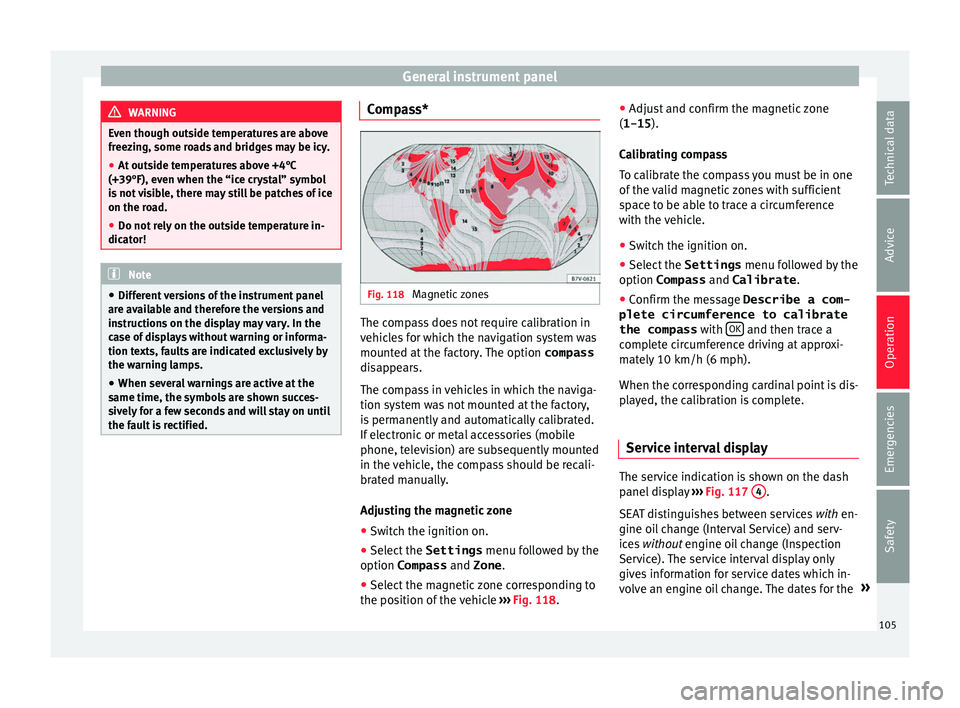
the fault is rectified. Compass*
Fig. 118
Magnetic zones The compass does not require calibration in
v
ehic
l
es for which the navigation system was
mounted at the factory. The option compass
disappears.
The compass in vehicles in which the naviga-
tion system was not mounted at the factory,
is permanently and automatically calibrated.
If electronic or metal accessories (mobile
phone, television) are subsequently mounted
in the vehicle, the compass should be recali-
brated manually.
Adjusting the magnetic zone
● Switch the ignition on.
● Select the Settings menu fol
lowed by the
option Compass and Zone.
● Select the magnetic zone corresponding to
the position of
the vehicle ››› Fig. 118. ●
Adjust
and confirm the magnetic zone
(1-15 ).
Calibrating compass
To calibrate the compass you must be in one
of the valid magnetic zones with sufficient
space to be able to trace a circumference
with the vehicle.
● Switch the ignition on.
● Select the Settings menu fol
lowed by the
option Compass and Calibrate .
● Confirm the message Describe a com-
plete circumference to calibrate
the compass with OK and then trace a
c omp
l
ete circumference driving at approxi-
mately 10 km/h (6 mph).
When the corresponding cardinal point is dis-
played, the calibration is complete.
Service interval display The service indication is shown on the dash
p
anel
di
splay ›››
Fig. 117 4 .
S EA
T di
stinguishes between services with en-
gine oil change (Interval Service) and serv-
ices without engine oil change (Inspection
Service). The service interval display only
gives information for service dates which in-
volve an engine oil change. The dates for the »
105
Technical data
Advice
Operation
Emergencies
Safety
Page 108 of 324
Operation
other services (e.g. the next Inspection Serv-
ic e or c
h
ange of brake fluid) are listed on the
label attached to the door strut, or in the
Maintenance Programme.
In vehicles with Services established by time
or mileage, the service intervals are already
pre-defined.
In vehicles with LongLife Service , the inter-
vals are determined individually. Technical
progress has made it possible to considera-
bly reduce servicing requirements. The tech-
nology used by SEAT ensures that your vehi-
cle only has an Interval Service when it is
necessary. To establish when the Interval
Service is due (max. 2 years), the vehicle's
conditions of use and individual driving
styles are considered. The service pre-warn-
ing first appears 20 days before the date es-
tablished for the corresponding service. The
kilometres (miles) remaining until the next
service are always rounded up to the nearest
100 km (miles) and the time is given in com-
plete days. The current service message can-
not be viewed until 500 km after the last
service. Prior to this only lines are visible on
the display.
Inspection reminder
When the Service date is approaching, when
the ignition is switched on a Service remind-
er is displayed. In vehicles without text messages
, a sp anner
symbol is displayed on the instrument
panel and a figure given in km. The number
of kilometres shown is the maximum number
that may be driven until the next service. Af-
ter a few seconds, the display mode changes.
A clock symbol appears and the number of
days until the next service appointment is
due.
In vehicles with text messages , Service in
--- km (miles) or --- days is dis-
played on the instrument panel.
Service due
After the service date, an audible warning is
given when the ignition is switched on and
the spanner displayed on the screen
flashes for a few seconds. In vehicles with
text messages , Service in --- km or
--- days is displayed on the instrument
panel.
Reading a service notification
With the ignition switched on, the engine off
and the vehicle at a standstill, the current
service notification can be read:
● Press the button on the in
strument pan-
el several times until the spanner symbol
is displayed.
● OR: select the Settings menu.
● From the
Service submenu, select
the op-
tion Info . When the servic
e date has past, a minus sign
is displayed in front of the number of kilome-
tres or days. In vehicles with text messages
the following is displayed: Service ---
km (miles) or --- days ago .
Resetting service interval display
If the service was not carried out by a techni-
cal service centre, the display can be reset as
follows:
In vehicles with text messages:
Select the Settings menu.
In the submenu Service , select the option Reset.
Confirm with OK when requested to do so by the sys-
tem.
In vehicles without text messages:
Switch the ignition off.
Press and hold the 0.0 / SET button.
Switch the ignition back on.
Release the 0.0 / SET button and press for the next
20 seconds. Do not r
eset the indicator to zero between
tw o int
ervals, otherwise the display will be
incorrect.
If you reset the display manually, the next
service interval will be indicated as in vehi-
cles with fixed service intervals. For this
106
Page 109 of 324
General instrument panel
reason we recommend that the service inter-
v al
di
splay be reset by a SEAT authorised
service ››› Booklet Maintenance schedule. Note
● The serv ic
e message disappears after a few
seconds, when the engine is started or when OK is pressed.
● In vehicles with the LongLife system in
which the b att
ery has been disconnected for
a long period of time, it is not possible to cal-
culate the date of the next service. Therefore
the service interval display may not be cor-
rect. In this case, bear in mind the maximum
service intervals permitted in the ››› Booklet
Maintenance Programme. Control lamps
C ontr
o
l and warning lamps Read the additional information carefully
› ›
›
page 34
The control and warning lamps are indicators
of warnings, ››› , faults
››
›
or certain func-
tion s.
Some c
ontrol and warning lamps come
on when the ignition is switched on, and
switch off when the engine starts running, or
while driving.
Depending on the model, additional text
messages may be viewed on the instrument panel display. These may be purely informa-
tive or they m
ay be advising of the need for
action ››› page 102, Instruments.
Depending upon the equipment fitted in the
vehicle, instead of a warning lamp, some-
times a symbol may be displayed on the in-
strument panel.
When certain control and warning lamps are
lit, an audible warning is also heard. WARNING
If the warning lamps and messages are ignor-
ed, the v ehic
le may stall in traffic, or may
cause accidents and severe injuries.
● Never ignore the warning lamps or text
mess
ages.
● Stop the vehicle safely as soon as possible.
● Park the vehicle away from traffic and en-
sure th
at there are no highly flammable ma-
terials under the vehicle that could come into
contact with the exhaust system (e.g. dry
grass, fuel).
● A faulty vehicle represents a risk of acci-
dent for the driv
er and for other road users. If
necessary, switch on the hazard warning
lamps and put out the warning triangle to ad-
vise other drivers.
● Before opening the bonnet, switch off the
engine and al
low it to cool.
● In any vehicle, the engine compartment is a
hazar
dous area and could cause severe inju-
ries ››› page 271. CAUTION
Failure to heed the control lamps and text
mes s
ages when they appear may result in
faults in the vehicle. 107
Technical data
Advice
Operation
Emergencies
Safety
Page 112 of 324
Operation
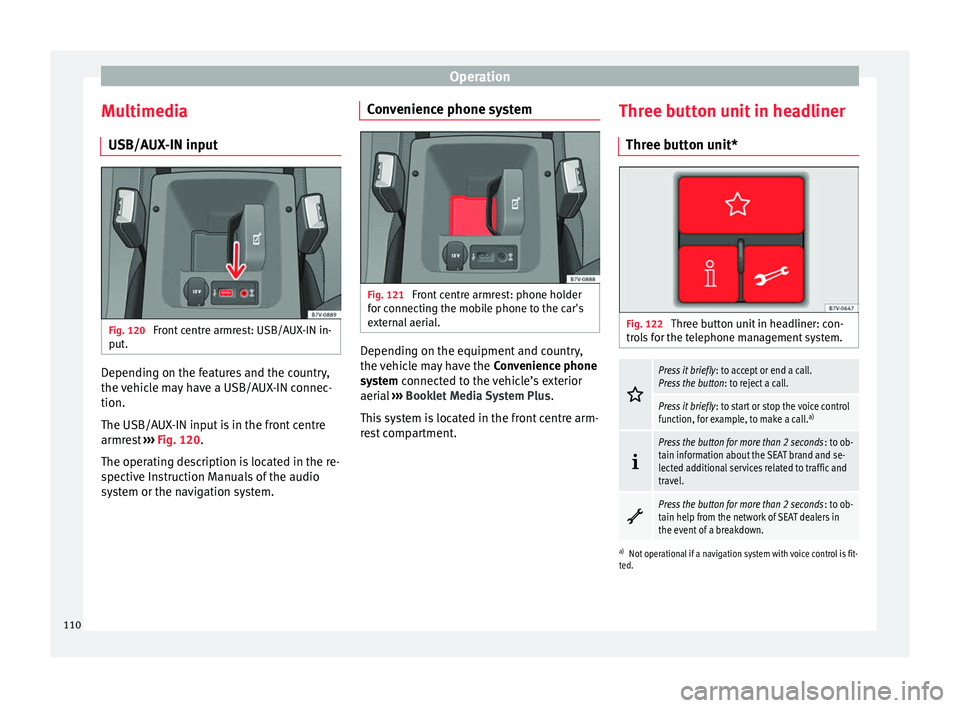
Multimedia USB/A UX
-IN inp
utFig. 120
Front centre armrest: USB/AUX-IN in-
p ut
. Depending on the features and the country,
the
v
ehic
le may have a USB/AUX-IN connec-
tion.
The USB/AUX-IN input is in the front centre
armrest ››› Fig. 120.
The operating description is located in the re-
spective Instruction Manuals of the audio
system or the navigation system. Convenience phone system
Fig. 121
Front centre armrest: phone holder
f or c
onnectin
g the mobile phone to the car's
external aerial. Depending on the equipment and country,
the
v
ehic
le may have the Convenience phone
system connected to the vehicle’s exterior
aerial ››› Booklet Media System Plus .
This system is located in the front centre arm-
rest compartment. Three button unit in headliner
Three butt
on unit* Fig. 122
Three button unit in headliner: con-
tr o
l
s for the telephone management system.
Press it briefly
: to accept or end a call.
Press the button : to reject a call.
Press it briefly: to start or stop the voice control
function, for example, to make a call. a)
Press the button for more than 2 seconds
: to ob-
tain information about the SEAT brand and se-
lected additional services related to traffic and
travel.
Press the button for more than 2 seconds
: to ob-
tain help from the network of SEAT dealers in
the event of a breakdown.
a) Not operational if a navigation system with voice control is fit-
ted.
110
Page 113 of 324
Communications and multimedia
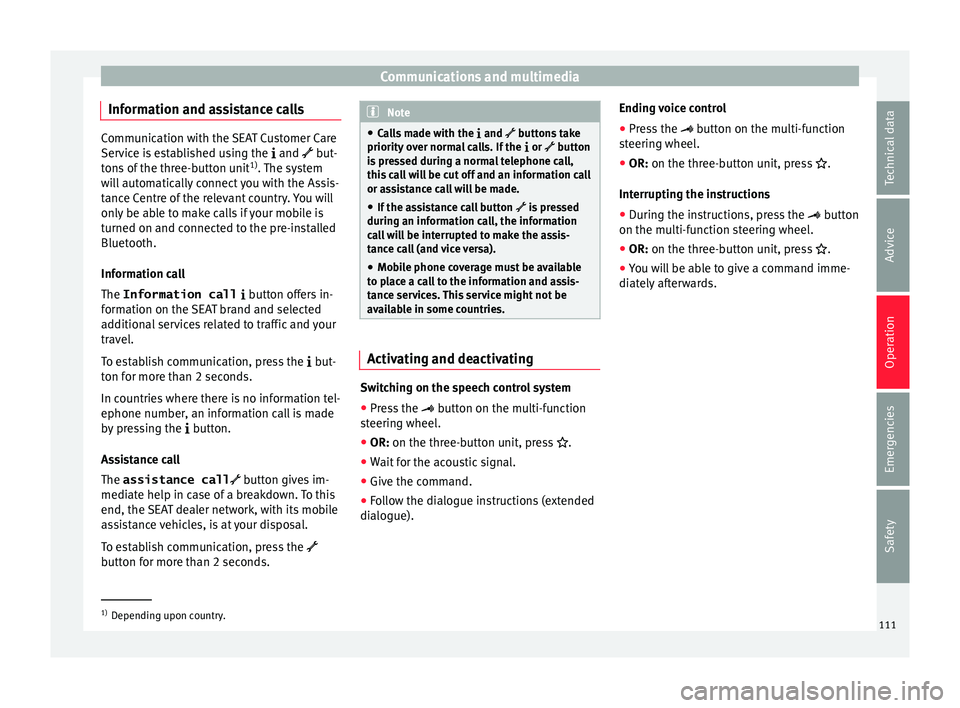
Information and assistance calls Communication with the SEAT Customer Care
Service is established using the
and but-
t
ons of the three-button unit 1)
. The system
will automatically connect you with the Assis-
tance Centre of the relevant country. You will
only be able to make calls if your mobile is
turned on and connected to the pre-installed
Bluetooth.
Information call
The Information call button offers in-
formation on the SEAT brand and selected
additional services related to traffic and your
travel.
To establish communication, press the but-
ton for more than 2 seconds.
In countries where there is no information tel-
ephone number, an information call is made
by pressing the button.
Assistance call
The assistance call button gives im-
mediate help in case of a breakdown. To this
end, the SEAT dealer network, with its mobile
assistance vehicles, is at your disposal.
To establish communication, press the
button for more than 2 seconds. Note
● Calls made with the and buttons take
priority over normal calls. If the or button
i
s pressed during a normal telephone call,
this call will be cut off and an information call
or assistance call will be made.
● If the assistance call button is pressed
during an information call, the information
call will be interrupted to make the assis-
tance call (and vice versa).
● Mobile phone coverage must be available
to place a call to the information and assis-
tance services. This service might not be
available in some countries. Activating and deactivating
Switching on the speech control system
● Press the button on the multi-function
steering wheel.
● OR: on the three-button unit, press
.
● Wait
for the acoustic signal.
● Give the command.
● Follow the dialogue instructions (extended
dialogue). Ending voice control
●
Press the
button on the multi-function
steering wheel.
● OR:
on the three-button unit, press .
Interrupting the instructions
● During the instructions, press the
button
on the multi-function steering wheel.
● OR:
on the three-button unit, press .
● You will be able to give a command imme-
diately afterwards. 1)
Depending upon country.
111
Technical data
Advice
Operation
Emergencies
Safety
Page 114 of 324
Operation
Opening and closing V ehic
l
e key set
Vehicle key Fig. 123
Vehicle keys Fig. 124
Vehicle key for vehicles with electric
s lidin
g door
s Vehicle keys
W
ith the v
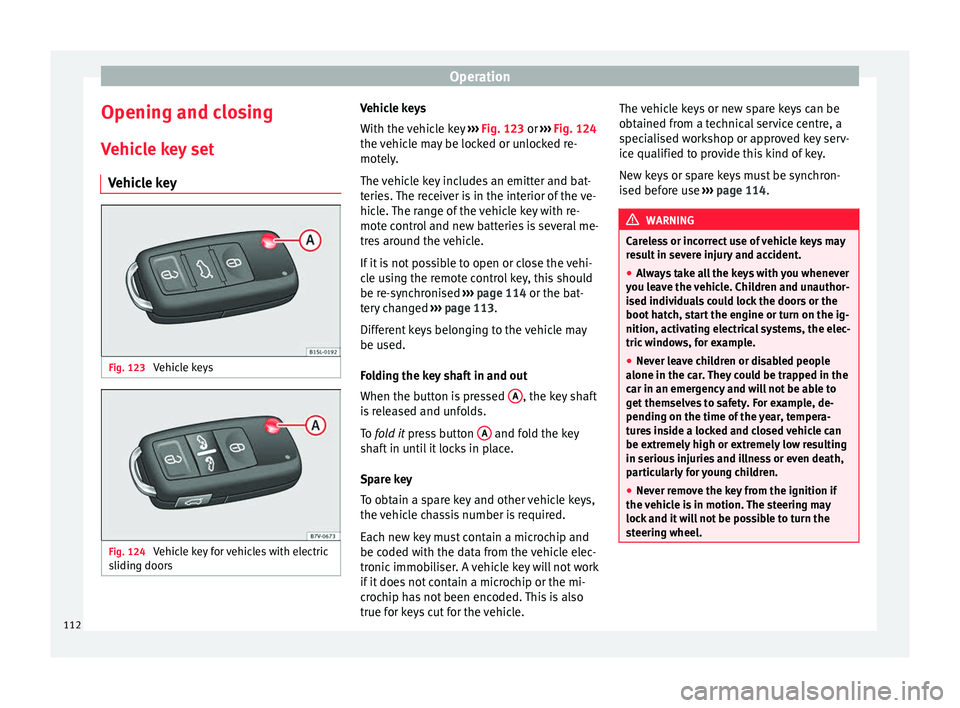
ehicle key ››› Fig. 123 or ››› Fig. 124
the vehicle may be locked or unlocked re-
motely.
The vehicle key includes an emitter and bat-
teries. The receiver is in the interior of the ve-
hicle. The range of the vehicle key with re-
mote control and new batteries is several me-
tres around the vehicle.
If it is not possible to open or close the vehi-
cle using the remote control key, this should
be re-synchronised ››› page 114 or the bat-
tery changed ››› page 113.
Different keys belonging to the vehicle may
be used.
Folding the key shaft in and out
When the button is pressed A , the key shaft
i s
r
eleased and unfolds.
To fold it press button A and fold the key
sh af
t
in until it locks in place.
Spare key
To obtain a spare key and other vehicle keys,
the vehicle chassis number is required.
Each new key must contain a microchip and
be coded with the data from the vehicle elec-
tronic immobiliser. A vehicle key will not work
if it does not contain a microchip or the mi-
crochip has not been encoded. This is also
true for keys cut for the vehicle. The vehicle keys or new spare keys can be
obtained fr
om a technical service centre, a
specialised workshop or approved key serv-
ice qualified to provide this kind of key.
New keys or spare keys must be synchron-
ised before use ››› page 114. WARNING
Careless or incorrect use of vehicle keys may
re s
ult in severe injury and accident.
● Always take all the keys with you whenever
you le
ave the vehicle. Children and unauthor-
ised individuals could lock the doors or the
boot hatch, start the engine or turn on the ig-
nition, activating electrical systems, the elec-
tric windows, for example.
● Never leave children or disabled people
alone in the car
. They could be trapped in the
car in an emergency and will not be able to
get themselves to safety. For example, de-
pending on the time of the year, tempera-
tures inside a locked and closed vehicle can
be extremely high or extremely low resulting
in serious injuries and illness or even death,
particularly for young children.
● Never remove the key from the ignition if
the vehic
le is in motion. The steering may
lock and it will not be possible to turn the
steering wheel. 112
Page 137 of 324
Lights and visibility
Allow the engine to cool and check if a
s pec
i
alist is required.
If the hazard warning lights are not working,
you must use an alternative method of draw-
ing attention to your vehicle. This method
must comply with traffic legislation. WARNING
A faulty vehicle in traffic represents a risk of
acc ident
for the driver and for other road
users.
● Stop the vehicle safely as soon as possible.
Park the
vehicle a safe distance from sur-
rounding traffic to lock all the doors in case of
an emergency. Turn on the hazard warning
lights to warn other road users.
● Never leave children or disabled people
alone in the v
ehicle if the doors are to be
locked. In case of an emergency, passengers
will be trapped inside the vehicle. Individuals
locked in the vehicle can be exposed to very
high or very low temperatures. WARNING
The components of the exhaust system reach
ver y
high temperatures. This could cause a
fire and considerable damage.
● Always park your vehicle so that no part of
the exhau
st system can come in contact with
flammable materials (such as dried grass or
fuel). 9.
Note
● The v ehic
le battery will discharge and run
down if the hazard warning lights remain on
for too long (even with the ignition turned
off).
● In some vehicles, the brake lights will flash
when brakin
g abruptly at speeds of approxi-
mately 80 km/h (50 mph) to warn vehicles
travelling behind. If braking continues, the
hazard warning lights system will automati-
cally be turned on at a speed of less than ap-
proximately 10 km/h (6 mph). The brake
lights remain lit. Upon accelerating, the haz-
ard warning lights will be automatically
turned off. Adhesive strips for headlights or ad-
ju
s
tin
g headlights In those countries where vehicles drive on
the other s
ide of
the r
oad to the home coun-
try, the asymmetric dipped beam may dazzle
drivers of oncoming vehicles. Therefore,
when driving abroad, adhesive strips should
be attached to the headlights or the head-
lights should be adjusted accordingly.
The direction of the headlights can be adjus-
ted from the instrument panel, in the Tou-
rist light submenu of the Configura-
tion menu ›››
page 31.
For those vehicles in which it is not possible
to adjust the headlights from the menu, ad- hesive strips are used to cover certain parts
of the hea
dlamp cover or the headlights may
be adjusted at a specialised workshop. For
further information, please refer to a special-
ised workshop. SEAT recommends visiting a
technical service. Note
Use of the Tourist light option and the
adhe s
ives on the headlights is only allowed if
they are to be used for a short period of time.
To modify the direction of the headlights per-
manently, please take the vehicle to a speci-
alised workshop. SEAT recommends visiting a
technical service centre. Headlight range control, lighting of
the in
s
trument
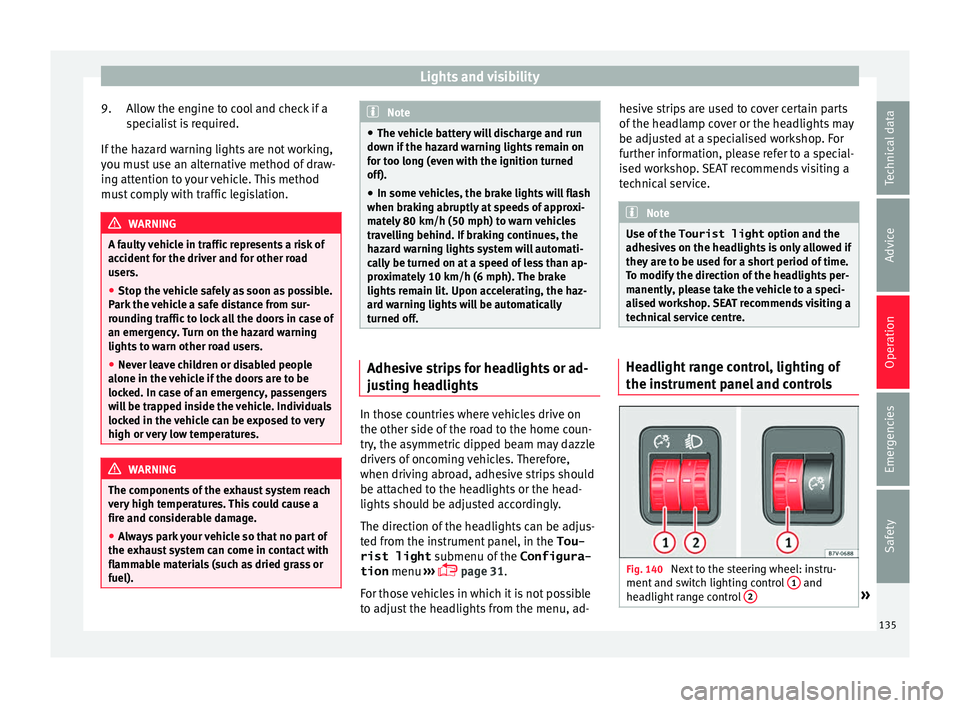
panel and controls Fig. 140
Next to the steering wheel: instru-
ment and sw it
ch lighting control 1 and
he a
dlight
range control 2 »
135
Technical data
Advice
Operation
Emergencies
Safety
Page 140 of 324
Operation
the windscreen with the ventilation system.
The antifreez
e c
ould freeze on the windscreen
and reduce visibility. WARNING
Worn or dirty wiper blades reduce visibility
and inc re
ase the risk of accident and serious
injury.
● Always replace damaged or worn blades or
bla
des which do not clean the windscreen
correctly. CAUTION
In icy conditions, always check that the wiper
bl a
des are not frozen to the glass before us-
ing the wipers for the first time. In cold
weather, it may help to leave the vehicle
parked with the wipers in service position
››› page 55. CAUTION
If the ignition is switched off while the wind-
sc r
een wipers are on, the windscreen wipers
carry on wiping at the same level when the
ignition is switched back on. Ice, snow and
other obstacles may damage the windscreen
wiper and the respective motor. Note
● The wind s
creen wipers will only function
when the ignition is switched on and the re-
spective bonnet or rear lid are closed. ●
The inter v
al wipe speed varies according to
the vehicle speed. The faster the vehicle is
moving, the more often the windscreen is
cleaned.
● The rear wiper is automatically switched on
when the winds
creen wiper is on and the car
is in reverse gear. Windscreen wiper functions
Windscreen wiper performance in different sit-
uations
If the vehicle
is at a stand-
stillThe activated position provisionally
changes to the previous position.
During auto-
matic wipe
The air conditioner comes on for ap-
proximately 30 seconds in air recircula-
tion mode to prevent the smell of the
windscreen washer fluid entering the
inside the vehicle.
For the inter-
val wipeIntervals between wipes depend on the
vehicle's speed. The higher the vehicle
speed the shorter the intervals.
Heated windscreen washer jets
The he
atin
g on
ly thaws the frozen jets, it
does not thaw the water in the washer hoses.
The heated windscreen washer jets automati-
cally adjust the heat depending on the ambi-
ent temperature when the ignition is switch-
ed on. Headlight wash/wipe system
The headlight
washers/wipers clean the
headlight lenses.
After the ignition is switched on, the first and
every fifth time the windscreen washer is
switched on, the headlights are also washed.
Therefore, the windscreen wiper lever should
be pulled towards the steering wheel when
the dipped beam or main beam are on. Any
incrusted dirt (such as insects) should be
cleaned regularly (e.g. when refuelling).
To ensure the headlight washers work cor-
rectly in winter, any snow which has got into
the bumper jet supports should be cleaned
away. If necessary, remove snow with an anti-
icing spray. Note
The wiper will try to wipe away any obstacles
that ar
e on the windscreen. The wiper will
stop moving if the obstacle blocks its path.
Remove the obstacle and switch the wiper
back on again. 138
Page 162 of 324
Operation
Folding in the net partition
● Press on the release button ››
› Fig. 165 2 and bend the rod
A in the direction of the
arr o
w w
ith the release button pressed.
● Press on the release button ›››
Fig. 165 3 and bend the rod
B in the direction of the
arr o
w w
ith the release button pressed.
● Store the net partition securely in the vehi-
cle. WARNING
Loose objects in the vehicle interior can be vi-
ol ently
thrown in case of a sudden manoeu-
vre or braking and especially in accidents
causing serious injury.
● Ensure that the rods are correctly locked in
plac
e.
● Even when the net partition is correctly fit-
ted, ob
jects must be secured.
● When driving with the net partition, no pas-
senger
s should be behind it. Fastening rings*
Fig. 167
In the luggage compartment: fasten-
in g rin
g
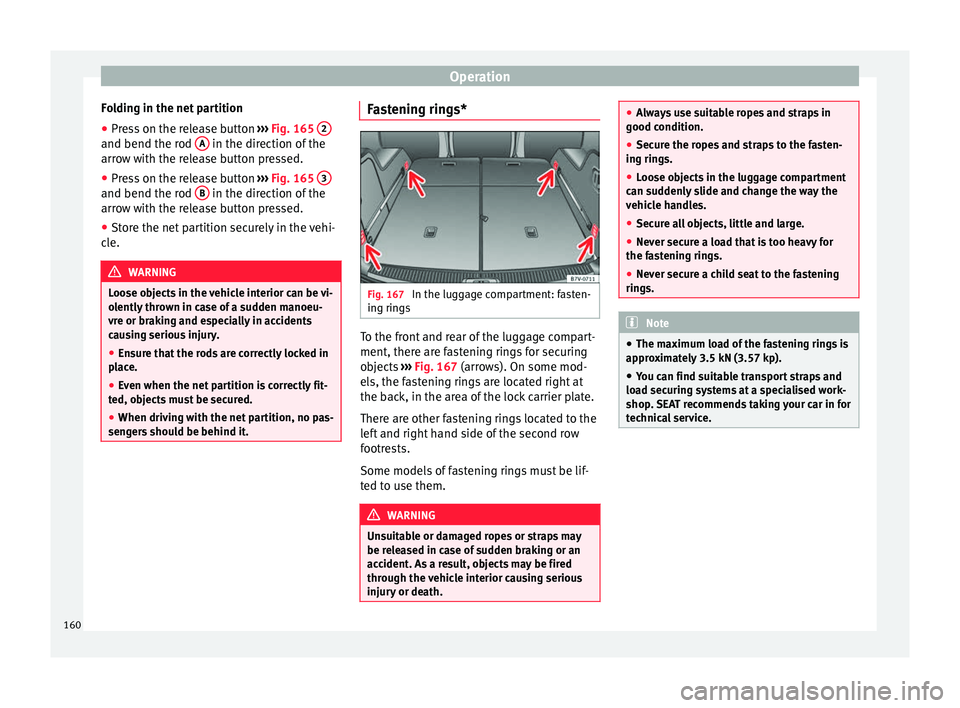
s To the front and rear of the luggage compart-
ment, ther
e ar
e f
astening rings for securing
objects ››› Fig. 167 (arrows). On some mod-
els, the fastening rings are located right at
the back, in the area of the lock carrier plate.
There are other fastening rings located to the
left and right hand side of the second row
footrests.
Some models of fastening rings must be lif-
ted to use them. WARNING
Unsuitable or damaged ropes or straps may
be rel e
ased in case of sudden braking or an
accident. As a result, objects may be fired
through the vehicle interior causing serious
injury or death. ●
Alw a
ys use suitable ropes and straps in
good condition.
● Secure the ropes and straps to the fasten-
ing ring
s.
● Loose objects in the luggage compartment
can sud
denly slide and change the way the
vehicle handles.
● Secure all objects, little and large.
● Never secure a load that is too heavy for
the fas
tening rings.
● Never secure a child seat to the fastening
rings. Note
● The max imum lo
ad of the fastening rings is
approximately 3.5 kN (3.57 kp).
● You can find suitable transport straps and
load sec
uring systems at a specialised work-
shop. SEAT recommends taking your car in for
technical service. 160
Page 167 of 324
Transport and practical equipment
roof. All these system components are
av ai
l
able from a technical service centre.
Securing the base supports and roof carrier
system
Always secure the base supports and roof
carrier system correctly.
The roof carrier system must always be instal-
led exactly according to the instructions pro-
vided.
The position openings are located on the in-
ner side of the side roof rods ››› Fig. 173. WARNING
If the base supports and the roof carrier sys-
tem ar e inc
orrectly fitted or used in an unsuit-
able manner, the entire system could break
free causing accident and injury.
● Always take the manufacturer assembly in-
structions
into account.
● Only use base supports and roof carrier
syst
ems that are not damaged and are cor-
rectly fitted.
● The base support should only be fitted to
the points indic
ated in the diagram
››› Fig. 173.
● Secure the base supports and roof carrier
syst
em correctly.
● Check the screws and attachments before
driving and af
ter a short distance. During
each long journey, check the attachments
during every break. ●
Alw a
ys fit the roof carrier system correctly
for wheels, skis, surfboards, etc.
● Never modify or repair the basic supports
or roof c
arrier system. Note
Read and take into account the instructions
inc luded w ith the r
oof carrier system fitted
and keep them in the vehicle. Loading the roof carrier
Loads can only be correctly secured when the
r
oof
c
arrier system is correctly fitted ››› .
M ax
imum authori
sed roof load
The maximum authorised roof load is 100 kg
(220 lbs). The roof load includes the roof car-
rier system and the load being transported
››› .
A lw
a
ys check the roof carrier system weight
and the weight of the load to be transported
and, if necessary, weigh them. Never exceed
the maximum authorised roof load.
If you are using a roof carrier with a lower
weight rating, you cannot transport the maxi-
mum roof load. Do not exceed the maximum
weight limit for the roof carrier given in the
fitting instructions. Distributing a load
Uniformly
distribute loads and secure them
correctly ››› .
Chec k
att
achments
After fitting the base supports and the roof
carrier system, always check the attachments
after a short trip and at regular intervals. WARNING
Exceeding the maximum authorised roof load
can r e
sult in accidents and/or vehicle dam-
age.
● Never surpass the maximum authorised
weight f
or the roof, the maximum authorised
weight on the axles and the total maximum
authorised weight of the vehicle.
● Never exceed the capacity of the roof carri-
er syst
em even if this is less than the maxi-
mum authorised roof load.
● Secure heavy items as far forward as possi-
ble and, in g
eneral, distribute the vehicle
load uniformly. WARNING
Loose and incorrectly secured loads can fall
from the r oof
carrier system causing acci-
dents and injury.
● Always use suitable ropes and straps in
good condition.
● A
lways secure loads correctly. 165
Technical data
Advice
Operation
Emergencies
Safety