steering Seat Alhambra 2018 Owner's Guide
[x] Cancel search | Manufacturer: SEAT, Model Year: 2018, Model line: Alhambra, Model: Seat Alhambra 2018Pages: 324, PDF Size: 7.04 MB
Page 92 of 324
Emergencies
Note the instructions for towing
› ›
›
page 51.
Fitting the towline anchorage to the rear for
vehicles without factory fitted tow hitch
● Take the towline anchorage from the vehi-
cle t
ool kit in the luggage compartment
››› page 83.
● Press on the upper cover and carefully re-
move it
back. This may require some
strength. Allow the cover to hang.
● Screw in the towline anchorage into its po-
sition antic
lockwise as far as it will go ››› .
U se a s
uit
able tool to firmly tighten the tow-
line anchorage in its location.
● After towing, remove the towline anchorage
by t
urning it clockwise and put the cover
back in place. CAUTION
● The to wline anc
horage must always be
completely and firmly tightened. Otherwise,
it could be released while towing and tow-
starting.
● Vehicles with a factory fitted towing brack-
et, can only
be used for towing with a tow
bar, specially designed to fit on a tow hitch
ball. Otherwise, the tow hitch ball and the ve-
hicle may be damaged. Otherwise, a tow rope
should be used. Towing advice
Towing requires some expertise and experi-
ence, e
s
pecially when using a tow rope. Both
drivers should be familiar with the technique
required for towing. For this reason, inexper-
ienced drivers should abstain.
While driving, avoid excessive traction forces
and jerking. When towing on an unpaved
road, there is always a risk of overloading
and damaging the anchorage points.
If the vehicle is towed, with the hazard warn-
ing lights on and the ignition switched on,
the turn signal may be used to indicate
changes of direction. Simply operate the turn
signal lever as usual. Meanwhile, the hazard
warning lights will go off. When the turn sig-
nal lever is returned to the rest position, the
hazard warning lights will be turned on auto-
matically.
Notes for the driver of the towed vehicle
● Leave the ignition on to avoid locking the
st eerin
g wheel, to release the electronic
parking brake and to activate the turn sig-
nals, the horn as well as the window wipers
and window washers.
● As the power assisted steering does not
work if
the engine is not running, you will
need more strength to steer than normally. ●
The brake mu
st be depressed must harder
as the brake servo does not operate. Avoid
hitting the towing vehicle.
● Note the instructions and information con-
tained in the Ins
truction Manual for the vehi-
cle to be towed.
Notes for the driver of the towing vehicle
● Accelerate gently and carefully. Avoid sud-
den manoeuvr
es.
● Brake well in advance than usual and brake
gently.
● Not
e the instructions and information con-
tained in the Ins
truction Manual for the vehi-
cle to be towed.
Emergency locking and unlock-
ing
Introduction Read the additional information carefully
› ›
›
page 10,
›››
page 12,
››› page 15
The doors, rear lid and panoramic sliding
sunroof can be locked manually and partially
opened, for example if the key or the central
locking is damaged.
90
Page 103 of 324
General instrument panel
Operation
Gener a
l
instrument panel
Instrument panel Door release lever
. . . . . . . . . . . . . . . . 121
Central lock button / . . . . . . . . . 114
Switch for adjusting the exterior
mirror s . . . . . . . . . . . . . . . . . . . . . . . . . . . 140
– Exterior mirr or a
djustment
– Exterior mirror heating
– Folding exterior mirrors
Brightness regulation for instru-
ment panel and controls . . . . . . .130
Headlamp range adjustment . . .130
Light switch . . . . . . . . . . . . . . . . . . . 130
– Light off
– Aut
omatic dipped beam head-
light control
– Side/dipped lights /
– Fog lights
Lever for . . . . . . . . . . . . . . . . . . . . . . . . . 130
– Main beam he
adlights
– Headlight flasher
– Turn signals
– Parking lights
Instrument panel:
1 2
3
4
5
6
7
8 –
Ins
truments . . . . . . . . . . . . . . . . . . . . 102
– Digit
al di
splay . . . . . . . . . . . . . . . . . . 102
– Warning and indic
ation lamps . . .107
Steering wheel with horn and – Driver airbag . . . . . . . . . . . . . . . . . . . 19
– On-bo
ard c
omputer controls . . . .27
– Contro
ls for radio, telephone,
navigation and speech dialogue
system ››› Booklet Radio
– Paddle levers for tiptronic gear-
shift (automatic gearbox) . . . . . . .196
Windscreen wiper/ windscreen
wash l
ever . . . . . . . . . . . . . . . . . . . . . . . 137
– Wind s
creen wipers –
– Intermittent wipe
– “Touch wipe” x
– Windscreen wipers
– Automatic windscreen
wash/wipe
– Rear window wiper system
– Automatic rear window
wash/wipe
– Lever with buttons for controlling
the SEAT information system –
/ . . . . . . . . . . . . . . . . . . . . . . . . . 27
Left seat heating controls . . . . . .147
Radio or navigation system (fitted
at fact
ory) ››› Booklet Radio or
››› Booklet Navigation system
9
10
11
12 Storage compartment
. . . . . . . . . . . . .166
Hazard warning lights switch . .134
Switches for: – Electr
onic
manual air condition-
ing . . . . . . . . . . . . . . . . . . . . . . . . . . . . . 176
– Climatr
onic . . . . . . . . . . . . . . . . . . . . . 176
Right seat heating controls . . . . . 147
Button for:
– Anti-slip r
egulation (ASR)
. . . . . . . . . . . . . . . . . . . . . . . . . . . 188
– Star t
-Stop operation . . . . . . . . .208
– Parkin
g distance warning system
(ParkPilot) . . . . . . . . . . . . . . . . . . 211
– Park As
sist system . . . . . . . . . .214
– Tyr
e pressure monitor . . . .234
– Dyn
amic chassis control (DCC)
– Opening the rear lid . . . . . . . . .124
– Opening and clo
sing of electric
sliding doors . . . . . . . . . . . . . . . . 122
Locking handle to open glove com-
par tment . . . . . . . . . . . . . . . . . . . . . . . . . 166
P
osition of passenger front airbag
on the dash p
anel . . . . . . . . . . . . . . . . 19
Key-operated switch in glove com-
partment
for deactivating front pas-
senger front airbag . . . . . . . . . . . . . . .20
Passenger front airbag off warning
lamp . . . . . . . . . . . . . . . . . . . . . . . . . . . . . 73»
13 14
15
16
17
18
19
20
21
101
Technical data
Advice
Operation
Emergencies
Safety
Page 104 of 324

Operation
Lever for:
– Manual
g
earbox . . . . . . . . . . . . . . . . 193
– Automatic
gearbox . . . . . . . . . . . . . 193
12 volt power socket . . . . . . . . . . . . . .173
Auto Hold switch
. . . . . . . . 208
Electronic parking brake switch
. . . . . . . . . . . . . . . . . . . . . . . . . . . . . . . 188
Start-up push button (Keyless Ac-
ces
s closing and start-up system)
Ignition lock . . . . . . . . . . . . . . . . . . . . . . 183
22 23
24
25
26
27 Pedals
. . . . . . . . . . . . . . . . . . . . . . . . . . . 193
Steering column adjustment lev-
er . . . . . . . . . . . . . . . . . . . . . . . . . . . . . . . . 58
Fuse box cover . . . . . . . . . . . . . . . . . . . 91
Lever for: – Crui
se C
ontrol System (CCS) –
– – – – . .221
Open bonnet lever . . . . . . . . . . . . . . . . 271
Controls for: – Electric w
indows . . . . . . . . . . . . 127
28 29
30
31
32
33 –
Chi l
d
proof locks . . . . . . . . . . . . . 121 Note
● Some of the it ems
of equipment listed here
are fitted only on certain model versions or
are optional extras.
● In versions with the steering wheel on the
right, the lay
out of the control elements is
somewhat different. But the symbols as-
signed to the controls correspond to the sym-
bols used in the versions with the steering
wheel on the left Instruments
V iew of
in
strument panel Fig. 117
Instrument panel, on dash panel. Details of the instruments
››
›
Fig. 117: Clock set button1)
.
1 –
Pr e
s
s the button to select the hour
or minute display.
102
Page 110 of 324
Operation
Communications and multimedia
St eerin
g wheel
controls*
Operating the audio system + telephone Fig. 119
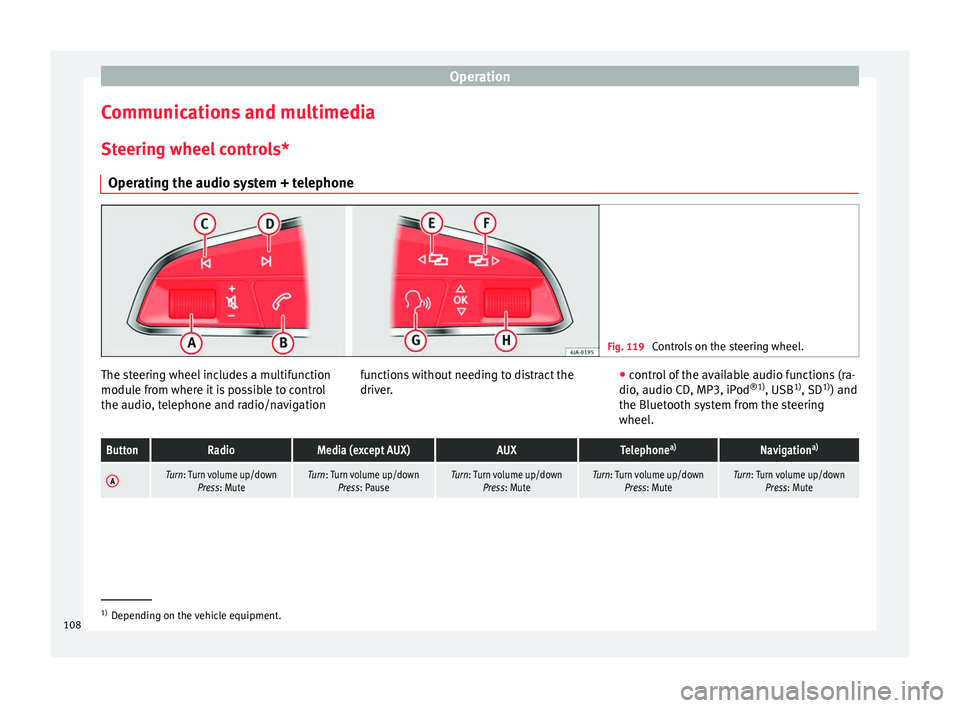
Controls on the steering wheel. The steering wheel includes a multifunction
modu
l
e fr
om where it is possible to control
the audio, telephone and radio/navigation functions without needing to distract the
driver.
●
c ontro
l of the available audio functions (ra-
dio, audio CD, MP3, iPod ®1)
, USB 1)
, SD 1)
) and
the Bluetooth system from the steering
wheel.
ButtonRadioMedia (except AUX)AUXTelephone a)Navigation a)
ATurn: Turn volume up/down
Press: MuteTurn: Turn volume up/downPress: PauseTurn: Turn volume up/down Press: MuteTurn: Turn volume up/downPress: MuteTurn: Turn volume up/downPress: Mute 1)
Depending on the vehicle equipment.
108
Page 113 of 324
Communications and multimedia
Information and assistance calls Communication with the SEAT Customer Care
Service is established using the
and but-
t
ons of the three-button unit 1)
. The system
will automatically connect you with the Assis-
tance Centre of the relevant country. You will
only be able to make calls if your mobile is
turned on and connected to the pre-installed
Bluetooth.
Information call
The Information call button offers in-
formation on the SEAT brand and selected
additional services related to traffic and your
travel.
To establish communication, press the but-
ton for more than 2 seconds.
In countries where there is no information tel-
ephone number, an information call is made
by pressing the button.
Assistance call
The assistance call button gives im-
mediate help in case of a breakdown. To this
end, the SEAT dealer network, with its mobile
assistance vehicles, is at your disposal.
To establish communication, press the
button for more than 2 seconds. Note
● Calls made with the and buttons take
priority over normal calls. If the or button
i
s pressed during a normal telephone call,
this call will be cut off and an information call
or assistance call will be made.
● If the assistance call button is pressed
during an information call, the information
call will be interrupted to make the assis-
tance call (and vice versa).
● Mobile phone coverage must be available
to place a call to the information and assis-
tance services. This service might not be
available in some countries. Activating and deactivating
Switching on the speech control system
● Press the button on the multi-function
steering wheel.
● OR: on the three-button unit, press
.
● Wait
for the acoustic signal.
● Give the command.
● Follow the dialogue instructions (extended
dialogue). Ending voice control
●
Press the
button on the multi-function
steering wheel.
● OR:
on the three-button unit, press .
Interrupting the instructions
● During the instructions, press the
button
on the multi-function steering wheel.
● OR:
on the three-button unit, press .
● You will be able to give a command imme-
diately afterwards. 1)
Depending upon country.
111
Technical data
Advice
Operation
Emergencies
Safety
Page 114 of 324
Operation
Opening and closing V ehic
l
e key set
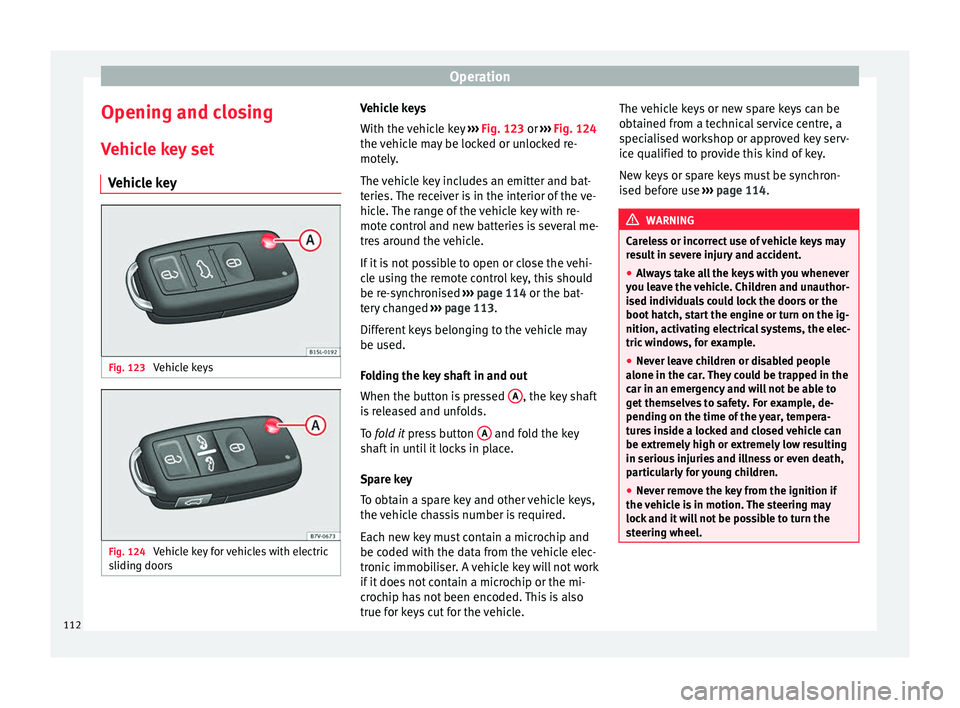
Vehicle key Fig. 123
Vehicle keys Fig. 124
Vehicle key for vehicles with electric
s lidin
g door
s Vehicle keys
W
ith the v
ehicle key ››› Fig. 123 or ››› Fig. 124
the vehicle may be locked or unlocked re-
motely.
The vehicle key includes an emitter and bat-
teries. The receiver is in the interior of the ve-
hicle. The range of the vehicle key with re-
mote control and new batteries is several me-
tres around the vehicle.
If it is not possible to open or close the vehi-
cle using the remote control key, this should
be re-synchronised ››› page 114 or the bat-
tery changed ››› page 113.
Different keys belonging to the vehicle may
be used.
Folding the key shaft in and out
When the button is pressed A , the key shaft
i s
r
eleased and unfolds.
To fold it press button A and fold the key
sh af
t
in until it locks in place.
Spare key
To obtain a spare key and other vehicle keys,
the vehicle chassis number is required.
Each new key must contain a microchip and
be coded with the data from the vehicle elec-
tronic immobiliser. A vehicle key will not work
if it does not contain a microchip or the mi-
crochip has not been encoded. This is also
true for keys cut for the vehicle. The vehicle keys or new spare keys can be
obtained fr
om a technical service centre, a
specialised workshop or approved key serv-
ice qualified to provide this kind of key.
New keys or spare keys must be synchron-
ised before use ››› page 114. WARNING
Careless or incorrect use of vehicle keys may
re s
ult in severe injury and accident.
● Always take all the keys with you whenever
you le
ave the vehicle. Children and unauthor-
ised individuals could lock the doors or the
boot hatch, start the engine or turn on the ig-
nition, activating electrical systems, the elec-
tric windows, for example.
● Never leave children or disabled people
alone in the car
. They could be trapped in the
car in an emergency and will not be able to
get themselves to safety. For example, de-
pending on the time of the year, tempera-
tures inside a locked and closed vehicle can
be extremely high or extremely low resulting
in serious injuries and illness or even death,
particularly for young children.
● Never remove the key from the ignition if
the vehic
le is in motion. The steering may
lock and it will not be possible to turn the
steering wheel. 112
Page 137 of 324
Lights and visibility
Allow the engine to cool and check if a
s pec
i
alist is required.
If the hazard warning lights are not working,
you must use an alternative method of draw-
ing attention to your vehicle. This method
must comply with traffic legislation. WARNING
A faulty vehicle in traffic represents a risk of
acc ident
for the driver and for other road
users.
● Stop the vehicle safely as soon as possible.
Park the
vehicle a safe distance from sur-
rounding traffic to lock all the doors in case of
an emergency. Turn on the hazard warning
lights to warn other road users.
● Never leave children or disabled people
alone in the v
ehicle if the doors are to be
locked. In case of an emergency, passengers
will be trapped inside the vehicle. Individuals
locked in the vehicle can be exposed to very
high or very low temperatures. WARNING
The components of the exhaust system reach
ver y
high temperatures. This could cause a
fire and considerable damage.
● Always park your vehicle so that no part of
the exhau
st system can come in contact with
flammable materials (such as dried grass or
fuel). 9.
Note
● The v ehic
le battery will discharge and run
down if the hazard warning lights remain on
for too long (even with the ignition turned
off).
● In some vehicles, the brake lights will flash
when brakin
g abruptly at speeds of approxi-
mately 80 km/h (50 mph) to warn vehicles
travelling behind. If braking continues, the
hazard warning lights system will automati-
cally be turned on at a speed of less than ap-
proximately 10 km/h (6 mph). The brake
lights remain lit. Upon accelerating, the haz-
ard warning lights will be automatically
turned off. Adhesive strips for headlights or ad-
ju
s
tin
g headlights In those countries where vehicles drive on
the other s
ide of
the r
oad to the home coun-
try, the asymmetric dipped beam may dazzle
drivers of oncoming vehicles. Therefore,
when driving abroad, adhesive strips should
be attached to the headlights or the head-
lights should be adjusted accordingly.
The direction of the headlights can be adjus-
ted from the instrument panel, in the Tou-
rist light submenu of the Configura-
tion menu ›››
page 31.
For those vehicles in which it is not possible
to adjust the headlights from the menu, ad- hesive strips are used to cover certain parts
of the hea
dlamp cover or the headlights may
be adjusted at a specialised workshop. For
further information, please refer to a special-
ised workshop. SEAT recommends visiting a
technical service. Note
Use of the Tourist light option and the
adhe s
ives on the headlights is only allowed if
they are to be used for a short period of time.
To modify the direction of the headlights per-
manently, please take the vehicle to a speci-
alised workshop. SEAT recommends visiting a
technical service centre. Headlight range control, lighting of
the in
s
trument
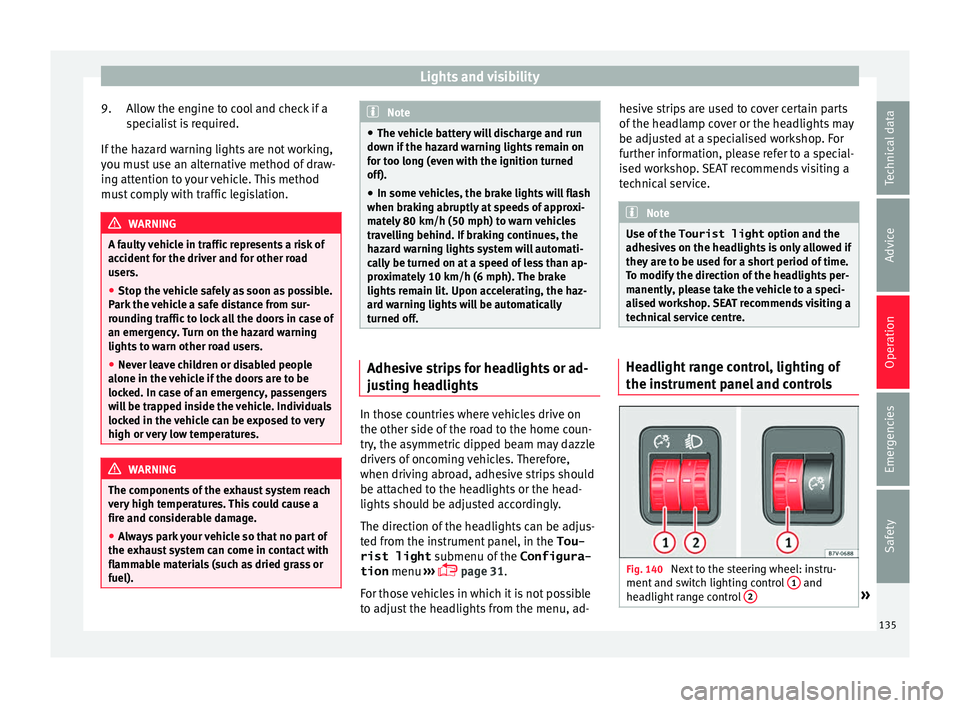
panel and controls Fig. 140
Next to the steering wheel: instru-
ment and sw it
ch lighting control 1 and
he a
dlight
range control 2 »
135
Technical data
Advice
Operation
Emergencies
Safety
Page 140 of 324
Operation
the windscreen with the ventilation system.
The antifreez
e c
ould freeze on the windscreen
and reduce visibility. WARNING
Worn or dirty wiper blades reduce visibility
and inc re
ase the risk of accident and serious
injury.
● Always replace damaged or worn blades or
bla
des which do not clean the windscreen
correctly. CAUTION
In icy conditions, always check that the wiper
bl a
des are not frozen to the glass before us-
ing the wipers for the first time. In cold
weather, it may help to leave the vehicle
parked with the wipers in service position
››› page 55. CAUTION
If the ignition is switched off while the wind-
sc r
een wipers are on, the windscreen wipers
carry on wiping at the same level when the
ignition is switched back on. Ice, snow and
other obstacles may damage the windscreen
wiper and the respective motor. Note
● The wind s
creen wipers will only function
when the ignition is switched on and the re-
spective bonnet or rear lid are closed. ●
The inter v
al wipe speed varies according to
the vehicle speed. The faster the vehicle is
moving, the more often the windscreen is
cleaned.
● The rear wiper is automatically switched on
when the winds
creen wiper is on and the car
is in reverse gear. Windscreen wiper functions
Windscreen wiper performance in different sit-
uations
If the vehicle
is at a stand-
stillThe activated position provisionally
changes to the previous position.
During auto-
matic wipe
The air conditioner comes on for ap-
proximately 30 seconds in air recircula-
tion mode to prevent the smell of the
windscreen washer fluid entering the
inside the vehicle.
For the inter-
val wipeIntervals between wipes depend on the
vehicle's speed. The higher the vehicle
speed the shorter the intervals.
Heated windscreen washer jets
The he
atin
g on
ly thaws the frozen jets, it
does not thaw the water in the washer hoses.
The heated windscreen washer jets automati-
cally adjust the heat depending on the ambi-
ent temperature when the ignition is switch-
ed on. Headlight wash/wipe system
The headlight
washers/wipers clean the
headlight lenses.
After the ignition is switched on, the first and
every fifth time the windscreen washer is
switched on, the headlights are also washed.
Therefore, the windscreen wiper lever should
be pulled towards the steering wheel when
the dipped beam or main beam are on. Any
incrusted dirt (such as insects) should be
cleaned regularly (e.g. when refuelling).
To ensure the headlight washers work cor-
rectly in winter, any snow which has got into
the bumper jet supports should be cleaned
away. If necessary, remove snow with an anti-
icing spray. Note
The wiper will try to wipe away any obstacles
that ar
e on the windscreen. The wiper will
stop moving if the obstacle blocks its path.
Remove the obstacle and switch the wiper
back on again. 138
Page 144 of 324
Operation
steering wheel buttons and select Conven-
ience .
● Select the Rear vision mirror ad-
justment fu
nction (if
it is already checked,
uncheck it and check the option again).
● Select reverse gear.
● Adjust the front passenger side exterior
mirror so that
you can see, for example, the
kerb area.
● The new position of the mirror will be stor-
ed automatic
ally and allocated to the vehicle
key that was used to unlock the vehicle. For
vehicles with seat memory, please see
››› page 147.
Activating the passenger exterior mirror set-
tings
● Turn the exterior mirror knob to position R.
● With the ignition switched on, select re-
verse g
ear.
● The stored position of the passenger exteri-
or mirror for r
everse gear is deleted when
driving forwards at 15 km/h (9 mph), or if the
knob is turned from position R to another po-
sition. WARNING
Fold and unfold the exterior mirror, taking
car e t
o avoid injuries.
● Only fold or unfold the exterior mirror when
there is
no-one in the way of the mirror. ●
When mov in
g the mirror, take care not to
trap fingers between the mirror and the mir-
ror bracket. WARNING
Failure to correctly estimate the distance of
the vehic
le behind could lead to serious acci-
dent.
● Rear-view convex or aspheric mirrors in-
cre
ase the field of vision, however objects ap-
pear smaller and further away in the mirrors.
● The use of these mirrors to estimate the
dist
ance to the next vehicle when changing
lane is imprecise and could result in serious
accident.
● If possible, use the rear vision mirror to es-
timate di
stances to vehicles behind you or in
other circumstances.
● Make sure that the rear visibility is ade-
quate. CAUTION
● Bef or
e entering a car wash, always ensure
that the exterior mirrors are correctly folded
in.
● Electrically-folding exterior mirrors should
not be fo
lded and unfolded mechanically as
this may damage the electrical operation. For the sake of the environment
The exterior mirror heating should be switch-
ed off when it i
s no longer needed. Other-
wise, it is an unnecessary fuel waste. Note
● The ext erior mirr
or heating initially heats
up with a high power, after two minutes the
heat will depend upon the ambient tempera-
ture.
● In the event of a fault, the electric exterior
mirrors
can be adjusted manually by pressing
the edge of the mirror surface. 142
Page 184 of 324
Operation
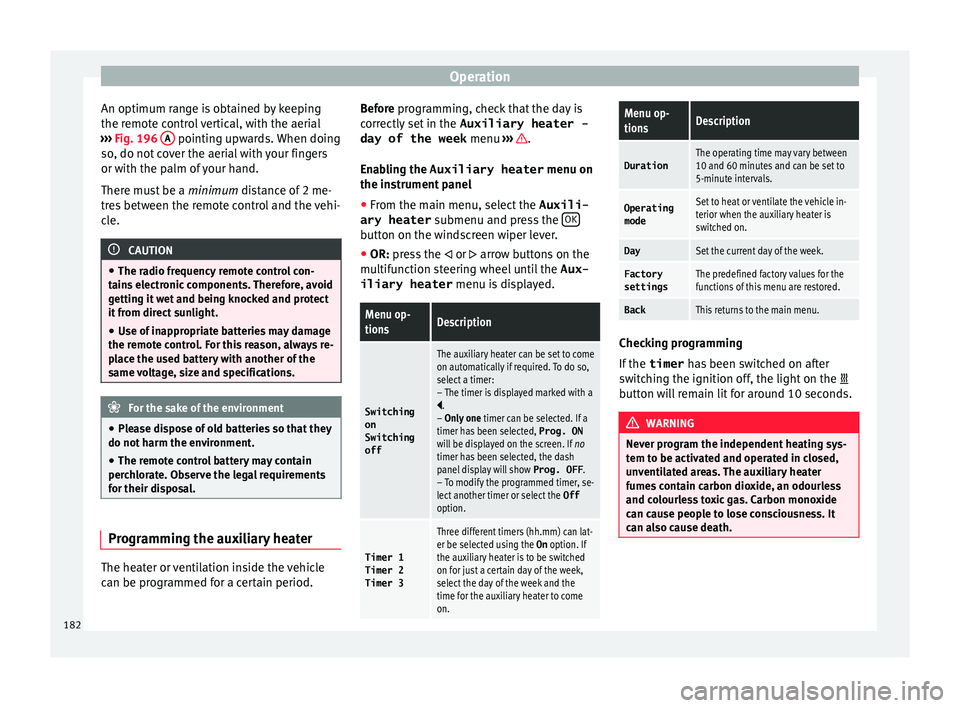
An optimum range is obtained by keeping
the r emot
e c
ontrol vertical, with the aerial
››› Fig. 196 A pointing upwards. When doing
so , do not
c
over the aerial with your fingers
or with the palm of your hand.
There must be a minimum distance of 2 me-
tres between the remote control and the vehi-
cle. CAUTION
● The ra dio fr
equency remote control con-
tains electronic components. Therefore, avoid
getting it wet and being knocked and protect
it from direct sunlight.
● Use of inappropriate batteries may damage
the remote c
ontrol. For this reason, always re-
place the used battery with another of the
same voltage, size and specifications. For the sake of the environment
● Ple a
se dispose of old batteries so that they
do not harm the environment.
● The remote control battery may contain
perch
lorate. Observe the legal requirements
for their disposal. Programming the auxiliary heater
The heater or ventilation inside the vehicle
c
an be pr
ogr
ammed for a certain period. Before programming, check that the day is
corr
ectly set in the Auxiliary heater -
day of the week menu ››› .
En ab
lin
g the Auxiliary heater menu on
the instrument panel
● From the main menu, select the Auxili-
ary heater submenu and pre
ss the OK button on the windscreen wiper lever.
● OR: pr ess the
or
arrow buttons on the
multifunction steering wheel until the Aux-
iliary heater menu is displayed.
Menu op-
tionsDescription
Switching
on
Switching
off
The auxiliary heater can be set to come
on automatically if required. To do so,
select a timer:
– The timer is displayed marked with a
.
– Only one timer can be selected. If a
timer has been selected, Prog. ON
will be displayed on the screen. If no
timer has been selected, the dash
panel display will show Prog. OFF.
– To modify the programmed timer, se-
lect another timer or select the Off
option.
Timer 1
Timer 2
Timer 3
Three different timers (hh.mm) can lat-
er be selected using the On option. If
the auxiliary heater is to be switched
on for just a certain day of the week,
select the day of the week and the
time for the auxiliary heater to come
on.
Menu op-
tionsDescription
DurationThe operating time may vary between
10 and 60 minutes and can be set to
5-minute intervals.
Operating
modeSet to heat or ventilate the vehicle in-
terior when the auxiliary heater is
switched on.
DaySet the current day of the week.
Factory
settingsThe predefined factory values for the
functions of this menu are restored.
BackThis returns to the main menu. Checking programming
If
the
timer h
a
s been switched on after
switching the ignition off, the light on the
button will remain lit for around 10 seconds. WARNING
Never program the independent heating sys-
tem t o be activ
ated and operated in closed,
unventilated areas. The auxiliary heater
fumes contain carbon dioxide, an odourless
and colourless toxic gas. Carbon monoxide
can cause people to lose consciousness. It
can also cause death. 182