seats Seat Alhambra 2018 Service Manual
[x] Cancel search | Manufacturer: SEAT, Model Year: 2018, Model line: Alhambra, Model: Seat Alhambra 2018Pages: 324, PDF Size: 7.04 MB
Page 159 of 324
Transport and practical equipment
backrest in case of sudden braking, sudden
manoeu
vr
es or an accident.
● No seat must be occupied if the seat back-
res
t or seat is folded or not correctly engag-
ed. CAUTION
● Bef or
e folding the rear seat backrest, ad-
just the front seats so that neither the head
restraint or backrest hit them when folded.
● Objects placed in the footrest area in front
of and behind the re
ar seats can be damaged
when seats are folded down or put back into
position. Remove any objects in the way be-
fore folding seats down or repositioning
them.
● Objects placed in the moulding on the back
of the third r
ow of seats can be damaged
when folding down the seats or putting them
back into position. Remove any objects in the
way before folding seats down or reposition-
ing them.
● The attachment elements and supports for
the net par
tition placed on the rail system
can be damaged when folding down seats
from the third row or putting them back into
position and these can also damage the seats
themselves. Before folding down or reposi-
tioning the seats, remove the attachment ele-
ments and supports for the net from the rail
system. Shelf*
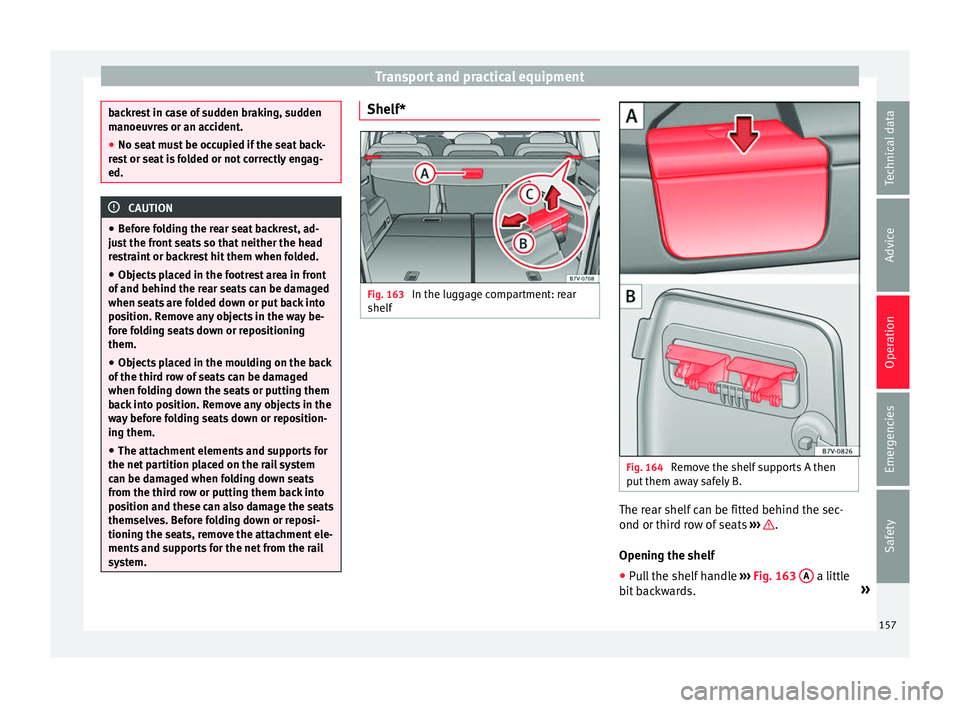
Fig. 163
In the luggage compartment: rear
shelf Fig. 164
Remove the shelf supports A then
p ut
them a
way safely B. The rear shelf can be fitted behind the sec-
ond or thir
d r
o
w of seats ››› .
Openin g the shelf
● Pu
ll the shelf handle ›››
Fig. 163 A a little
b it
b
ackwards. »
157
Technical data
Advice
Operation
Emergencies
Safety
Page 160 of 324
Operation
● Rel
e
ase the shelf upwards by the side sup-
ports and guide it forward.
Closing the shelf
● Pull the unfolded shelf evenly on the guide
back
wards.
● Secure the shelf using the left and right
side sup
ports.
Installing the shelf behind the second row of
seats
● Place the shelf in its position in the side
lining, lef
t-hand side first.
● Release the shelf in the direction of the ar-
row ›
›› Fig. 163 B .
● Insert the shelf into the right-hand support,
pr e
s
sing down.
Installing the shelf behind the third row of
seats
● Remove the shelf from the support in the
side lining ›
›› Fig. 164 A. To do this, press the
shelf upwards (arrow) and remove it.
● Open the compartment in the left-hand
side boot linin
g ››› page 166 and hook the
shelf to the rear of the compartment lid
››› Fig. 164 B.
● Close the rear left-hand side lining com-
partment
.
● Place the shelf in its position in the side
lining, lef
t-hand side first. ●
Lift the shelf
off in direction of the arrow
››› Fig. 163 B .
● Insert the shelf into the right-hand support,
pr e
s
sing down.
Removing the shelf
● Release the shelf in the direction of the ar-
row ›
›› Fig. 163 B and lift it in the direction
of the arr
o
w C .
● Remove the shelf from the right-hand side
s up
por
t.
● In addition, when removing the shelf be-
hind the third ro
w of seats: cover the side lin-
ing supports with their covers.
● Only with 5 places: suppor
t the released
shelf by placing it on the front section of the
boot floor ››› page 166. WARNING
If the shelf is placed on one of the rear seats,
this c
ould cause serious injury in case of sud-
den braking or an accident.
● Whenever it the third row seats are occu-
pied, the shelf shoul
d be put behind this row. WARNING
Unsecured or incorrectly secured objects or
anima l
s on the rear shelf could cause serious
injuries in case of a sudden manoeuvre or
braking or even an accident. ●
Do not l e
ave hard, heavy or sharp objects
(loose or in bags) on the rear shelf.
● Never transport animals on the rear shelf. 158
Page 161 of 324
Transport and practical equipment
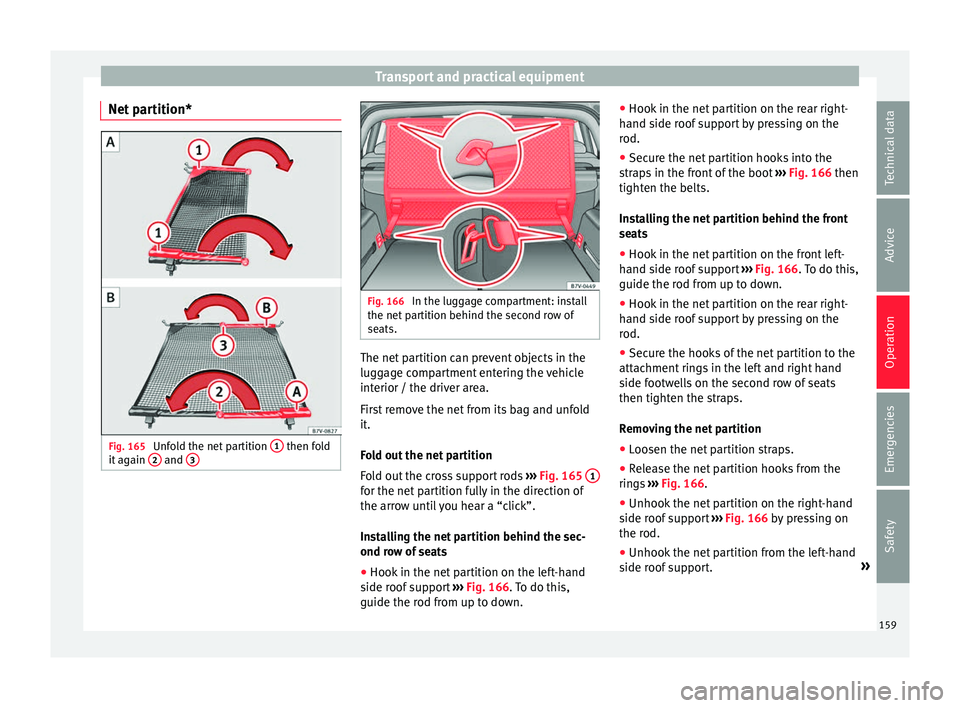
Net partition* Fig. 165
Unfold the net partition 1 then fold
it ag ain 2 and
3 Fig. 166
In the luggage compartment: install
the net p
ar
tition behind the second row of
seats. The net partition can prevent objects in the
lug
g
ag
e compartment entering the vehicle
interior / the driver area.
First remove the net from its bag and unfold
it.
Fold out the net partition
Fold out the cross support rods ››› Fig. 165 1 for the net partition fully in the direction of
the arr
o
w u
ntil you hear a “click”.
Installing the net partition behind the sec-
ond row of seats
● Hook in the net partition on the left-hand
side roof
support ››› Fig. 166. To do this,
guide the rod from up to down. ●
Hook in the net p
artition on the rear right-
hand side roof support by pressing on the
rod.
● Secure the net partition hooks into the
strap
s in the front of the boot ››› Fig. 166 then
tighten the belts.
Installing the net partition behind the front
seats
● Hook in the net partition on the front left-
hand side r
oof support ››› Fig. 166. To do this,
guide the rod from up to down.
● Hook in the net partition on the rear right-
hand side r
oof support by pressing on the
rod.
● Secure the hooks of the net partition to the
attachment
rings in the left and right hand
side footwells on the second row of seats
then tighten the straps.
Removing the net partition
● Loosen the net partition straps.
● Release the net partition hooks from the
rings
››› Fig. 166.
● Unhook the net partition on the right-hand
side roof
support ››› Fig. 166 by pressing on
the rod.
● Unhook the net partition from the left-hand
side roof
support. »
159
Technical data
Advice
Operation
Emergencies
Safety
Page 163 of 324
Transport and practical equipment
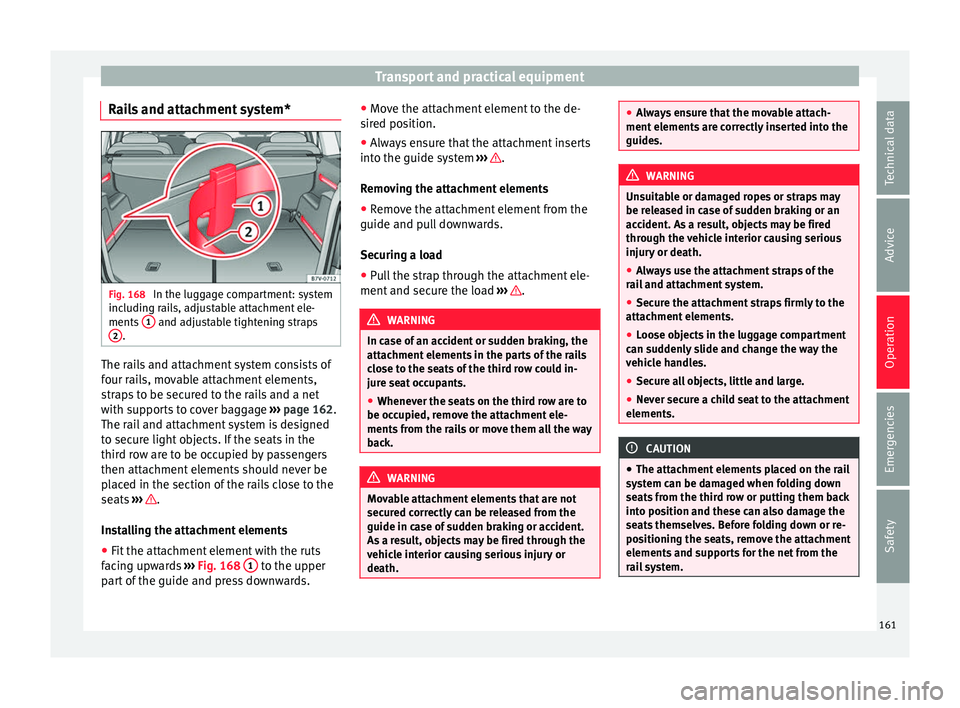
Rails and attachment system* Fig. 168
In the luggage compartment: system
inc ludin
g r
ails, adjustable attachment ele-
ments 1 and adjustable tightening straps
2 .
The rails and attachment system consists of
f
our r
ai
ls, movable attachment elements,
straps to be secured to the rails and a net
with supports to cover baggage ››› page 162.
The rail and attachment system is designed
to secure light objects. If the seats in the
third row are to be occupied by passengers
then attachment elements should never be
placed in the section of the rails close to the
seats ››› .
In s
t
alling the attachment elements
● Fit the attachment element with the ruts
facin
g upwards ››› Fig. 168 1 to the upper
p ar
t
of the guide and press downwards. ●
Move the att
achment element to the de-
sired position.
● Always ensure that the attachment inserts
into the guide sys
tem ››› .
R emo
v
ing the attachment elements
● Remove the attachment element from the
guide and pul
l downwards.
Securing a load
● Pull the strap through the attachment ele-
ment and secur
e the load ››› .
WARNING
In case of an accident or sudden braking, the
attac hment
elements in the parts of the rails
close to the seats of the third row could in-
jure seat occupants.
● Whenever the seats on the third row are to
be occupied, r
emove the attachment ele-
ments from the rails or move them all the way
back. WARNING
Movable attachment elements that are not
secur ed c
orrectly can be released from the
guide in case of sudden braking or accident.
As a result, objects may be fired through the
vehicle interior causing serious injury or
death. ●
Alw a
ys ensure that the movable attach-
ment elements are correctly inserted into the
guides. WARNING
Unsuitable or damaged ropes or straps may
be r ele
ased in case of sudden braking or an
accident. As a result, objects may be fired
through the vehicle interior causing serious
injury or death.
● Always use the attachment straps of the
rail
and attachment system.
● Secure the attachment straps firmly to the
attachment
elements.
● Loose objects in the luggage compartment
can sud
denly slide and change the way the
vehicle handles.
● Secure all objects, little and large.
● Never secure a child seat to the attachment
elements. CAUTION
● The attac hment
elements placed on the rail
system can be damaged when folding down
seats from the third row or putting them back
into position and these can also damage the
seats themselves. Before folding down or re-
positioning the seats, remove the attachment
elements and supports for the net from the
rail system. 161
Technical data
Advice
Operation
Emergencies
Safety
Page 164 of 324
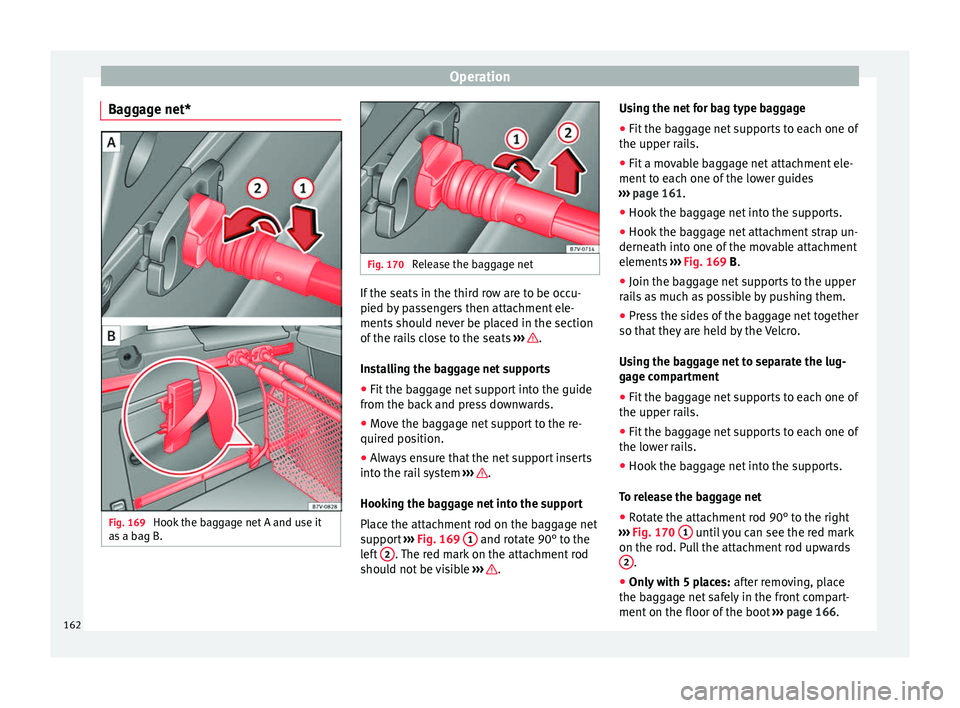
Operation
Baggage net* Fig. 169
Hook the baggage net A and use it
a s
a b
ag B. Fig. 170
Release the baggage net If the seats in the third row are to be occu-
pied b
y
p
assengers then attachment ele-
ments should never be placed in the section
of the rails close to the seats ››› .
In s
t
alling the baggage net supports
● Fit the baggage net support into the guide
from the bac
k and press downwards.
● Move the baggage net support to the re-
quired pos
ition.
● Always ensure that the net support inserts
into the rai
l system ››› .
Hook in
g the b
aggage net into the support
Place the attachment rod on the baggage net
support ››› Fig. 169 1 and rotate 90° to the
l ef
t
2 . The red mark on the attachment rod
shou ld not
be visible ››› .Using the net for bag type baggage
●
Fit the baggage net supports to each one of
the up per r
ai
ls.
● Fit a movable baggage net attachment ele-
ment to e
ach one of the lower guides
››› page 161.
● Hook the baggage net into the supports.
● Hook the baggage net attachment strap un-
derneath into one of
the movable attachment
elements ››› Fig. 169 B.
● Join the baggage net supports to the upper
rail
s as much as possible by pushing them.
● Press the sides of the baggage net together
so that they
are held by the Velcro.
Using the baggage net to separate the lug-
gage compartment
● Fit the baggage net supports to each one of
the upper rai
ls.
● Fit the baggage net supports to each one of
the lower r
ails.
● Hook the baggage net into the supports.
To rel
ease the baggage net
● Rotate the attachment rod 90° to the right
›››
Fig. 170 1 until you can see the red mark
on the r od. P
u
ll the attachment rod upwards
2 .
● Only with 5 places: af
ter r
emoving, place
the baggage net safely in the front compart-
ment on the floor of the boot ››› page 166.
162
Page 165 of 324
Transport and practical equipment
Removing the baggage net supports
● Remove the net attachment element from
the r ai
l
and pull it out downwards. WARNING
In case of an accident or sudden braking, the
net att ac
hment elements in the parts of the
rails close to the seats of the third row could
injure seat occupants.
● Whenever the seats on the third row are to
be occupied, r
emove the attachment ele-
ments from the rails or move them all the way
back. WARNING
Baggage net supports that are not secured
corr ectly
can be released from the guide in
case of the sudden braking or accident. As a
result, objects may be fired through the vehi-
cle interior causing serious injury or death.
● Always ensure that the baggage net sup-
ports
are correctly inserted into the rails; the
red mark should not be visible.
● Never secure a child seat to the baggage
net sup
ports. CAUTION
● The bag g
age net supports placed on the
rail system can be damaged when folding
down seats from the third row or putting
them back into position and these can also
damage the seats themselves. Before folding down or repositioning the seats, remove the
bag
g
age net supports from the rail system. Retaining hooks
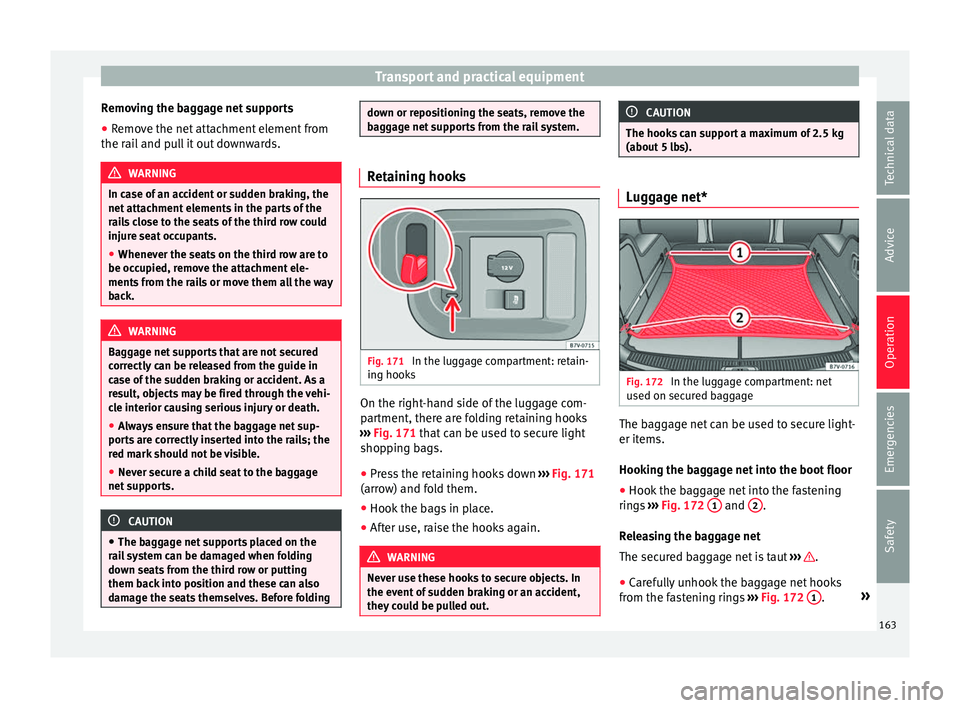
Fig. 171
In the luggage compartment: retain-
in g hook
s On the right-hand side of the luggage com-
p
ar
tment, ther
e are folding retaining hooks
››› Fig. 171 that can be used to secure light
shopping bags.
● Press the retaining hooks down ›››
Fig. 171
(arrow) and fold them.
● Hook the bags in place.
● After use, raise the hooks again. WARNING
Never use these hooks to secure objects. In
the event of
sudden braking or an accident,
they could be pulled out. CAUTION
The hooks can support a maximum of 2.5 kg
(about 5 l
bs). Luggage net*
Fig. 172
In the luggage compartment: net
u sed on sec
ur
ed baggage The baggage net can be used to secure light-
er it
ems.
Hook in
g the baggage net into the boot floor
● Hook the baggage net into the fastening
rings
››› Fig. 172 1 and
2 .
R el
e
asing the baggage net
The secured baggage net is taut ››› .
● Carefully unhook the baggage net hooks
fr om the f
a
stening rings ››› Fig. 172 1 .
»
163
Technical data
Advice
Operation
Emergencies
Safety
Page 171 of 324
Transport and practical equipment
Vehicle wallet compartment
The glo v
e c
ompartment is designed to store
the vehicle documentation.
The vehicle on-board documentation wallet
should always be kept in the glove compart-
ment. Insert it crosswise in the glove com-
partment.
Glove compartment cooling
There is an air vent ››› Fig. 181 A on the rear
p anel
so th
at cooled air from the air condi-
tioner (this must be connected) is fed into
the glove compartment. Turn the air vent to
open and close it. WARNING
The risk of serious injuries in the event of an
acc ident
during a sudden braking manoeuvre
or turn is increased if the glove compartment
is left open.
● Keep the glove compartment closed while
the vehic
le is in motion. CAUTION
For structural reasons, some model versions
wi l
l have gaps behind the glove compartment
into which small objects may fall. This could
lead to strange noises and damage to the ve-
hicle. You should therefore not keep very
small objects in the glove compartment. Storage compartments in the rear
f
ootw
el
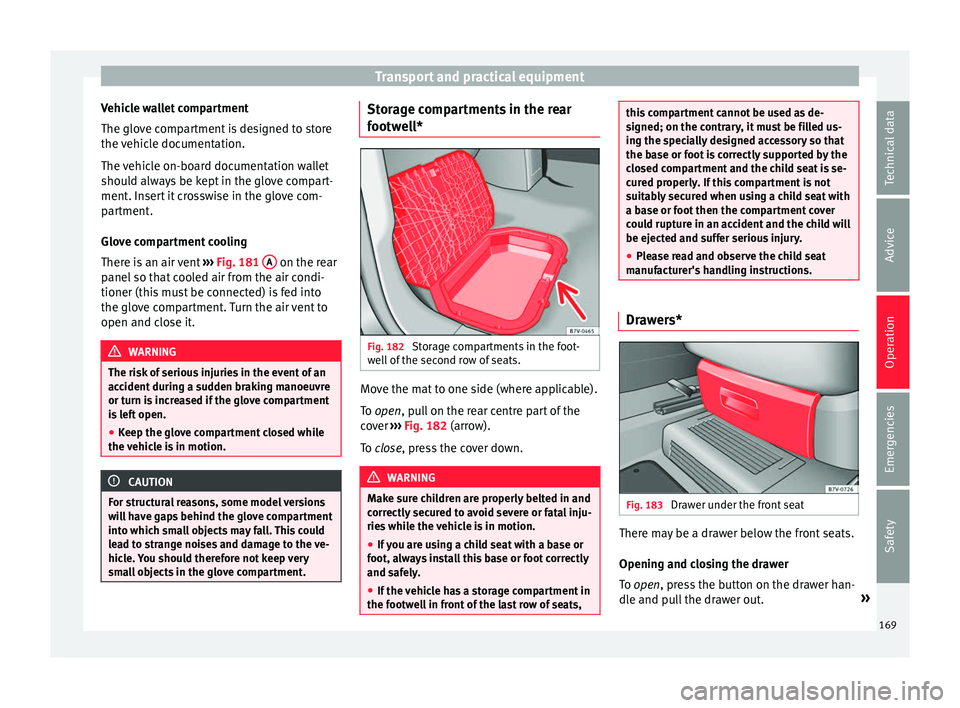
l* Fig. 182
Storage compartments in the foot-
w el
l
of the second row of seats. Move the mat to one side (where applicable).
T
o
open
, pull on the rear centre part of the
cover ›››
Fig. 182 (arrow).
To close, press the cover down. WARNING
Make sure children are properly belted in and
corr ectly
secured to avoid severe or fatal inju-
ries while the vehicle is in motion.
● If you are using a child seat with a base or
foot, alw
ays install this base or foot correctly
and safely.
● If the vehicle has a storage compartment in
the footwel
l in front of the last row of seats, this compartment cannot be used as de-
signed; on the c
ontr
ary, it must be filled us-
ing the specially designed accessory so that
the base or foot is correctly supported by the
closed compartment and the child seat is se-
cured properly. If this compartment is not
suitably secured when using a child seat with
a base or foot then the compartment cover
could rupture in an accident and the child will
be ejected and suffer serious injury.
● Please read and observe the child seat
manufact
urer's handling instructions. Drawers*
Fig. 183
Drawer under the front seat There may be a drawer below the front seats.
Openin
g and c
lo
sing the drawer
To open, press the button on the drawer han-
dle and pull the drawer out. »
169
Technical data
Advice
Operation
Emergencies
Safety
Page 174 of 324
Operation
Note
The drink holders can be removed for clean-
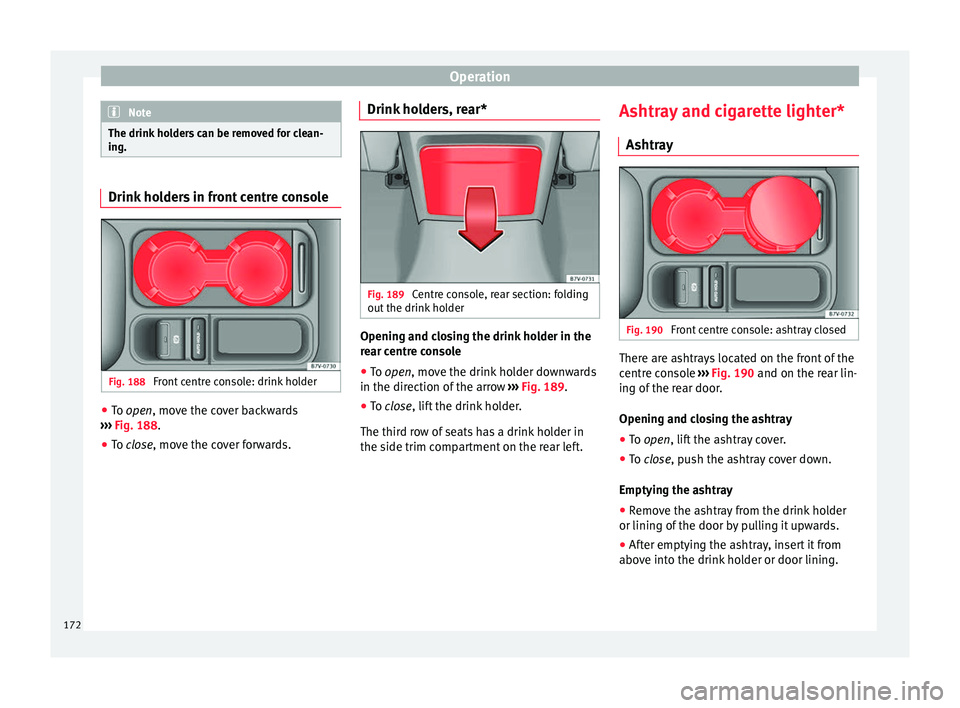
ing. Drink holders in front centre console
Fig. 188
Front centre console: drink holder ●
To open, mo v
e the c over backwards
››› Fig. 188.
● To close, move the cover forwards. Drink ho
lders, rear* Fig. 189
Centre console, rear section: folding
out the drink
ho
lder Opening and closing the drink holder in the
r
e
ar c
entre console
● To open, move the drink
holder downwards
in the direction of the arrow ››› Fig. 189.
● To close, lift the drink holder.
The third r
ow of seats has a drink holder in
the side trim compartment on the rear left. Ashtray and cigarette lighter*
Ashtray Fig. 190
Front centre console: ashtray closed There are ashtrays located on the front of the
c
entr
e c
onsole ››› Fig. 190 and on the rear lin-
ing of the rear door.
Opening and closing the ashtray
● To open, lift the ashtray cover.
● To
close, push the ashtray cover down.
Emptyin
g the ashtray
● Remove the ashtray from the drink holder
or lining of the door b
y pulling it upwards.
● After emptying the ashtray, insert it from
above int
o the drink holder or door lining.
172
Page 179 of 324
Air conditioning
the rear centre console. These controls are
u sed t
o m
ake the appropriate settings for the
rear seats. Note
● Not a l
l Climatronic buttons are operational
in mode.
● The button is locked in defrost mode.
Controls in the rear seats
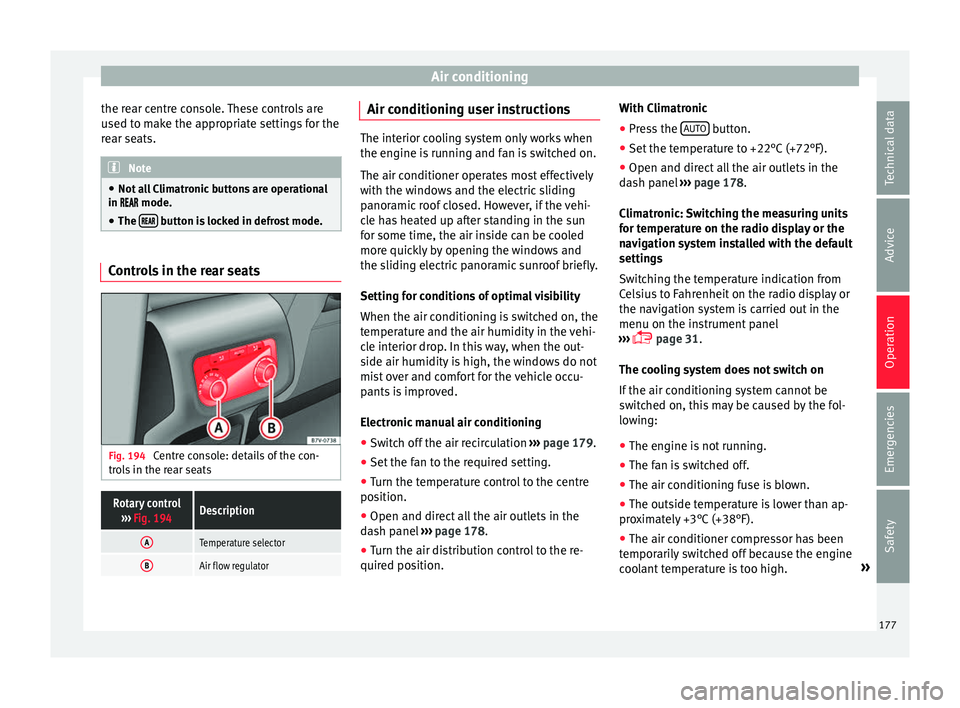
Fig. 194
Centre console: details of the con-
tr o
l
s in the rear seats
Rotary control
››› Fig. 194Description
ATemperature selector
BAir flow regulator Air conditioning user instructions
The interior cooling system only works when
the engine i
s
running and fan is switched on.
The air conditioner operates most effectively
with the windows and the electric sliding
panoramic roof closed. However, if the vehi-
cle has heated up after standing in the sun
for some time, the air inside can be cooled
more quickly by opening the windows and
the sliding electric panoramic sunroof briefly.
Setting for conditions of optimal visibility
When the air conditioning is switched on, the
temperature and the air humidity in the vehi-
cle interior drop. In this way, when the out-
side air humidity is high, the windows do not
mist over and comfort for the vehicle occu-
pants is improved.
Electronic manual air conditioning
● Switch off the air recirculation ››
›
page 179.
● Set the fan to the required setting.
● Turn the temperature control to the centre
position.
● Open and dir
ect all the air outlets in the
dash p
anel ›››
page 178.
● Turn the air distribution control to the re-
quired pos
ition. With Climatronic
●
Press the AUTO button.
● Set the temperature to +22°C (+72°F).
● Open and direct all the air outlets in the
d a
sh p
anel ››› page 178.
Climatronic: Switching the measuring units
for temperature on the radio display or the
navigation system installed with the default
settings
Switching the temperature indication from
Celsius to Fahrenheit on the radio display or
the navigation system is carried out in the
menu on the instrument panel
››› page 31.
The cooling system does not switch on
If the air conditioning system cannot be
switched on, this may be caused by the fol-
lowing:
● The engine is not running.
● The fan is switched off.
● The air conditioning fuse is blown.
● The outside temperature is lower than ap-
prox
imately +3°C (+38°F).
● The air conditioner compressor has been
temporari
ly switched off because the engine
coolant temperature is too high. »
177
Technical data
Advice
Operation
Emergencies
Safety
Page 203 of 324
Driving
In addition, “skipping” gears when shifting
up help s
t
o save fuel, weather and traffic
conditions permitting.
Do not wait until the last moment before
changing gear. Only use first gear when you
move off and change to second gear quickly.
Avoid the kick-down function in vehicles with
automatic gearbox.
Vehicles with a gear display help to achieve
an economical driving style as the display in-
dicates the best moment to change gear.
Let the vehicle roll
If you take your foot off the accelerator, the
fuel supply is stopped and consumption is
reduced.
Allow the vehicle to roll without accelerating,
for example when approaching a red traffic
light. However, if the vehicle is rolling too
slowly or the distance is too long, the clutch
pedal should be pressed to declutch. The en-
gine will then operate at idle speed.
If the vehicle is going to be at a standstill for
a period of time, switch off the engine; for ex-
ample, while waiting at a level crossing. In
vehicles which have the Start-Stop function
on, the engine switches off automatically
when the vehicle is not moving. Think ahead and “flow” with the traffic
Frequent ac
celeration and braking considera-
bly increase fuel consumption. If you think
ahead as you drive and keep a safe distance
from the vehicle in front, it is possible to slow
down by simply lifting your foot off the accel-
erator. This eliminates the need for constant
braking and acceleration.
Calm and steady driving
Constancy is more important than speed: The
more you drive at a constant speed, the lower
the fuel consumption.
When driving on the motorway, it is more effi-
cient to drive at a constant and more moder-
ate speed than to be continuously accelerat-
ing and braking. As a general rule, you will
reach your destination just as quickly when
you drive at a constant speed.
The cruise control function helps you to ach-
ieve a constant style of driving.
Moderate use of additional devices
It is important to travel in comfort, but con-
venience systems should be used ecological-
ly.
Some equipment, when connected, increase
fuel consumption considerably, for example:
● Air conditioning cooling system: If the air
conditionin g sy
stem is required to cool to
significantly lower temperatures than the true outside temperature, it will require a large
amount
of
energy from the engine. Therefore,
we recommend that the selected temperature
for the vehicle is not too different to the out-
side temperature. It is a good idea to air the
vehicle before starting your journey and to
drive a short distance with all the windows
open. Only then should you close all the win-
dows and switch on the air conditioning.
Keep windows closed when travelling at high
speeds. Driving with the windows open in-
creases fuel consumption.
● Switch off the seat heating when the seats
have w
armed up.
● Switch off the heated rear window and the
winds
creen heating when the windows have
demisted and are free of ice.
● Do not leave the auxiliary heater switched
on when the vehic
le is moving ››› page 180.
Avoid short journeys
Fuel consumption is much higher when the
engine is cold, immediately after it has been
started. It takes a few kilometres of driving
for the engine to warm up and to normalise
consumption.
The engine and catalytic converter need to
reach their proper working temperature in or-
der to minimise fuel consumption and emis-
sions. The ambient temperature has a deci-
sive influence. »
201
Technical data
Advice
Operation
Emergencies
Safety