light Seat Alhambra 2018 Repair Manual
[x] Cancel search | Manufacturer: SEAT, Model Year: 2018, Model line: Alhambra, Model: Seat Alhambra 2018Pages: 324, PDF Size: 7.04 MB
Page 140 of 324
Operation
the windscreen with the ventilation system.
The antifreez
e c
ould freeze on the windscreen
and reduce visibility. WARNING
Worn or dirty wiper blades reduce visibility
and inc re
ase the risk of accident and serious
injury.
● Always replace damaged or worn blades or
bla
des which do not clean the windscreen
correctly. CAUTION
In icy conditions, always check that the wiper
bl a
des are not frozen to the glass before us-
ing the wipers for the first time. In cold
weather, it may help to leave the vehicle
parked with the wipers in service position
››› page 55. CAUTION
If the ignition is switched off while the wind-
sc r
een wipers are on, the windscreen wipers
carry on wiping at the same level when the
ignition is switched back on. Ice, snow and
other obstacles may damage the windscreen
wiper and the respective motor. Note
● The wind s
creen wipers will only function
when the ignition is switched on and the re-
spective bonnet or rear lid are closed. ●
The inter v
al wipe speed varies according to
the vehicle speed. The faster the vehicle is
moving, the more often the windscreen is
cleaned.
● The rear wiper is automatically switched on
when the winds
creen wiper is on and the car
is in reverse gear. Windscreen wiper functions
Windscreen wiper performance in different sit-
uations
If the vehicle
is at a stand-
stillThe activated position provisionally
changes to the previous position.
During auto-
matic wipe
The air conditioner comes on for ap-
proximately 30 seconds in air recircula-
tion mode to prevent the smell of the
windscreen washer fluid entering the
inside the vehicle.
For the inter-
val wipeIntervals between wipes depend on the
vehicle's speed. The higher the vehicle
speed the shorter the intervals.
Heated windscreen washer jets
The he
atin
g on
ly thaws the frozen jets, it
does not thaw the water in the washer hoses.
The heated windscreen washer jets automati-
cally adjust the heat depending on the ambi-
ent temperature when the ignition is switch-
ed on. Headlight wash/wipe system
The headlight
washers/wipers clean the
headlight lenses.
After the ignition is switched on, the first and
every fifth time the windscreen washer is
switched on, the headlights are also washed.
Therefore, the windscreen wiper lever should
be pulled towards the steering wheel when
the dipped beam or main beam are on. Any
incrusted dirt (such as insects) should be
cleaned regularly (e.g. when refuelling).
To ensure the headlight washers work cor-
rectly in winter, any snow which has got into
the bumper jet supports should be cleaned
away. If necessary, remove snow with an anti-
icing spray. Note
The wiper will try to wipe away any obstacles
that ar
e on the windscreen. The wiper will
stop moving if the obstacle blocks its path.
Remove the obstacle and switch the wiper
back on again. 138
Page 141 of 324
Lights and visibility
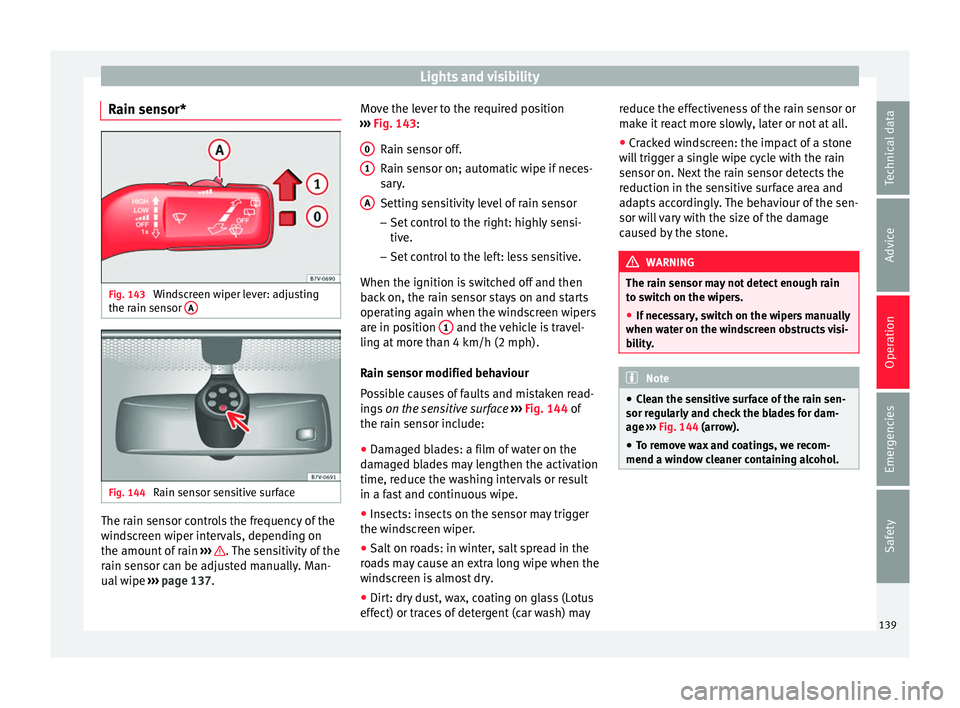
Rain sensor* Fig. 143
Windscreen wiper lever: adjusting
the r ain sen
sor A Fig. 144
Rain sensor sensitive surface The rain sensor controls the frequency of the
w
ind
s
creen wiper intervals, depending on
the amount of rain ››› . The sensitivity of the
r ain sen
sor c
an be adjusted manually. Man-
ual wipe ››› page 137. Move the lever to the required position
›››
Fig. 143:
Rain sensor off.
Rain sensor on; automatic wipe if neces-
sary.
Setting sensitivity level of rain sensor
– Set control to the right: highly sensi-
tive.
– Set control to the left: less sensitive.
When the ignition is switched off and then
back on, the rain sensor stays on and starts
operating again when the windscreen wipers
are in position 1 and the vehicle is travel-
lin g at
mor
e than 4 km/h (2 mph).
Rain sensor modified behaviour
Possible causes of faults and mistaken read-
ings on the sensitive surface ››› Fig. 144 of
the rain sensor include:
● Damaged blades: a film of water on the
damag
ed blades may lengthen the activation
time, reduce the washing intervals or result
in a fast and continuous wipe.
● Insects: insects on the sensor may trigger
the winds
creen wiper.
● Salt on roads: in winter, salt spread in the
roa
ds may cause an extra long wipe when the
windscreen is almost dry.
● Dirt: dry dust, wax, coating on glass (Lotus
effect) or trac
es of detergent (car wash) may
0 1
A reduce the effectiveness of the rain sensor or
m
ak
e it
react more slowly, later or not at all.
● Cracked windscreen: the impact of a stone
wil
l trigger a single wipe cycle with the rain
sensor on. Next the rain sensor detects the
reduction in the sensitive surface area and
adapts accordingly. The behaviour of the sen-
sor will vary with the size of the damage
caused by the stone. WARNING
The rain sensor may not detect enough rain
to sw it
ch on the wipers.
● If necessary, switch on the wipers manually
when water on the w
indscreen obstructs visi-
bility. Note
● Cle
an the sensitive surface of the rain sen-
sor regularly and check the blades for dam-
age ››› Fig. 144 (arrow).
● To remove wax and coatings, we recom-
mend a window c
leaner containing alcohol. 139
Technical data
Advice
Operation
Emergencies
Safety
Page 142 of 324
Operation
Rear vision mirror Intr oduction WARNING
The automatic anti-dazzle rear vision mirror
cont ain
s an electrolytic fluid which may leak
if the mirror is broken. This could cause irrita-
tion to the skin, eyes and respiratory organs.
● The electrolytic fluid may cause irritation to
the skin, eye
s and respiratory organs, partic-
ularly in individuals suffering from asthma or
other illnesses. Make sure that adequate
quantities of fresh air enter and leave the ve-
hicle if it is not possible to open all the doors
and windows.
● If the electrolytic fluid comes into contact
with eye
s or skin, wash the area for at least
15 minutes with plenty of water, and seek
medical advice.
● If the electrolytic fluid comes into contact
with shoes
or clothing, wash the area for at
least 15 minutes with plenty of water. Wash
shoes and clothing before wearing them
again.
● If the electrolytic fluid is swallowed, wash
your mouth with p
lenty of water for at least
15 minutes. Do not try to provoke vomiting
unless recommended by a Doctor. Seek medi-
cal advice immediately. CAUTION
In the event that an automatic anti-dazzle
re ar
vision mirror breaks, an electrolyte fluid
may leak. This liquid attacks plastic surfaces.
Therefore, it should be cleaned as fast as
possible with a damp sponge or similar. Interior rear vision mirror
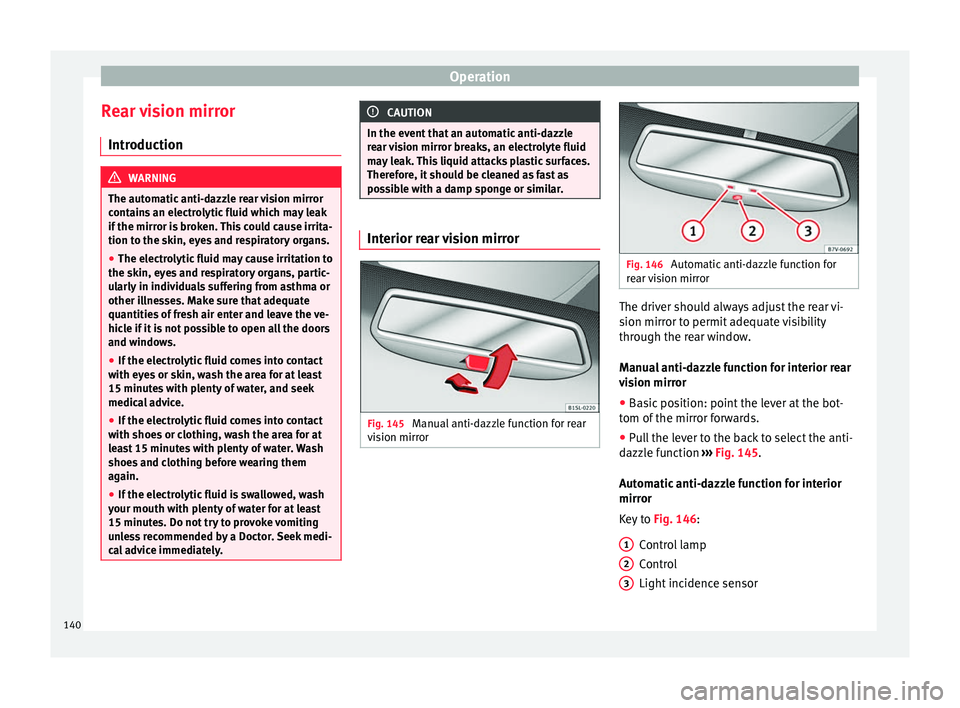
Fig. 145
Manual anti-dazzle function for rear
v i
s
ion mirror Fig. 146
Automatic anti-dazzle function for
re ar
vision mirror The driver should always adjust the rear vi-
s
ion mirr
or t
o permit adequate visibility
through the rear window.
Manual anti-dazzle function for interior rear
vision mirror
● Basic position: point the lever at the bot-
tom of the mirr
or forwards.
● Pull the lever to the back to select the anti-
dazzl
e function ››› Fig. 145.
Automatic anti-dazzle function for interior
mirror
Key to Fig. 146:
Control lamp
Control
Light incidence sensor
1 2
3
140
Page 143 of 324
Lights and visibility
This function can be activated and deactiva-
t ed b
y
pressing the rear-view mirror switch
››› Fig. 146 2 . When it is activated, the warn-
in g l
amp lights
up 1 .
When the ignition i s
on, the sen
sor 3 auto-
matic a
l
ly moves the rear vision mirror to the
anti-dazzle position depending upon the in-
cidence of the light from behind.
The automatic anti-dazzle function is deacti-
vated when reverse gear is engaged or the in-
terior or reading lights are on. Note
If the light is obstructed or prevented from
re ac
hing the sensor, e.g. by the sun blinds,
the rear vision mirror with automatic anti-
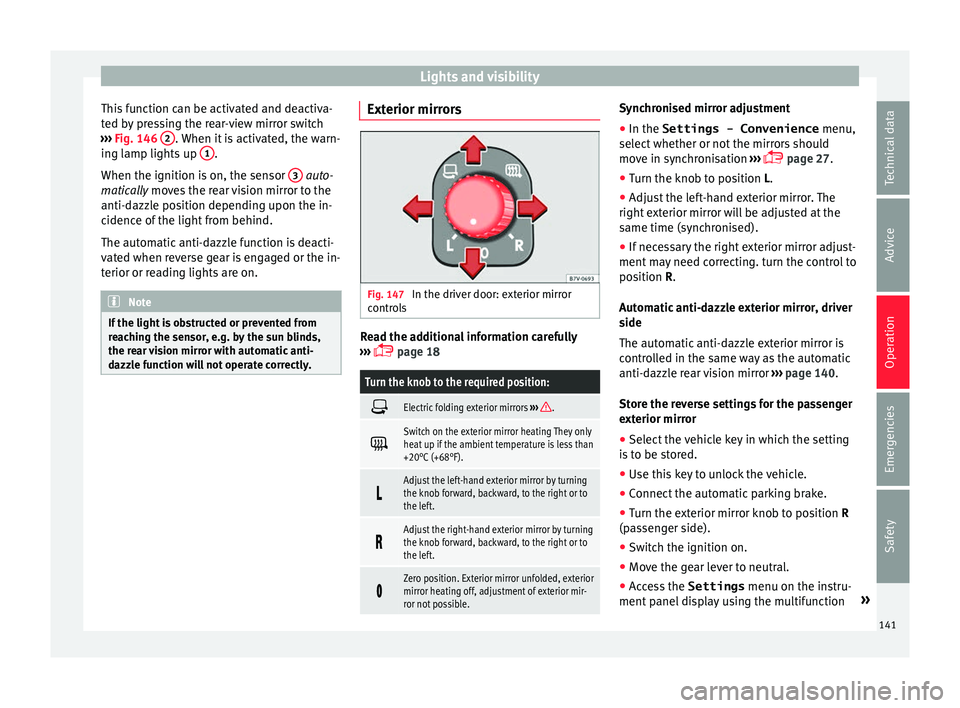
dazzle function will not operate correctly. Exterior mirrors
Fig. 147
In the driver door: exterior mirror
c ontr
o
ls Read the additional information carefully
› ›
›
page 18
Turn the knob to the required position:
Electric folding exterior mirrors
››› .
Switch on the exterior mirror heating They only
heat up if the ambient temperature is less than
+20°C (+68°F).
Adjust the left-hand exterior mirror by turning
the knob forward, backward, to the right or to
the left.
Adjust the right-hand exterior mirror by turning
the knob forward, backward, to the right or to
the left.
Zero position. Exterior mirror unfolded, exterior
mirror heating off, adjustment of exterior mir-
ror not possible. Synchronised mirror adjustment
●
In the Settings - Convenience menu,
sel ect
whether or not
the mirrors should
move in synchronisation ›››
page 27.
● Turn the knob to position L.
● Adjust the left-hand exterior mirror. The
right ext
erior mirror will be adjusted at the
same time (synchronised).
● If necessary the right exterior mirror adjust-
ment ma
y need correcting. turn the control to
position R.
Automatic anti-dazzle exterior mirror, driver
side
The automatic anti-dazzle exterior mirror is
controlled in the same way as the automatic
anti-dazzle rear vision mirror ››› page 140.
Store the reverse settings for the passenger
exterior mirror ● Select the vehicle key in which the setting
is t
o be stored.
● Use this key to unlock the vehicle.
● Connect the automatic parking brake.
● Turn the exterior mirror knob to position R
(pas
senger side).
● Switch the ignition on.
● Move the gear lever to neutral.
● Access the Settings menu on the instru-
ment
panel display using the multifunction »
141
Technical data
Advice
Operation
Emergencies
Safety
Page 149 of 324
Seats and head restraints
Seat functions Se at
he
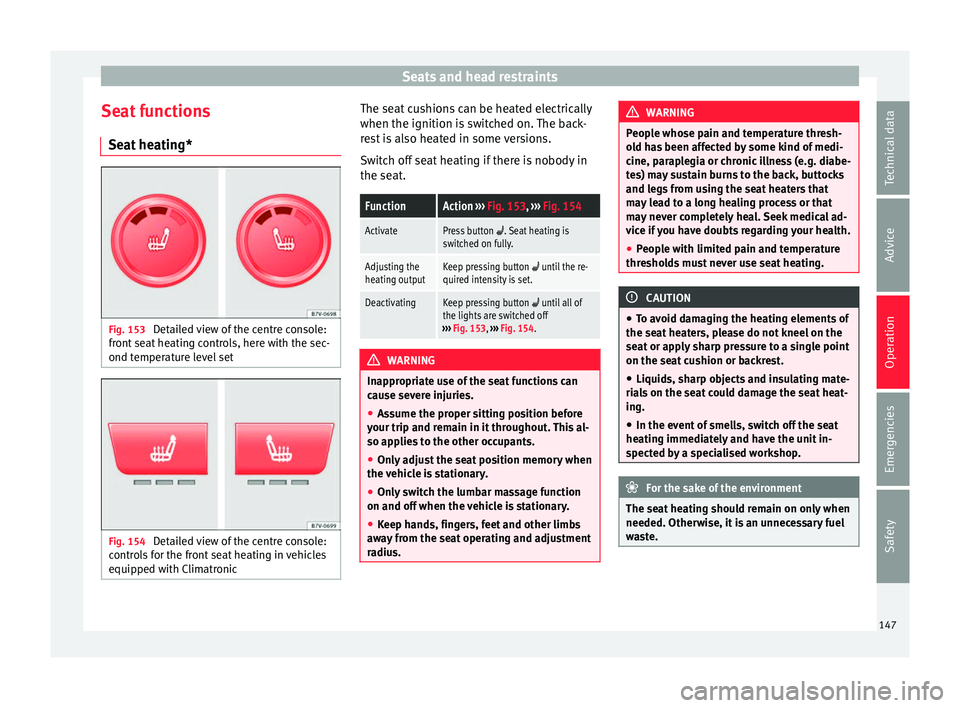
ating* Fig. 153
Detailed view of the centre console:
fr ont
se
at heating controls, here with the sec-
ond temperature level set Fig. 154
Detailed view of the centre console:
c ontr o
ls for the front seat heating in vehicles
equipped with Climatronic The seat cushions can be heated electrically
when the ignition i
s
sw
itched on. The back-
rest is also heated in some versions.
Switch off seat heating if there is nobody in
the seat.
FunctionAction ››› Fig. 153, ››› Fig. 154
ActivatePress button . Seat heating is
switched on fully.
Adjusting the
heating outputKeep pressing button until the re-
quired intensity is set.
DeactivatingKeep pressing button until all of
the lights are switched off
››› Fig. 153, ››› Fig. 154. WARNING
Inappropriate use of the seat functions can
cau se sev
ere injuries.
● Assume the proper sitting position before
your trip and rem
ain in it throughout. This al-
so applies to the other occupants.
● Only adjust the seat position memory when
the vehic
le is stationary.
● Only switch the lumbar massage function
on and off when the v
ehicle is stationary.
● Keep hands, fingers, feet and other limbs
awa
y from the seat operating and adjustment
radius. WARNING
People whose pain and temperature thresh-
ol d h
as been affected by some kind of medi-
cine, paraplegia or chronic illness (e.g. diabe-
tes) may sustain burns to the back, buttocks
and legs from using the seat heaters that
may lead to a long healing process or that
may never completely heal. Seek medical ad-
vice if you have doubts regarding your health.
● People with limited pain and temperature
thresho
lds must never use seat heating. CAUTION
● To av oid d
amaging the heating elements of
the seat heaters, please do not kneel on the
seat or apply sharp pressure to a single point
on the seat cushion or backrest.
● Liquids, sharp objects and insulating mate-
rial
s on the seat could damage the seat heat-
ing.
● In the event of smells, switch off the seat
heating immedi
ately and have the unit in-
spected by a specialised workshop. For the sake of the environment
The seat heating should remain on only when
needed. Otherw i
se, it is an unnecessary fuel
waste. 147
Technical data
Advice
Operation
Emergencies
Safety
Page 153 of 324
Seats and head restraints
Folding the backrest of the front pas-
sen g
er se
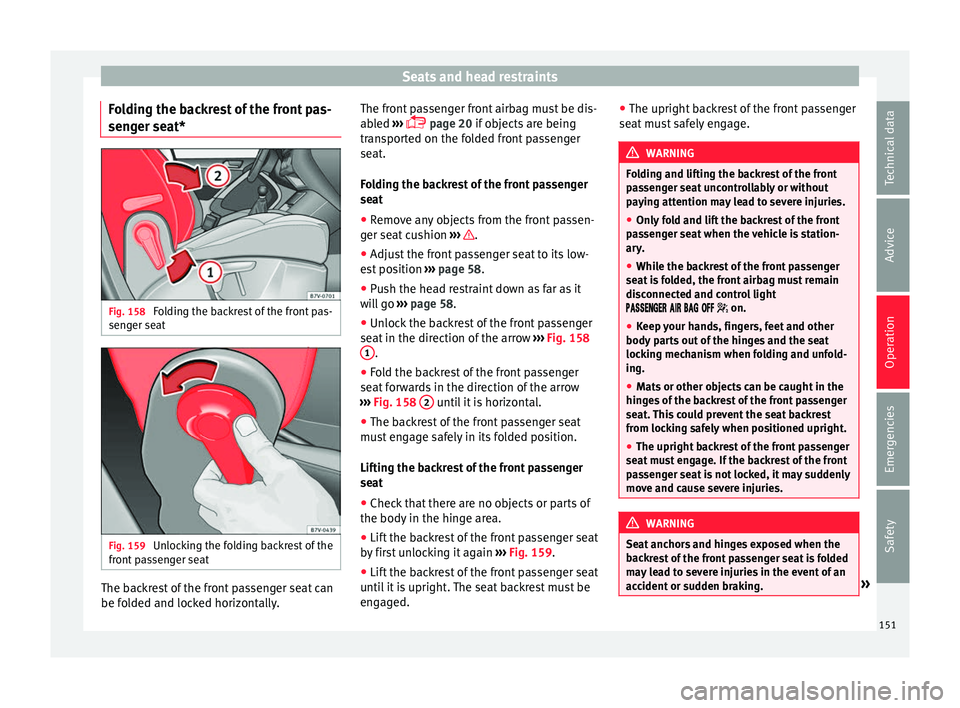
at*Fig. 158
Folding the backrest of the front pas-
sen g
er se
at Fig. 159
Unlocking the folding backrest of the
fr ont
p
assenger seat The backrest of the front passenger seat can
be f
o
l
ded and locked horizontally. The front passenger front airbag must be dis-
abled
›
›› page 20 if objects are being
transported on the folded front passenger
seat.
Folding the backrest of the front passenger
seat
● Remove any objects from the front passen-
ger seat
cushion ››› .
● Adjust the front passenger seat to its low-
e s
t
position ››› page 58.
● Push the head restraint down as far as it
wil
l go ››› page 58.
● Unlock the backrest of the front passenger
seat in the dir
ection of the arrow ››› Fig. 158
1 .
● Fold the backrest of the front passenger
se at
f
orwards in the direction of the arrow
››› Fig. 158 2 until it is horizontal.
● The backrest of the front passenger seat
mu s
t
engage safely in its folded position.
Lifting the backrest of the front passenger
seat
● Check that there are no objects or parts of
the body in the hing
e area.
● Lift the backrest of the front passenger seat
by fir
st unlocking it again ››› Fig. 159.
● Lift the backrest of the front passenger seat
unti l
it is upright. The seat backrest must be
engaged. ●
The upright b ac
krest of the front passenger
seat must safely engage. WARNING
Folding and lifting the backrest of the front
pa s
senger seat uncontrollably or without
paying attention may lead to severe injuries.
● Only fold and lift the backrest of the front
pas
senger seat when the vehicle is station-
ary.
● While the backrest of the front passenger
seat i
s folded, the front airbag must remain
disconnected and control light
on.
● Keep your hands, fingers, feet and other
body par
ts out of the hinges and the seat
locking mechanism when folding and unfold-
ing.
● Mats or other objects can be caught in the
hinge
s of the backrest of the front passenger
seat. This could prevent the seat backrest
from locking safely when positioned upright.
● The upright backrest of the front passenger
seat mu
st engage. If the backrest of the front
passenger seat is not locked, it may suddenly
move and cause severe injuries. WARNING
Seat anchors and hinges exposed when the
bac k
rest of the front passenger seat is folded
may lead to severe injuries in the event of an
accident or sudden braking. » 151
Technical data
Advice
Operation
Emergencies
Safety
Page 155 of 324
Transport and practical equipment
●
Alw a
ys ensure that objects inside the vehi-
cle cannot move into the area of the airbags
while driving.
● While driving, always keep object compart-
ments c
losed.
● Remove all objects from the front passen-
ger seat
when it is folded down. When the
seat backrest is folded down, it presses on
small and light objects and these are detec-
ted by the weight sensor on the seat; this
sends false information to the airbag control
unit.
● While the backrest of the front passenger
seat i
s folded, the front airbag must remain
disconnected and control light
on.
● Objects secured in the vehicle should never
be plac
ed in such a way as to make passen-
gers sit in an incorrect position.
● If secured objects occupy a seat, this seat
should not
be occupied or used by anyone. WARNING
The driving behaviour and braking ability
ch an
ge when transporting heavy and large
objects.
● Adjust your speed and driving style to visi-
bility
, road, traffic and weather conditions.
● Accelerate gently and carefully.
● Avoid sudden braking and manoeuvres.
● Brake early. Transporting a load
Secure all objects in the vehicle
● Distribute the load throughout the vehicle,
on the roof and in a tr
ailer as uniformly as
possible.
● Transport heavy objects as far forward as
poss
ible in the luggage compartment and
lock the seat backs in the vertical position.
● Secure luggage in the luggage compart-
ment with s
uitable straps on the fastening
rings ››› page 154.
● Check the headlight adjustment
›› ›
page 130.
● Use the suitable tyre pressure according to
the load bein
g transported. Read the tyre in-
flation information label ›››
page 287.
● For vehicles with a tyre pressure indicator,
chan
ge the vehicle load status ›››
page 234. CAUTION
Objects on the shelf could chafe against the
wir e
s of the heating element in the heated
rear window and cause damage. Note
Please note the information about loading a
trai l
er ››› page 237 and the roof carrier sys-
tem ››› page 164. Driving with the rear lid open
Driving with the rear lid open creates an addi-
tional
ri
sk. Secure all objects and secure the
rear lid correctly and take all measures possi-
ble to reduce toxic gases from entering the
vehicle. WARNING
Driving with the rear lid unlocked or open
cou l
d cause serious injuries.
● Always drive with the rear lid closed.
● Secure all objects in the vehicle. Loose
items c
ould fall out of the vehicle and injure
other road users or damage other vehicles.
● Drive particularly carefully and think
ahead.
● A
void sudden manoeuvres and braking giv-
en that thi
s could cause an uncontrolled
movement of the open rear lid.
● When transporting objects that protrude
out of the lug
gage compartment, indicate
them suitably. Observe legal requirements.
● If objects must project out of the luggage
compar
tment, the rear lid must never be used
to “secure” or “attach” objects.
● If a baggage rack is fitted on the rear lid, it
should be r
emoved before travelling with the
rear lid open. » 153
Technical data
Advice
Operation
Emergencies
Safety
Page 163 of 324
Transport and practical equipment
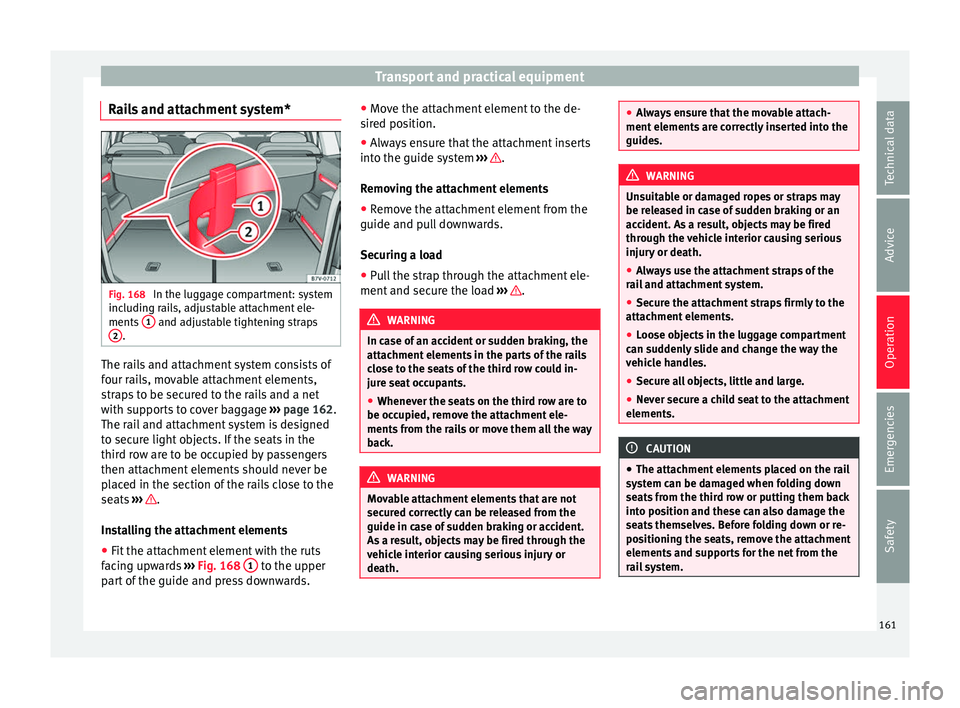
Rails and attachment system* Fig. 168
In the luggage compartment: system
inc ludin
g r
ails, adjustable attachment ele-
ments 1 and adjustable tightening straps
2 .
The rails and attachment system consists of
f
our r
ai
ls, movable attachment elements,
straps to be secured to the rails and a net
with supports to cover baggage ››› page 162.
The rail and attachment system is designed
to secure light objects. If the seats in the
third row are to be occupied by passengers
then attachment elements should never be
placed in the section of the rails close to the
seats ››› .
In s
t
alling the attachment elements
● Fit the attachment element with the ruts
facin
g upwards ››› Fig. 168 1 to the upper
p ar
t
of the guide and press downwards. ●
Move the att
achment element to the de-
sired position.
● Always ensure that the attachment inserts
into the guide sys
tem ››› .
R emo
v
ing the attachment elements
● Remove the attachment element from the
guide and pul
l downwards.
Securing a load
● Pull the strap through the attachment ele-
ment and secur
e the load ››› .
WARNING
In case of an accident or sudden braking, the
attac hment
elements in the parts of the rails
close to the seats of the third row could in-
jure seat occupants.
● Whenever the seats on the third row are to
be occupied, r
emove the attachment ele-
ments from the rails or move them all the way
back. WARNING
Movable attachment elements that are not
secur ed c
orrectly can be released from the
guide in case of sudden braking or accident.
As a result, objects may be fired through the
vehicle interior causing serious injury or
death. ●
Alw a
ys ensure that the movable attach-
ment elements are correctly inserted into the
guides. WARNING
Unsuitable or damaged ropes or straps may
be r ele
ased in case of sudden braking or an
accident. As a result, objects may be fired
through the vehicle interior causing serious
injury or death.
● Always use the attachment straps of the
rail
and attachment system.
● Secure the attachment straps firmly to the
attachment
elements.
● Loose objects in the luggage compartment
can sud
denly slide and change the way the
vehicle handles.
● Secure all objects, little and large.
● Never secure a child seat to the attachment
elements. CAUTION
● The attac hment
elements placed on the rail
system can be damaged when folding down
seats from the third row or putting them back
into position and these can also damage the
seats themselves. Before folding down or re-
positioning the seats, remove the attachment
elements and supports for the net from the
rail system. 161
Technical data
Advice
Operation
Emergencies
Safety
Page 165 of 324
Transport and practical equipment
Removing the baggage net supports
● Remove the net attachment element from
the r ai
l
and pull it out downwards. WARNING
In case of an accident or sudden braking, the
net att ac
hment elements in the parts of the
rails close to the seats of the third row could
injure seat occupants.
● Whenever the seats on the third row are to
be occupied, r
emove the attachment ele-
ments from the rails or move them all the way
back. WARNING
Baggage net supports that are not secured
corr ectly
can be released from the guide in
case of the sudden braking or accident. As a
result, objects may be fired through the vehi-
cle interior causing serious injury or death.
● Always ensure that the baggage net sup-
ports
are correctly inserted into the rails; the
red mark should not be visible.
● Never secure a child seat to the baggage
net sup
ports. CAUTION
● The bag g
age net supports placed on the
rail system can be damaged when folding
down seats from the third row or putting
them back into position and these can also
damage the seats themselves. Before folding down or repositioning the seats, remove the
bag
g
age net supports from the rail system. Retaining hooks
Fig. 171
In the luggage compartment: retain-
in g hook
s On the right-hand side of the luggage com-
p
ar
tment, ther
e are folding retaining hooks
››› Fig. 171 that can be used to secure light
shopping bags.
● Press the retaining hooks down ›››
Fig. 171
(arrow) and fold them.
● Hook the bags in place.
● After use, raise the hooks again. WARNING
Never use these hooks to secure objects. In
the event of
sudden braking or an accident,
they could be pulled out. CAUTION
The hooks can support a maximum of 2.5 kg
(about 5 l
bs). Luggage net*
Fig. 172
In the luggage compartment: net
u sed on sec
ur
ed baggage The baggage net can be used to secure light-
er it
ems.
Hook in
g the baggage net into the boot floor
● Hook the baggage net into the fastening
rings
››› Fig. 172 1 and
2 .
R el
e
asing the baggage net
The secured baggage net is taut ››› .
● Carefully unhook the baggage net hooks
fr om the f
a
stening rings ››› Fig. 172 1 .
»
163
Technical data
Advice
Operation
Emergencies
Safety
Page 168 of 324
Operation
Storage compartments Intr oduction Storage compartments must only be used to
st
or
e light or small objects.
In the front centre armrest compartment the
following factory-fitted connections are avail-
able: USB/AUX-IN.
The factory-fitted CD changer is located in the
left-hand storage compartment of the boot. WARNING
In the event of sudden braking movements or
turn s, loo
se objects may be thrown around
the vehicle interior. This could cause serious
injuries to passengers and cause the driver to
lose control of the vehicle.
● Do not transport animals or place hard,
heavy or sh
arp objects inside the vehicle in:
open storage compartments, dash panel, rear
shelf, items of clothing or bags.
● While driving, always keep object compart-
ments c
losed. WARNING
Objects falling into the driver's footwell could
prev ent
use of the pedals. This could lead the
driver to lose control of the vehicle, increas-
ing the risk of a serious accident. ●
Mak e s
ure the pedals can be used at all
times, with no objects rolling underneath
them.
● The floor mat should always be secured to
the floor.
● Never p
lace other mats or rugs on top of
the original
mat supplied by the factory.
● Make sure that no objects can fall into the
driver's f
ootwell while the vehicle is in mo-
tion. CAUTION
● Obj
ects on the shelf could chafe against
the wires of the heating element in the heat-
ed rear window and cause damage.
● Do not keep heat-sensitive objects, food or
medicines
inside the vehicle. Heat and cold
could damage them or render them useless.
● Light-transparent objects placed inside the
vehicl
e, such as lenses, magnifying glasses
or transparent suction caps on the windows,
may concentrate the sun's rays and cause
damage to the vehicle. Note
The ventilating slits between the heated rear
windo w and the shelf
must not be covered so
that used air can escape from the vehicle. (Sun)glasses case in the roof console
Fig. 174
On the roof console: sunglasses
s t
or
age compartment. To open, pr
ess and release the button
› ›
› Fig. 174 (arrow).
To close, press the cover upwards until it
clicks into place.
To ensure the interior monitoring works cor-
rectly, the (sun)glasses case must be closed
when the vehicle is locked ››› page 120.
166