keyless Seat Alhambra 2018 Owner's Manual
[x] Cancel search | Manufacturer: SEAT, Model Year: 2018, Model line: Alhambra, Model: Seat Alhambra 2018Pages: 324, PDF Size: 7.04 MB
Page 5 of 324
Frequently Asked Ques-
tion
sBefore driving
How do you adjust the seat?
››› page 15
How do you adjust the steering wheel? ››› page 18
How do you adjust the exterior mirrors? ››› page 18
How do you turn on the exterior lights? ››› page 25
How does the automatic gearbox selector lever work?
››› page 36
How do you refuel? ››› page 40
How do you activate the windscreen wipers and wind-
screen washer system? ››› page 27
Emergency situations
A warning lamp lights up or flashes. What does this
mean? ››› page 34
Where are the first-aid kit and the warning triangle in
the vehicle? ››› page 83
How do you open the bonnet? ››› page 13
How do you perform a jump start? ››› page 52
Where is the vehicle tool kit located? ››› page 46
How do you repair a tyre with the anti-puncture kit?
››› page 45
How do you change a wheel? ››› page 46
How do you change a fuse? ››› page 43
How do you change a light? ››› page 92
How do you tow a vehicle? ››› page 51
Useful tips
How do you set the time? ››› page 103
When should the vehicle inspection should be per-
formed? ››› page 105
What functions do the buttons/thumbwheels on the
steering wheel perform? ››› page 108
How do you remove the luggage compartment cover?
››› page 170
How do you drive in an economical and environmental-
ly-friendly way? ››› page 200
How do you check and top up the engine oil?
››› page 40
How do you check and top up the engine coolant?
››› page 41
How do you top up the windscreen washer fluid?
››› page 42
How do you check and top up the brake fluid?
››› page 42
How do you check and adjust tyre pressure values?
››› page 291
Vehicle washing tips ››› page 253
Functions of interest
How does the START-STOP system work? ››› page 209
What parking assistants are available? ››› page 211,
››› page 214
How does the rear assist work? ››› page 217
How does the lane departure warning system work?
››› page 222
How does tyre pressure monitoring work? ››› page 234
How do you open the vehicle without a key (Keyless Ac-
cess)? ››› page 117
Interior lighting and ambient light ››› page 136
Page 34 of 324
The essentials
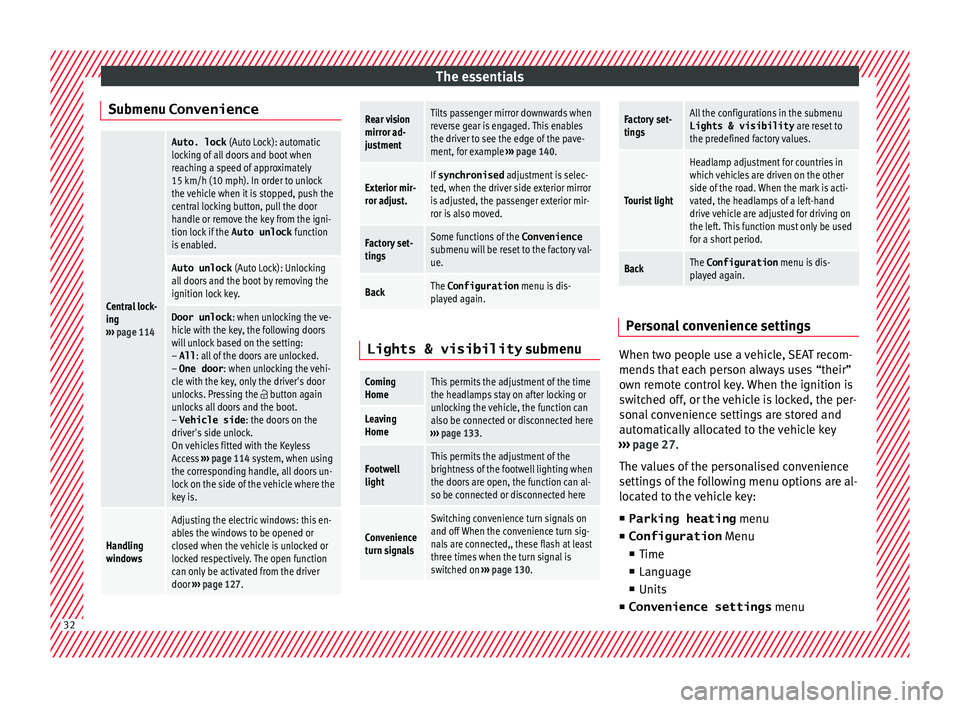
Submenu ConvenienceCentral lock-
ing
››› page 114
Auto. lock (Auto Lock): automatic
locking of all doors and boot when
reaching a speed of approximately
15 km/h (10 mph). In order to unlock
the vehicle when it is stopped, push the
central locking button, pull the door
handle or remove the key from the igni-
tion lock if the Auto unlock function
is enabled.
Auto unlock (Auto Lock): Unlocking
all doors and the boot by removing the
ignition lock key.
Door unlock : when unlocking the ve-
hicle with the key, the following doors
will unlock based on the setting:
– All : all of the doors are unlocked.
– One door : when unlocking the vehi-
cle with the key, only the driver's door
unlocks. Pressing the
button again
unlocks all doors and the boot.
– Vehicle side : the doors on the
driver's side unlock.
On vehicles fitted with the Keyless
Access ››› page 114 system, when using
the corresponding handle, all doors un-
lock on the side of the vehicle where the
key is.
Handling
windows
Adjusting the electric windows: this en-
ables the windows to be opened or
closed when the vehicle is unlocked or
locked respectively. The open function
can only be activated from the driver
door ››› page 127.
Rear vision
mirror ad-
justmentTilts passenger mirror downwards when
reverse gear is engaged. This enables
the driver to see the edge of the pave-
ment, for example ››› page 140.
Exterior mir-
ror adjust.If synchronised adjustment is selec-
ted, when the driver side exterior mirror
is adjusted, the passenger exterior mir-
ror is also moved.
Factory set-
tingsSome functions of the Convenience
submenu will be reset to the factory val-
ue.
BackThe Configuration menu is dis-
played again. Lights & visibility
submenu
Coming
HomeThis permits the adjustment of the time
the headlamps stay on after locking or
unlocking the vehicle, the function can
also be connected or disconnected here
››› page 133.
Leaving
Home
Footwell
lightThis permits the adjustment of the
brightness of the footwell lighting when
the doors are open, the function can al-
so be connected or disconnected here
Convenience
turn signals
Switching convenience turn signals on
and off When the convenience turn sig-
nals are connected,, these flash at least
three times when the turn signal is
switched on ››› page 130.
Factory set-
tingsAll the configurations in the submenu
Lights & visibility are reset to
the predefined factory values.
Tourist light
Headlamp adjustment for countries in
which vehicles are driven on the other
side of the road. When the mark is acti-
vated, the headlamps of a left-hand
drive vehicle are adjusted for driving on
the left. This function must only be used
for a short period.
BackThe Configuration menu is dis-
played again. Personal convenience settings
When two people use a vehicle, SEAT recom-
mend
s
th
at each person always uses “their”
own remote control key. When the ignition is
switched off, or the vehicle is locked, the per-
sonal convenience settings are stored and
automatically allocated to the vehicle key
››› page 27.
The values of the personalised convenience
settings of the following menu options are al-
located to the vehicle key: ■ Parking heating menu
■ Configuration Menu
■ Time
■ Language
■ Units
■ Convenience settings menu32
Page 54 of 324
The essentials
Only secure the tow rope or tow bar to the
t o
wline anc
horage or specially designed fit-
ting.
Vehicles with a factory fitted towing device ,
can only be used for towing with a tow bar,
specially designed to fit on a tow hitch ball
››› page 237.
Towing vehicles with an automatic gearbox
Note the following for a towed vehicle: ● Make sure the gear selector lever is in the N
position.
● Do not
drive faster than 50 km/h (30 mph).
● Do not tow further than 50 km (30 miles).
● If a breakdown truck is used, the vehicle
must
be towed with the front wheels raised.
Note the following instructions for towing
four all-wheel drive vehicles.
Instructions for towing all-wheel drive vehi-
cles
All-wheel drive vehicles can be towed using a
toolbar or tow rope. If the vehicle is towed
with the front or rear axle raised, the engine
must be turned off to avoid transmission
damage.
For vehicles with a double clutched DSG ®
(di-
rect shift gearbox) the instructions for towing
vehicles with an automatic gearbox apply
››› page 52. Situations in which a vehicle should not be
tow
ed
In the following cases, the vehicle should not
be towed but transported on a trailer or spe-
cial vehicle:
● If the vehicle gearbox does not contain lu-
bricant due t
o a fault.
● If the vehicle battery is flat and, as a result,
the electronic
steering lock and electronic
parking brake cannot be disengaged if ap-
plied.
● If the vehicle to be towed has an automatic
gearbo
x and the distance to be covered is
greater than 50 km (30 miles).
››› in Introduction on page 88
››› page 88 Tow-starting
In general, the vehicle should not be started
b
y
t
owing. Jump-starting is much more pref-
erable ›››
page 52.
For technical reasons, the following vehicles
can not be tow started:
● Vehicles with an automatic gearbox. ●
Vehicl
es with the Keyless Access locking
and ignition system, since the electronic
steering lock may not unlock.
● Vehicles with an electronic parking brake,
given that
it is possible that the brake will
not be disengaged.
● If the vehicle battery is flat, it is possible
that the en
gine control units do not operate
correctly.
However, if your vehicle must absolutely be
tow-started (manual gearbox):
● Put it into second or third gear.
● Keep the clutch pressed down.
● Switch on the ignition and the hazard warn-
ing lights.
● Rel
ease the clutch when both vehicles are
movin
g.
● As soon as the engine starts, press the
clutc
h and move the gear lever into neutral.
This helps to prevent a collision with the tow-
ing vehicle.
How to jump start
Jump lea
ds If the engine fails to start because of a dis-
c
h
ar
ged battery, the battery of another vehi-
cle can be used to start the engine. Before 52
Page 90 of 324
Emergencies
Changing the windscreen wiper
b l
a
des
Changing the windscreen and rear
window wiper blades Read the additional information carefully
›› ›
page 55.
The windscreen wiper blades are supplied as
standard with a layer of graphite. This layer is
responsible for ensuring that the wipe is si-
lent. If the graphite layer is damaged, the
noise of the water as it is wiped across the
windscreen will be louder.
Check the condition of the wiper blades regu-
larly. If the wipers scrape across the glass
they should be changed if they are damaged,
or cleaned if they are dirty ››› .
Dam ag
ed w
iper blades should be replaced
immediately. These are available from quali-
fied workshops. WARNING
Worn or dirty windscreen wiper blades reduce
vi s
ibility and increase the risk of accident
and serious injury.
● Always replace damaged or worn wind-
scr
een wiper blades or blades that no longer
clean the windscreen properly. CAUTION
● Damag ed or dir
ty windscreen wipers could
scratch the glass.
● If products containing solvents, rough
spong
es or sharp objects are used to clean
the blades, the graphite layer will be dam-
aged.
● Never use fuel, nail varnish remover, paint
thinner or simil
ar products to clean the win-
dows.
● In icy conditions, always check that the
wiper bl
ades are not frozen to the glass be-
fore using the wipers. In cold weather, it may
help to leave the vehicle parked with the wip-
ers in service position ›››
page 55.
● To prevent damage to the bonnet and the
wiper arms, only
leave them in the service
position.
● Before driving, always lower the wiper
arms. Tow-starting and towing
Intr oduction Read the additional information carefully
› ›
›
page 51
When towing, always respect legal require-
ments.
For technical reasons, it is not possible to
tow a vehicle if the battery is flat. If the vehicle comes with the Keyless Access
syst
em, towing is only allowed with the igni-
tion on!
The vehicle battery drains if the vehicle is
towed with the engine switched off and the
ignition connected. Depending on the battery
charge status, the drop in voltage may be so
large, even after just a few minutes, that no
electrical device in the vehicle may work e.g.
the hazard warning lights. In vehicles with
the Keyless Access system, the steering
wheel could lock ››› .
WARNING
A vehicle with a flat battery should never be
to w
ed.
● Never remove the key from the ignition
lock. Otherw
ise, the steering wheel lock
could suddenly lock. The vehicle would not
be controlled and a serious accident could
ensue. WARNING
When towing the vehicle, the handling and
brak in
g efficiency change considerably.
Please observe the following instructions to
minimise the risk of serious accidents and in-
jury:
● As the driver of the vehicle being towed:
– The brake mu
st be depressed must hard-
er as the brake servo does not operate. 88
Page 91 of 324
Self-help
Always remain aware to avoid collision
with the t
o
wing vehicle.
– More strength is required at the steering
wheel as the power steering does not op-
erate when the engine is switched off.
● As the driver of the towing vehicle:
– Acc
elerate gently and carefully.
– Avoid sudden braking and manoeuvres.
– Brake well in advance than usual and
brake gently. CAUTION
● Car ef
ully fit and remove the towline anchor-
age and its cover to avoid damage to the ve-
hicle (e.g. paintwork).
● When towing, fuel could enter the catalytic
conv
erter and cause damage! Note
● The v ehic
le can only be towed if the elec-
tronic parking brake and steering lock are de-
activated. If the vehicle has no power supply
or there is an electric system fault, the en-
gine must be started using jump leads to de-
activate the electronic parking brake and
electronic steering lock.
● Vehicles with the Keyless Access locking
and ignition syst
em should only be towed
with the ignition connected since, otherwise,
the electronic steering lock will not unlock. Fitting the front towline anchorage
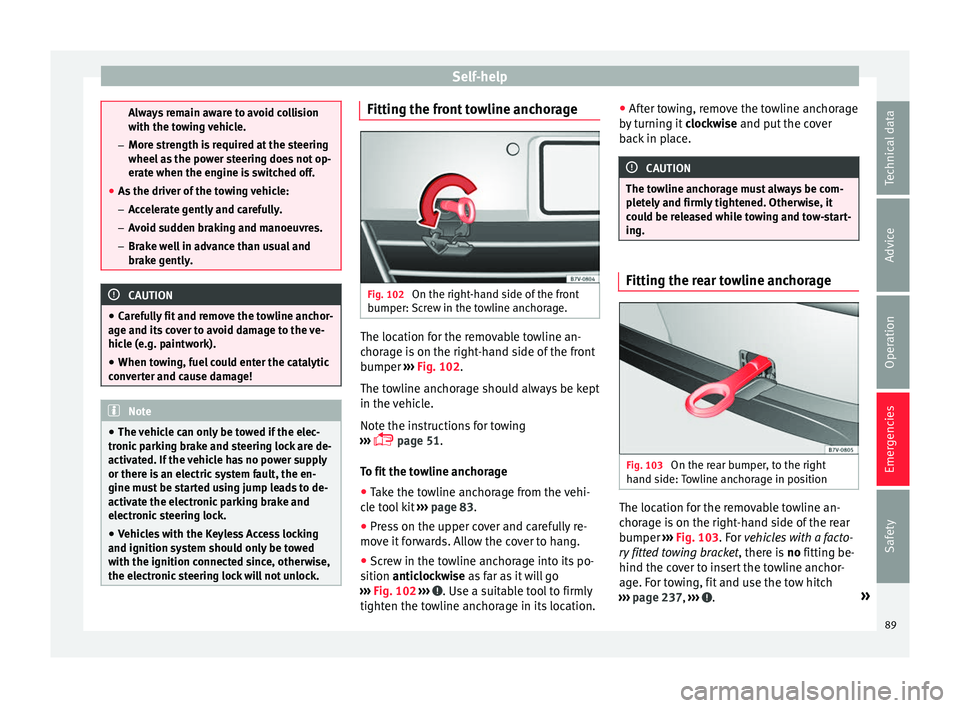
Fig. 102
On the right-hand side of the front
b umper:
Sc
rew in the towline anchorage. The location for the removable towline an-
c
hor
ag
e is on the right-hand side of the front
bumper ››› Fig. 102.
The towline anchorage should always be kept
in the vehicle.
Note the instructions for towing
››› page 51.
To fit the towline anchorage
● Take the towline anchorage from the vehi-
cle t
ool kit ››› page 83.
● Press on the upper cover and carefully re-
move it
forwards. Allow the cover to hang.
● Screw in the towline anchorage into its po-
sition antic
lockwise as far as it will go
››› Fig. 102 ››› . Use a suitable tool to firmly
tight en the t o
wline anchorage in its location. ●
After t
owing, remove the towline anchorage
by turning it clockwise and put the cover
back in place. CAUTION
The towline anchorage must always be com-
pl et
ely and firmly tightened. Otherwise, it
could be released while towing and tow-start-
ing. Fitting the rear towline anchorage
Fig. 103
On the rear bumper, to the right
h and s ide:
Towline anchorage in position The location for the removable towline an-
c
hor
ag
e is on the right-hand side of the rear
bumper ››› Fig. 103. For vehicles with a facto-
ry fitted towing bracket , there is no fitting be-
hind the cover to insert the towline anchor-
age. For towing, fit and use the tow hitch
››› page 237, ››› .
»
89
Technical data
Advice
Operation
Emergencies
Safety
Page 104 of 324

Operation
Lever for:
– Manual
g
earbox . . . . . . . . . . . . . . . . 193
– Automatic
gearbox . . . . . . . . . . . . . 193
12 volt power socket . . . . . . . . . . . . . .173
Auto Hold switch
. . . . . . . . 208
Electronic parking brake switch
. . . . . . . . . . . . . . . . . . . . . . . . . . . . . . . 188
Start-up push button (Keyless Ac-
ces
s closing and start-up system)
Ignition lock . . . . . . . . . . . . . . . . . . . . . . 183
22 23
24
25
26
27 Pedals
. . . . . . . . . . . . . . . . . . . . . . . . . . . 193
Steering column adjustment lev-
er . . . . . . . . . . . . . . . . . . . . . . . . . . . . . . . . 58
Fuse box cover . . . . . . . . . . . . . . . . . . . 91
Lever for: – Crui
se C
ontrol System (CCS) –
– – – – . .221
Open bonnet lever . . . . . . . . . . . . . . . . 271
Controls for: – Electric w
indows . . . . . . . . . . . . 127
28 29
30
31
32
33 –
Chi l
d
proof locks . . . . . . . . . . . . . 121 Note
● Some of the it ems
of equipment listed here
are fitted only on certain model versions or
are optional extras.
● In versions with the steering wheel on the
right, the lay
out of the control elements is
somewhat different. But the symbols as-
signed to the controls correspond to the sym-
bols used in the versions with the steering
wheel on the left Instruments
V iew of
in
strument panel Fig. 117
Instrument panel, on dash panel. Details of the instruments
››
›
Fig. 117: Clock set button1)
.
1 –
Pr e
s
s the button to select the hour
or minute display.
102
Page 116 of 324
Operation
To change the battery
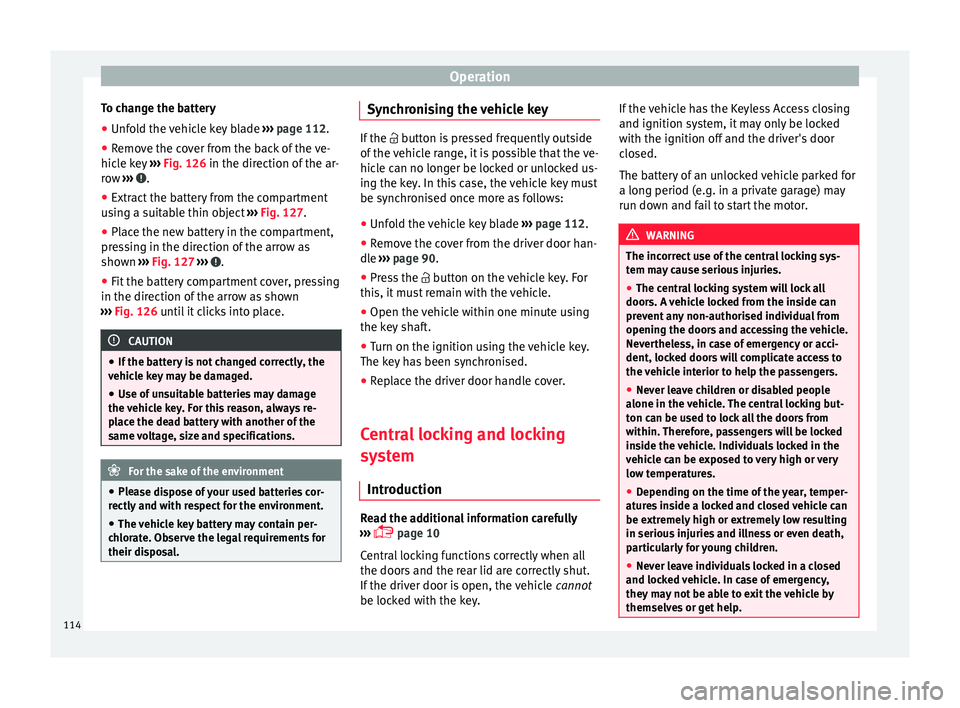
● Unfold the vehicle key blade ››
› page 112.
● Remove the cover from the back of the ve-
hicle k
ey ››› Fig. 126 in the direction of the ar-
row ››› .
● Extract the battery from the compartment
u s
in
g a suitable thin object ››› Fig. 127.
● Place the new battery in the compartment,
pres
sing in the direction of the arrow as
shown ››› Fig. 127 ››› .
● Fit the battery compartment cover, pressing
in the dir ection of
the arr
ow as shown
››› Fig. 126 until it clicks into place. CAUTION
● If the b att
ery is not changed correctly, the
vehicle key may be damaged.
● Use of unsuitable batteries may damage
the vehic
le key. For this reason, always re-
place the dead battery with another of the
same voltage, size and specifications. For the sake of the environment
● Ple a
se dispose of your used batteries cor-
rectly and with respect for the environment.
● The vehicle key battery may contain per-
chlor
ate. Observe the legal requirements for
their disposal. Synchronising the vehicle key
If the
button is pressed frequently outside
of the
vehicle range, it is possible that the ve-
hicle can no longer be locked or unlocked us-
ing the key. In this case, the vehicle key must
be synchronised once more as follows:
● Unfold the vehicle key blade ›››
page 112.
● Remove the cover from the driver door han-
dle ››
› page 90.
● Press the button on the
vehicle key. For
this, it must remain with the vehicle.
● Open the vehicle within one minute using
the key sh
aft.
● Turn on the ignition using the vehicle key.
The key h
as been synchronised.
● Replace the driver door handle cover.
Central locking and locking
syst
em
Introduction Read the additional information carefully
› ›
›
page 10
Central locking functions correctly when all
the doors and the rear lid are correctly shut.
If the driver door is open, the vehicle cannot
be locked with the key. If the vehicle has the Keyless Access closing
and ignition syst
em, it may only be locked
with the ignition off and the driver's door
closed.
The battery of an unlocked vehicle parked for
a long period (e.g. in a private garage) may
run down and fail to start the motor. WARNING
The incorrect use of the central locking sys-
tem m a
y cause serious injuries.
● The central locking system will lock all
doors. A v
ehicle locked from the inside can
prevent any non-authorised individual from
opening the doors and accessing the vehicle.
Nevertheless, in case of emergency or acci-
dent, locked doors will complicate access to
the vehicle interior to help the passengers.
● Never leave children or disabled people
alone in the v
ehicle. The central locking but-
ton can be used to lock all the doors from
within. Therefore, passengers will be locked
inside the vehicle. Individuals locked in the
vehicle can be exposed to very high or very
low temperatures.
● Depending on the time of the year, temper-
ature
s inside a locked and closed vehicle can
be extremely high or extremely low resulting
in serious injuries and illness or even death,
particularly for young children.
● Never leave individuals locked in a closed
and locked
vehicle. In case of emergency,
they may not be able to exit the vehicle by
themselves or get help. 114
Page 117 of 324
Opening and closing
Description of the central locking sys-
t em The central locking system allows all doors
and the re
ar lid t
o be locked and unlocked
centrally.
● From outside, using the vehicle key.
● From outside with the Keyless Access sys-
tem ››
› page 117,
● From inside, by pushing the central locking
button ›
›› page 116.
In the submenu Convenience in the Con-
figuration menu, or by visiting a special-
ised workshop, special functions of the cen-
tral locking system can be switched on or off
››› page 27.
In case of a vehicle key fault or central lock-
ing system fault, all doors can be locked or
unlocked manually.
Automatic locking (Auto Lock)
In this instance, the vehicle locks automati-
cally when moving at speeds above approx.
15 km/h (10 mph) ›››
page 27. When the
vehicle is locked, the control lamp on the
central locking button lights up in yellow
››› Fig. 129. Automatic unlocking (Auto Unlock)
When the key
i
s removed from the ignition
slot, here the vehicle unlocks all doors and
the boot automatically ›››
page 27.
Locking the vehicle after the airbags have
been deployed
If the airbags are deployed due to an acci-
dent, the vehicle will be automatically and
completely unlocked. Depending on the
amount of damage, it can be locked follow-
ing an accident in the following ways:
FunctionAction
Lock the vehicle
by pushing the
central locking
button:– Switch off the ignition.
– Open a door of the vehicle and
close it again.
– Push the central locking button
.
Lock the vehicle
with the vehicle
key:– Disconnect the ignition button.
OR: remove the key from the igni-
tion.
– Open a door once.
– Lock the vehicle with the key. Note
If the vehicle key buttons are pressed
›› ›
Fig. 128 or one of the central locking but-
tons is pressed ››› Fig. 129 several times in
quick succession, the central locking feature
is disabled briefly to protect from overload-
ing. The vehicle will then remain unlocked for
around 30 seconds. If no door nor the boot is opened during this time, the vehicle will then
autom
atic
ally unlock. Unlocking and locking the vehicle
from out
s
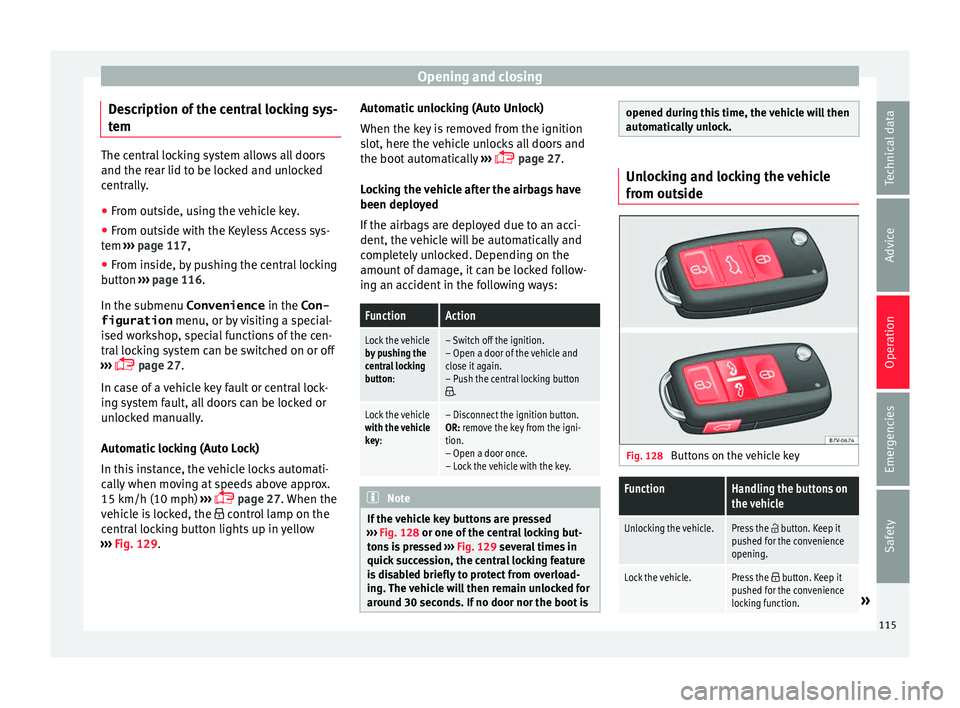
ide Fig. 128
Buttons on the vehicle key
FunctionHandling the buttons on
the vehicle
Unlocking the vehicle.Press the button. Keep it
pushed for the convenience
opening.
Lock the vehicle.Press the button. Keep it
pushed for the convenience
locking function.
» 115
Technical data
Advice
Operation
Emergencies
Safety
Page 119 of 324
Opening and closing
Locking and unlocking the vehicle
w ith K
eyl
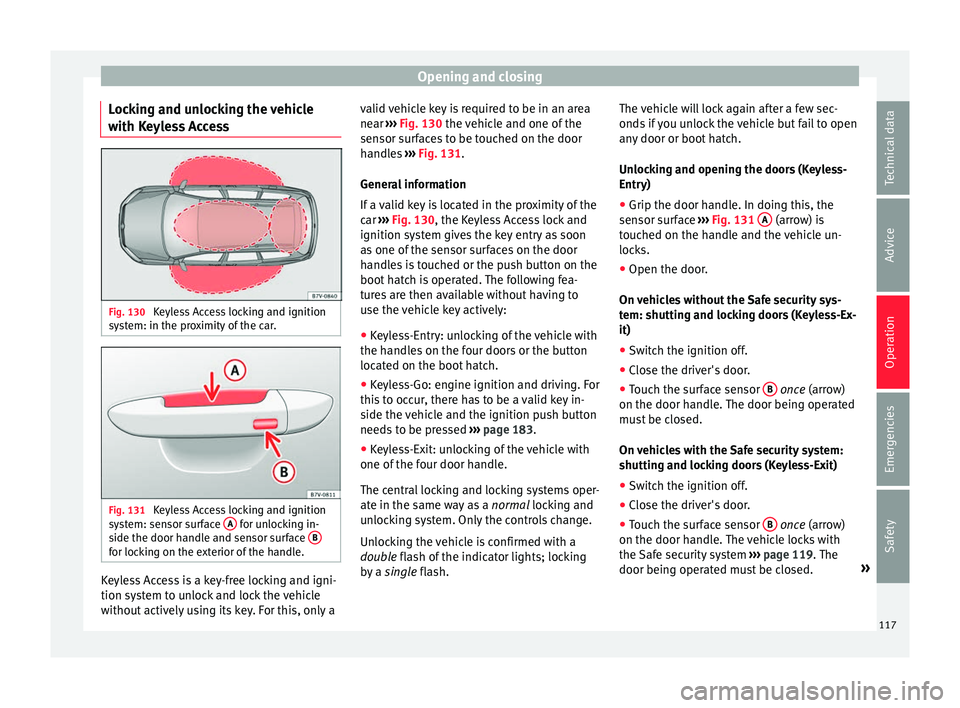
ess Access Fig. 130
Keyless Access locking and ignition
sy s
t
em: in the proximity of the car. Fig. 131
Keyless Access locking and ignition
sy s
t
em: sensor surface A for unlocking in-
s ide the door h
andl
e and sensor surface Bfor locking on the exterior of the handle.
Keyless Access is a key-free locking and igni-
tion sy
s
t
em to unlock and lock the vehicle
without actively using its key. For this, only a valid vehicle key is required to be in an area
near
››
› Fig. 130 the vehicle and one of the
sensor surfaces to be touched on the door
handles ››› Fig. 131.
General information
If a valid key is located in the proximity of the
car ››› Fig. 130, the Keyless Access lock and
ignition system gives the key entry as soon
as one of the sensor surfaces on the door
handles is touched or the push button on the
boot hatch is operated. The following fea-
tures are then available without having to
use the vehicle key actively:
● Keyless-Entry: unlocking of the vehicle with
the handle
s on the four doors or the button
located on the boot hatch.
● Keyless-Go: engine ignition and driving. For
this t
o occur, there has to be a valid key in-
side the vehicle and the ignition push button
needs to be pressed ››› page 183.
● Keyless-Exit: unlocking of the vehicle with
one of the four door h
andle.
The central locking and locking systems oper-
ate in the same way as a normal locking and
unlocking system. Only the controls change.
Unlocking the vehicle is confirmed with a
double flash of the indicator lights; locking
by a single flash. The vehicle will lock again after a few sec-
onds if
you unlock the vehicle but fail to open
any door or boot hatch.
Unlocking and opening the doors (Keyless-
Entry)
● Grip the door handle. In doing this, the
sensor sur
face ››› Fig. 131 A (arrow) is
t ouc
hed on the h
andle and the vehicle un-
locks.
● Open the door.
On vehic
les without the Safe security sys-
tem: shutting and locking doors (Keyless-Ex-
it)
● Switch the ignition off.
● Close the driver's door.
● Touch the surface sensor B onc
e (arrow)
on the door h andl
e. The door being operated
must be closed.
On vehicles with the Safe security system:
shutting and locking doors (Keyless-Exit)
● Switch the ignition off.
● Close the driver's door.
● Touch the surface sensor B onc
e (arrow)
on the door h andl
e. The vehicle locks with
the Safe security system ››› page 119. The
door being operated must be closed. »
117
Technical data
Advice
Operation
Emergencies
Safety
Page 120 of 324
Operation
● Touc
h
the sensor surface B twice (arrow)
on the door h andl
e t
o lock the vehicle with-
out the Safe security system ››› page 119.
Unlocking and locking the boot hatch
When the vehicle is locked, the hatch auto-
matically unlocks on opening if ››› Fig. 130
there is a valid vehicle key in the proximity.
Open or close the hatch normally
››› page 124.
After closing, the hatch locks automatically.
In the following instances, the rear lid does
not lock automatically after closing:
● If the entire vehicle is unlocked.
● If the key used last is inside the vehicle. All
vehicl
e indicator lights flash four times. The
vehicle will lock again after a few seconds if
no door or boot hatch are opened.
Locking the vehicle with a second key
If there is a vehicle key inside the vehicle and
it is locked from the outside with a second
vehicle key, the key inside the vehicle is
blocked for engine ignition ››› page 183. In
order to enable engine ignition, the button
on the key inside the vehicle needs to be
pressed ››› Fig. 128.
Automatically disabling sensors
If the vehicle is not locked or unlocked for a
long period of time, the proximity sensor on the passenger door is automatically disa-
bled.
If
the exterior sensor on the door handle is
often activated unusually with the vehicle
locked (e.g. by the branches of a bush rub-
bing against it), all proximity sensors are dis-
abled for a time. If this only happens with the
exterior sensor on the driver's door, only this
sensor is disabled.
Sensors will again be enabled:
● After a time.
● OR: if the vehicle is unlocked with the
butt
on on the key.
● OR: if the boot is opened.
Keyl
ess Access temporary disconnection
function*
You can deactivate the vehicle's Keyless Ac-
cess unlocking for a locking and unlocking
cycle.
● Move the gear lever to position P (if the v
e-
hicle has automatic gearbox), since other-
wise the vehicle cannot be locked.
● Close the door.
● Push the central locking button on the
remote c
ontrol and touch the locking sensor
surface ›››
Fig. 131 B on the driver door han-
dl e onc e w
ithin the following 5 seconds. Do
not grip the door handle, otherwise the vehi-
cle will not lock. Deactivation is also possible if the vehicle is locked through the driver’s
door lock.
●
To c
heck that the function has been deacti-
vated, w
ait at least 10 seconds, grip and pull
on the door handle. The door should not
open.
The next time the door can only be unlocked
via the remote control or the lock cylinder.
The next time the door is locked/unlocked,
Keyless Access will be active again.
Convenience functions
To close all electric windows, the sun roof
and electric tilting panoramic roof with the
convenience feature, keep your finger for a
few seconds on the lock sensor surface B located on the exterior part of the driver or
p
a
s
senger door handle until the windows
and roof close.
Opening the doors by touching the sensor
surface on the handle takes places in accord-
ance with the settings activated on the menu
Configuration - Convenience
››› page 27. CAUTION
The sensor surfaces on the door handles
cou l
d engage if hit with a water jet or high
pressure steam if there is a valid vehicle key
in the nearby area. If at least one of the win-
dows is open and the sensor surface B on
one of the h andl
e permanently activates, all 118