mirror Seat Alhambra 2018 Owner's Manual
[x] Cancel search | Manufacturer: SEAT, Model Year: 2018, Model line: Alhambra, Model: Seat Alhambra 2018Pages: 324, PDF Size: 7.04 MB
Page 5 of 324
Frequently Asked Ques-
tion
sBefore driving
How do you adjust the seat?
››› page 15
How do you adjust the steering wheel? ››› page 18
How do you adjust the exterior mirrors? ››› page 18
How do you turn on the exterior lights? ››› page 25
How does the automatic gearbox selector lever work?
››› page 36
How do you refuel? ››› page 40
How do you activate the windscreen wipers and wind-
screen washer system? ››› page 27
Emergency situations
A warning lamp lights up or flashes. What does this
mean? ››› page 34
Where are the first-aid kit and the warning triangle in
the vehicle? ››› page 83
How do you open the bonnet? ››› page 13
How do you perform a jump start? ››› page 52
Where is the vehicle tool kit located? ››› page 46
How do you repair a tyre with the anti-puncture kit?
››› page 45
How do you change a wheel? ››› page 46
How do you change a fuse? ››› page 43
How do you change a light? ››› page 92
How do you tow a vehicle? ››› page 51
Useful tips
How do you set the time? ››› page 103
When should the vehicle inspection should be per-
formed? ››› page 105
What functions do the buttons/thumbwheels on the
steering wheel perform? ››› page 108
How do you remove the luggage compartment cover?
››› page 170
How do you drive in an economical and environmental-
ly-friendly way? ››› page 200
How do you check and top up the engine oil?
››› page 40
How do you check and top up the engine coolant?
››› page 41
How do you top up the windscreen washer fluid?
››› page 42
How do you check and top up the brake fluid?
››› page 42
How do you check and adjust tyre pressure values?
››› page 291
Vehicle washing tips ››› page 253
Functions of interest
How does the START-STOP system work? ››› page 209
What parking assistants are available? ››› page 211,
››› page 214
How does the rear assist work? ››› page 217
How does the lane departure warning system work?
››› page 222
How does tyre pressure monitoring work? ››› page 234
How do you open the vehicle without a key (Keyless Ac-
cess)? ››› page 117
Interior lighting and ambient light ››› page 136
Page 7 of 324
Table of Contents
Table of Contents
The e s
senti
als . . . . . . . . . . . . . . . . . . . . . . . . 7
Exterior view . . . . . . . . . . . . . . . . . . . . . . . . . . . . 7
Exterior view . . . . . . . . . . . . . . . . . . . . . . . . . . . . 8
Interior view (left-hand drive) . . . . . . . . . . . . . . 9
How it works . . . . . . . . . . . . . . . . . . . . . . . . . . . . 10
Unlocking and locking . . . . . . . . . . . . . . . . . . . . 10
Before driving . . . . . . . . . . . . . . . . . . . . . . . . . . . 15
Airbags . . . . . . . . . . . . . . . . . . . . . . . . . . . . . . . . 19
Child seats . . . . . . . . . . . . . . . . . . . . . . . . . . . . . 22
Starting the vehicle . . . . . . . . . . . . . . . . . . . . . . 25
Lights and visibility . . . . . . . . . . . . . . . . . . . . . . 25
SEAT information system . . . . . . . . . . . . . . . . . . 27
Cruise control . . . . . . . . . . . . . . . . . . . . . . . . . . . 33
Warning lamps . . . . . . . . . . . . . . . . . . . . . . . . . . 34
Gearbox lever . . . . . . . . . . . . . . . . . . . . . . . . . . . 35
Air conditioning . . . . . . . . . . . . . . . . . . . . . . . . . 37
Fluid Level control . . . . . . . . . . . . . . . . . . . . . . . 40
Emergencies . . . . . . . . . . . . . . . . . . . . . . . . . . . . 43
Fuses . . . . . . . . . . . . . . . . . . . . . . . . . . . . . . . . . . 43
Bulbs . . . . . . . . . . . . . . . . . . . . . . . . . . . . . . . . . . 44
Action in the event of a puncture . . . . . . . . . . . 45
Changing a wheel . . . . . . . . . . . . . . . . . . . . . . . 46
Snow chains . . . . . . . . . . . . . . . . . . . . . . . . . . . . 50
Emergency towing of the vehicle . . . . . . . . . . . 51
How to jump start . . . . . . . . . . . . . . . . . . . . . . . . 52
Changing windscreen wipers . . . . . . . . . . . . . . 55
Safety . . . . . . . . . . . . . . . . . . . . . . . . . . . . . . . . 57
Safe driving . . . . . . . . . . . . . . . . . . . . . . . . . . . . 57
Safety first! . . . . . . . . . . . . . . . . . . . . . . . . . . . . . 57
Advice about driving . . . . . . . . . . . . . . . . . . . . . 57
Correct position of the vehicle occupants . . . . 58
Pedal area . . . . . . . . . . . . . . . . . . . . . . . . . . . . . . 61 Seat belts
. . . . . . . . . . . . . . . . . . . . . . . . . . . . . . 62
Why wear a seat belt . . . . . . . . . . . . . . . . . . . . . 62
How to properly adjust your seatbelt . . . . . . . . 65
Seat belt tensioners . . . . . . . . . . . . . . . . . . . . . . 68
Airbag system . . . . . . . . . . . . . . . . . . . . . . . . . . 69
Brief introduction . . . . . . . . . . . . . . . . . . . . . . . . 69
Airbag safety instructions . . . . . . . . . . . . . . . . . 72
Deactivating airbags . . . . . . . . . . . . . . . . . . . . . 73
Transporting children safely . . . . . . . . . . . . . . . 75
Safety for children . . . . . . . . . . . . . . . . . . . . . . . 75
Child seats . . . . . . . . . . . . . . . . . . . . . . . . . . . . . 76
Integrated child seat . . . . . . . . . . . . . . . . . . . . . 79
Emergencies . . . . . . . . . . . . . . . . . . . . . . . . . . 83
Self-help . . . . . . . . . . . . . . . . . . . . . . . . . . . . . . . 83
In case of emergency . . . . . . . . . . . . . . . . . . . . . 83
Vehicle tool kit* . . . . . . . . . . . . . . . . . . . . . . . . . 83
Changing a wheel* . . . . . . . . . . . . . . . . . . . . . . . 85
Tyre repair . . . . . . . . . . . . . . . . . . . . . . . . . . . . . . 86
Changing the windscreen wiper blades . . . . . . 88
Tow-starting and towing . . . . . . . . . . . . . . . . . . 88
Emergency locking and unlocking . . . . . . . . . . 90
Fuses and bulbs . . . . . . . . . . . . . . . . . . . . . . . . . 91
Fuses . . . . . . . . . . . . . . . . . . . . . . . . . . . . . . . . . . 91
Changing bulbs . . . . . . . . . . . . . . . . . . . . . . . . . 92
Operation . . . . . . . . . . . . . . . . . . . . . . . . . . . . . 101
General instrument panel . . . . . . . . . . . . . . . . . 101
Instrument panel . . . . . . . . . . . . . . . . . . . . . . . . 100
Instruments . . . . . . . . . . . . . . . . . . . . . . . . . . . . 102
Control lamps . . . . . . . . . . . . . . . . . . . . . . . . . . . 107
Communications and multimedia . . . . . . . . . . . 108
Steering wheel controls* . . . . . . . . . . . . . . . . . . 108
Multimedia . . . . . . . . . . . . . . . . . . . . . . . . . . . . . 110
Three button unit in headliner . . . . . . . . . . . . . . 110
Opening and closing . . . . . . . . . . . . . . . . . . . . . 112
Vehicle key set . . . . . . . . . . . . . . . . . . . . . . . . . . 112
Central locking and locking system . . . . . . . . . 114 Doors . . . . . . . . . . . . . . . . . . . . . . . . . . . . . . . . . . 121
Sliding doors . . . . . . . . . . . . . . . . . . . . . . . . . . . 122
Rear lid . . . . . . . . . . . . . . . . . . . . . . . . . . . . . . . . 124
Controls for the windows . . . . . . . . . . . . . . . . . . 127
Panoramic sliding sunroof* . . . . . . . . . . . . . . . . 129
Lights and visibility
. . . . . . . . . . . . . . . . . . . . . . 130
Lights . . . . . . . . . . . . . . . . . . . . . . . . . . . . . . . . . 130
Visibility . . . . . . . . . . . . . . . . . . . . . . . . . . . . . . . 136
Windscreen wiper and window wiper sys-
tems . . . . . . . . . . . . . . . . . . . . . . . . . . . . . . . . . . 137
R
ear vision mirror . . . . . . . . . . . . . . . . . . . . . . . . 140
Seats and head restraints . . . . . . . . . . . . . . . . . 143
Adjusting the seats and headrests . . . . . . . . . . 143
Seat functions . . . . . . . . . . . . . . . . . . . . . . . . . . 147
Transport and practical equipment . . . . . . . . . 152
Transporting objects . . . . . . . . . . . . . . . . . . . . . 152
Luggage compartment . . . . . . . . . . . . . . . . . . . . 154
Roof carrier* . . . . . . . . . . . . . . . . . . . . . . . . . . . . 164
Storage compartments . . . . . . . . . . . . . . . . . . . 166
Drink holders . . . . . . . . . . . . . . . . . . . . . . . . . . . 171
Ashtray and cigarette lighter* . . . . . . . . . . . . . . 172
Power sockets . . . . . . . . . . . . . . . . . . . . . . . . . . . 173
Air conditioning . . . . . . . . . . . . . . . . . . . . . . . . . 176
Air conditioning . . . . . . . . . . . . . . . . . . . . . . . . . 176
Auxiliary heater* (additional heater) . . . . . . . . 180
Driving . . . . . . . . . . . . . . . . . . . . . . . . . . . . . . . . 183
Stopping and starting the engine . . . . . . . . . . . 183
Braking and parking . . . . . . . . . . . . . . . . . . . . . 188
Gearbox . . . . . . . . . . . . . . . . . . . . . . . . . . . . . . . . 193
Address . . . . . . . . . . . . . . . . . . . . . . . . . . . . . . . . 198
Run-in and economical driving . . . . . . . . . . . . . 199
Engine management and exhaust gas purifica-
tion syst
em . . . . . . . . . . . . . . . . . . . . . . . . . . . . . 202
Driving tips . . . . . . . . . . . . . . . . . . . . . . . . . . . . . 204
Driver assistance systems . . . . . . . . . . . . . . . . . 205
Braking and stability systems . . . . . . . . . . . . . . 205
Start assist systems . . . . . . . . . . . . . . . . . . . . . . 208
Parking distance warning system* . . . . . . . . . . 211 5
Page 17 of 324
The essentials
Manually closing the panoramic sun-
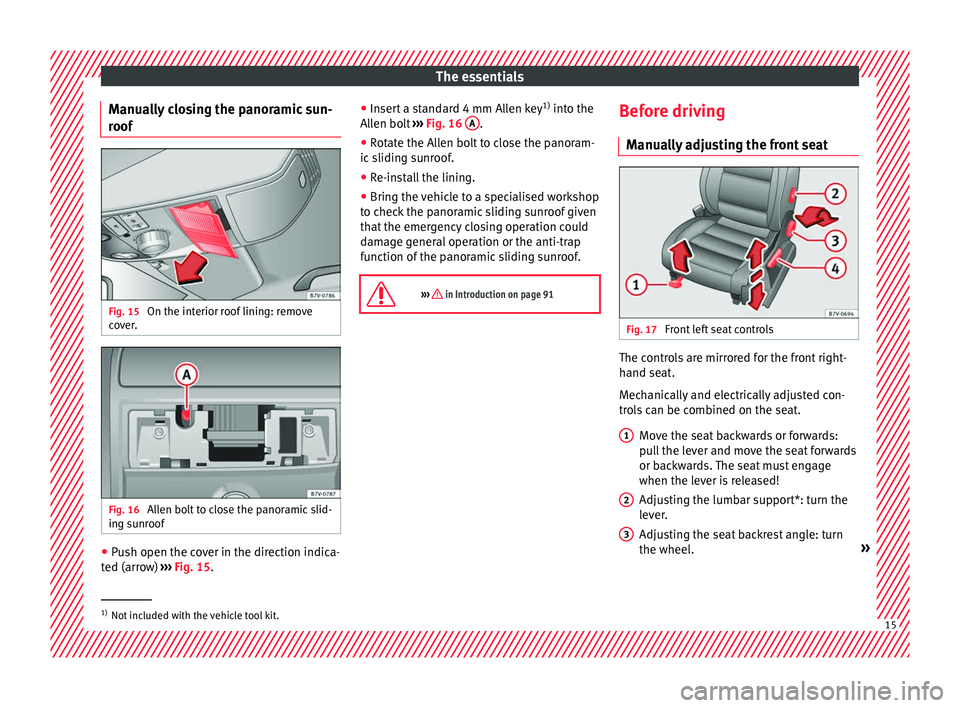
r oof Fig. 15
On the interior roof lining: remove
c o
v
er. Fig. 16
Allen bolt to close the panoramic slid-
in g s
u
nroof ●
Push open the cover in the direction indica-
t ed (arr
o
w) ››› Fig. 15. ●
Insert
a standard 4 mm Allen key 1)
into the
Allen bolt ››› Fig. 16 A .
● Rotate the Allen bolt to close the panoram-
ic s
lidin
g sunroof.
● Re-install the lining.
● Bring the vehicle to a specialised workshop
to chec
k the panoramic sliding sunroof given
that the emergency closing operation could
damage general operation or the anti-trap
function of the panoramic sliding sunroof.
››› in Introduction on page 91 Before driving
M anua
l
ly adjusting the front seat Fig. 17
Front left seat controls The controls are mirrored for the front right-
h
and se
at
.
Mechanically and electrically adjusted con-
trols can be combined on the seat.
Move the seat backwards or forwards:
pull the lever and move the seat forwards
or backwards. The seat must engage
when the lever is released!
Adjusting the lumbar support*: turn the
lever.
Adjusting the seat backrest angle: turn
the wheel. »
1 2
3
1)
Not included with the vehicle tool kit. 15
Page 18 of 324
The essentials
Adjusting the seat height: pull the lever
up or p u
sh do
wn (several times if neces-
sary) from its home position.
››› in Manual adjustment of the seats
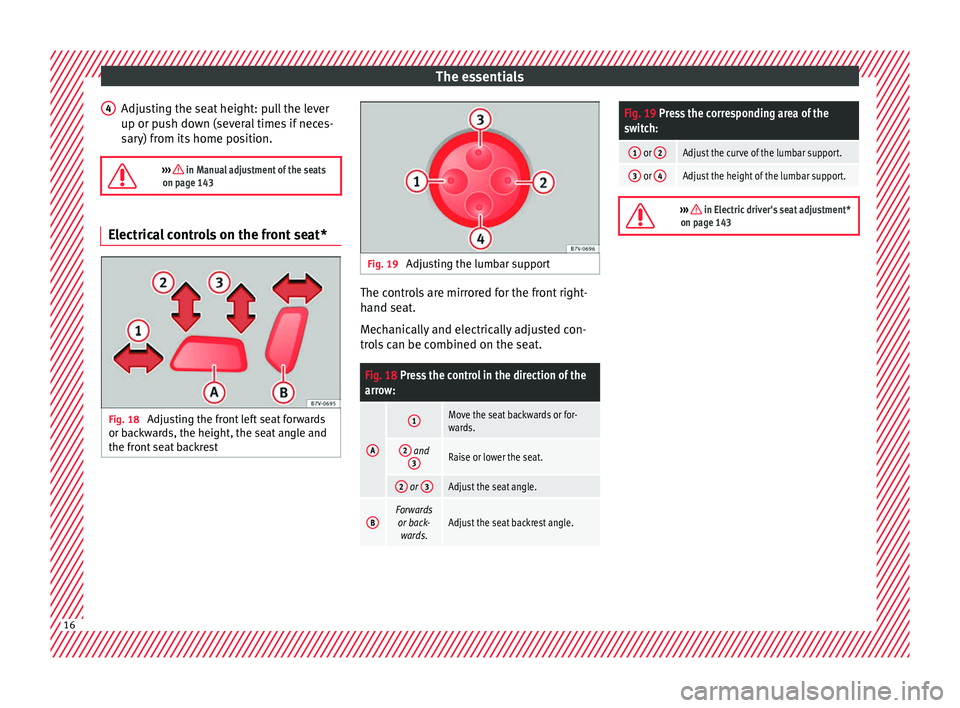
on page 143 Electrical controls on the front seat*
Fig. 18
Adjusting the front left seat forwards
or b ac
k
wards, the height, the seat angle and
the front seat backrest 4
Fig. 19
Adjusting the lumbar support The controls are mirrored for the front right-
h
and se
at
.
Mechanically and electrically adjusted con-
trols can be combined on the seat.
Fig. 18 Press the control in the direction of the
arrow:
A
1Move the seat backwards or for-
wards.
2 and 3Raise or lower the seat.
2 or 3Adjust the seat angle.
BForwards
or back- wards.Adjust the seat backrest angle.
Fig. 19 Press the corresponding area of the
switch:
1 or 2Adjust the curve of the lumbar support.
3 or 4Adjust the height of the lumbar support.
››› in Electric driver's seat adjustment*
on page 143 16
Page 20 of 324
The essentials
Seat belt tensioners In the event of a head-on, lateral or rear colli-
sion, the se
at
belts on the front seats and the
outer seats of the second row will tighten au-
tomatically.
The tensioner can be triggered only once.
››› in Service and disposal of belt ten-
sion devices on page 69
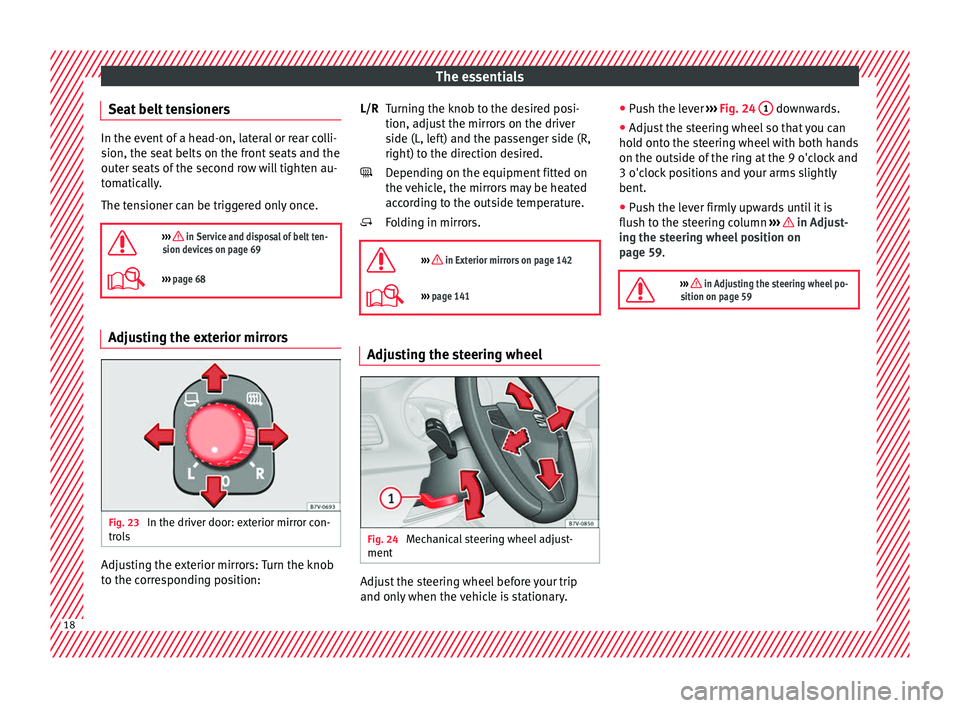
››› page 68 Adjusting the exterior mirrors
Fig. 23
In the driver door: exterior mirror con-
tr o
l
s Adjusting the exterior mirrors: Turn the knob
t
o the c
orr
esponding position: Turning the knob to the desired posi-
tion, adjus
t the mirrors on the driver
side (L, left) and the passenger side (R,
right) to the direction desired.
Depending on the equipment fitted on
the vehicle, the mirrors may be heated
according to the outside temperature.
Folding in mirrors.
››› in Exterior mirrors on page 142
››› page 141 Adjusting the steering wheel
Fig. 24
Mechanical steering wheel adjust-
ment Adjust the steering wheel before your trip
and on
ly
when the
vehicle is stationary.
L/R
●
Push the l
ever ››› Fig. 24 1 downwards.
● Adjust the steering wheel so that you can
ho l
d ont
o the steering wheel with both hands
on the outside of the ring at the 9 o'clock and
3 o'clock positions and your arms slightly
bent.
● Push the lever firmly upwards until it is
flush to the s
teering column ››› in Adjust-
in g the s
t
eering wheel position on
page 59.
››› in Adjusting the steering wheel po-
sition on page 59 18
Page 30 of 324
The essentials
A specialised workshop will be able to pro-
gr amme or modif
y
additional functions, ac-
cording to the vehicle equipment. SEAT rec-
ommends taking your car in for technical
service.
Some menu options can only be read when
the vehicle is at a standstill.
As long as a priority 1 warning is displayed, it
will not be possible to read the menus. To
display the menus, confirm the warning by
pressing OK .
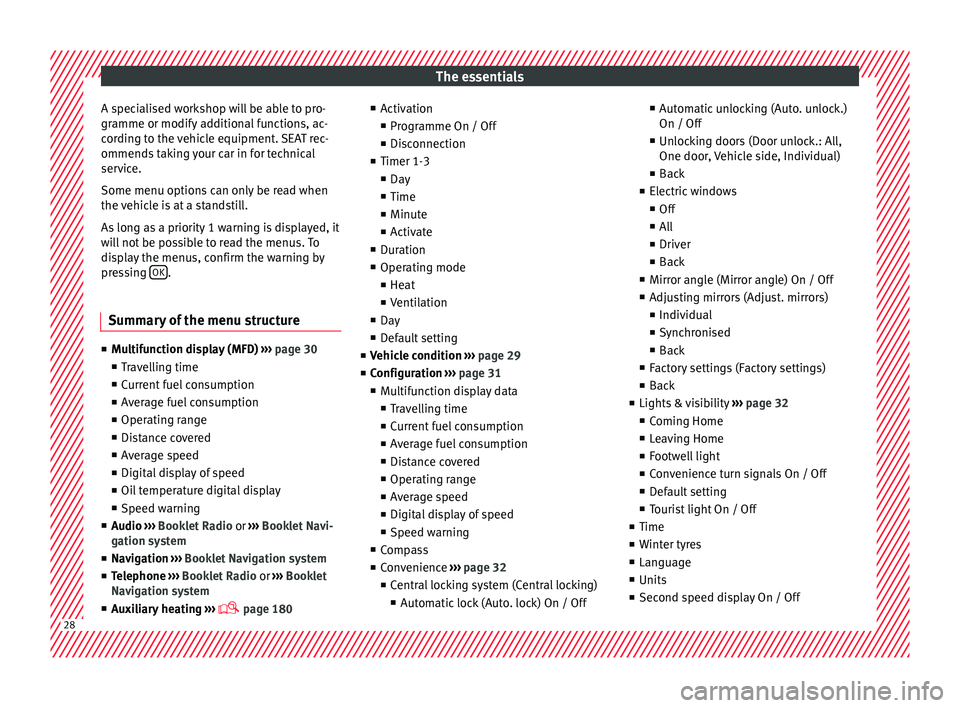
Summary of the menu structure ■
Mu ltif
unction display (MFD) ››› page 30
■ Travelling time
■ Current fuel consumption
■ Average fuel consumption
■ Operating range
■ Distance covered
■ Average speed
■ Digital display of speed
■ Oil temperature digital display
■ Speed warning
■ Audio ›››
Booklet Radio or ›››
Booklet Navi-
gation system
■ Navigation ›››
Booklet Navigation system
■ Telephone ›››
Booklet Radio or ›››
Booklet
Navigation system
■ Auxiliary heating ›››
page 180 ■
Activ ation
■ Pr
ogramme On / Off
■ Disconnection
■ Timer 1-3
■ Day
■ Time
■ Minute
■ Activate
■ Duration
■ Operating mode
■ Heat
■ Ventilation
■ Day
■ Default setting
■ Vehicle condition ››› page 29
■ Configuration ››› page 31
■ Multifunction display data
■ Travelling time
■ Current fuel consumption
■ Average fuel consumption
■ Distance covered
■ Operating range
■ Average speed
■ Digital display of speed
■ Speed warning
■ Compass
■ Convenience ››› page 32
■ Central locking system (Central locking)
■Automatic lock (Auto. lock) On / Off ■
Automatic unlocking (Auto. unlock.)
On / Off
■ Unlocking doors (Door unlock.: All,
One door, Vehicle side, Individual)
■ Back
■ Electric windows
■ Off
■ All
■ Driver
■ Back
■ Mirror angle (Mirror angle) On / Off
■ Adjusting mirrors (Adjust. mirrors)
■ Individual
■ Synchronised
■ Back
■ Factory settings (Factory settings)
■ Back
■ Lights & visibility ››› page 32
■ Coming Home
■ Leaving Home
■ Footwell light
■ Convenience turn signals On / Off
■ Default setting
■ Tourist light On / Off
■ Time
■ Winter tyres
■ Language
■ Units
■ Second speed display On / Off 28
Page 34 of 324
The essentials
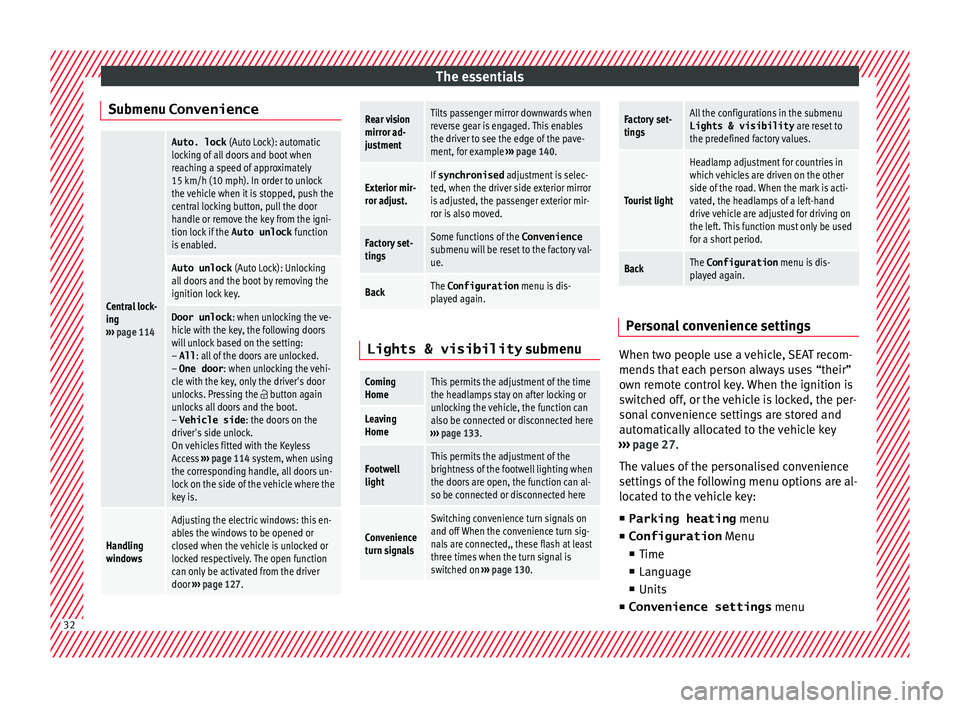
Submenu ConvenienceCentral lock-
ing
››› page 114
Auto. lock (Auto Lock): automatic
locking of all doors and boot when
reaching a speed of approximately
15 km/h (10 mph). In order to unlock
the vehicle when it is stopped, push the
central locking button, pull the door
handle or remove the key from the igni-
tion lock if the Auto unlock function
is enabled.
Auto unlock (Auto Lock): Unlocking
all doors and the boot by removing the
ignition lock key.
Door unlock : when unlocking the ve-
hicle with the key, the following doors
will unlock based on the setting:
– All : all of the doors are unlocked.
– One door : when unlocking the vehi-
cle with the key, only the driver's door
unlocks. Pressing the
button again
unlocks all doors and the boot.
– Vehicle side : the doors on the
driver's side unlock.
On vehicles fitted with the Keyless
Access ››› page 114 system, when using
the corresponding handle, all doors un-
lock on the side of the vehicle where the
key is.
Handling
windows
Adjusting the electric windows: this en-
ables the windows to be opened or
closed when the vehicle is unlocked or
locked respectively. The open function
can only be activated from the driver
door ››› page 127.
Rear vision
mirror ad-
justmentTilts passenger mirror downwards when
reverse gear is engaged. This enables
the driver to see the edge of the pave-
ment, for example ››› page 140.
Exterior mir-
ror adjust.If synchronised adjustment is selec-
ted, when the driver side exterior mirror
is adjusted, the passenger exterior mir-
ror is also moved.
Factory set-
tingsSome functions of the Convenience
submenu will be reset to the factory val-
ue.
BackThe Configuration menu is dis-
played again. Lights & visibility
submenu
Coming
HomeThis permits the adjustment of the time
the headlamps stay on after locking or
unlocking the vehicle, the function can
also be connected or disconnected here
››› page 133.
Leaving
Home
Footwell
lightThis permits the adjustment of the
brightness of the footwell lighting when
the doors are open, the function can al-
so be connected or disconnected here
Convenience
turn signals
Switching convenience turn signals on
and off When the convenience turn sig-
nals are connected,, these flash at least
three times when the turn signal is
switched on ››› page 130.
Factory set-
tingsAll the configurations in the submenu
Lights & visibility are reset to
the predefined factory values.
Tourist light
Headlamp adjustment for countries in
which vehicles are driven on the other
side of the road. When the mark is acti-
vated, the headlamps of a left-hand
drive vehicle are adjusted for driving on
the left. This function must only be used
for a short period.
BackThe Configuration menu is dis-
played again. Personal convenience settings
When two people use a vehicle, SEAT recom-
mend
s
th
at each person always uses “their”
own remote control key. When the ignition is
switched off, or the vehicle is locked, the per-
sonal convenience settings are stored and
automatically allocated to the vehicle key
››› page 27.
The values of the personalised convenience
settings of the following menu options are al-
located to the vehicle key: ■ Parking heating menu
■ Configuration Menu
■ Time
■ Language
■ Units
■ Convenience settings menu32
Page 35 of 324
The essentials
■ Door u n
loc
k (individual opening, Auto
Lock)
■ Convenience handling of windows
■ Rear vision mirror adjustment
■ Lights & visibility settings
menu
■ Coming home and leaving home
■ Footwell light
■ Convenience turn signals
The stored settings are automatically activa-
ted, at the latest when the ignition is switch-
ed on. Please refer to the information and
tips relating to the seat memory
››› page 147. Cruise control
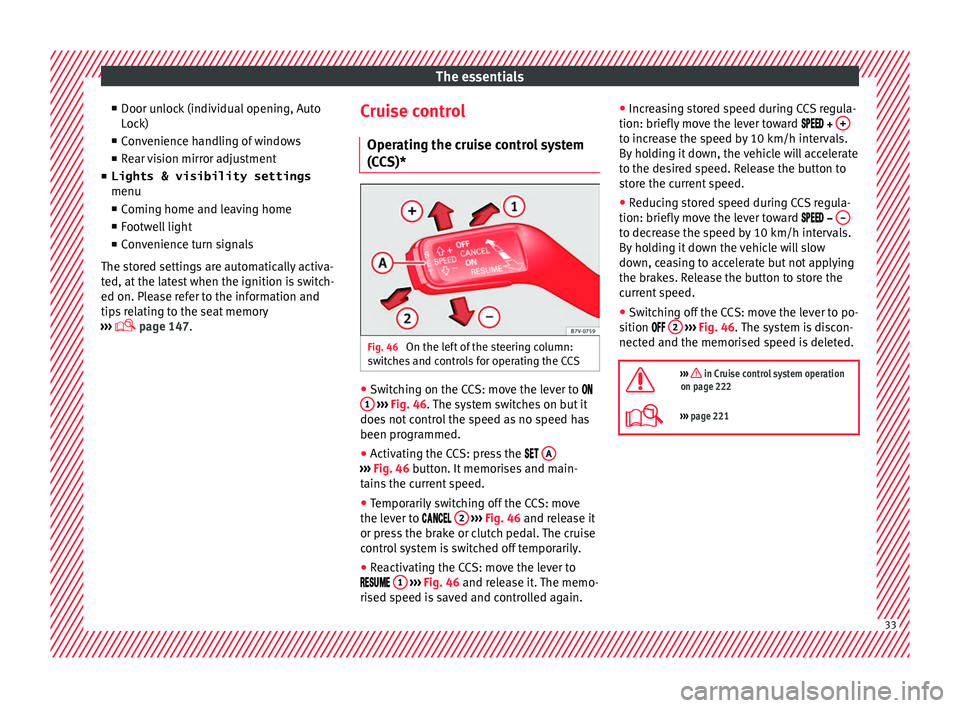
Operating the c ruise control system
(CCS)* Fig. 46
On the left of the steering column:
sw it
c
hes and controls for operating the CCS ●
Switching on the CCS: move the lever to
1
› ›
› Fig. 46
. The system switches on but it
does not control the speed as no speed has
been programmed.
● Activating the CCS: press the A ›››
Fig. 46 butt on. It
memorises and main-
tains the current speed.
● Temporarily switching off the CCS: move
the lev er t
o 2
› ›
› Fig. 46 and release it
or press the brake or clutch pedal. The cruise
control system is switched off temporarily.
● Reactivating the CCS: move the lever to
1
› ›
› Fig. 46
and release it. The memo-
rised speed is saved and controlled again. ●
Incre
asing stored speed during CCS regula-
tion: briefly move the lever toward + to increase the speed by 10 km/h intervals.
B
y
ho
lding it down, the vehicle will accelerate
to the desired speed. Release the button to
store the current speed.
● Reducing stored speed during CCS regula-
tion: briefly mov
e the lever toward – to decrease the speed by 10 km/h intervals.
B
y
ho
lding it down the vehicle will slow
down, ceasing to accelerate but not applying
the brakes. Release the button to store the
current speed.
● Switching off the CCS: move the lever to po-
sition 2
› ›
› Fig. 46
. The system is discon-
nected and the memorised speed is deleted.
››› in Cruise control system operation
on page 222
››› page 221 33
Page 103 of 324
General instrument panel
Operation
Gener a
l
instrument panel
Instrument panel Door release lever
. . . . . . . . . . . . . . . . 121
Central lock button / . . . . . . . . . 114
Switch for adjusting the exterior
mirror s . . . . . . . . . . . . . . . . . . . . . . . . . . . 140
– Exterior mirr or a
djustment
– Exterior mirror heating
– Folding exterior mirrors
Brightness regulation for instru-
ment panel and controls . . . . . . .130
Headlamp range adjustment . . .130
Light switch . . . . . . . . . . . . . . . . . . . 130
– Light off
– Aut
omatic dipped beam head-
light control
– Side/dipped lights /
– Fog lights
Lever for . . . . . . . . . . . . . . . . . . . . . . . . . 130
– Main beam he
adlights
– Headlight flasher
– Turn signals
– Parking lights
Instrument panel:
1 2
3
4
5
6
7
8 –
Ins
truments . . . . . . . . . . . . . . . . . . . . 102
– Digit
al di
splay . . . . . . . . . . . . . . . . . . 102
– Warning and indic
ation lamps . . .107
Steering wheel with horn and – Driver airbag . . . . . . . . . . . . . . . . . . . 19
– On-bo
ard c
omputer controls . . . .27
– Contro
ls for radio, telephone,
navigation and speech dialogue
system ››› Booklet Radio
– Paddle levers for tiptronic gear-
shift (automatic gearbox) . . . . . . .196
Windscreen wiper/ windscreen
wash l
ever . . . . . . . . . . . . . . . . . . . . . . . 137
– Wind s
creen wipers –
– Intermittent wipe
– “Touch wipe” x
– Windscreen wipers
– Automatic windscreen
wash/wipe
– Rear window wiper system
– Automatic rear window
wash/wipe
– Lever with buttons for controlling
the SEAT information system –
/ . . . . . . . . . . . . . . . . . . . . . . . . . 27
Left seat heating controls . . . . . .147
Radio or navigation system (fitted
at fact
ory) ››› Booklet Radio or
››› Booklet Navigation system
9
10
11
12 Storage compartment
. . . . . . . . . . . . .166
Hazard warning lights switch . .134
Switches for: – Electr
onic
manual air condition-
ing . . . . . . . . . . . . . . . . . . . . . . . . . . . . . 176
– Climatr
onic . . . . . . . . . . . . . . . . . . . . . 176
Right seat heating controls . . . . . 147
Button for:
– Anti-slip r
egulation (ASR)
. . . . . . . . . . . . . . . . . . . . . . . . . . . 188
– Star t
-Stop operation . . . . . . . . .208
– Parkin
g distance warning system
(ParkPilot) . . . . . . . . . . . . . . . . . . 211
– Park As
sist system . . . . . . . . . .214
– Tyr
e pressure monitor . . . .234
– Dyn
amic chassis control (DCC)
– Opening the rear lid . . . . . . . . .124
– Opening and clo
sing of electric
sliding doors . . . . . . . . . . . . . . . . 122
Locking handle to open glove com-
par tment . . . . . . . . . . . . . . . . . . . . . . . . . 166
P
osition of passenger front airbag
on the dash p
anel . . . . . . . . . . . . . . . . 19
Key-operated switch in glove com-
partment
for deactivating front pas-
senger front airbag . . . . . . . . . . . . . . .20
Passenger front airbag off warning
lamp . . . . . . . . . . . . . . . . . . . . . . . . . . . . . 73»
13 14
15
16
17
18
19
20
21
101
Technical data
Advice
Operation
Emergencies
Safety
Page 123 of 324
Opening and closing
Switching off the interior monitoring and the
anti-t o
w sy
stems
The vehicle interior monitoring is switched off
by pressing the remote control lock button
twice.
● Lock all doors and rear lid.
● Use the key to lock the vehicle. The interior
monitoring and / or anti-t
owing alarm are
switched off until the next time the vehicle is
locked.
To turn off the interior monitoring and anti-
tow systems before unlocking the vehicle, for
example in the following situations:
● When leaving animals inside the vehicle
›››
page 114.
● When the vehicle must be loaded.
● When the vehicle is being transported, for
examp
le, by ferry.
● When the vehicle must be towed with the
axle r
aised.
Risk of false alarms
The interior monitoring system will only oper-
ate correctly if the vehicle is completely
closed. Observe legal requirements. The
alarm may be accidentally triggered in the
following cases:
● When a window is completely or partially
open. ●
If the su
nglasses storage compartment in
the roof console is open.
● When the panoramic sliding sunroof is
compl
etely or partially open.
● When suspended objects are hung from
the interior mirror (air fr
eshener) or there are
loose papers in the vehicle.
● If the separation net is fitted and moves
(due to heatin
g).
● Due to a vibrating mobile telephone inside
the vehic
le. Note
Upon activating the alarm, if any door or the
re ar lid i
s open, only the anti-theft alarm will
be activated. The interior monitoring and an-
ti-tow systems will only be activated when
the doors and rear lid are fully closed. Doors
Intr oduction WARNING
If a door is not correctly closed, it could open
une xpect
edly when driving and cause serious
injuries.
● Always stop immediately and close the
door. ●
When clo s
ing, ensure that the door has
closed correctly. A closed door should be
flush with the corresponding parts of the
bodywork.
● Open and close doors only when nobody is
in the way
of the door. WARNING
A door held open by its retainer could be
b lo wn c
losed by the wind or close if the vehi-
cle is on a hill, causing injury.
● When opening and closing doors, always
use the door handl
e. Warning lamp
It lights up
At least one vehicle
door is open or not
correctly shut.
Stop driving immediately!
Open the corresponding door
and close it immediately. Several warning and control lamps light up
f
or a f
ew sec
onds when the ignition is switch-
ed on, signalling that the function is being
verified. They will switch off after a few sec-
onds.
If a door is open or not properly closed, the
warning lamp or will light up on the in-
strument panel.
Depending on the vehicle equipment, a sym-
bol may be displayed on the dash panel »
121
Technical data
Advice
Operation
Emergencies
Safety