sensor Seat Alhambra 2018 Owner's Manual
[x] Cancel search | Manufacturer: SEAT, Model Year: 2018, Model line: Alhambra, Model: Seat Alhambra 2018Pages: 324, PDF Size: 7.04 MB
Page 29 of 324
The essentials
Interior lightsButton/Position: Function
Switches interior lights off.
Switches interior lights on.
Switches door contact control on (central
position).
The interior lights come on automatically
when the vehicle is unlocked, a door is
opened or the key is removed from the igni-
tion.
The lights go off a few seconds after all the
doors are closed, the vehicle is locked or
the ignition is switched on.
Turning the reading light on and off
›››
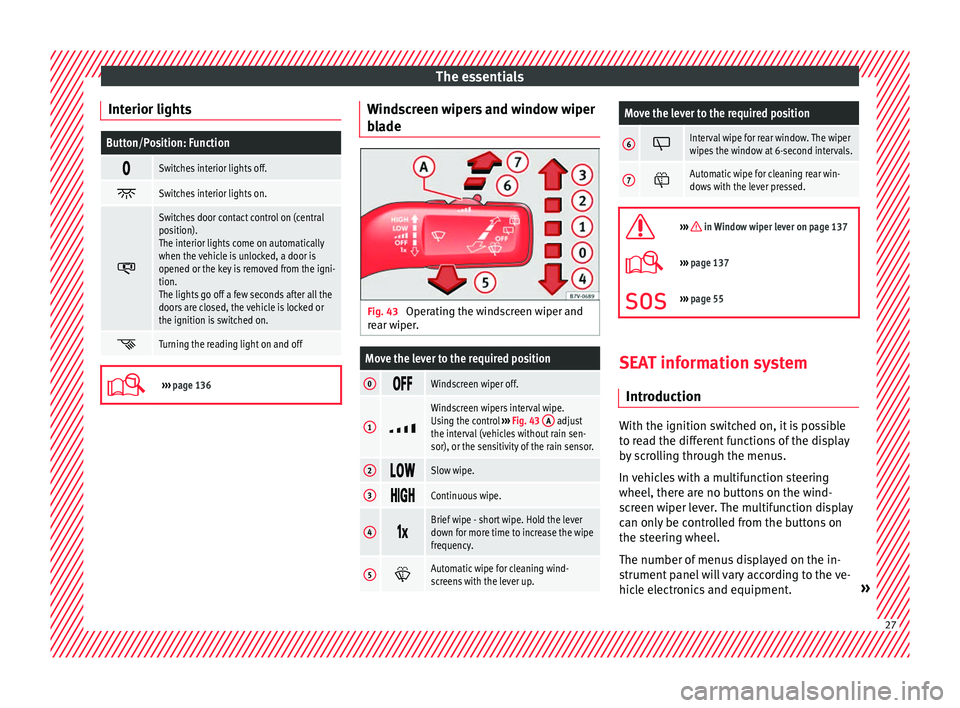
page 136 Windscreen wipers and window wiper
b
l
a
de Fig. 43
Operating the windscreen wiper and
r e
ar w
iper.
Move the lever to the required position
0 Windscreen wiper off.
1
Windscreen wipers interval wipe.
Using the control
››› Fig. 43 A adjust
the interval (vehicles without rain sen-
sor), or the sensitivity of the rain sensor.
2 Slow wipe.
3
Continuous wipe.
4
Brief wipe - short wipe. Hold the lever
down for more time to increase the wipe
frequency.
5
Automatic wipe for cleaning wind-
screens with the lever up.
Move the lever to the required position
6 Interval wipe for rear window. The wiper
wipes the window at 6-second intervals.
7
Automatic wipe for cleaning rear win-
dows with the lever pressed.
››› in Window wiper lever on page 137
›››
page 137
››› page 55 SEAT information system
Intr oduction With the ignition switched on, it is possible
t
o r
e
ad the different functions of the display
by scrolling through the menus.
In vehicles with a multifunction steering
wheel, there are no buttons on the wind-
screen wiper lever. The multifunction display
can only be controlled from the buttons on
the steering wheel.
The number of menus displayed on the in-
strument panel will vary according to the ve-
hicle electronics and equipment. » 27
Page 36 of 324
The essentials
Warning lamps C ontr
o
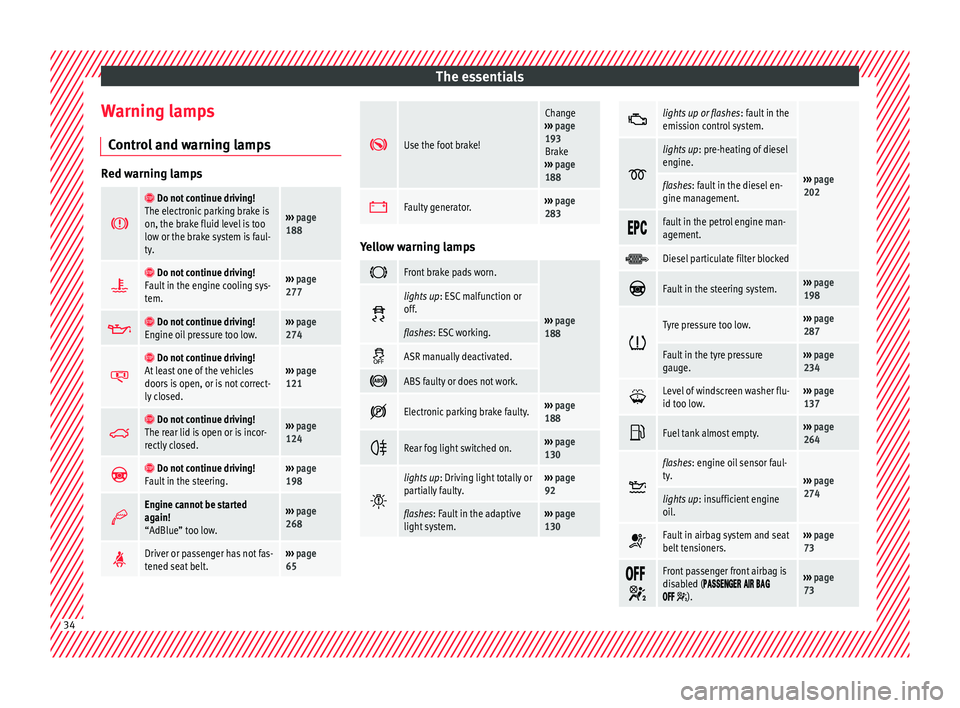
l and warning lamps Red warning lamps
Do not continue driving!
The electronic parking brake is
on, the brake fluid level is too
low or the brake system is faul-
ty.
››› page
188
Do not continue driving!
Fault in the engine cooling sys-
tem.››› page
277
Do not continue driving!
Engine oil pressure too low.››› page
274
Do not continue driving!
At least one of the vehicles
doors is open, or is not correct-
ly closed.››› page
121
Do not continue driving!
The rear lid is open or is incor-
rectly closed.››› page
124
Do not continue driving!
Fault in the steering.››› page
198
Engine cannot be started
again!
“AdBlue” too low.›››
page
268
Driver or passenger has not fas-
tened seat belt.›››
page
65
Use the foot brake!
Change
››› page
193
Brake
››› page
188
Faulty generator.›››
page
283 Yellow warning lamps
Front brake pads worn.
›››
page
188
lights up
: ESC malfunction or
off.
flashes: ESC working.
ASR manually deactivated.
ABS faulty or does not work.
Electronic parking brake faulty.›››
page
188
Rear fog light switched on.›››
page
130
lights up
: Driving light totally or
partially faulty.››› page
92
flashes: Fault in the adaptive
light system.››› page
130
lights up or flashes
: fault in the
emission control system.
››› page
202
lights up
: pre-heating of diesel
engine.
flashes: fault in the diesel en-
gine management.
fault in the petrol engine man-
agement.
Diesel particulate filter blocked
Fault in the steering system.›››
page
198
Tyre pressure too low.›››
page
287
Fault in the tyre pressure
gauge.››› page
234
Level of windscreen washer flu-
id too low.›››
page
137
Fuel tank almost empty.›››
page
264
flashes: engine oil sensor faul-
ty.
›››
page
274
lights up : insufficient engine
oil.
Fault in airbag system and seat
belt tensioners.›››
page
73
Front passenger front airbag is
disabled (
).
››› page
73 34
Page 70 of 324
Safety
WARNING
An incorrectly worn seat belt web can cause
sever e or f
atal injuries in the event of an acci-
dent.
● The seat belt cannot offer its full protection
unl
ess the seat backrests are in an upright
position and the seat belt is worn correctly,
according to your size.
● Unbuckling your seat belt while the vehicle
is in motion c
an cause severe or fatal injuries
in the event of an accident or sudden braking. Note
Seat belts with two buckles include a dia-
gram t o sho
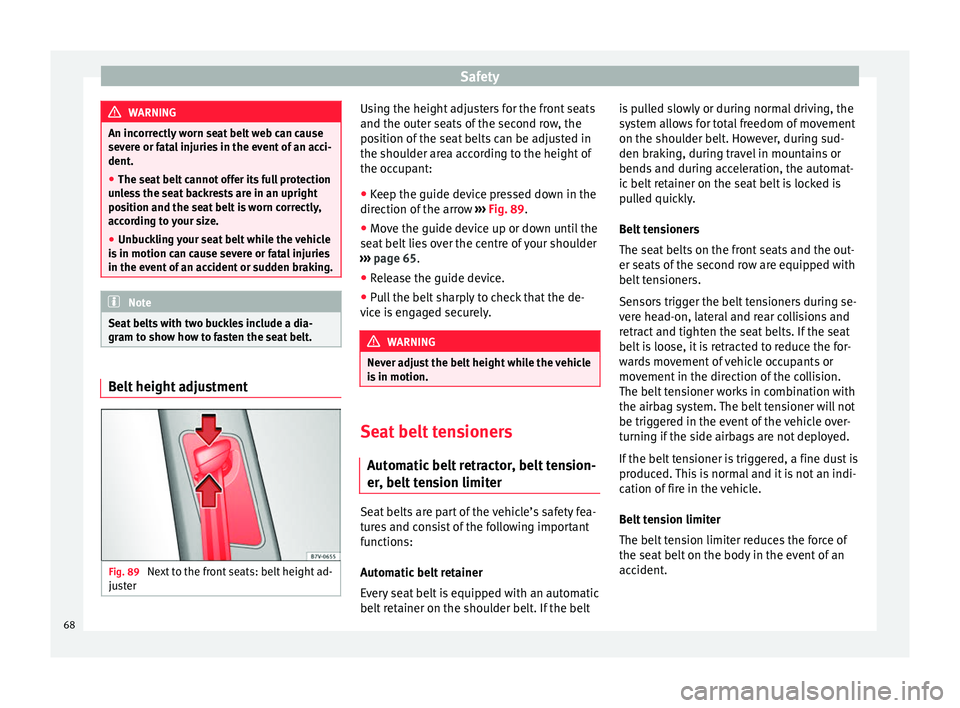
w how to fasten the seat belt.Belt height adjustment
Fig. 89
Next to the front seats: belt height ad-
ju s
t
er Using the height adjusters for the front seats
and the out
er se
ats
of the second row, the
position of the seat belts can be adjusted in
the shoulder area according to the height of
the occupant:
● Keep the guide device pressed down in the
direction of the arr
ow ››› Fig. 89.
● Move the guide device up or down until the
seat belt
lies over the centre of your shoulder
››› page 65.
● Release the guide device.
● Pull the belt sharply to check that the de-
vice i
s engaged securely. WARNING
Never adjust the belt height while the vehicle
is in motion. Seat belt tensioners
Aut omatic
belt retractor, belt tension-
er, belt tension limiter Seat belts are part of the vehicle’s safety fea-
t
ur
e
s and consist of the following important
functions:
Automatic belt retainer
Every seat belt is equipped with an automatic
belt retainer on the shoulder belt. If the belt is pulled slowly or during normal driving, the
syst
em allows for total freedom of movement
on the shoulder belt. However, during sud-
den braking, during travel in mountains or
bends and during acceleration, the automat-
ic belt retainer on the seat belt is locked is
pulled quickly.
Belt tensioners
The seat belts on the front seats and the out-
er seats of the second row are equipped with
belt tensioners.
Sensors trigger the belt tensioners during se-
vere head-on, lateral and rear collisions and
retract and tighten the seat belts. If the seat
belt is loose, it is retracted to reduce the for-
wards movement of vehicle occupants or
movement in the direction of the collision.
The belt tensioner works in combination with
the airbag system. The belt tensioner will not
be triggered in the event of the vehicle over-
turning if the side airbags are not deployed.
If the belt tensioner is triggered, a fine dust is
produced. This is normal and it is not an indi-
cation of fire in the vehicle.
Belt tension limiter
The belt tension limiter reduces the force of
the seat belt on the body in the event of an
accident.
68
Page 119 of 324
Opening and closing
Locking and unlocking the vehicle
w ith K
eyl
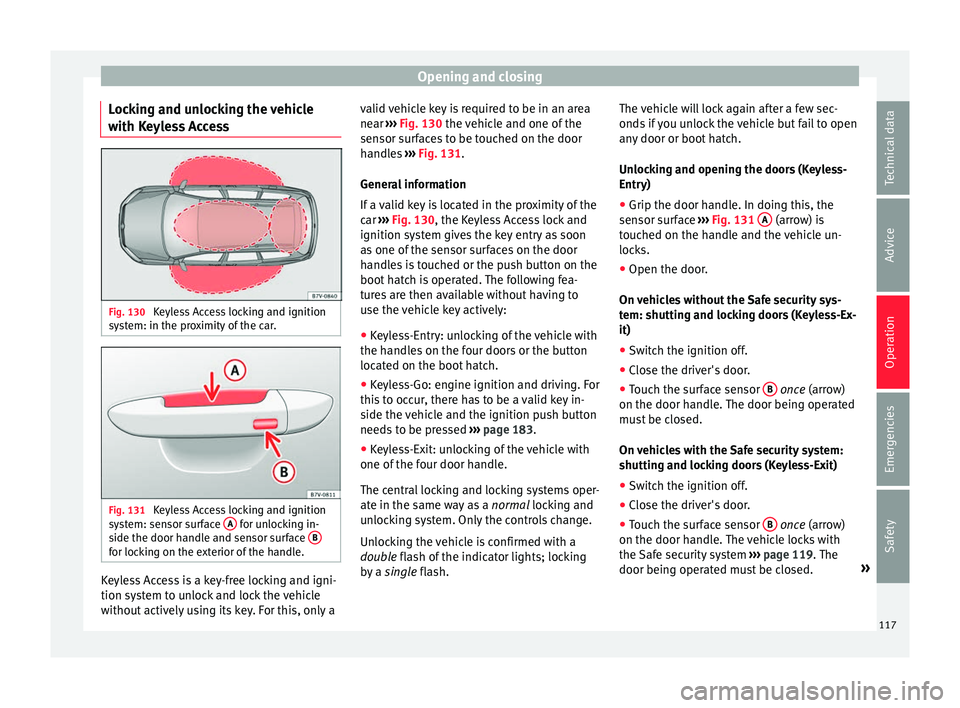
ess Access Fig. 130
Keyless Access locking and ignition
sy s
t
em: in the proximity of the car. Fig. 131
Keyless Access locking and ignition
sy s
t
em: sensor surface A for unlocking in-
s ide the door h
andl
e and sensor surface Bfor locking on the exterior of the handle.
Keyless Access is a key-free locking and igni-
tion sy
s
t
em to unlock and lock the vehicle
without actively using its key. For this, only a valid vehicle key is required to be in an area
near
››
› Fig. 130 the vehicle and one of the
sensor surfaces to be touched on the door
handles ››› Fig. 131.
General information
If a valid key is located in the proximity of the
car ››› Fig. 130, the Keyless Access lock and
ignition system gives the key entry as soon
as one of the sensor surfaces on the door
handles is touched or the push button on the
boot hatch is operated. The following fea-
tures are then available without having to
use the vehicle key actively:
● Keyless-Entry: unlocking of the vehicle with
the handle
s on the four doors or the button
located on the boot hatch.
● Keyless-Go: engine ignition and driving. For
this t
o occur, there has to be a valid key in-
side the vehicle and the ignition push button
needs to be pressed ››› page 183.
● Keyless-Exit: unlocking of the vehicle with
one of the four door h
andle.
The central locking and locking systems oper-
ate in the same way as a normal locking and
unlocking system. Only the controls change.
Unlocking the vehicle is confirmed with a
double flash of the indicator lights; locking
by a single flash. The vehicle will lock again after a few sec-
onds if
you unlock the vehicle but fail to open
any door or boot hatch.
Unlocking and opening the doors (Keyless-
Entry)
● Grip the door handle. In doing this, the
sensor sur
face ››› Fig. 131 A (arrow) is
t ouc
hed on the h
andle and the vehicle un-
locks.
● Open the door.
On vehic
les without the Safe security sys-
tem: shutting and locking doors (Keyless-Ex-
it)
● Switch the ignition off.
● Close the driver's door.
● Touch the surface sensor B onc
e (arrow)
on the door h andl
e. The door being operated
must be closed.
On vehicles with the Safe security system:
shutting and locking doors (Keyless-Exit)
● Switch the ignition off.
● Close the driver's door.
● Touch the surface sensor B onc
e (arrow)
on the door h andl
e. The vehicle locks with
the Safe security system ››› page 119. The
door being operated must be closed. »
117
Technical data
Advice
Operation
Emergencies
Safety
Page 120 of 324
Operation
● Touc
h
the sensor surface B twice (arrow)
on the door h andl
e t
o lock the vehicle with-
out the Safe security system ››› page 119.
Unlocking and locking the boot hatch
When the vehicle is locked, the hatch auto-
matically unlocks on opening if ››› Fig. 130
there is a valid vehicle key in the proximity.
Open or close the hatch normally
››› page 124.
After closing, the hatch locks automatically.
In the following instances, the rear lid does
not lock automatically after closing:
● If the entire vehicle is unlocked.
● If the key used last is inside the vehicle. All
vehicl
e indicator lights flash four times. The
vehicle will lock again after a few seconds if
no door or boot hatch are opened.
Locking the vehicle with a second key
If there is a vehicle key inside the vehicle and
it is locked from the outside with a second
vehicle key, the key inside the vehicle is
blocked for engine ignition ››› page 183. In
order to enable engine ignition, the button
on the key inside the vehicle needs to be
pressed ››› Fig. 128.
Automatically disabling sensors
If the vehicle is not locked or unlocked for a
long period of time, the proximity sensor on the passenger door is automatically disa-
bled.
If
the exterior sensor on the door handle is
often activated unusually with the vehicle
locked (e.g. by the branches of a bush rub-
bing against it), all proximity sensors are dis-
abled for a time. If this only happens with the
exterior sensor on the driver's door, only this
sensor is disabled.
Sensors will again be enabled:
● After a time.
● OR: if the vehicle is unlocked with the
butt
on on the key.
● OR: if the boot is opened.
Keyl
ess Access temporary disconnection
function*
You can deactivate the vehicle's Keyless Ac-
cess unlocking for a locking and unlocking
cycle.
● Move the gear lever to position P (if the v
e-
hicle has automatic gearbox), since other-
wise the vehicle cannot be locked.
● Close the door.
● Push the central locking button on the
remote c
ontrol and touch the locking sensor
surface ›››
Fig. 131 B on the driver door han-
dl e onc e w
ithin the following 5 seconds. Do
not grip the door handle, otherwise the vehi-
cle will not lock. Deactivation is also possible if the vehicle is locked through the driver’s
door lock.
●
To c
heck that the function has been deacti-
vated, w
ait at least 10 seconds, grip and pull
on the door handle. The door should not
open.
The next time the door can only be unlocked
via the remote control or the lock cylinder.
The next time the door is locked/unlocked,
Keyless Access will be active again.
Convenience functions
To close all electric windows, the sun roof
and electric tilting panoramic roof with the
convenience feature, keep your finger for a
few seconds on the lock sensor surface B located on the exterior part of the driver or
p
a
s
senger door handle until the windows
and roof close.
Opening the doors by touching the sensor
surface on the handle takes places in accord-
ance with the settings activated on the menu
Configuration - Convenience
››› page 27. CAUTION
The sensor surfaces on the door handles
cou l
d engage if hit with a water jet or high
pressure steam if there is a valid vehicle key
in the nearby area. If at least one of the win-
dows is open and the sensor surface B on
one of the h andl
e permanently activates, all 118
Page 121 of 324
Opening and closing
windows will close. If the water jet or steam
is
briefly
moved away from the sensor sur-
face A on one of the handles and then poin-
ted at it
again, all the windows will probably
open ››› page 118, Convenience functions. Note
● If the v
ehicle battery has little or no charge,
or the vehicle key battery is almost or entire-
ly out of charge, it is likely that the vehicle
will not be able to be lock or unlocked with
the Keyless Access system. The vehicle can
be unlocked or locked manually ››› page 90.
● If there is no valid key inside the vehicle or
the syst
em fails to detect one, a warning will
display on the dash panel screen. This could
happen if any other radio frequency signal in-
terferes with the key signal (e.g. from a mo-
bile device accessory) or if the key is covered
by another object (e.g. an aluminium case).
● If the sensors are very dirty, e.g. have a lay-
er of sa
lt, how the sensors on the door han-
dles operate may be affected. If this is the
case, wash the vehicle ››› page 253.
● If the vehicle is equipped with an automatic
gearbo
x, it may only be locked in the gear
stick is in position P. Safe security system
FunctionNecessary operations
Lock the vehicle and
activate the “Safe” se-
curity system.Press the button once on
the vehicle key.
Lock the vehicle with-
out activating the
“Safe” security system.
Press the button twice on
the vehicle key.
Touch the Keyless Access
close and ignition lock sensor
surface located on the exteri-
or part of the door handle
twice ››› page 117.
Press the central locking but-
ton on the driver door
once. Depending on the vehicle, when switching
the ignition off
, a w
arnin
g may be displayed
on the dash panel screen stating that the
Safe security system is activated ( SAFE
Lock or
SAFELOCK ).
Disabling the Safe security system
The Safe security system may be disabled in
any of the following ways:
● Press the button on the
vehicle key
twice.
● Touch the Keyless Access close and igni-
tion lock sen
sor surface located on the exteri-
or part of the door handle twice ››› page 117. ●
Switc
h the ignition on.
● Press the ignition push button of the
Keyle
ss Access lock and ignition system.
When the “safe” security system is disabled,
the following needs to be taken into account:
● The vehicle can be opened and unlocked
from the ins
ide using an inside door handle.
● The anti-theft alarm is activated.
● The vehicle interior monitoring system and
the anti-tow sy
stem are disabled. WARNING
Careless use of the “Safe” security system
can c au
se serious injury.
● Never leave anybody inside the vehicle if it
has
been locked using the key. When the
Safe security system is activated, the doors
cannot be opened from the inside!
● When the doors are locked, it is difficult to
get t
o passengers in the vehicle interior in
case of an emergency. Passengers could re-
main trapped inside and unable to unlock the
doors in case of an emergency. Anti-theft alarm
The anti-theft alarm makes it more difficult to
br
e
ak
into the vehicle or steal it.
The anti-theft alarm is automatically turned
on when the vehicle is locked with the key. »
119
Technical data
Advice
Operation
Emergencies
Safety
Page 134 of 324
Operation
Note
● If the c on
venience turn signals are operat-
ing (three flashes) and the other convenience
turn signals are switched on, the active part
stops flashing and only flashes once in the
new part selected.
● The turn signal only works when the igni-
tion is sw
itched on. The hazard warning
lights also work when the ignition is switch-
ed off ››› page 83.
● If a turn signal on the vehicle or trailer is
faulty
, the warning lamp flashes twice as fast
as usual.
● The main beam headligh
ts can only be
switched on if the dipped beam headlights
are already on. Lights and visibility: functions
Parking light
When the p ark
in
g light is switched on, (right
or left turn signal), the front side light and
the rear light on the corresponding side of
the vehicle stay lit. The parking lights will on-
ly work with the ignition off.
Daytime running lights
The daytime running lights reduce the risk of
accidents by increasing the visibility of the
vehicle. These are independent lights that
are built into the headlights and come on each time the ignition is turned on if the light
switc
h is in position or 0.
When the light switch is in position , a
photo sensor automatically turns the instru-
ment and switch lighting on and off.
Automatic dipped beam control
The automatic dipped beam control is merely
intended as an aid and is not able to recog-
nise all driving situations.
When the light switch is in position , the
vehicle lights and the instrument panel and
switch lighting switch on and off automatical-
ly in the following situations ››› :
Automatic switching
onAutomatic switching
off or switch to day-
time running lighting
The photo sensor detects
darkness, for example,
when driving through a
tunnel.When adequate lighting is
detected.
The rain sensor detects
rain and activates the
windscreen wipers.When the windscreen wip-
er has been inactive for a
few minutes.
Adaptive headlights (AFS)
The a
d
aptiv
e headlights only operate when
the dipped beam is on and at speeds of over
10 km/h (6 mph). On bends, the adaptive
headlights automatically improve lighting on
the road ahead. The adaptive headlights can be switched on
and off from the inf
otainment system.
Static cornering lights
When turning slowly to change direction or
going round a tight bend, the static cornering
lights automatically come on. The static cor-
nering lights only work at speeds of less than
40 km/h (25 mph).
The static cornering lights may be incorpora-
ted into the fog lights or the front headlights,
depending upon the equipment. WARNING
If the road is not well lit and other road users
cannot see the
vehicle well enough or at all,
accidents may occur.
● The automatic dipped beam control ( )
only sw
itches on the dipped beam when
there are no changes in brightness, and not,
for example when it is foggy.
● Never drive with daytime lights if the road
is not
well lit due to weather or lighting con-
ditions. Daytime lights do not provide
enough light to illuminate the road properly
or be seen by other road users.
● The rear lights do not come on with the
daytime driv
ing light. A vehicle which does
not have the rear lights on may not be visible
to other drivers in the darkness, if it is rain-
ing or in conditions of poor visibility. 132
Page 135 of 324
Lights and visibility
Headlight adjustment Headlight adjustment (Light Assist)
The hea
dlight
adjustment automatically con-
nects and disconnects these lights depend-
ing on the environmental and traffic condi-
tions and on the speed, within the limitations
of the system ››› . This is monitored by a
sensor loc at
ed on the inside of the wind-
screen, above the interior rear vision mirror.
The automatic headlight adjustment auto-
matically switches on the lights depending
on the vehicles travelling in front and in the
opposite direction, and on other environmen-
tal and traffic conditions from an approxi-
mate speed of 60 km/h (37 mph) and turns
them off again at speeds below approximate-
ly 30 km/h (18 mph).
Switching on and off
Action
Switching
on:
– With the ignition on, turn the lights
control to the position and put the
turn signal and main beam lever in the
main beam position ››› page 131. When
the headlight adjustment (automatic
lights also) is activated, the warning
lamp lights up in the dash panel display
.
Switching
off:
– Disconnect the on button.
– OR: turn the lights control to a differ-
ent position to
››› page 131.
–OR: place the turn signal and main
beam lever in the headlight flasher or
main beam position ››› page 131. The following conditions can cause the head-
light a
dju
stment to fail to turn off the main
beam or fail to do so in time:
● On roads with insufficient lighting with very
reflectiv
e signs
● If road users are insufficiently lit up, e.g.
pedes tri
ans or cyclists.
● On closed curves, when the traffic in the
oppos
ite direction is partially hidden, on pro-
nounced slopes
● On roads with traffic in the opposite direc-
tion and with a centr
al reservation barrier
where the driver can see through gaps or
over it e.g. lorry drivers.
● If the camera is damaged or if the power
supp
ly has been cut off
● In the event of fog, snow or heavy rain
● In the event of dust or sand storms
● If the windscreen is damaged by the impact
from a st
one in the camera's field of vision
● If the camera's field of vision is misted up,
dirty or c
overed by a sticker, snow or ice. WARNING
The greater comfort that the headlight ad-
jus tment
provides (automatic also) must not
cause you to take risks. The system is not a
replacement for driver awareness.
● Always monitor the lights yourself and ad-
just
them depending on the light, visibility
and traffic conditions.
● The headlight adjustment (automatic also)
may
not correctly detect all situations and in
certain situations may only provide limited
function.
● If the windscreen is damaged or modifica-
tions ar
e made to the vehicle lighting, this
may harm the functioning of the headlight
adjustment (automatic lights also), for exam-
ple, if additional headlight are fitted. Note
Main beam and flashed headlights can be
turned on and off m
anually at any time with
the turn signal and main beam lever
››› page 131. “Coming home” and “Leaving home”
f
u
nction (guid
ance lights) The “Coming home” function should be
sw
it
c
hed on manually. However the “Leav-
ing home” function is automatically control-
led by a photo sensor. »
133
Technical data
Advice
Operation
Emergencies
Safety
Page 136 of 324
Operation“Coming home”: necessary operations
To switch
system on:
– Switch off the ignition.
– Briefly flash the headlights
for approxi-
mately one second ››› page 131.
The “Coming home” lighting comes on
when the driver door is opened. The de-
lay in switching off the headlights is
counted from when the last door or boot
hatch is closed.
To switch
system off:
– Automatically at the end of the delay
period.
– Automatically, if 30 seconds after com-
ing on, a vehicle door or the boot hatch
remains open.
– When the light switch is turned to posi-
tion
.
– When the ignition is switched on.
“Leaving home”: necessary operations
To switch
system on:– Unlock the vehicle when the light
switch is in position and the photo
sensor detects darkness.
To switch
system off:
– Automatically, at the end of the delay
period.
– When the vehicle is locked.
– When the light switch is turned to posi-
tion
.
– When the ignition is switched on. Lighting around the exterior mirrors
The lightin
g ar
ou
nd the exterior mirrors illu-
minates the door area on entering and leav-
ing the vehicles. It comes on when the vehi-
cle is unlocked, when the vehicle door is opened and when the “Coming home” or
“Leav
ing home” function is switched on. If
the equipment includes the light sensor, the
lighting around the exterior mirrors only
comes when it is dark. Note
● The time tak en f
or the headlights to go off
can be changed in the Lights & Visibil- ity menu and the function can be switched
on or off ›››
page 27.
● When the “Coming home” function is on, if
the vehic
le door is opened there is no audible
warning signal to advise that the light is still
on. Hazard warning lights
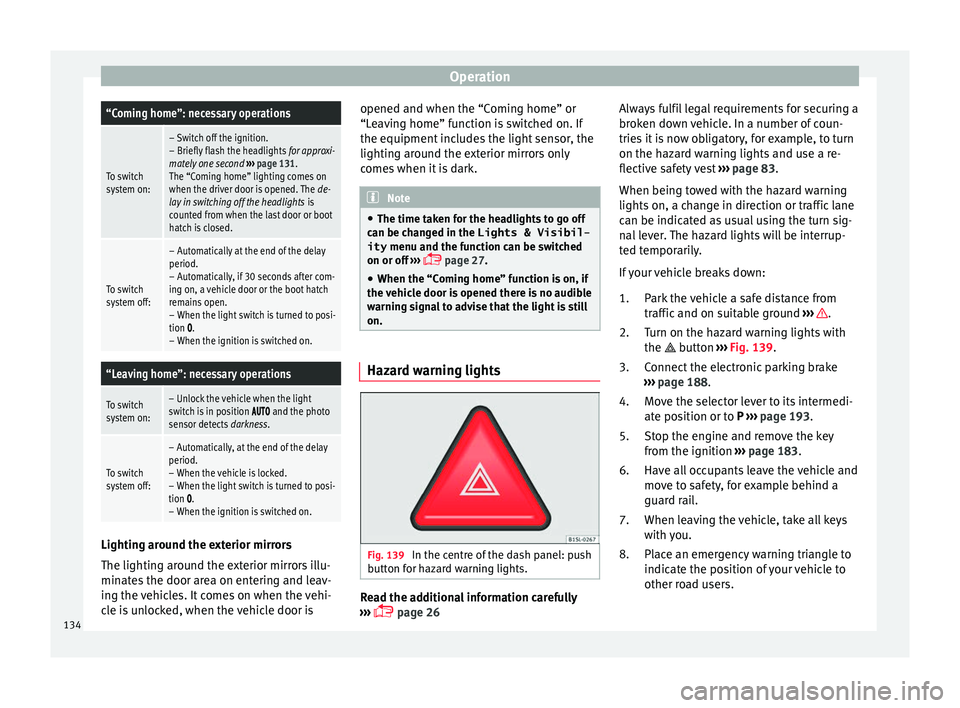
Fig. 139
In the centre of the dash panel: push
b utt
on f
or hazard warning lights. Read the additional information carefully
› ›
›
page 26 Always fulfil legal requirements for securing a
broken do
wn vehicle. In a number of coun-
tries it is now obligatory, for example, to turn
on the hazard warning lights and use a re-
flective safety vest ››› page 83.
When being towed with the hazard warning
lights on, a change in direction or traffic lane
can be indicated as usual using the turn sig-
nal lever. The hazard lights will be interrup-
ted temporarily.
If your vehicle breaks down:
Park the vehicle a safe distance from
traffic and on suitable ground ››› .
T urn on the h
az
ard warning lights with
the button ››› Fig. 139.
Connect the electronic parking brake
››› page 188.
Move the selector lever to its intermedi-
ate position or to P ››› page 193.
Stop the engine and remove the key
from the ignition ››› page 183.
Have all occupants leave the vehicle and
move to safety, for example behind a
guard rail.
When leaving the vehicle, take all keys
with you.
Place an emergency warning triangle to
indicate the position of your vehicle to
other road users.
1.
2.
3.
4.
5.
6.
7.
8.
134
Page 141 of 324
Lights and visibility
Rain sensor* Fig. 143
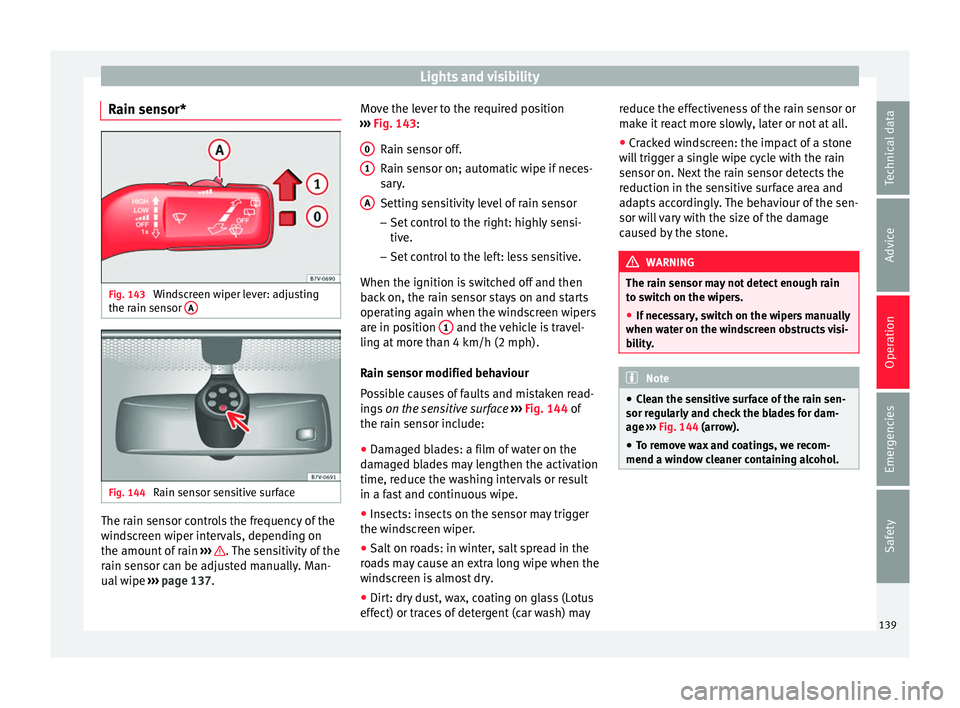
Windscreen wiper lever: adjusting
the r ain sen
sor A Fig. 144
Rain sensor sensitive surface The rain sensor controls the frequency of the
w
ind
s
creen wiper intervals, depending on
the amount of rain ››› . The sensitivity of the
r ain sen
sor c
an be adjusted manually. Man-
ual wipe ››› page 137. Move the lever to the required position
›››
Fig. 143:
Rain sensor off.
Rain sensor on; automatic wipe if neces-
sary.
Setting sensitivity level of rain sensor
– Set control to the right: highly sensi-
tive.
– Set control to the left: less sensitive.
When the ignition is switched off and then
back on, the rain sensor stays on and starts
operating again when the windscreen wipers
are in position 1 and the vehicle is travel-
lin g at
mor
e than 4 km/h (2 mph).
Rain sensor modified behaviour
Possible causes of faults and mistaken read-
ings on the sensitive surface ››› Fig. 144 of
the rain sensor include:
● Damaged blades: a film of water on the
damag
ed blades may lengthen the activation
time, reduce the washing intervals or result
in a fast and continuous wipe.
● Insects: insects on the sensor may trigger
the winds
creen wiper.
● Salt on roads: in winter, salt spread in the
roa
ds may cause an extra long wipe when the
windscreen is almost dry.
● Dirt: dry dust, wax, coating on glass (Lotus
effect) or trac
es of detergent (car wash) may
0 1
A reduce the effectiveness of the rain sensor or
m
ak
e it
react more slowly, later or not at all.
● Cracked windscreen: the impact of a stone
wil
l trigger a single wipe cycle with the rain
sensor on. Next the rain sensor detects the
reduction in the sensitive surface area and
adapts accordingly. The behaviour of the sen-
sor will vary with the size of the damage
caused by the stone. WARNING
The rain sensor may not detect enough rain
to sw it
ch on the wipers.
● If necessary, switch on the wipers manually
when water on the w
indscreen obstructs visi-
bility. Note
● Cle
an the sensitive surface of the rain sen-
sor regularly and check the blades for dam-
age ››› Fig. 144 (arrow).
● To remove wax and coatings, we recom-
mend a window c
leaner containing alcohol. 139
Technical data
Advice
Operation
Emergencies
Safety