warning lights Seat Altea 2005 Owner's Guide
[x] Cancel search | Manufacturer: SEAT, Model Year: 2005, Model line: Altea, Model: Seat Altea 2005Pages: 286, PDF Size: 9.59 MB
Page 115 of 286
Lights and visibility113
Safety First
Operating instructions
Tips and Maintenance
Te c h n i c a l D a t a
7. Always take the vehicle key wi th you when you leave the vehicle.You should switch on the hazard warning lights to warn other road users, for
instance:•
When reaching the tail end of a traffic jam
•
There is an emergency
•
Your vehicle breaks down due to a technical defect
•
You are towing another vehicle or your vehicle is being towed.
All turn signals flash simultaneously when the hazard warning lights are
switched on. That is that the two turn signal indicator lamps
and the
indicator lamp in the switch
will flash at the same time. The hazard
warning lights also work when the ignition is switched off.
WARNING
•
The risk of an accident increases if your vehicle breaks down. Always
using the hazard warning lights and a warning triangle to draw the atten-
tion of other road users to your stationary vehicle.
•
Never park where the catalytic converter could come into contact with
inflammable materials under the vehicle, for example dry grass or spilt
petrol. This could start a fire!Note
•
The battery will run down if the hazard warning lights are left on for a long
time, even if the ignition is switched off.
•
The use of the hazard warning lights d escribed here is subject to the rele-
vant statutory requirements.
Turn signal and main beam headlight lever
The turn signal and main beam lever also operates the
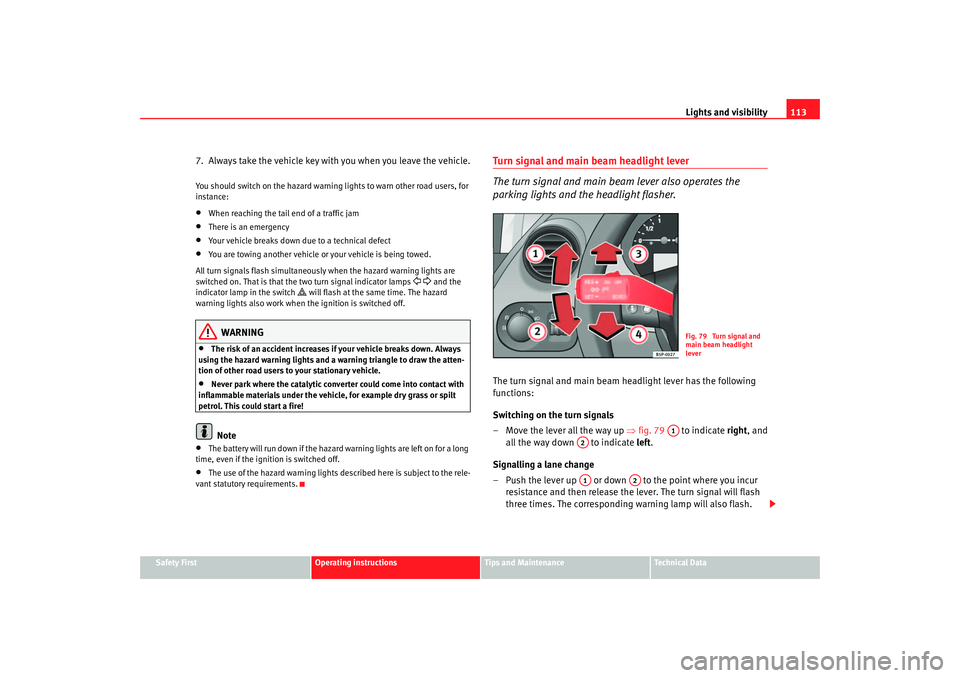
parking lights and the headlight flasher.The turn signal and main beam headlight lever has the following
functions:
Switching on the turn signals
– Move the lever all the way up ⇒fig. 79 to indicate right, and
all the way down to indicate left.
Signalling a lane change
– Push the lever up or down to the point where you incur resistance and then release the lever. The turn signal will flash
three times. The corresponding warning lamp will also flash.
Fig. 79 Turn signal and
main beam headlight
lever
A1
A2A1
A2
altea_ingles Seite 113 Donnerstag, 19. Mai 2005 3:02 15
Page 116 of 286
Lights and visibility
114
Switching main beam on and off
– Turn the light switch to position
.
– Press the lever forward ⇒page 113, fig. 79 to switch on the
main beams.
– Pull the lever back towards you to switch the main beam head- lights off again.
Headlight flasher
– Pull the lever towards the steering wheel to operate the flasher.
Switching on parking lights
– Switch off the ignition and remove the key from the lock.
– Move the lever up or down to turn on the right or left-hand parking lights respectively.
WARNING
The main beam can dazzle other drivers. Risk of accident! Never use the
main beam headlights or the headlight flasher if they could dazzle other
drivers.
Note
•
The turn signals only work when the ignition is switched on. The corre-
sponding warning lamp
or flashes in the combi-instrument. The
warning lamp
flashes when the turn signals are operated, provided a
trailer is correctly attached and connected to the vehicle. If a turn signal bulb
is defective, the warning lamp flashes at double speed. If the trailer turn signal bulbs are damaged, warning lamp
does not light up. You should
have the bulb replaced.
•
The main beam headlights can only be switched on if the dipped beam
headlights are already on. The warning lamp
then comes on in the combi-
instrument.
•
The headlight flasher comes on for as long as you pull the lever – even if
no other lights are switch ed on. The warning lamp
then comes on in the
combi-instrument.
•
When the parking lights are switched on, the headlight and the rear light
on the corresponding side of the vehicle light up. The parking lights will only
work if the key is removed from the igni tion. If the lights are switched on, a
buzzer gives an audible warning while the driver door is open.
•
If the turn signal lever is left on after the key has been taken out of the
ignition lock, an acoustic signal sounds when the driver door is opened. This
is a reminder to switch off the turn signal, unless of course you wish to leave
the parking light on.
A3
A4
altea_ingles Seite 114 Donnerstag, 19. Mai 2005 3:02 15
Page 121 of 286

Lights and visibility119
Safety First
Operating instructions
Tips and Maintenance
Te c h n i c a l D a t a
Optional heated windscreen in the wiper blade* area
In some countries and with some versions, there is the possibility of heating
the windscreen in the area of the windscreen wiper blades in order to aid de-
icing in the zone.
This function is activated by turning the exterior heated rearview mirror*
control forwards.
⇒page 123
WARNING
•
Worn and dirty wiper blades obstruct visibility and reduce safety levels.
•
In cold conditions, you should not use the wash / wipe system unless
you have warmed the windscreen with the heating and ventilation system.
The washer fluid could otherwise freeze on the windscreen and obscure
your view of the road.
•
Always note the corresponding warnings on ⇒page 212, “Changing
windscreen wiper blades”.Caution
In icy conditions, always check that th e wiper blades are not frozen to the
glass before using the wipers for the fi rst time. If you switch on the wipers
when the wiper blades are frozen to the windscreen, you could damage both
the wiper blades and the wiper motor.
Note
•
The windscreen wipers will only function when the ignition is switched on
and the bonnet is closed.
•
When in use, the wipers do not go as far as the rest position. When the
lever is moved to position 0, they are totally hidden.
•
The next speed down will automatically be selected if wiper speed
⇒ page 118, fig. 86 or is selected when the vehicle stops. The set speed
will be resumed when the vehicle starts again
•
The windscreen will be wiped again after approximately five seconds once
the “automatic wipe/wash system” has been operated while the vehicle is in
transit.
•
When the “intermittent wi pe function” is on, the intervals are directly
proportional to the speed. This way, the higher the vehicle speed the shorter
the intervals.
•
The wiper will try to wipe away any obstacles that are on the windscreen.
The wiper will stop moving if the obstacle blocks its path. Remove the
obstacle and switch the wiper back on again.
•
Before removing any objects that may be trapped in the side areas of the
windscreen, always move the wiper arms to the service position
(horizontal).
A2
A3
altea_ingles Seite 119 Donnerstag, 19. Mai 2005 3:02 15
Page 123 of 286
Lights and visibility121
Safety First
Operating instructions
Tips and Maintenance
Te c h n i c a l D a t a
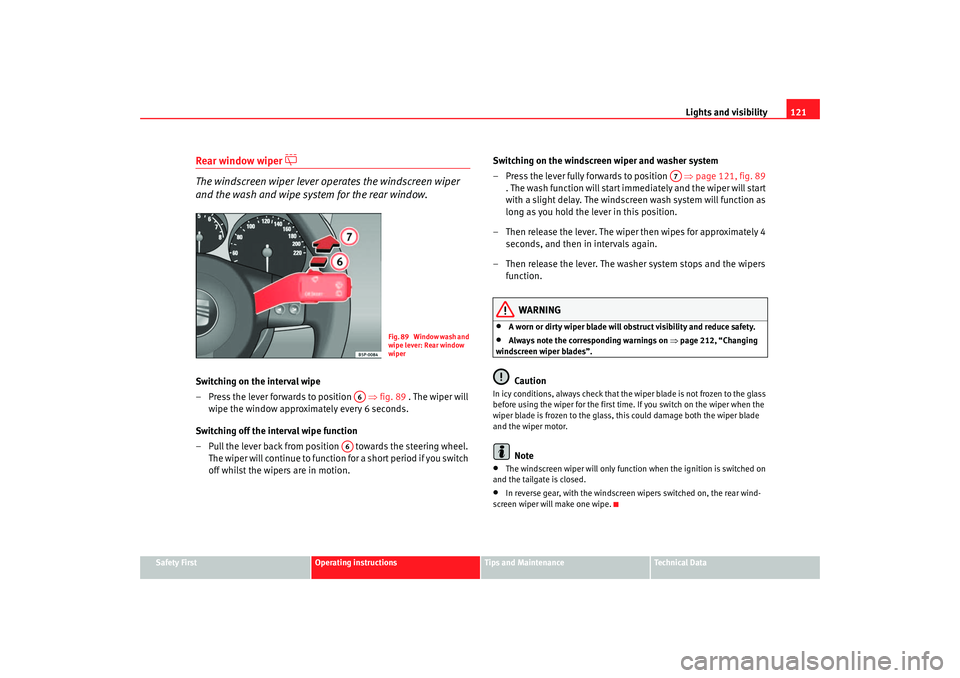
Rear window wiper
The windscreen wiper lever operates the windscreen wiper
and the wash and wipe system for the rear window.Switching on the interval wipe
– Press the lever forwards to position ⇒fig. 89 . The wiper will
wipe the window approximately every 6 seconds.
Switching off the interval wipe function
– Pull the lever back from positi on towards the steering wheel.
The wiper will continue to function for a short period if you switch
off whilst the wipers are in motion. Switching on the windscreen wiper and washer system
– Press the lever fully forwards to position
⇒page 121, fig. 89
. The wash function will start immediately and the wiper will start
with a slight delay. The windscreen wash system will function as
long as you hold the lever in this position.
– Then release the lever. The wiper then wipes for approximately 4 seconds, and then in intervals again.
– Then release the lever. The washer system stops and the wipers function.
WARNING
•
A worn or dirty wiper blade will obstruct visibility and reduce safety.
•
Always note the corresponding warnings on ⇒page 212, “Changing
windscreen wiper blades”.Caution
In icy conditions, always check that the wiper blade is not frozen to the glass
before using the wiper for the first time. If you switch on the wiper when the
wiper blade is frozen to the glass, this could damage both the wiper blade
and the wiper motor.
Note
•
The windscreen wiper will only function when the ignition is switched on
and the tailgate is closed.
•
In reverse gear, with the windscreen wipers switched on, the rear wind-
screen wiper will make one wipe.
F i g . 8 9 W i n d o w w a s h a n d
wipe lever: Rear window
wiper
A6
A6
A7
altea_ingles Seite 121 Donnerstag, 19. Mai 2005 3:02 15
Page 124 of 286

Lights and visibility
122Headlight washer system
The headlight washers clean the headlight lenses.The headlight washers are activated automatically when the windscreen
washer is used and the windscreen wiper lever is pulled towards the steering
wheel for at least 1.5 seconds – provided the dipped headlights or main
beams are switched on. Clean off stubborn dirt (insects, etc.) from the head-
lights at regular intervals, for in stance when filling the fuel tank.
Note
•
To ensure that the headlight washers work properly in winter, keep the
nozzle holders in the bumper free of snow and remove any ice with a de-icer
spray.
•
To remove water, the windscreen wiper s will be activated from time to
time, the headlight wipers will be activated every three cycles.
MirrorsInterior mirror
It is dangerous to drive if you cannot see clearly through the
rear window.Manual anti-dazzle function for interior mirror
In the basic mirror position, the lever at the bottom edge of the mirror should
be at the front. Pull the lever to the back to select the anti-dazzle function.
Automatic anti-dazzle interior mirror*
The automatic anti-dazzle function can be switched on and off
as desired.Switching off anti-dazzle function
– Press button ⇒fig. 90 . Warning lamp goes out:
Switching on anti-dazzle function
– Press button ⇒fig. 90 . Warning lamp is lit.Anti-dazzle function
The anti-dazzle function is activated every time the ignition is switched on.
The green indicator lamp ligh ts up in the mirror housing.
When the anti-dazzle function is acti vated the interior mirror will darken auto-
matically according to the amount of light it receives (for example from the
headlights of a vehicle behind). The anti-dazzle function is cancelled if
reverse gear is engaged.
Fig. 90 Automatic anti-
dazzle interior mirror.
AA
AB
AA
altea_ingles Seite 122 Donnerstag, 19. Mai 2005 3:02 15
Page 126 of 286

Lights and visibility
124
WARNING
•
The rear view convex or aspheric mirror increase the field of vision
however the objects appear smaller and further away in the mirrors. If you
use these mirrors to estimate the distance to vehicles behind you when
changing lane, you could make a mistake. Risk of accident.
•
If possible, use the interior mirror to estimate distances to vehicles
behind you.
•
Make sure that you do not get your finger trapped between the mirror
and the mirror base when folding back the mirrors. Risk of injury!For the sake of the environment
The exterior mirror heating should be switched off when it is no longer
needed. Fuel is wasted otherwise.
Note
•
If the electrical adjustment ever fa ils to operate, the mirrors can be
adjusted by hand by lightly pressing the edge of the mirror glass.
•
The following guideline applies to vehicles with electric exterior mirrors:
If the mirror housing is moved as a resu lt of exterior force (e.g. knocked when
parking the vehicle), the mirrors must be folded in electrically to the final
position. Do not readjust the mirror h ousing by hand, as this will interfere
with the mirror adjuster function.
•
The rear view mirrors can be adjusted separately or simultaneously, as
described before.
altea_ingles Seite 124 Donnerstag, 19. Mai 2005 3:02 15
Page 153 of 286
Air conditioning151
Safety First
Operating instructions
Tips and Maintenance
Te c h n i c a l D a t a
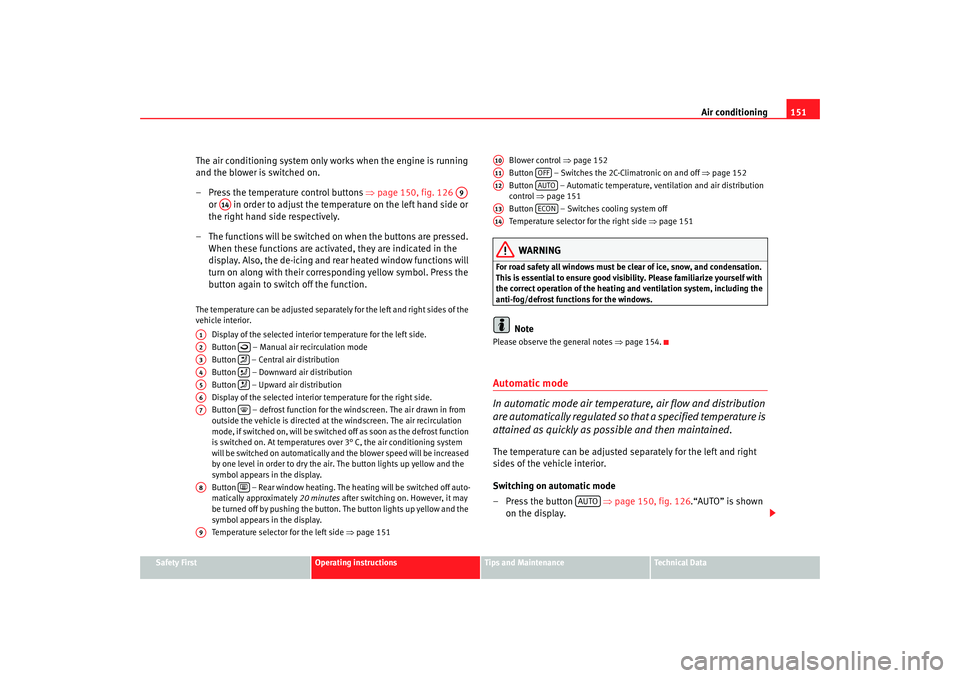
The air conditioning system only works when the engine is running
and the blower is switched on.
– Press the temperature control buttons ⇒page 150, fig. 126
or in order to adjust the temperature on the left hand side or
the right hand side respectively.
– The functions will be switched on when the buttons are pressed. When these functions are activated, they are indicated in the
display. Also, the de-icing and re ar heated window functions will
turn on along with their corres ponding yellow symbol. Press the
button again to switch off the function.The temperature can be adjusted separately for the left and right sides of the
vehicle interior.
Display of the selected interior temperature for the left side.
Button – Manual air recirculation mode
Button – Central air distribution
Button – Downward air distribution
Button – Upward air distribution
Display of the selected interior temperature for the right side.
Button – defrost function for the windscreen. The air drawn in from
outside the vehicle is directed at the windscreen. The air recirculation
mode, if switched on, will be switched off as soon as the defrost function
is switched on. At temperatures over 3° C, the air conditioning system
will be switched on automatically and the blower speed will be increased
by one level in order to dry the air. The button lights up yellow and the
symbol appears in the display.
Button – Rear window heating. The heating will be switched off auto-
matically approximately 20 minutes after switching on. However, it may
be turned off by pushing the button. The button lights up yellow and the
symbol appears in the display.
Temperature selector for the left side ⇒page 151 Blower control
⇒page 152
Button – Switches the 2C-Climatronic on and off ⇒page 152
Button – Automatic temperature, ventilation and air distribution
control ⇒page 151
Button – Switches cooling system off
Temperature selector for the right side ⇒page 151
WARNING
For road safety all windows must be clear of ice, snow, and condensation.
This is essential to ensure good visibility. Please familiarize yourself with
the correct operation of the heating and ventilation system, including the
anti-fog/defrost functions for the windows.
Note
Please observe the general notes ⇒page 154.Automatic mode
In automatic mode air temperatur e, air flow and distribution
are automatically regulated so that a specified temperature is
attained as quickly as possible and then maintained.The temperature can be adjusted separately for the left and right
sides of the vehicle interior.
Switching on automatic mode
– Press the button ⇒page 150, fig. 126 .“AUTO” is shown
on the display.
A9
A14
A1A2
A3
A4
A5
A6A7
A8
A9
A10A11
OFF
A12
AUTO
A13
ECON
A14
AUTO
altea_ingles Seite 151 Donnerstag, 19. Mai 2005 3:02 15
Page 159 of 286
Driving157
Safety First
Operating instructions
Tips and Maintenance
Te c h n i c a l D a t a
•
when rocking the vehicle backwards and forwards to free it from mud, for
example.
You should press the button to switch the ESP back on when you no longer
need wheel spin.
The TCS and EDL are also switched off if the ESP is switched off. That is to say,
these systems are not available while ESP is not activated.
When does the button light up or flash?
•
It lights up when the ignition is switched on and should go out again after
about 2 seconds.
•
It will start flashing to indicate that ESP is counteracting an unstable
driving condition.
•
It will light up continuously if there is a malfunction in the ESP.
•
It will light up continuously if the ESP is switched off.
WARNING
•
The electronic stabilisation program (ESP) cannot defy the laws of
physics. This should be kept in mind, particularly on slippery and wet
roads and when towing a trailer.
•
Always adapt your driving style to suit the condition of the roads and
the traffic situation. Do not let the extra safety afforded by ESP tempt you
into taking any risks when driving, this can cause accidents.
•
Please refer to the corresponding warning notes on ESP in ⇒page 173,
“Intelligent technology”.
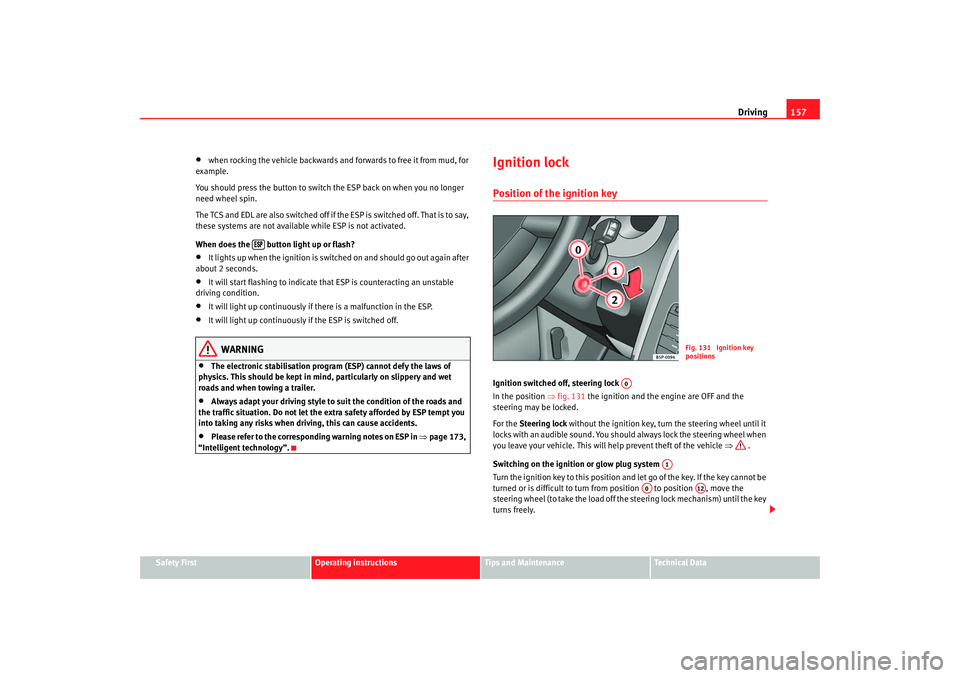
Ignition lockPosition of the ignition keyIgnition switched off, steering lock
In the position ⇒fig. 131 the ignition and the engine are OFF and the
steering may be locked.
For the Steering lock without the ignition key, turn the steering wheel until it
locks with an audible sound. You should always lock the steering wheel when
you leave your vehicle. This will help prevent theft of the vehicle ⇒ .
Switching on the ignition or glow plug system
Tu rn the ignition key to this position and let go of the key. If the key canno t b e
turned or is difficult to turn from position to position , move the
steering wheel (to take the load off the steering lock mechanism) until the key
turns freely.
Fig. 131 Ignition key
positions
A0
A1
A0
A12
altea_ingles Seite 157 Donnerstag, 19. Mai 2005 3:02 15
Page 163 of 286

Driving161
Safety First
Operating instructions
Tips and Maintenance
Te c h n i c a l D a t a
Caution
If the engine has been driven hard for a long period, the engine could over-
heat when it is switched off. Risk of engine damage. For this reason, you
should idle the engine for approx. 2 minutes before you switch it off.Manual gearboxDriving a car with a manual gearbox
Selecting the reverse gear
– T h e v e h i c l e s h o u l d b e s t a t i o n a r y with the engine idling. Press the
clutch right down.
–Place the gear lever into neutra l gate and push the lever all the
way down.
– Slide the gearstick to the left, and then into the reverse position shown on the gearstick.The reversing lights come on when the reverse gear is selected and the igni-
tion is on.
WARNING
•
When the engine is running, the vehicle will start to move as soon as a
gear is engaged and the clutch released.
•
Never select the reverse gear when the vehicle is in motion. Risk of acci-
dent.
Fig. 132 Detail of the
centre console: Shift
diagram of a 5-speed
manual gearbox
Fig. 133 Detail of the
centre console: Shift
diagram of a 6-speed
manual gearbox
altea_ingles Seite 161 Donnerstag, 19. Mai 2005 3:02 15
Page 168 of 286

Driving
166
– Press the gear lever forwards (+) to select a higher gear.
– Press the gear lever back (-) to select a lower gear.HandbrakeUsing the handbrake
The handbrake should be applied firmly to prevent the
vehicle from accidentally rolling away.Always apply the handbrake when you leave your vehicle and when
you park.
Applying the handbrake
– Pull the handbrake lever up firmly ⇒fig. 139. Releasing the handbrake
– Pull the lever up slightly and press the locking knob in the direc-
tion of the arrow ⇒fig. 139 and guide the handbrake lever down
fully. ⇒ .
Always apply the handbrake firmly. This prevents you driving with the hand-
brake applied ⇒.
The handbrake warning lamp
lights up when the handbrake is applied
and the ignition switched on. The warning lamp goes out when the hand-
brake is released.
If you drive faster than 6 km/h with the handbrake on, the following
message* will appear on the instrument panel display: HANDBRAKE ON Also,
an audible warning is given.
WARNING
•
Never use the handbrake to slow down the vehicle when it is in motion.
The braking distance is considerably longer, as braking is only applied to
the rear wheels. Risk of accident!
•
If it is only partially released this will cause overheating of the rear
brakes, which can impair the function of the brake system and could lead
to an accident. This also causes premature wear on the rear brake
pads/linings.Caution
Always apply the handbrake before you leave the vehicle. The first gear
should also be selected.
Fig. 139 Handbrake
between the front seats
altea_ingles Seite 166 Donnerstag, 19. Mai 2005 3:02 15