light Seat Altea 2005 Repair Manual
[x] Cancel search | Manufacturer: SEAT, Model Year: 2005, Model line: Altea, Model: Seat Altea 2005Pages: 286, PDF Size: 9.59 MB
Page 158 of 286
Driving
156•
Adjust the driver seat or steering wheel so that there is a distance of at
least 25 cm between the steering wheel and your breast bone ⇒page 155,
fig. 129. If you fail to observe the minimum distance, the airbag will not
protect you. Risk of fatal injury.
•
If your physical constitution prevents you from maintaining the
minimum distance of 25 cm, contact an Authorised Service Centre. The
Authorised Service Centre will help you decide if special specific modifica-
tions are necessary.
•
If you adjust the steering wheel so tha t it points towards your face, the
driver airbag will not protect you properly in the event of an accident. Make
sure that the steering wheel points towards your chest.
•
When driving, always hold the steer ing wheel with both hands on the
outside of the ring at the 9 o'clock and 3 o'clock positions. Never hold the
steering wheel at the 12 o'clock positi on, or in any other manner (e.g. in
the centre of the steering wheel, or on the inside of the rim). In such cases,
you could receive severe injuries to the arms, hands and head.
SafetyElectronic stabilisation programme (ESP)*
ESP helps make driving safer in certain situations.The Electronic Stabilisation Program (ESP ) contains the electronic differential
lock (EDL) and the traction control syst em (TCS). The ESP function works in
conjunction with the ABS. Both warning lamps will light up if the ESP or ABS
systems are faulty.
The ESP is started automatically when the engine is started.
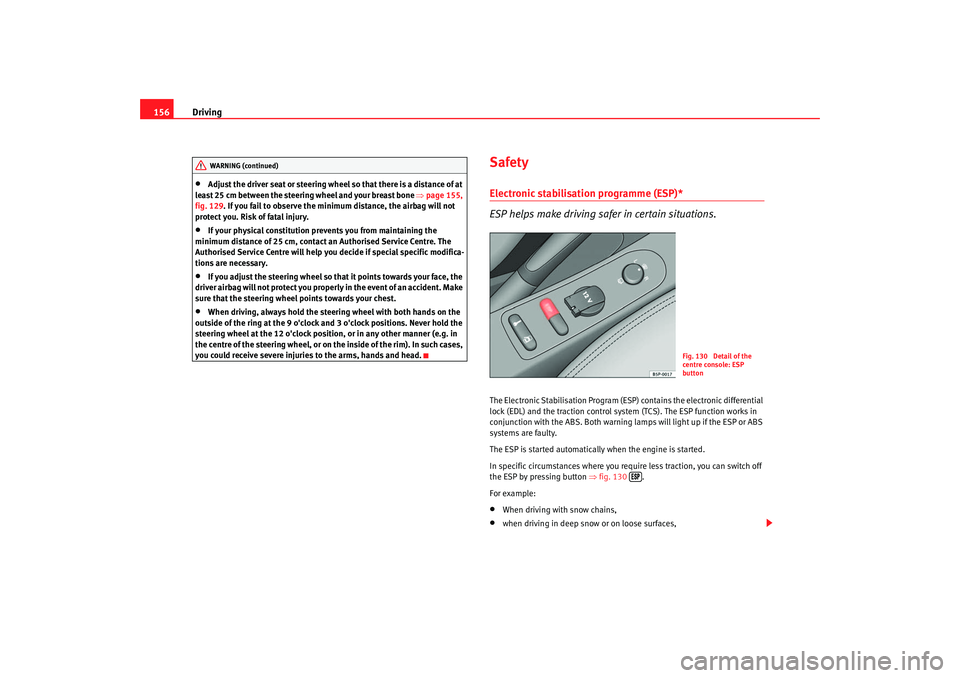
In specific circumstances where you require less traction, you can switch off
the ESP by pressing button ⇒fig. 130 .
For example:•
When driving with snow chains,
•
when driving in deep snow or on loose surfaces,
WARNING (continued)
Fig. 130 Detail of the
centre console: ESP
button
altea_ingles Seite 156 Donnerstag, 19. Mai 2005 3:02 15
Page 159 of 286
Driving157
Safety First
Operating instructions
Tips and Maintenance
Te c h n i c a l D a t a
•
when rocking the vehicle backwards and forwards to free it from mud, for
example.
You should press the button to switch the ESP back on when you no longer
need wheel spin.
The TCS and EDL are also switched off if the ESP is switched off. That is to say,
these systems are not available while ESP is not activated.
When does the button light up or flash?
•
It lights up when the ignition is switched on and should go out again after
about 2 seconds.
•
It will start flashing to indicate that ESP is counteracting an unstable
driving condition.
•
It will light up continuously if there is a malfunction in the ESP.
•
It will light up continuously if the ESP is switched off.
WARNING
•
The electronic stabilisation program (ESP) cannot defy the laws of
physics. This should be kept in mind, particularly on slippery and wet
roads and when towing a trailer.
•
Always adapt your driving style to suit the condition of the roads and
the traffic situation. Do not let the extra safety afforded by ESP tempt you
into taking any risks when driving, this can cause accidents.
•
Please refer to the corresponding warning notes on ESP in ⇒page 173,
“Intelligent technology”.
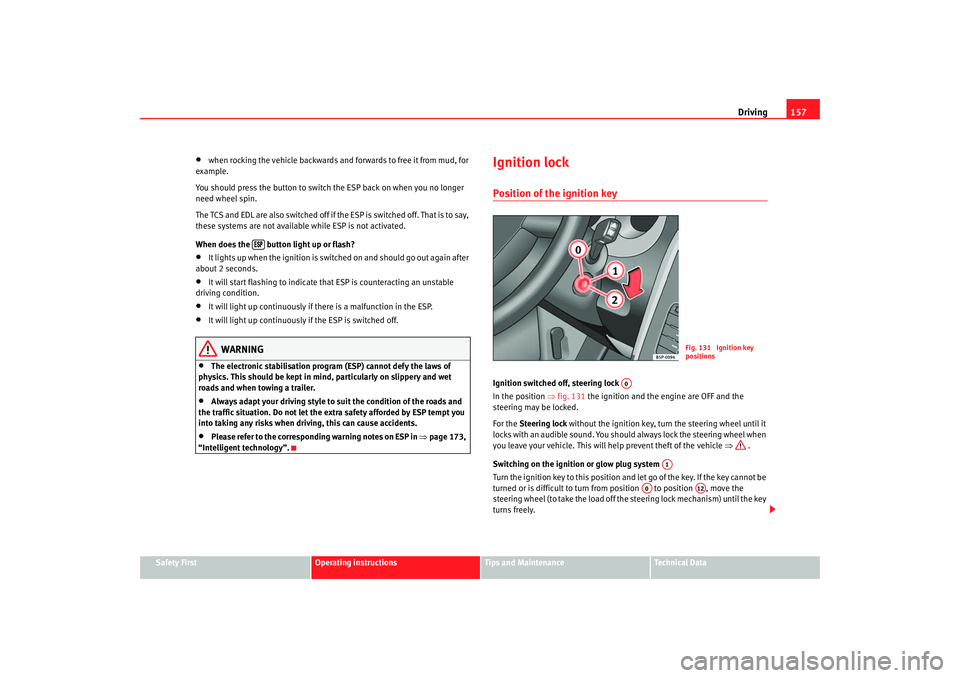
Ignition lockPosition of the ignition keyIgnition switched off, steering lock
In the position ⇒fig. 131 the ignition and the engine are OFF and the
steering may be locked.
For the Steering lock without the ignition key, turn the steering wheel until it
locks with an audible sound. You should always lock the steering wheel when
you leave your vehicle. This will help prevent theft of the vehicle ⇒ .
Switching on the ignition or glow plug system
Tu rn the ignition key to this position and let go of the key. If the key canno t b e
turned or is difficult to turn from position to position , move the
steering wheel (to take the load off the steering lock mechanism) until the key
turns freely.
Fig. 131 Ignition key
positions
A0
A1
A0
A12
altea_ingles Seite 157 Donnerstag, 19. Mai 2005 3:02 15
Page 161 of 286

Driving159
Safety First
Operating instructions
Tips and Maintenance
Te c h n i c a l D a t a
– Let go of the ignition key as soon as the engine starts; the starter
motor must not be allowed to run on with the engine.After starting a very hot e ngine, you may need to pres s the accelerator briefly.
When starting from cold, the engine ma y be a little noisy for the first few
seconds until oil pressure has built up in the hydraulic valve compensators.
This is quite normal, and no cause for concern.
If the engine does not start immediatel y, switch off the starter after about
10 seconds and try again after about half a minute. If the engine still does not
start, the fuel pump fuse should be checked ⇒page 233, “Fuses”.
WARNING
•
Never start or run the engine in unventilated or closed rooms. The
exhaust fumes contain carbon monoxide, an odourless and colourless
poisonous gas. Risk of fatal accidents. Carbon monoxide can cause loss of
consciousness. It can also cause death.
•
Never leave the vehicle unattended if the engine is running.
•
Never use “cold start sprays”, they could explode or cause the engine
to run at high revs. Risk of injury.Caution
•
When the engine is cold, you should avo id high engine speeds, driving at
full throttle and over-loading th e engine. Risk of engine damage.
•
The vehicle should not be pushed or towed for more than approximately
50 metres to start the engine. Fuel could enter the catalytic converter and
damage it.
•
Before attempting to push-start or tow a vehicle to start it, you should first
try to start it using the battery of another vehicle. Note and follow the instruc-
tions ⇒ page 249, “Jump-starting”.
For the sake of the environment
Do not warm-up the engine by running th e engine with the vehicle stationary.
You should drive off as soon as you start the engine. This helps the engine
reach operating temperature faster and reduces emissions.Starting diesel engines
The engine can only be started using a genuine SEAT key with
the correct code.– Move the gear lever to the neutral position and depress the clutch pedal fully and hold it in this position, the starter will then
only have to turn the engine.
– Turn the ignition key to the starting position.
– Turn the ignition key to position ⇒page 157, fig. 131 . The
indication lamp
will light for engine pre-heating.
– When the warning lamp goes out, turn the key to position to start the engine. Do not press the accelerator.
– Let go of the ignition key as soon as the engine starts, the starter motor must not be allowed to run on with the engine.
When starting from cold, the engine ma y be a little noisy for the first few
seconds until oil pressure has built up in the hydraulic valve compensators.
This is quite normal, and no cause for concern.
If there are problems to start the engine, see ⇒page 249.
A1A2
altea_ingles Seite 159 Donnerstag, 19. Mai 2005 3:02 15
Page 163 of 286

Driving161
Safety First
Operating instructions
Tips and Maintenance
Te c h n i c a l D a t a
Caution
If the engine has been driven hard for a long period, the engine could over-
heat when it is switched off. Risk of engine damage. For this reason, you
should idle the engine for approx. 2 minutes before you switch it off.Manual gearboxDriving a car with a manual gearbox
Selecting the reverse gear
– T h e v e h i c l e s h o u l d b e s t a t i o n a r y with the engine idling. Press the
clutch right down.
–Place the gear lever into neutra l gate and push the lever all the
way down.
– Slide the gearstick to the left, and then into the reverse position shown on the gearstick.The reversing lights come on when the reverse gear is selected and the igni-
tion is on.
WARNING
•
When the engine is running, the vehicle will start to move as soon as a
gear is engaged and the clutch released.
•
Never select the reverse gear when the vehicle is in motion. Risk of acci-
dent.
Fig. 132 Detail of the
centre console: Shift
diagram of a 5-speed
manual gearbox
Fig. 133 Detail of the
centre console: Shift
diagram of a 6-speed
manual gearbox
altea_ingles Seite 161 Donnerstag, 19. Mai 2005 3:02 15
Page 166 of 286

Driving
164Driving with an automatic gearbox*
The drive and reverse gears are automatically engaged.Driving
– Press and hold the foot brake.
– Press on the button on the selector lever knob (on the left,
⇒fig. 137.
– Select a gear for driving ( R, D or S).
– Release the button and wait a few seconds for the gear to engage, a light jerk will be felt.
– Release the brake and accelerate. Short stop
– Hold the vehicle stationary with the brake pressed down (for
example at traffic lights). The sele ctor lever does not need to be
put into the positions P or N for this.
– Do not press the accelerator.
Parking the vehicle
– Press the foot brake and hold to bring the vehicle to a stop.
–Apply the handbrake firmly.
– Press in the button on the selector lever knob, move the lever to the position P and release the button.
Driving slowly
– Move the selector lever to the position D and press to the right to
put the lever into Tiptronic mode.
– Press the gear lever towards (-) to select a lower gear.
Hill stop
– Hold the vehicle, in all cases, using the foot brake to prevent rolling back.
– Do not try to slow the vehicle using another forward gear (engine braking).
Descending gradients
– With the gear engaged, release the brake and accelerate.
The steeper the gradient the lower the gear must be for effective engine
braking. For example, if 3rd gear is used on a very steep gradient, the engine
Fig. 137 Driving
altea_ingles Seite 164 Donnerstag, 19. Mai 2005 3:02 15
Page 167 of 286

Driving165
Safety First
Operating instructions
Tips and Maintenance
Te c h n i c a l D a t a
braking is insufficient and vehicle accelerates. So that the engine speed does
not become excessive, the gearbox changes to the next highest gear. Depress
the brake pedal and move the selector lever to the Tiptronic gate to return to
3rd gear.
WARNING
•
The driver should never leave the vehicle while the engine is running or
with any gear selected. If for any reason you must leave the vehicle with the
engine running, apply the handbrake and move the selector lever to posi-
tion P.
•
When the engine is running and the po sitions D, S or R are selected, it
is necessary to hold the vehicle with the foot brake because the vehicle will
creep at a low speed.
•
Never accelerate while changing the position of the selector lever (risk
of an accident).
•
The selector lever must never be mo ved into the positions R or P while
moving (risk of an accident).
•
Before descending a steep gradient, reduce speed and use the Tiptronic
program to select a lower gear.
•
If you must stop on a hill, always hold the vehicle using the footbrake
to avoid rolling back.
•
The footbrake must not be held fo r a long period of time, not even
lightly; continuous braking will cause overheating of the brakes and a
reduction or even a loss of braking power and a significant increase in
braking distances.
•
Never allow the vehicle to coast down a gradient with the selector lever
in positions N or D, even when the engine is not running. For descents, the
use of the Tiptronic program is recommended to keep the speed reduced.
Caution
•
Never use the automatic gearbox to hold the vehicle stationary on a hill,
even for short periods, as this may overheat the gearbox and cause damage.
Apply the handbrake or depress the foot brake to hold the vehicle in position.
•
If the vehicle is allowed to roll with the engine stopped but the selector in
position N then the gearbox may be damaged because it will not be
lubricated.
Using the Tiptronic gear system
The Tiptronic system allows the driver to manually select
gearsChanging gear with Tiptronic
– Put the lever in the position D and press towards the right to
enter the Tiptronic gate.
Fig. 138 Changing gear
with Tiptronic
altea_ingles Seite 165 Donnerstag, 19. Mai 2005 3:02 15
Page 168 of 286

Driving
166
– Press the gear lever forwards (+) to select a higher gear.
– Press the gear lever back (-) to select a lower gear.HandbrakeUsing the handbrake
The handbrake should be applied firmly to prevent the
vehicle from accidentally rolling away.Always apply the handbrake when you leave your vehicle and when
you park.
Applying the handbrake
– Pull the handbrake lever up firmly ⇒fig. 139. Releasing the handbrake
– Pull the lever up slightly and press the locking knob in the direc-
tion of the arrow ⇒fig. 139 and guide the handbrake lever down
fully. ⇒ .
Always apply the handbrake firmly. This prevents you driving with the hand-
brake applied ⇒.
The handbrake warning lamp
lights up when the handbrake is applied
and the ignition switched on. The warning lamp goes out when the hand-
brake is released.
If you drive faster than 6 km/h with the handbrake on, the following
message* will appear on the instrument panel display: HANDBRAKE ON Also,
an audible warning is given.
WARNING
•
Never use the handbrake to slow down the vehicle when it is in motion.
The braking distance is considerably longer, as braking is only applied to
the rear wheels. Risk of accident!
•
If it is only partially released this will cause overheating of the rear
brakes, which can impair the function of the brake system and could lead
to an accident. This also causes premature wear on the rear brake
pads/linings.Caution
Always apply the handbrake before you leave the vehicle. The first gear
should also be selected.
Fig. 139 Handbrake
between the front seats
altea_ingles Seite 166 Donnerstag, 19. Mai 2005 3:02 15
Page 169 of 286

Driving167
Safety First
Operating instructions
Tips and Maintenance
Te c h n i c a l D a t a
Parking
The handbrake should always be firmly applied when the
vehicle is parked.Always note the following points when parking the vehicle:
– Use the foot brake to stop the vehicle.
–Apply the handbrake.
– The first gear should also be selected.
– Switch off the engine and remove the key from the ignition lock.
Turn the steering wheel slightly to engage the steering lock.
– Always take you car keys with you when you leave the vehicle ⇒ .Additional notes on parking the vehicle on gradients:
Turn the steering wheel so that the vehicle would roll against the kerb if it did
start to roll.•
If the vehicle is facing downhill, turn the front wheels so that they point
towards the kerb.
•
If the vehicle is facing uphill , turn the front wheels so that they point away
from the kerb .
•
Secure the vehicle as normal by applying the handbrake firmly and
selecting first gear.
WARNING
•
Take measures to reduce the risk of injury when you leave your vehicle
unattended.
•
Never park where the hot exhaust system could ignite inflammable
materials, such as dry grass, low bushes, spilt fuel etc.
•
Never allow vehicle occupants to remain in the vehicle when it is
locked. They would be unable to open the vehicle from the inside, and
could become trapped in the vehicle in an emergency. In the event of an
emergency, locked doors will delay assistance to occupants.
•
Never leave children unsupervised in the vehicle. They could set the
vehicle in motion, for example, by releasing the handbrake or the gear
lever / selector lever.
•
Depending on weather conditions, it may become extremely hot or cold
inside the vehicle. This can be fatal.
Acoustic parking aid system*Rear parking aid
The parking aid system will use an acoustic signal to warn of
the approach of any object towards the rear of the vehicle.Description
The acoustic parking aid system will measure the distance between the rear
of the vehicle and any possible obstacle using four ultrasonic sensors located
on the rear bumper. The measuring range of the sensors starts at approxi-
mately and depending on the nature of the obstacle at a distance of:•
outer zone of the rear bumper: 0.8 m
•
central zone of the rear bumper: 1.3 mWARNING (continued)
altea_ingles Seite 167 Donnerstag, 19. Mai 2005 3:02 15
Page 171 of 286

Driving169
Safety First
Operating instructions
Tips and Maintenance
Te c h n i c a l D a t a
Cruise control system (CCS)*Description
The cruise control system is able to maintain the set speed in
the range from approx. 30 km/h to 180 km/h.Once the speed setting has been saved, you may take your foot off the accel-
erator.
WARNING
It could be dangerous to use the cruise control system if it is not possible
to drive at constant speed.•
For safety reasons the cruise control system should not be used in
dense traffic, in sections with bends or where roads conditions are poor
(e.g. aquaplaning, loose chippings, slippery surfaces, snow). Risk of acci-
dent.
•
Always switch off the CCS when you have finished using it. This will
prevent you using it by mistake.
•
It is dangerous to use a set speed whic h is too high for the current road,
traffic or weather conditions. Risk of accident.Note
The cruise control cannot maintain a constant speed when descending gradi-
ents. The vehicle will accelerate under its own weight. Use the foot brake to
slow the vehicle.
Switching the cruise control system on and offSwitching on the system
–Push the switch ⇒fig. 140 to the left to the position ON.
Switching off system
– Push the switch to the right to the position OFF or turn off the
ignition if the vehicle is stopped.The symbol lights up in the combi-instrument when the cruise control
system is switched on.
16)
If the cruise control system is switched off, the
symbol is switched off. The
system will also be switched off fully when t
he 1st g
ear is selected.*
16)Depending on the model version
Fig. 140 Turn signal and
main beam lever: Switch
and rocker switch for CCS
AB
AB
altea_ingles Seite 169 Donnerstag, 19. Mai 2005 3:02 15
Page 178 of 286

Intelligent technology
176
Caution•
In order to ensure that ESP functions correctly, all four wheels must be
fitted with the same tyres. Any differences in the rolling radius of the tyres can
cause the system to reduce engine power when this is not desired.
•
Modifications to the vehicle (e.g. to the engine, the brake system, running
gear or any components affecting the wheels and tyres) could affect the effi-
ciency of the ABS, EDL, ESP and TCS.Note
To disconnect using the ESP button, ⇒page 156Anti-lock brake system (ABS)The anti-lock brake system prevents the wheels locking during
braking ⇒page 174Electronic differential lock (EDL)*
The electronic differential lock helps prevent the loss of trac-
tion caused if one of the driven wheels starts spinning.EDL helps the vehicle to start moving, accelerate and climb a gradient in slip-
pery conditions where this may otherwise be difficult or even impossible.
The system will control the revolutions of the drive wheels using the ABS
sensors (in case of an EDL fault the warning lamp for ABS lights up)
⇒page 77.
At speeds of up to approximately 80 km/h, it is able to balance out differ-
ences in the speed of the driven wheel s of approximately 100 rpm caused by a slippery road surface on
one side of the vehicle. It does this by braking the
wheel which has lost traction and distributing more driving force to the other
driven wheel via the differential.
To prevent the disc brake of the braked wheel from overheating, the EDL cuts
out automatically if subjected to excessive loads. The vehicle will continue to
function normally without EDL. For this reason, the driver is not informed that
the EDL has been switched off.
The EDL will switch on again automatically when the brake has cooled down.
WARNING
•
When accelerating on a slippery surface, for example on ice and snow,
press the accelerator carefully. Despite EDL, the driven wheels may start to
spin. This could impair the vehicles stability.
•
Always adapt your driving style to su it road conditions and the traffic
situation. Do not let the extra safety afforded by EDL tempt you into taking
any risks when driving, this can cause accidents.Caution
Modifications to the vehicle (e. g. to the engine, the brake system, running
gear or any components affecting the wh eels and tyres) could affect the oper-
ation of the EDL. ⇒page 194The traction control system (TCS)The traction control system prevents the drive wheels from spinning when the
car is accelerating. ⇒page 174
altea_ingles Seite 176 Donnerstag, 19. Mai 2005 3:02 15