ECU Seat Altea 2006 User Guide
[x] Cancel search | Manufacturer: SEAT, Model Year: 2006, Model line: Altea, Model: Seat Altea 2006Pages: 288, PDF Size: 8.61 MB
Page 49 of 288
Child safety47
Safety First
Operating instructions
Tips and Maintenance
Te c h n i c a l D a t a
Safety notes on using child seats
Proper use of child seats substantially reduces the risk of
injury in an accident!As the driver, you are responsible for any children you transport in
your vehicle.
– Protect your children by properly using appropriate child seats
⇒page 48.
– Always ensure that the belt webbing is properly positioned according to the instructions prov ided by the manufacturer of the
child seat.
– When travelling, do not allow children to distract you from traffic.
– Take breaks regularly during long trips. Take a break at least every two hours.
WARNING
•
Never install a rear-facing child seat on the front passenger seat unless
the front passenger airbag has been disabled. Risk of potentially fatal inju-
ries to the child! If it is necessary, in exceptional circumstances, to trans-
port a child on the front passenger seat, always disable the front passenger
airbag ⇒ page 44, “Deactivating airbags*”.
•
For those vehicles that do not include a key lock switch to turn the
airbag off, an Authorised Service Centre must be consulted.
•
All passengers, especially children, must assume the proper sitting
position and be properly belted in while travelling.
•
Never hold children or babies on your lap, this can result in potentially
fatal injuries to the child!
•
Never allow a child to be transported in a vehicle without being properly
secured, or to stand up or kneel on a seat while travelling. In an accident,
the child could be flung through the vehicle, causing possibly fatal injuries
to themselves and other occupants.
•
If children assume an improper sitting position when the car is moving,
they expose themselves to greater risk of injury during a sudden braking
manoeuvre or in an accident. This is particularly the case if the child is trav-
elling on the front passenger seat and the airbag system is triggered in an
accident; this could have consequences including serious injury or death.
•
A suitable child seat can protect your child!
•
Never leave a child unsupervised in a child seat or alone in the vehicle.
•
Depending on weather conditions, it may become extremely hot or cold
inside the vehicle. This can be fatal.
•
Children who are less than 1.5 metres tall must not wear a normal seat
belt without a child restraint system, as this could cause injuries to the
abdominal and neck areas during a sudden braking manoeuvre or in an
accident.
•
Do not allow the belt webbing to become twisted or jammed, or to rub
on any sharp edges.
•
Incorrectly worn seat belts can cause injuries even in a minor collision
or sudden braking manoeuvres.
•
The seat belt provides maximum protection only when the belt web is
properly positioned ⇒page 24, “Seat belts”.
•
Only one child may occupy a child seat ⇒page 48, “Child seats”.WARNING (continued)
altea_ingles Seite 47 Dienstag, 4. Oktober 2005 6:57 18
Page 53 of 288
Child safety51
Safety First
Operating instructions
Tips and Maintenance
Te c h n i c a l D a t a
Securing child seatsWays to secure a child seat
A child seat can be secured differently on th e rear seat and on the front passenger seat.You can secure a child seat to the rear seat or front passenger seat in the
following ways:
•
Child seats in groups 0 to 3 can be secured with a seat belt.
•
Group 0, 0+ and 1 child seats with the “ISOFIX” system can be secured to
the “ISOFIX” retaining rings without seat belts ⇒ page 52.
U: Suitable for approved universal retention systems for use with this age group (universal retention systems, ar e those that can be fitted using the
standard adult safety belt)
*: Move the passenger seat as far back as possible, to the highest setting and always turn the airbag off.
L: Suitable for anchored retention systems using the “ISOFIX” anchors
WARNING
•
When travelling, children must be secured in the vehicle with a
restraint system suitable for age, weight and size.
•
Never install a rear-facing child seat on the front passenger seat unless
the front passenger airbag has been disabled. Risk of potentially fatal inju-
ries to the child! If it is necessary in exceptional cases to transport a child on the front passenger seat, you must always disable the front passenger
airbag
⇒page 44, “Deactivating airbags*”.
•
Read and always observe information and warnings concerning the use
of child seats ⇒ in “Safety notes on using child seats” on page 47.
Weight class
Weight Seat locations
Front passenger Rear outerRear centre
Group 0 <10 kgU*U/L U
Group 0+ <13 kgU*U/L U
Group 1 9-18 kgU*U/L U
Group 2 / 3 15-36 kgU*UUWARNING (continued)
altea_ingles Seite 51 Dienstag, 4. Oktober 2005 6:57 18
Page 54 of 288
Child safety
52Securing child seat with the “ISOFIX” system
The child seat can be secured quickly, easily and safely on the
rear outer seats using the “ISOFIX” system.When removing or fitting the child seat, please be sure to follow the
manufacturer's instructions.
– Move the seat as far to rear as it will go.
– Press the child seat onto the “ISOFIX” retaining rings until the
child seat can be heard to engage securely.
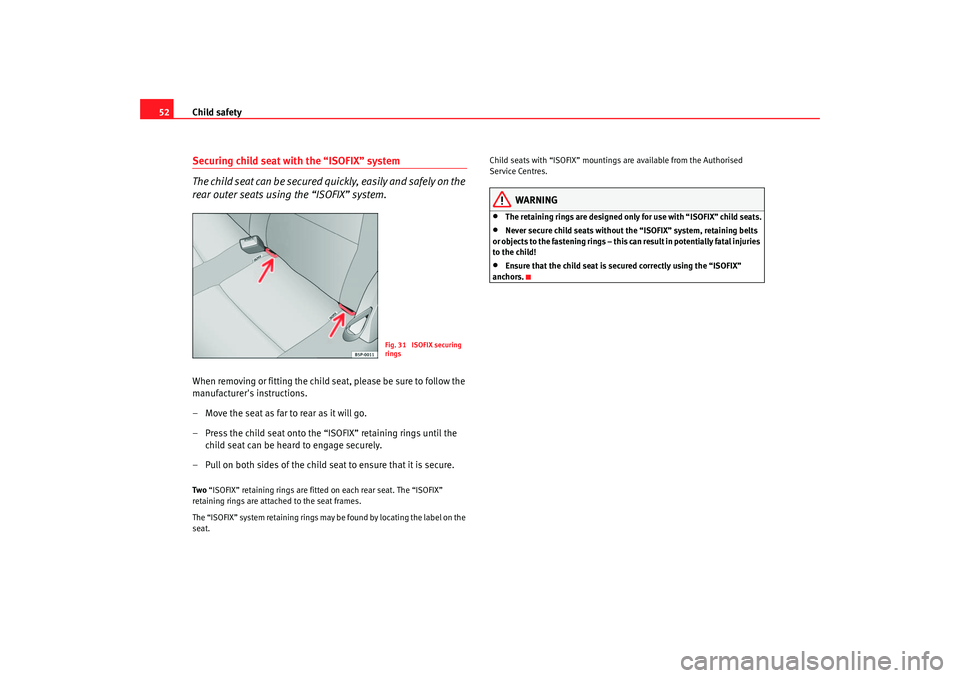
– Pull on both sides of the child se at to ensure that it is secure.Two “ISOFIX” retaining rings are f itted on ea ch rear sea t. The “ISOFIX”
retaining rings are attached to the seat frames.
The “ISOFIX” system retaining rings may be found by locating the label on the
seat. Child seats with “ISOFIX” mountings are available from the Authorised
Service Centres.
WARNING
•
The retaining rings are designed only for use with “ISOFIX” child seats.
•
Never secure child seats without the “ISOFIX” system, retaining belts
or objects to the fastening rings – this c an result in potentially fatal injuries
to the child!
•
Ensure that the child seat is se cured correctly using the “ISOFIX”
anchors.
Fig. 31 ISOFIX securing
rings
altea_ingles Seite 52 Dienstag, 4. Oktober 2005 6:57 18
Page 94 of 288
Unlocking and locking
92Unlocking and lockingCentral lockingDescription
The central locking system enables you to lock and unlock all
the doors and the tailgate from one point.Central locking can be activated us ing any of the following options:•
the key, by inserting it into the driver's door cylinder and rotating manu-
ally,
•
the central locking button , (electronic control) in the passenger compart-
ment ⇒ page 96.
•
the radio frequency remote control, using the buttons on the key
⇒ page 99.
Various functions are available to improve the vehicle security:
- Locking system “Safe”
- Selective locking system*
- Automatic locking system in case of involuntary unlocking
- Speed dependent automatic locking and unlocking system*
- Safety unlocking systemNote
For anti-theft security, only the driver's door is fitted with a lock cylinder.
Safety system “Safe”
This is an anti-theft device consisting of a double lock for the
door locks and a deactivation function for the boot in order to
make forced entry more difficult.Activation
The “safe” system is activated when the vehicle is locked using the key or the
remote control.
To activate this system with the key, rotate the key once in the door lock
cylinder in the locking direction.
To activate the system using the remote control, press the lock button on the
remote once.
When this system is activated, it is no t possible to open the doors normally,
from the outside or the inside. The boot/tailgate may not be opened. The
central locking button does not work.
Voluntary deactivation
The “Safe” system can be deactivated voluntarily by the user.
This is done by locking two times in quick succession (in under 2 seconds).
This double locking can be executed using the key or the remote control.
Using the key, rotate the lock cylinder twice in the locking direction.
To activate the system using the remote control, press the lock button on the
remote twice.
When the “Safe” system is deactivated, the alarm volumetric sensor is also
deactivated.
altea_ingles Seite 92 Dienstag, 4. Oktober 2005 6:57 18
Page 95 of 288

Unlocking and locking93
Safety First
Operating instructions
Tips and Maintenance
Te c h n i c a l D a t a
When the “Safe” system is deactivated, the doors are locked using the simple
locking system, meaning that
they may be opened from the interior but not
from the exterior.
Involuntary deactivation
The methods described for deactivation of the “Safe” system may be
executed involuntarily (for example, if we press the button because we
want to lock the vehicle, and it locks as a result, however, we are not sure that
it is locked and we press the button once more within 2 seconds, we will have
deactivated the “Safe” system).
Deactivation when opening
To deactivate the system on opening, see “Selective unlocking system*”
“Safe” status
On the front left hand side door, there is a light indicator visible from the
outside of the vehicle that indicates the “Safe” system status.
We can see that the “Safe” system is activated, by the flashing of the light
indicator . The indicator will flash on all vehicles, whether they are fitted with
an alarm or not, and until the vehicle is unlocked.
We can see that the “Safe” system is deactivated, when the light indicator
flashes about seven times and turns off. If the vehicle is not fitted with an
alarm then it remains off. If the vehicle is fitted with an alarm, once 28
seconds have passed since the indicator is switched off, it will start to flash
again and continue until the vehicle is unlocked once more.
Remember:
Safe activated with or without alarm: Continuous flashing of the indicator.
Safe deactivated without alarm: The indicator flashes about seven times and
turns off.
Safe deactivated with alarm: The indicator flashes seven times, turns off and
then continues to flash after 28 seconds.
WARNING
No one should remain in the vehicle if the “Safe” deadlock mechanism has
been activated. It is not possible to open the doors from the inside or the
outside and this would make any outside intervention difficult in case of
emergency. Danger of death. People could become trapped inside in an
emergency.Selective unlocking system*
This system allows for unlocking only the driver's door, or all
the vehicle.Driver's door unlock button
This is done by a simple unlocking (o nce). This can be done with the key or
the remote control.
With the key, rotate the key once in the lock cylinder in the unlock direction.
The driver's door will be released from the “Safe” system and unlocked and
may be opened. Once the door is open ed, 15 seconds remain for turning on
the ignition, in which moment, the “Safe” system will be deactivated on the
remaining doors and the light indicator wi ll be turned off. For vehicles fitted
with an alarm, this system is deactivated.
U sing the remote control, pre ss th e unlock button on the re
mote
once
. The
“Safe” system is deactivated for all the vehicle, only the driver's door is
unlocked for opening, the alarm is tu rned off as is the light indicator.
Unlocking all doors and the boot
So that all the doors and the boot ca n be opened, the unlock button on
the remote must be pressed twice.
The button must be pressed twice in under 2 seconds and this will deactivate
the “Safe” system for all the vehicle, all doors will be unlocked and the boot
altea_ingles Seite 93 Dienstag, 4. Oktober 2005 6:57 18
Page 98 of 288
Unlocking and locking
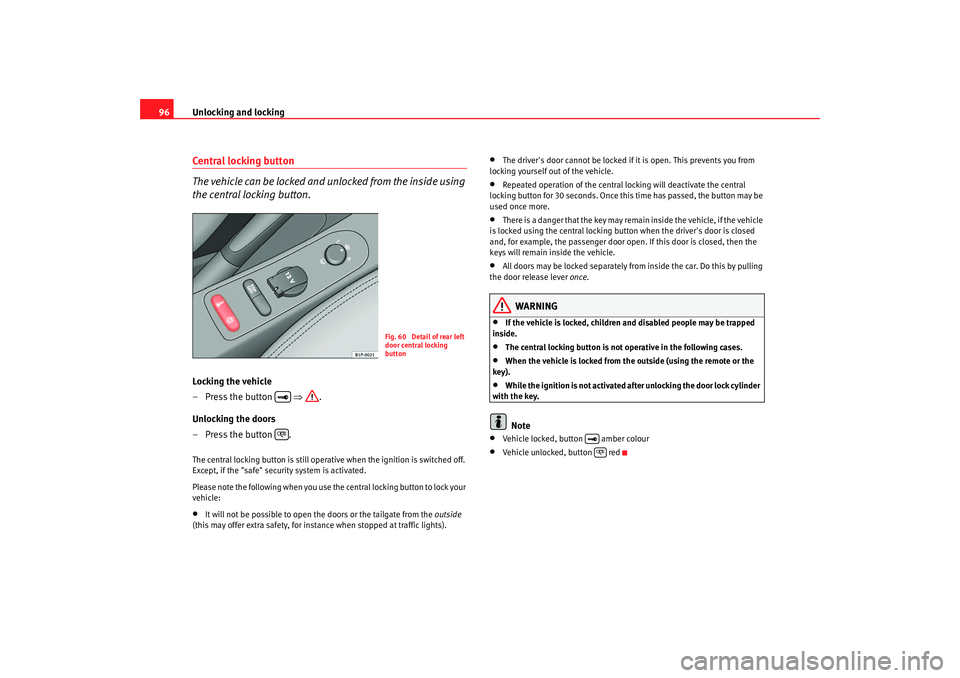
96Central locking button
The vehicle can be locked and unlocked from the inside using
the central locking button.Locking the vehicle
– Press the button ⇒.
Unlocking the doors
– Press the button .The central locking button is still operative when the ignition is switched off.
Except, if the "safe" security system is activated.
Please note the following when you use th e central locking button to lock your
vehicle:•
It will not be possible to open the doors or the tailgate from the outside
(this may offer extra safety, for instance when stopped at traffic lights).
•
The driver's door cannot be locked if it is open. This prevents you from
locking yourself out of the vehicle.
•
Repeated operation of the central locking will deactivate the central
locking button for 30 seconds. Once this time has passed, the button may be
used once more.
•
There is a danger that the key may remain inside the vehicle, if the vehicle
is locked using the central locking button when the driver's door is closed
and, for example, the passenger door o pen. If this door is closed, then the
keys will remain inside the vehicle.
•
All doors may be locked separately from inside the car. Do this by pulling
the door release lever once.
WARNING
•
If the vehicle is locked, children and disabled people may be trapped
inside.
•
The central locking button is not operative in the following cases.
•
When the vehicle is locked from the outside (using the remote or the
key).
•
While the ignition is not activated afte r unlocking the door lock cylinder
with the key.Note
•
Vehicle locked, button amber colour
•
Vehicle unlocked, button red
Fig. 60 Detail of rear left
door central locking
button
altea_ingles Seite 96 Dienstag, 4. Oktober 2005 6:57 18
Page 104 of 288
Unlocking and locking
102
Note•
If, after the alarm goes off, access is gained to a second secured zone
(e.g. the tailgate is opened after a door has been opened), the warning signal
is triggered again.
•
Vehicle monitoring remains active even if the battery is disconnected or
not working for any reason.
•
The alarm is triggered immediately if one of the battery cables is discon-
nected while the alarm system is active.
altea_ingles Seite 102 Dienstag, 4. Oktober 2005 6:57 18
Page 105 of 288
Unlocking and locking103
Safety First
Operating instructions
Tips and Maintenance
Te c h n i c a l D a t a
altea_ingles Seite 103 Dienstag, 4. Oktober 2005 6:57 18
Volumetric sensor*
Monitoring or control function incorporated in the anti-theft
alarm*, that detects unauthorized entry into the vehicle using
ultrasound.The system consists of 3 sensors, 2 emitters and a receptor.
Activation
– It is automatically turned on with the anti-theft alarm, when the
vehicle is locked mechanically with the key and when the button on the remote control is used.
Deactivation
– Press the button on the remote control twice. Only the volu- metric sensor is deactivated. The alarm system remains acti-
vated.
WARNING
•
The “safe” security system remains deactivated if the volumetric
sensor is deactivated.
•
For those vehicles in which a separate sunblind is fitted in the
passenger compartment, the alarm will not function correctly due to inter-
ference with the sensor.Note
•
If the alarm has been triggered by the volumetric sensor, this will be indi-
cated by a flashing of the indicator on the driver's door. This flashing will be
different to that for an activated alarm.
Page 131 of 288
Seats and stowage129
Safety First
Operating instructions
Tips and Maintenance
Te c h n i c a l D a t a
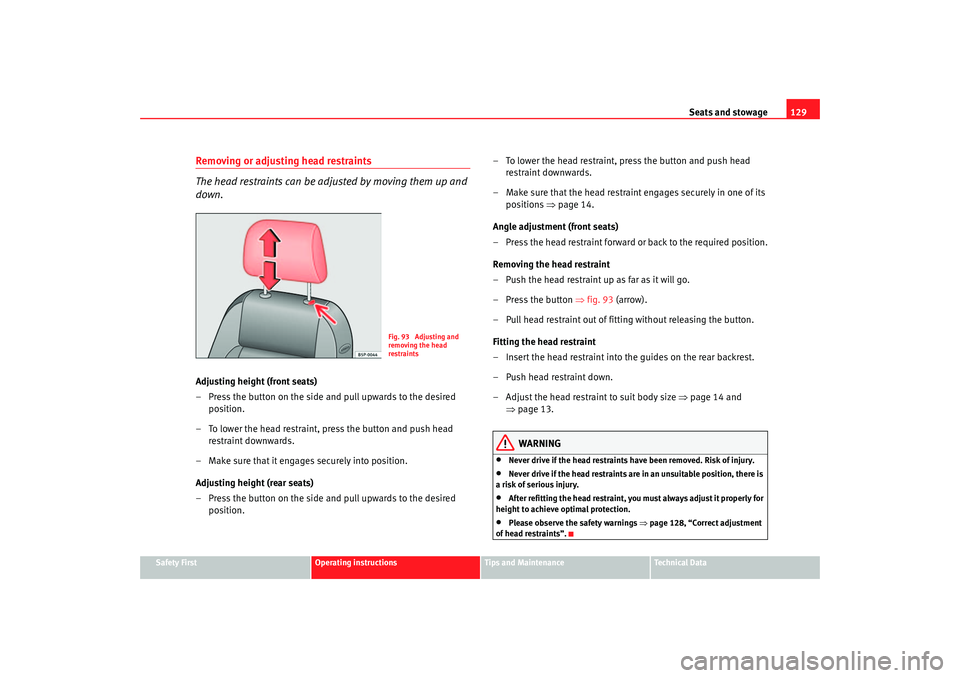
Removing or adjusting head restraints
The head restraints can be adju sted by moving them up and
down.Adjusting height (front seats)
– Press the button on the side and pull upwards to the desired
position.
– To lower the head restraint, press the button and push head restraint downwards.
– Make sure that it engages securely into position.
Adjusting height (rear seats)
– Press the button on the side and pull upwards to the desired
position. – To lower the head restraint, press the button and push head
restraint downwards.
– Make sure that the head restraint engages securely in one of its positions ⇒ page 14.
Ang l
e adjustment (front seats)
– Press the head restraint forward or back to the required position.
Removing the head restraint
– Push the head restraint up as far as it will go.
– Press the button ⇒fig. 93 (arrow).
– Pull head restraint out of fitting without releasing the button.
Fitting the head restraint
– Insert the head restraint into the guides on the rear backrest.
– Push head restraint down.
– Adjust the head restraint to suit body size ⇒page 14 and
⇒ page 13.WARNING
•
Never drive if the head restraints have been removed. Risk of injury.
•
Never drive if the head restraints are in an unsuitable position, there is
a risk of serious injury.
•
After refitting the head restraint, you must always adjust it properly for
height to achieve optimal protection.
•
Please observe the safety warnings ⇒page 128, “Correct adjustment
of head restraints”.
Fig. 93 Adjusting and
removing the head
restraints
altea_ingles Seite 129 Dienstag, 4. Oktober 2005 6:57 18
Page 134 of 288
Seats and stowage
132
The seats may be moved forwards independently. The movement
can be 1/3 or 2/3 of the seat. There are various possible positions.
Adjusting reach
– In the seated position, unlock the lever in the direction of the arrow ⇒page 131, fig. 96 .
– Move the seat cushion forwards to the desired position.
Backrest angle adjustment
– Hold the backrest at the top. Pull the loop on the side of the seat
⇒ page 131, fig. 97 in the direction of the arrow and hold the
loop in this position. Push the backrest to the required position
and release the loop.
WARNING
•
Adjust the seat only when the vehicle is stationary. Otherwise your seat
could move unexpectedly while the vehicle is moving. This could increase
the risk of an accident and therefore injury.
•
Do not push the seatbacks down until the seat is moved, this is to avoid
damage to the centre console.
•
Ensure that the seat, once mo ved, is fixed in position.Note
•
In order to maintain the maximum luggage compartment space, put the
seatbacks in position normal, without moving.
•
In order to maintain the maximum space without putting the seatbacks
down, move the seats forward to the desired position.
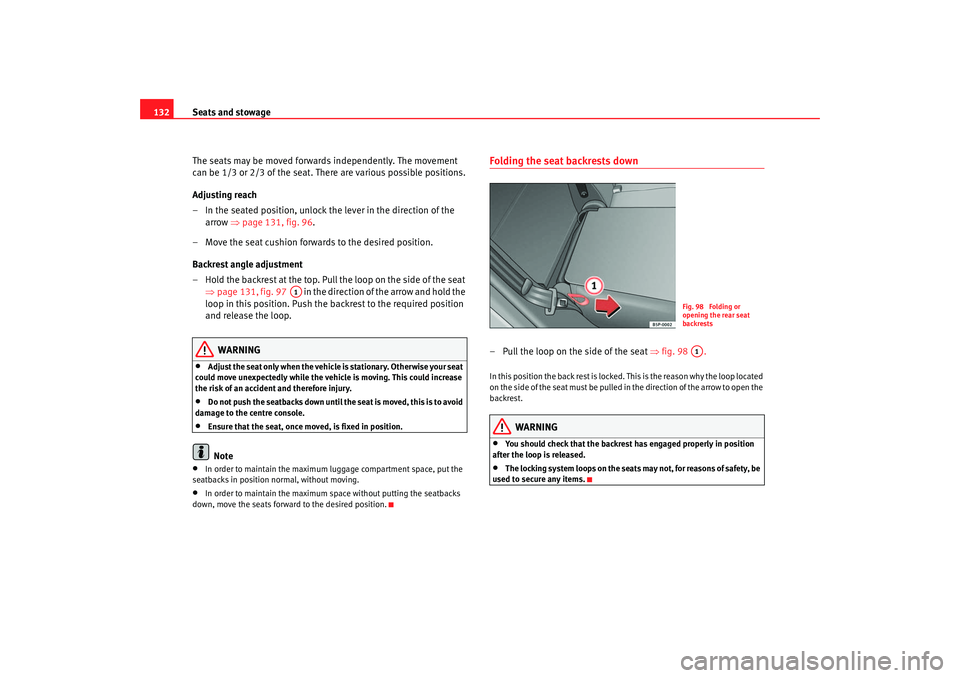
Folding the seat backrests down – Pull the loop on the s ide of the seat ⇒ fig. 98 . In this position the back rest is locked. This is the reason why the loop located
on the side of the seat must be pulled in the direction of the arrow to open the
backrest.
WARNING
•
You should check that the backrest has engaged properly in position
after the loop is released.
•
The locking system loops on the seats may not, for reasons of safety, be
used to secure any items.
A1
Fig. 98 Folding or
opening the rear seat
backrestsA1
altea_ingles Seite 132 Dienstag, 4. Oktober 2005 6:57 18