warning light Seat Altea 2006 User Guide
[x] Cancel search | Manufacturer: SEAT, Model Year: 2006, Model line: Altea, Model: Seat Altea 2006Pages: 288, PDF Size: 8.61 MB
Page 59 of 288
Cockpit57
Safety First
Operating instructions
Tips and Maintenance
Te c h n i c a l D a t a
Fuel gauge
and reserve indicator
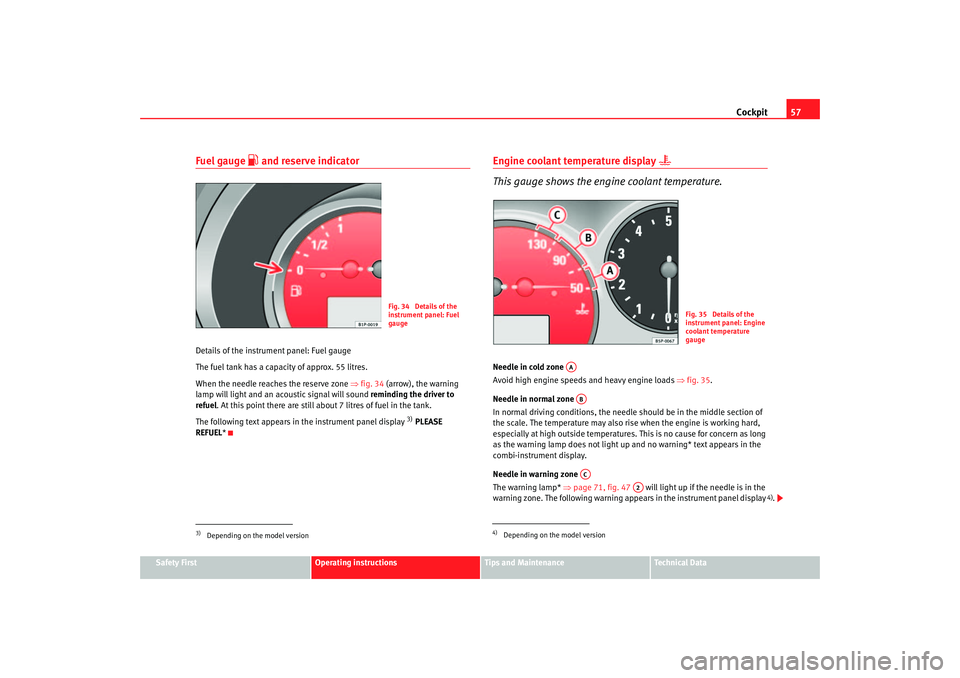
Details of the instrument panel: Fuel gauge
The fuel tank has a capacity of approx. 55 litres.
When the needle reaches the reserve zone ⇒fig. 34 (arrow), the warning
lamp w ill light and an ac oustic signal w ill sou
nd r
eminding the driv
er to
refuel . At this point there are still about 7 litres of fuel in the tank.
The following text appears in the instrument panel display
3) PLEASE
REFUEL *
Engine coolant temperature display
This gauge shows the engine coolant temperature.
Needle in cold zone
Avoid high engine speeds and heavy engine loads ⇒fig. 35.
Needle in normal zone
In normal driving conditions, the needle should be in the middle section of
the scale. The temperature may also rise when the engine is working hard,
especially at high outside temperatures. This is no cause for concern as long
as the warning lamp does not light up and no warning* text appears in the
combi-instrument display.
Needle in warning zone
The warning lamp* ⇒page 71, fig. 47 will light up if the needle is in the
warning zone. The following warning appears in the instrument panel display .
3)Depending on the model version
Fig. 34 Details of the
instrument panel: Fuel
gauge
Fig. 35 Details of the
instrument panel: Engine
coolant temperature
gauge
AAABAC
A2
altea_ingles Seite 57 Dienstag, 4. Oktober 2005 6:57 18
4)
4)Depending on the model version
Page 61 of 288
Cockpit59
Safety First
Operating instructions
Tips and Maintenance
Te c h n i c a l D a t a
Digital display in the instrument panelDisplay (without warning or information texts)
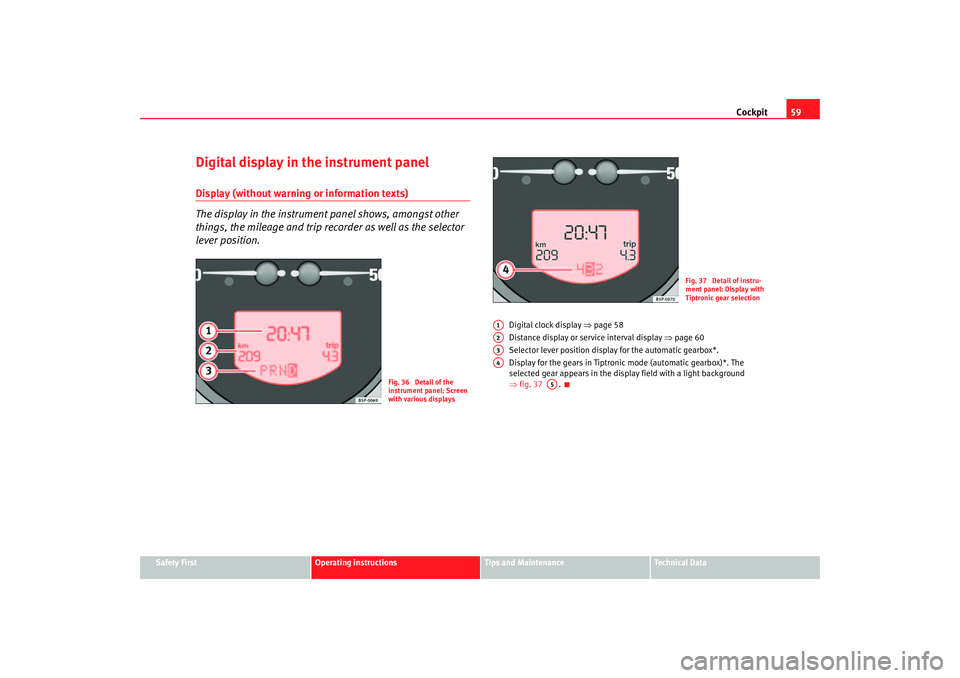
The display in the instrument panel shows, amongst other
things, the mileage and trip recorder as well as the selector
lever position.
Digital clock display ⇒page 58
Distance display or service interval display ⇒page 60
Selector lever position display for the automatic gearbox*.
Display for the gears in Tiptronic mode (automatic gearbox)*. The
selected gear appears in the display field with a light background
⇒ fig. 37 .
Fig. 36 Detail of the
instrument panel: Screen
with various displays
Fig. 37 Detail of instru-
ment panel: Display with
Tiptronic gear selection
A1A2A3A4
A5
altea_ingles Seite 59 Dienstag, 4. Oktober 2005 6:57 18
Page 62 of 288
Cockpit
60Displayed categories
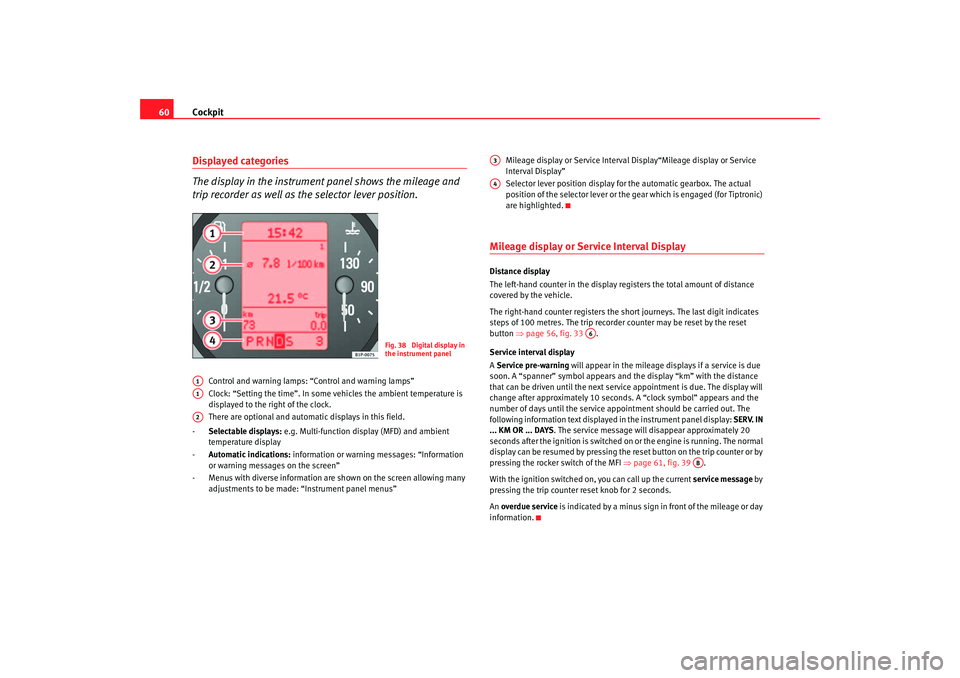
The display in the instrument panel shows the mileage and
trip recorder as well as the selector lever position.
Control and warning lamps: “Control and warning lamps”
Clock: “Setting the time”. In some vehicles the ambient temperature is
displayed to the right of the clock.
There are optional and automatic displays in this field.
- Selectable displays: e.g. Multi-function display (MFD) and ambient
temperature display
- Automatic indications: information or warning messages: “Information
or warning messages on the screen”
- Menus with diverse information are shown on the screen allowing many adjustments to be made: “Instrument panel menus” Mileage display or Service Interval Display“Mileage display or Service
Interval Display”
Selector lever position display for the automatic gearbox. The actual
position of the selector lever or the gear which is engaged (for Tiptronic)
are highlighted.
Mileage display or Service Interval DisplayDistance display
The left-hand counter in the display registers the total amount of distance
covered by the vehicle.
The right-hand counter regi
sters the short journeys. The last digit indicates
steps of 100 metres. The trip recorder counter may be reset by the reset
button ⇒page 56, fig. 33 .
Service interval display
A Service pre-warning will appear in the mileage displays if a service is due
soon. A “spanner” symbol appears and the display “km” with the distance
that can be driven until the next service appointment is due. The display will
change after approximately 10 seconds. A “clock symbol” appears and the
number of days until the service appointment should be carried out. The
following information text displaye d in the instrument panel display: SERV. IN
... KM OR ... DAYS . The service message will disappear approximately 20
seconds after the ignition is switched on or the engine is running. The normal
display can be resumed by pressing the re set button on the trip counter or by
pressing the rocker switch of the MFI ⇒page 61, fig. 39 .
With the ignition switched on, you can call up the current service message by
pressing the trip counter reset knob for 2 seconds.
An overdue service is indicated by a minus sign in front of the mileage or day
information.
Fig. 38 Digital display in
the instrument panel
A1A1A2
A3A4
A6
AB
altea_ingles Seite 60 Dienstag, 4. Oktober 2005 6:57 18
Page 65 of 288
Cockpit63
Safety First
Operating instructions
Tips and Maintenance
Te c h n i c a l D a t a
Miles - Distance travelled
The display shows the distance travelled since the ignition was switched on.
The maximum display value in both memories is 9999 miles. The memory will
automatically be deleted once this value has been reached.
Miles - Fuel range
The fuel range is calculated using the fi gures for tank content and current fuel
consumption. It shows how far the vehicle can travel using the same condi-
tions as a reference.
Ø litre/100km - Average fuel consumption
The average fuel consumption will be shown ⇒page 62, fig. 42 after a
distance of approximately 100 metres has been travelled. Dashes will appear
in the display until that time. The display will be updated every 5 seconds
whilst the vehicle is in motion. The am ount of fuel used will not be shown.
ltr/100km or ltr/hr - Current fuel consumption
The display will show the current fuel consumption in litre/km whilst the
vehicle is in motion or in litre/hour when the vehicle is in a stationary position
with the engine running.
Using this display you can see how your driving style affects fuel consump-
tion ⇒page 185.
Ambient temperature display
The measurement margin extends from -45° C to +58° C. At temperatures
lower than +4° C, an “ice crystal symbol” is displayed and a “warning”
sounds if the vehicle is moving at more than 20 km/h (ice warning). This
symbol will flash for about 10 seconds and remains lit until the exterior
temperature rises above +4° C or 6° C if it was already lit.
WARNING
There could be black ice on the road surface even if the “snowflake symbol”
is not shown. You should, for this reason, not rely exclusively on this
display - Risk of accident!
Note
When the vehicle is stationary or travelling at very low speeds, the tempera-
ture displayed may be slightly higher than the actual ambient temperature as
a result of the heat radiated from the engine.Warning or information text in the display
Faults are shown in the display with warning lamps and
warning/information reports.The system runs a check on certain components and functions when the igni-
tion is switched on and while the vehicle is moving. Functional faults are indi-
cated by symbols with warnings and information texts in the display. An
audible warning is gi ven in certain cases.
Warning symbols
There are red warning symbols (priority 1) and yellow warning symbols
(priority 2)
Information text
In addition to warning messages given on a fault, you will receive information
in the display on procedures or will be asked to carry out certain tasks.
altea_ingles Seite 63 Dienstag, 4. Oktober 2005 6:57 18
Page 66 of 288
Cockpit
64
NoteIn the case of screens without warning or information texts, faults are indi-
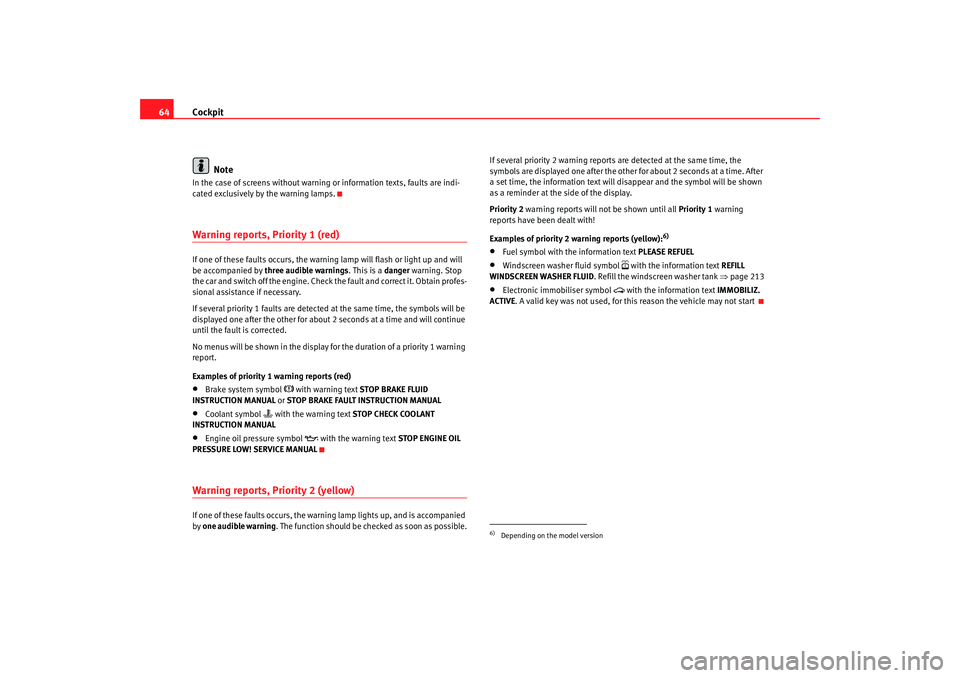
cated exclusively by the warning lamps.Warning reports, Priority 1 (red)If one of these faults occurs, the warning lamp will flash or light up and will
be accompanied by three audible warnings . This is a danger warning. Stop
the car and switch off the engine. Check the fault and correct it. Obtain profes-
sional assistance if necessary.
If several priority 1 faults are detected at the same time, the symbols will be
displayed one after the other for about 2 seconds at a time and will continue
until the fault is corrected.
No menus will be shown in the display fo r the duration of a priority 1 warning
report.
Examples of priority 1 warning reports (red)•
Brake system symbol
with warning text STOP BRAKE FLUID
INSTRUCTION MANUAL or STOP BRAKE FAULT INSTRUCTION MANUAL
•
Coolant symbol
with the warning text STOP CHECK COOLANT
INSTRUCTION MANUAL
•
Engine oil pressure symbol
with the warning text STOP ENGINE OIL
PRESSURE LOW! SERVICE MANUAL
Warning reports, Priority 2 (yellow)If one of these faults occurs, the warning lamp lights up, and is accompanied
by one audible warning. The function should be checked as soon as possible. If several priority 2 warning reports are detected at the same time, the
symbols are displayed one after the other for about 2 seconds at a time. After
a set time, the information text will disappear and the symbol will be shown
as a reminder at the side of the display.
Priority 2
warning reports will not be shown until all Priority 1 warning
reports have been dealt with!
Examples of priority 2 warning reports (yellow):
6)
•
Fuel symbol with the information text PLEASE REFUEL
•
Windscreen washer fluid symbol
with the information text REFILL
WINDSCREEN WASHER FLUID . Refill the windscreen washer tank ⇒page 213
•
Electronic immobiliser symbol
with the information text IMMOBILIZ.
ACTIVE . A valid key was not used, for this reason the vehicle may not start
6)Depending on the model version
altea_ingles Seite 64 Dienstag, 4. Oktober 2005 6:57 18
Page 68 of 288
Cockpit
66
NoteFor electronic and vehicle equipment on e or more of these menus will be
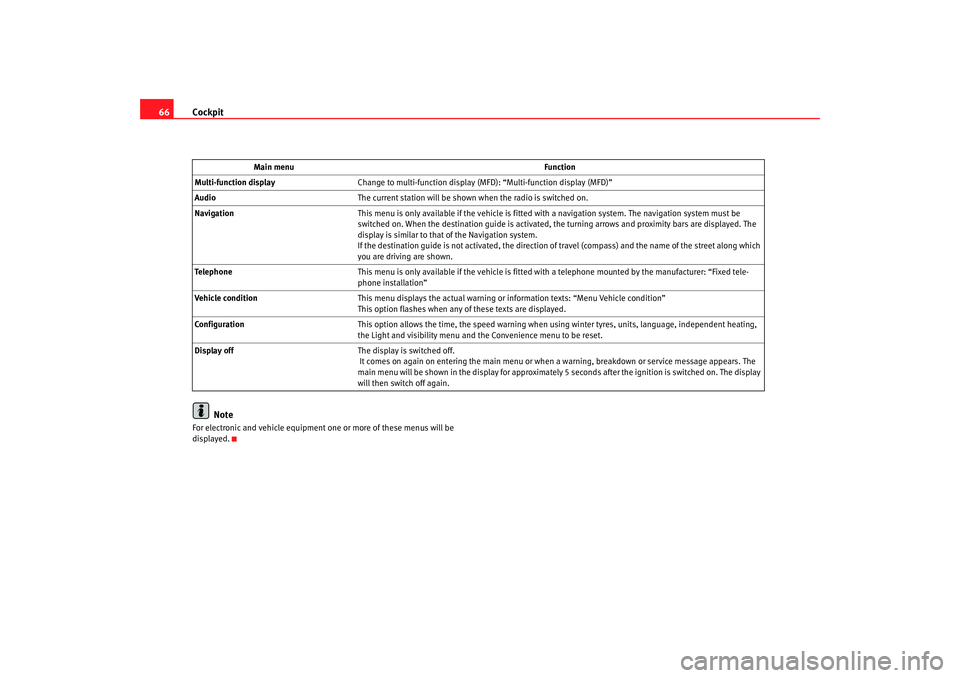
displayed. Main menu
Function
Multi-function display Change to multi-function display (MFD): “Multi-function display (MFD)”
Audio The current station will be shown when the radio is switched on.
Navigation This menu is only available if the vehicle is fitted with a navigation system. The navigation system must be
switched on. When the destination guide is activated, the turning arrows and proximity bars are displayed. The
display is similar to that of the Navigation system.
If the destination guide is not activated, the direction of travel (compass) and the name of the street along which
you are driving are shown.
Telephone This menu is only available if the vehicle is fitted wi th a telephone mounted by the manufacturer: “Fixed tele-
phone installation”
Vehicle condition This menu displays the actual warning or information texts: “Menu Vehicle condition”
This option flashes when any of these texts are displayed.
Configuration This option allows the time, the speed warning when using winter tyres, units, language, independent heating,
the Light and visibility menu and the Convenience menu to be reset.
Display off The display is switched off.
It comes on again on entering the main menu or when a warning, breakdown or service message appears. The
main menu will be shown in the display for approximately 5 seconds after the ignition is switched on. The display
will then switch off again.
altea_ingles Seite 66 Dienstag, 4. Oktober 2005 6:57 18
Page 71 of 288
Cockpit69
Safety First
Operating instructions
Tips and Maintenance
Te c h n i c a l D a t a
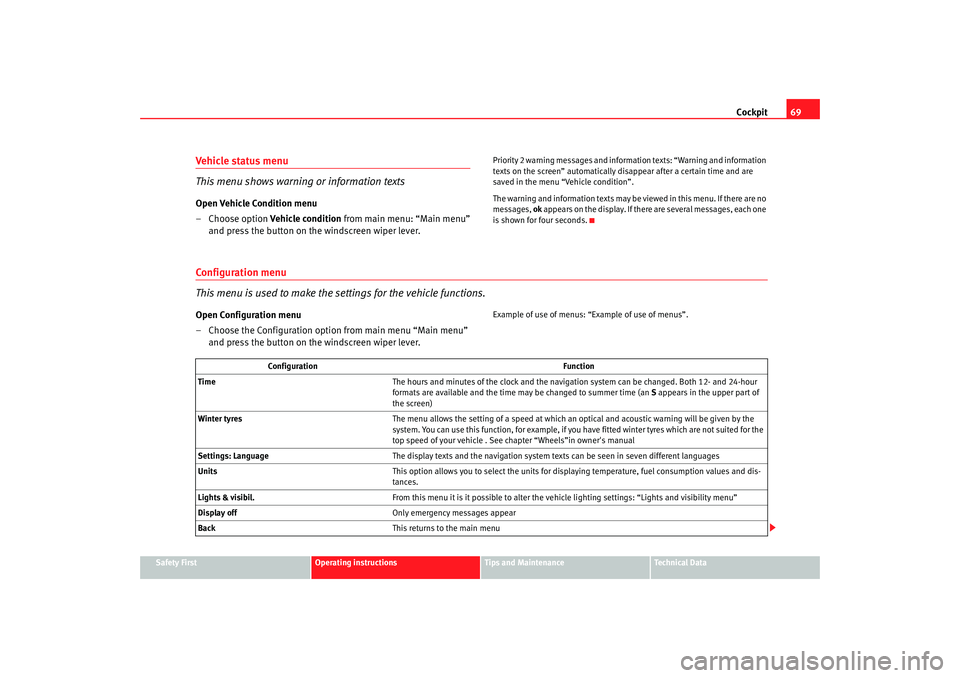
Vehicle status menu
This menu shows warning or information textsOpen Vehicle Condition menu
– Choose option Vehicle condition from main menu: “Main menu”
and press the button on the windscreen wiper lever.
Priority 2 warning messages and inform ation texts: “Warning and information
texts on the screen” automatically di sappear after a certain time and are
saved in the menu “Vehicle condition”.
The warning and information texts may be viewed in this menu. If there are no
messages, ok appears on the display. If there are several messages, each one
is shown for four seconds.
Configuration menu
This menu is used to make the settings for the vehicle functions.Open Configuration menu
– Choose the Configuration option from main menu “Main menu” and press the button on the windscreen wiper lever.
Example of use of menus: “E xample of use of menus”.
Configuration Function
Time The hours and minutes of the clock and the navigation system can be changed. Both 12- and 24-hour
formats are available and the time may be changed to summer time (an S appears in the upper part of
the screen)
Winter tyres The menu allows the setting of a speed at which an optical and acoustic warning will be given by the
system. You can use this function, for example, if you have fitted winter tyres which are not suited for the
top speed of your vehicle . See chapter “Wheels”in owner's manual
Settings: Language The display texts and the navigation system texts can be seen in seven different languages
Units This option allows you to select the units for displaying temperature, fuel consumption values and dis-
tances.
Lights & visibil. From this menu it is it possible to alter the vehicle lighting settings: “Lights and visibility menu”
Display off Only emergency messages appear
Back This returns to the main menu
altea_ingles Seite 69 Dienstag, 4. Oktober 2005 6:57 18
Page 74 of 288
Cockpit
72
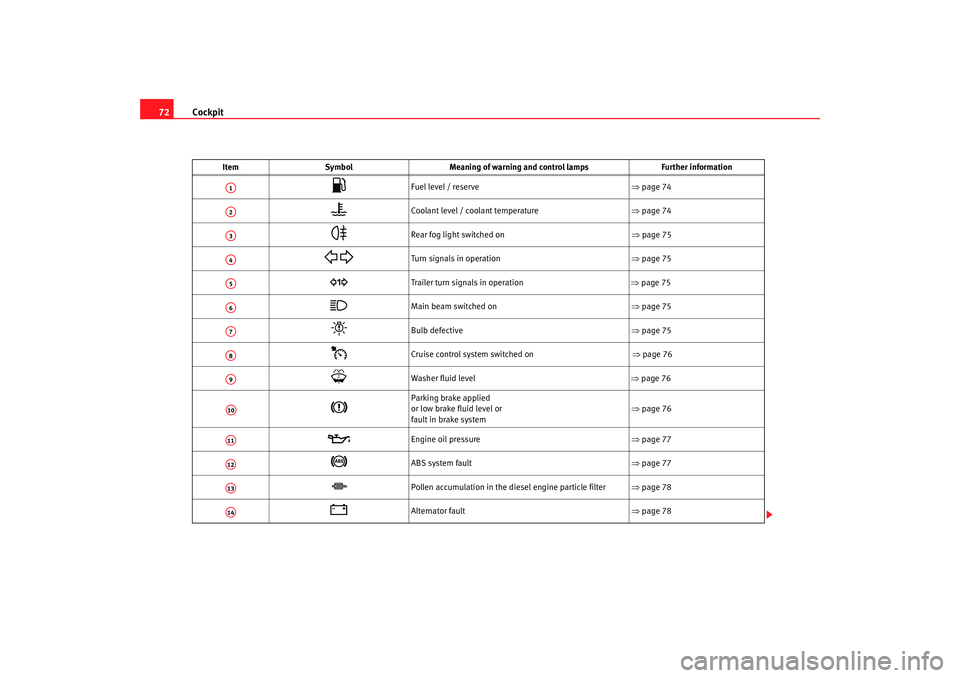
Item Symbol Meaning of warning and control lamps Further information
Fuel level / reserve ⇒page 74
Coolant level / coolant temperature ⇒page 74
Rear fog light switched on ⇒ page 75
Turn signals in operation ⇒page 75
Trailer turn signals in operation ⇒ page 75
Main beam switched on ⇒page 75
Bulb defective ⇒page 75
Cruise control system switched on ⇒ page 76
Washer fluid level
⇒ page 76
Parking brake applied
or low brake fluid level or
fault in brake system ⇒
page 76
Engine oil pressure ⇒page 77
ABS system fault ⇒page 77
Pollen accumulation in the diesel engine particle filter ⇒page 78
Alternator fault ⇒page 78
A1A2A3A4A5A6A7A8A9A10A11A12A13A14
altea_ingles Seite 72 Dienstag, 4. Oktober 2005 6:57 18
Page 76 of 288
Cockpit
74•
The engine compartment of any motor vehicle is a dangerous area!
Before you open the bonnet to work on the engine or in the engine compart-
ment, you must switch off the engine and allow it to cool to reduce the risk
of scalding or other injuries. Read and observe the relevant warnings
⇒ page 203.Note
•
The appropriate warning lamp for a fa ult will light up in vehicles without
warning or information texts in the display.
•
In vehicles with warning or information texts in the display, the appro-
priate warning lamp for a fault will ligh t up and a warning or information text
will also appear in the display.
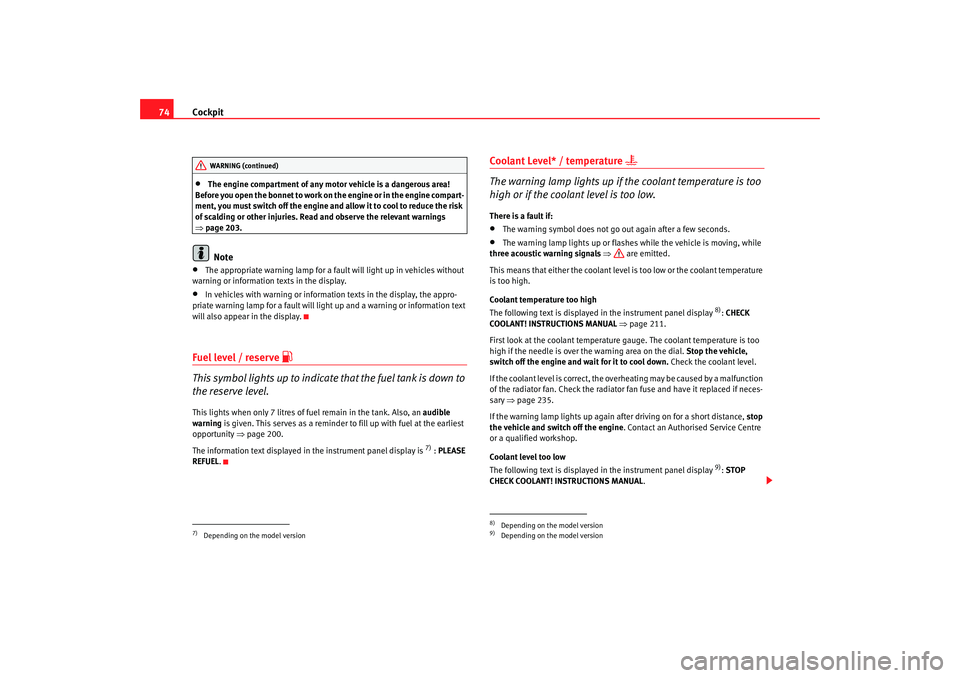
Fuel level / reserve
This symbol lights up to indicate that the fuel tank is down to
the reserve level.This lights when only 7 litres of fuel remain in the tank. Also, an audible
warning is given. This serves as a reminder to fill up with fuel at the earliest
opportunity ⇒page 200.
The information text displayed in the instrument panel display is
7) : PLEASE
REFUEL .
Coolant Level* / temperature
The warning lamp lights up if the coolant temperature is too
high or if the coolant level is too low.There is a fault if:•
The warning symbol does not go out again after a few seconds.
•
The warning lamp lights up or flashes while the vehicle is moving, while
three acoustic warning signals ⇒ are emitted.
This means that either the coolant level is too low or the coolant temperature
is too high.
Coolant temperature too high
The following text is displayed in the instrument panel display
8): CHECK
COOLANT! INS TRUCTIONS MANUAL ⇒ pa
ge 211 .
Fir
st look at the coolant temperature gauge. The coolant temperature is too
high if the needle is over the warning area on the dial. Stop the vehicle,
switch off the engine and wa it for it to cool down. Check the coolant level.
If the coolant level is correct, the overheating may be caused by a malfunction
of the radiator fan. Check the radiator fan fuse and have it replaced if neces-
sary ⇒page 235.
If the warning lamp lights up again after driving on for a short distance, stop
the vehicle and switch off the engine. Contact an Authorised Service Centre
or a qualified workshop.
Coolant level too low
The following text is displayed in the instrument panel display
9): STOP
CHECK COOLANT! INSTRUCTIONS MANUAL .
7)Depending on the model versionWARNING (continued)
8)Depending on the model version9)Depending on the model version
altea_ingles Seite 74 Dienstag, 4. Oktober 2005 6:57 18
Page 77 of 288
Cockpit75
Safety First
Operating instructions
Tips and Maintenance
Te c h n i c a l D a t a
First look at the coolant temperature gauge. If the needle is in the normal
range, top up with coolant at the earliest opportunity ⇒
.
WARNING
•
If your vehicle is immobilised for any technical reasons, move it to a
safe distance from traffic. Turn off the engine, turn on the hazard lights and
place the warning triangle.
•
Never open the bonnet if you can see or hear steam or coolant escaping
from the engine compartment. Risk of scalding. Wait until you can no
longer see or hear escaping steam or coolant.
•
The engine compartment of any motor vehicle is a dangerous area!
Before carrying out any work in the engine compartment, switch off the
engine and allow it to cool down. Always note the corresponding warnings
⇒ page 203.
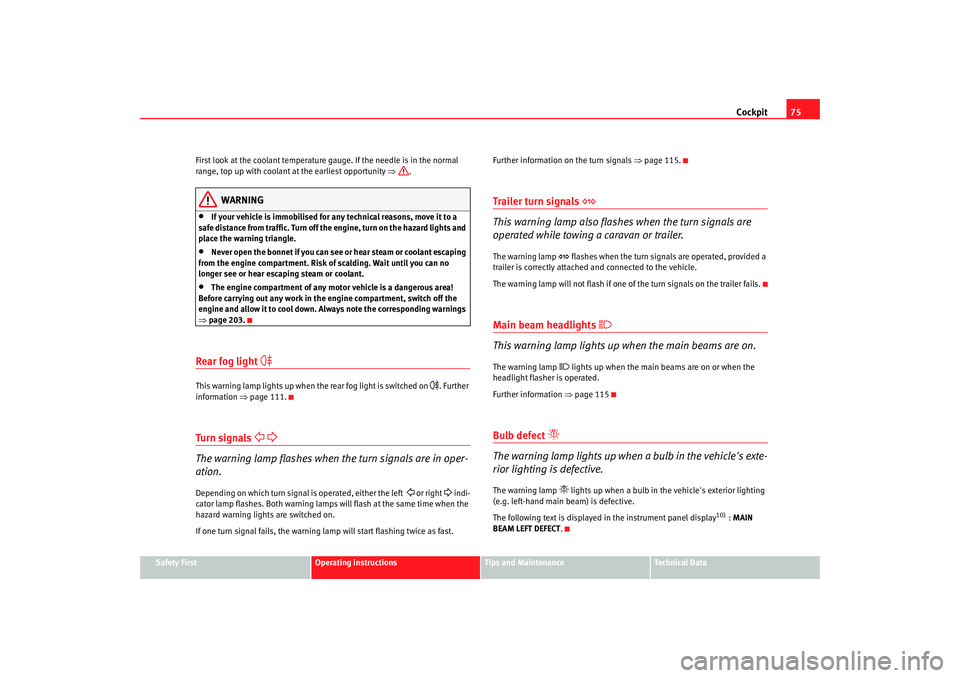
Rear fog light
This warning lamp lights up when the rear fog light is switched on
. Further
information ⇒page 111.
Turn signals
The warning lamp flashes when the turn signals are in oper-
ation.Depending on which turn signal is operated, either the left
or right
indi-
cator lamp flashes. Both warning lamps wi ll flash at the same time when the
hazard warning lights are switched on.
If one turn signal fails, the warning lamp will start flashing twice as fast. Further information on the turn signals
⇒page 115.
Trailer turn signals
This warning lamp also flashe s when the turn signals are
operated while towing a caravan or trailer.The warning lamp
flashes when the turn signals are operated, provided a
trailer is correctly attached and connected to the vehicle.
The warning lamp will not flash if one of the turn signals on the trailer fails.
Main beam headlights
This warning lamp lights up when the main beams are on.The warning lamp
lights up when the main beams are on or when the
headlight flasher is operated.
Further information ⇒page 115
Bulb defect
The warning lamp lights up when a bulb in the vehicle's exte-
rior lighting is defective.The warning lamp
lights up when a bulb in the vehicle's exterior lighting
(e.g. left-hand main beam) is defective.
The following text is displayed in the instrument panel display
10) : MAIN
BEAM LEFT DEFECT .
altea_ingles Seite 75 Dienstag, 4. Oktober 2005 6:57 18