instrument panel Seat Altea 2006 Owner's Guide
[x] Cancel search | Manufacturer: SEAT, Model Year: 2006, Model line: Altea, Model: Seat Altea 2006Pages: 288, PDF Size: 8.61 MB
Page 82 of 288
Cockpit
80Glow plug system / Engine fault
The warning lamp lights up to show that the glow plugs are
preheating. It flashes if there is an engine fault.
Warning lamp
is lit
The warning lamp lights up while the glow plugs are preheating. When the
warning lamp goes off, the engine should be started straight away.
Warning lamp
flashes
If a fault develops in the engine management system while you are driving,
the glow plug lamp will flash
. Take the vehicle to an Authorised Service
Centre as soon as possible and have the engine checked.
Emi ssion control sy stem*
This warning lamp monitors the exhaust system.
Warning lamp
flashes:
When there is misfiring that can damage the catalytic converter. Reduce
speed and drive carefully to the near est qualified workshop to have the
engine checked.
The following text is displayed in the instrument panel display
14) : EXHAUST
FUMES GO TO WORKSHOP!
Warning lamp
is lit:
If a fault has developed during driving which has reduced the quality of the
exhaust gas (e. g. lambda probe fault). Reduce speed and drive carefully to
the nearest qualified workshop to have the engine checked. The following text is displayed in the instrument panel display:
EXHAUST
FUMES GO TO WORKSHOP!
Electronic stabilisation programme (ESP)*
This warning lamp monitors the electronic stabilisation
program.
This program includes the ABS, EDL and TCS.
The warning lamp
has the following functions:
•
It will light for about 2 seconds when the ignition is switched on while a
test of the function is carried out.
•
It flashes when the ESP is activated when driving.
•
It will light up continuously if there is a malfunction in the ESP.
•
It will light up continuously if the ESP is switched off.
•
It will also come on if a fault should occur in the ABS because the ESP
operates in conjunction with the ABS.
If the ESP warning lamp
lights up and stays on after the engine is started,
this may mean that the control system has temporarily switched off the ESP.
In this case the ESP can be reactivated by switching the ignition off and then
on again. If the warning lamp goes out, this means the system is fully
functional.
Operating the foot brake
The footbrake must be depressed when this warning lamp lights up. This is
necessary when the automatic gearbox* selector lever is moved out of the
positions P or N.
14)Depending on the model version
altea_ingles Seite 80 Dienstag, 4. Oktober 2005 6:57 18
Page 83 of 288
Cockpit81
Safety First
Operating instructions
Tips and Maintenance
Te c h n i c a l D a t a
Power steering system*
For vehicles with power steering, the level of steering assistance depends on
the vehicle's speed and on the steering angle.
The warning lamp should light up for a few seconds when the ignition is
switched on. It should go out when the engine has started running.
If the battery is disconnected, the indicator remains lit, even with the engine
running. The warning light only goes of f after a distance of approx. 50 m.
There is a fault in the electromechanica l steering system if the lamp does not
go out or lights up whilst the vehicle is in motion. The indicator may appear
in two different colours to indicate faults. If it lights yellow, this indicates a
minor fault. If it lights red, seek wo rkshop assistance immediately, if no
assistance is available stop driving. Stop the vehicle and seek technical
assistance. The power steering does not work if the battery is flat or if the
engine is off (for example, for towing). You should take into account that you
will need considerably more power than normal to steer the vehicle if the
steering assistance is reduced or has failed completely.
For those vehicles fitted with ESP* the function “Recommended steering
manoeuv r
e” is included. S e e ⇒ page 177Brake pad wear indicator*
As the brake pad wear indicator only monitors the front brake pads, it is advis-
able to have the rear brake pads inspected at the same time.
The information text displayed in the instrument panel display is
15) : CHECK
BRAKE PADS .
WARNING
Have the brake pads inspected immediately by a qualified dealership if the
warning display
lights up.
Indicator for open doors or tailgate
This indicator lights if one of th e doors or the tailgate is open.The warning light
should go off when all the doors are closed correctly.
The system also works when the ignition is switched off. It should go off
about 15 seconds after the vehicle is locked.
Electronic immobiliser* “Safe”
This warning lamp flashes if an unauthorised key is used.Inside the key there is a chip that deactivates the electronic immobiliser auto-
matically when the key is inserted into the ignition. The immobiliser will be
activated again automatically as soon as you pull the key out of the ignition
lock.
The message displayed in the instrument panel display is
16) : SAFE. The
vehicle cannot be used in that case ⇒page 160.
The engine can, however, be started if the appropriate coded SEAT genuine
key is used.
15)Depending on the model version
16)Depending on the model version
altea_ingles Seite 81 Dienstag, 4. Oktober 2005 6:57 18
Page 106 of 288
Unlocking and locking
104Ta i l g a t eOpening and locking
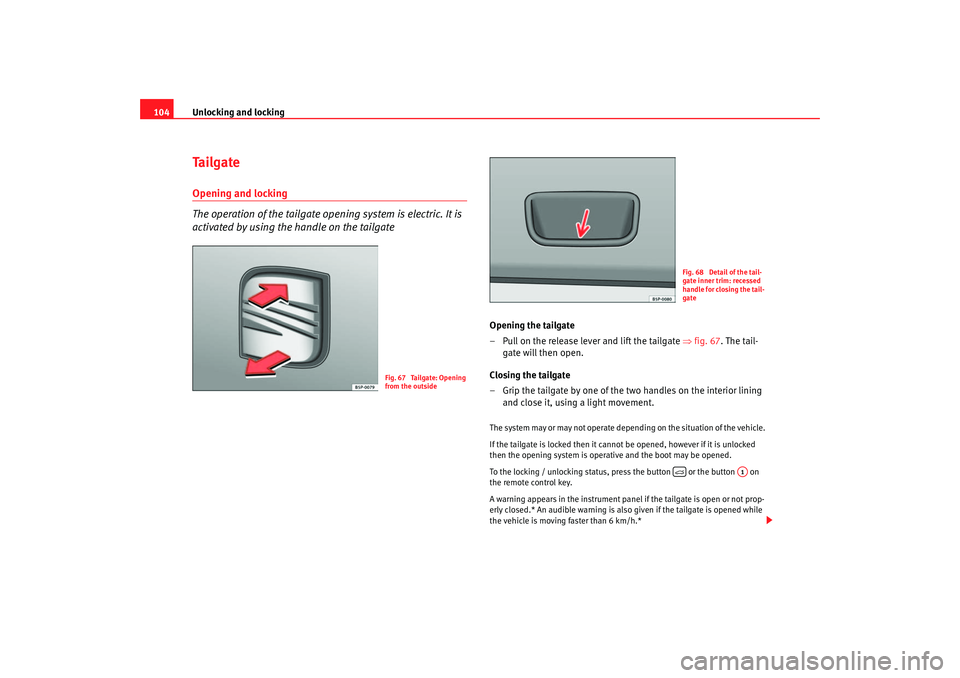
The operation of the tailgate opening system is electric. It is
activated by using the handle on the tailgate
Opening the tailgate
– Pull on the release lever and lift the tailgate ⇒fig. 67 . The tail-
gate will then open.
Closing the tailgate
– Grip the tailgate by one of the two handles on the interior lining and close it, using a light movement.The system may or may not operate depending on the situ
ation of the vehi
cle.
If the tailgate is locked then it cannot be opened, however if it is unlocked
then the opening system is operat ive and the boot may be opened.
To the locking / unlocking status, press the button or the button on
the remote control key.
A warning appears in the instrument panel if the tailgate is open or not prop-
erly closed.* An audible warning is also given if the tailgate is opened while
the vehicle is moving faster than 6 km/h.*
Fig. 67 Tailgate: Opening
from the outside
Fig. 68 Detail of the tail-
gate inner trim: recessed
handle for closing the tail-
gate
A1
altea_ingles Seite 104 Dienstag, 4. Oktober 2005 6:57 18
Page 113 of 288

Lights and visibility111
Safety First
Operating instructions
Tips and Maintenance
Te c h n i c a l D a t a
Lights and visibilityLightsSwitch ing ligh ts on and off
Switching on the side lights
– Turn the light switch ⇒ fig. 74 to position
.
Switching on dipped headlights
– Turn the light switch to position
.
Switching off the lights
– Turn the light switch to position 0. Switching on the fog lights*
– Pull the switch out of position
or
to the first stop. The
symbol
in the light switch lights up.
Switching on the rear fog lights (vehicles with front fog lights)
– Pull the switch out of position
or
to the second stop
⇒ . A warning lamp lights up in the control panel.
Switching on the rear fog lights (vehicles with no front fog lights)
– Pull the switch out of position
to the last stop. A warning lamp
lights up in the instrument panel.
WARNING
Never drive with just the side lights on . Risk of accident. The side lights are
not bright enough to illuminate the road ahead and to ensure that other
road users are able to see you. Always use your dipped headlights if it is
dark or if visibility is poor.
Note
•
The dipped beam headlights will only work with the ignition on. The side
lights come on automatically when the ignition is turned off.
•
If the lights are left on after the key has been taken out of the ignition lock,
a buzzer sounds when the driver door is opened. This is a reminder to switch
off the lights.
Fig. 74 Detail of the dash
panel: Switch for lights,
fog lights and rear fog
light
altea_ingles Seite 111 Dienstag, 4. Oktober 2005 6:57 18
Page 115 of 288

Lights and visibility113
Safety First
Operating instructions
Tips and Maintenance
Te c h n i c a l D a t a
Coming home / leaving home function*
After dark the area around the car is lit up with the aid of the
coming home / leaving home function.Coming home function*
To activate the function
– Put the light switch into the position
or in the “Auto” position
for those vehicles fitted with the automatic lighting function.
– Remove key from ignition switch.
To deactivate the function
– Turn light switch to position 0
When the system is activated and it is dark, the coming home function will
illuminate the vehicle and its surroundings by switching on the dipped head-
lights, rear lights and nu mber plate lights when the driver's door is opened.
While one of the doors or the tailgate are open, the dipped headlights, the
rear lights and the registration plate lighting remain on for about 90 seconds.
If, before this time is up, all of the doors and the tailgate are closed, another
40 seconds of lighting is given. However, if all of the doors and the tailgate
are closed after the 90 seconds have passed, the system will be deactivated
and the lights will not come on.
If you wish to reactivate the system, you must start from the beginning.
The lighting time is defined at the time of manufacture.
Leaving home function*
The function is activated when the vehicle is unlocked using the remote
control. In the dark, the leaving home function will light the dipped beam
lights, the rear lights and the registration plate lighting for about 40 seconds.
Note
•
If the vehicle is used often during the night for short trips using the
coming home function, this will place a heavy demand on the battery. To
avoid this, make longer journeys whenever possible.
•
Observe all relevant statutory requirements when using the lighting
systems described here.
•
For those vehicles fitted with the “Dot Matrix” display, the delay in turning
off the headlights (about 40 seconds) can be adjusted using the “Configura-
tion, lights and visibility” menu.
Instrument and switch lighting / Headlight range controlInstrument and switch lighting
When the headlights are switched on, the brightness of the instruments and
switch lighting can be regulated to su it your requirements by turning the
thumb wheel ⇒fig. 76 .
Fig. 76 Detail of the dash
panel: Regulation for
instrument and switch
illumination and head-
light range control
A1
A1
altea_ingles Seite 113 Dienstag, 4. Oktober 2005 6:57 18
Page 129 of 288
Seats and stowage127
Safety First
Operating instructions
Tips and Maintenance
Te c h n i c a l D a t a
Seats and stowageThe importance of correct seat adjustmentProper seat adjustment optimi ses the level of protection
offered by seat belts and airbags.Your vehicle has five passenger places, two individual front seats and three
places on the rear seat. Each seat is equipped with a three-point seat belt.
The driver seat and front passenger seat can be adjusted in many ways to suit
the physical requirements of the vehicle occupants. The correct seat position
is very important for:•
fast and easy operation of all controls on the instrument panel,
•
relaxed posture that does not cause drowsiness,
•
safe driving ⇒ page 7,
•
and to ensure that the seat belts and airbag system provide maximum
protection ⇒page 19.
WARNING
•
If the driver and passengers assume improper sitting positions, they
may sustain critical injuries.
•
Never transport more people than there are seats available in the
vehicle.
•
Every occupant in the vehicle must properly fasten and wear the seat
belt belonging to his or her seat. Children must be protected with an appro-
priate child restraint system ⇒page 46, “Child safety”.
•
The front seats and all head restraints must always be adjusted to body
size and the seat belt must always be properly adjusted to provide you and
your passengers with optimum protection.
•
Always keep your feet in the footwell when the vehicle is moving; never
rest them on the dash panel, out of the window or on the seat. This also
applies to passengers. An incorrect sitting position exposes you to an
increased risk of injury in the event of a braking manoeuvre or an accident.
If the airbag is triggered, you could sustain severe injuries due to an incor-
rect sitting position.
•
It is important for the driver and front passenger to maintain a distance
of at least 25 cm from the steering wheel or dash panel. Failure to respect
the minimum distance means that the airbag will not protect you. Risk of
fatal injury. The distance between the driver and the steering wheel or
between the front passenger and the dash panel should always be as great
as possible.
•
Adjust the driver or front passenger seat only when the vehicle is
stationary. This also applies to the forwards/backwards adjustment of the
rear seats. Otherwise your seat coul d move unexpectedly while the vehicle
is moving. This could increase the risk of an accident and therefore injury.
In addition, while adjusting your seat, you will assume an incorrect sitting
position. Risk of fatal accidents.
•
Special guidelines apply to installing a child seat on the front
passenger seat. When installing a child seat, observe the warning note in
the ⇒page 46, “Child safety”.WARNING (continued)
altea_ingles Seite 127 Dienstag, 4. Oktober 2005 6:57 18
Page 174 of 288
Driving
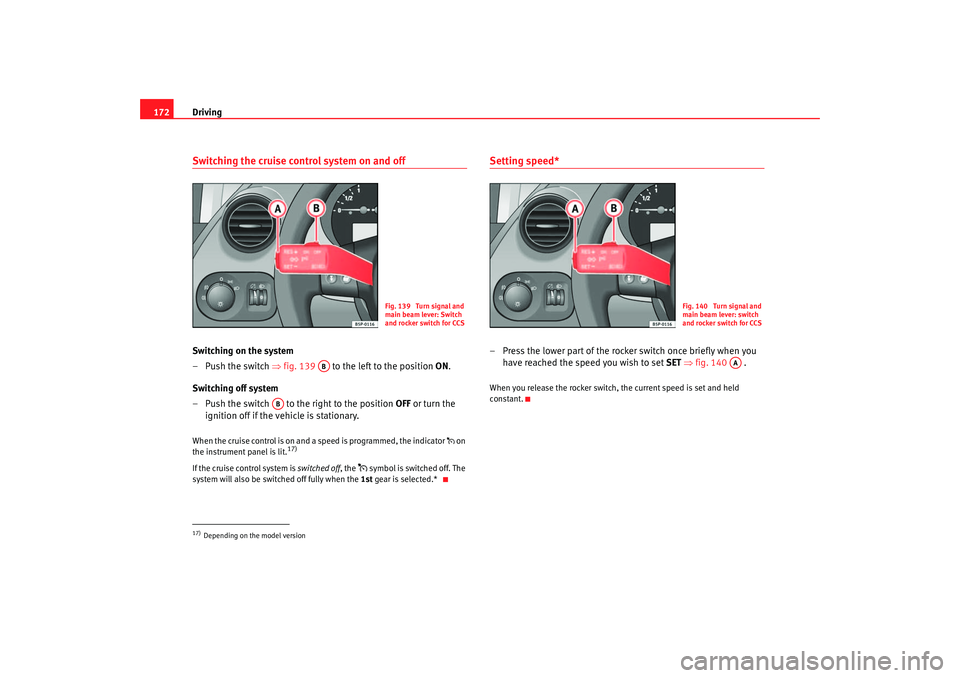
172Switching the cruise control system on and offSwitching on the system
–Push the switch ⇒ fig. 139 to the left to the position ON.
Switching off system
– Push the switch to the right to the position OFF or turn the
ignition off if the vehicle is stationary.When the cruise control is on and a speed is programmed, the indicator on
the instrument panel is lit.
17)
If the cruise control system is switched off, the
symbol is switched off. The
system will also be switched off fully when the 1st gear is selected.*
Setting speed*– Press the lower part of the rocker switch once briefly when you
have reached the speed you wish to set SET ⇒ fig. 140 .When you release the rocker switch, the current speed is set and held
constant.
17)Depending on the model version
Fig. 139 Turn signal and
main beam lever: Switch
and rocker switch for CCS
AB
AB
Fig. 140 Turn signal and
main beam lever: switch
and rocker switch for CCS
AA
altea_ingles Seite 172 Dienstag, 4. Oktober 2005 6:57 18
Page 283 of 288
Index281
Information texts in the display . . . . . . . . . . . . . 63
Instrument and switch lighting . . . . . . . . . . . . . 113
Instrument lighting . . . . . . . . . . . . . . . . . . . . . . . 55
Instrument panel . . . . . . . . . . . . . . . . . . . . . . . . . 55
Instrument panel menu
Configuration menu . . . . . . . . . . . . . . . . . . . . 69
Example of menu use . . . . . . . . . . . . . . . . . . 67
Lights and visibility menu . . . . . . . . . . . . . . . 70
Instrument panel menus Principal menu . . . . . . . . . . . . . . . . . . . . . . . . 65
Vehicle status menu . . . . . . . . . . . . . . . . . . . 69
Instruments . . . . . . . . . . . . . . . . . . . . . . . . . . . . . 56
Interior front light, type 1 . . . . . . . . . . . . . . . . . 116
Interior front light, type 2 . . . . . . . . . . . . . . . . . 117
Interior monitoring system Deactivating . . . . . . . . . . . . . . . . . . . . . . . . . 102
Intermittent wipe, windscreen . . . . . . . . . . . . . 120
ISOFIX system . . . . . . . . . . . . . . . . . . . . . . . . . . . 52JJump leads . . . . . . . . . . . . . . . . . . . . . . . . . . . . . 251
Jump-starting . . . . . . . . . . . . . . . . . . . . . . . . . . . 251KKey tab . . . . . . . . . . . . . . . . . . . . . . . . . . . . . . . . . 98
Keys . . . . . . . . . . . . . . . . . . . . . . . . . . . . . . . . . . . 98
LLamp changes general notes . . . . . . . . . . . . . . . . . . . . . . . . 242
Lights . . . . . . . . . . . . . . . . . . . . . . . . . . . . . . . . . 111
Load compartment See Luggage compartment . . . . . . . . . . . . . . 17
Locks . . . . . . . . . . . . . . . . . . . . . . . . . . . . . . . . . 191
Luggage compartment . . . . . . . . . . . . . . . . 17, 144 See also Luggage compartment . . . . . . . . . . 17
Luggage compartment retaining net . . . . . . . . 136MMain beam . . . . . . . . . . . . . . . . . . . . . . . . . . . . . 115
Main beam headlights Indicator lamp . . . . . . . . . . . . . . . . . . . . . . . . 75
Main headlight lamps . . . . . . . . . . . . . . . . . . . . 243
Manual gearbox . . . . . . . . . . . . . . . . . . . . . . . . . 163
Manual mode 2C-Climatronic . . . . . . . . . . . . . . . . . . . . . . . 154
MFD . . . . . . . . . . . . . . . . . . . . . . . . . . . . . . . . . . . . 61
Mileage display . . . . . . . . . . . . . . . . . . . . . . . . . . 60
Mirrors Exterior mirrors, electrical . . . . . . . . . . . . . . 125
Interior mirror . . . . . . . . . . . . . . . . . . . . . . . . 124
Make-up mirrors . . . . . . . . . . . . . . . . . . . . . 119
Mobile phone . . . . . . . . . . . . . . . . . . . . . . . . . . . 197
Modifications . . . . . . . . . . . . . . . . . . . . . . . . . . . 196
Multi-function display . . . . . . . . . . . . . . . . . . . . . 61 Multi-purpose* mobile
stowage compartment 140
Closing . . . . . . . . . . . . . . . . . . . . . . . . . . . . . 140
Fitting . . . . . . . . . . . . . . . . . . . . . . . . . . . . . . 139
Opening . . . . . . . . . . . . . . . . . . . . . . . . . . . . 140
Removal . . . . . . . . . . . . . . . . . . . . . . . . . . . . 139
Uses . . . . . . . . . . . . . . . . . . . . . . . . . . . . . . . 140
NNumber of seats . . . . . . . . . . . . . . . . . . . . . . . . . 19OObservations . . . . . . . . . . . . . . . . . . . . . . . . . . . 181
Octane number . . . . . . . . . . . . . . . . . . . . . . . . . 201
Oil . . . . . . . . . . . . . . . . . . . . . . . . . . . . . . . . . . . . 206
Oil change . . . . . . . . . . . . . . . . . . . . . . . . . . . . . 210
Oil properties . . . . . . . . . . . . . . . . . . . . . . . . . . . 207
One-touch opening and closing Electric windows . . . . . . . . . . . . . . . . . . . . . 107
Opening and locking . . . . . . . . . . . . . . . . . . . . . 104
Overview Control lamps . . . . . . . . . . . . . . . . . . . . . . . . 71
Instrument panel . . . . . . . . . . . . . . . . . . . . . . 55
Instruments . . . . . . . . . . . . . . . . . . . . . . . . . . 56
Warning lamps . . . . . . . . . . . . . . . . . . . . . . . . 71PPaintworkPolishing . . . . . . . . . . . . . . . . . . . . . . . . . . . 190
Waxing . . . . . . . . . . . . . . . . . . . . . . . . . . . . . 189
altea_ingles Seite 281 Dienstag, 4. Oktober 2005 6:57 18