wheel Seat Altea 2008 Owner's Guide
[x] Cancel search | Manufacturer: SEAT, Model Year: 2008, Model line: Altea, Model: Seat Altea 2008Pages: 309, PDF Size: 9.45 MB
Page 90 of 309
Steering wheel controls
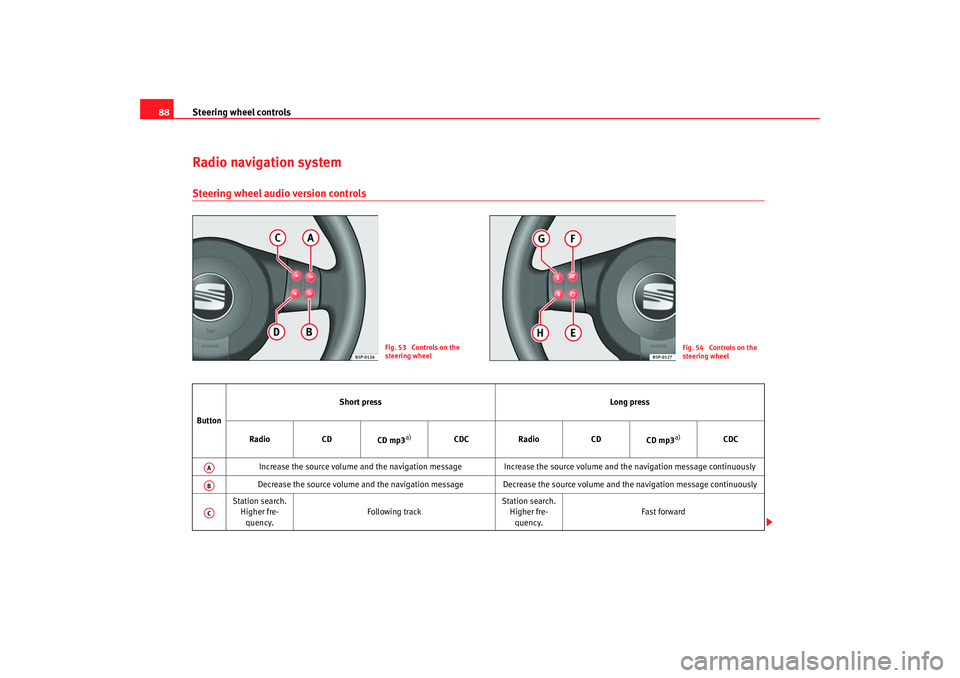
88Radio navigation systemSteering wheel audio version controls
Fig. 53 Controls on the
steering wheel
Fig. 54 Controls on the
steering wheel
Button Short press
Long press
Radio CD
CD mp3
a)
CDC Radio CD
CD mp3
a)
CDC
Increase the source volume and the navigation message Increa se the source volume and the navigation message continuously
Decrease the source volume and the navigation message Decrease the source volume and the navigation message continuously
Station search. Higher fre-quency. Following track Station search.
Higher fre-quency. Fast forward
AAABAC
altea ingles.book Seite 88 Dienstag, 11. September 2007 4:39 16
Page 91 of 309
Steering wheel controls89
Safety First
Operating instructions
Tips and Maintenance
Te c h n i c a l D a t a
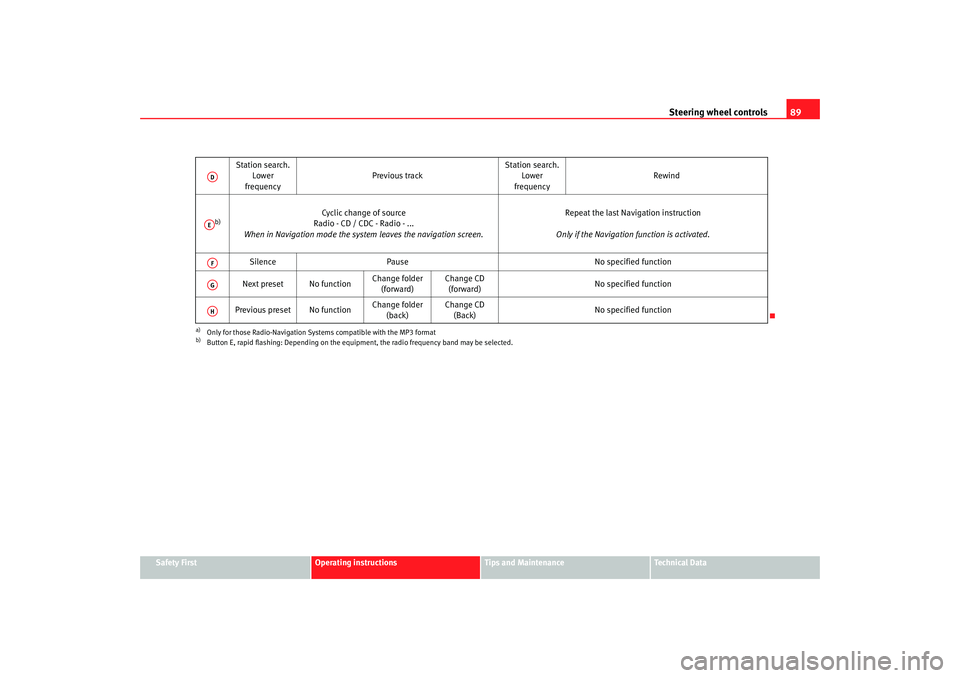
Station search.
Lower
frequency Previous track
Station search.
Lower
frequency Rewind
b)
Cyclic change of source
Radio - CD / CDC - Radio - ...
When in Navigation mode the system leaves the navigation screen. Repeat the last Navigation instruction
Only if the Navigation function is activated.
Silence Pause No specified function
Next preset No function Change folder
(forward) Change CD
(forward) No specified function
Previous preset No function Change folder
(back) Change CD
(Back) No specified function
a)Only for those Radio-Navigation Systems compatible with the MP3 formatb)Button E, rapid flashing: Depending on the equipment, the radio frequency band may be selected.ADAEAFAGAH
altea ingles.book Seite 89 Dienstag, 11. September 2007 4:39 16
Page 92 of 309
Steering wheel controls
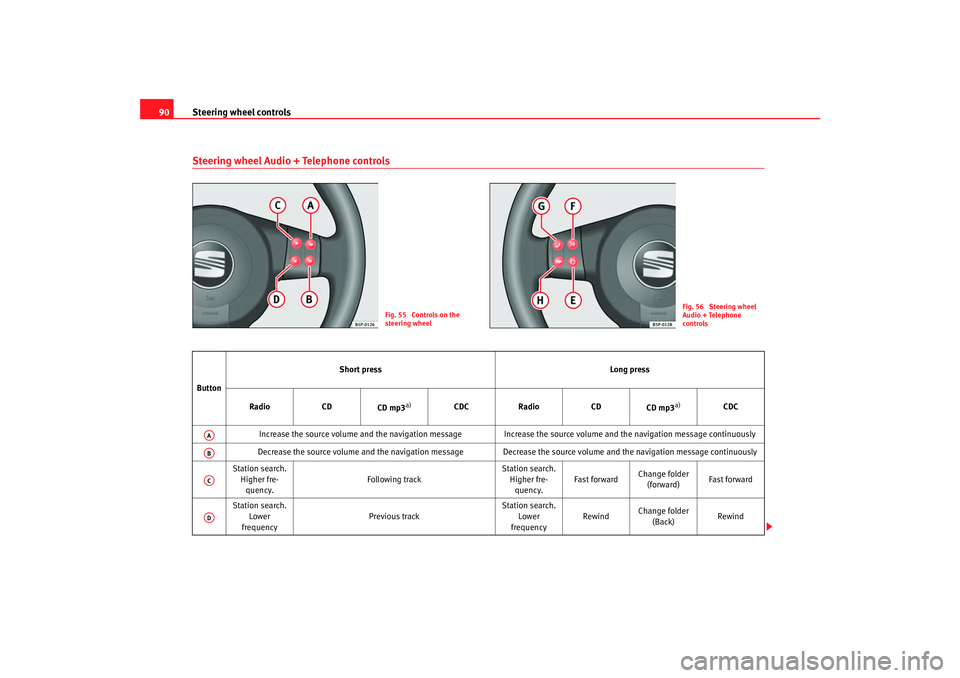
90Steering wheel Audio + Telephone controls
Fig. 55 Controls on the
steering wheel
Fig. 56 Steering wheel
Audio + Telephone
controls
Button Short press
Long press
Radio CD
CD mp3
a)
CDC Radio CD
CD mp3
a)
CDC
Increase the source volume and the navigation message Increa se the source volume and the navigation message continuously
Decrease the source volume and the navigation message Decrease the source volume and the navigation message continuously
Station search. Higher fre-quency. Following track Station search.
Higher fre-quency. Fast forward
Change folder
(forward) Fast forward
Station search. Lower
frequency Previous track Station search.
Lower
frequency Rewind
Change folder
(Back) Rewind
AAABACAD
altea ingles.book Seite 90 Dienstag, 11. September 2007 4:39 16
Page 93 of 309
Steering wheel controls91
Safety First
Operating instructions
Tips and Maintenance
Te c h n i c a l D a t a
b)
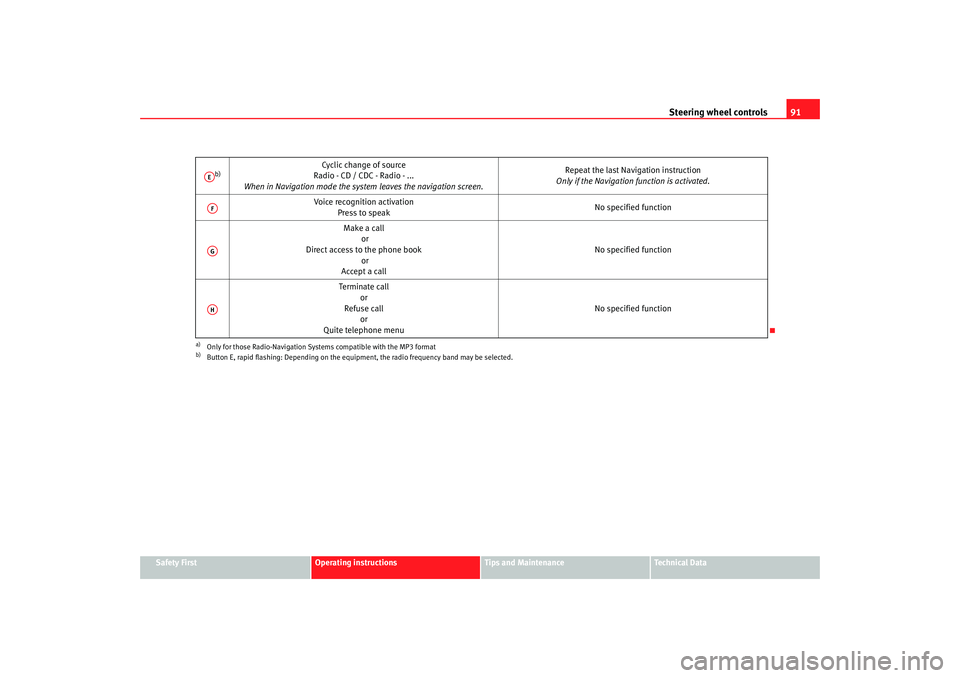
Cyclic change of source
Radio - CD / CDC - Radio - ...
When in Navigation mode the system leaves the navigation screen. Repeat the last Navigation instruction
Only if the Navigation function is activated.
Voice recognition activation Press to speak No specified function
Make a call or
Direct access to the phone book or
Accept a call No specified function
Terminate call or
Refuse call or
Quite telephone menu No specified function
a)Only for those Radio-Navigation Systems compatible with the MP3 formatb)Button E, rapid flashing: Depending on the equipment, the radio frequency band may be selected.AEAFAGAH
altea ingles.book Seite 91 Dienstag, 11. September 2007 4:39 16
Page 94 of 309
Steering wheel controls
92Steering wheel lighting controls
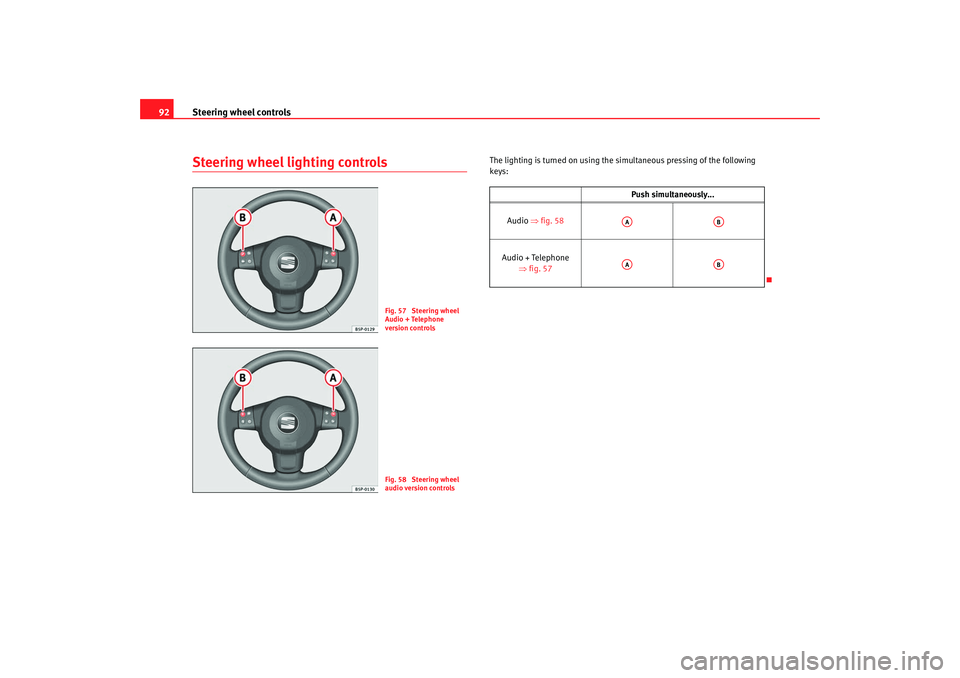
The lighting is turn ed on using the simultaneous pressing of the following
keys:
Fig. 57 Steering wheel
Audio + Telephone
version controlsFig. 58 Steering wheel
audio version controls
Push simultaneously...
Audio ⇒fig. 58
Audio + Telephone ⇒fig. 57AA
AB
AA
AB
altea ingles.book Seite 92 Dienstag, 11. September 2007 4:39 16
Page 116 of 309
Lights and visibility
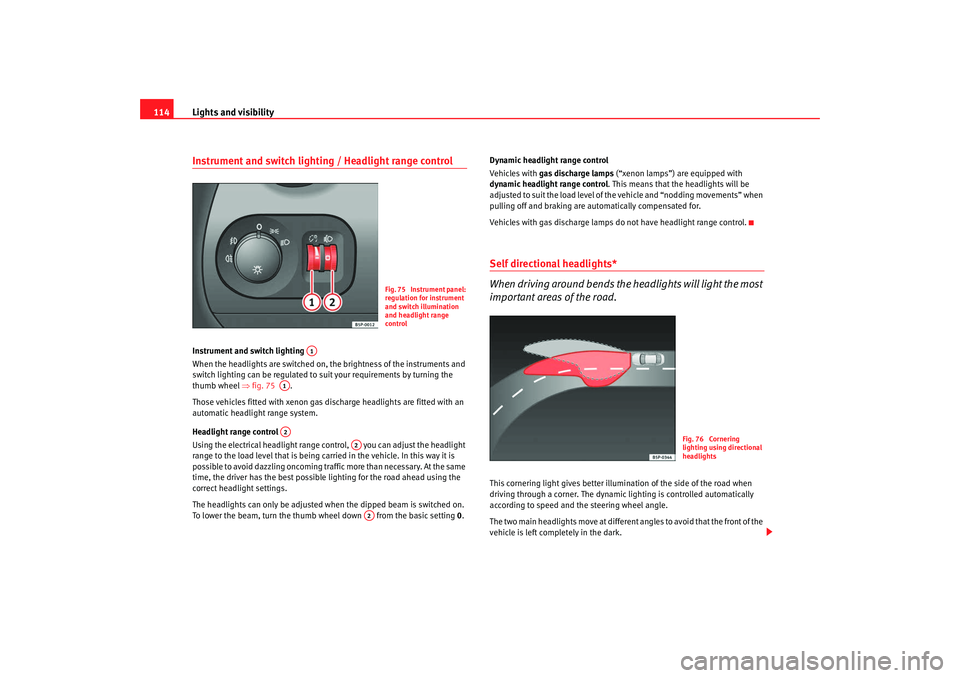
114Instrument and switch lighting / Headlight range controlInstrument and switch lighting
When the headlights are switched on, the brightness of the instruments and
switch lighting can be regulated to suit your requirements by turning the
thumb wheel ⇒fig. 75 .
Those vehicles fitted with xenon gas discharge headlights are fitted with an
automatic headlight range system.
Headlight range control
Using the electrical headlight range control, you can adjust the headlight
range to the load level that is being carried in the vehicle. In this way it is
possible to avoid dazzling oncoming traffic more than necessary. At the same
time, the driver has the best possible lighting for the road ahead using the
correct headlight settings.
The headlights can only be adjusted when the dipped beam is switched on.
To lower the beam, turn the thumb wheel down from the basic setting 0.Dynamic headlight range control
Vehicles with
gas discharge lamps (“xenon lamps”) are equipped with
dynamic headlight range control . This means that the headlights will be
adjusted to suit the load level of the vehicle and “nodding movements” when
pulling off and braking are automatically compensated for.
Vehicles with gas discharge lamps do not have headlight range control.
Self directional headlights*
When driving around bends the headlights will light the most
important areas of the road.This cornering light gives better illumi nation of the side of the road when
driving through a corner. The dynamic lighting is controlled automatically
according to speed and the steering wheel angle.
The two main headlights move at different angles to avoid that the front of the
vehicle is left comp letely in the dark.
Fig. 75 Instrument panel:
regulation for instrument
and switch illumination
and headlight range
control
A1
A1A2
A2A2
Fig. 76 Cornering
lighting using directional
headlights
altea ingles.book Seite 114 Dienstag, 11. September 2007 4:39 16
Page 118 of 309
Lights and visibility
116
Note•
The battery will run down if the hazard warning lights are left on for a long
time, even if the ignition is switched off.
•
The use of the hazard warning lights de scribed here is subject to the rele-
vant statutory requirements.
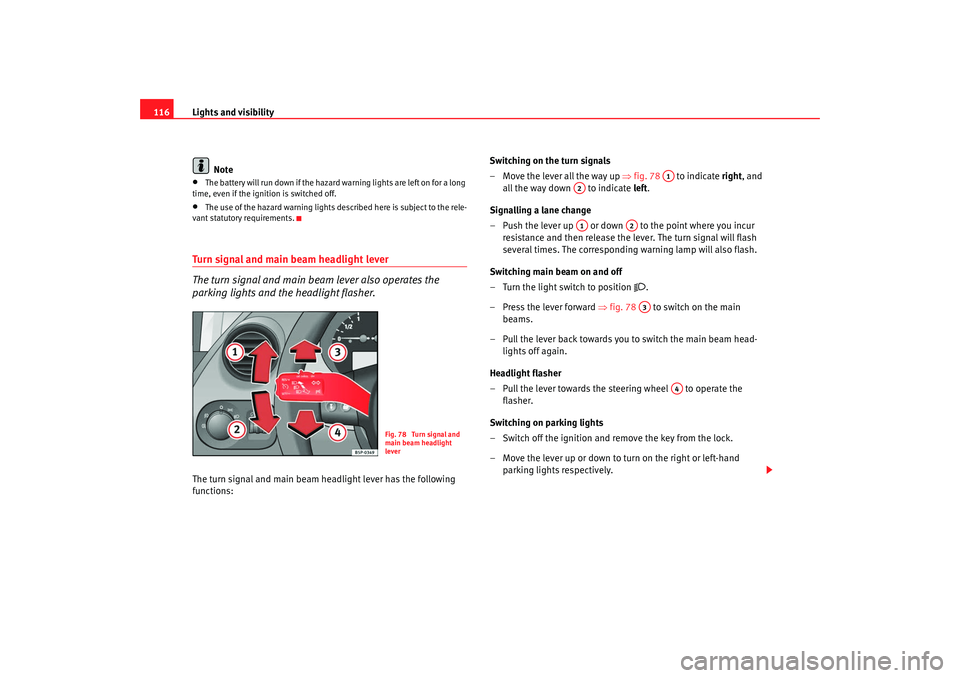
Turn signal and main beam headlight lever
The turn signal and main beam lever also operates the
parking lights and the headlight flasher.The turn signal and main beam headlight lever has the following
functions: Switching on the turn signals
– Move the lever all the way up
⇒fig. 78 to indicate right , and
all the way down to indicate left.
Signalling a lane change
– Push the lever up or down to the point where you incur resistance and then release the lever. The turn signal will flash
several times. The corresponding warning lamp will also flash.
Switching main beam on and off
– Turn the light switch to position
.
–Press the lever forward ⇒ fig. 78 to switch on the main
beams.
– Pull the lever back towards you to switch the main beam head- lights off again.
Headlight flasher
– Pull the lever towards the steering wheel to operate the flasher.
Switching on parking lights
– Switch off the ignition and remove the key from the lock.
– Move the lever up or down to turn on the right or left-hand parking lights respectively.
Fig. 78 Turn signal and
main beam headlight
lever
A1
A2A1
A2A3
A4
altea ingles.book Seite 116 Dienstag, 11. September 2007 4:39 16
Page 123 of 309
Lights and visibility121
Safety First
Operating instructions
Tips and Maintenance
Te c h n i c a l D a t a
Windscreen washersFront windscreen wipers
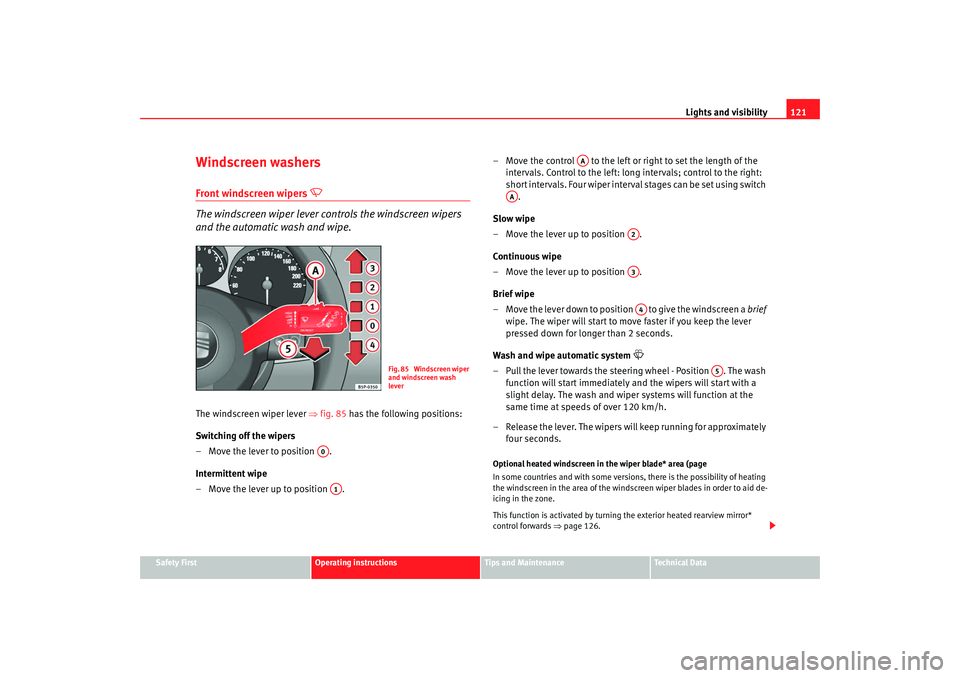
The windscreen wiper lever controls the windscreen wipers
and the automatic wash and wipe.
The windscreen wiper lever ⇒fig. 85 has the following positions:
Switching off the wipers
– Move the lever to position .
Intermittent wipe
– Move the lever up to position . – Move the control to the left or right to set the length of the
intervals. Control to the left: long intervals; control to the right:
short intervals. Four wiper interval stages can be set using switch .
Slow wipe
– Move the lever up to position .
Continuous wipe
– Move the lever up to position .
Brief wipe
– Move the lever down to position to give the windscreen a brief
wipe. The wiper will start to move faster if you keep the lever
pressed down for longer than 2 seconds.
Wash and wipe automatic system
– Pull the lever towards the steering wheel - Position . The wash function will start immediately and the wipers will start with a
slight delay. The wash and wiper systems will function at the
same time at speeds of over 120 km/h.
– Release the lever. The wipers will keep running for approximately four seconds.Optional heated windscreen in the wiper blade* area (page
In some countries and with some versions, there is the possibility of heating
the windscreen in the area of the windscreen wiper blades in order to aid de-
icing in the zone.
This function is activated by turning the exterior heated rearview mirror*
control forwards ⇒page 126.
Fig. 85 Windscreen wiper
and windscreen wash
lever
A0A1
AA
AA
A2A3A4
A5
altea ingles.book Seite 121 Dienstag, 11. September 2007 4:39 16
Page 126 of 309
Lights and visibility
124Rear window wiper
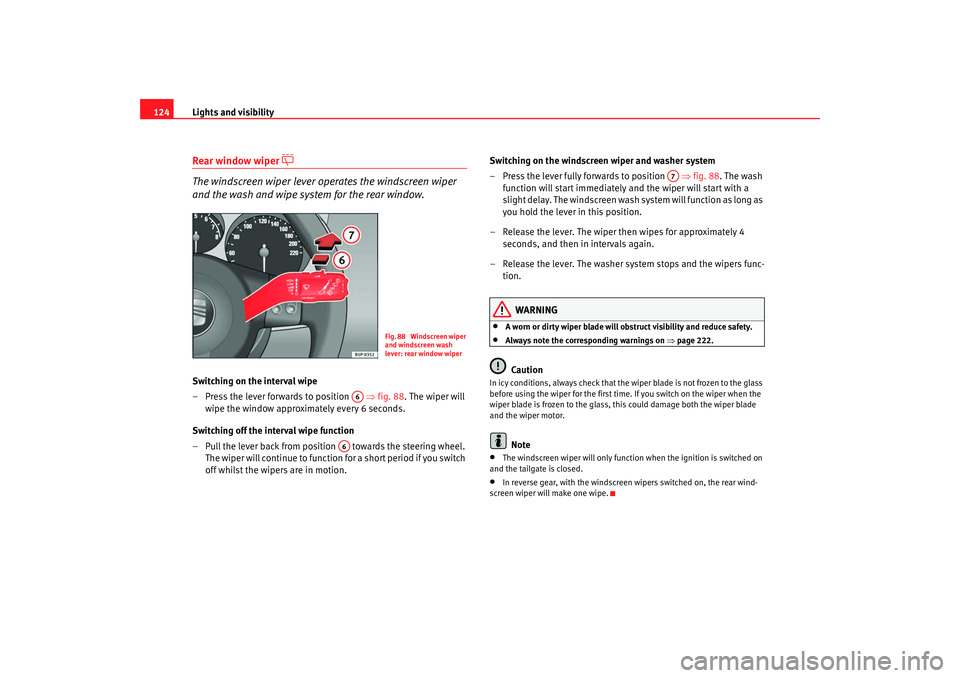
The windscreen wiper lever operates the windscreen wiper
and the wash and wipe system for the rear window.
Switching on the interval wipe
– Press the lever forwards to position ⇒fig. 88 . The wiper will
wipe the window approximately every 6 seconds.
Switching off the interval wipe function
– Pull the lever back from position towards the steering wheel. T h e wi p e r will co n t i n u e to fun c t i o n fo r a sh o r t p e r i o d i f yo u s wi tch
off whilst the wipers are in motion. Switching on the windscreen wiper and washer system
– Press the lever fully forwards to position
⇒fig. 88 . The wash
function will start immediately and the wiper will start with a
slight delay. The windscreen wash system will function as long as
you hold the lever in this position.
– Release the lever. The wiper then wipes for approximately 4 seconds, and then in intervals again.
– Release the lever. The washer system stops and the wipers func- tion.
WARNING
•
A worn or dirty wiper blade will obstruct visibility and reduce safety.
•
Always note the corresponding warnings on ⇒page 222.Caution
In icy conditions, always check that the wiper blade is not frozen to the glass
before using the wiper for the first time. If you switch on the wiper when the
wiper blade is frozen to the glass, this could damage both the wiper blade
and the wiper motor.
Note
•
The windscreen wiper will only function when the ignition is switched on
and the tailgate is closed.
•
In reverse gear, with the windscreen wipers switched on, the rear wind-
screen wiper will make one wipe.
Fig. 88 Windscreen wiper
and windscreen wash
lever: rear window wiper
A6
A6
A7
altea ingles.book Seite 124 Dienstag, 11. September 2007 4:39 16
Page 127 of 309
Lights and visibility125
Safety First
Operating instructions
Tips and Maintenance
Te c h n i c a l D a t a
Headlight washer system
The headlight washers clean the headlight lenses.The headlight washers are activated automatically when the windscreen
washer is used and the windscreen wiper lever is pulled towards the steering
wheel for at least 1.5 seconds – provided the dipped headlights or main
beams are switched on. Clean off stubborn dirt (insects, etc.) from the head-
lights at regular intervals, for instance when filling the fuel tank.
Note
•
To ensure that the headlight washers work properly in winter, keep the
nozzle holders in the bumper free of sn ow and remove any ice with a de-icer
spray.
•
To remove water, the windscreen wipers will be activated from time to
time, the headlight wipers will be activated every three cycles.
MirrorsInterior mirror
It is dangerous to drive if you cannot see clearly through the
rear window.Manual anti-dazzle function for interior mirror
In the basic mirror position, the lever at the bottom edge of the mirror should
be at the front. Pull the lever to the back to select the anti-dazzle function.
Automatic anti-dazzle interior mirror*
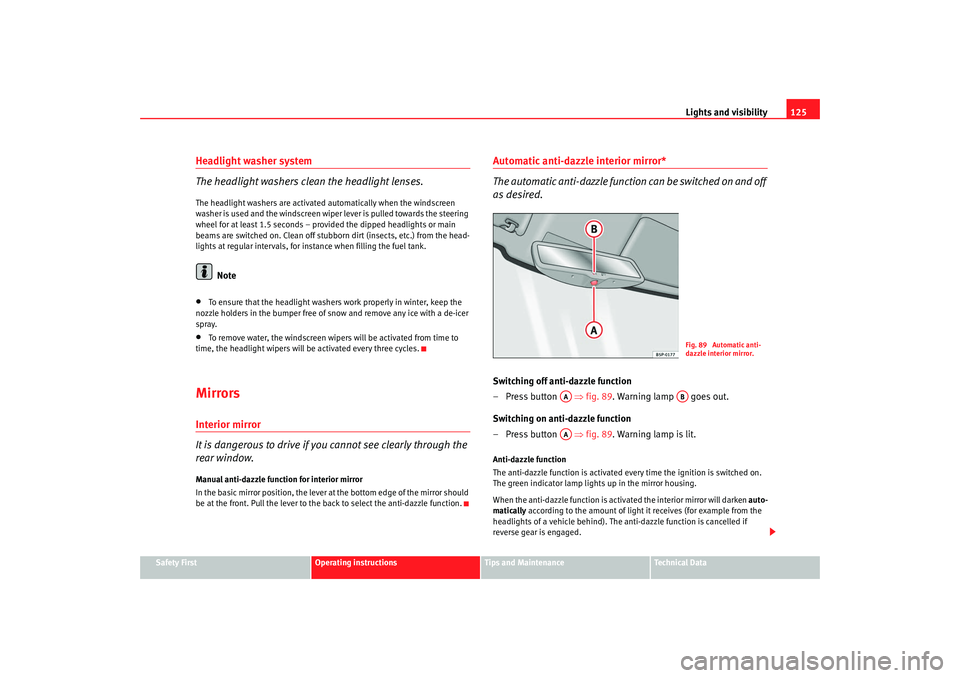
The automatic anti-da zzle function can be switched on and off
as desired.Switching off anti-dazzle function
– Press button ⇒ fig. 89. Warning lamp goes out.
Switching on anti-dazzle function
– Press button ⇒ fig. 89. Warning lamp is lit.Anti-dazzle function
The anti-dazzle function is activated every time the ignition is switched on.
The green indicator lamp ligh ts up in the mirror housing.
When the anti-dazzle function is activa ted the interior mirror will darken auto-
matically according to the amount of light it receives (for example from the
headlights of a vehicle behind). The anti-dazzle function is cancelled if
reverse gear is engaged.
Fig. 89 Automatic anti-
dazzle interior mirror.
AA
AB
AA
altea ingles.book Seite 125 Dienstag, 11. September 2007 4:39 16