lock Seat Altea 2009 Service Manual
[x] Cancel search | Manufacturer: SEAT, Model Year: 2009, Model line: Altea, Model: Seat Altea 2009Pages: 299, PDF Size: 9.39 MB
Page 115 of 299
Lights and visibility
114
NotePlease observe any relevant legal requirements which may apply in your
country.Coming home / leaving home function*
The Coming Home function is controlled manually. The
Leaving Home function is cont rolled with a photo sensor.If the Coming Home or Leaving Home function is connected, the front side
and dipped lights, the tail lights and the registration plate light will light up
to provide assistance.
Coming home function
The Coming Home function is activate d by switching off the ignition and
briefly flashing the lights. When the dr iver's door is opened, the Coming
Home lighting comes on. If the driver's door is already open when the lights
are flashed briefly, the Comi ng Home lighting comes on immediately.
When the last door of the vehicle or the tailgate is closed, the Coming Home
function starts and the switching off the headlights is delayed.
The Coming Home lighting switches off in the following cases:•
On completion of the time period established for the delay in switching off
the lights after all the vehicle doors and the tailgate have been closed.
•
If, 30 seconds after being connected, any doors or the tailgate remain
open.
•
If the light switch is turned to position
.
•
If the ignition is switched on.
Leaving home function
The Leaving Home function is activated when the vehicle is unlocked if:
•
the light control is in position
and
•
the photosensor detects “darkness”.
The Leaving Home lighting switches off in the following cases:
•
If the time period for the delay in switching off the headlamps has ended
•
If the vehicle is locked again.
•
If the light switch is turned to position
.
•
If the ignition is switched on.Note
The setting for the delay in switching off the headlamps in the Coming Home
and Leaving Home function can be chan ged or the function can be connected
or disconnected in the menu Lights and visibility ⇒ page 74.•
If the ignition key is removed while the lights are on, and the lights are
flashed briefly and the driver's door opened, no acoustic signal is heard, as
when the Coming Home function is on, the lights are automatically switched
off after a period of time (except when the light switch is in position
or
.
Altea_EN.book Seite 114 Montag, 19. Januar 2009 1:31 13
Page 119 of 299
Lights and visibility
118Indicator and main beam headlight lever
The turn signal and main beam lever also operates the
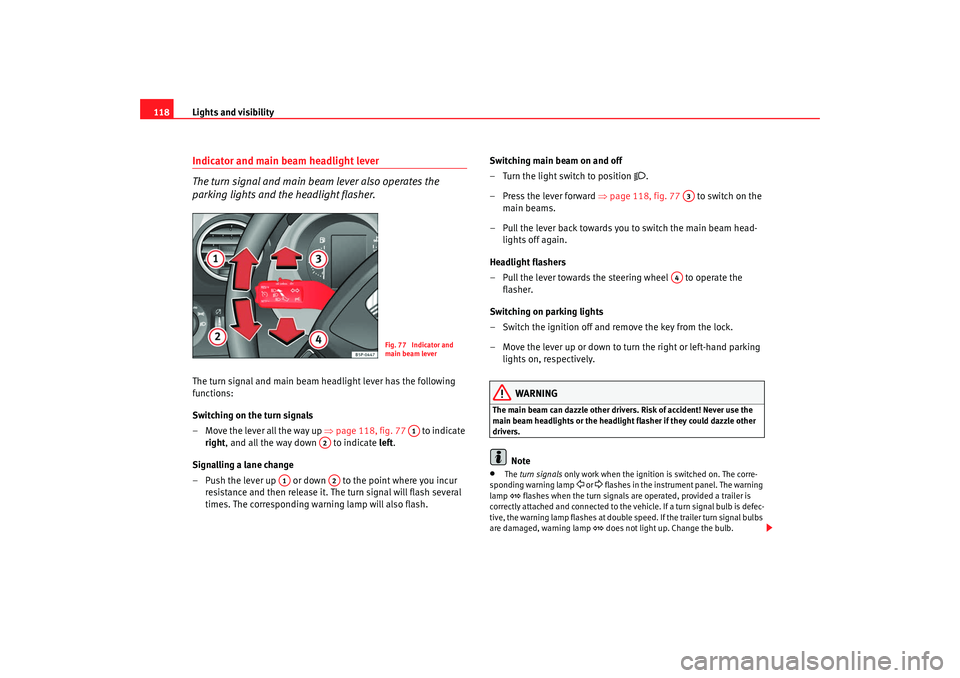
parking lights and the headlight flasher.The turn signal and main beam headlight lever has the following
functions:
Switching on the turn signals
– Move the lever all the way up ⇒page 118, fig. 77 to indicate
right , and all the way down to indicate left.
Signalling a lane change
– Push the lever up or down to the point where you incur resistance and then release it. The turn signal will flash several
times. The corresponding warning lamp will also flash. Switching main beam on and off
– Turn the light switch to position
.
–Press the lever forward ⇒ page 118, fig. 77 to switch on the
main beams.
– Pull the lever back towards you to switch the main beam head- lights off again.
Headlight flashers
– Pull the lever towards the steering wheel to operate the flasher.
Switching on parking lights
– Switch the ignition off and remove the key from the lock.
– Move the lever up or down to turn the right or left-hand parking lights on, respectively.
WARNING
The main beam can dazzle other driver s. Risk of accident! Never use the
main beam headlights or the headligh t flasher if they could dazzle other
drivers.
Note
•
The turn signals only work when the ignition is switched on. The corre-
sponding warning lamp
or flashes in the instrume nt panel. The warning
lamp
flashes when the turn signals are operated, provided a trailer is
correctly attached and connected to the vehicle. If a turn signal bulb is defec-
tive, the warning lamp flashes at double speed. If the trailer turn signal bulbs
are damaged, warning lamp
does not light up. Change the bulb.
Fig. 77 Indicator and
main beam lever
A1
A2
A1
A2
A3
A4
Altea_EN.book Seite 118 Montag, 19. Januar 2009 1:31 13
Page 120 of 299
Lights and visibility119
Safety First
Operating instructions
Practical tips
Te c h n i c a l D a t a
•
The main beam headlights can only be switched on if the dipped beam
headlights are already on. The warning lamp
then comes on in the combi-
instrument.
•
The headlight flasher comes on for as long as you pull the lever – even if
no other lights are switched on. The warning lamp
then comes on in the
combi-instrument.
•
When the parking lights are switched on, the headlight and the rear light
on the corresponding side of the vehicle light up. The parking lights will only
work if the key is removed from the ignition. If the lights are switched on, a
buzzer gives an audible warning while the driver door is open.
•
If the turn signal lever is left on after the key has been taken out of the
ignition lock, an acoustic signal sounds when the driver door is opened. This
is a reminder to switch off the turn signal, unless of course you wish to leave
the parking light on.
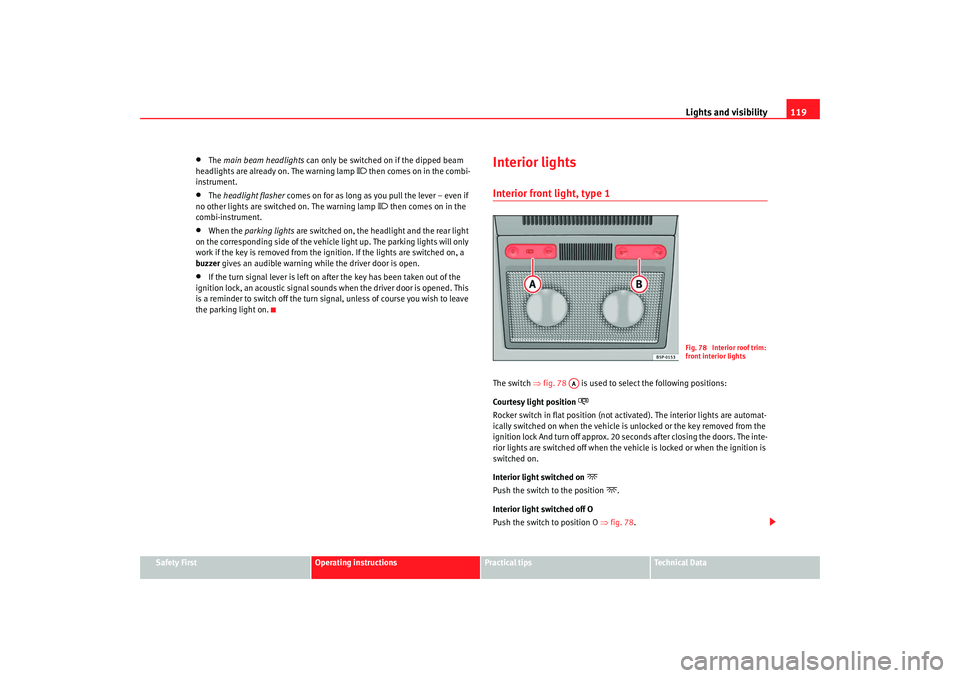
Interior lightsInterior front light, type 1 The switch ⇒fig. 78 is used to select the following positions:
Courtesy light position
Rocker switch in flat position (not ac tivated). The interior lights are automat-
ically switched on when the vehicle is unlocked or the key removed from the
ignition lock And turn off approx. 20 seconds after closing the doors. The inte-
rior lights are switched off when the vehi cle is locked or when the ignition is
switched on.
Interior light switched on
Push the switch to the position
.
Interior light switched off O
Push the switch to position O ⇒fig. 78 .
Fig. 78 Interior roof trim:
front interior lights
AA
Altea_EN.book Seite 119 Montag, 19. Januar 2009 1:31 13
Page 121 of 299
Lights and visibility
120
NoteIf not all the vehicle doors are closed, th e interior lights will be switched off
after approx. 10 minutes, providing th e key has been removed and the cour-
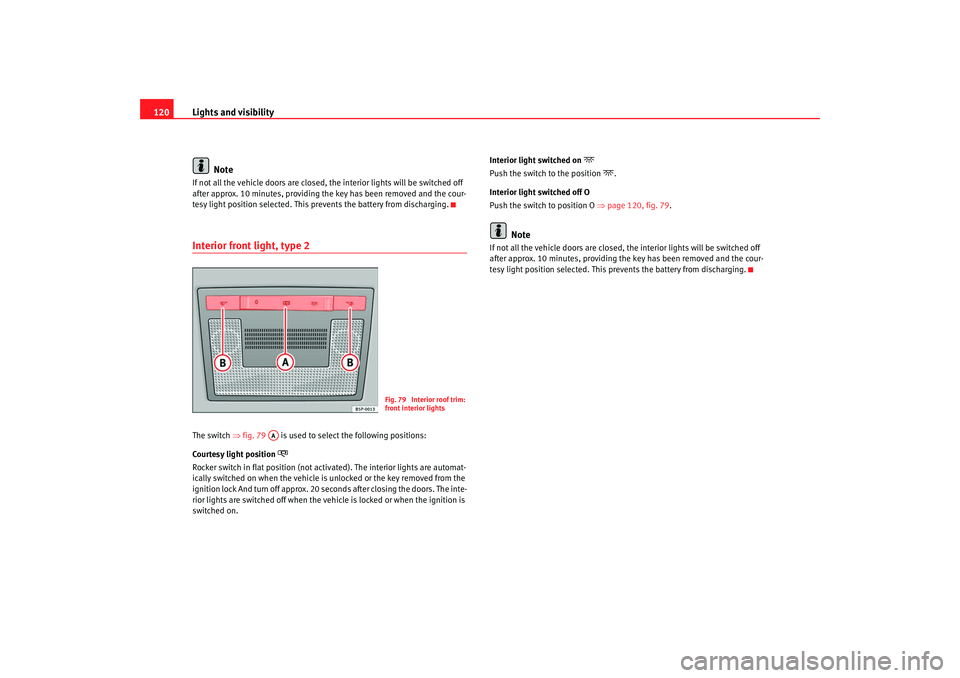
tesy light position selected. This prevents the battery from discharging.Interior front light, type 2 The switch ⇒fig. 79 is used to select the following positions:
Courtesy light position
Rocker switch in flat position (not ac tivated). The interior lights are automat-
ically switched on when the vehicle is unlocked or the key removed from the
ignition lock And turn off approx. 20 seconds after closing the doors. The inte-
rior lights are switched off when the vehicle is locked or when the ignition is
switched on. Interior light switched on
Push the switch to the position
.
Interior light switched off O
Push the switch to position O ⇒page 120, fig. 79.
Note
If not all the vehicle doors are closed, the interior lights will be switched off
after approx. 10 minutes, providing the key has been removed and the cour-
tesy light position selected. This pr events the battery from discharging.
Fig. 79 Interior roof trim:
front interior lights
AA
Altea_EN.book Seite 120 Montag, 19. Januar 2009 1:31 13
Page 122 of 299
Lights and visibility121
Safety First
Operating instructions
Practical tips
Te c h n i c a l D a t a
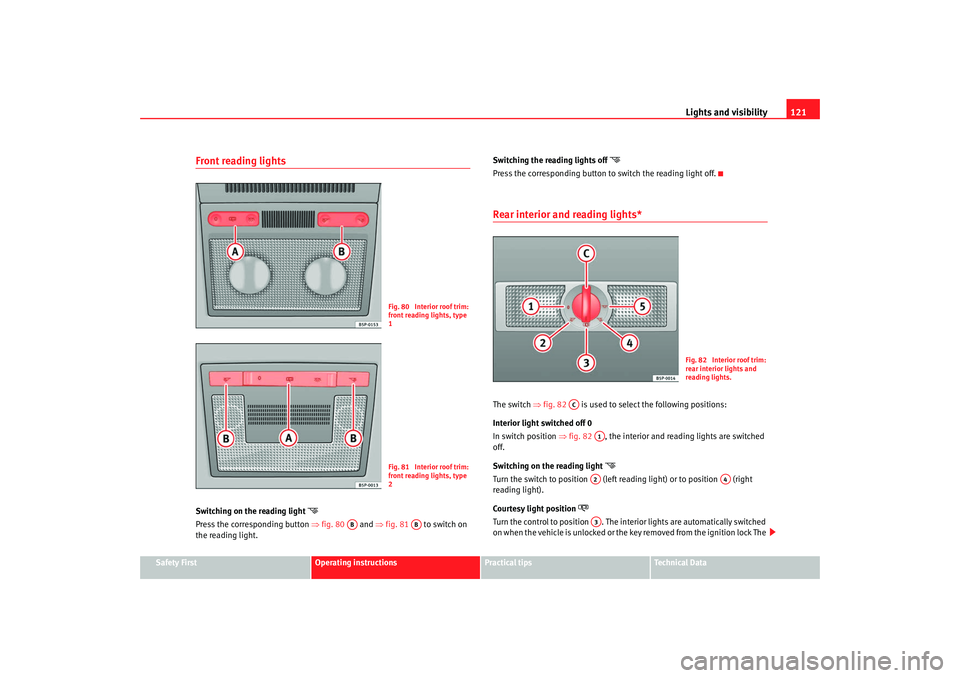
Front reading lights Switching on the reading light
Press the corresponding button ⇒fig. 80 and ⇒fig. 81 to switch on
the reading light. Switching the reading lights off
Press the corresponding button to switch the reading light off.Rear interior and reading lights* The switch
⇒fig. 82 is used to select the following positions:
Interior light switched off 0
In switch position ⇒fig. 82 , the interior and reading lights are switched
off.
Switching on the reading light
Turn the switch to position (left reading light) or to position (right
reading light).
Courtesy light position
Turn the control to position . The interior lights are automatically switched
on when the vehicle is unlocked or the key removed from the ignition lock The
Fig. 80 Interior roof trim:
front reading lights, type
1Fig. 81 Interior roof trim:
front reading lights, type
2
AB
AB
Fig. 82 Interior roof trim:
rear interior lights and
reading lights.
AC
A1A2
A4
A3
Altea_EN.book Seite 121 Montag, 19. Januar 2009 1:31 13
Page 123 of 299
Lights and visibility
122light turns off about 20 seconds after closing the doors. The interior lights are
switched off when the vehicle is locked or when the ignition is switched on.
Interior lights or both reading lights switched on
Turn the control to position .
Note
If not all the vehicle doors are closed, th e interior lights will be switched off
after approx. 10 minutes, providing th e key has been removed and the cour-
tesy light position selected. This prevents the battery from discharging.VisibilitySun visors
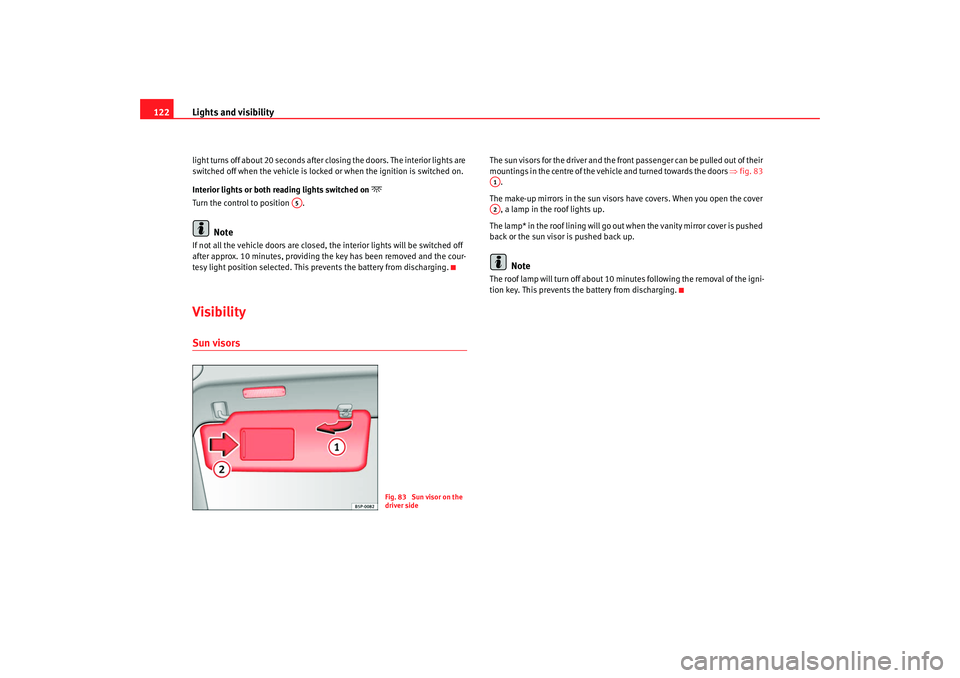
The sun visors for the driver and the front passenger can be pulled out of their
mountings in the centre of the vehicle and turned towards the doors ⇒fig. 83
.
The make-up mirrors in the sun visors have covers. When you open the cover
, a lamp in the roof lights up.
The lamp* in the roof lining will go out when the vanity mirror cover is pushed
back or the sun visor is pushed back up.
Note
The roof lamp will turn of f about 10 minutes following the removal of the igni-
tion key. This prevents the battery from discharging.
A5
Fig. 83 Sun visor on the
driver side
A1A2
Altea_EN.book Seite 122 Montag, 19. Januar 2009 1:31 13
Page 125 of 299
Lights and visibility
124
WARNING
•
Worn and dirty wiper blades obstruct visibility and reduce safety levels.
•
In cold conditions, you should not use the wash / wipe system unless
you have warmed the windscreen with the heating and ventilation system.
The washer fluid could otherwise freeze on the windscreen and obscure
your view of the road.
•
Always note the corresponding warnings on ⇒page 225.Caution
In icy conditions, always check that the wiper blades are not frozen to the
glass before using the wipers for the first time. If you switch on the wipers
when the wiper blades are frozen to the windscreen, you could damage both
the wiper blades and the wiper motor.
Note
•
The windscreen wipers will only work when the ignition is switched on.
•
In certain versions of vehicles with alarms, the windscreen wiper will only
work when the ignition is on and the bonnet closed.
•
When in use, the wipers do not go as far as the rest position. When the
lever is moved to position 0, they are totally hidden.
•
The next speed down will automatically be selected if wiper speed
⇒ page 123, fig. 84 or is selected when the vehicle stops. The set speed
will be resumed when the vehicle starts again
•
The windscreen will be wiped again after approximately five seconds once
the “automatic wipe/wash system” has been operated, provided the vehicle
is in transit (drip function). If you activate the wipers less than three secionds
after the drip function, a new wash sequence will begin without the last wipe.
For the “drip” function to work again, you have to turn the ignition off and
then on again.
•
When the “intermittent wipe function” is on, the intervals are directly
proportional to the speed. This way, the higher the vehicle speed the shorter
the intervals.
•
The wiper will try to wipe away any obstacles that are on the windscreen.
The wiper will stop moving if the obstacle blocks its path. Remove the
obstacle and switch the wiper back on again.
•
Before removing any objects that may be trapped in the side areas of the
windscreen, always move the wiper arms to the service position (horizontal).
•
The heat output of the heated jets is controlled automatically when the
ignition is switched on, depending upon the outside temperature.
A2
A3
Altea_EN.book Seite 124 Montag, 19. Januar 2009 1:31 13
Page 136 of 299
Seats and stowage135
Safety First
Operating instructions
Practical tips
Te c h n i c a l D a t a
Rear seat benchSeat adjustment
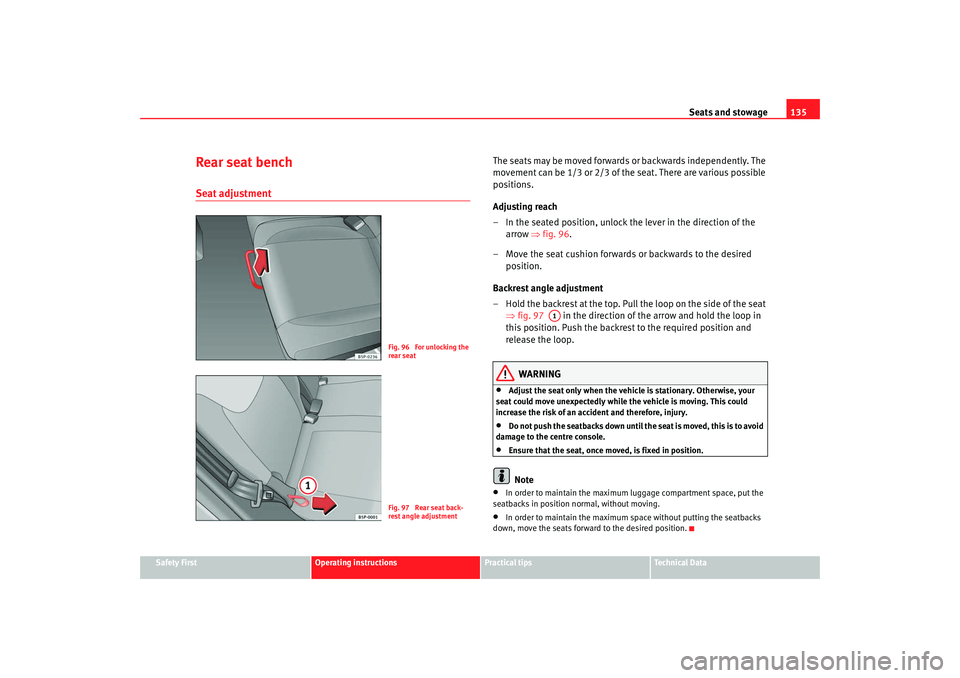
The seats may be moved forwards or backwards independently. The
movement can be 1/3 or 2/3 of the seat. There are various possible
positions.
Adjusting reach
– In the seated position, unlock the lever in the direction of the
arrow ⇒fig. 96.
– Move the seat cushion forwards or backwards to the desired position.
Backrest angle adjustment
– Hold the backrest at the top. Pull the loop on the side of the seat ⇒fig. 97 in the direction of the arrow and hold the loop in
this position. Push the backrest to the required position and
release the loop.
WARNING
•
Adjust the seat only when the vehicle is stationary. Otherwise, your
seat could move unexpectedly while the vehicle is moving. This could
increase the risk of an accident and therefore, injury.
•
Do not push the seatbacks down until th e seat is moved, this is to avoid
damage to the centre console.
•
Ensure that the seat, once moved, is fixed in position.Note
•
In order to maintain the maximum luggage compartment space, put the
seatbacks in position normal, without moving.
•
In order to maintain the maximum space without putting the seatbacks
down, move the seats forward to the desired position.
Fig. 96 For unlocking the
rear seatFig. 97 Rear seat back-
rest angle adjustment
A1
Altea_EN.book Seite 135 Montag, 19. Januar 2009 1:31 13
Page 137 of 299
Seats and stowage
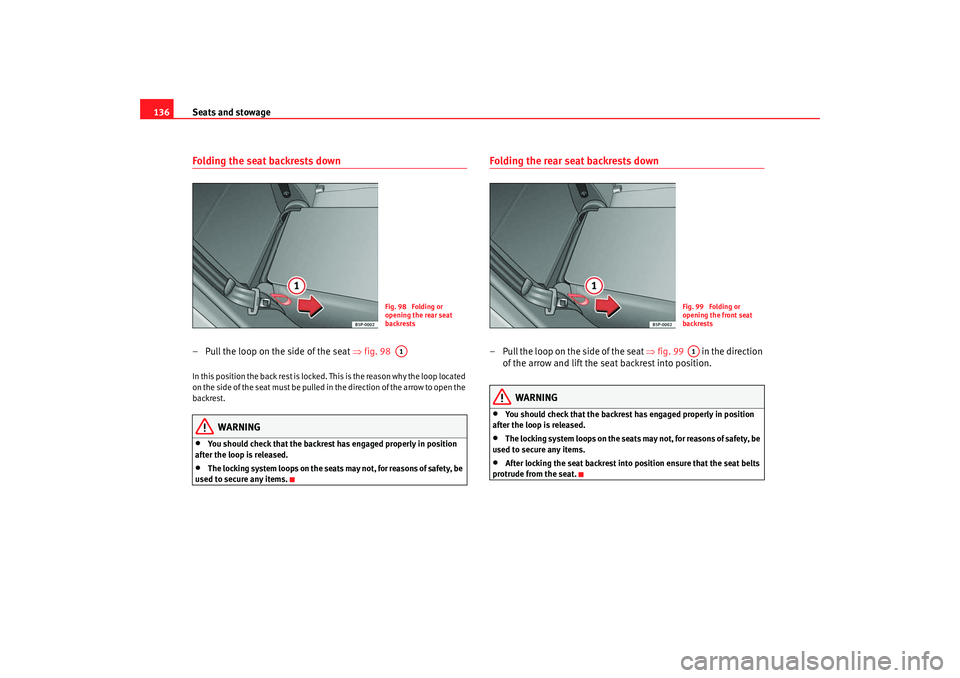
136Folding the seat backrests down – Pull the loop on the side of the seat ⇒fig. 98 In this position the back rest is locked. This is the reason why the loop located
on the side of the seat must be pulled in the direction of the arrow to open the
backrest.
WARNING
•
You should check that the backrest has engaged properly in position
after the loop is released.
•
The locking system loops on the seats may not, for reasons of safety, be
used to secure any items.
Folding the rear seat backrests down– Pull the loop on the side of the seat ⇒fig. 99 in the direction
of the arrow and lift the seat backrest into position.
WARNING
•
You should check that the backrest has engaged properly in position
after the loop is released.
•
The locking system loops on the seats may not, for reasons of safety, be
used to secure any items.
•
After locking the seat backrest into po sition ensure that the seat belts
protrude from the seat.
Fig. 98 Folding or
opening the rear seat
backrestsA1
Fig. 99 Folding or
opening the front seat
backrestsA1
Altea_EN.book Seite 136 Montag, 19. Januar 2009 1:31 13
Page 139 of 299
Seats and stowage
138
NoteThe CD changer is located in this compartment.Stowage areas under the front seats*
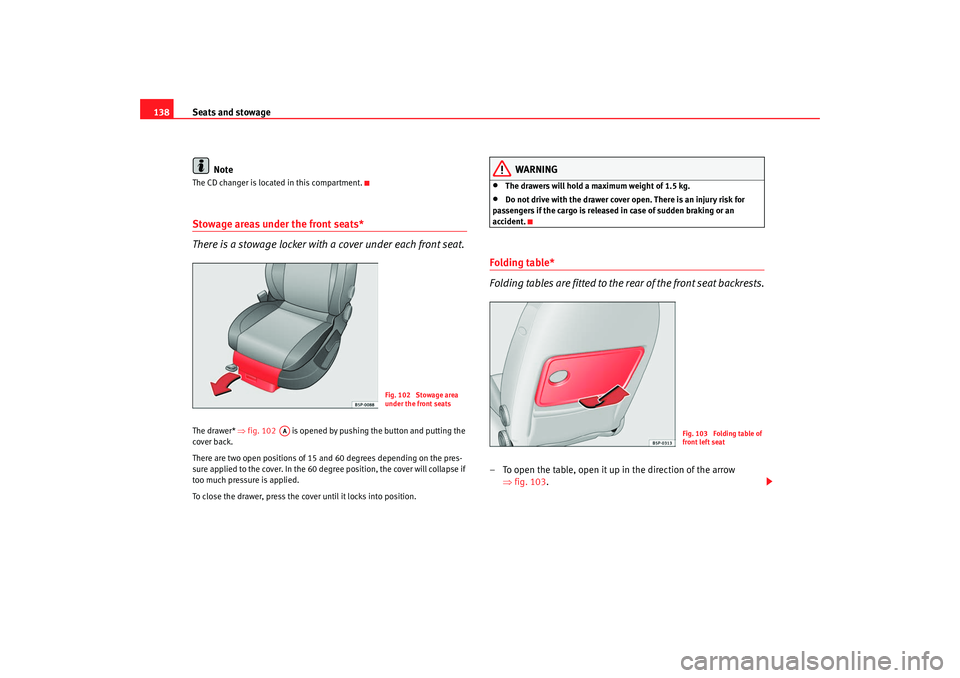
There is a stowage locker with a cover under each front seat.The drawer* ⇒fig. 102 is opened by pushing the button and putting the
cover back.
There are two open positions of 15 and 60 degrees depending on the pres-
sure applied to the cover. In the 60 degree position, the cover will collapse if
too much pressure is applied.
To close the drawer, press the cover until it locks into position.
WARNING
•
The drawers will hold a maximum weight of 1.5 kg.
•
Do not drive with the drawer cover open. There is an injury risk for
passengers if the cargo is released in case of sudden braking or an
accident.
Folding table*
Folding tables are fitted to the rear of the front seat backrests.– To open the table, open it up in the direction of the arrow ⇒fig. 103.
Fig. 102 Stowage area
under the front seats
AA
Fig. 103 Folding table of
front left seat
Altea_EN.book Seite 138 Montag, 19. Januar 2009 1:31 13