instrument panel Seat Altea 2010 User Guide
[x] Cancel search | Manufacturer: SEAT, Model Year: 2010, Model line: Altea, Model: Seat Altea 2010Pages: 310, PDF Size: 7.46 MB
Page 90 of 310
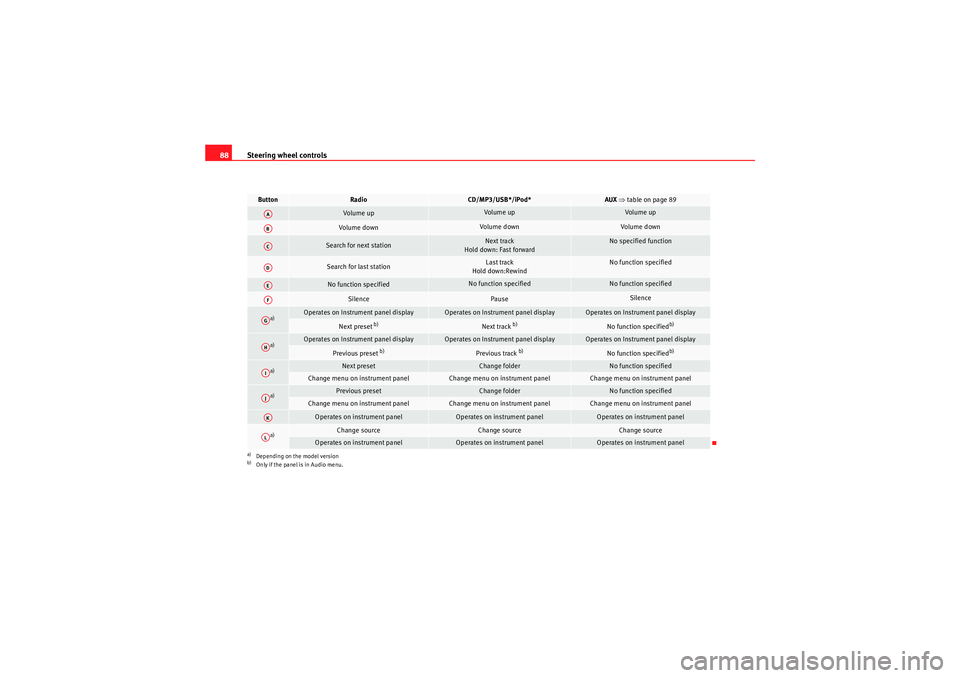
Steering wheel controls
88Button
Radio
CD/MP3/USB*/iPod*
AUX ⇒ table on page 89
Volume up
Volume up
Volume up
Volume down
Volume down
Volume down
Search for next station
Next track
Hold down: Fast forward
No specified function
Search for last station
Last track
Hold down:Rewind
No function specified
No function specified
No function specified
No function specified
Silence
Pause
Silence
a)
a)Depending on the model version
Operates on Instrument panel display
Operates on Instrument panel display
Operates on Instrument panel display
Next preset
b)
b)Only if the panel is in Audio menu.
Next track
b)
No function specified
b)
a)
Operates on Instrument panel display
Operates on Instrument panel display
Operates on Instrument panel display
Previous preset
b)
Previous track
b)
No function specified
b)
a)
Next preset
Change folder
No function specified
Change menu on instrument panel
Change menu on instrument panel
Change menu on instrument panel
a)
Previous preset
Change folder
No function specified
Change menu on instrument panel
Change menu on instrument panel
Change menu on instrument panel
Operates on instrument panel
Operates on instrument panel
Operates on instrument panel
a)
Change source
Change source
Change source
Operates on instrument panel
Operates on instrument panel
Operates on instrument panel
AAABACADAEAFAGAHAIAJAKAL
altea_EN Seite 88 Mittwoch, 26. August 2009 6:00 18
Page 91 of 310
Steering wheel controls89
Safety First
Operating instructions
Practical tips
Technical Data
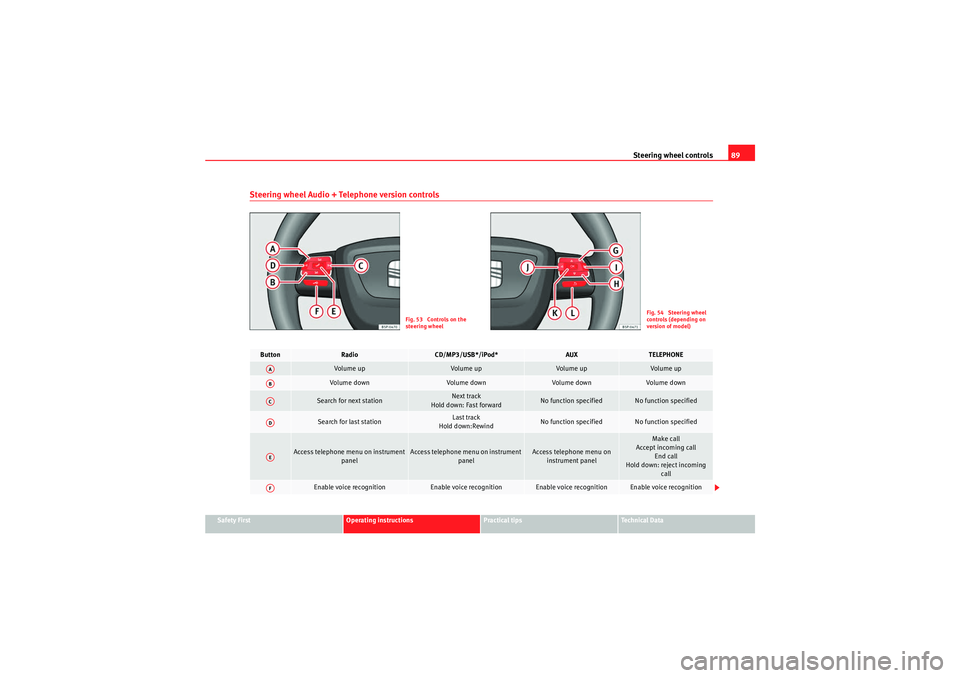
Steering wheel Audio + Telephone version controls
Fig. 53 Controls on the
steering wheel
Fig. 54 Steering wheel
controls (depending on
version of model)
Button
Radio
CD/MP3/USB*/iPod*
AUX
TELEPHONE
Volume up
Volume up
Volume up
Volume up
Vol um e d own
Volume down
Volume down
Volume down
Search for next station
Next track
Hold down: Fast forward
No function specified
No function specified
Search for last station
Last track
Hold down:Rewind
No function specified
No function specified
Access telephone menu on instrument panel
Access telephone menu on instrument panel
Access telephone menu on instrument panel
Make call
Accept incoming call End call
Hold down: reject incoming call
Enable voice recognition
Enable voice recognition
Enable voice recognition
Enable voice recognition
AAABACADAEAF
altea_EN Seite 89 Mittwoch, 26. August 2009 6:00 18
Page 92 of 310
Steering wheel controls
90
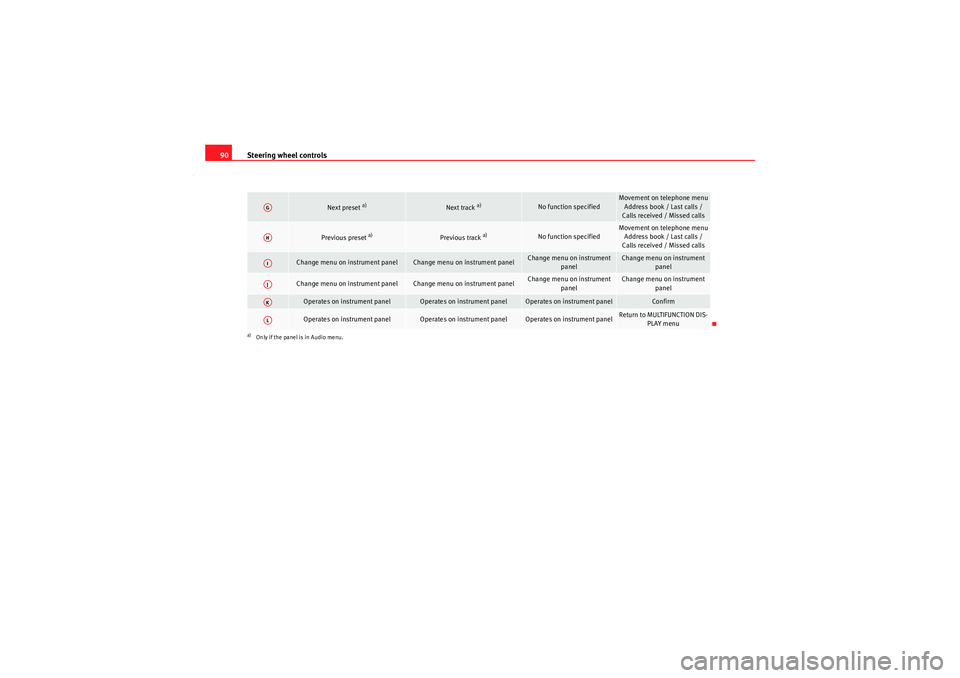
Next preset
a)
Next track
a)
No function specified
Movement on telephone menu
Address book / Last calls /
Calls received / Missed calls
Previous preset
a)
Previous track
a)
No function specified
Movement on telephone menu Address book / Last calls /
Calls received / Missed calls
Change menu on instrument panel
Change menu on instrument panel
Change menu on instrument panel
Change menu on instrument panel
Change menu on instrument panel
Change menu on instrument panel
Change menu on instrument
panel
Change menu on instrument panel
Operates on instrument panel
Operates on instrument panel
Operates on instrument panel
Confirm
Operates on instrument panel
Operates on instrument panel
Operates on instrument panel
Return to MULTIFUNCTION DIS-PLAY menu
a)Only if the panel is in Audio menu.AGAHAIAJAKAL
altea_EN Seite 90 Mittwoch, 26. August 2009 6:00 18
Page 93 of 310
Steering wheel controls91
Safety First
Operating instructions
Practical tips
Technical Data
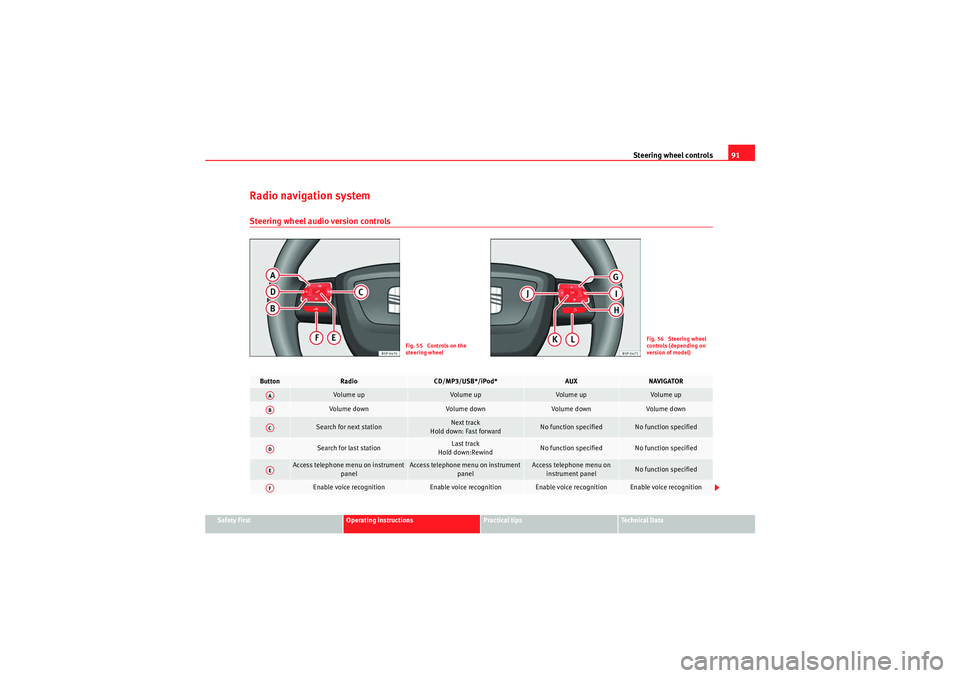
Radio navigation systemSteering wheel audio version controls
Fig. 55 Controls on the
steering wheel
Fig. 56 Steering wheel
controls (depending on
version of model)
Button
Radio
CD/MP3/USB*/iPod*
AUX
NAVIGATOR
Vol um e u p
Volume up
Volume up
Volume up
Volume down
Vol um e d own
Volume down
Volume down
Search for next station
Next track
Hold down: Fast forward
No function specified
No function specified
Search for last station
Last track
Hold down:Rewind
No function specified
No function specified
Access telephone menu on instrument panel
Access telephone menu on instrument panel
Access telephone menu on instrument panel
No function specified
Enable voice recognition
Enable voice recognition
Enable voice recognition
Enable voice recognition
AAABACADAEAF
altea_EN Seite 91 Mittwoch, 26. August 2009 6:00 18
Page 94 of 310
Steering wheel controls
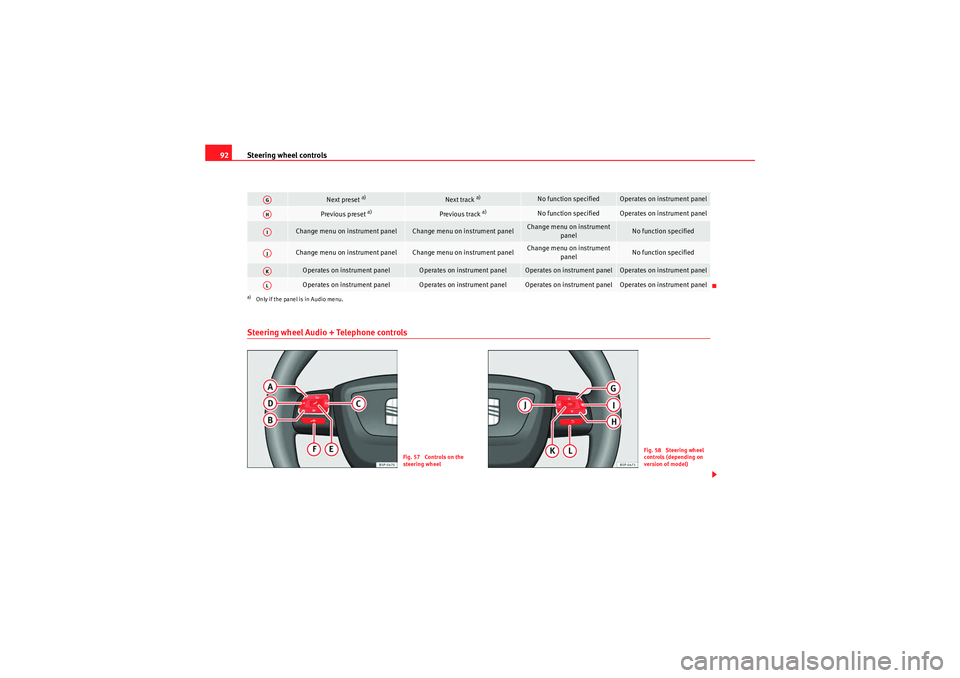
92Steering wheel Audio + Telephone controls
Next preset
a)
Next track
a)
No function specified
Operates on instrument panel
Previous preset
a)
Previous track
a)
No function specified
Operates on instrument panel
Change menu on instrument panel
Change menu on instrument panel
Change menu on instrument
panel
No function specified
Change menu on instrument panel
Change menu on instrument panel
Change menu on instrument panel
No function specified
Operates on instrument panel
Operates on instrument panel
Operates on instrument panel
Operates on instrument panel
Operates on instrument panel
Operates on instrument panel
Operates on instrument panel
Operates on instrument panel
a)Only if the panel is in Audio menu.AGAHAIAJAKAL
Fig. 57 Controls on the
steering wheel
Fig. 58 Steering wheel
controls (depending on
version of model)
altea_EN Seite 92 Mittwoch, 26. August 2009 6:00 18
Page 95 of 310
Steering wheel controls93
Safety First
Operating instructions
Practical tips
Technical Data
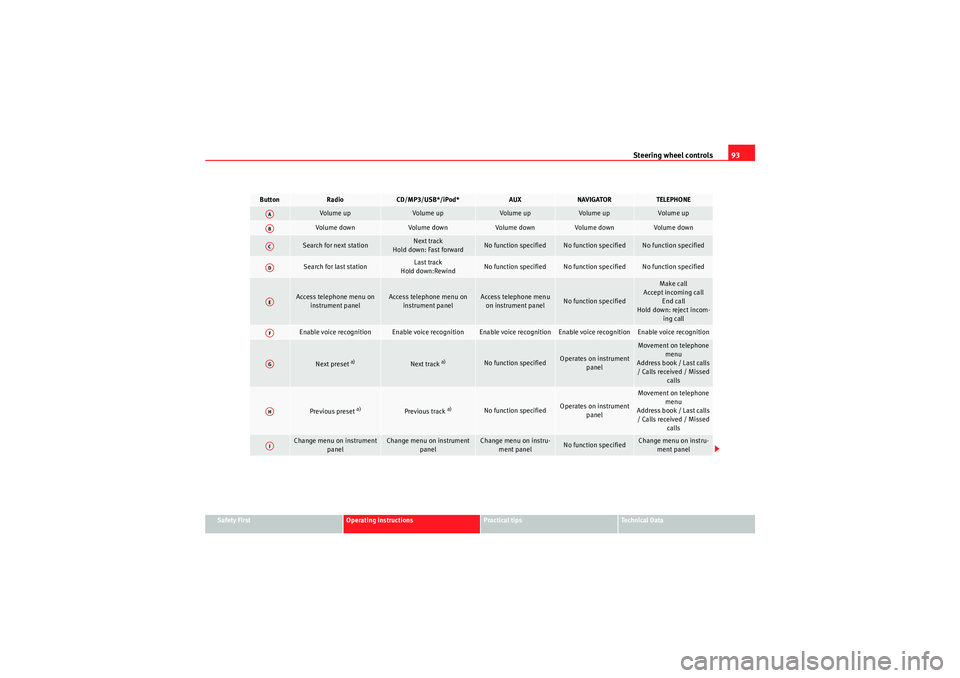
Button
Radio
CD/MP3/USB*/iPod*
AUX
NAVIGATOR
TELEPHONE
Volume up
Volume up
Volume up
Volume up
Volume up
Volume down
Volume down
Volume down
Volume down
Volume down
Search for next station
Next track
Hold down: Fast forward
No function specified
No function specified
No function specified
Search for last station
Last track
Hold down:Rewind
No function specified
No function specified
No function specified
Access telephone menu on instrument panel
Access telephone menu on instrument panel
Access telephone menu on instrument panel
No function specified
Make call
Accept incoming call End call
Hold down: reject incom- ing call
Enable voice recognition
Enable voice recognition
Enable voice recognition
Enable voice recognition
Enable voice recognition
Next preset
a)
Next track
a)
No function specified
Operates on instrument panel
Movement on telephone menu
Address book / Last calls / Calls received / Missed calls
Previous preset
a)
Previous track
a)
No function specified
Operates on instrument panel
Movement on telephone
menu
Address book / Last calls / Calls received / Missed calls
Change menu on instrument panel
Change menu on instrument panel
Change menu on instru-ment panel
No function specified
Change menu on instru-ment panel
AAABACADAEAFAGAHAI
altea_EN Seite 93 Mittwoch, 26. August 2009 6:00 18
Page 96 of 310
Steering wheel controls
94
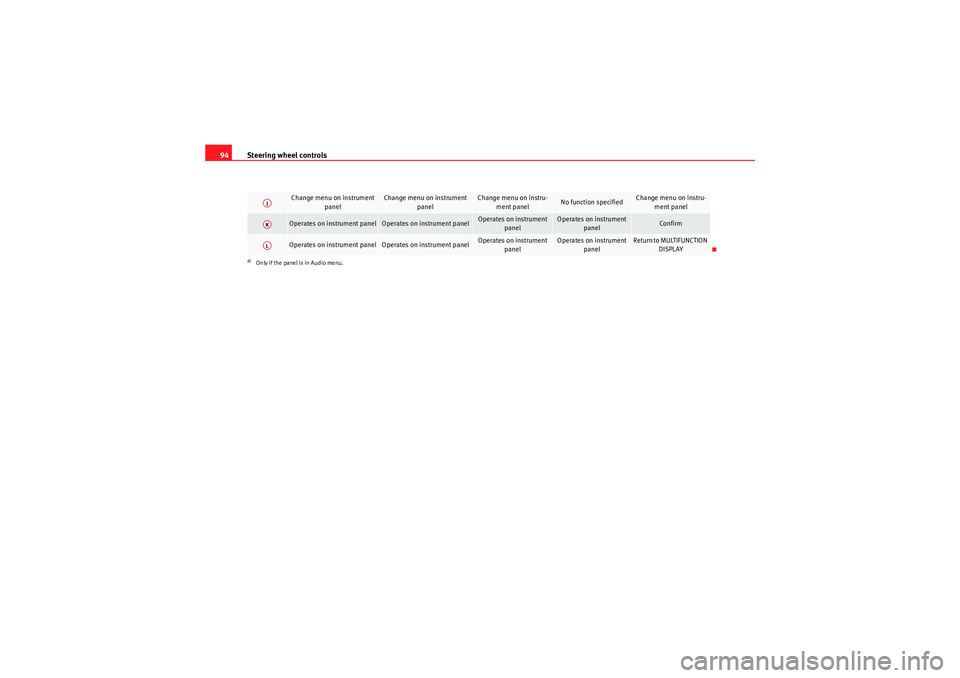
Change menu on instrument
panel
Change menu on instrument panel
Change menu on instru-ment panel
No function specified
Change menu on instru-ment panel
Operates on instrument panel
Operates on instrument panel
Operates on instrument panel
Operates on instrument panel
Confirm
Operates on instrument panel
Operates on instrument panel
Operates on instrument panel
Operates on instrument panel
Return to MULTIFUNCTION DISPLAY
a)Only if the panel is in Audio menu.AJAKAL
altea_EN Seite 94 Mittwoch, 26. August 2009 6:00 18
Page 108 of 310
Unlocking and locking
106Ta i l g a t eUnlocking and locking
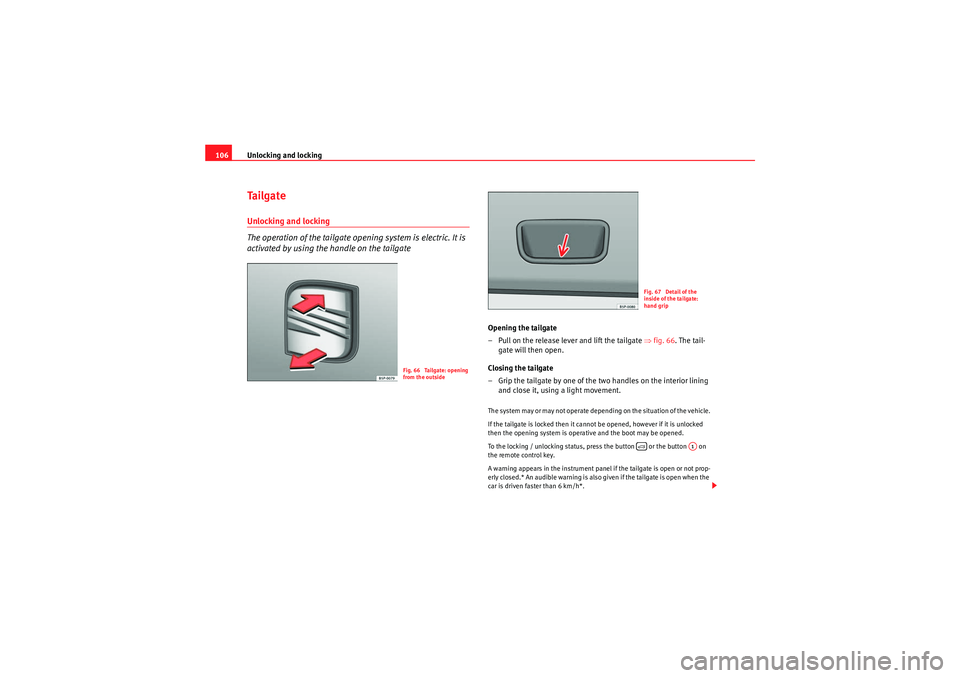
The operation of the tailgate opening system is electric. It is
activated by using the handle on the tailgate
Opening the tailgate
– Pull on the release lever and lift the tailgate ⇒fig. 66. The tail-
gate will then open.
Closing the tailgate
– Grip the tailgate by one of the two handles on the interior lining and close it, using a light movement.The system may or may not operate depending on the situation of the vehicle.
If the tailgate is locked then it cannot be opened, however if it is unlocked
then the opening system is operative and the boot may be opened.
To the locking / unlocking status, press the button or the button on
the remote control key.
A warning appears in the instrument panel if the tailgate is open or not prop-
erly closed.* An audible warning is also given if the tailgate is open when the
car is driven faster than 6 km/h*.
Fig. 66 Tailgate: opening
from the outside
Fig. 67 Detail of the
inside of the tailgate:
hand grip
A1
altea_EN Seite 106 Mittwoch, 26. August 2009 6:00 18
Page 115 of 310
Lights and visibility113
Safety First
Operating instructions
Practical tips
Technical Data
Lights and visibilityLightsSwitching lights on and off
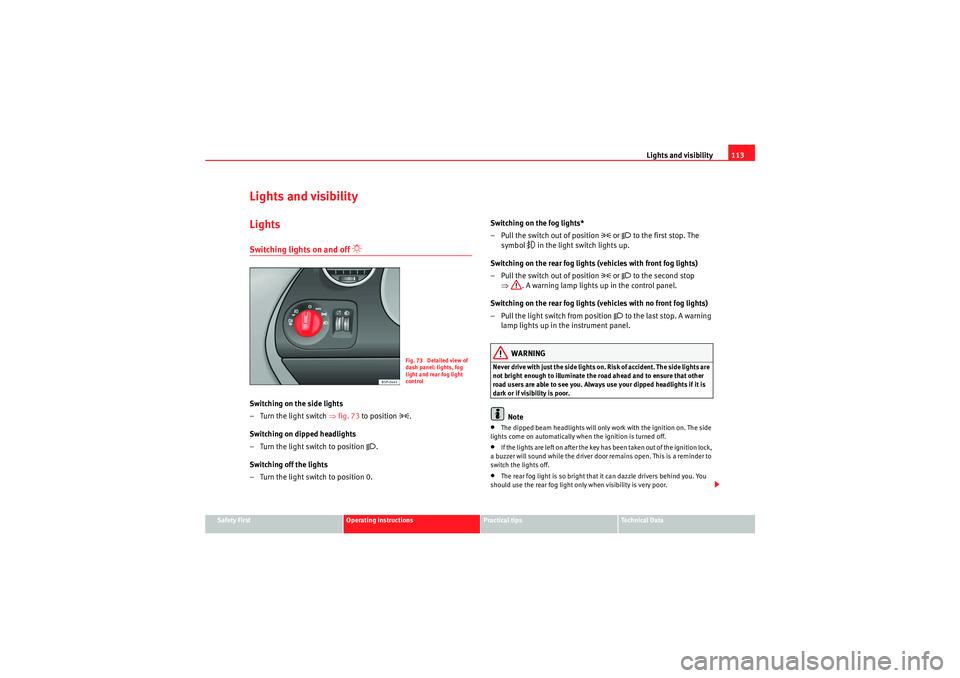
Switching on the side lights
–Turn the light switch ⇒ fig. 73 to position
.
Switching on dipped headlights
– Turn the light switch to position
.
Switching off the lights
– Turn the light switch to position 0. Switching on the fog lights*
– Pull the switch out of position
or to the first stop. The
symbol
in the light switch lights up.
Switching on the rear fog lights (vehicles with front fog lights)
– Pull the switch out of position
or to the second stop
⇒ . A warning lamp lights up in the control panel.
Switching on the rear fog lights (vehicles with no front fog lights)
– Pull the light switch from position
to the last stop. A warning
lamp lights up in the instrument panel.
WARNING
Never drive with just the side lights on. Risk of accident. The side lights are
not bright enough to illuminate the road ahead and to ensure that other
road users are able to see you. Always use your dipped headlights if it is
dark or if visibility is poor.
Note
•The dipped beam headlights will only work with the ignition on. The side
lights come on automatically when the ignition is turned off.•If the lights are left on after the key has been taken out of the ignition lock,
a buzzer will sound while the driver door remains open. This is a reminder to
switch the lights off.•The rear fog light is so bright that it can dazzle drivers behind you. You
should use the rear fog light only when visibility is very poor.
Fig. 73 Detailed view of
dash panel: lights, fog
light and rear fog light
control
altea_EN Seite 113 Mittwoch, 26. August 2009 6:00 18
Page 117 of 310
Lights and visibility115
Safety First
Operating instructions
Practical tips
Technical Data
•If the daylight driving automatic light function is switched on, the fog
lights or rear fog light cannot be switched on in addition.•The use of the lighting described here is subject to the relevant statutory
requirements.•Do not put stickers on the windscreen in front of the sensor. This may
cause disruptions or faults in the automatic lighting system.•To avoid damage to the tail lights, the lights mounted on the tailgate go
off when the tailgate is opened (according to country).Daytime lights*
The daytime light reduces the risk of accidents by increasing
the visibility of the vehicle. The daytime running lights are
enabled automatically when the ignition is switched on. It is
automatically switched off when the side lights are turned on.Daytime lights (halogen lamps)
19)
The daytime lights increase road safety in vehicles fitted with halogen lamps.
These include the dipped, side and registration plate lights.
The daytime lights are switched on each time the ignition is turned on if the
light setting is in position 0 or
. Depending upon the model, a control
lamp
on the light control switch or the lighting up of the instrument panel
will indicate that the daytime lighting is on.
It is not possible for the driver to switch the daytime lights on or off. Please
contact a qualified workshop if you wish to deactivate the lights. Daytime lights (bi-xenon lamps)
The daytime lights increase road safety in vehicles fitted with bi-xenon lamps.
The lights are built-in separately to the headlights and are switched on each
time the ignition is turned on if the light setting is in position
0 or
.
Automatic control of the dipped light in combination with the daytime
lighting (bi-xenon headlamps)
If the dipped light control and the daytime lighting are activated at the same
time, the dipped lights and the instrument panel lighting will automatically
come on as required (e.g. on entering a tunnel) and the daytime lights will go
off. When the automatic dipped light control switches off the dipped lights
(e.g. on coming out of the tunnel), the daytime lights come back on.
Activating the daytime lights*
With the ignition switched off, move the indicator and main beam lever
upwards and back (right indicator and headlamp flash) and hold in this posi-
tion.
Switch on the ignition for 3 seconds while holding this position. The daytime
lights are activated and can be switched on.
Deactivating the daytime lights
With the ignition switched off, move the indicator and main beam lever
upwards and back (left indicator and headlamp flash) and hold in this posi-
tion.
Switch on the ignition for 3 seconds while holding this position. The daytime
lights are deactivated and can not be switched on.
Deactivating daytime lights (bi-xenon lamps)
With the ignition switched off, move the indicator and main beam lever
upwards and back (left indicator and headlamp flash).
Switch on the ignition for 3 seconds. The daytime lights are deactivated and
can not be switched on.
19)It is only available in some countries or as an optional extra
altea_EN Seite 115 Mittwoch, 26. August 2009 6:00 18