wheel Seat Altea 2010 Service Manual
[x] Cancel search | Manufacturer: SEAT, Model Year: 2010, Model line: Altea, Model: Seat Altea 2010Pages: 310, PDF Size: 7.46 MB
Page 137 of 310
Seats and stowage135
Safety First
Operating instructions
Practical tips
Technical Data
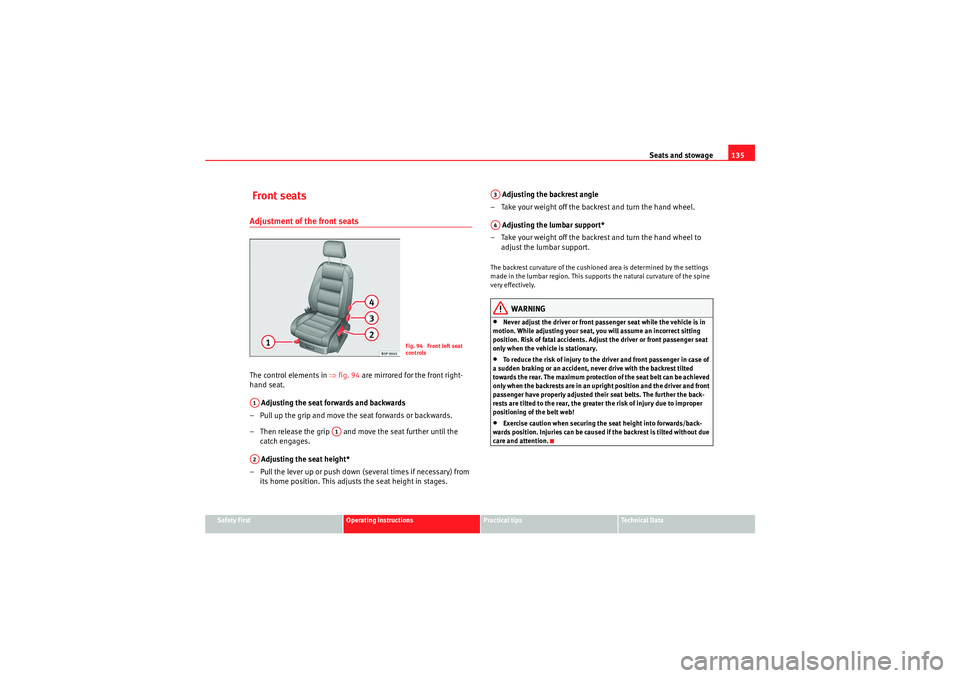
Front seatsAdjustment of the front seatsThe control elements in ⇒fig. 94 are mirrored for the front right-
hand seat.
Adjusting the seat forwards and backwards
– Pull up the grip and move the seat forwards or backwards.
– Then release the grip and move the seat further until the catch engages.
Adjusting the seat height*
– Pull the lever up or push down (several times if necessary) from its home position. This adjusts the seat height in stages. Adjusting the backrest angle
– Take your weight off the backrest and turn the hand wheel.
Adjusting the lumbar support*
– Take your weight off the backrest and turn the hand wheel to adjust the lumbar support.
The backrest curvature of the cushioned area is determined by the settings
made in the lumbar region. This supports the natural curvature of the spine
very effectively.
WARNING
•Never adjust the driver or front passenger seat while the vehicle is in
motion. While adjusting your seat, you will assume an incorrect sitting
position. Risk of fatal accidents. Adjust the driver or front passenger seat
only when the vehicle is stationary.•To reduce the risk of injury to the driver and front passenger in case of
a sudden braking or an accident, never drive with the backrest tilted
towards the rear. The maximum protection of the seat belt can be achieved
only when the backrests are in an upright position and the driver and front
passenger have properly adjusted their seat belts. The further the back-
rests are tilted to the rear, the greater the risk of injury due to improper
positioning of the belt web!•Exercise caution when securing the seat height into forwards/back-
wards position. Injuries can be caused if the backrest is tilted without due
care and attention.
Fig. 94 Front left seat
controls
A1
A1
A2
A3A4
altea_EN Seite 135 Mittwoch, 26. August 2009 6:00 18
Page 138 of 310
Seats and stowage
136Heated seats*
The front seat cushions and backrests can be heated electri-
cally.
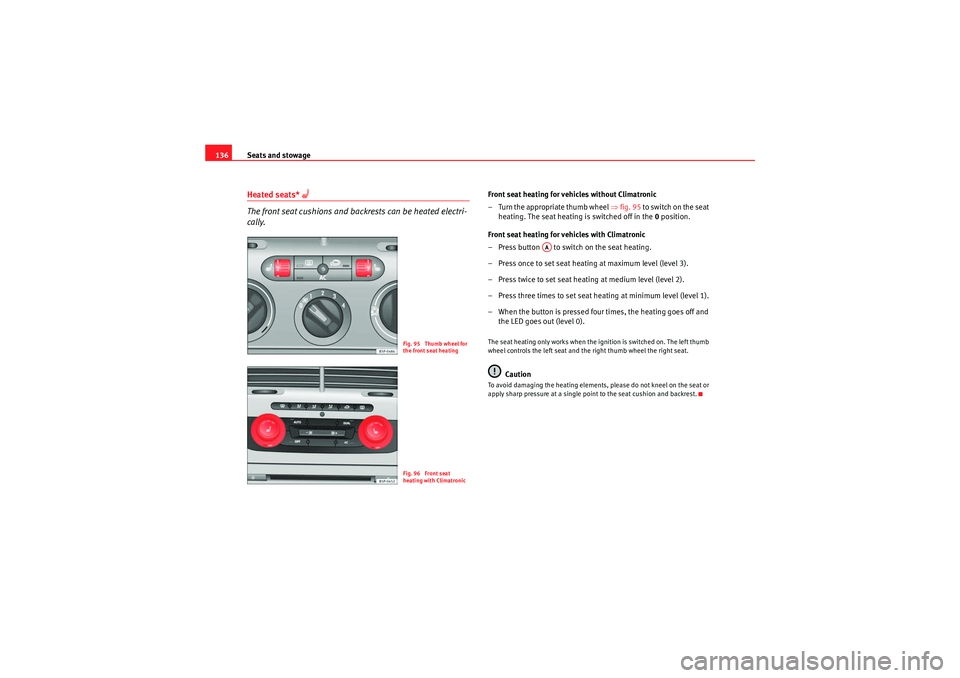
Front seat heating for vehicles without Climatronic
– Turn the appropriate thumb wheel ⇒fig. 95 to switch on the seat
heating. The seat heating is switched off in the 0 position.
Front seat heating for vehicles with Climatronic
– Press button to switch on the seat heating.
– Press once to set seat heating at maximum level (level 3).
– Press twice to set seat heating at medium level (level 2).
– Press three times to set seat heating at minimum level (level 1).
– When the button is pressed four times, the heating goes off and the LED goes out (level 0).The seat heating only works when the ignition is switched on. The left thumb
wheel controls the left seat and the right thumb wheel the right seat.
Caution
To avoid damaging the heating elements, please do not kneel on the seat or
apply sharp pressure at a single point to the seat cushion and backrest.
Fig. 95 Thumb wheel for
the front seat heatingFig. 96 Front seat
heating with Climatronic
AA
altea_EN Seite 136 Mittwoch, 26. August 2009 6:00 18
Page 144 of 310
Seats and stowage
142Stowage in the luggage compartment*
There is a variable stowage area* in the luggage compart-
ment floor.
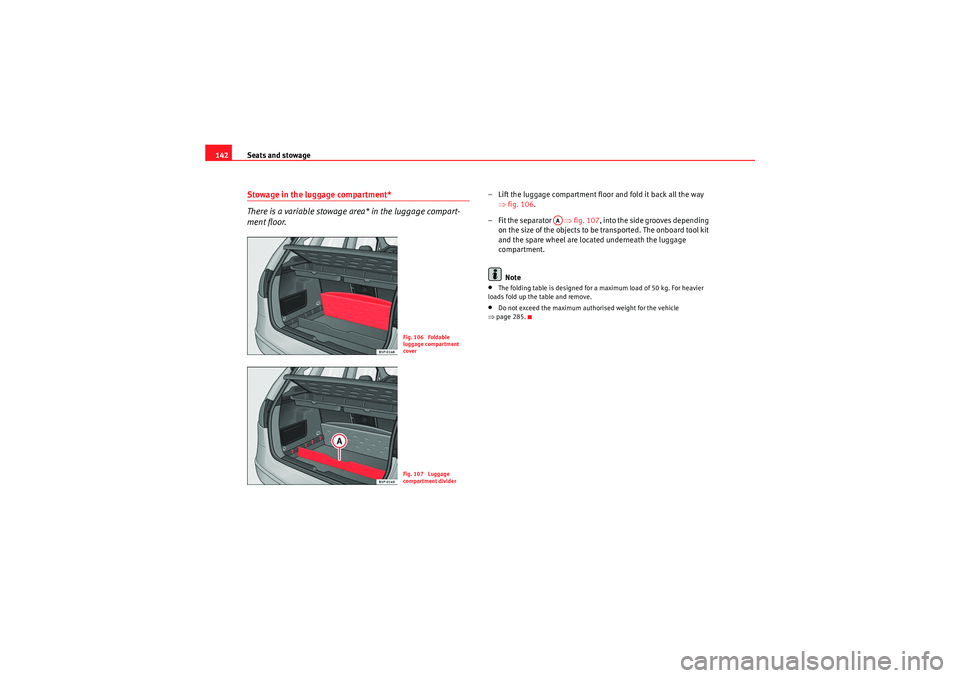
– Lift the luggage compartment floor and fold it back all the way
⇒fig. 106 .
–Fit the separator ⇒ fig. 107, into the side grooves depending
on the size of the objects to be transported. The onboard tool kit
and the spare wheel are located underneath the luggage
compartment.
Note•The folding table is designed for a maximum load of 50 kg. For heavier
loads fold up the table and remove.•Do not exceed the maximum authorised weight for the vehicle
⇒ page 285.
Fig. 106 Foldable
luggage compartment
coverFig. 107 Luggage
compartment divider
AA
altea_EN Seite 142 Mittwoch, 26. August 2009 6:00 18
Page 145 of 310
Seats and stowage143
Safety First
Operating instructions
Practical tips
Technical Data
Luggage compartment net
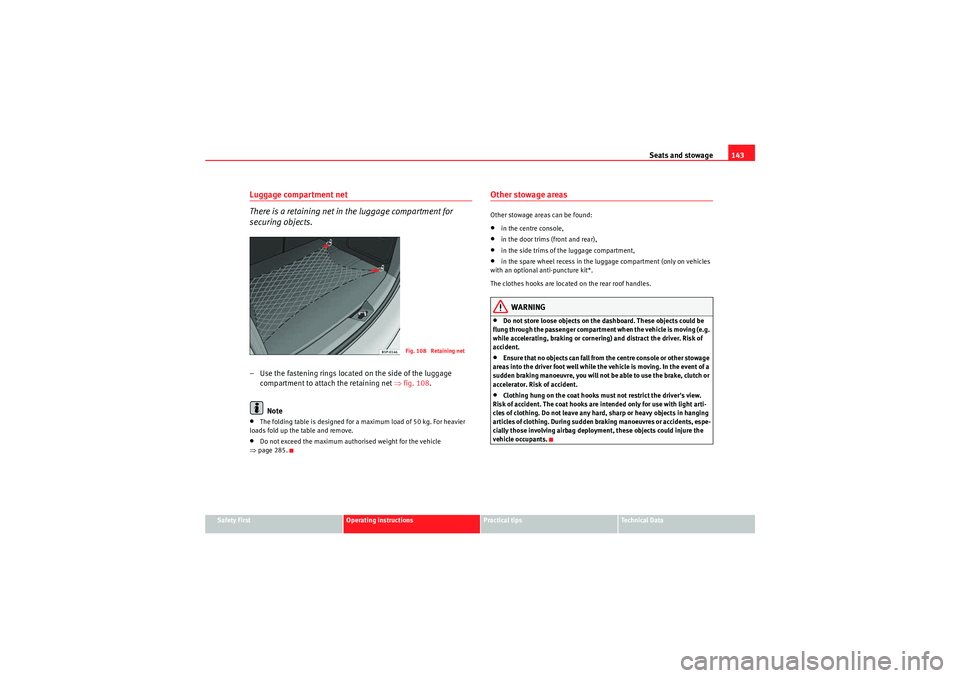
There is a retaining net in the luggage compartment for
securing objects.– Use the fastening rings located on the side of the luggage
compartment to attach the retaining net ⇒ fig. 108.
Note•The folding table is designed for a maximum load of 50 kg. For heavier
loads fold up the table and remove.•Do not exceed the maximum authorised weight for the vehicle
⇒ page 285.
Other stowage areasOther stowage areas can be found:•in the centre console,•in the door trims (front and rear),•in the side trims of the luggage compartment,•in the spare wheel recess in the luggage compartment (only on vehicles
with an optional anti-puncture kit*.
The clothes hooks are located on the rear roof handles.WARNING
•Do not store loose objects on the dashboard. These objects could be
flung through the passenger compartment when the vehicle is moving (e.g.
while accelerating, braking or cornering) and distract the driver. Risk of
accident.•Ensure that no objects can fall from the centre console or other stowage
areas into the driver foot well while the vehicle is moving. In the event of a
sudden braking manoeuvre, you will not be able to use the brake, clutch or
accelerator. Risk of accident.•Clothing hung on the coat hooks must not restrict the driver's view.
Risk of accident. The coat hooks are intended only for use with light arti-
cles of clothing. Do not leave any hard, sharp or heavy objects in hanging
articles of clothing. During sudden braking manoeuvres or accidents, espe-
cially those involving airbag deployment, these objects could injure the
vehicle occupants.
Fig. 108 Retaining net
altea_EN Seite 143 Mittwoch, 26. August 2009 6:00 18
Page 169 of 310
Driving167
Safety First
Operating instructions
Practical tips
Technical Data
DrivingAddressAdjusting the steering wheel position
The height and reach of the steering wheel can be freely
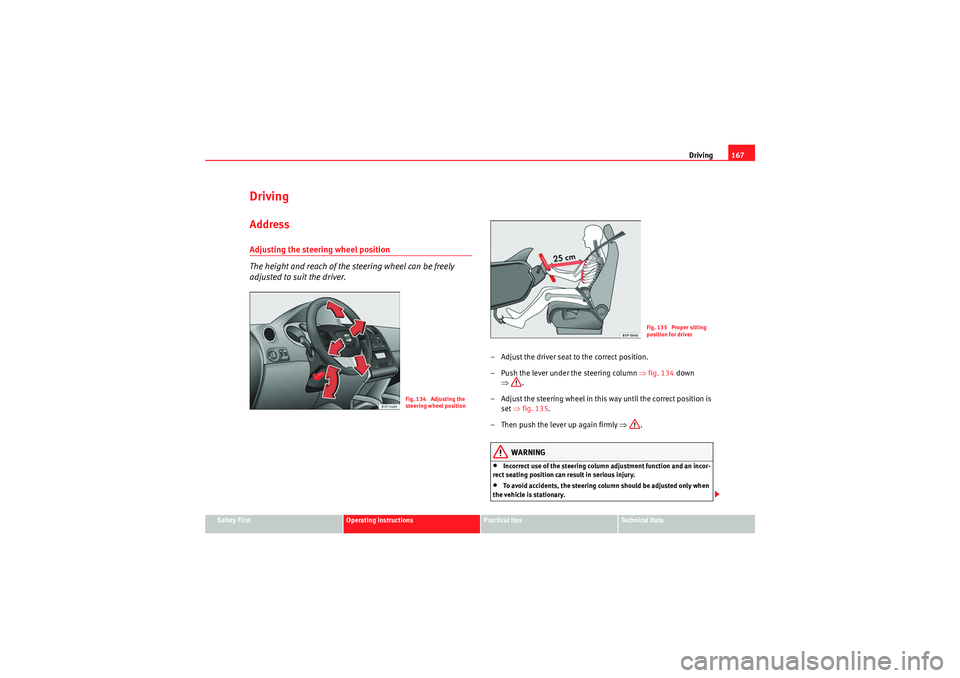
adjusted to suit the driver.
– Adjust the driver seat to the correct position.
– Push the lever under the steering column ⇒fig. 134 down
⇒ .
– Adjust the steering wheel in this way until the correct position is set ⇒fig. 135 .
– Then push the lever up again firmly ⇒.
WARNING
•Incorrect use of the steering column adjustment function and an incor-
rect seating position can result in serious injury.•To avoid accidents, the steering column should be adjusted only when
the vehicle is stationary.
Fig. 134 Adjusting the
steering wheel position
Fig. 135 Proper sitting
position for driver
altea_EN Seite 167 Mittwoch, 26. August 2009 6:00 18
Page 170 of 310

Driving
168•Adjust the driver seat or steering wheel so that there is a distance of at
least 25 cm between the steering wheel and your chest ⇒page 167,
fig. 135 . If you fail to observe the minimum distance, the airbag will not
protect you. Risk of fatal injury.•If your physical constitution does not allow you to maintain the
minimum distance of 25 cm, contact an Authorised Service Centre. The
Authorised Service Centre will help you to decide if special specific modifi-
cations are necessary.•If you adjust the steering wheel so that it points towards your face, the
driver airbag will not protect you properly in the event of an accident. Make
sure that the steering wheel points towards your chest.•When driving, always hold the steering wheel with both hands on the
outside of the ring at the 9 o'clock and 3 o'clock positions. Never hold the
steering wheel at the 12 o'clock position, or in any other manner (e.g. in
the centre of the steering wheel, or on the inside of the rim). In such cases,
you could receive severe injuries to the arms, hands and head.
SafetyElectronic stabilisation programme (ESP)*
ESP helps make driving safer in certain situations.The electronic stabilisation programme (ESP) includes the electronic differen-
tial lock (EDS), the traction control system (TCS), the brake assist system
(BAS) and the trailer stability programme (TSP). The ESP function works
together with the ABS. Both warning lamps will light up if the ESP or ABS
systems are faulty.
The ESP is started automatically when the engine is started.
The ESP is always active, and cannot be switched off. With the ESP switch it is
only possible to switch TCS off.
The TCS can be deactivated when in cases where wheel sliding is desirable.
For example:•When driving with snow chains,
WARNING (continued)
Fig. 136 Detail of the
centre console: ESP
button
altea_EN Seite 168 Mittwoch, 26. August 2009 6:00 18
Page 171 of 310
Driving169
Safety First
Operating instructions
Practical tips
Technical Data
•when driving in deep snow or on loose surfaces,•when rocking the vehicle backwards and forwards to free it from mud, for
example.
Next, the button should be pressed to reactivate the TCS.
When does the warning light switch on or flash? •On switching the ignition on, it lights up for about two seconds to carry
out a function control.•The warning lamp will start flashing when the vehicle is moving if the ESP
or the TCS is activated. The warning lamp will light up slowly if the TCS is
switched off.•It will light up continuously if there is a malfunction in the ESP.WARNING
•The electronic stabilisation programme (ESP) cannot defy the laws of
physics. This should be kept in mind, particularly on slippery and wet
roads and when towing a trailer.•Always adapt your driving style to suit the condition of the roads and
the traffic situation. Do not let the extra safety afforded by ESP tempt you
into taking any risks when driving, this can cause accidents.•Please refer to the corresponding warning notes on ESP in ⇒page 193,
“Intelligent technology”.
Ignition lockPosition of the ignition keyIgnition switched off, steering lock
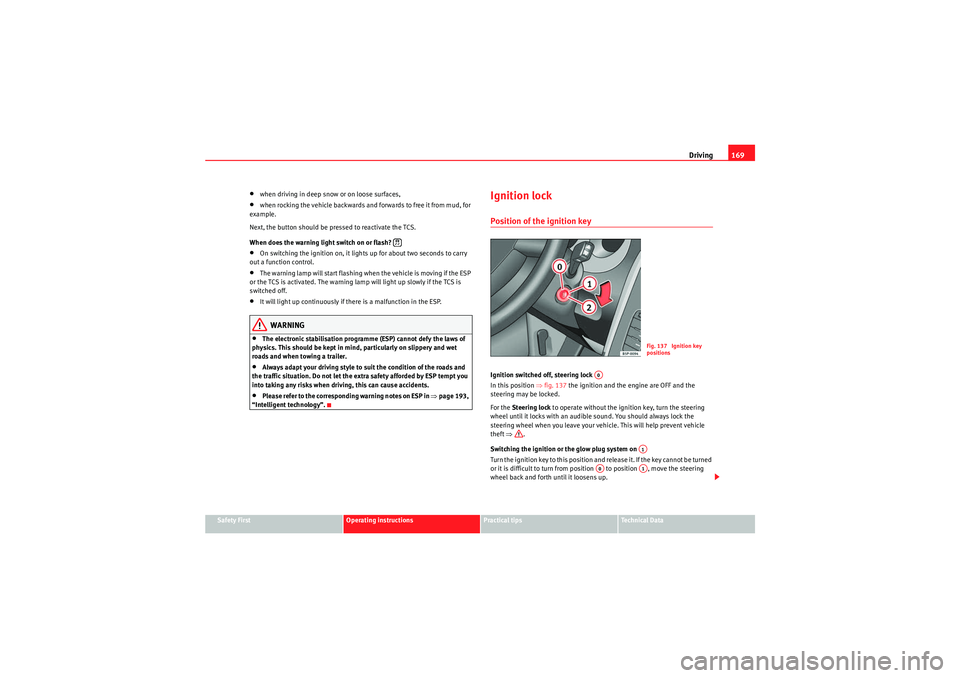
In this position ⇒fig. 137 the ignition and the engine are OFF and the
steering may be locked.
For the Steering lock to operate without the ignition key, turn the steering
wheel until it locks with an audible sound. You should always lock the
steering wheel when you leave your vehicle. This will help prevent vehicle
theft ⇒ .
Switching the ignition or the glow plug system on
Turn the ignition key to this position and release it. If the key cannot be turned
or it is difficult to turn from position to position , move the steering
wheel back and forth until it loosens up.
Fig. 137 Ignition key
positions
A0
A1
A0
A1
altea_EN Seite 169 Mittwoch, 26. August 2009 6:00 18
Page 175 of 310
Driving173
Safety First
Operating instructions
Practical tips
Technical Data
Driving with LPG*
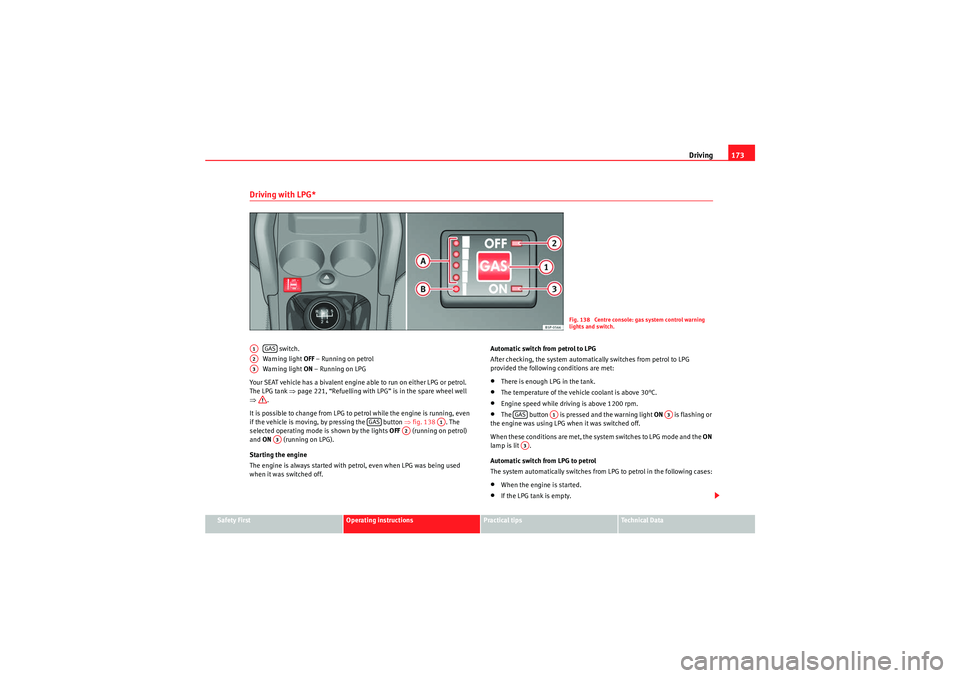
switch.
Wa rning light OFF – Running on petrol
Wa rning light ON – Running on LPG
Your SEAT vehicle has a bivalent engine able to run on either LPG or petrol.
The LPG tank ⇒page 221, “Refuelling with LPG” is in the spare wheel well
⇒ .
It is possible to change from LPG to petrol while the engine is running, even
if the vehicle is moving, by pressing the button ⇒fig. 138 . The
selected operating mode is shown by the lights OFF (running on petrol)
and ON (running on LPG).
Starting the engine
The engine is always started with petrol, even when LPG was being used
when it was switched off. Automatic switch from petrol to LPG
After checking, the system automatically switches from petrol to LPG
provided the following conditions are met:
•There is enough LPG in the tank.•The temperature of the vehicle coolant is above 30°C.•Engine speed while driving is above 1200 rpm.•The button is pressed and the warning light ON
is flashing or
the engine was using LPG when it was switched off.
When these conditions are met, the system switches to LPG mode and the ON
lamp is lit .
Automatic switch from LPG to petrol
The system automatically switches from LPG to petrol in the following cases:•When the engine is started.•If the LPG tank is empty.
Fig. 138 Centre console: gas system control warning
lights and switch.
A1
GAS
A2A3
GAS
A1
A2
A3
GAS
A1
A3
A3
altea_EN Seite 173 Mittwoch, 26. August 2009 6:00 18
Page 176 of 310
Driving
174•If there is a fault in the LPG system.•At very low temperatures below minus 10°C.
Manual switch from petrol to LPG
Press the GAS button to switch modes. When the necessary conditions are
met, the system switches to LPG mode and the ON lamp is lit. If the ON
lamp flashes, the following conditions have not been met:•There is enough LPG in the tank.•The temperature of the vehicle coolant is above 30°C.•Engine speed while driving is above 1200 rpm.
When these conditions are met, the system switches to LPG mode and the ON
lamp is lit .
Manual switch from LPG to petrol
Press the button to switch modes. When the OFF lamp is lit, the
vehicle is running on petrol.
Running on petrol
Run the engine with petrol for short journeys at regular intervals to avoid
problems in the petrol system.WARNING
LPG is a highly explosive and inflammable substance. It may cause severe
burns and other injury.•Due care must be taken to avoid any risk of fire or explosion.•When parking the vehicle in a closed area (for example in a garage),
make sure that there is adequate ventilation, either natural or mechanical,
to neutralise the LPG in the event of a leak.
Note
•If frequent short journeys are made, especially when the outside temper-
ature is low, the vehicle will tend to run on petrol more often than on LPG.
Therefore, the petrol tank may empty before the LPG tank.Start-Stop function*Description and operationThe Start-Stop function stops the engine when the vehicle is
stopped and starts it automatically when required.
– When the vehicle is stopped, put it in neutral and release the clutch pedal. The engine will stop.
– When the clutch pedal is pressed, the engine starts again.
– The instrument panel screen displays information about the status of the Start-Stop function ⇒page 176, fig. 140 .Start-Stop function conditions•The driver's seat belt must be buckled.•The engine hood must be closed.•The engine must be at operating temperature•The steering wheel must be straight.•The vehicle must be on flat ground.•The vehicle must not be in reverse.•A trailer must not be connected.
A1
A3
A3A3GAS
A1
A2
altea_EN Seite 174 Mittwoch, 26. August 2009 6:00 18
Page 177 of 310
Driving175
Safety First
Operating instructions
Practical tips
Technical Data
•The temperature of the passenger compartment must be within the
convenience limits (button ⇒page 164, fig. 133 should be selected).•The windscreen de-mist function must be off.•If not , it requires an increase in airflow ⇒page 164, fig. 133 for more
than three presses.•Either of the temperature settings, HI or LO must not be set.•The driver's door must be closed.•The diesel particulate filter must not be in regeneration mode, for diesel
engines.•The battery charge must not be low for the next start.•The battery temperature must be between -1°C and 55°C.•The parking assistant, Park Assist* must not be activated.
Interrupting the Start-Stop function
In the following situations, the Start-Stop function will be interrupted and the
engine will automatically start:•The vehicle is moving.•The brake pedal is pressed several times in a row.•The battery has been discharged excessively.•The Start-Stop System has been manually deactivated.•The windscreen de-mist function is turned on.•The temperature of the passenger compartment exceeds the convenience
limits (button ⇒page 164, fig. 133 should be selected).•If in an increase in airflow ⇒page 164, fig. 133 is required for more
than three presses.•Either of the temperature settings, HI or LO, is selected.•The engine coolant temperature is insufficient.•The alternator is faulty, for example the V-belt has ruptured.•If any of the conditions described in the previous section are not fulfilled.
WARNING
Never allow the vehicle to move with the engine off for any reason. You
could lose control of your vehicle. This could cause an accident and serious
injury.•The brake servo does not work when the engine is not running. You
need more force to stop the vehicle.•Power assisted steering does not work when the engine is not running.
That is why it is much more difficult to turn the steering wheel.Note
•For vehicles with the Start-Stop function and a manual gearbox, when the
engine is started, the clutch must be pressed.•When the conditions for the Start-Stop function are not fulfilled, the dash
panel displays the Start-Stop indicator dimmed.•The vehicle can be restarted by rotating the steering wheel three times,
that is, more than 270°.
ACA11
A10
ACA11
A10
altea_EN Seite 175 Mittwoch, 26. August 2009 6:00 18