audio Seat Altea 2010 Owner's Manual
[x] Cancel search | Manufacturer: SEAT, Model Year: 2010, Model line: Altea, Model: Seat Altea 2010Pages: 310, PDF Size: 7.46 MB
Page 5 of 310
Contents3
ContentsManual structure
. . . . . . . . . . . . . . . . . . . .
Content
. . . . . . . . . . . . . . . . . . . . . . . . . . . . . . . .
Safety First
. . . . . . . . . . . . . . . . . . . . . . . . . . .
Safe driving
. . . . . . . . . . . . . . . . . . . . . . . . . . . . . .
Brief introduction . . . . . . . . . . . . . . . . . . . . . . . .
Proper sitting position for occupants . . . . . . . . .
Pedal area . . . . . . . . . . . . . . . . . . . . . . . . . . . . . .
Stowing luggage . . . . . . . . . . . . . . . . . . . . . . . . .
Seat belts
. . . . . . . . . . . . . . . . . . . . . . . . . . . . . . . .
Brief Introduction . . . . . . . . . . . . . . . . . . . . . . . .
Why wear seat belts? . . . . . . . . . . . . . . . . . . . . . .
Seat belts . . . . . . . . . . . . . . . . . . . . . . . . . . . . . . .
Belt tension devices . . . . . . . . . . . . . . . . . . . . . .
Airbag system
. . . . . . . . . . . . . . . . . . . . . . . . . . . .
Brief introduction . . . . . . . . . . . . . . . . . . . . . . . .
Front airbags . . . . . . . . . . . . . . . . . . . . . . . . . . . .
Side airbags* . . . . . . . . . . . . . . . . . . . . . . . . . . . .
Curtain airbags . . . . . . . . . . . . . . . . . . . . . . . . . .
Deactivating airbags* . . . . . . . . . . . . . . . . . . . . .
Child safety
. . . . . . . . . . . . . . . . . . . . . . . . . . . . . .
Brief introduction . . . . . . . . . . . . . . . . . . . . . . . .
Child seats . . . . . . . . . . . . . . . . . . . . . . . . . . . . . .
Securing child seats . . . . . . . . . . . . . . . . . . . . . .
Operating instructions
. . . . . . . . . . . .
Cockpit
. . . . . . . . . . . . . . . . . . . . . . . . . . . . . . . . . . .
Overview . . . . . . . . . . . . . . . . . . . . . . . . . . . . . . .
Instruments . . . . . . . . . . . . . . . . . . . . . . . . . . . . .
LPG system* . . . . . . . . . . . . . . . . . . . . . . . . . . . . .
Digital display in the dash panel . . . . . . . . . . . .
Dash panel menus* . . . . . . . . . . . . . . . . . . . . . . .
Warning lamps . . . . . . . . . . . . . . . . . . . . . . . . . . .
Steering wheel controls
. . . . . . . . . . . . . . . . . . .
General information . . . . . . . . . . . . . . . . . . . . . .
Audio system . . . . . . . . . . . . . . . . . . . . . . . . . . . .
Radio navigation system . . . . . . . . . . . . . . . . . . .
Unlocking and locking
. . . . . . . . . . . . . . . . . . . .
Central locking . . . . . . . . . . . . . . . . . . . . . . . . . . .
Keys . . . . . . . . . . . . . . . . . . . . . . . . . . . . . . . . . . .
Radio frequency remote control . . . . . . . . . . . . .
Anti-theft alarm system* . . . . . . . . . . . . . . . . . . .
Tailgate . . . . . . . . . . . . . . . . . . . . . . . . . . . . . . . . .
Windows . . . . . . . . . . . . . . . . . . . . . . . . . . . . . . .
Sliding/tilting roof* . . . . . . . . . . . . . . . . . . . . . . .
Lights and visibility
. . . . . . . . . . . . . . . . . . . . . . .
Lights . . . . . . . . . . . . . . . . . . . . . . . . . . . . . . . . . .
Interior lights . . . . . . . . . . . . . . . . . . . . . . . . . . . .
Visibility . . . . . . . . . . . . . . . . . . . . . . . . . . . . . . . .
Windscreen washers . . . . . . . . . . . . . . . . . . . . . .
Mirrors . . . . . . . . . . . . . . . . . . . . . . . . . . . . . . . . .
Seats and stowage
. . . . . . . . . . . . . . . . . . . . . . .
The importance of correct seat adjustment . . . .
Head restraints . . . . . . . . . . . . . . . . . . . . . . . . . .
Front seats . . . . . . . . . . . . . . . . . . . . . . . . . . . . . .
Rear seat bench . . . . . . . . . . . . . . . . . . . . . . . . . .
Stowage compartments . . . . . . . . . . . . . . . . . . . Ashtrays*, cigarette lighter* and electrical
sockets . . . . . . . . . . . . . . . . . . . . . . . . . . . . . . . . .
First-aid kit, warning triangle, fire extinguisher
Luggage compartment . . . . . . . . . . . . . . . . . . . .
Heating, Ventilation and Air conditioning
. .
Heating . . . . . . . . . . . . . . . . . . . . . . . . . . . . . . . . .
Climatic* . . . . . . . . . . . . . . . . . . . . . . . . . . . . . . .
2C-Climatronic* . . . . . . . . . . . . . . . . . . . . . . . . . .
General notes . . . . . . . . . . . . . . . . . . . . . . . . . . .
Driving
. . . . . . . . . . . . . . . . . . . . . . . . . . . . . . . . . . .
Address . . . . . . . . . . . . . . . . . . . . . . . . . . . . . . . .
Safety . . . . . . . . . . . . . . . . . . . . . . . . . . . . . . . . . .
Ignition lock . . . . . . . . . . . . . . . . . . . . . . . . . . . . .
Starting and stopping the engine . . . . . . . . . . .
Start-Stop function* . . . . . . . . . . . . . . . . . . . . . .
Manual gearbox . . . . . . . . . . . . . . . . . . . . . . . . . .
Automatic gearbox* / DSG automatic gearbox .
Handbrake . . . . . . . . . . . . . . . . . . . . . . . . . . . . . .
Parking aid acoustic system* . . . . . . . . . . . . . . .
Cruise control* (Cruise control - GRA) . . . . . . . .
Practical tips
. . . . . . . . . . . . . . . . . . . . . . . . .
Intelligent technology
. . . . . . . . . . . . . . . . . . . . .
Brakes . . . . . . . . . . . . . . . . . . . . . . . . . . . . . . . . .
Anti-lock brake system and traction control M-ABS
(ABS and TCS) . . . . . . . . . . . . . . . . . . . . . . . . . . .
Electronic stabilisation programme (ESP)* . . . .
Driving and the environment
. . . . . . . . . . . . . .
Running-in . . . . . . . . . . . . . . . . . . . . . . . . . . . . . .
Exhaust gasses purification system . . . . . . . . . .
Economical and ecological driving . . . . . . . . . .
Driving abroad . . . . . . . . . . . . . . . . . . . . . . . . . . .
5
6
7
7
7
10
16
17
19
19
21
24
28
30
30
34
37
41
44
46
46
48
51 55
55
55
57
60
61
68
77
87
87
87
91
95
95
101
102
104
106
108
110
113
113
121
124
125
129
132
132
133
135
137
139 148
151
152
155
155
157
161
165
167
167
168
169
170
174
177
178
183
185
188
193
193
193
194
195
200
200
201
202
204
altea_EN Seite 3 Mittwoch, 26. August 2009 6:00 18
Page 72 of 310
Cockpit
70Main menu
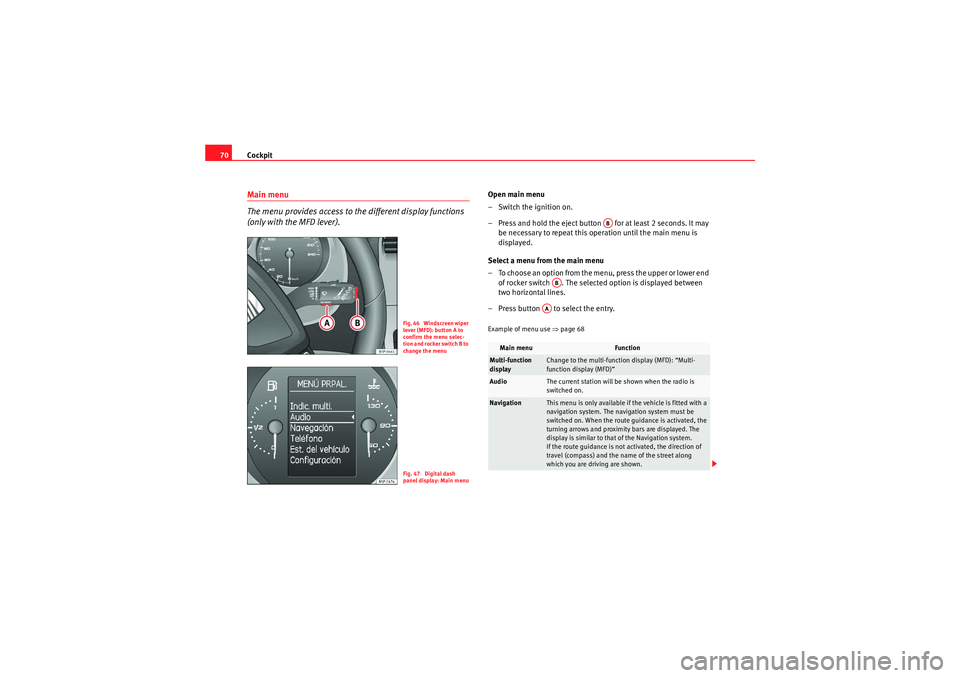
The menu provides access to the different display functions
(only with the MFD lever).
Open main menu
– Switch the ignition on.
– Press and hold the eject button for at least 2 seconds. It may
be necessary to repeat this operation until the main menu is
displayed.
Select a menu from the main menu
– To choose an option from the menu, press the upper or lower end of rocker switch . The selected option is displayed between
two horizontal lines.
– Press button to select the entry.Example of menu use ⇒page 68
Fig. 46 Windscreen wiper
lever (MFD): button A to
confirm the menu selec-
tion and rocker switch B to
ch ange th e m enuFig. 47 Digital dash
panel display: Main menu
Main menu
Function
Multi-function
display
Change to the multi-function display (MFD): “Multi-
function display (MFD)”
Audio
The current station will be shown when the radio is
switched on.
Navigation
This menu is only available if the vehicle is fitted with a
navigation system. The navigation system must be
switched on. When the route guidance is activated, the
turning arrows and proximity bars are displayed. The
display is similar to that of the Navigation system.
If the route guidance is not activated, the direction of
travel (compass) and the name of the street along
which you are driving are shown.
AB
AB
AA
altea_EN Seite 70 Mittwoch, 26. August 2009 6:00 18
Page 89 of 310
Steering wheel controls87
Safety First
Operating instructions
Practical tips
Technical Data
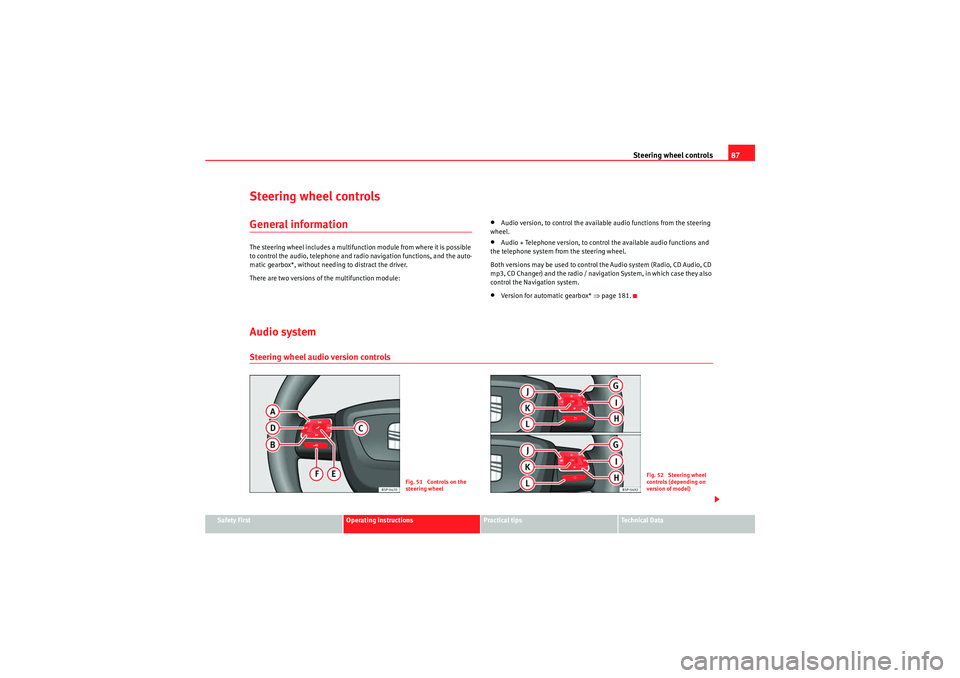
Steering wheel controlsGeneral informationThe steering wheel includes a multifunction module from where it is possible
to control the audio, telephone and radio navigation functions, and the auto-
matic gearbox*, without needing to distract the driver.
There are two versions of the multifunction module:
•Audio version, to control the available audio functions from the steering
wheel.•Audio + Telephone version, to control the available audio functions and
the telephone system from the steering wheel.
Both versions may be used to control the Audio system (Radio, CD Audio, CD
mp3, CD Changer) and the radio / navigation System, in which case they also
control the Navigation system.•Version for automatic gearbox* ⇒page 181.
Audio systemSteering wheel audio version controls
Fig. 51 Controls on the
steering wheel
Fig. 52 Steering wheel
controls (depending on
version of model)
altea_EN Seite 87 Mittwoch, 26. August 2009 6:00 18
Page 90 of 310
Steering wheel controls
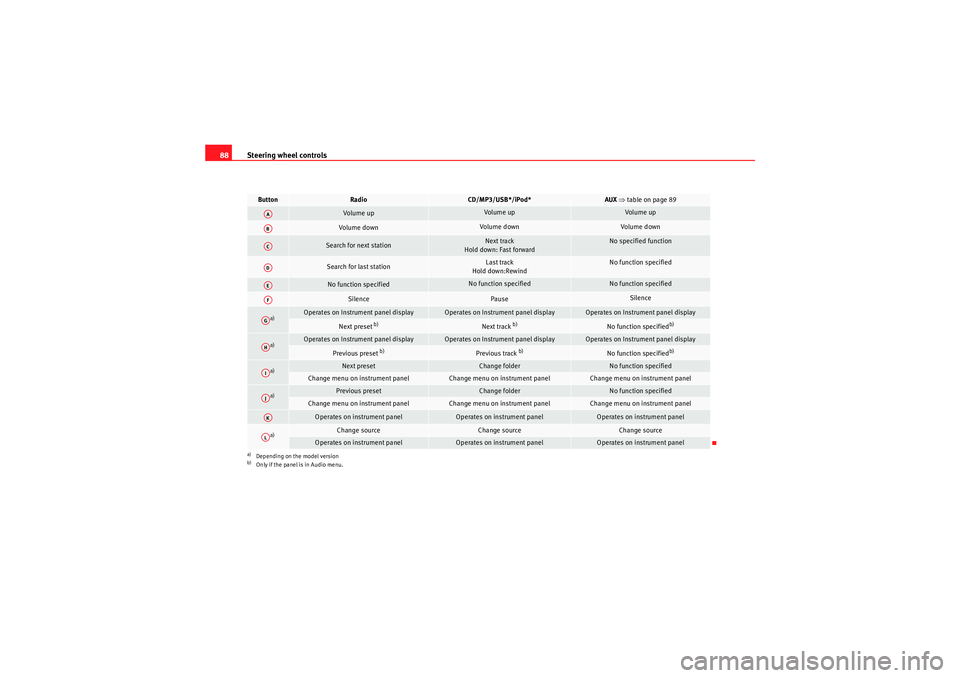
88Button
Radio
CD/MP3/USB*/iPod*
AUX ⇒ table on page 89
Volume up
Volume up
Volume up
Volume down
Volume down
Volume down
Search for next station
Next track
Hold down: Fast forward
No specified function
Search for last station
Last track
Hold down:Rewind
No function specified
No function specified
No function specified
No function specified
Silence
Pause
Silence
a)
a)Depending on the model version
Operates on Instrument panel display
Operates on Instrument panel display
Operates on Instrument panel display
Next preset
b)
b)Only if the panel is in Audio menu.
Next track
b)
No function specified
b)
a)
Operates on Instrument panel display
Operates on Instrument panel display
Operates on Instrument panel display
Previous preset
b)
Previous track
b)
No function specified
b)
a)
Next preset
Change folder
No function specified
Change menu on instrument panel
Change menu on instrument panel
Change menu on instrument panel
a)
Previous preset
Change folder
No function specified
Change menu on instrument panel
Change menu on instrument panel
Change menu on instrument panel
Operates on instrument panel
Operates on instrument panel
Operates on instrument panel
a)
Change source
Change source
Change source
Operates on instrument panel
Operates on instrument panel
Operates on instrument panel
AAABACADAEAFAGAHAIAJAKAL
altea_EN Seite 88 Mittwoch, 26. August 2009 6:00 18
Page 91 of 310
Steering wheel controls89
Safety First
Operating instructions
Practical tips
Technical Data
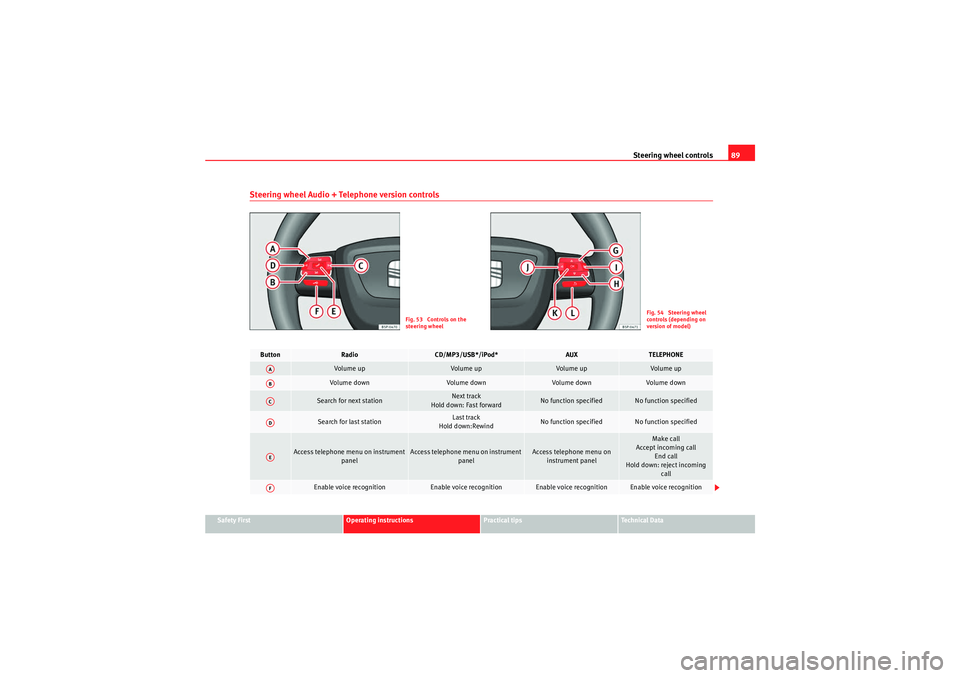
Steering wheel Audio + Telephone version controls
Fig. 53 Controls on the
steering wheel
Fig. 54 Steering wheel
controls (depending on
version of model)
Button
Radio
CD/MP3/USB*/iPod*
AUX
TELEPHONE
Volume up
Volume up
Volume up
Volume up
Vol um e d own
Volume down
Volume down
Volume down
Search for next station
Next track
Hold down: Fast forward
No function specified
No function specified
Search for last station
Last track
Hold down:Rewind
No function specified
No function specified
Access telephone menu on instrument panel
Access telephone menu on instrument panel
Access telephone menu on instrument panel
Make call
Accept incoming call End call
Hold down: reject incoming call
Enable voice recognition
Enable voice recognition
Enable voice recognition
Enable voice recognition
AAABACADAEAF
altea_EN Seite 89 Mittwoch, 26. August 2009 6:00 18
Page 92 of 310
Steering wheel controls
90
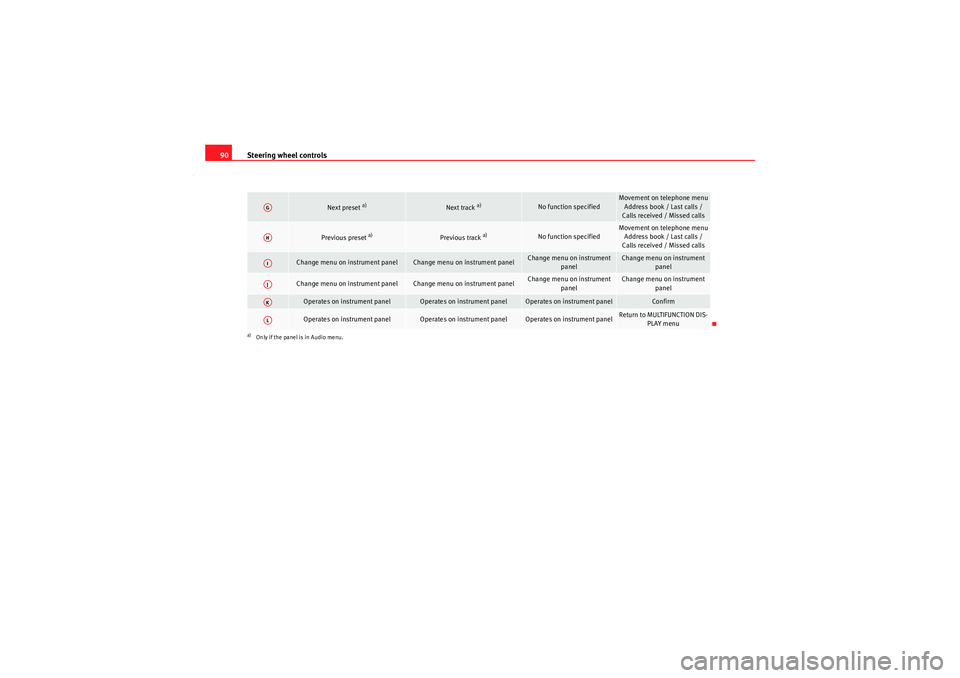
Next preset
a)
Next track
a)
No function specified
Movement on telephone menu
Address book / Last calls /
Calls received / Missed calls
Previous preset
a)
Previous track
a)
No function specified
Movement on telephone menu Address book / Last calls /
Calls received / Missed calls
Change menu on instrument panel
Change menu on instrument panel
Change menu on instrument panel
Change menu on instrument panel
Change menu on instrument panel
Change menu on instrument panel
Change menu on instrument
panel
Change menu on instrument panel
Operates on instrument panel
Operates on instrument panel
Operates on instrument panel
Confirm
Operates on instrument panel
Operates on instrument panel
Operates on instrument panel
Return to MULTIFUNCTION DIS-PLAY menu
a)Only if the panel is in Audio menu.AGAHAIAJAKAL
altea_EN Seite 90 Mittwoch, 26. August 2009 6:00 18
Page 93 of 310
Steering wheel controls91
Safety First
Operating instructions
Practical tips
Technical Data
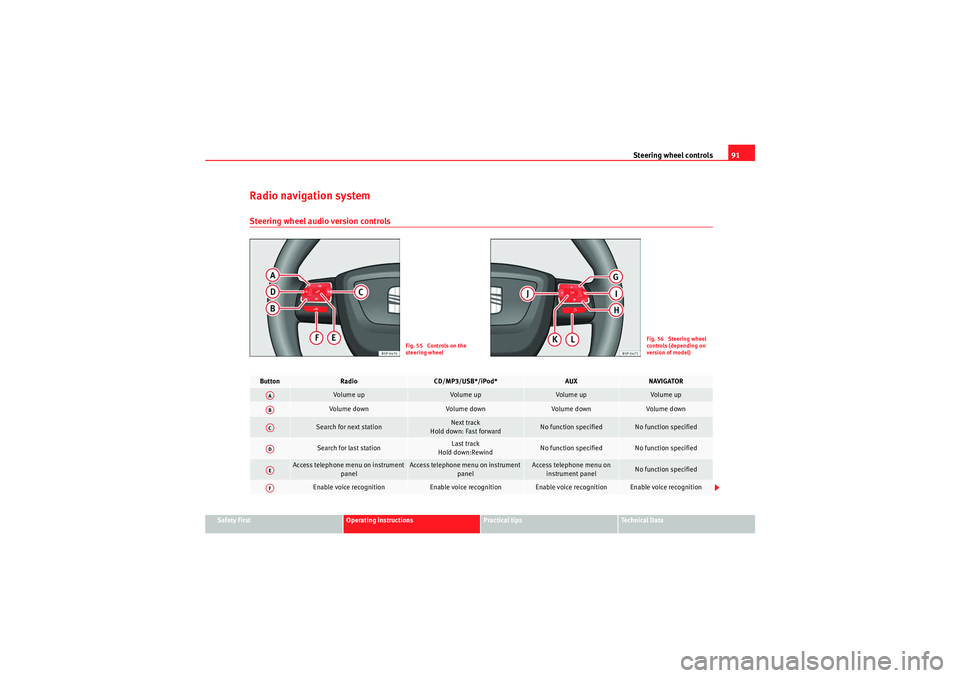
Radio navigation systemSteering wheel audio version controls
Fig. 55 Controls on the
steering wheel
Fig. 56 Steering wheel
controls (depending on
version of model)
Button
Radio
CD/MP3/USB*/iPod*
AUX
NAVIGATOR
Vol um e u p
Volume up
Volume up
Volume up
Volume down
Vol um e d own
Volume down
Volume down
Search for next station
Next track
Hold down: Fast forward
No function specified
No function specified
Search for last station
Last track
Hold down:Rewind
No function specified
No function specified
Access telephone menu on instrument panel
Access telephone menu on instrument panel
Access telephone menu on instrument panel
No function specified
Enable voice recognition
Enable voice recognition
Enable voice recognition
Enable voice recognition
AAABACADAEAF
altea_EN Seite 91 Mittwoch, 26. August 2009 6:00 18
Page 94 of 310
Steering wheel controls
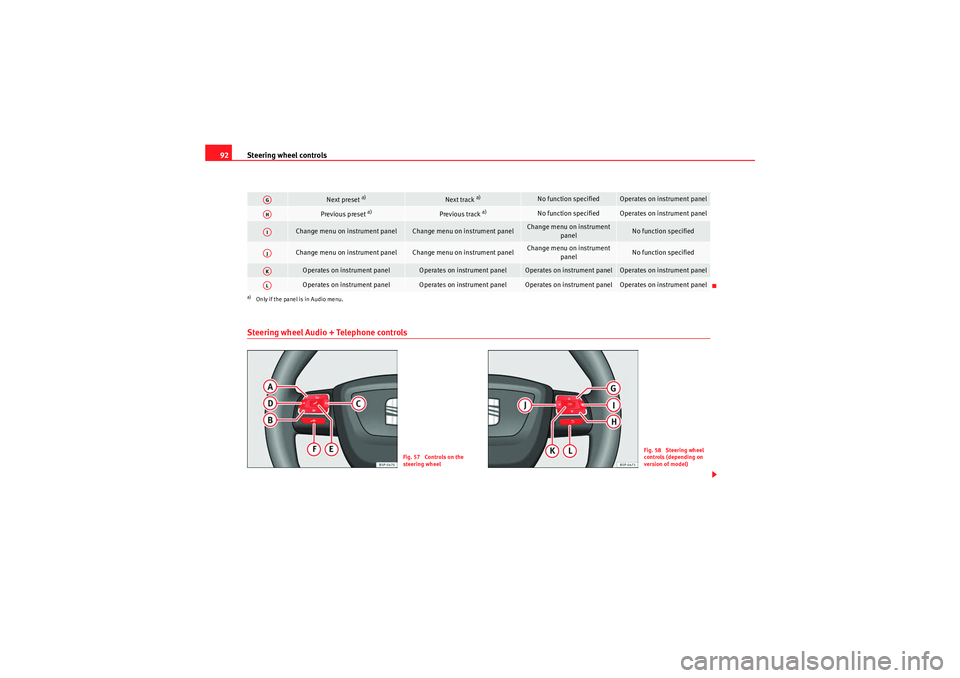
92Steering wheel Audio + Telephone controls
Next preset
a)
Next track
a)
No function specified
Operates on instrument panel
Previous preset
a)
Previous track
a)
No function specified
Operates on instrument panel
Change menu on instrument panel
Change menu on instrument panel
Change menu on instrument
panel
No function specified
Change menu on instrument panel
Change menu on instrument panel
Change menu on instrument panel
No function specified
Operates on instrument panel
Operates on instrument panel
Operates on instrument panel
Operates on instrument panel
Operates on instrument panel
Operates on instrument panel
Operates on instrument panel
Operates on instrument panel
a)Only if the panel is in Audio menu.AGAHAIAJAKAL
Fig. 57 Controls on the
steering wheel
Fig. 58 Steering wheel
controls (depending on
version of model)
altea_EN Seite 92 Mittwoch, 26. August 2009 6:00 18
Page 96 of 310
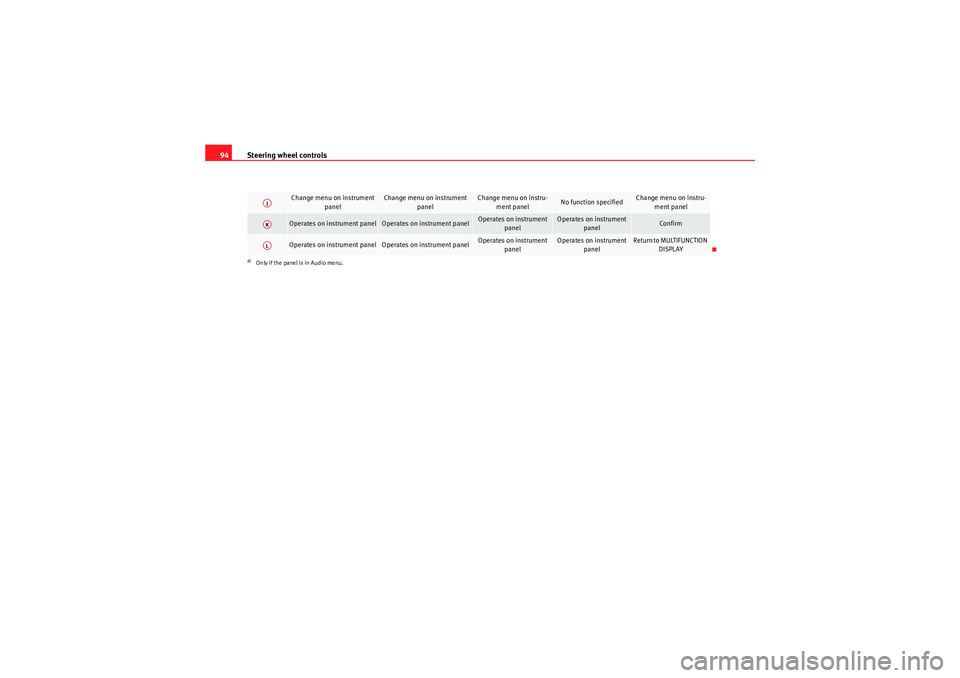
Steering wheel controls
94
Change menu on instrument
panel
Change menu on instrument panel
Change menu on instru-ment panel
No function specified
Change menu on instru-ment panel
Operates on instrument panel
Operates on instrument panel
Operates on instrument panel
Operates on instrument panel
Confirm
Operates on instrument panel
Operates on instrument panel
Operates on instrument panel
Operates on instrument panel
Return to MULTIFUNCTION DISPLAY
a)Only if the panel is in Audio menu.AJAKAL
altea_EN Seite 94 Mittwoch, 26. August 2009 6:00 18
Page 151 of 310
Seats and stowage149
Safety First
Operating instructions
Practical tips
Technical Data
Electrical sockets
Electrical equipment can be connected to any of the 12 volt
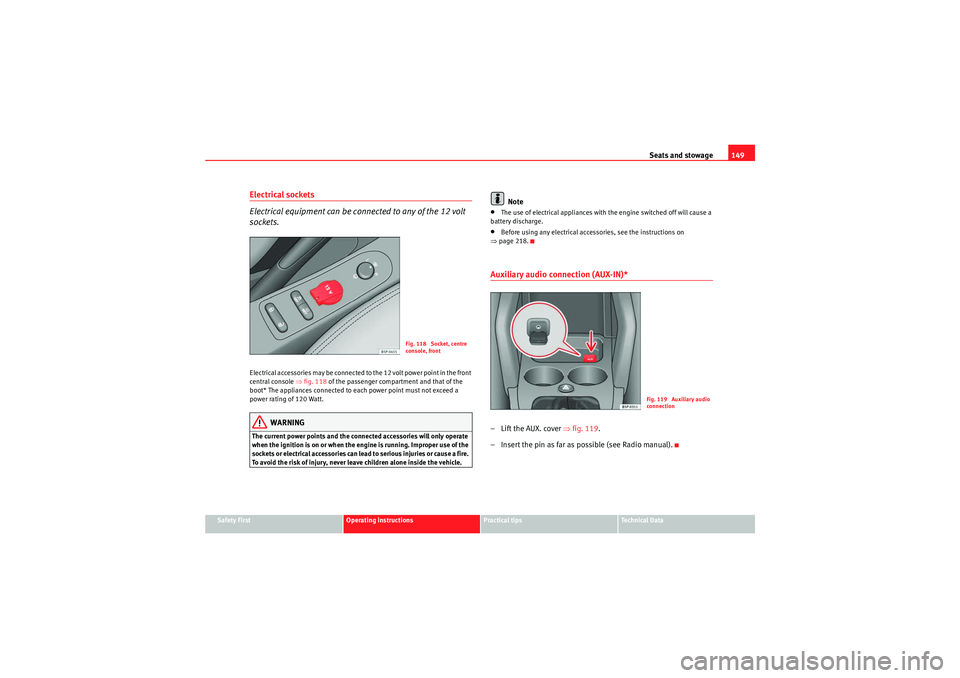
sockets.Electrical accessories may be connected to the 12 volt power point in the front
central console ⇒fig. 118 of the passenger compartment and that of the
boot* The appliances connected to each power point must not exceed a
power rating of 120 Watt.
WARNING
The current power points and the connected accessories will only operate
when the ignition is on or when the engine is running. Improper use of the
sockets or electrical accessories can lead to serious injuries or cause a fire.
To avoid the risk of injury, never leave children alone inside the vehicle.
Note
•The use of electrical appliances with the engine switched off will cause a
battery discharge.•Before using any electrical accessories, see the instructions on
⇒ page 218.Auxiliary audio connection (AUX-IN)*– Lift the AUX. cover ⇒fig. 119 .
– Insert the pin as far as possible (see Radio manual).
Fig. 118 Socket, centre
console, front
Fig. 119 Auxiliary audio
connection
altea_EN Seite 149 Mittwoch, 26. August 2009 6:00 18