radio controls Seat Altea 2010 Owner's Manual
[x] Cancel search | Manufacturer: SEAT, Model Year: 2010, Model line: Altea, Model: Seat Altea 2010Pages: 310, PDF Size: 7.46 MB
Page 5 of 310
Contents3
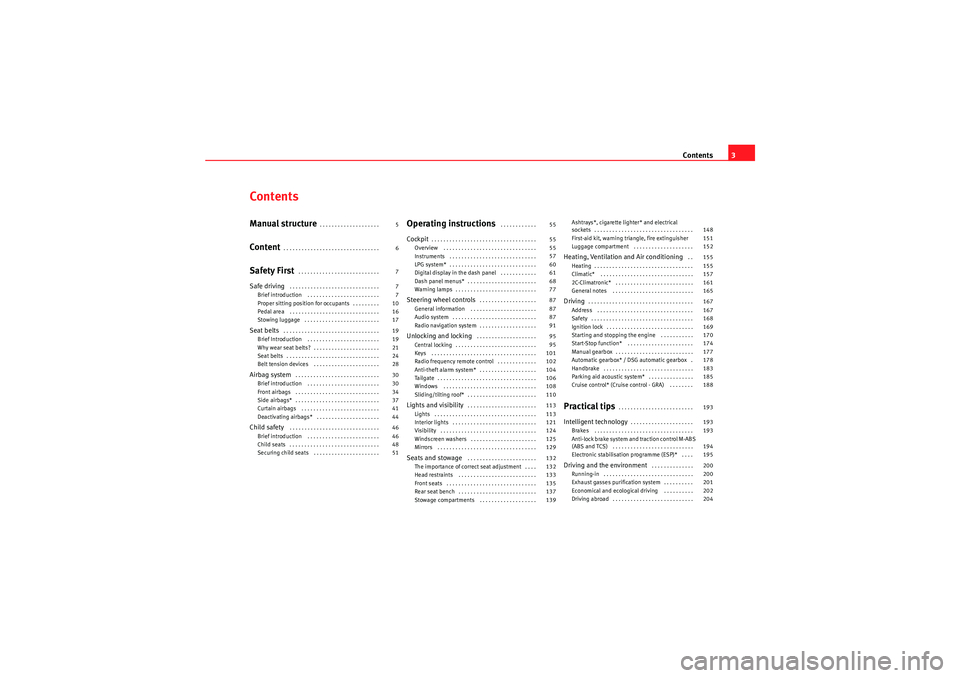
ContentsManual structure
. . . . . . . . . . . . . . . . . . . .
Content
. . . . . . . . . . . . . . . . . . . . . . . . . . . . . . . .
Safety First
. . . . . . . . . . . . . . . . . . . . . . . . . . .
Safe driving
. . . . . . . . . . . . . . . . . . . . . . . . . . . . . .
Brief introduction . . . . . . . . . . . . . . . . . . . . . . . .
Proper sitting position for occupants . . . . . . . . .
Pedal area . . . . . . . . . . . . . . . . . . . . . . . . . . . . . .
Stowing luggage . . . . . . . . . . . . . . . . . . . . . . . . .
Seat belts
. . . . . . . . . . . . . . . . . . . . . . . . . . . . . . . .
Brief Introduction . . . . . . . . . . . . . . . . . . . . . . . .
Why wear seat belts? . . . . . . . . . . . . . . . . . . . . . .
Seat belts . . . . . . . . . . . . . . . . . . . . . . . . . . . . . . .
Belt tension devices . . . . . . . . . . . . . . . . . . . . . .
Airbag system
. . . . . . . . . . . . . . . . . . . . . . . . . . . .
Brief introduction . . . . . . . . . . . . . . . . . . . . . . . .
Front airbags . . . . . . . . . . . . . . . . . . . . . . . . . . . .
Side airbags* . . . . . . . . . . . . . . . . . . . . . . . . . . . .
Curtain airbags . . . . . . . . . . . . . . . . . . . . . . . . . .
Deactivating airbags* . . . . . . . . . . . . . . . . . . . . .
Child safety
. . . . . . . . . . . . . . . . . . . . . . . . . . . . . .
Brief introduction . . . . . . . . . . . . . . . . . . . . . . . .
Child seats . . . . . . . . . . . . . . . . . . . . . . . . . . . . . .
Securing child seats . . . . . . . . . . . . . . . . . . . . . .
Operating instructions
. . . . . . . . . . . .
Cockpit
. . . . . . . . . . . . . . . . . . . . . . . . . . . . . . . . . . .
Overview . . . . . . . . . . . . . . . . . . . . . . . . . . . . . . .
Instruments . . . . . . . . . . . . . . . . . . . . . . . . . . . . .
LPG system* . . . . . . . . . . . . . . . . . . . . . . . . . . . . .
Digital display in the dash panel . . . . . . . . . . . .
Dash panel menus* . . . . . . . . . . . . . . . . . . . . . . .
Warning lamps . . . . . . . . . . . . . . . . . . . . . . . . . . .
Steering wheel controls
. . . . . . . . . . . . . . . . . . .
General information . . . . . . . . . . . . . . . . . . . . . .
Audio system . . . . . . . . . . . . . . . . . . . . . . . . . . . .
Radio navigation system . . . . . . . . . . . . . . . . . . .
Unlocking and locking
. . . . . . . . . . . . . . . . . . . .
Central locking . . . . . . . . . . . . . . . . . . . . . . . . . . .
Keys . . . . . . . . . . . . . . . . . . . . . . . . . . . . . . . . . . .
Radio frequency remote control . . . . . . . . . . . . .
Anti-theft alarm system* . . . . . . . . . . . . . . . . . . .
Tailgate . . . . . . . . . . . . . . . . . . . . . . . . . . . . . . . . .
Windows . . . . . . . . . . . . . . . . . . . . . . . . . . . . . . .
Sliding/tilting roof* . . . . . . . . . . . . . . . . . . . . . . .
Lights and visibility
. . . . . . . . . . . . . . . . . . . . . . .
Lights . . . . . . . . . . . . . . . . . . . . . . . . . . . . . . . . . .
Interior lights . . . . . . . . . . . . . . . . . . . . . . . . . . . .
Visibility . . . . . . . . . . . . . . . . . . . . . . . . . . . . . . . .
Windscreen washers . . . . . . . . . . . . . . . . . . . . . .
Mirrors . . . . . . . . . . . . . . . . . . . . . . . . . . . . . . . . .
Seats and stowage
. . . . . . . . . . . . . . . . . . . . . . .
The importance of correct seat adjustment . . . .
Head restraints . . . . . . . . . . . . . . . . . . . . . . . . . .
Front seats . . . . . . . . . . . . . . . . . . . . . . . . . . . . . .
Rear seat bench . . . . . . . . . . . . . . . . . . . . . . . . . .
Stowage compartments . . . . . . . . . . . . . . . . . . . Ashtrays*, cigarette lighter* and electrical
sockets . . . . . . . . . . . . . . . . . . . . . . . . . . . . . . . . .
First-aid kit, warning triangle, fire extinguisher
Luggage compartment . . . . . . . . . . . . . . . . . . . .
Heating, Ventilation and Air conditioning
. .
Heating . . . . . . . . . . . . . . . . . . . . . . . . . . . . . . . . .
Climatic* . . . . . . . . . . . . . . . . . . . . . . . . . . . . . . .
2C-Climatronic* . . . . . . . . . . . . . . . . . . . . . . . . . .
General notes . . . . . . . . . . . . . . . . . . . . . . . . . . .
Driving
. . . . . . . . . . . . . . . . . . . . . . . . . . . . . . . . . . .
Address . . . . . . . . . . . . . . . . . . . . . . . . . . . . . . . .
Safety . . . . . . . . . . . . . . . . . . . . . . . . . . . . . . . . . .
Ignition lock . . . . . . . . . . . . . . . . . . . . . . . . . . . . .
Starting and stopping the engine . . . . . . . . . . .
Start-Stop function* . . . . . . . . . . . . . . . . . . . . . .
Manual gearbox . . . . . . . . . . . . . . . . . . . . . . . . . .
Automatic gearbox* / DSG automatic gearbox .
Handbrake . . . . . . . . . . . . . . . . . . . . . . . . . . . . . .
Parking aid acoustic system* . . . . . . . . . . . . . . .
Cruise control* (Cruise control - GRA) . . . . . . . .
Practical tips
. . . . . . . . . . . . . . . . . . . . . . . . .
Intelligent technology
. . . . . . . . . . . . . . . . . . . . .
Brakes . . . . . . . . . . . . . . . . . . . . . . . . . . . . . . . . .
Anti-lock brake system and traction control M-ABS
(ABS and TCS) . . . . . . . . . . . . . . . . . . . . . . . . . . .
Electronic stabilisation programme (ESP)* . . . .
Driving and the environment
. . . . . . . . . . . . . .
Running-in . . . . . . . . . . . . . . . . . . . . . . . . . . . . . .
Exhaust gasses purification system . . . . . . . . . .
Economical and ecological driving . . . . . . . . . .
Driving abroad . . . . . . . . . . . . . . . . . . . . . . . . . . .
5
6
7
7
7
10
16
17
19
19
21
24
28
30
30
34
37
41
44
46
46
48
51 55
55
55
57
60
61
68
77
87
87
87
91
95
95
101
102
104
106
108
110
113
113
121
124
125
129
132
132
133
135
137
139 148
151
152
155
155
157
161
165
167
167
168
169
170
174
177
178
183
185
188
193
193
193
194
195
200
200
201
202
204
altea_EN Seite 3 Mittwoch, 26. August 2009 6:00 18
Page 57 of 310
Cockpit55
Safety First
Operating instructions
Practical tips
Technical Data
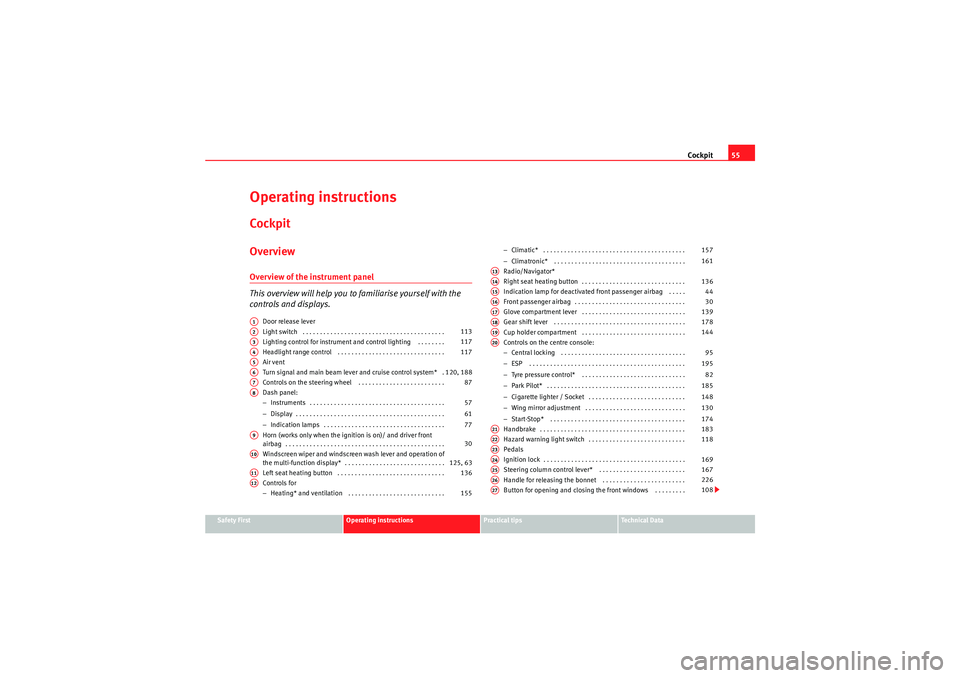
Operating instructionsCockpitOverviewOverview of the instrument panel
This overview will help you to familiarise yourself with the
controls and displays.
Door release lever
Light switch . . . . . . . . . . . . . . . . . . . . . . . . . . . . . . . . . . . . . . . . .
Lighting control for instrument and control lighting . . . . . . . .
Headlight range control . . . . . . . . . . . . . . . . . . . . . . . . . . . . . . .
Air vent
Turn signal and main beam lever and cruise control system* .
Controls on the steering wheel . . . . . . . . . . . . . . . . . . . . . . . . .
Dash panel:
−Instruments . . . . . . . . . . . . . . . . . . . . . . . . . . . . . . . . . . . . . . .
− Display . . . . . . . . . . . . . . . . . . . . . . . . . . . . . . . . . . . . . . . . . . .
− Indication lamps . . . . . . . . . . . . . . . . . . . . . . . . . . . . . . . . . . .
Horn (works only when the ignition is on)/ and driver front
airbag . . . . . . . . . . . . . . . . . . . . . . . . . . . . . . . . . . . . . . . . . . . . . .
Windscreen wiper and windscreen wash lever and operation of
the multi-function display* . . . . . . . . . . . . . . . . . . . . . . . . . . . . .
Left seat heating button . . . . . . . . . . . . . . . . . . . . . . . . . . . . . . .
Controls for
− Heating* and ventilation . . . . . . . . . . . . . . . . . . . . . . . . . . . . −
Climatic* . . . . . . . . . . . . . . . . . . . . . . . . . . . . . . . . . . . . . . . . .
− Climatronic* . . . . . . . . . . . . . . . . . . . . . . . . . . . . . . . . . . . . . .
Radio/Navigator*
Right seat heating button . . . . . . . . . . . . . . . . . . . . . . . . . . . . . .
Indication lamp for deactivated front passenger airbag . . . . .
Front passenger airbag . . . . . . . . . . . . . . . . . . . . . . . . . . . . . . . .
Glove compartment lever . . . . . . . . . . . . . . . . . . . . . . . . . . . . . .
Gear shift lever . . . . . . . . . . . . . . . . . . . . . . . . . . . . . . . . . . . . . .
Cup holder compartment . . . . . . . . . . . . . . . . . . . . . . . . . . . . . .
Controls on the centre console:
− Central locking . . . . . . . . . . . . . . . . . . . . . . . . . . . . . . . . . . . .
− ESP . . . . . . . . . . . . . . . . . . . . . . . . . . . . . . . . . . . . . . . . . . . . .
− Tyre pressure control* . . . . . . . . . . . . . . . . . . . . . . . . . . . . . .
− Park Pilot* . . . . . . . . . . . . . . . . . . . . . . . . . . . . . . . . . . . . . . . .
− Cigarette lighter / Socket . . . . . . . . . . . . . . . . . . . . . . . . . . . .
− Wing mirror adjustment . . . . . . . . . . . . . . . . . . . . . . . . . . . . .
− Start-Stop* . . . . . . . . . . . . . . . . . . . . . . . . . . . . . . . . . . . . . . .
Handbrake . . . . . . . . . . . . . . . . . . . . . . . . . . . . . . . . . . . . . . . . . .
Hazard warning light switch . . . . . . . . . . . . . . . . . . . . . . . . . . . .
Pedals
Ignition lock . . . . . . . . . . . . . . . . . . . . . . . . . . . . . . . . . . . . . . . . .
Steering column control lever* . . . . . . . . . . . . . . . . . . . . . . . . .
Handle for releasing the bonnet . . . . . . . . . . . . . . . . . . . . . . . .
Button for opening and closing the front windows . . . . . . . . .
A1A2
113
A3
117
A4
117
A5A6
120, 188
A7
87
A8
57
61
77
A9
30
A10
125, 63
A11
136
A12
155 157
161
A13A14
136
A15
44
A16
30
A17
139
A18
178
A19
144
A20
95
195 82
185
148
130
174
A21
183
A22
118
A23A24
169
A25
167
A26
226
A27
108
altea_EN Seite 55 Mittwoch, 26. August 2009 6:00 18
Page 89 of 310
Steering wheel controls87
Safety First
Operating instructions
Practical tips
Technical Data
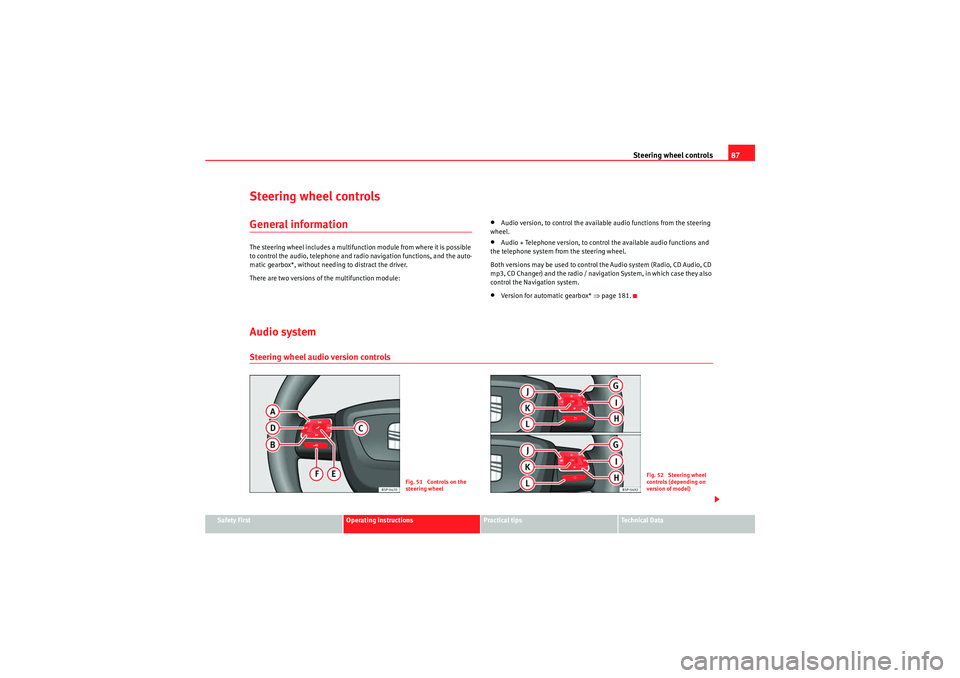
Steering wheel controlsGeneral informationThe steering wheel includes a multifunction module from where it is possible
to control the audio, telephone and radio navigation functions, and the auto-
matic gearbox*, without needing to distract the driver.
There are two versions of the multifunction module:
•Audio version, to control the available audio functions from the steering
wheel.•Audio + Telephone version, to control the available audio functions and
the telephone system from the steering wheel.
Both versions may be used to control the Audio system (Radio, CD Audio, CD
mp3, CD Changer) and the radio / navigation System, in which case they also
control the Navigation system.•Version for automatic gearbox* ⇒page 181.
Audio systemSteering wheel audio version controls
Fig. 51 Controls on the
steering wheel
Fig. 52 Steering wheel
controls (depending on
version of model)
altea_EN Seite 87 Mittwoch, 26. August 2009 6:00 18
Page 90 of 310
Steering wheel controls
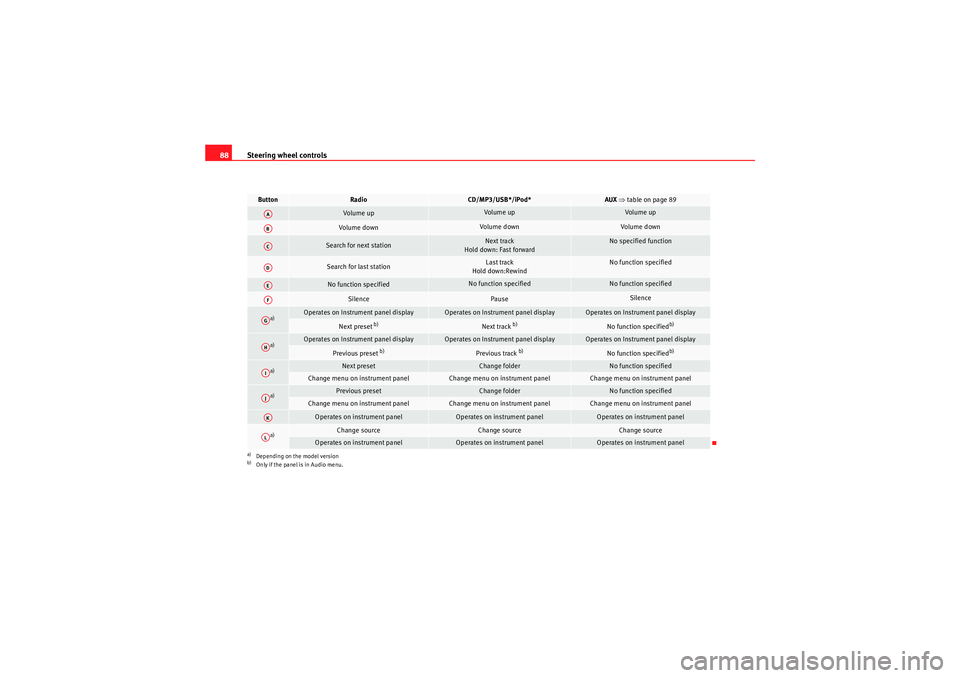
88Button
Radio
CD/MP3/USB*/iPod*
AUX ⇒ table on page 89
Volume up
Volume up
Volume up
Volume down
Volume down
Volume down
Search for next station
Next track
Hold down: Fast forward
No specified function
Search for last station
Last track
Hold down:Rewind
No function specified
No function specified
No function specified
No function specified
Silence
Pause
Silence
a)
a)Depending on the model version
Operates on Instrument panel display
Operates on Instrument panel display
Operates on Instrument panel display
Next preset
b)
b)Only if the panel is in Audio menu.
Next track
b)
No function specified
b)
a)
Operates on Instrument panel display
Operates on Instrument panel display
Operates on Instrument panel display
Previous preset
b)
Previous track
b)
No function specified
b)
a)
Next preset
Change folder
No function specified
Change menu on instrument panel
Change menu on instrument panel
Change menu on instrument panel
a)
Previous preset
Change folder
No function specified
Change menu on instrument panel
Change menu on instrument panel
Change menu on instrument panel
Operates on instrument panel
Operates on instrument panel
Operates on instrument panel
a)
Change source
Change source
Change source
Operates on instrument panel
Operates on instrument panel
Operates on instrument panel
AAABACADAEAFAGAHAIAJAKAL
altea_EN Seite 88 Mittwoch, 26. August 2009 6:00 18
Page 91 of 310
Steering wheel controls89
Safety First
Operating instructions
Practical tips
Technical Data
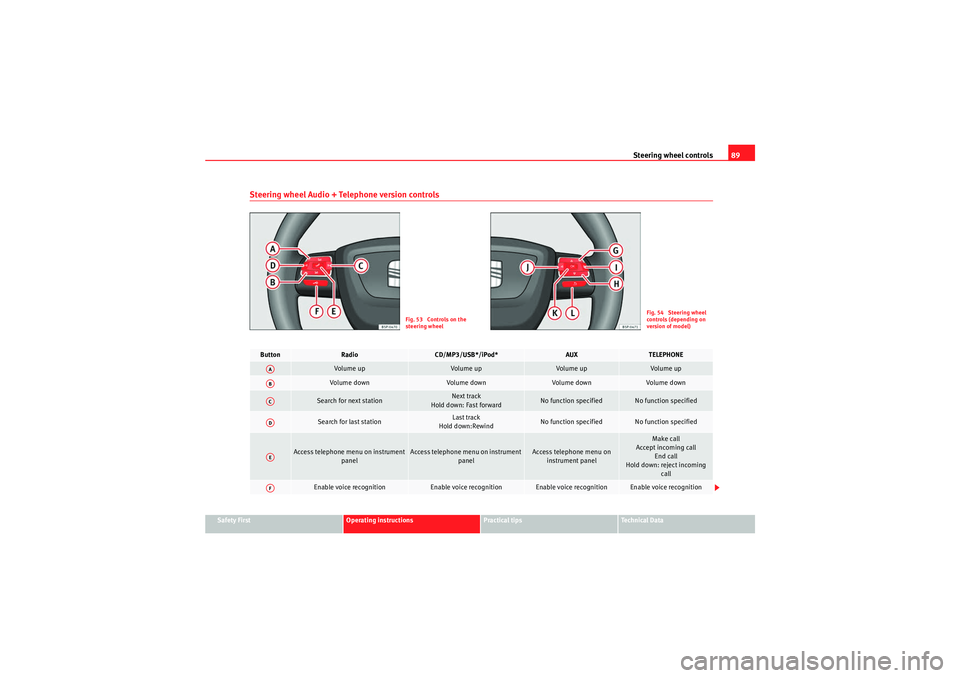
Steering wheel Audio + Telephone version controls
Fig. 53 Controls on the
steering wheel
Fig. 54 Steering wheel
controls (depending on
version of model)
Button
Radio
CD/MP3/USB*/iPod*
AUX
TELEPHONE
Volume up
Volume up
Volume up
Volume up
Vol um e d own
Volume down
Volume down
Volume down
Search for next station
Next track
Hold down: Fast forward
No function specified
No function specified
Search for last station
Last track
Hold down:Rewind
No function specified
No function specified
Access telephone menu on instrument panel
Access telephone menu on instrument panel
Access telephone menu on instrument panel
Make call
Accept incoming call End call
Hold down: reject incoming call
Enable voice recognition
Enable voice recognition
Enable voice recognition
Enable voice recognition
AAABACADAEAF
altea_EN Seite 89 Mittwoch, 26. August 2009 6:00 18
Page 93 of 310
Steering wheel controls91
Safety First
Operating instructions
Practical tips
Technical Data
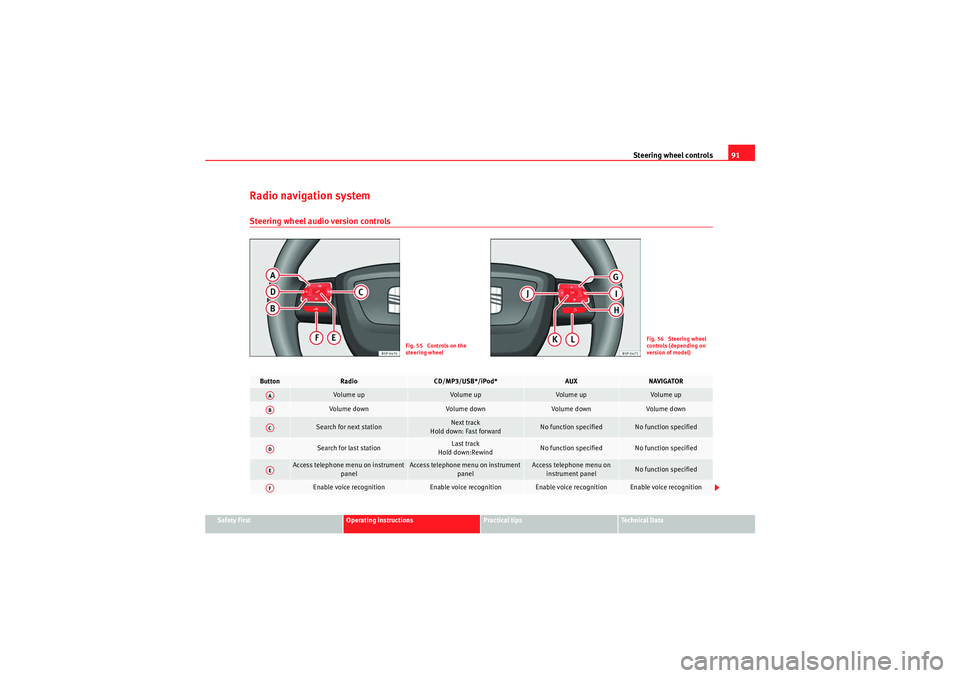
Radio navigation systemSteering wheel audio version controls
Fig. 55 Controls on the
steering wheel
Fig. 56 Steering wheel
controls (depending on
version of model)
Button
Radio
CD/MP3/USB*/iPod*
AUX
NAVIGATOR
Vol um e u p
Volume up
Volume up
Volume up
Volume down
Vol um e d own
Volume down
Volume down
Search for next station
Next track
Hold down: Fast forward
No function specified
No function specified
Search for last station
Last track
Hold down:Rewind
No function specified
No function specified
Access telephone menu on instrument panel
Access telephone menu on instrument panel
Access telephone menu on instrument panel
No function specified
Enable voice recognition
Enable voice recognition
Enable voice recognition
Enable voice recognition
AAABACADAEAF
altea_EN Seite 91 Mittwoch, 26. August 2009 6:00 18
Page 95 of 310
Steering wheel controls93
Safety First
Operating instructions
Practical tips
Technical Data
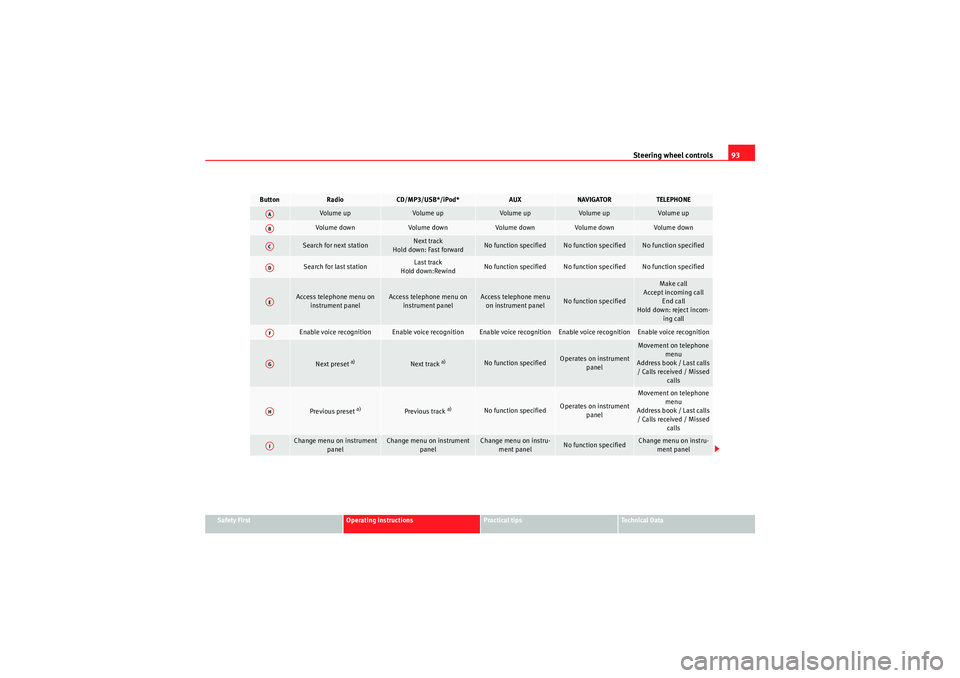
Button
Radio
CD/MP3/USB*/iPod*
AUX
NAVIGATOR
TELEPHONE
Volume up
Volume up
Volume up
Volume up
Volume up
Volume down
Volume down
Volume down
Volume down
Volume down
Search for next station
Next track
Hold down: Fast forward
No function specified
No function specified
No function specified
Search for last station
Last track
Hold down:Rewind
No function specified
No function specified
No function specified
Access telephone menu on instrument panel
Access telephone menu on instrument panel
Access telephone menu on instrument panel
No function specified
Make call
Accept incoming call End call
Hold down: reject incom- ing call
Enable voice recognition
Enable voice recognition
Enable voice recognition
Enable voice recognition
Enable voice recognition
Next preset
a)
Next track
a)
No function specified
Operates on instrument panel
Movement on telephone menu
Address book / Last calls / Calls received / Missed calls
Previous preset
a)
Previous track
a)
No function specified
Operates on instrument panel
Movement on telephone
menu
Address book / Last calls / Calls received / Missed calls
Change menu on instrument panel
Change menu on instrument panel
Change menu on instru-ment panel
No function specified
Change menu on instru-ment panel
AAABACADAEAFAGAHAI
altea_EN Seite 93 Mittwoch, 26. August 2009 6:00 18
Page 163 of 310
Heating, Ventilation and Air conditioning161
Safety First
Operating instructions
Practical tips
Technical Data
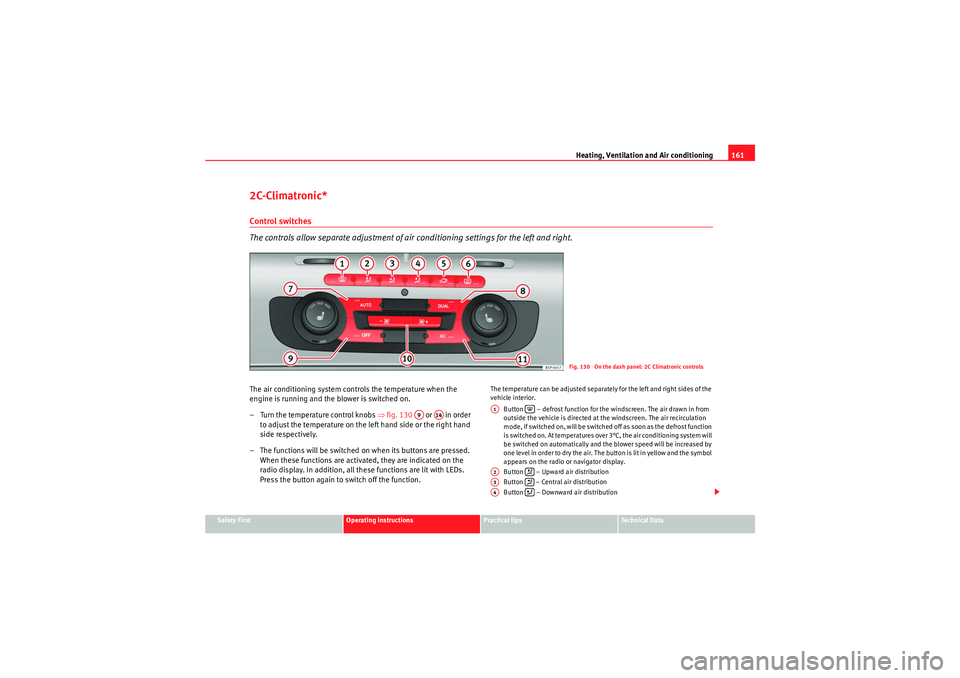
2C-Climatronic*Control switches
The controls allow separate adjustment of air co nditioning settings for the left and right.The air conditioning system controls the temperature when the
engine is running and the blower is switched on.
– Turn the temperature control knobs ⇒fig. 130 or in order
to adjust the temperature on the left hand side or the right hand
side respectively.
– The functions will be switched on when its buttons are pressed.
When these functions are activated, they are indicated on the
radio display. In addition, all these functions are lit with LEDs.
Press the button again to switch off the function.
The temperature can be adjusted separately for the left and right sides of the
vehicle interior.
Button – defrost function for the windscreen. The air drawn in from
outside the vehicle is directed at the windscreen. The air recirculation
mode, if switched on, will be switched off as soon as the defrost function
is switched on. At temperatures over 3°C, the air conditioning system will
be switched on automatically and the blower speed will be increased by
one level in order to dry the air. The button is lit in yellow and the symbol
appears on the radio or navigator display.
Button – Upward air distribution
Button – Central air distribution
Button – Downward air distribution
Fig. 130 On the dash panel: 2C Climatronic controls
A9
A14
A1
A2
A3
A4
altea_EN Seite 161 Mittwoch, 26. August 2009 6:00 18
Page 165 of 310
Heating, Ventilation and Air conditioning163
Safety First
Operating instructions
Practical tips
Technical Data
The LEDs on the Climatronic controls indicate that the selected function has
been activated.
In addition, the radio or radio and navigation displays mounted at factory
briefly display the current settings of the Climatronic if any are modified.
The symbols used on the radio or radio and navigation displays are the same
as the symbols used for the Climatronic controls.
Automatic mode
In automatic mode air temperature, air flow and distribution
are automatically regulated so that a specified temperature is
attained as quickly as possible and then maintained.The temperature can be adjusted separately for the left and right
sides of the vehicle interior.
Switching on automatic mode
– Press the
⇒page 161, fig. 130 button. “AUTO High” is
shown on the radio display (high fan speed).
– Press the button again ⇒page 161, fig. 130 . “AUTO Low”
is shown on the radio display (low fan speed).Depending upon the version and finish, the vehicle may include:
When a temperature of 22°C (72°F) is set in automatic mode a comfortable
interior climate is quickly reached. Therefore, we recommend you not to
change this adjustment, except as necessary to suit individual preferences or
particular circumstances. The compartment temperature can be set between
+18°C (64°F) and +26°C (80°F). These are approximate temperatures and the actual temperature may be slightly higher or lower depending on the ambient
conditions.
Climatronic maintains a constant temperature. The temperature of the air
supplied to the interior, the blower speed and the air distribution are regu-
lated automatically. The system also considers the sunlight radiation, so
there is no need for manual readjustment. Therefore,
automatic mode almost
always provides the best comfort for the vehicle occupants throughout the
year.
Automatic mode is switched off whenever an adjustment is made using the
buttons for the air distribution, air flow or or the air recirculation button . The temperature will continue to be regulated within the parameters
manually selected by the user.
Note
There are two automatic modes:•Automatic mode LO: This calculates the air flow for two people.•Automatic mode HI: This calculates the air flow for more than two
people.
AUTOAUTO
altea_EN Seite 163 Mittwoch, 26. August 2009 6:00 18
Page 166 of 310
Heating, Ventilation and Air conditioning
164Manual mode
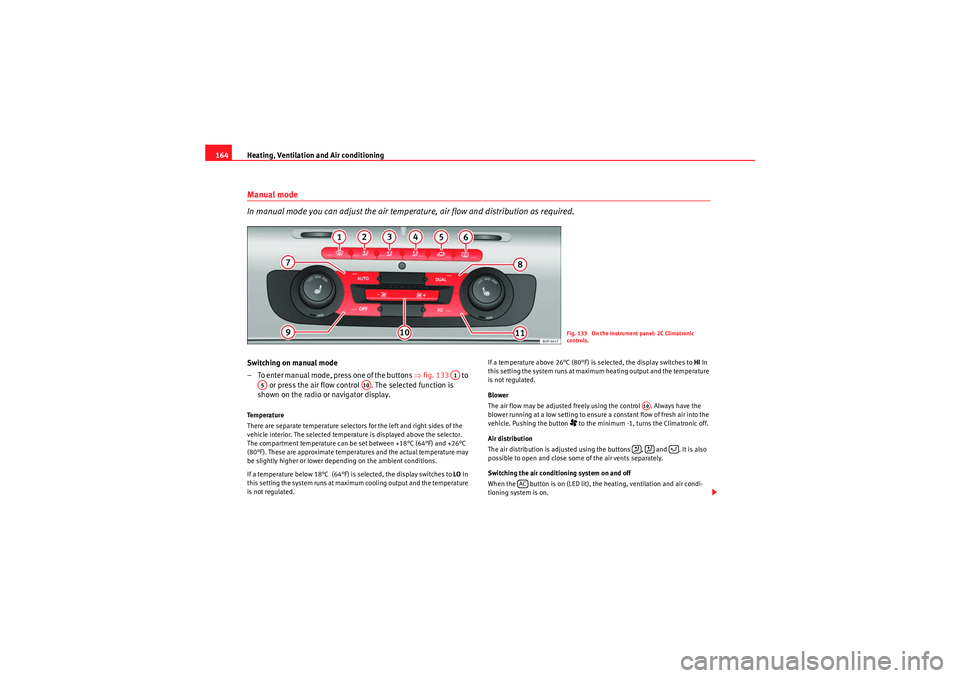
In manual mode you can adjust the air temperature, air flow and distribution as required.Switching on manual mode
– To enter manual mode, press one of the buttons ⇒fig. 133 to
or press the air flow control . The selected function is
shown on the radio or navigator display.Te m p e r a t u r e
There are separate temperature selectors for the left and right sides of the
vehicle interior. The selected temperature is displayed above the selector.
The compartment temperature can be set between +18°C (64°F) and +26°C
(80°F). These are approximate temperatures and the actual temperature may
be slightly higher or lower depending on the ambient conditions.
If a temperature below 18°C (64°F) is selected, the display switches to LO In
this setting the system runs at maximum cooling output and the temperature
is not regulated. If a temperature above 26°C (80°F) is selected, the display switches to
HI In
this setting the system runs at maximum heating output and the temperature
is not regulated.
Blower
The air flow may be adjusted freely using the control . Always have the
blower running at a low setting to ensure a constant flow of fresh air into the
vehicle. Pushing the button
to the minimum -1, turns the Climatronic off.
Air distribution
The air distribution is adjusted using the buttons , and . It is also
possible to open and close some of the air vents separately.
Switching the air conditioning system on and off
When the button is on (LED lit), the heating, ventilation and air condi-
tioning system is on.Fig. 133 On the instrument panel: 2C Climatronic
controls.
A1
A5
A10
A10
AC
altea_EN Seite 164 Mittwoch, 26. August 2009 6:00 18