warning Seat Altea 2011 Owner's Manual
[x] Cancel search | Manufacturer: SEAT, Model Year: 2011, Model line: Altea, Model: Seat Altea 2011Pages: 317, PDF Size: 8.87 MB
Page 188 of 317
Driving
186
General information about driving in tiptronic mode
Changing gear with the selector lever
– Put the lever in position D and press towards the right to enter
the Tiptronic gate ⇒page 185, fig. 146 .
– Press the gear lever forwards ⇒page 185, fig. 146 to select
a higher gear.
–Press the gear lever back ⇒ page 185, fig. 146 to select a
lower gear.
Changing gear with the steering wheel levers
– Press the right paddle lever ( +OFF) towards the steering
wheel to change up ⇒page 185, fig. 147 .
– Press the left paddle towards the steering wheel to change down ⇒page 185, fig. 147 .Using the paddle levers on the steering wheel, you can access manual driving
mode regardless of the pre-selected driving mode.
General information about driving in tiptronic mode
When accelerating, the automatic gearbox / DSG automatic gearbox goes
into a higher gear a little before the engine reaches its maximum permitted
revolutions.
If a lower gear is selected, the automatic gearbox / DSG automatic gearbox
will only change down when the engine cannot go over its maximum
permitted revolutions.
If tiptronic is selected whilst the vehicle is in motion and the automatic
gearbox / DSG automatic gearbox is in third gear and selector lever position
D, tiptronic mode will then also be in third gear. Changing gears in the normal or sport programme using the steering wheel
paddle levers
If the paddle levers ⇒
page 185, fig. 147 are used in the normal or sport
programme, the system switches temporarily to tiptronic mode. To exit
tiptronic mode again, press the right paddle lever towards the steering
wheel for approximately one second. You will also leave “Tiptronic” mode if
the paddle levers are not moved for a certain time.
Note
•The gearbox controls on the steering wheel can operate with the selector
lever in any position and with the vehicle in motion.Kickdown feature
This feature allows maximum acceleration.If you press the accelerator down thoroughly, the gearbox automatically
changes down, depending on speed and engine speed, into a lower gear to
take full advantage of give the vehicle maximum acceleration.
The gearbox does not change gear until the engine reaches the maximum
determined engine speed for the gear.
WARNING
You could lose control of the vehicle if you accelerate on slippery road
surfaces. Risk of serious injury.•Be particularly careful when using the kickdown features on slippery
road surfaces. With a fast acceleration, the vehicle could lose traction and
skid.•You should use the kickdown feature only when traffic and weather
conditions allow it to be used safely.
A+
A–A+
A–
+ OFF
Altea_EN.book Seite 186 Donnerstag, 2. September 2010 2:00 14
Page 189 of 317
Driving187
Safety First
Operating Instructions
Practical Tips
Technical Specifications
HandbrakeUsing the handbrake
The handbrake should be applied firmly to prevent the
vehicle from accidentally rolling away.Always apply the handbrake when you leave your vehicle and when
you park.
Applying the handbrake
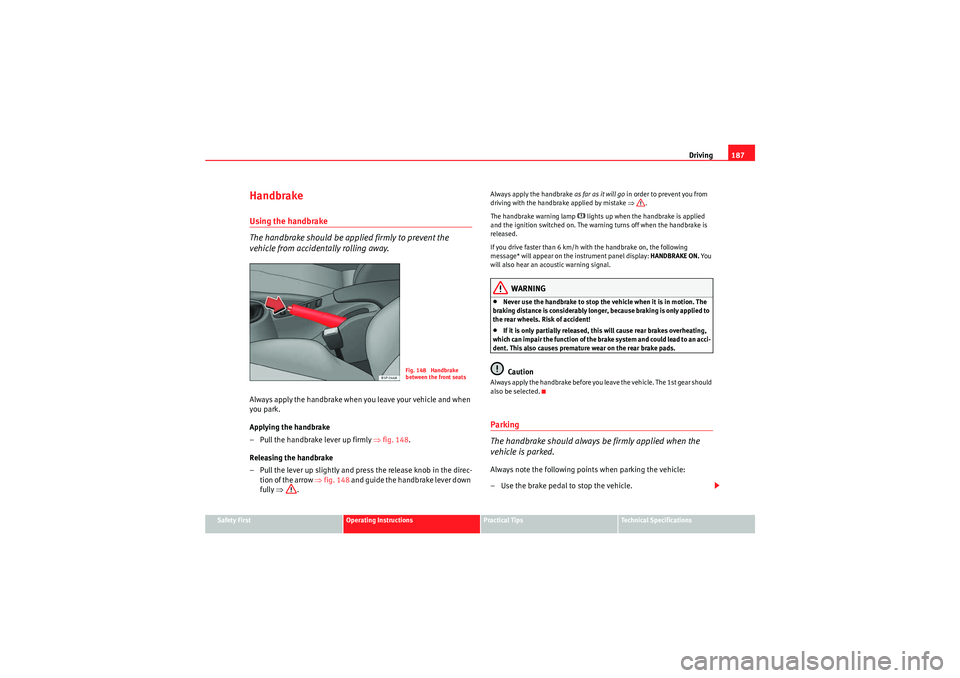
– Pull the handbrake lever up firmly ⇒ fig. 148.
Releasing the handbrake
– Pull the lever up slightly and press the release knob in the direc- tion of the arrow ⇒fig. 148 and guide the handbrake lever down
fully ⇒ .
Always apply the handbrake as far as it will go in order to prevent you from
driving with the handbrake applied by mistake ⇒.
The handbrake warning lamp
H lights up when the handbrake is applied
and the ignition switched on. The warning turns off when the handbrake is
released.
If you drive faster than 6 km/h with the handbrake on, the following
message* will appear on the instrument panel display: HANDBRAKE ON. Yo u
will also hear an acoustic warning signal.
WARNING
•Never use the handbrake to stop the vehicle when it is in motion. The
braking distance is considerably longer, because braking is only applied to
the rear wheels. Risk of accident!•If it is only partially released, this will cause rear brakes overheating,
which can impair the function of the brake system and could lead to an acci-
dent. This also causes premature wear on the rear brake pads.Caution
Always apply the handbrake before you leave the vehicle. The 1st gear should
also be selected.Parking
The handbrake should always be firmly applied when the
vehicle is parked.Always note the following points when parking the vehicle:
– Use the brake pedal to stop the vehicle.
Fig. 148 Handbrake
between the front seats
Altea_EN.book Seite 187 Donnerstag, 2. September 2010 2:00 14
Page 190 of 317
Driving
188
– Apply the handbrake.
– The 1st gear should also be selected.
– Switch the engine off and remove the key from the ignition. Turn the steering wheel slightly to engage the steering lock.
– Always take you car keys with you when you leave the vehicle ⇒ .Additional notes on parking the vehicle on gradients:
Turn the steering wheel so that the vehicle rolls against the kerb if it started
to roll.•If the vehicle is parked facing downhill, turn the front wheels so that they
point towards the kerb .•If the vehicle is parked facing uphill, turn the front wheels so that they
point away from the kerb .•Secure the vehicle as normal by applying the handbrake firmly and
engaging 1st gear.WARNING
•Take measures to reduce the risk of injury when you leave your vehicle
unattended.•Never park where the hot exhaust system could ignite inflammable
materials, such as dry grass, low bushes, spilt fuel etc.•Never allow vehicle occupants to remain in the vehicle when it is
locked. They would be unable to open the vehicle from the inside, and
could become trapped in the vehicle in an emergency. In the event of an
emergency, locked doors will delay assistance to occupants.•Never leave children alone in the vehicle. They could set the vehicle in
motion, for example, by releasing the handbrake or the gear lever.
•Depending on weather conditions, it may become extremely hot or cold
inside the vehicle. This can be fatal.
Hill-start aid*
This function is only included in vehicles with ESP.This device helps when starting uphill.
These are the basic operation conditions: doors closed, brake pedal pressed
down and vehicle in neutral. The system gets activated on engaging gear.
After removing your foot from the brake pedal, the braking force is maintained
for a few seconds to prevent the vehicle from moving backward when putting
into gear. This short space of time is enough to start the vehicle with ease.
This system also works when reversing uphill.
WARNING
•If you do not start the vehicle immediately after taking your foot off the
brake pedal, the vehicle may start to roll back under certain conditions.
Depress the brake pedal or use the hand brake immediately.•If the engine stalls, depress the brake pedal or use the hand brake
immediately.•When following a line of traffic uphill, if you want to prevent the vehicle
from rolling back accidentally when starting off, hold the brake pedal down
for a few seconds before starting off.WARNING (continued)
Altea_EN.book Seite 188 Donnerstag, 2. September 2010 2:00 14
Page 191 of 317

Driving189
Safety First
Operating Instructions
Practical Tips
Technical Specifications
Note
The Official Service or a specialist workshop can tell you if your vehicle is
equipped with this system.Parking aid acoustic system*General notesVarious systems are available to help you when parking or manoeuvring in
tight spaces, depending on the equipment fitted on your vehicle.
The SEAT Parking System* gives an acoustic warning if there are any obsta-
cles behind your vehicle.
When you are parking, the SEAT Parking System Plus* warns you acoustically
and optically
23) about obstacles “in front of” and “behind” the vehicle.
Note
To ensure the acoustic parking aid works properly, the sensors must be kept
clean and free of snow and ice.
SEAT Parking System: Description
The Parking System is an acoustic parking aid.Sensors are located in the rear bumper. When the sensors detect an obstacle,
you are alerted by acoustic signals. The measuring range of the sensors starts
at approximately:
The acoustic signals sound with increasing frequency as you approach the
obstacle. When the vehicle is less than 0.30 m away from the obstacle, the
warning tone will sound continuously. Do not drive on!
The volume of the warning beeps will be gradually reduced after about four
seconds if the vehicle remains at a constant distance from a detected
obstacle (it does not affect the permanent acoustic signal).
The parking aid is switched on automatically when reverse gear is engaged.
You will hear a brief confirmation tone.
WARNING
•The parking aid is not a replacement for driver awareness. The driver is
personally responsible for safe parking and other manoeuvres.•The sensors have blind spots in which obstacles are not registered.
Always look out for small children and animals because the system will not
always detect them. Always pay attention when reversing to avoid acci-
dents.•Always keep a close eye on the area around the vehicle and make full
use of the rear view mirrors.
23)Vehicles with a navigation system.
Rear
Side
0.60
Centre
1.60
Altea_EN.book Seite 189 Donnerstag, 2. September 2010 2:00 14
Page 192 of 317

Driving
190
CautionPlease note that low obstacles detected by the system may no longer be
registered by the sensors as the vehicle moves closer, so the system will not
give any further warning. Certain kinds of obstacles (such as wire fences,
chains, thin painted posts or trailer draw bars, etc) may not always be
detected by the system, so take care not to damage the vehicle in such cases.
Note
Please refer to the notes on towing ⇒page 191.SEAT Parking System Plus*: Description
The parking system plus is an acoustic and optical parking
aid.Sensors are located in the front and rear bumpers. When the sensors detect
an obstacle, you are alerted by acoustic and optical signals. The measuring
range of the sensors starts at approximately:
The acoustic signals sound with increasing frequency as you approach the
obstacle. When the vehicle is less than 0.30 m away from the obstacle, the
warning tone will sound continuously. Stop moving immediately!
The volume of the warning beeps will be gradually reduced after about four
seconds if the vehicle remains at a constant distance from a detected
obstacle (it does not affect the permanent acoustic signal).
Activating/DeactivatingActivating
– Connects the radio navigator
–Press the switch
on the centre console ⇒ fig. 149 or on the
gear selector gate. You will hear a brief confirmation tone and the
LED on the switch will light up.
Deactivating
– Drive forward faster than 10 km/h, or
–Press the switch or
– Switch the ignition off.
Segments in the optical display
Some colour segments in front and behind and an acoustic signal enable the
driver to assess the distance with respect to an obstacle. The amber colour
Front
Side
0.90
Centre
1.20
Rear
Side
0.60
Centre
1.60
Fig. 149 Centre console:
Switch for parking aid
Altea_EN.book Seite 190 Donnerstag, 2. September 2010 2:00 14
Page 193 of 317

Driving191
Safety First
Operating Instructions
Practical Tips
Technical Specifications
segments combined with a discontinuous beep indicate the presence of an
obstacle. As the vehicle gets closer to the obstacle, the colour of the segment
changes to red and the acoustic signal beeps continuously. When the penul-
timate segment is displayed, this means that the vehicle has reached the
collision zone. Stop moving immediately!
⇒.
WARNING
•The parking aid is not a replacement for driver awareness. The driver is
personally responsible for safe parking and other manoeuvres.•The sensors have blind spots in which obstacles are not registered.
Always look out for small children and animals because the system will not
always detect them. Always pay attention when reversing to avoid acci-
dents.•Always keep a close eye on the area around the vehicle and make full
use of the rear view mirrors.Caution
Please note that low obstacles detected by the system may no longer be
registered by the sensors as the vehicle moves closer, so the system will not
give any further warning. Certain kinds of obstacles (such as wire fences,
chains, thin painted posts or trailer draw bars, etc) may not always be
detected by the system, so take care not to damage the vehicle in such cases.
Note
•Please refer to the notes on towing ⇒page 191.•There is a slight delay in the picture display.
To w i n g b r a c k e tIn towing mode, the rear parking aid sensors are not enabled when you select
reverse gear or press the switch
. This function may not be guaranteed on
towing brackets that are not factory fitted. This results in the following restric-
tions:
SEAT Parking System*
No warning is given
SEAT Parking System Plus:*
There is no rear distance warning. The system will still give a warning when
obstacles are detected while driving forward. The optical display changes to
towing mode.
Fault messagesIf you hear a long beep for a few seconds and the LED on the switch
* starts
flashing when you switch on the parking aid, a system fault has occurred.
Please refer the problem to an Authorised SEAT dealer or specialised work-
shop.
Note
If the fault is not corrected before you switch off the ignition, it will only be
indicated by the flashing LED on the switch
the next time you switch on
the parking aid.
Altea_EN.book Seite 191 Donnerstag, 2. September 2010 2:00 14
Page 194 of 317
Driving
192Cruise control*Description
The cruise control system is able to maintain the set speed in
the range of 30 km/h to 180 km/h.Once the speed setting has been saved, you may take your foot off the accel-
erator.
WARNING
It could be dangerous to use the cruise control system if it is not possible
to drive at constant speed.•Do not use the cruise control system when driving in dense traffic, on
roads with lots of bends or on roads with poor conditions (with ice, slippery
surfaces, loose grit or gravel), as this could cause an accident.•Always switch the cruise control system off after using it in order to
avoid an involuntary use.•It is dangerous to use a set speed which is too high for the current road,
traffic or weather conditions. Risk of accident.Note
The cruise control cannot maintain a constant speed when descending down-
hill. The vehicle will accelerate due to its own weight. Use the foot brake to
slow the vehicle.
Switching the cruise control system on and offSwitching on the system
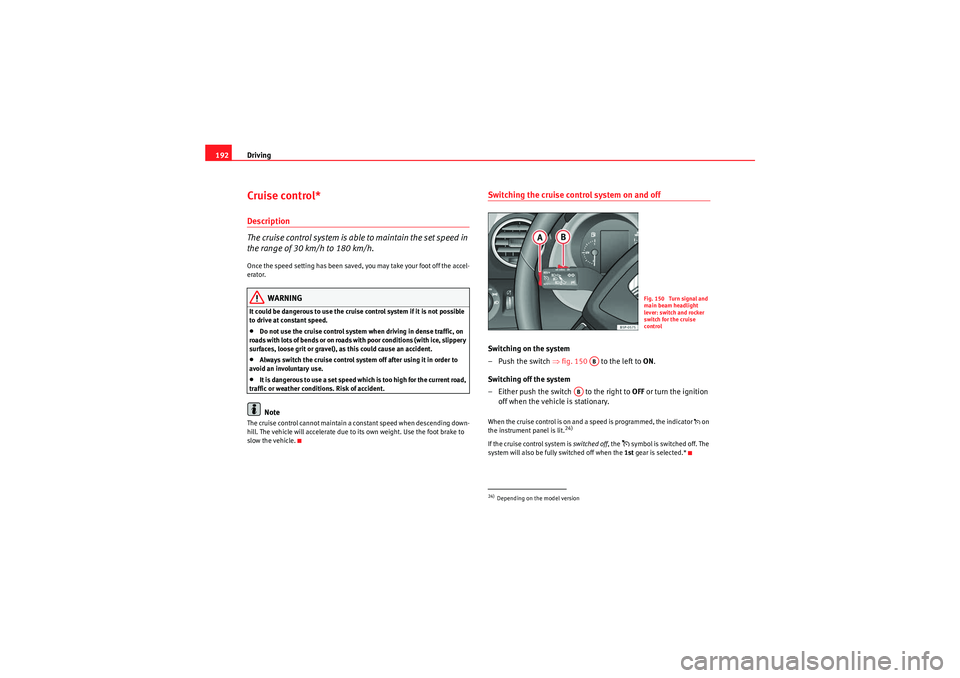
–Push the switch ⇒fig. 150 to the left to ON.
Switching off the system
– Either push the switch to the right to OFF or turn the ignition
off when the vehicle is stationary.W h en the cr uis e cont rol is o n an d a sp ee d is pr ogra m m e d, the in di cato r on
the instrument panel is lit.
24)
If the cruise control system is switched off , the
symbol is switched off. The
system will also be fully switched off when the 1st gear is selected.*
24)Depending on the model version
Fig. 150 Turn signal and
main beam headlight
lever: switch and rocker
switch for the cruise
control
AB
AB
Altea_EN.book Seite 192 Donnerstag, 2. September 2010 2:00 14
Page 196 of 317
Driving
194When you increase speed with the accelerator and then release the pedal, the
system will automatically restore the set speed. This will not be the case,
however, if the vehicle speed is more than 10 km/h higher than the stored
speed for longer than 5 minutes. The speed will have to be stored again.
Cruise control is switched off if you reduce speed by depressing the brake
pedal. You can reactivate the control by pressing once on the upper part of the
rocker switch RES/+ ⇒ page 193, fig. 152 .
WARNING
It is dangerous to use a set speed which is too high for the current road,
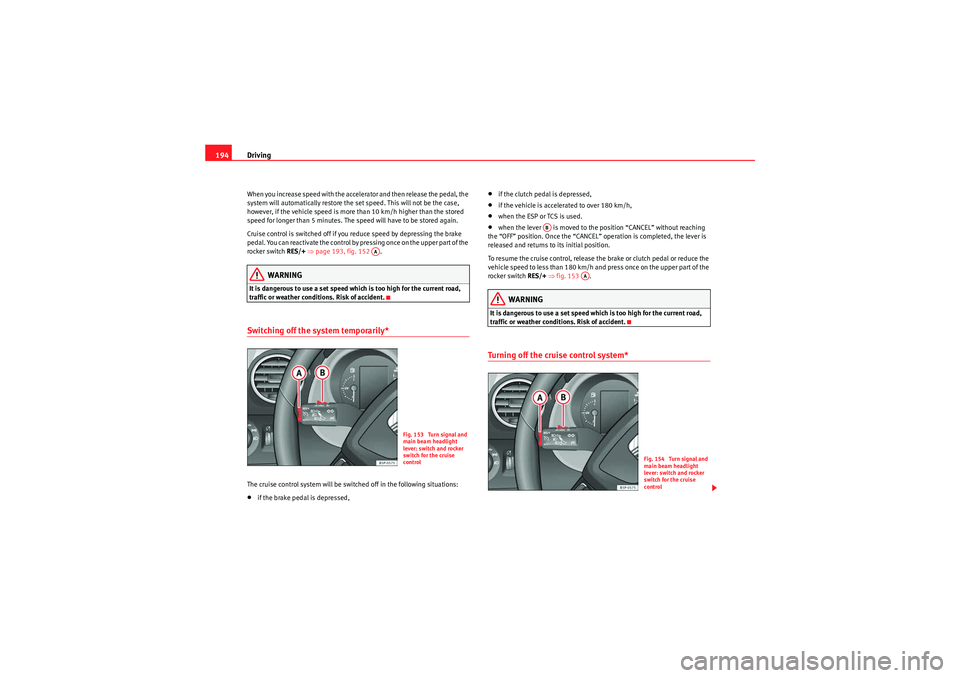
traffic or weather conditions. Risk of accident.Switching off the system temporarily*The cruise control system will be switched off in the following situations:•if the brake pedal is depressed,
•if the clutch pedal is depressed,•if the vehicle is accelerated to over 180 km/h,•when the ESP or TCS is used.•when the lever is moved to the position “CANCEL” without reaching
the “OFF” position. Once the “CANCEL” operation is completed, the lever is
released and returns to its initial position.
To resume the cruise control, release the brake or clutch pedal or reduce the
vehicle speed to less than 180 km/h and press once on the upper part of the
rocker switch RES/+ ⇒ fig. 153 .WARNING
It is dangerous to use a set speed which is too high for the current road,
traffic or weather conditions. Risk of accident.Turning off the cruise control system*
AA
Fig. 153 Turn signal and
main beam headlight
lever: switch and rocker
switch for the cruise
control
AB
AA
Fig. 154 Turn signal and
main beam headlight
lever: switch and rocker
switch for the cruise
control
Altea_EN.book Seite 194 Donnerstag, 2. September 2010 2:00 14
Page 199 of 317
Intelligent technology197
Safety First
Operating Instructions
Practical Tips
Technical Specifications
Practical TipsIntelligent technologyBrakesBrake servoThe brake servo increases the pressure you apply to the brake pedal. It works
only when the engine is running .
If the brake servo is not functioning due to a malfunction, or if the vehicle has
to be towed, you will have to press the brake pedal considerably harder to
make up for the lack of servo assistance.
WARNING
The braking distance can also be affected by external factors.•Never let the vehicle coast with the engine switched off. Failure to do so
could result in an accident. The braking distance is increased considerably
when the brake servo is not active.•If the brake servo is not working, for example when the vehicle is being
towed, you will have to press the brake pedal considerably harder than
normal.
Hydraulic Brake Assist (HBA)*
The Hydraulic Brake Assist function (HBA) is only included in
vehicles with ESP.In an emergency, most drivers brake in time, but not with maximum force.
This results in unnecessarily long braking distances.
This is when the brake assist system comes into action. When pressing the
brake pedal rapidly, the assistant interprets it as an emergency. It then very
quickly builds up the full brake pressure so that the ABS can be activated
more quickly and efficiently, thus reducing the braking distance.
Do not reduce the pressure on the brake pedal. The brake assist system
switches off automatically as soon as you release the brake.
Emergency braking warning
If the vehicle is braked suddenly and continuously at a speed of more than 80
km/h, the brake light flashes several times per second to warn vehicles
driving behind. If you continue braking, the hazard warning lights will come
on automatically when the vehicle comes to a standstill. They switch off auto-
matically when the vehicle starts to move again.
WARNING
•The risk of accident is higher if you drive too fast, if you do not keep
your distance to the vehicle in front, and when the road surface is slippery
or wet. The increased accident risk cannot be reduced by the brake assist
system.
Altea_EN.book Seite 197 Donnerstag, 2. September 2010 2:00 14
Page 200 of 317
Intelligent technology
198•The brake assist system cannot defy the laws of physics. Slippery and
wet roads are dangerous even with the brake assist system! Therefore, it is
essential that you adjust your speed to suit the road and traffic conditions.
Do not let the extra safety features tempt you into taking any risks when
driving.
Anti-lock brake system and traction control
M-ABS (ABS and TCS)Anti-lock brake system (ABS)
The anti-lock brake system prevents the wheels locking
during braking.The anti-lock brake system (ABS) is an important part of the vehicle’s active
safety system.
How the ABS works
If one of the wheels is turns too slowly in relation to the road speed, and is
close to locking, the system will reduce the braking pressure for this wheel.
The driver is made aware of this control process by a pulsating of the brake
pedal and audible noise. This is a deliberate warning to the driver that one or
more of the wheels is tending to lock and the ABS control function has inter-
vened. In this situation it is important to keep the brake pedal fully depressed
so the ABS can regulate the brake application. Do not “pump”.
If you brake hard on a slippery road surface, the best possible control is
retained as the wheels do not lock. However, ABS will not necessarily gu
arantee shorter braking distances in all
conditions. The braking distance could even be longer if you brake on gravel
or on fresh snow covering a slippery surface.
WARNING
•The anti-lock brake system cannot defy the laws of physics. Slippery
and wet roads are dangerous even with ABS! If you notice that the ABS is
working (to counteract locked wheels under braking), you should reduce
speed immediately to suit the road and traffic conditions. Do not let the
extra safety features tempt you into taking any risks when driving.•The effectiveness of ABS is also determined by the tyres fitted
⇒ page 249.•If the running gear or brakes are modified, the effectiveness of the ABS
could be severely limited.
Traction control system (TCS)
The traction control system prevents the drive wheels from
spinning when the vehicle is accelerating.Description and operation of the traction control system during acceleration
(TCS)
TCS reduces engine power to help prevent the drive wheels of front-wheel
drive vehicles losing traction during acceleration. The system works in the
entire speed range in conjunction with ABS. If a malfunction occurs in the
ABS, the TCS will also be inoperative.
TCS helps the vehicle to start moving, accelerate and climb a gradient in slip-
pery conditions where this may otherwise be difficult or even impossible.
T h e T C S i s s wi tch e d o n a u t o m a t i ca ll y w h e n t h e e n g i n e i s s t a r te d . I f n e ce s sa r y,
it may be turned on or off pushing the button on the centre console.
WARNING (continued)
Altea_EN.book Seite 198 Donnerstag, 2. September 2010 2:00 14