technical specifications Seat Altea 2011 Owner's Guide
[x] Cancel search | Manufacturer: SEAT, Model Year: 2011, Model line: Altea, Model: Seat Altea 2011Pages: 317, PDF Size: 8.87 MB
Page 45 of 317
Airbag system43
Safety First
Operating Instructions
Practical Tips
Technical Specifications
•There must be no other persons, animals or objects between the occu-
pants of the outer seats and the deployment space of the curtain airbags
so that the curtain airbag can deploy without restriction and provide the
greatest possible protection. Therefore, sun blinds which have not been
expressly approved for use in your vehicle may not be attached to the side
windows ⇒page 224, “Accessories, parts replacement and modifica-
tions”.•The built-in coat hooks should be used only for lightweight clothing. Do
not leave any heavy or sharp-edged objects in the pockets. Please, do not
hang the clothes on coat hangers.•The airbags provide protection for just one accident; replace them once
they have deployed.•Any work on the curtain airbag system or removal and installation of
the airbag components for other repairs (such as removal of the roof lining)
should only be performed by a spec ialised workshop. Otherwise, faults
may occur during the airbag system operation.•Do not attempt to modify components of the airbag system in any way.•The side and head airbags are managed through sensors located in the
interior of the front doors. To ensure the correct functioning of the side and
head airbags neither the doors nor the door panels should be modified in
any way (e.g. fitting loudspeakers). If the front door is damaged, the airbag
system may not work correctly. All work carried out on the front door must
be made in a specialised workshop.WARNING (continued)
Altea_EN.book Seite 43 Donnersta g, 2. September 2010 2:00 14
Page 47 of 317
Airbag system45
Safety First
Operating Instructions
Practical Tips
Technical Specifications
– Check that the warning lamp on the instrument panel
⇒page 44, fig. 27 does not light up when the ignition is
switched on ⇒ .
WARNING
•The driver is responsible for the proper position of the key-operated
switch. •You should only deactivate the front passenger airbag when, in excep-
tional cases, you have to use a rear-facing child seat on the front passenger
seat ⇒page 46, “Child safety”.•Never install a child seat facing backwards on the front passenger seat
unless the front passenger airbag has been disabled. Otherwise, there is a
risk of death. If under exceptional circumstances it is necessary to trans-
port a child in a rear-facing child seat on the front passenger seat, you must
always disable the front passenger airbag.•As soon as the child seat is no longer needed on the front passenger
seat, enable the front passenger airbag again.•Only deactivate the passenger airbag when the ignition is off, other-
wise a fault may occur in the airbag system, which could cause the airbag
to not deploy properly or not deploy at all.•When the passenger airbag is deactivated, if the warning lamp AIRBAG
OFF is not continuously lit up, there may be a fault in the airbag system:
−Have the airbag system inspected immediately by a specialised
workshop.
− Do not use a child seat on the front passenger seat! The front
passenger airbag could be triggered despite the fact that there is a fault
in the system and, as a result, a child could sustain serious or fatal inju-
ries.
− It is unpredictable whether the front passenger airbag will deploy in
the event of an accident. Warn all your passengers of this.
•When using the ignition key to activate/deactivate the front passenger
airbag, only the front passenger airbag will be activated/deactivated. The
side airbag and head airbag on the passenger side will remain active.WARNING (continued)
Altea_EN.book Seite 45 Donnersta g, 2. September 2010 2:00 14
Page 49 of 317
Child safety47
Safety First
Operating Instructions
Practical Tips
Technical Specifications
airbags*”. If the passenger seat has a height adjustment option, move it to
the highest position.
•For those vehicles that do not include a key lock switch to disconnect
the airbag, the vehicle must be taken to a Technical Service.•All passengers, especially children, must assume the proper sitting
position and be properly belted in while travelling.•Never hold children or babies on your lap, this can result in potentially
fatal injuries to the child!•Never allow a child to be transported in a vehicle without being properly
secured, or to stand up or kneel on a seat while travelling. In an accident,
the child could be flung through the vehicle, causing possibly fatal injuries
to themselves and to the other passengers.•If children assume an improper sitting position when the vehicle is
moving, they expose themselves to greater risk of injury in the event of a
sudden braking manoeuvre or in an accident. This is particularly important
if the child is travelling on the front passenger seat and the airbag system
is t riggered in an accid ent ; as this could caus e s erious inj ur y or eve n deat h.•A suitable child seat can protect your child!•Never leave an unsupervised child alone on a child seat or in the
vehicle.•Depending on weather conditions, it may become extremely hot or cold
inside the vehicle. This can be fatal.•Children who are less than 1.5 metres tall must not wear a normal seat
belt without a child seat, as this could cause injuries to the abdominal and
neck areas during a sudden braking manoeuvre or in an accident.•Do not allow the seat belt to become twisted or jammed, or to rub on
any sharp edges.•Incorrectly worn seat belts can cause injuries even in a minor collision
or in sudden braking manoeuvres.
•The seat belt provides maximum protection only when the seat belt is
properly positioned ⇒page 24, “Seat belts”.•Only one child may occupy a child seat ⇒page 48, “Child seats”.
WARNING (continued)
WARNING (continued)
Altea_EN.book Seite 47 Donnersta g, 2. September 2010 2:00 14
Page 51 of 317
Child safety49
Safety First
Operating Instructions
Practical Tips
Technical Specifications
Group 1 child seats
A suitable child seat and a correctly adjusted seat belt can
help you to protect your child.Child seats using the ISOFIX system or seats in which the child faces the rear
of the vehicle are most appropriate for babies and small children weighing
between 9 and 18 kg.
Follow the manufacturer's instructions and observe any statutory require-
ments when installing and using child seats.
We recommend you to include the manufacturer's Child Seat instruction
manual together with the on-board documentation.
WARNING
Read and always observe information and warnings concerning the use of
child seats ⇒ in “Safety notes on using child seats” on page 46.
Group 2 and 3 child seats
A suitable child seat and a correctly adjusted seat belt can
help you to protect your child.Follow the manufacturer's instructions and observe any statutory require-
ments when installing and using child seats.
We recommend you to include the manufacturer's Child Seat instruction
manual together with the on-board documentation.
Group 2 child seats
Children under 7 years of age weighing between 15 and 25 kg are best
protected by group 2 child seats together with properly adjusted seat belts.
Group 3 child seats
Children over 7 years of age weighing between 22 and 36 kg but less than 1.5
metres tall are best protected by seat cushions with head restraints together
with properly worn seat belts ⇒fig. 30 .
Fig. 29 A category 1
forward-facing child seat
fitted on the rear seat.
Fig. 30 Forward-facing
child seat installed on rear
seat.
Altea_EN.book Seite 49 Donnersta g, 2. September 2010 2:00 14
Page 53 of 317
Child safety51
Safety First
Operating Instructions
Practical Tips
Technical Specifications
Securing child seatsWays to secure a child seat
A child seat can be secured differently on the rear seat and on
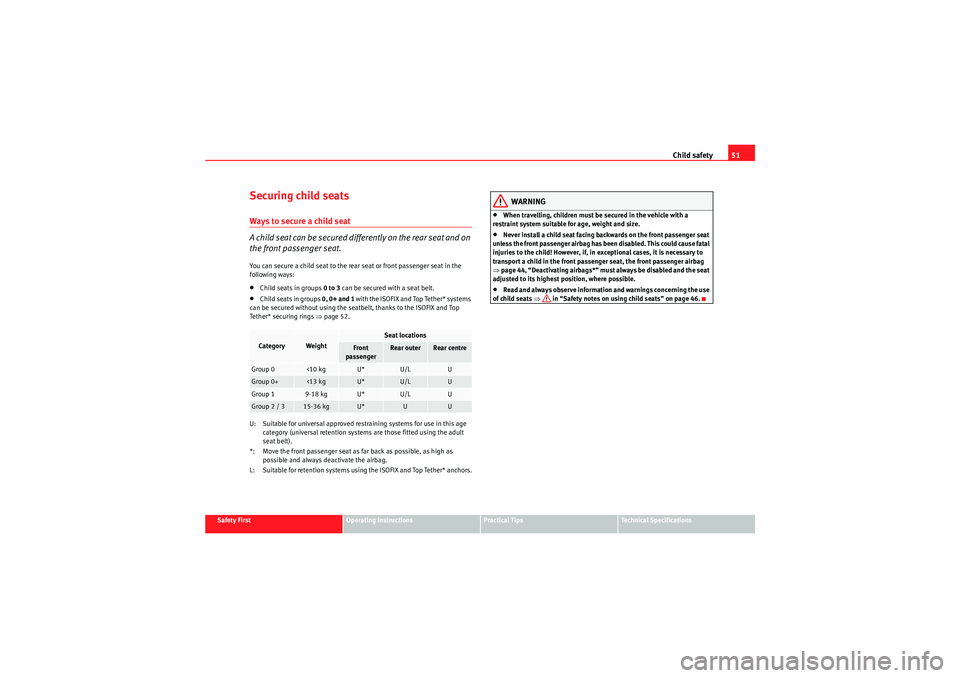
the front passenger seat.You can secure a child seat to the rear seat or front passenger seat in the
following ways:•Child seats in groups 0 to 3 can be secured with a seat belt.•Child seats in groups 0, 0+ and 1 with the ISOFIX and Top Tether* systems
can be secured without using the seatbelt, thanks to the ISOFIX and Top
Tether* securing rings ⇒ page 52.
U: Suitable for universal approved restraining systems for use in this age category (universal retention systems are those fitted using the adult
seat belt).
*: Move the front passenger seat as far back as possible, as high as possible and always deactivate the airbag.
L: Suitable for retention systems using the ISOFIX and Top Tether* anchors.
WARNING
•When travelling, children must be secured in the vehicle with a
restraint system suitable for age, weight and size.•Never install a child seat facing backwards on the front passenger seat
unless the front passenger airbag has been disabled. This could cause fatal
injuries to the child! However, if, in exceptional cases, it is necessary to
transport a child in the front passenger seat, the front passenger airbag
⇒ page 44, “Deactivating airbags*” must always be disabled and the seat
adjusted to its highest position, where possible.•Read and always observe information and warnings concerning the use
of child seats ⇒ in “Safety notes on using child seats” on page 46.
Category
Weight
Seat locations
Front
passenger
Rear outer
Rear centre
Group 0
<10 kg
U*
U/L
U
Group 0+
<13 kg
U*
U/L
U
Group 1
9-18 kg
U*
U/L
U
Group 2 / 3
15-36 kg
U*
U
U
Altea_EN.book Seite 51 Donnersta g, 2. September 2010 2:00 14
Page 55 of 317
53
Safety First
Operating Instructions
Practical Tips
Technical Specifications
Altea_EN.book Seite 53 Donnerstag, 2. September 2010 2:00 14
Page 57 of 317
Cockpit55
Safety First
Operating Instructions
Practical Tips
Technical Specifications
Operating InstructionsCockpitOverviewOverview of the dash panel
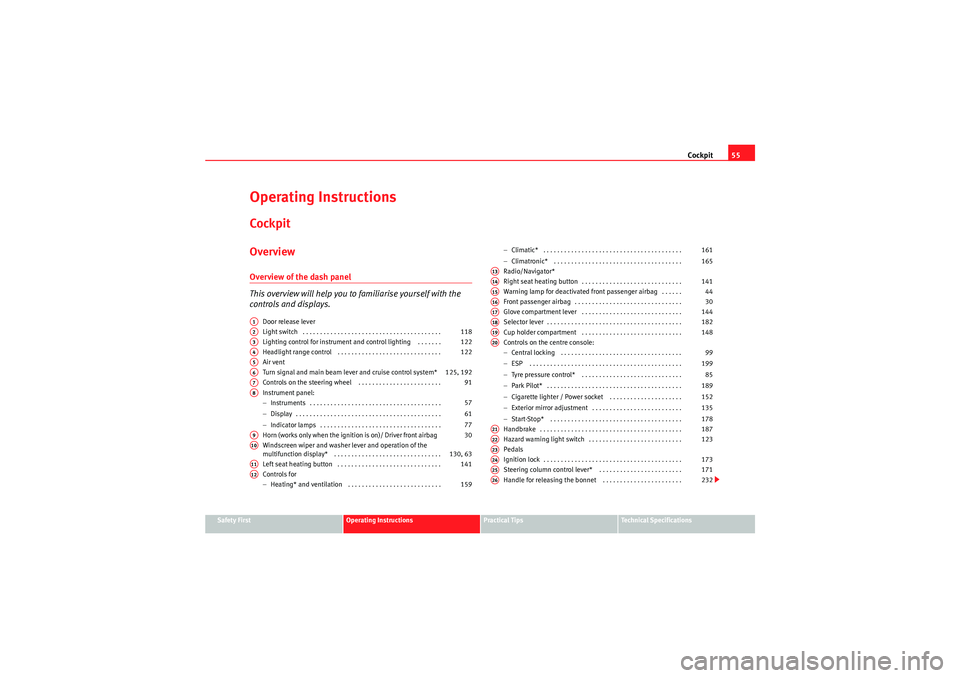
This overview will help you to familiarise yourself with the
controls and displays.
Door release lever
Light switch . . . . . . . . . . . . . . . . . . . . . . . . . . . . . . . . . . . . . . . .
Lighting control for instrument and control lighting . . . . . . .
Headlight range control . . . . . . . . . . . . . . . . . . . . . . . . . . . . . .
Air vent
Turn signal and main beam lever and cruise control system*
Controls on the steering wheel . . . . . . . . . . . . . . . . . . . . . . . .
Instrument panel:
− Instruments . . . . . . . . . . . . . . . . . . . . . . . . . . . . . . . . . . . . . .
− Display . . . . . . . . . . . . . . . . . . . . . . . . . . . . . . . . . . . . . . . . . .
− Indicator lamps . . . . . . . . . . . . . . . . . . . . . . . . . . . . . . . . . . .
Horn (works only when the ignition is on)/ Driver front airbag
Windscreen wiper and washer lever and operation of the
multifunction display* . . . . . . . . . . . . . . . . . . . . . . . . . . . . . . .
Left seat heating button . . . . . . . . . . . . . . . . . . . . . . . . . . . . . .
Controls for
− Heating* and ventilation . . . . . . . . . . . . . . . . . . . . . . . . . . . −
Climatic* . . . . . . . . . . . . . . . . . . . . . . . . . . . . . . . . . . . . . . . .
− Climatronic* . . . . . . . . . . . . . . . . . . . . . . . . . . . . . . . . . . . . .
Radio/Navigator*
Right seat heating button . . . . . . . . . . . . . . . . . . . . . . . . . . . . .
Warning lamp for deactivated front passenger airbag . . . . . .
Front passenger airbag . . . . . . . . . . . . . . . . . . . . . . . . . . . . . . .
Glove compartment lever . . . . . . . . . . . . . . . . . . . . . . . . . . . . .
Selector lever . . . . . . . . . . . . . . . . . . . . . . . . . . . . . . . . . . . . . . .
Cup holder compartment . . . . . . . . . . . . . . . . . . . . . . . . . . . . .
Controls on the centre console:
− Central locking . . . . . . . . . . . . . . . . . . . . . . . . . . . . . . . . . . .
− ESP . . . . . . . . . . . . . . . . . . . . . . . . . . . . . . . . . . . . . . . . . . . .
− Tyre pressure control* . . . . . . . . . . . . . . . . . . . . . . . . . . . . .
− Park Pilot* . . . . . . . . . . . . . . . . . . . . . . . . . . . . . . . . . . . . . . .
− Cigarette lighter / Power socket . . . . . . . . . . . . . . . . . . . . .
− Exterior mirror adjustment . . . . . . . . . . . . . . . . . . . . . . . . . .
− Start-Stop* . . . . . . . . . . . . . . . . . . . . . . . . . . . . . . . . . . . . . .
Handbrake . . . . . . . . . . . . . . . . . . . . . . . . . . . . . . . . . . . . . . . . .
Hazard warning light switch . . . . . . . . . . . . . . . . . . . . . . . . . . .
Pedals
Ignition lock . . . . . . . . . . . . . . . . . . . . . . . . . . . . . . . . . . . . . . . .
Steering column control lever* . . . . . . . . . . . . . . . . . . . . . . . .
Handle for releasing the bonnet . . . . . . . . . . . . . . . . . . . . . . .
A1A2
118
A3
122
A4
122
A5A6
125, 192
A7
91
A8
57
61
77
A9
30
A10
130, 63
A11
141
A12
159 161
165
A13A14
141
A15
44
A16
30
A17
144
A18
182
A19
148
A20
99
199 85
189
152
135
178
A21
187
A22
123
A23A24
173
A25
171
A26
232
Altea_EN.book Seite 55 Donnersta g, 2. September 2010 2:00 14
Page 59 of 317
Cockpit57
Safety First
Operating Instructions
Practical Tips
Technical Specifications
InstrumentsInstrument overview
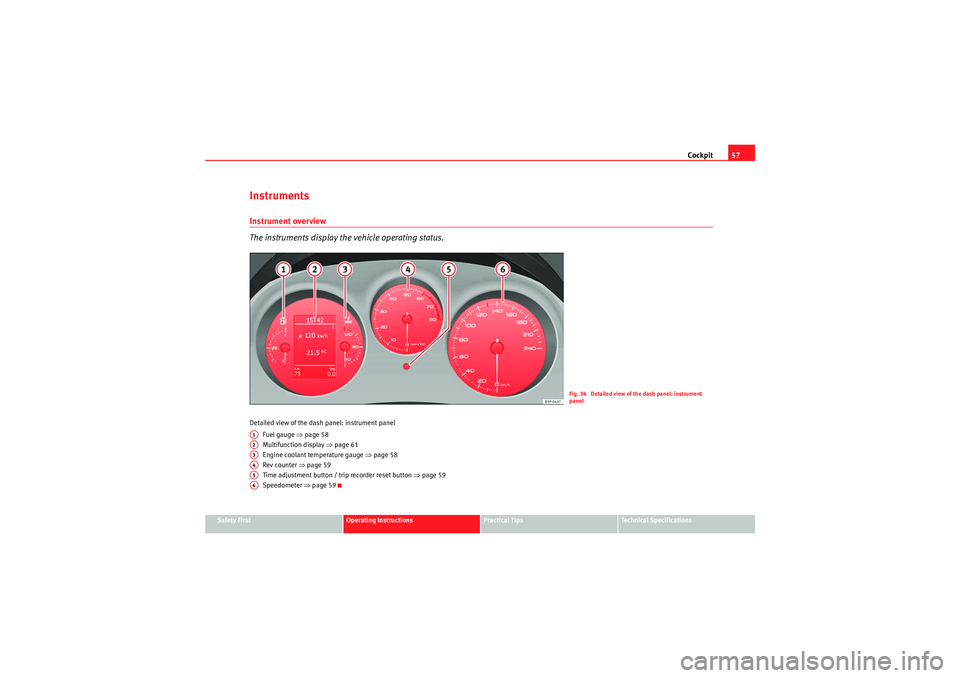
The instruments display the vehicle operating status.Detailed view of the dash panel: instrument panel
Fuel gauge ⇒ page 58
Multifunction display ⇒page 61
Engine coolant temperature gauge ⇒ page 58
Rev counter ⇒ page 59
Time adjustment button / trip recorder reset button ⇒page 59
Speedometer ⇒page 59
Fig. 34 Detailed view of the dash panel: instrument
panel
A1A2A3A4A5A6
Altea_EN.book Seite 57 Donnersta g, 2. September 2010 2:00 14
Page 61 of 317

Cockpit59
Safety First
Operating Instructions
Practical Tips
Technical Specifications
panel display
4).
Stop the vehicle and switch off the engine. Check the
coolant level ⇒ page 239 ⇒.
Even if the coolant level is correct do not continue driving. You should obtain
technical assistance.
WARNING
When working in the engine compartment, always observe the safety warn-
ings ⇒page 232.
Caution
Accessories in front of the air inlet reduce the cooling effect of the coolant. At
high outside temperatures and high engine loads, there is a risk of the
engine overheating.Rev counter
The rev counter displays the engine speed in revolutions per
minute.The start of the red zone ⇒page 57, fig. 34 indicates the maximum
engine speed operating at service temperature. However, it is advisable to
change up a into a higher gear, move the selector lever to D or lift your foot
off the accelerator before the needle reaches the red zone.
Caution
The rev counter needle must never enter the red zone on the scale. Risk of
engine damage.
For the sake of the environment
C h a n g i ng u p i n t o h i g h e r ge a r s e a r l y wi ll h e l p yo u t o r e d u ce f u e l co ns u m p t i o n ,
emissions and minimise engine noise.SpeedometerThe speedometer is equipped with a digital odometer and a trip recorder, in
addition to a service intervals display.
During the running-in period, the instructions shown on ⇒page 205 should
be followed.Setting the digital clock*
The digital clock is located in the instrument panel display.– Turn the setting knob ⇒page 57, fig. 34 clockwise until the
first “click” to set the hour. The hour will flash. To change the
hour, press the button.
– Turn the setting knob clockwise to the second “click” to set the minutes. The minutes will flash. To change the minutes, press the
button.
4)Depending on the version of the model.
A4
A5
Altea_EN.book Seite 59 Donnersta g, 2. September 2010 2:00 14
Page 63 of 317
Cockpit61
Safety First
Operating Instructions
Practical Tips
Technical Specifications
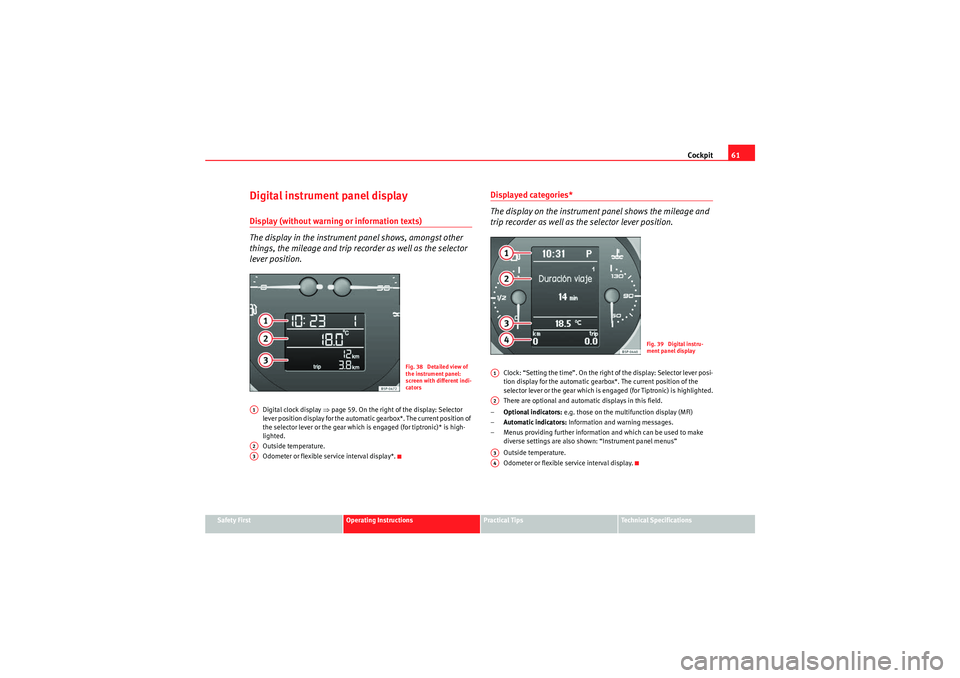
Digital instrument panel displayDisplay (without warnin g or information texts)
The display in the instrument panel shows, amongst other
things, the mileage and trip recorder as well as the selector
lever position.
Digital clock display ⇒page 59. On the right of the display: Selector
lever position display for the automatic gearbox*. The current position of
the selector lever or the gear which is engaged (for tiptronic)* is high-
lighted.
Outside temperature.
Odometer or flexible service interval display*.
Displayed categories*
The display on the instrument panel shows the mileage and
trip recorder as well as the selector lever position.
Clock: “Setting the time”. On the right of the display: Selector lever posi-
tion display for the automatic gearbox*. The current position of the
selector lever or the gear which is en gaged (for Tiptronic) is highlighted.
There are optional and automatic displays in this field.
– Optional indicators: e.g. those on the multifunction display (MFI)
– Automatic indicators: Information and warning messages.
– Menus providing further information and which can be used to make diverse settings are also shown: “Instrument panel menus”
Outside temperature.
Odometer or flexible service interval display.
Fig. 38 Detailed view of
the instrument panel:
screen with different indi-
cators
A1A2A3
Fig. 39 Digital instru-
ment panel display
A1A2A3A4
Altea_EN.book Seite 61 Donnersta g, 2. September 2010 2:00 14