service Seat Altea 2012 User Guide
[x] Cancel search | Manufacturer: SEAT, Model Year: 2012, Model line: Altea, Model: Seat Altea 2012Pages: 313, PDF Size: 4.47 MB
Page 65 of 313
63
Cockpit
Indications for vehicles with LongLife service
Technical progress has made it possible to considerably reduce servicing re-
quirements. With the LongLife System, SEAT ensures that your vehicle only
has an interval service when it is necessary. The length of the service inter-
vals (max. two years) is determined by factors such as conditions under
which the vehicle is used and personal driving style.
The service pre-warning will first appear 20 days before the date on which
the service is due. The distance travelled is rounded off to the nearest 100
km and the time to full days. The current service message can only be con-
sulted 500 km after the last service. Until that time, only dashes are dis-
played.
Note
● If you reset the display manually, the next service interval will be indica-
ted after 15 000 km or one year and will not be calculated individually.
● Do not reset the display between service intervals as the display will
otherwise be incorrect.
● In LongLife Service vehicles, if the battery is disconnected for a long pe-
riod, the days remaining until the next service cannot be calculated. There-
fore, the service message displays on the instrument panel may be incor-
rect. Take into account the maximum authorised service intervals. Multifunction display (MFI)*
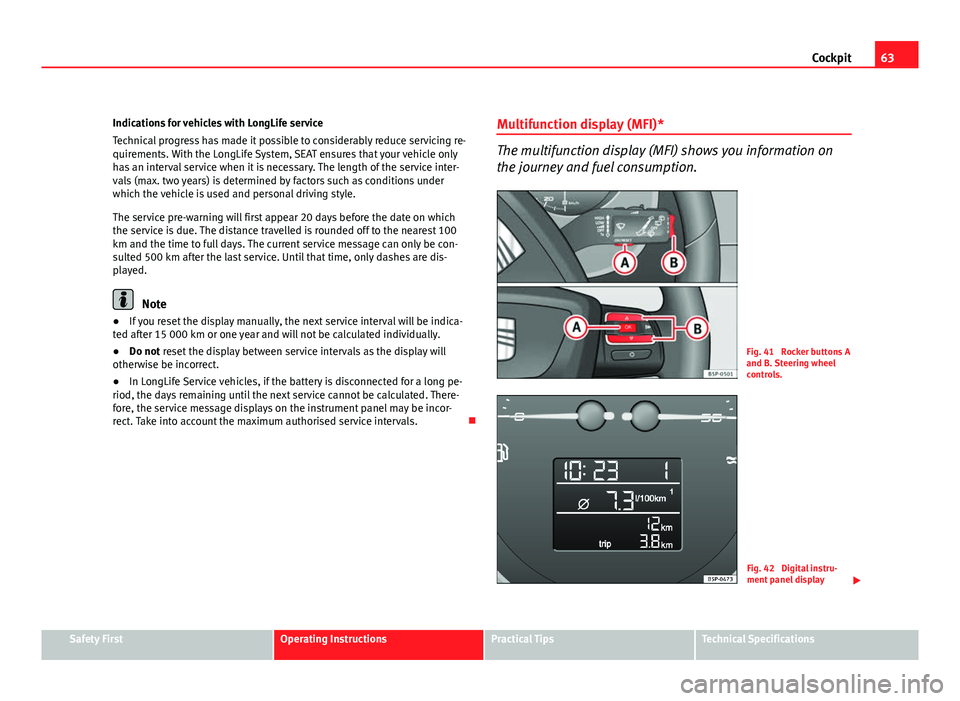
The multifunction display (MFI) shows you information on
the journey and fuel consumption.
Fig. 41 Rocker buttons A
and B. Steering wheel
controls.
Fig. 42 Digital instru-
ment panel display
Safety FirstOperating InstructionsPractical TipsTechnical Specifications
Page 68 of 313
66Cockpit
This may be deactivated by pressing the button A
(Reset).
The speed may be altered using the rocker switch B
in steps of 5 km/h
within 5 seconds of the initial memory value.
WARNING
There could be black ice on the road surface even if the “snowflake sym-
bol” is not shown. For this reason you should not rely exclusively on this
display - Risk of accident!
Note
When the vehicle is stationary or travelling at very low speeds, the tempera-
ture displayed may be slightly higher than the actual outside temperature
as a result of the heat radiated from the engine.
Warning or information message in the display
Faults are shown in the display with warning lamps and
warning/information reports.
The system runs a check on certain components and functions when the ig-
nition is switched on and while the vehicle is moving. Functional faults are
indicated by symbols with warning or information messages in the display.
An acoustic warning is given in certain cases.
Warning symbols
There are red warning symbols (priority 1) and yellow warning symbols (pri-
ority 2)
Information text
In addition to warning messages given on a fault, you will receive informa-
tion in the display on procedures or will be asked to carry out certain tasks.
Note
In the case of screens without warning or information texts, faults are indi-
cated exclusively by the warning lamps.
Warning reports, Priority 1 (red)
If one of these faults occurs, the warning lamp will flash or light up and will
be accompanied by three audible warnings. This is a danger warning. Stop
the vehicle and switch off the engine. Check the fault and correct it. Obtain
professional assistance if necessary.
If several priority 1 faults are detected at the same time, the symbols will be
displayed one after the other for about 2 seconds at a time and will contin-
ue until the fault is corrected.
No menus will be shown in the display for the duration of a priority 1 warn-
ing message.
Examples of priority 1 warning messages (red)
● Brake system symbol with the warning message STOP BRAKE FLUID
SERVICE MANUAL or STOP BRAKE FAULT SERVICE MANUAL .
● Coolant symbol with the warning message STOP SEE COOLANT IN-
STRUCTION MANUAL.
● Engine oil pressure symbol with the warning message STOP ENGINE
OIL PRESSURE LOW! INSTRUCTION MANUAL .
Warning reports, Priority 2 (yellow)
If one of these faults occurs, the warning lamp lights up, and is accompa-
nied by one audible warning. The function should be checked as soon as
possible.
Page 77 of 313
75
Cockpit
Settings: LanguageThe display texts and the navigation system texts
can be seen in different languages.
UnitsThis option allows you to select the units for dis-
playing temperature, fuel consumption values and
distances.
sel. speedThe instrument panel also displays the speed in
another different unit of measurement (mph or km/
h) to that given on the speedometer.
Inter ServiceConsult service messages and reset service interval
display here.
Factory settingsThe manufacturer's predefined values for the func-
tions of this menu are restored.
Back a)This returns to the main menua)
Only if the windscreen wiper lever is used (MFI).
Note
● For electronic and vehicle equipment one or more of these menus will be
displayed.
● SEAT dealers are able to programme other functions or change the exist-
ing functions depending upon the vehicle equipment.
● The Configuration menu is only accessible when the vehicle is at a
standstill.
Convenience menu
From this menu it is it possible to alter the vehicle conven-
ience settings.
Open menu Convenience
– Choose the option Configuration from the main menu and press
the button OK
A ⇒ fig. 45 on the windscreen wiper lever. –
Press button
or on the multifunction steering wheel*
⇒ fig. 46 until the Configuration menu is displayed.
– Choose the option Convenience from the main menu and press
the button A
on the windscreen wiper lever.
Example of menu use ⇒ page 68
Displayed on the
screenFunction
Open doorOne door: Individual unlocking activated.
Auto. locking: the doors are automatically locked
when the vehicle is travelling at more than approx
15 km/h.
Auto unlock: the doors are unlocked when the key
is removed from the ignition.
Elec. window controlOpening and closing electric windows: this deter-
mines whether to open or close all the windows
when the vehicle is unlocked or locked. The open
function can also be activated for the driver door
only.
Exterior mirror ad-
just.If synchronised adjustment is selected, when the
driver side exterior mirror is adjusted, the passen-
ger exterior mirror is also moved.
Factory settingsThe manufacturer's predefined values for the func-
tions of this menu are restored.
BackThis returns to the Configuration menu
Note
For electronic and vehicle equipment one or more of these menus will be
displayed.
Safety FirstOperating InstructionsPractical TipsTechnical Specifications
Page 82 of 313
80Cockpit
WARNING
● Failure to observe warning lamps and warning messages can result in
serious personal injury or damage to your vehicle.
● The risk of an accident increases if your vehicle breaks down. Use a
warning triangle to draw the attention of other road users in order to pre-
vent danger to third parties.
● The engine compartment is a dangerous area! Before you open the
bonnet to work on the engine or in the engine compartment, you must
switch the engine off and allow it to cool to reduce the risk of scalding or
other injuries. Read and observe the relevant warnings ⇒ page 230.
Note
● The appropriate warning lamp for a fault will light up in vehicles without
warning or information messages in the display.
● In vehicles with warning or information texts on the screen, the appro-
priate warning lamp for a fault will light up and a warning or information
message will also appear on the screen.
Warning symbols
There are red warning symbols (priority 1) and yellow warning sym-
bols (priority 2) Warning reports, Priority 1 (red)
If one of these faults occurs, the warning lamp will flash or light up and will
be accompanied by three audible warnings. This is a danger warning. Stop
the vehicle and switch off the engine. Check the fault and correct it. Obtain
professional assistance if necessary. If several priority 1 faults are detected at the same time, the symbols will be
displayed one after the other for about 2 seconds at a time and will contin-
ue until the fault is corrected.
No menus will be shown in the display for the duration of a priority 1 warn-
ing message.
Examples of priority 1 warning messages (red)
●
Brake system symbol with the warning message STOP BRAKE FLUID
SERVICE MANUAL or STOP BRAKE FAULT SERVICE MANUAL .
● Coolant symbol with the warning message STOP SEE COOLANT IN-
STRUCTION MANUAL.
● Engine oil pressure symbol with the warning message STOP ENGINE
OIL PRESSURE LOW! INSTRUCTION MANUAL .
Warning reports, Priority 2 (yellow)
If one of these faults occurs, the warning lamp lights up, and is accompa-
nied by one audible warning. Check the corresponding function as soon as
possible although the vehicle may be used without risk.
If several priority 2 warning messages are detected at the same time, the
symbols are displayed one after the other for about 2 seconds at a time. Af-
ter a set time, the information text will disappear and the symbol will be
shown as a reminder at the side of the display.
Priority 2 warning messages will not be shown until all Priority 1 warning
messages have been dealt with!
Examples of priority 2 warning messages (yellow): 1)
● Fuel warning light with the information text PLEASE REFUEL.
● Windscreen washer fluid symbol with the information text REFILL
WINDSCREEN WASHER FLUID . Top up the washer fluid level.
1)
Depending on the version of the model.
Page 83 of 313
81
Cockpit
Information messages displayed on the screen*
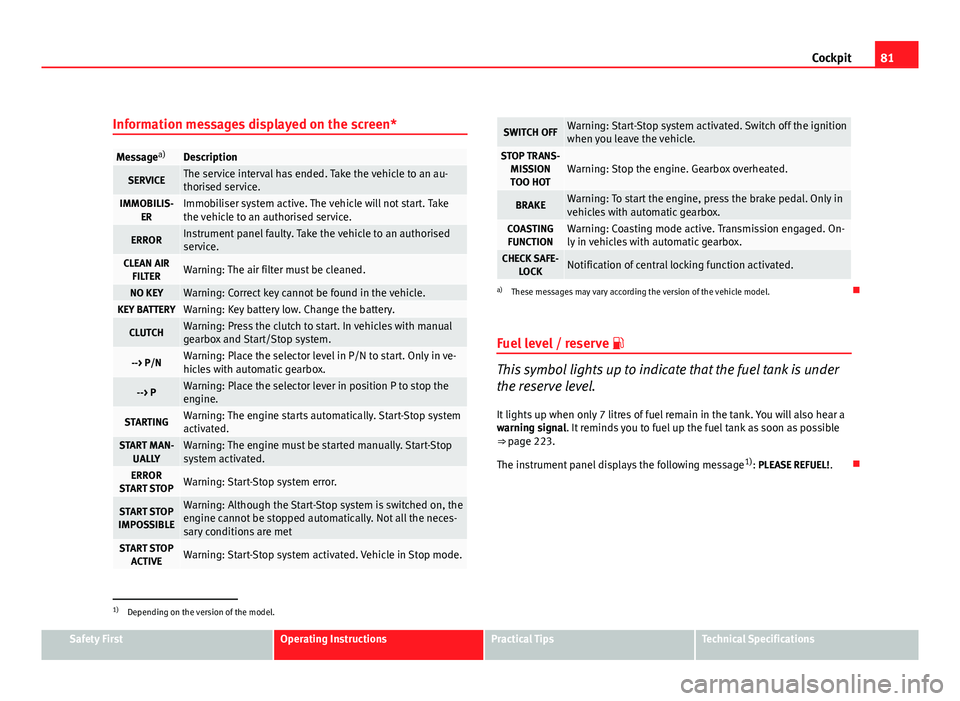
Message a)Description
SERVICEThe service interval has ended. Take the vehicle to an au-
thorised service.
IMMOBILIS-
ERImmobiliser system active. The vehicle will not start. Take
the vehicle to an authorised service.
ERRORInstrument panel faulty. Take the vehicle to an authorised
service.
CLEAN AIRFILTERWarning: The air filter must be cleaned.
NO KEYWarning: Correct key cannot be found in the vehicle.KEY BATTERYWarning: Key battery low. Change the battery.
CLUTCHWarning: Press the clutch to start. In vehicles with manual
gearbox and Start/Stop system.
--> P/NWarning: Place the selector level in P/N to start. Only in ve-
hicles with automatic gearbox.
--> PWarning: Place the selector lever in position P to stop the
engine.
STARTINGWarning: The engine starts automatically. Start-Stop system
activated.
START MAN- UALLYWarning: The engine must be started manually. Start-Stop
system activated.
ERROR
START STOPWarning: Start-Stop system error.
START STOP
IMPOSSIBLEWarning: Although the Start-Stop system is switched on, the
engine cannot be stopped automatically. Not all the neces-
sary conditions are met
START STOP ACTIVEWarning: Start-Stop system activated. Vehicle in Stop mode.
SWITCH OFFWarning: Start-Stop system activated. Switch off the ignition
when you leave the vehicle.
STOP TRANS-MISSIONTOO HOTWarning: Stop the engine. Gearbox overheated.
BRAKEWarning: To start the engine, press the brake pedal. Only in
vehicles with automatic gearbox.
COASTING FUNCTIONWarning: Coasting mode active. Transmission engaged. On-
ly in vehicles with automatic gearbox.
CHECK SAFE- LOCKNotification of central locking function activated.
a)These messages may vary according the version of the vehicle model.
Fuel level / reserve
This symbol lights up to indicate that the fuel tank is under
the reserve level.
It lights up when only 7 litres of fuel remain in the tank. You will also hear a
warning signal. It reminds you to fuel up the fuel tank as soon as possible
⇒ page 223.
The instrument panel displays the following message 1)
: PLEASE REFUEL! .
1)
Depending on the version of the model.
Safety FirstOperating InstructionsPractical TipsTechnical Specifications
Page 84 of 313
82Cockpit
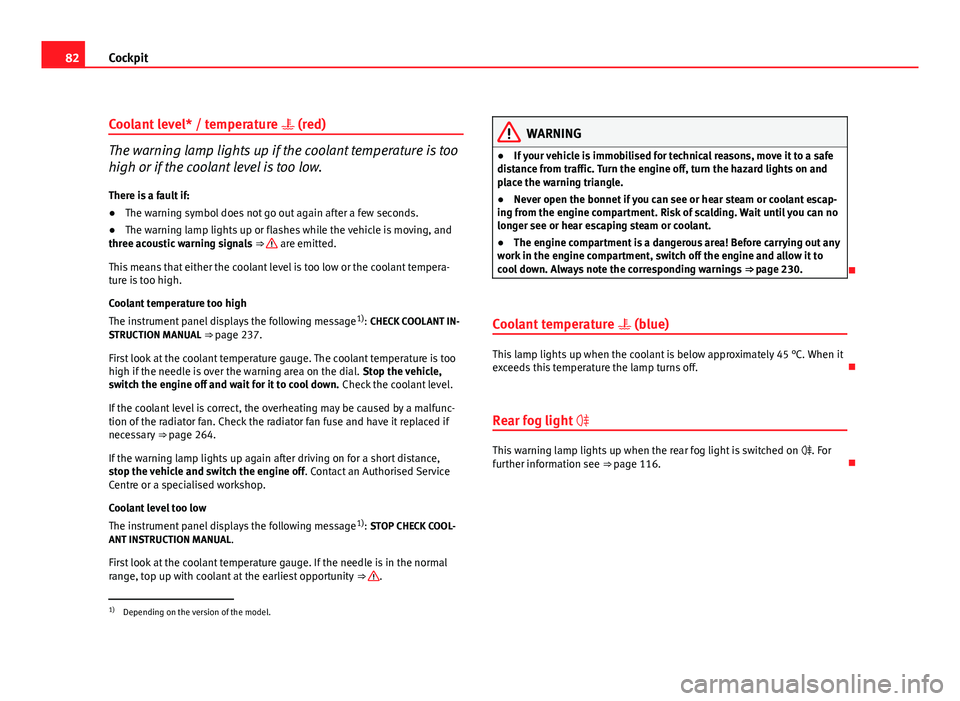
Coolant level* / temperature (red)
The warning lamp lights up if the coolant temperature is too
high or if the coolant level is too low.
There is a fault if:
● The warning symbol does not go out again after a few seconds.
● The warning lamp lights up or flashes while the vehicle is moving, and
three acoustic warning signals ⇒
are emitted.
This means that either the coolant level is too low or the coolant tempera-
ture is too high.
Coolant temperature too high
The instrument panel displays the following message 1)
: CHECK COOLANT IN-
STRUCTION MANUAL ⇒ page 237.
First look at the coolant temperature gauge. The coolant temperature is too
high if the needle is over the warning area on the dial. Stop the vehicle,
switch the engine off and wait for it to cool down. Check the coolant level.
If the coolant level is correct, the overheating may be caused by a malfunc-
tion of the radiator fan. Check the radiator fan fuse and have it replaced if
necessary ⇒ page 264.
If the warning lamp lights up again after driving on for a short distance,
stop the vehicle and switch the engine off . Contact an Authorised Service
Centre or a specialised workshop.
Coolant level too low
The instrument panel displays the following message 1)
: STOP CHECK COOL-
ANT INSTRUCTION MANUAL.
First look at the coolant temperature gauge. If the needle is in the normal
range, top up with coolant at the earliest opportunity ⇒
.
WARNING
● If your vehicle is immobilised for technical reasons, move it to a safe
distance from traffic. Turn the engine off, turn the hazard lights on and
place the warning triangle.
● Never open the bonnet if you can see or hear steam or coolant escap-
ing from the engine compartment. Risk of scalding. Wait until you can no
longer see or hear escaping steam or coolant.
● The engine compartment is a dangerous area! Before carrying out any
work in the engine compartment, switch off the engine and allow it to
cool down. Always note the corresponding warnings ⇒ page 230.
Coolant temperature (blue)
This lamp lights up when the coolant is below approximately 45 °C. When it
exceeds this temperature the lamp turns off.
Rear fog light
This warning lamp lights up when the rear fog light is switched on . For
further information see ⇒ page 116.
1)
Depending on the version of the model.
Page 85 of 313
83
Cockpit
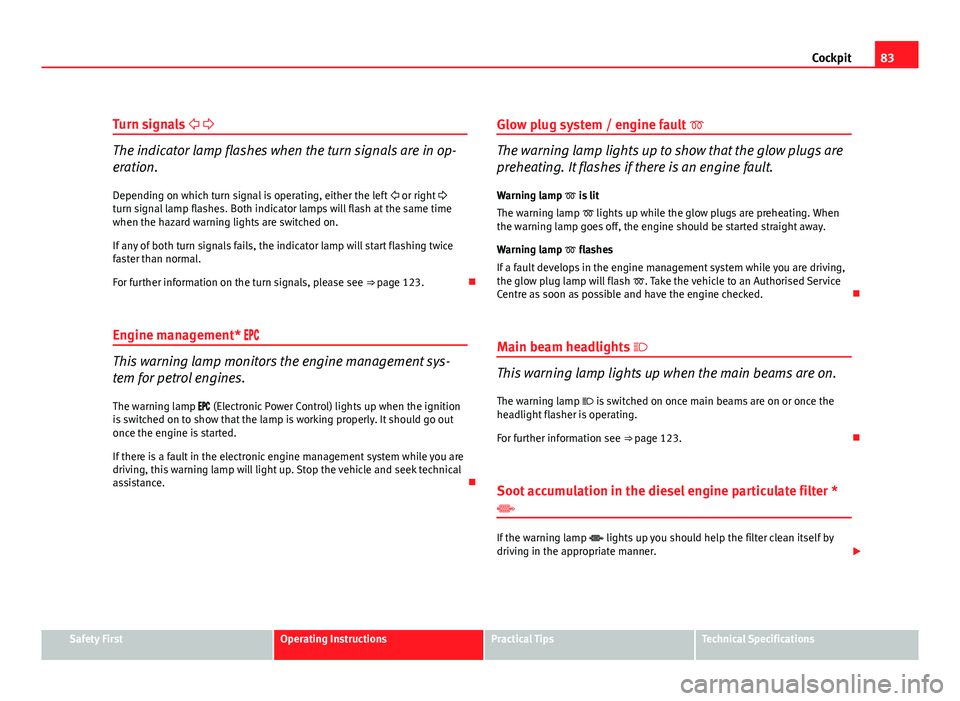
Turn signals
The indicator lamp flashes when the turn signals are in op-
eration.
Depending on which turn signal is operating, either the left or right
turn signal lamp flashes. Both indicator lamps will flash at the same time
when the hazard warning lights are switched on.
If any of both turn signals fails, the indicator lamp will start flashing twice
faster than normal.
For further information on the turn signals, please see ⇒ page 123.
Engine management*
This warning lamp monitors the engine management sys-
tem for petrol engines.
The warning lamp (Electronic Power Control) lights up when the ignition
is switched on to show that the lamp is working properly. It should go out
once the engine is started.
If there is a fault in the electronic engine management system while you are
driving, this warning lamp will light up. Stop the vehicle and seek technical
assistance. Glow plug system / engine fault
The warning lamp lights up to show that the glow plugs are
preheating. It flashes if there is an engine fault.
Warning lamp is lit
The warning lamp lights up while the glow plugs are preheating. When
the warning lamp goes off, the engine should be started straight away.
Warning lamp flashes
If a fault develops in the engine management system while you are driving,
the glow plug lamp will flash . Take the vehicle to an Authorised Service
Centre as soon as possible and have the engine checked.
Main beam headlights
This warning lamp lights up when the main beams are on.
The warning lamp is switched on once main beams are on or once the
headlight flasher is operating.
For further information see ⇒ page 123.
Soot accumulation in the diesel engine particulate filter *
If the warning lamp lights up you should help the filter clean itself by
driving in the appropriate manner.
Safety FirstOperating InstructionsPractical TipsTechnical Specifications
Page 105 of 313
103
Unlocking and locking
This function is independent of the vehicle electronic opening and
locking systems. It only affects rear doors. It can only be activated
and deactivated manually, as described below:
Activating the childproof lock
– Unlock the vehicle and open the door in which you wish to acti-
vate the childproof lock.
– With the door open, rotate the groove in the door using the igni-
tion key, clockwise for the left hand side doors, and anti-clock-
wise for the right hand side doors ⇒ fig. 61 ⇒ fig. 62.
Deactivating the childproof lock
– Unlock the vehicle and open the door whose childproof lock you
want to deactivate.
– With the door open, rotate the groove in the door using the igni-
tion key, clockwise for the right hand side doors, and anti-clock-
wise for the left hand side doors ⇒ fig. 61 ⇒ fig. 62.
Once the childproof lock is activated, the door can only be opened from the
outside. The childproof lock can be activated and deactivated by inserting
the key in the groove when the door is open, as described above. Keys
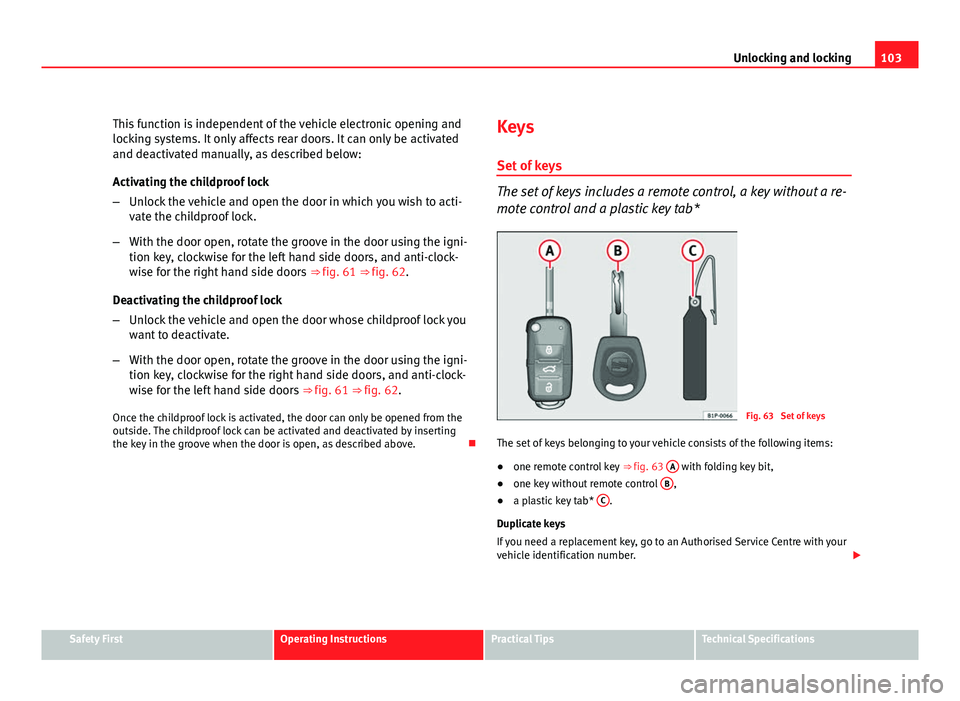
Set of keys
The set of keys includes a remote control, a key without a re-
mote control and a plastic key tab*
Fig. 63 Set of keys
The set of keys belonging to your vehicle consists of the following items:
● one remote control key ⇒ fig. 63 A
with folding key bit,
● one key without remote control B,
● a plastic key tab* C.
Duplicate keys
If you need a replacement key, go to an Authorised Service Centre with your
vehicle identification number.
Safety FirstOperating InstructionsPractical TipsTechnical Specifications
Page 108 of 313
106Unlocking and locking
WARNING
● An improper use of the key can cause serious injuries.
● Never leave children or disabled persons in the vehicle. In case of
emergency, they may not be able to leave the vehicle or manage on their
own.
● Never forget the keys inside the vehicle. Otherwise, this could result
in serious injuries, accidents or even the theft of your vehicle. Always
take the key with you when you leave the vehicle.
● An uncontrolled use of the key could start the engine or activate any
electric equipment (e.g. electric windows), causing risk of accident. The
vehicle can be locked when using the remote control key. This could com-
plicate the aid in case of emergency.
Note
● The remote control can be programmed by means of pressing the un-
locking button once; as a result, only the driver door will unlock. When the
button is pressed once more, all doors and the tailgate will be unlocked.
● The remote control functions only when you are in range ⇒ fig. 65 (red
area).
● If the vehicle is unlocked using the
1 button, it will lock again auto-
matically if any of the doors or the tailgate are not opened within 30 sec-
onds after unlocking it. This function prevents the vehicle from remaining
unlocked if the unlock button is pressed by mistake.
● If the vehicle cannot be opened and closed using the remote control,
the remote control key will have to be re-synchronised ⇒ page 106.
Changing the battery
If the battery indicator does not flash when the buttons are pushed, the bat-
tery must be replaced.
CAUTION
The use of inappropriate batteries may damage the radio frequency remote
control. For this reason, always replace the dead battery with another of the
same size and power.
For the sake of the environment
Used batteries must be disposed of at an appropriate waste facility or
through an authorised service, given that their components can affect the
environment.
Synchronising the remote control key
If it is not possible to unlock or lock the door with the remote
control, it should be re-synchronised.
– Press the
⇒ fig. 64 button on the remote control.
– Then close the vehicle using the key bit within one minute.
It is possible that the vehicle could no longer be opened and closed with
the remote control if the button
is repeatedly pressed outside of the ef-
fective range of the radio frequency remote control. The remote control key
will have to be resynchronised.
Spare remote control keys are available in your Authorised Service Centres,
where they must be matched to the locking system.
Up to eight remote control keys can be used.
Page 114 of 313
112Unlocking and locking
Note
If the window is not able to close because it is stiff or because of an ob-
struction, the window will automatically open again ⇒ page 112. If this
happens, check why the window could not be closed before attempting to
close it again.
One-touch opening and closing
One-touch opening and closing means you do not have to
hold down the button.
One-touch closing
– Pull up the window button briefly up to the second position. The
window closes fully.
One-touch opening
– Push down the window button briefly up to the second position.
The window opens fully.
Restoring one-touch opening and closing
– Close all windows.
– Use the key to lock the vehicle from outside and hold the key in
the lock position for at least one second. The one-touch func-
tion is now ready for operation.
The buttons ⇒ fig. 69 1
and 2 have two levels for opening the window
and two for closing it. This makes it easier to open and close windows to the
desired position.
One-touch closing does not work when the ignition has been switched off,
even if the key is in the ignition. The automatic open and close function will not work if the battery has been
temporarily disconnected, or if the battery is flat. The function then has to
be reactivated.
The one-touch function and roll-back function will not work if there is a mal-
function in the electric windows. Contact an Authorised Service Centre.
Roll-back function
The windows have a roll-back function. This reduces the risk
of injuries when the windows are closing.
● If a window is obstructed when closing automatically, the window stops
at this point and lowers immediately ⇒
.
● If this happens, check immediately (within 10 seconds) why the window
could not be closed before attempting to close it again. After 10 seconds
the normal automatic function resumes.
● If the window is still obstructed, the window will stop at this point.
● If there is no obvious reason why the window cannot be closed, try to
close it again within 5 seconds.
If you wait longer than 5 - 10 seconds, the window will open fully when you
operate one of the buttons. One-touch closing is reactivated.
The one-touch function and roll-back function will not work if there is a mal-
function in the electric windows. Contact an Authorised Service Centre.