brakes Seat Altea 2012 Owner's Manual
[x] Cancel search | Manufacturer: SEAT, Model Year: 2012, Model line: Altea, Model: Seat Altea 2012Pages: 313, PDF Size: 4.47 MB
Page 5 of 313
Table of Contents
Manual structure . . . . . . . . . . . . . . . . . . . . 5
Content . . . . . . . . . . . . . . . . . . . . . . . . . . . . . . . . 6
Safety First . . . . . . . . . . . . . . . . . . . . . . . . . . . . 7
Safe driving . . . . . . . . . . . . . . . . . . . . . . . . . . . . . . . 7
Brief introduction . . . . . . . . . . . . . . . . . . . . . . . . . 7
Proper sitting position for occupants . . . . . . . . . 10
Pedal area . . . . . . . . . . . . . . . . . . . . . . . . . . . . . . . 16
Storing objects . . . . . . . . . . . . . . . . . . . . . . . . . . . 17
Seat belts . . . . . . . . . . . . . . . . . . . . . . . . . . . . . . . . . 19
Brief introduction . . . . . . . . . . . . . . . . . . . . . . . . . 19
Why wear seat belts? . . . . . . . . . . . . . . . . . . . . . . 21
Seat belts . . . . . . . . . . . . . . . . . . . . . . . . . . . . . . . 25
Seat belt tensioners . . . . . . . . . . . . . . . . . . . . . . . 29
Airbag system . . . . . . . . . . . . . . . . . . . . . . . . . . . . . 30
Brief introduction . . . . . . . . . . . . . . . . . . . . . . . . . 30
Front airbags . . . . . . . . . . . . . . . . . . . . . . . . . . . . . 34
Side airbags* . . . . . . . . . . . . . . . . . . . . . . . . . . . . 38
Curtain airbags . . . . . . . . . . . . . . . . . . . . . . . . . . . 41
Deactivating airbags* . . . . . . . . . . . . . . . . . . . . . . 44
Child safety . . . . . . . . . . . . . . . . . . . . . . . . . . . . . . . 46
Brief introduction . . . . . . . . . . . . . . . . . . . . . . . . . 46
Child seats . . . . . . . . . . . . . . . . . . . . . . . . . . . . . . . 48
Securing child seats . . . . . . . . . . . . . . . . . . . . . . . 51 Operating Instructions
. . . . . . . . . . . . . 55
Cockpit . . . . . . . . . . . . . . . . . . . . . . . . . . . . . . . . . . . 55
Overview . . . . . . . . . . . . . . . . . . . . . . . . . . . . . . . . 55
Instruments . . . . . . . . . . . . . . . . . . . . . . . . . . . . . . 57
LPG system* . . . . . . . . . . . . . . . . . . . . . . . . . . . . . 60
Digital instrument panel display . . . . . . . . . . . . . 61
Instrument panel menus* . . . . . . . . . . . . . . . . . . . 68
Warning lamps . . . . . . . . . . . . . . . . . . . . . . . . . . . 77
Steering wheel controls . . . . . . . . . . . . . . . . . . . . 91
General information . . . . . . . . . . . . . . . . . . . . . . . 91
Audio system . . . . . . . . . . . . . . . . . . . . . . . . . . . . . 92
Radio navigation system . . . . . . . . . . . . . . . . . . . 95
Unlocking and locking . . . . . . . . . . . . . . . . . . . . . 97
Central locking . . . . . . . . . . . . . . . . . . . . . . . . . . . 97
Keys . . . . . . . . . . . . . . . . . . . . . . . . . . . . . . . . . . . . 103
Radio frequency remote control . . . . . . . . . . . . . . 105
Anti-theft alarm system* . . . . . . . . . . . . . . . . . . . 107
Tailgate . . . . . . . . . . . . . . . . . . . . . . . . . . . . . . . . . 109
Windows . . . . . . . . . . . . . . . . . . . . . . . . . . . . . . . . 111
Sliding/tilting sunroof* . . . . . . . . . . . . . . . . . . . . 113
Lights and visibility . . . . . . . . . . . . . . . . . . . . . . . . 116
Lights . . . . . . . . . . . . . . . . . . . . . . . . . . . . . . . . . . . 116
Interior lights . . . . . . . . . . . . . . . . . . . . . . . . . . . . . 124
Visibility . . . . . . . . . . . . . . . . . . . . . . . . . . . . . . . . . 127
Windscreen wipers . . . . . . . . . . . . . . . . . . . . . . . . 128
Rear-view mirrors . . . . . . . . . . . . . . . . . . . . . . . . . 132
Seats and storage compartments . . . . . . . . . . 135
The importance of correct seat adjustment . . . . . 135
Head restraints . . . . . . . . . . . . . . . . . . . . . . . . . . . 136
Front seats . . . . . . . . . . . . . . . . . . . . . . . . . . . . . . . 138
Rear seats . . . . . . . . . . . . . . . . . . . . . . . . . . . . . . . 140
Storage compartment . . . . . . . . . . . . . . . . . . . . . . 142
Ashtray*, cigarette lighter* and power points . . 150 First-aid kit, warning triangle, fire extinguisher . 153
Luggage compartment . . . . . . . . . . . . . . . . . . . . . 154
Air conditioning . . . . . . . . . . . . . . . . . . . . . . . . . . . 157
Heating . . . . . . . . . . . . . . . . . . . . . . . . . . . . . . . . . 157
Climatic* . . . . . . . . . . . . . . . . . . . . . . . . . . . . . . . . 159
2C-Climatronic* . . . . . . . . . . . . . . . . . . . . . . . . . . . 163
General notes . . . . . . . . . . . . . . . . . . . . . . . . . . . . 167
Driving . . . . . . . . . . . . . . . . . . . . . . . . . . . . . . . . . . . . 169
Steering . . . . . . . . . . . . . . . . . . . . . . . . . . . . . . . . . 169
Safety . . . . . . . . . . . . . . . . . . . . . . . . . . . . . . . . . . . 170
Ignition lock . . . . . . . . . . . . . . . . . . . . . . . . . . . . . . 171
Starting and stopping the engine . . . . . . . . . . . . 172
Start-Stop function* . . . . . . . . . . . . . . . . . . . . . . . 176
Manual gearbox . . . . . . . . . . . . . . . . . . . . . . . . . . 179
Automatic gearbox/DSG automatic gearbox* . . . 180
Handbrake . . . . . . . . . . . . . . . . . . . . . . . . . . . . . . . 185
Parking aid acoustic system* . . . . . . . . . . . . . . . . 187
Cruise speed* (Cruise control system) . . . . . . . . 190
Practical Tips . . . . . . . . . . . . . . . . . . . . . . . . . 194
Intelligent technology . . . . . . . . . . . . . . . . . . . . . 194
Brakes . . . . . . . . . . . . . . . . . . . . . . . . . . . . . . . . . . 194
Anti-lock brake system and traction control M-
ABS (ABS and ASR (TCS)) . . . . . . . . . . . . . . . . . . . 195
Electronic Stability Control ESC (ESP) * . . . . . . . . 196
Driving and the environment . . . . . . . . . . . . . . . 202
Running-in . . . . . . . . . . . . . . . . . . . . . . . . . . . . . . . 202
Exhaust gas purification system . . . . . . . . . . . . . 203
Economical and environmentally friendly driving 204
Driving abroad . . . . . . . . . . . . . . . . . . . . . . . . . . . . 207
3
Table of Contents
Page 91 of 313
89
Cockpit
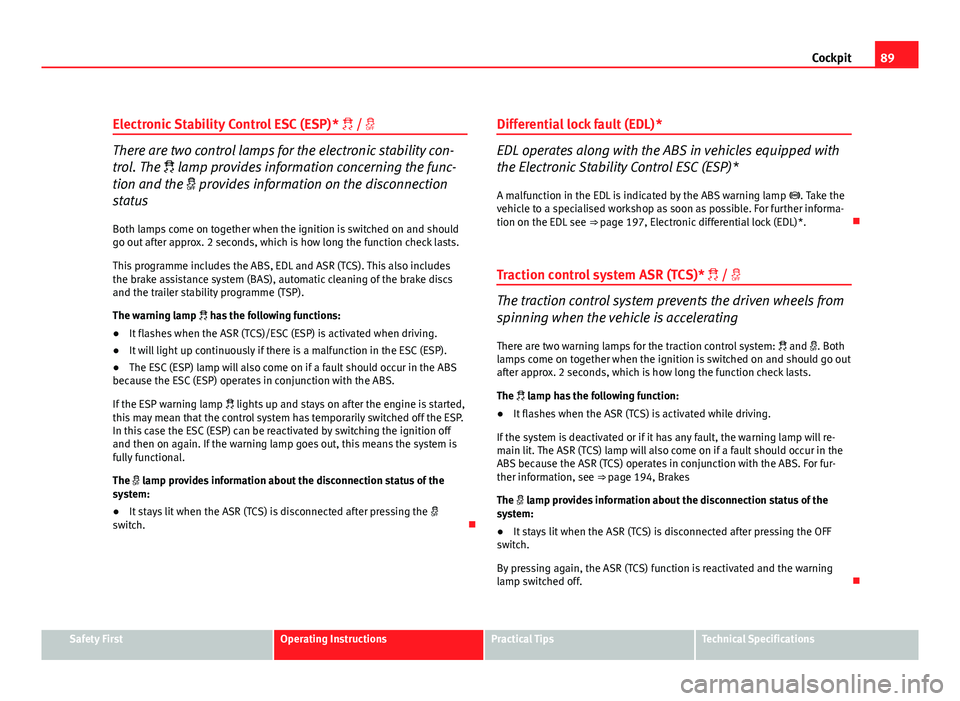
Electronic Stability Control ESC (ESP) * /
There are two control lamps for the electronic stability con-
trol. The lamp provides information concerning the func-
tion and the provides information on the disconnection
status
Both lamps come on together when the ignition is switched on and should
go out after approx. 2 seconds, which is how long the function check lasts.
This programme includes the ABS, EDL and ASR (TCS). This also includes
the brake assistance system (BAS), automatic cleaning of the brake discs
and the trailer stability programme (TSP).
The warning lamp has the following functions:
● It flashes when the ASR (TCS)/ESC (ESP) is activated when driving.
● It will light up continuously if there is a malfunction in the ESC (ESP).
● The ESC (ESP) lamp will also come on if a fault should occur in the ABS
because the ESC (ESP) operates in conjunction with the ABS.
If the ESP warning lamp lights up and stays on after the engine is started,
this may mean that the control system has temporarily switched off the ESP.
In this case the ESC (ESP) can be reactivated by switching the ignition off
and then on again. If the warning lamp goes out, this means the system is
fully functional.
The lamp provides information about the disconnection status of the
system:
● It stays lit when the ASR (TCS) is disconnected after pressing the
switch. Differential lock fault (EDL)*EDL operates along with the ABS in vehicles equipped with
the Electronic Stability Control ESC (ESP)*
A malfunction in the EDL is indicated by the ABS warning lamp . Take the
vehicle to a specialised workshop as soon as possible. For further informa-
tion on the EDL see ⇒ page 197, Electronic differential lock (EDL)*.
Traction control system ASR (TCS)* /
The traction control system prevents the driven wheels from
spinning when the vehicle is accelerating
There are two warning lamps for the traction control system: and . Both
lamps come on together when the ignition is switched on and should go out
after approx. 2 seconds, which is how long the function check lasts.
The lamp has the following function:
● It flashes when the ASR (TCS) is activated while driving.
If the system is deactivated or if it has any fault, the warning lamp will re-
main lit. The ASR (TCS) lamp will also come on if a fault should occur in the
ABS because the ASR (TCS) operates in conjunction with the ABS. For fur-
ther information, see ⇒ page 194, Brakes
The lamp provides information about the disconnection status of the
system:
● It stays lit when the ASR (TCS) is disconnected after pressing the OFF
switch.
By pressing again, the ASR (TCS) function is reactivated and the warning
lamp switched off.
Safety FirstOperating InstructionsPractical TipsTechnical Specifications
Page 185 of 313
183
Driving
WARNING (Continued)
● The footbrake must not be held for a long period of time, not even
lightly; continuous braking will cause overheating of the brakes and a re-
duction or even a loss of braking power and a significant increase in
braking distances.
● Never allow the vehicle to coast down a gradient with the selector lev-
er in positions N or D, even when the engine is not running. For descents,
the use of the tiptronic programme is recommended to keep the speed
reduced.
CAUTION
● Never use the automatic gearbox to hold the vehicle stationary on a hill,
even for short periods, as this may overheat the gearbox and cause dam-
age. Apply the handbrake or depress the foot brake to hold the vehicle in
position.
● If the vehicle is allowed to roll with the engine stopped but the selector
in position N then the gearbox may be damaged because it will not be lubri-
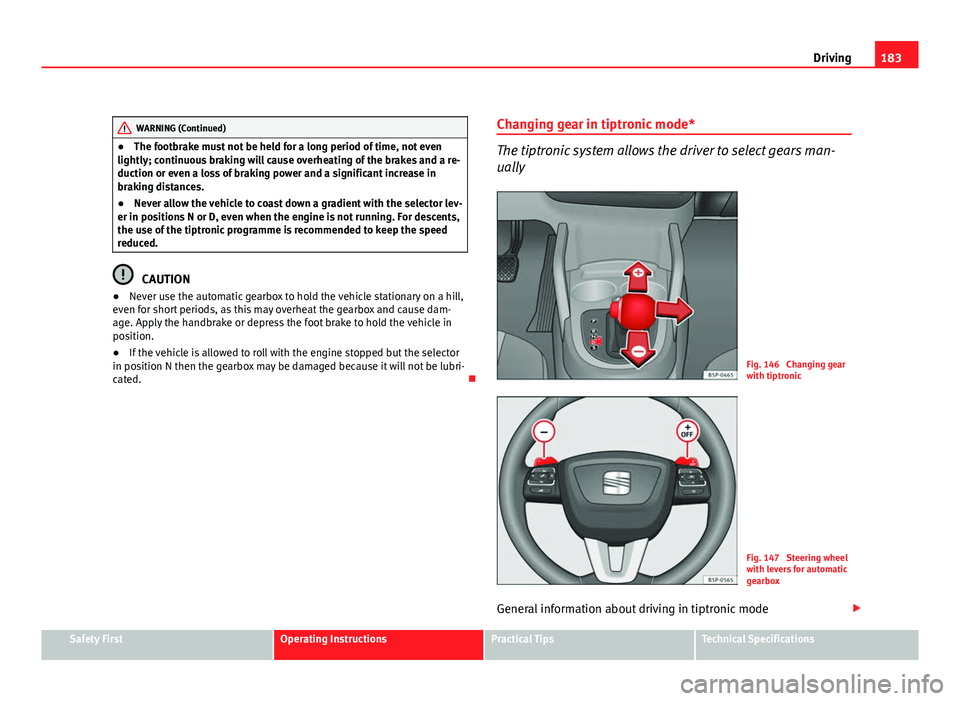
cated. Changing gear in tiptronic mode*
The tiptronic system allows the driver to select gears man-
ually
Fig. 146 Changing gear
with tiptronic
Fig. 147 Steering wheel
with levers for automatic
gearbox
General information about driving in tiptronic mode
Safety FirstOperating InstructionsPractical TipsTechnical Specifications
Page 187 of 313
185
Driving
Handbrake Using the handbrake
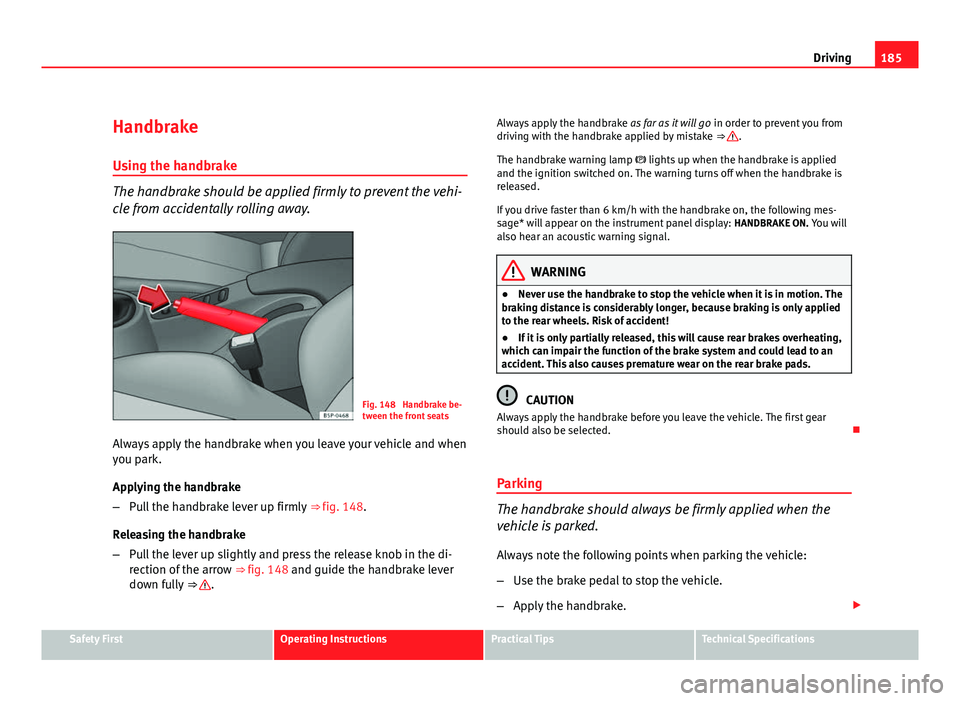
The handbrake should be applied firmly to prevent the vehi-
cle from accidentally rolling away.
Fig. 148 Handbrake be-
tween the front seats
Always apply the handbrake when you leave your vehicle and when
you park.
Applying the handbrake
– Pull the handbrake lever up firmly ⇒ fig. 148.
Releasing the handbrake
– Pull the lever up slightly and press the release knob in the di-
rection of the arrow ⇒ fig. 148 and guide the handbrake lever
down fully ⇒
. Always apply the handbrake
as far as it will go in order to prevent you from
driving with the handbrake applied by mistake ⇒
.
The handbrake warning lamp lights up when the handbrake is applied
and the ignition switched on. The warning turns off when the handbrake is
released.
If you drive faster than 6 km/h with the handbrake on, the following mes-
sage* will appear on the instrument panel display: HANDBRAKE ON. You will
also hear an acoustic warning signal.
WARNING
● Never use the handbrake to stop the vehicle when it is in motion. The
braking distance is considerably longer, because braking is only applied
to the rear wheels. Risk of accident!
● If it is only partially released, this will cause rear brakes overheating,
which can impair the function of the brake system and could lead to an
accident. This also causes premature wear on the rear brake pads.
CAUTION
Always apply the handbrake before you leave the vehicle. The first gear
should also be selected.
Parking
The handbrake should always be firmly applied when the
vehicle is parked.
Always note the following points when parking the vehicle:
– Use the brake pedal to stop the vehicle.
– Apply the handbrake.
Safety FirstOperating InstructionsPractical TipsTechnical Specifications
Page 196 of 313
194Intelligent technology
Practical Tips
Intelligent technology
Brakes Brake servo
The brake servo increases the pressure you apply to the brake pedal. It
works only when the engine is running .
If the brake servo is not functioning due to a malfunction, or if the vehicle
has to be towed, you will have to press the brake pedal considerably harder
to make up for the lack of servo assistance.
WARNING
The braking distance can also be affected by external factors.
● Never let the vehicle coast with the engine switched off. Failure to do
so could result in an accident. The braking distance is increased consid-
erably when the brake servo is not active.
● If the brake servo is not working, for example when the vehicle is be-
ing towed, you will have to press the brake pedal considerably harder
than normal.
Hydraulic Brake Assist (HBA)*
The Hydraulic Brake Assist function (HBA) is only included in
vehicles with ESC (ESP).
In an emergency, most drivers brake in time, but not with maximum force.
This results in unnecessarily long braking distances.
This is when the brake assist system comes into action. When pressing the
brake pedal rapidly, the assistant interprets it as an emergency. It then very
quickly builds up the full brake pressure so that the ABS can be activated
more quickly and efficiently, thus reducing the braking distance.
Do not reduce the pressure on the brake pedal. The brake assist system
switches off automatically as soon as you release the brake.
Emergency braking warning
If the vehicle is braked suddenly and continuously at a speed of more than
80 km/h, the brake light flashes several times per second to warn vehicles
driving behind. If you continue braking, the hazard warning lights will come
on automatically when the vehicle comes to a standstill. They switch off au-
tomatically when the vehicle starts to move again.
Page 197 of 313
195
Intelligent technology
WARNING
● The risk of accident is higher if you drive too fast, if you do not keep
your distance to the vehicle in front, and when the road surface is slip-
pery or wet. The increased accident risk cannot be reduced by the brake
assist system.
● The brake assist system cannot defy the laws of physics. Slippery
and wet roads are dangerous even with the brake assist system! There-
fore, it is essential that you adjust your speed to suit the road and traffic
conditions. Do not let the extra safety features tempt you into taking any
risks when driving.
Anti-lock brake system and traction control
M-ABS (ABS and ASR (TCS))
Anti-lock brake system (ABS)
The anti-lock brake system prevents the wheels locking dur-
ing braking. The anti-lock brake system (ABS) is an important part of the vehicle's active
safety system.
How the ABS works
If one of the wheels is turns too slowly in relation to the road speed, and is
close to locking, the system will reduce the braking pressure for this wheel.
The driver is made aware of this control process by a pulsating of the brake
pedal and audible noise. This is a deliberate warning to the driver that one
or more of the wheels is tending to lock and the ABS control function has
intervened. In this situation it is important to keep the brake pedal fully de-
pressed so the ABS can regulate the brake application. Do not “pump”. If you brake hard on a slippery road surface, the best possible control is re-
tained as the wheels do not lock.
However, ABS will not necessarily guarantee shorter braking distances in
all
conditions. The braking distance could even be longer if you brake on gravel
or on fresh snow covering a slippery surface.
WARNING
● The anti-lock brake system cannot defy the laws of physics. Slippery
and wet roads are dangerous even with ABS! If you notice that the ABS is
working (to counteract locked wheels under braking), you should reduce
speed immediately to suit the road and traffic conditions. Do not let the
extra safety features tempt you into taking any risks when driving.
● The effectiveness of ABS is also determined by the tyres fitted
⇒ page 247.
● If the running gear or brakes are modified, the effectiveness of the
ABS could be severely limited.
Drive wheel traction control system ASR (TCS)
The traction control system prevents the drive wheels from
spinning when the vehicle is accelerating. Description and operation of the traction control system during
acceleration ASR (TCS)
ASR (TCS) reduces engine power to help prevent the drive wheels of front-
wheel drive vehicles losing traction during acceleration. The system works
in the entire speed range in conjunction with ABS. If a malfunction should
occur in the ABS, the ASR (TCS) will also stop working.
The ASR (TCS) helps the vehicle to start moving, accelerate and climb a gra-
dient in slippery conditions where this may otherwise be difficult or even
impossible.
Safety FirstOperating InstructionsPractical TipsTechnical Specifications
Page 198 of 313
196Intelligent technology
The ASR (TCS) is connected automatically when the engine starts. If neces-
sary, it may be turned on or off by briefly pushing the button on the centre
console.
When the ASR (TCS) is disconnected, the warning lamp OFF
lights up. The
TCS should normally be left on. Only in exceptional circumstances, when the
slipping of the wheels is required, it will be necessary to have it disconnec-
ted, for example.
● With compact temporary spare wheel.
● When using the snow chains.
● When driving in deep snow or on loose surfaces
● When the vehicle is bogged-down, to free it by rocking.
The TCS should be switched on again as soon as possible.
WARNING
● Remember that the ASR (TCS) cannot defy the laws of physics. This
should be kept in mind, particularly on slippery and wet roads and when
towing a trailer.
● Always adapt your driving style to suit the condition of the roads and
the traffic situation. Do not let the extra safety afforded by ASR (TCS)
tempt you into taking any risks when driving.
CAUTION
● To ensure that the ASR (TCS) functions correctly, all four wheels must be
fitted with the same tyres. Any differences in the rolling radius of the tyres
can cause the system to reduce engine power when this is not desired.
● Modifications to the vehicle (e.g. to the engine, the brake system, run-
ning gear or any components affecting the wheels and tyres) could affect
the efficiency of the ABS and ASR (TCS). XDS*
Driveshaft differential
When taking a bend, the driveshaft differential mechanism allows the outer
wheel to turn at a higher speed than the inner wheel. In this way, the wheel
that is turning faster (outer wheel) receives less drive torque than the inner
wheel. This may mean that in certain situations the torque delivered to the
inner wheel is too high, causing the wheels to spin. On the other hand, the
outer wheel is receiving a lower drive torque than it could transmit. This
causes an overall loss of lateral grip on the front axle, resulting in under-
steer or “lengthening” of the trajectory.
By using the ESC (ESP) sensors and signals, the XDS system is able to de-
tect and correct this effect.
Through the ESC (ESP), the XDS brakes the inner wheel, thereby counteract-
ing the excess drive torque in this wheel. This means that the driver's de-
sired trajectory is much more precise,
The XDS system operates in combination with the ESC (ESP) and is always
active, even when the traction control ASR (TCS) is disconnected.
Electronic Stability Control ESC (ESP) *
General notes
The Electronic Stability Control increases the vehicle's stabil-
ity on the road. The Electronic Stability Control helps reduce the danger of skidding.
The Electronic Stability Control ESC (ESP) includes the ABS, EDL, ASR (TCS)
and Steering manoeuvre recommendations.
Page 201 of 313
199
Intelligent technology
WARNING
● Even with all-wheel drive, you should always adjust your speed to
suit the conditions. Do not let the extra safety features tempt you into
taking any risks when driving. Failure to do so could result in an accident.
● The braking capability of your vehicle is limited by the tyres' grip. Ve-
hicle behaviour is no different from a vehicle without four-wheel drive. So
do not be tempted to drive too fast on icy or slippery roads just because
the vehicle still has good acceleration in these conditions. Failure to do
so could result in an accident.
● On wet roads bear in mind that the front wheels may start to aqua-
plane and lose contact with the road if the vehicle is driven too fast. If
this should happen, there will be no sudden increase in engine speed
when aquaplaning begins to warn the driver, as with a front-wheel drive
vehicle. For this reason and for that mentioned above, always choose a
driving speed suitable for the road conditions. Failure to do so could re-
sult in an accident.
Brakes
What factors can have a negative effect on the brakes?
New brake pads
New brake pads do not provide optimal performance during the first 400
km; first they must be run in. However, the reduced braking capacity may be
compensated by pressing on the brake pedal a little harder. Avoid overload-
ing the brakes during run-in.
Wear
The rate of wear on the brake pads depends a great deal on how you drive
and the conditions in which the vehicle is operated. Negative factors are, for
instance, city traffic, frequent short trips or hard driving with abrupt starts
and stops. Wet roads or road salt
When the speed is
over 80 km/h and the windscreen wipers are on, the
brake system moves the pads towards the brake discs for a few seconds.
This occurs - without the driver knowing - at regular intervals and allows a
faster response from the brakes when driving on wet roads.
In certain conditions, such as in heavy rain, or after washing the vehicle or
driving through water, the full braking effect can be delayed by moisture (or
in winter by ice) on the discs and brake pads. In this case the brakes should
be dried by pressing the brake pedal several times.
The effectiveness of the brakes can also be temporarily reduced if the vehi-
cle is driven for some distance without using the brakes when there is a lot
of salt on the road in winter. In this case, the layer of salt on the brake discs
and pads has to wear off before braking.
Corrosion
There may be a tendency for corrosion to form on the discs and dirt to build
up on the brake pads if the vehicle is used infrequently or the brakes are
not used very often.
If the brakes are not used frequently, or if rust has formed on the disks, it is
advisable to clean off the pads and disks by braking firmly a few times at a
moderately high speed ⇒ .
Faults in the brake system
If the brake pedal travel should ever increase suddenly, this may mean that
one of the two brake circuits has failed. Drive immediately to the nearest
specialised workshop and have the fault repaired. Drive there slowly and re-
member that you will have to apply more pressure on the brake pedal and
allow for longer stopping distances.
Low brake fluid level
Malfunctions can occur in the brake system if the brake fluid level is too
low. The brake fluid level is monitored electronically.
Safety FirstOperating InstructionsPractical TipsTechnical Specifications
Page 202 of 313
200Intelligent technology
Brake servo
The brake servo increases the pressure you apply to the brake pedal. The
brake servo works only when the engine is running.
WARNING
● When applying the brakes to clean off deposits on the pads and
discs, select a clear, dry road. Be sure not to inconvenience or endanger
other road users. Risk of accident.
● Ensure the vehicle does not move while in neutral, when the engine is
stopped. Failure to do so could result in an accident.
CAUTION
● Never let the brakes “drag” by leaving your foot on the pedal when it is
not necessary to brake. This overheats the brakes, resulting in longer stop-
ping distances and greater wear.
● Before driving down a long, steep gradient, it is advisable to reduce
speed and change to a lower gear (or move the gear lever to a lower gear
position if your vehicle has automatic transmission). This makes use of en-
gine braking and prolongs the service life of the brakes. If you still have to
use the brakes, it is better to brake firmly at intervals than to apply the
brakes continuously.
Note
● If the brake servo is not functioning due to a malfunction, or if the vehi-
cle has to be towed, you will have to press the brake pedal considerably
harder to make up for the lack of servo assistance.
● If you wish to equip the vehicle with accessories such as a front spoiler
or wheel covers, it is important that the flow of air to the front wheels is not
obstructed, otherwise the brakes can overheat. Power steering (servotronic*)
Power steering makes it easier to turn the steering wheel
when the engine is running.
Power steering assists the driver by reducing the force needed to turn the
steering wheel. In cars equipped with servotronic* power steering the de-
gree of power assistance is regulated electronically according to road
speed.
The power steering will keep on working even if the servotronic* device
fails. The degree of power assistance will, however, no longer adapt to dif-
ferent speeds. If the electronic regulating system is not working properly,
this is most noticeable when turning the steering wheel at low speeds (for
instance when parking), as more effort will be required than usual. The fault
should be corrected by a specialised workshop as soon as possible.
Power steering does not work if the engine is off. In this case the steering
wheel requires much more force to turn.
If the steering is held at its turning limit when the vehicle is stationary, this
will place an excessive load on the power steering system. Turning the
steering wheel to its limit places a load on the system, which causes noise.
It will also reduce the idling speed of the engine.
CAUTION
When the engine is running, do not turn the steering wheel to its limit for
more than 15 seconds. Otherwise, there is a risk of damaging the power
steering.
Page 204 of 313
202Driving and the environment
Driving and the environment
Running-in Running in a new engine
The engine needs to be run in over the first 1500 km.
Up to 1000 kilometres
– Do not drive at speeds of more than 2/3 the maximum speed.
– Do not accelerate hard.
– Avoid high engine revolutions.
– Do not tow a trailer.
From 1000 to 1500 kilometres
– Speeds can be gradually increased to the maximum road speed
or maximum permissible engine speed (rpm).
During its first few hours of running, the internal friction in the engine is
greater than later on, when all the moving parts have bedded in.
For the sake of the environment
If the engine is run in gently, its life will be increased and its oil consump-
tion reduced. Braking capacity and braking distance
The braking capacity and braking distance are influenced by
driving situations and road conditions.
The efficiency of the brakes depends directly on the
brake pad wear. The
rate of wear of the brake pads depends to a great extent on the conditions
under which the vehicle is operated and the way the vehicle is driven. If you
often drive in town traffic, drive short distances or have a sporty driving
style, we recommend that you have the thickness of your brake pads
checked by an Authorised Service Centre more frequently than recommen-
ded in the Service Plan.
If you drive with wet brakes, for example, after crossing areas of water, in
heavy rainfall or even after washing the vehicle, the effect of the brakes is
lessened as the brake discs are wet or even frozen (in winter). In this case
the brakes should be dried by pressing the brake pedal several times.
WARNING
Longer braking distances and faults in the brake system increase the risk
of accidents.
● New brake pads must be run in and do not have the correct friction
during the first 400 km. However, the reduced braking capacity may be
compensated by pressing on the brake pedal a little harder. This also ap-
plies when the brake pads have to be changed further on.
● If brakes are wet or frozen, or if you are driving on roads which have
been salted, braking power may be lower than normal.