steering Seat Altea 2013 Owner's Guide
[x] Cancel search | Manufacturer: SEAT, Model Year: 2013, Model line: Altea, Model: Seat Altea 2013Pages: 315, PDF Size: 4.66 MB
Page 76 of 315
74Cockpit
Displayed on the
screenFunction
Multifunction display
data.This menu is used to establish the data in the mul-
tifunction display menu to be displayed on the in-
strument panel ⇒ page 71
ConvenienceThis menu allows you to make the settings for the
convenience functions in the vehicle.
Lights and visibilityFrom this menu it is it possible to alter the vehicle
lighting settings.
TimeThe hours and minutes of the clock and the naviga-
tion system can be changed. Choose between 12
and 24-hour format and change to summer time.
Winter tyresThe menu allows the setting of a speed at which an
optical and acoustic warning will be given by the
system. You can use this function, for example, if
you have fitted winter tyres which are not suited for
the top speed of your vehicle. Please see the sec-
tion “Wheels and tyres”.
LanguageThe display texts and the navigation system texts
can be seen in different languages.
UnitsThis option allows you to select the units for dis-
playing temperature, fuel consumption values and
distances.
sel. speedThe instrument panel also displays the speed in
another different unit of measurement (mph or km/
h) to that given on the speedometer.
Inter ServiceConsult service messages and reset service interval
display here.
Factory settingsThe manufacturer's predefined values for the func-
tions of this menu are restored.
Backa)This returns to the main menua)
Only if the windscreen wiper lever is used (MFI).
Note
● For electronic and vehicle equipment one or more of these menus will be
displayed.
● SEAT dealerships are able to programme other functions or change the
existing functions depending upon the vehicle equipment.
● The Configuration menu is only accessible when the vehicle is at a
standstill.
Convenience menu
From this menu it is it possible to alter the vehicle conven-
ience settings.
Open menu Convenience
– Choose the option Configuration from the main menu and press
the button OK
A ⇒ Fig. 45 on the windscreen wiper lever.
– Press button
or on the multifunction steering wheel*
⇒ Fig. 46 until the Configuration menu is displayed.
– Choose the option Convenience from the main menu and press
the button A
on the windscreen wiper lever.
Example of menu use ⇒ page 68
Page 77 of 315
75
Cockpit
Displayed on the
screenFunction
Central locking.One door: individual unlocking activated.
Auto lock: The doors are automatically locked when
the vehicle is travelling at more than approx
15 km/h (10 mph).
Auto unlock: the doors are unlocked when the key
is removed from the ignition.
Elec. window controlOpening and closing electric windows: this deter-
mines whether to open or close all the windows
when the vehicle is unlocked or locked. The open
function can also be activated for the driver door
only.
Exterior mirror ad-
just.If synchronised adjustment is selected, when the
driver side exterior mirror is adjusted, the passen-
ger exterior mirror is also moved.
Factory settingsThe predefined factory values for the functions of
this menu are restored.
BackThis returns to the Configuration menu
Note
For electronic and vehicle equipment one or more of these menus will be
displayed. Lights and visibility menu
From this menu it is it possible to alter the vehicle lighting
settings.
Open Lights and visibility Menu
– Select the option Configuration from the main menu: “Main
menu” and press button OK
A ⇒ page 68 on the windscreen
wiper lever. Or
– Press button
or on the multifunction steering wheel*
⇒ Fig. 46 until the Configuration menu is displayed.
– Select the option Lights & visibil. from the menu and press but-
ton A
on the windscreen wiper lever.
Example of menu use ⇒ page 68
Displayed on the
screenFunction
Coming Home/
Leaving HomeThis option permits the adjustment of the time dur-
ing which the headlights remain lit after the vehicle
is locked, and also permits the function to be
switched on and off
Indicator conf.The convenience turn signal function can be activa-
ted or deactivated here. With the convenience
mode activated, the turn signal will blink at least
three times when turned on.
Factory settingsThe predefined factory values for the functions of
this menu are restored.
BackThis returns to the Configuration menu
Safety FirstOperating InstructionsPractical TipsTechnical Specifications
Page 80 of 315
78Cockpit
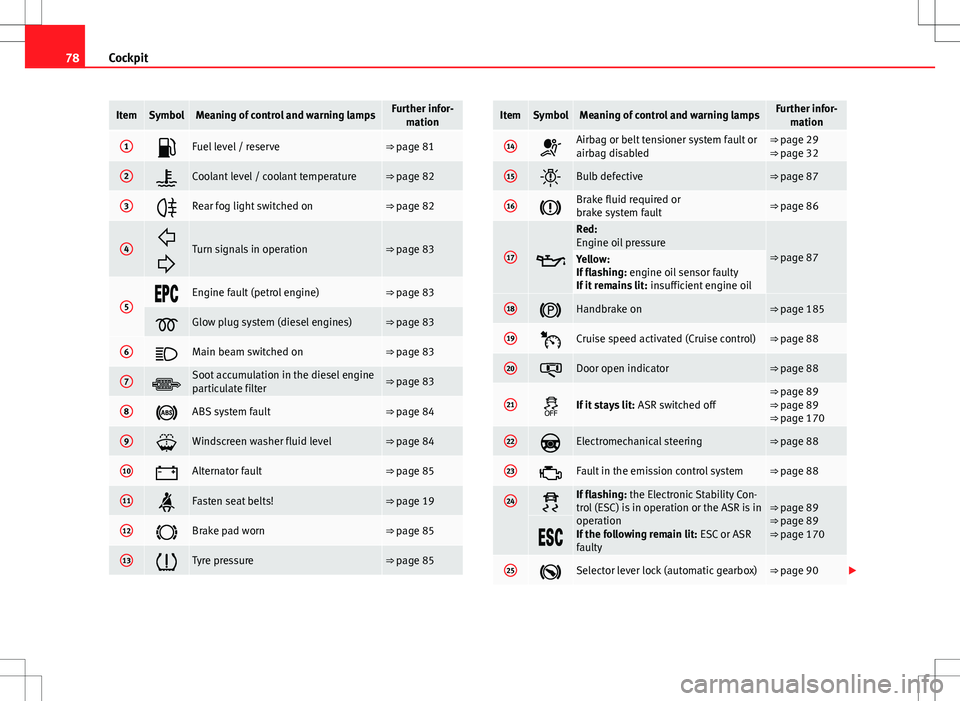
ItemSymbolMeaning of control and warning lampsFurther infor-
mation
1Fuel level / reserve⇒ page 81
2Coolant level / coolant temperature⇒ page 82
3Rear fog light switched on⇒ page 82
4
Turn signals in operation⇒ page 83
5Engine fault (petrol engine)⇒ page 83
Glow plug system (diesel engines)⇒ page 83
6Main beam switched on⇒ page 83
7Soot accumulation in the diesel engine
particulate filter⇒ page 83
8ABS system fault⇒ page 84
9Windscreen washer fluid level⇒ page 84
10Alternator fault⇒ page 85
11Fasten seat belts!⇒ page 19
12Brake pad worn⇒ page 85
13Tyre pressure⇒ page 85
ItemSymbolMeaning of control and warning lampsFurther infor- mation
14Airbag or belt tensioner system fault or
airbag disabled⇒ page 29
⇒ page 32
15Bulb defective⇒ page 87
16Brake fluid required or
brake system fault⇒ page 86
17
Red:
Engine oil pressure
⇒ page 87Yellow:
If flashing: engine oil sensor faulty
If it remains lit: insufficient engine oil
18Handbrake on⇒ page 185
19Cruise speed activated (Cruise control)⇒ page 88
20Door open indicator⇒ page 88
21If it stays lit: ASR switched off⇒ page 89
⇒ page 89
⇒ page 170
22Electromechanical steering⇒ page 88
23Fault in the emission control system⇒ page 88
24If flashing: the Electronic Stability Con-
trol (ESC) is in operation or the ASR is in
operation
If the following remain lit: ESC or ASR
faulty⇒ page 89
⇒ page 89
⇒ page 170
25Selector lever lock (automatic gearbox)⇒ page 90
Page 90 of 315
88Cockpit
Cruise speed (Cruise control)*
The warning lamp comes on when the cruise control system
is switched on.
The warning lamp lights up when the cruise control system is switched
on. For further information on the cruise control system, see ⇒ page 190.
Indicator for open doors or rear lid*
This warning lamp lights up if one of the doors or the rear
lid is open. The warning light should go off when all the doors are closed correctly.
The system also works when the ignition is switched off. It should go off ap-
prox. 15 seconds after the vehicle is locked.
Electromechanical steering*
For vehicles with power steering, the level of steering assistance depends
on the vehicle's speed and on the steering angle.
The control lamp should light up for a few seconds when the ignition is
switched on. It should go out once the engine is started.
If the battery is disconnected, the indicator remains lit, even with the en-
gine running. The warning light only goes off after a distance of approx. 50
m. There is a fault in the electromechanical steering system if the lamp does
not go out or lights up whilst the vehicle is in motion. The warning lamp
may appear in two different colours to indicate faults. If it lights yellow, this
indicates a minor fault. If it lights red, seek assistance from a specialised
workshop immediately, as the steering assistance is not working; in this
case you should not keep driving. Stop the vehicle and seek technical assis-
tance. The power steering does not work if the battery is flat or if the engine
is off (for example, for towing). You should take into account that you will
need considerably more power than normal to steer the vehicle if the power
steering is not working correctly or at all.
For those vehicles fitted with ESC*, the “Steering manoeuvre recommenda-
tion” function is included. See
⇒ page 196.
Emission control system*
This warning lamp monitors the exhaust system.
Control lamp flashes:
When there is misfiring that can damage the catalytic converter. Reduce
speed and drive carefully to the nearest specialised workshop to have the
engine checked.
The instrument panel displays the following message 1)
: EXHAUST GAS SEE
WORKSHOP.
Control lamp is lit:
If a fault has developed during driving which has reduced the quality of the
exhaust gas (e.g. lambda probe fault). Reduce speed and drive carefully to
the nearest specialised workshop to have the engine checked.
The following message is shown in the instrument panel display: EXHAUST
GAS SEE WORKSHOP .
1)
Depending on the version of the model.
Page 93 of 315
91
Steering wheel controls
Steering wheel controls
General information
The steering wheel includes a multifunction module from where it is possi-
ble to control the audio, telephone and radio navigation functions, and the
automatic gearbox*, without requiring the driver to be distracted from driv-
ing.
There are three versions of the multifunction module:
● Audio version, to control the available audio functions from the steering
wheel.
● Audio + Telephone version, to control the available audio functions and
the telephone system from the steering wheel.
Both versions may be used to control the Audio system (Radio, Audio CD,
mp3 CD, iPod 1)
/USB 1)
/SD 1)
) and the Radio navigation system, in which
case they also control the Navigation system.
● Version for automatic gearbox* ⇒ page 183.
1)
If fitted in the vehicle.
Safety FirstOperating InstructionsPractical TipsTechnical Specifications
Page 94 of 315
92Steering wheel controls
Audio system
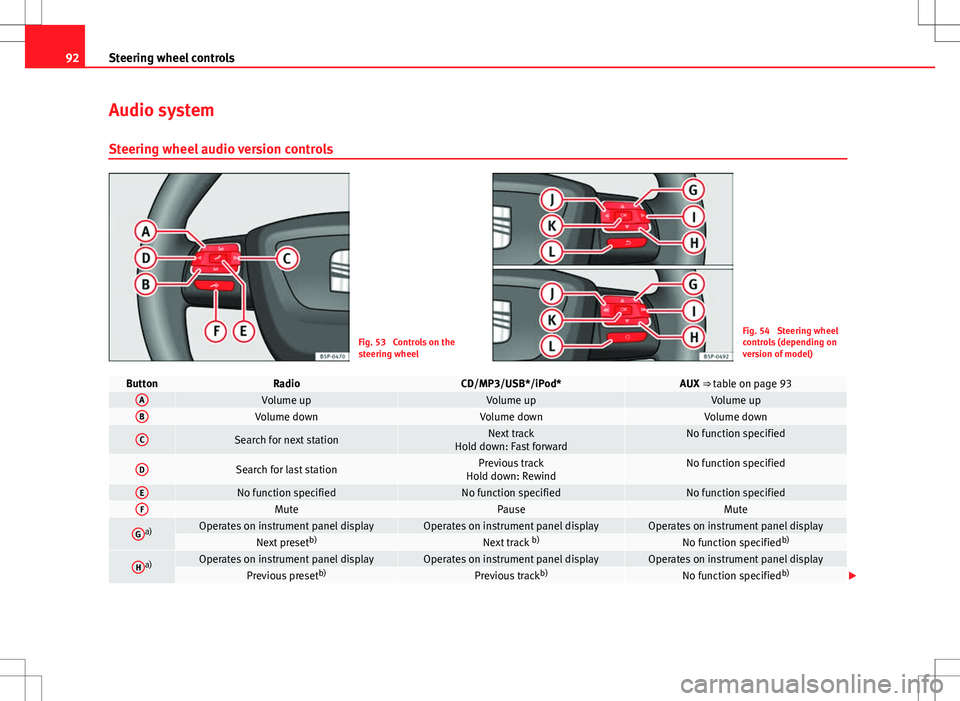
Steering wheel audio version controls
Fig. 53 Controls on the
steering wheelFig. 54 Steering wheel
controls (depending on
version of model)
ButtonRadioCD/MP3/USB*/iPod*AUX ⇒ table on page 93AVolume upVolume upVolume upBVolume downVolume downVolume down
CSearch for next stationNext track
Hold down: Fast forwardNo function specified
DSearch for last stationPrevious track
Hold down: RewindNo function specified
ENo function specifiedNo function specifiedNo function specifiedFMutePauseMute
Ga)Operates on instrument panel displayOperates on instrument panel displayOperates on instrument panel displayNext preset b)Next track b)No function specified b)
Ha)Operates on instrument panel displayOperates on instrument panel displayOperates on instrument panel displayPrevious presetb)Previous trackb)No function specified b)
Page 95 of 315
93
Steering wheel controls
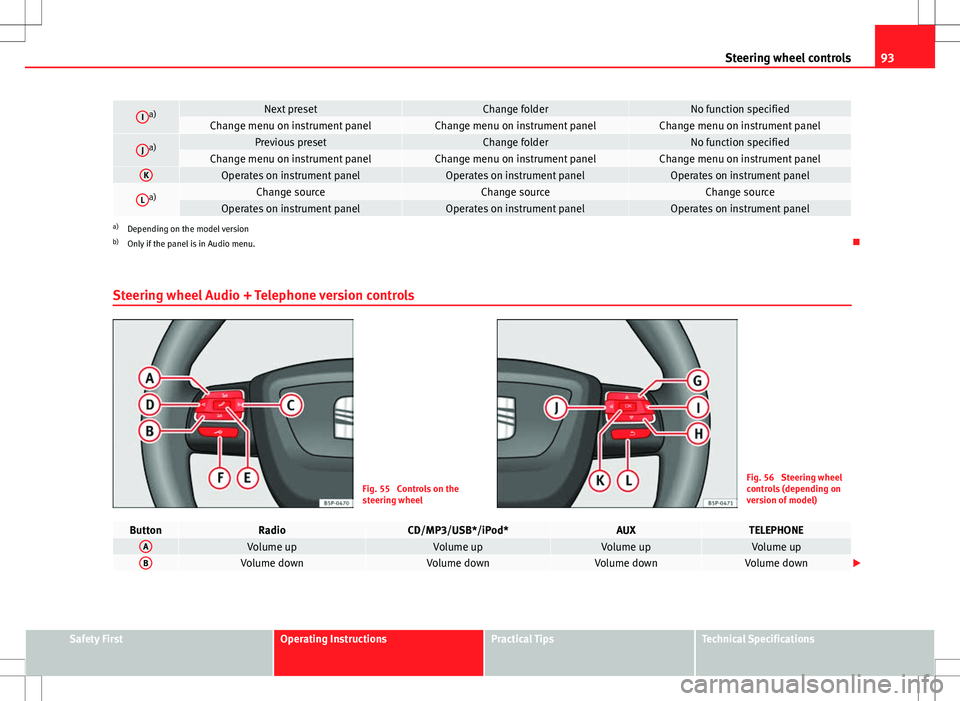
Ia)Next presetChange folderNo function specifiedChange menu on instrument panelChange menu on instrument panelChange menu on instrument panel
Ja)Previous presetChange folderNo function specifiedChange menu on instrument panelChange menu on instrument panelChange menu on instrument panelKOperates on instrument panelOperates on instrument panelOperates on instrument panel
La)Change sourceChange sourceChange sourceOperates on instrument panelOperates on instrument panelOperates on instrument panela)
Depending on the model version
b) Only if the panel is in Audio menu.
Steering wheel Audio + Telephone version controls
Fig. 55 Controls on the
steering wheelFig. 56 Steering wheel
controls (depending on
version of model)
ButtonRadioCD/MP3/USB*/iPod*AUXTELEPHONEAVolume upVolume upVolume upVolume upBVolume downVolume downVolume downVolume down
Safety FirstOperating InstructionsPractical TipsTechnical Specifications
Page 96 of 315
94Steering wheel controls
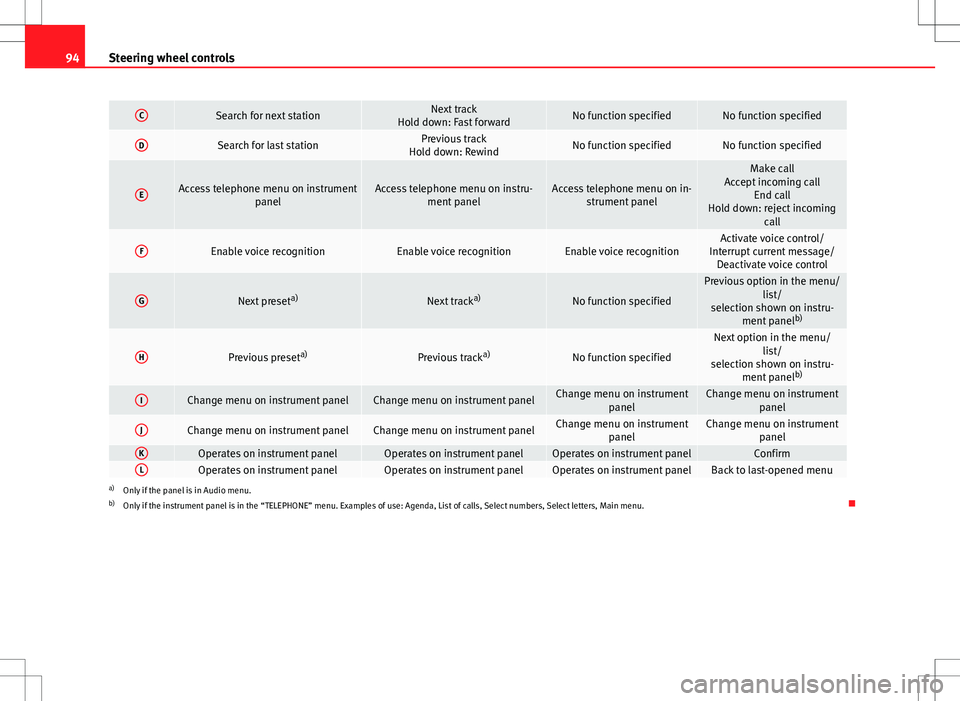
CSearch for next stationNext track
Hold down: Fast forwardNo function specifiedNo function specified
DSearch for last stationPrevious track
Hold down: RewindNo function specifiedNo function specified
EAccess telephone menu on instrument panelAccess telephone menu on instru-ment panelAccess telephone menu on in-strument panel
Make call
Accept incoming call End call
Hold down: reject incoming call
FEnable voice recognitionEnable voice recognitionEnable voice recognitionActivate voice control/
Interrupt current message/ Deactivate voice control
GNext preset a)Next tracka)No function specified
Previous option in the menu/
list/
selection shown on instru- ment panel b)
HPrevious preset a)Previous tracka)No function specified
Next option in the menu/
list/
selection shown on instru- ment panel b)
IChange menu on instrument panelChange menu on instrument panelChange menu on instrument
panelChange menu on instrumentpanel
JChange menu on instrument panelChange menu on instrument panelChange menu on instrumentpanelChange menu on instrumentpanel
KOperates on instrument panelOperates on instrument panelOperates on instrument panelConfirmLOperates on instrument panelOperates on instrument panelOperates on instrument panelBack to last-opened menua)Only if the panel is in Audio menu.
b) Only if the instrument panel is in the “TELEPHONE” menu. Examples of use: Agenda, List of calls, Select numbers, Select letters, Main menu.
Page 97 of 315
95
Steering wheel controls
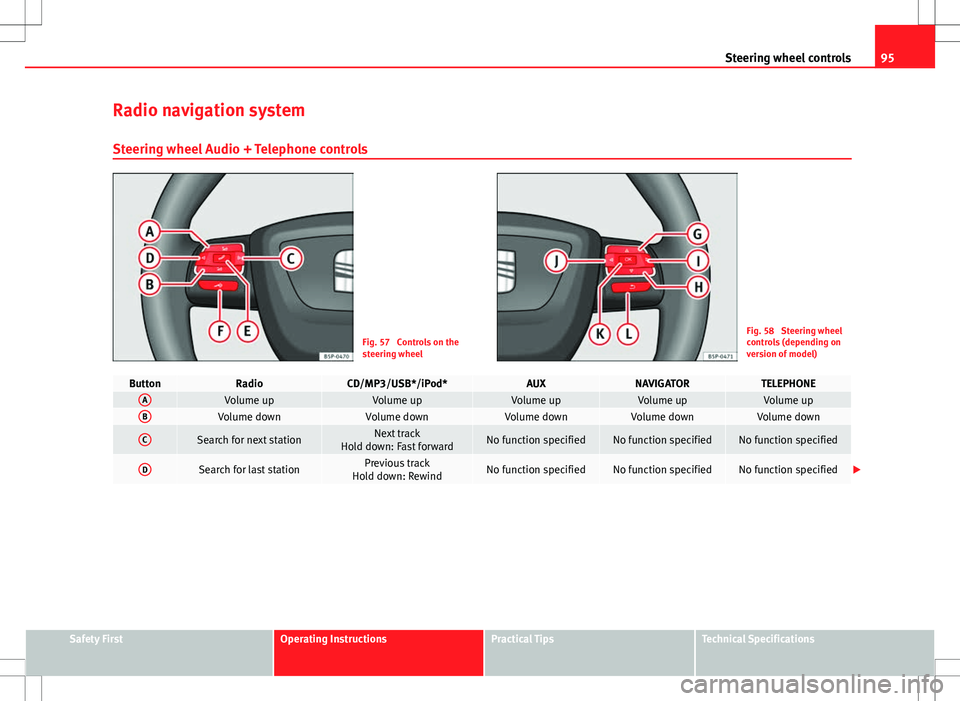
Radio navigation system Steering wheel Audio + Telephone controls
Fig. 57 Controls on the
steering wheelFig. 58 Steering wheel
controls (depending on
version of model)
ButtonRadioCD/MP3/USB*/iPod*AUXNAVIGATORTELEPHONEAVolume upVolume upVolume upVolume upVolume upBVolume downVolume downVolume downVolume downVolume down
CSearch for next stationNext track
Hold down: Fast forwardNo function specifiedNo function specifiedNo function specified
DSearch for last stationPrevious track
Hold down: RewindNo function specifiedNo function specifiedNo function specified
Safety FirstOperating InstructionsPractical TipsTechnical Specifications
Page 98 of 315
96Steering wheel controls
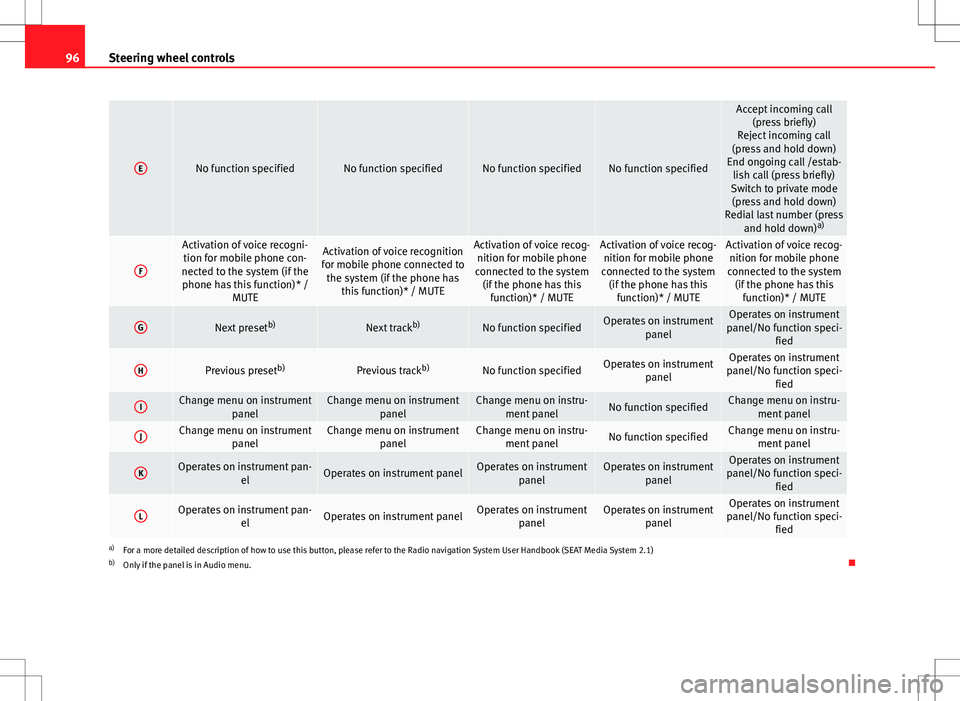
ENo function specifiedNo function specifiedNo function specifiedNo function specified
Accept incoming call
(press briefly)
Reject incoming call
(press and hold down)
End ongoing call /estab- lish call (press briefly)
Switch to private mode (press and hold down)
Redial last number (press and hold down) a)
F
Activation of voice recogni-
tion for mobile phone con-
nected to the system (if the phone has this function)* / MUTEActivation of voice recognition
for mobile phone connected to the system (if the phone has this function)* / MUTEActivation of voice recog-nition for mobile phone
connected to the system (if the phone has this function)* / MUTEActivation of voice recog-nition for mobile phone
connected to the system (if the phone has this function)* / MUTEActivation of voice recog-nition for mobile phone
connected to the system (if the phone has this function)* / MUTE
GNext preset b)Next trackb)No function specifiedOperates on instrument
panelOperates on instrument
panel/No function speci- fied
HPrevious preset b)Previous trackb)No function specifiedOperates on instrument
panelOperates on instrument
panel/No function speci- fied
IChange menu on instrument panelChange menu on instrumentpanelChange menu on instru-ment panelNo function specifiedChange menu on instru- ment panel
JChange menu on instrument panelChange menu on instrumentpanelChange menu on instru-ment panelNo function specifiedChange menu on instru- ment panel
KOperates on instrument pan- elOperates on instrument panelOperates on instrumentpanelOperates on instrumentpanelOperates on instrument
panel/No function speci- fied
LOperates on instrument pan- elOperates on instrument panelOperates on instrumentpanelOperates on instrumentpanelOperates on instrument
panel/No function speci- fied
a)For a more detailed description of how to use this button, please refer to the Radio navigation System User Handbook (SEAT Media System 2.1)
b) Only if the panel is in Audio menu.