lock Seat Altea 2013 Workshop Manual
[x] Cancel search | Manufacturer: SEAT, Model Year: 2013, Model line: Altea, Model: Seat Altea 2013Pages: 315, PDF Size: 4.66 MB
Page 162 of 315
160Air conditioning
Heating and cooling the interior
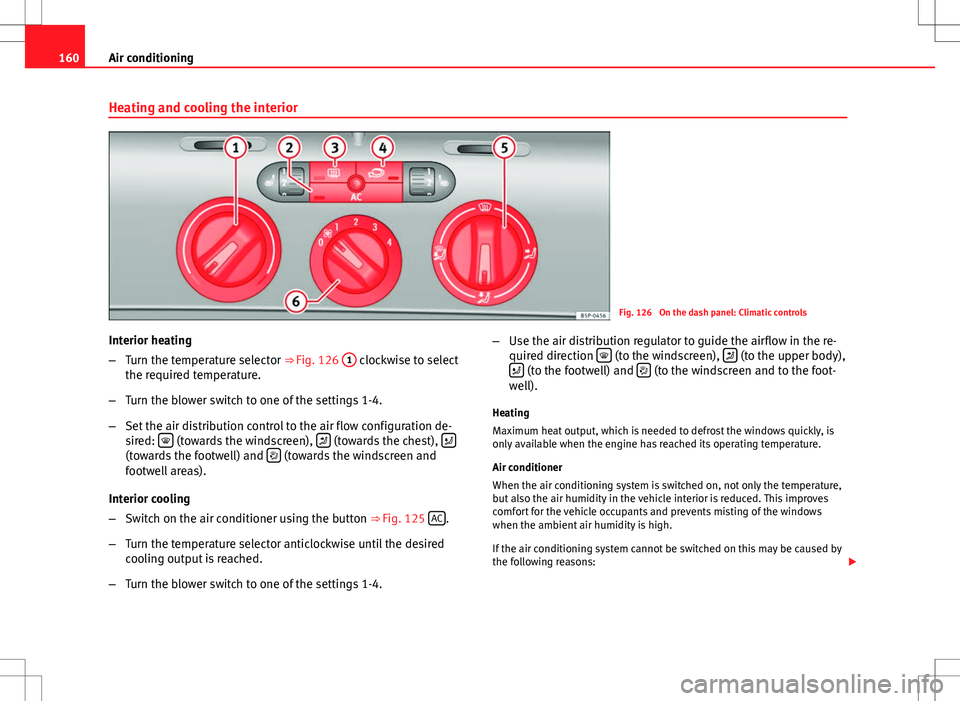
Fig. 126 On the dash panel: Climatic controls
Interior heating
– Turn the temperature selector ⇒ Fig. 126 1
clockwise to select
the required temperature.
– Turn the blower switch to one of the settings 1-4.
– Set the air distribution control to the air flow configuration de-
sired:
(towards the windscreen), (towards the chest), (towards the footwell) and (towards the windscreen and
footwell areas).
Interior cooling
– Switch on the air conditioner using the button ⇒ Fig. 125 AC
.
– Turn the temperature selector anticlockwise until the desired
cooling output is reached.
– Turn the blower switch to one of the settings 1-4. –
Use the air distribution regulator to guide the airflow in the re-
quired direction
(to the windscreen), (to the upper body),
(to the footwell) and (to the windscreen and to the foot-
well).
Heating
Maximum heat output, which is needed to defrost the windows quickly, is
only available when the engine has reached its operating temperature.
Air conditioner
When the air conditioning system is switched on, not only the temperature,
but also the air humidity in the vehicle interior is reduced. This improves
comfort for the vehicle occupants and prevents misting of the windows
when the ambient air humidity is high.
If the air conditioning system cannot be switched on this may be caused by
the following reasons:
Page 172 of 315
170Driving
WARNING (Continued)
● Adjust the driver seat or steering wheel so that there is a distance of
at least 25 cm between the steering wheel and your chest ⇒ Fig. 133. If
you fail to observe the minimum distance, the airbag will not protect you.
Risk of fatal injury.
● If your physical constitution does not allow you to maintain the mini-
mum distance of 25 cm, contact a Technical Service. The Technical Serv-
ice will help you to decide if special specific modifications are necessary.
● If you adjust the steering wheel so that it points towards your face,
the driver airbag will not protect you properly in the event of an accident.
Make sure that the steering wheel points towards your chest.
● When driving, always hold the steering wheel with both hands on the
outside of the ring at the 9 o'clock and 3 o'clock positions. Never hold
the steering wheel at the 12 o'clock position, or in any other manner
(e.g. in the centre of the steering wheel, or on the inside of the rim). In
such cases, if the airbag is triggered, you may sustain injuries to the
arms, hands and head.
Safety
Electronic Stability Control (ESC)*
The ESC helps make driving safer in extreme driving condi-
tions.
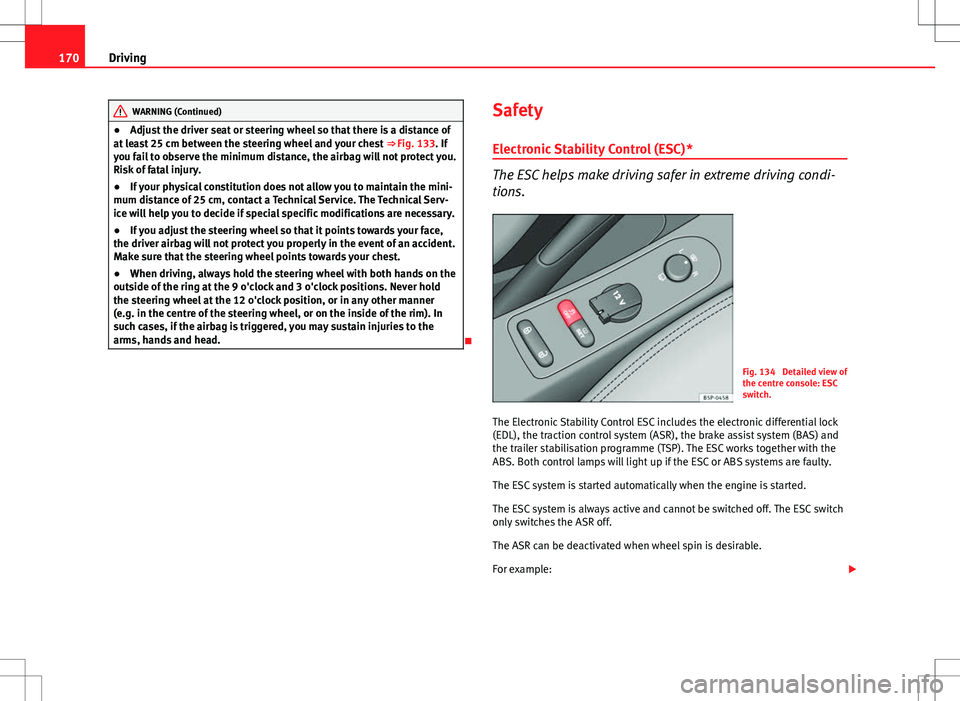
Fig. 134 Detailed view of
the centre console: ESC
switch.
The Electronic Stability Control ESC includes the electronic differential lock
(EDL), the traction control system (ASR), the brake assist system (BAS) and
the trailer stabilisation programme (TSP). The ESC works together with the
ABS. Both control lamps will light up if the ESC or ABS systems are faulty.
The ESC system is started automatically when the engine is started.
The ESC system is always active and cannot be switched off. The ESC switch
only switches the ASR off.
The ASR can be deactivated when wheel spin is desirable.
For example:
Page 173 of 315
171
Driving
● When driving with snow chains.
● When driving in deep snow or on loose surfaces.
● When the vehicle is stuck, to rock it backwards and forwards.
Press the button to switch the ASR back on when you no longer need wheel
spin.
WARNING
● Do not forget that the Electronic stability control (ESC) cannot defy
the laws of physics. This should be kept in mind, particularly on slippery
and wet roads and when towing a trailer.
● Always adapt your driving style to suit the condition of the roads and
the traffic situation. The greater safety provided by the ESC should not
encourage you to run any risks.
● Please refer to the corresponding warning notes on ESC in
⇒ page 194, Intelligent technology.
Ignition lock
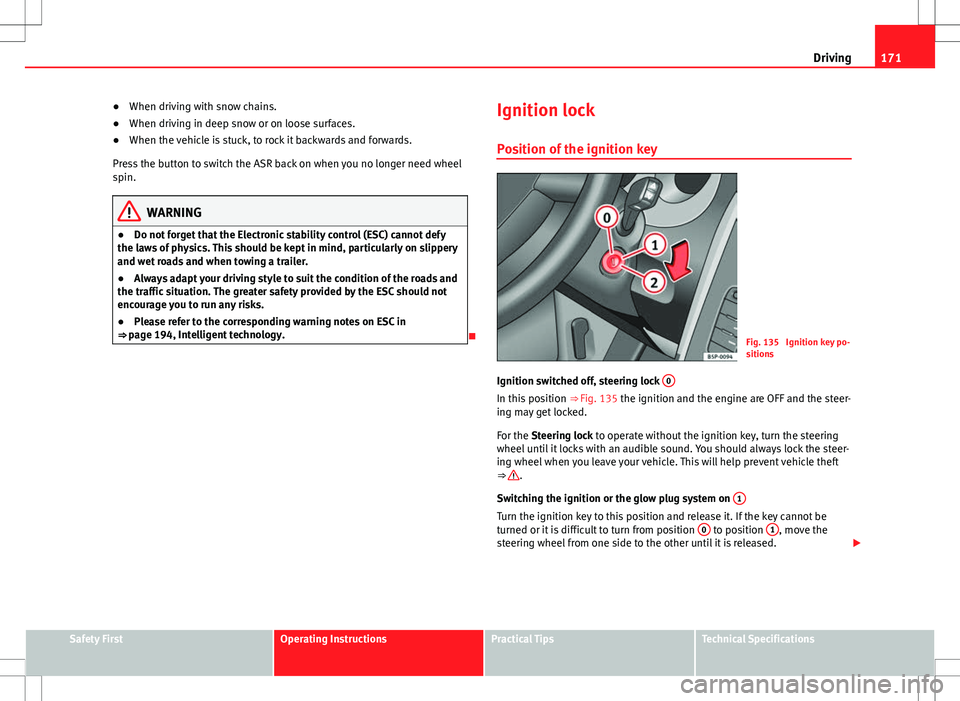
Position of the ignition keyFig. 135 Ignition key po-
sitions
Ignition switched off, steering lock 0
In this position
⇒ Fig. 135 the ignition and the engine are OFF and the steer-
ing may get locked.
For the Steering lock to operate without the ignition key, turn the steering
wheel until it locks with an audible sound. You should always lock the steer-
ing wheel when you leave your vehicle. This will help prevent vehicle theft
⇒
.
Switching the ignition or the glow plug system on 1
Turn the ignition key to this position and release it. If the key cannot be
turned or it is difficult to turn from position 0 to position 1, move the
steering wheel from one side to the other until it is released.
Safety FirstOperating InstructionsPractical TipsTechnical Specifications
Page 174 of 315
172Driving
Starting 2
The engine is started when the key is in this position. Electrical components
with a high power consumption are switched off temporarily.
Every time the vehicle is started again, the ignition key must be turned to
position 0
. The
repetitive start prevention lock of the ignition prevents
possible damage to the starter motor if the engine is already running.
WARNING
● The ignition key must NOT be removed from the lock until the vehicle
comes to a standstill. Otherwise, the steering could be immediately
blocked- Risk of accident!
● Always remove the key from the ignition when leaving the vehicle,
even for a short period. This is especially important if children or disa-
bled people are left alone in the vehicle. They could accidentally start the
engine or work electrical equipment such as the electric windows, conse-
quently resulting in an accident.
● Unsupervised use of the keys could start the engine or any electrical
system, such as the electric window. This could result in serious injury.
CAUTION
The starter motor will only work when the engine is stopped (ignition key
position 2
).
Electronic immobiliser
The electronic immobiliser prevents unauthorised persons
from driving the vehicle.
Inside the key there is a chip that deactivates the electronic immobiliser au-
tomatically when the key is inserted into the ignition. The electronic immobiliser will be activated again automatically as soon as
you pull the key out of the ignition lock.
The engine can only be started using a genuine SEAT key with its correct
code.
Note
A perfect operation of the vehicle is ensured if genuine SEAT keys are used.
Starting and stopping the engine Starting petrol engines
The engine can only be started using a genuine SEAT key
with its correct code. – Move the gearbox lever to the neutral position and depress the
clutch pedal thoroughly and hold it in this position for the start-
er to turn the engine on.
– Turn the ignition key to the starting ⇒ page 171 position.
– Let go of the ignition key as soon as the engine starts; the start-
er motor must not run on with the engine.
After starting a very hot engine, you may need to slightly press down the ac-
celerator.
When starting a very cold engine, it may be a little noisy for the first few sec-
onds until oil pressure has built up in the hydraulic valve compensators.
This is quite normal, and no cause for concern.
Page 176 of 315
174Driving
WARNING
● Never start or run the engine in unventilated or closed rooms. The ex-
haust gases contain carbon monoxide, an odourless and colourless poi-
sonous gas. Risk of fatal accidents. Carbon monoxide can cause loss of
consciousness. It can also result in death.
● Never leave the vehicle unattended if the engine is running.
● Never use “cold start sprays”, they could explode or cause the engine
to run at high revs. Risk of injury.
CAUTION
● When the engine is cold, you should avoid high engine speeds, driving
at full throttle and over-loading the engine. Risk of engine damage.
● The vehicle should not be pushed or towed more than 50 metres to start
the engine. Unburnt fuel could enter the catalytic converter and damage it.
● Before attempting to push-start or tow a vehicle in order to start it, you
should first try to start it using the battery of another vehicle. Note and fol-
low the instructions in ⇒ page 281, Jump-starting.
For the sake of the environment
Do not warm-up the engine by running the engine with the vehicle station-
ary. You should drive off as soon as you start the engine. This helps the en-
gine reach operating temperature faster and reduces emissions.
Switching off the engine
– Stop the vehicle.
– Turn the ignition key to position ⇒ Fig. 135 0
.
After switching the engine off, the radiator fan may run on for up to 10 mi-
nutes. It is also possible that the fan turns itself on once more if the coolant temperature increases due to the heat accumulated in the engine compart-
ment or due to its prolonged exposure to solar radiation.
WARNING
● Never switch the engine off until the vehicle is completely stationary.
● The brake servo works only when the engine is running. With the en-
gine switched off, more strength is needed to brake. As normal brake op-
eration cannot be performed, risk of accidents and serious injury may ex-
ist.
● The steering lock can be immediately blocked once the key is re-
moved from the ignition. The vehicle cannot be steered. Risk of accident.
CAUTION
When the engine has been running under a heavy load for a long period,
heat can accumulate in the engine compartment and cause engine damage.
For this reason, you should idle the engine for approx. 2 minutes before you
switch it off.
Page 182 of 315
180Driving
Automatic gearbox/DSG automatic gearbox*
Selector lever positions
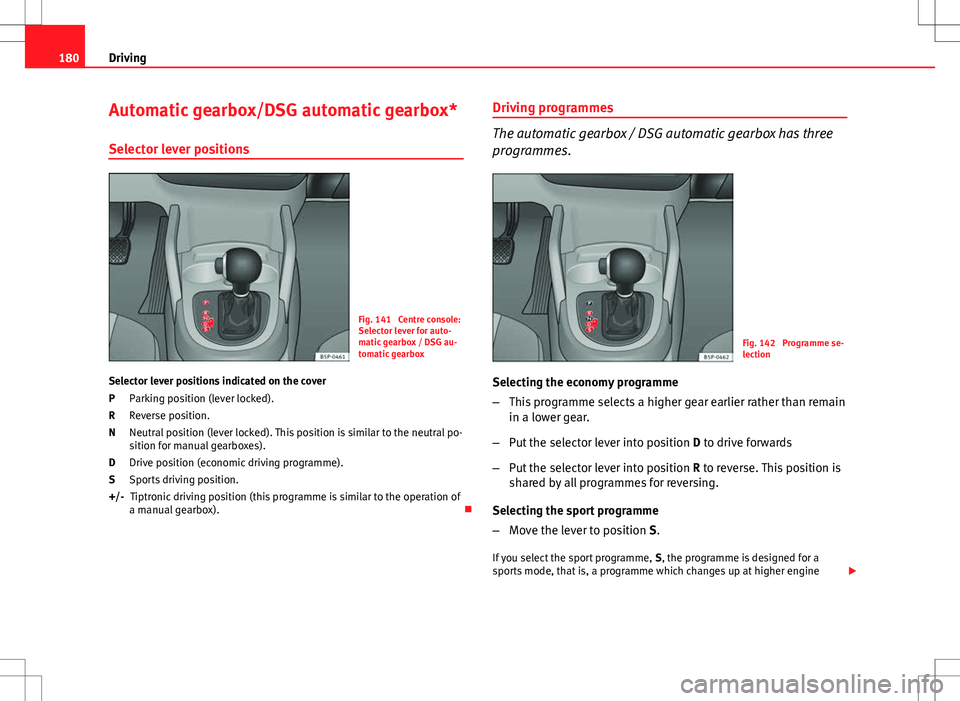
Fig. 141 Centre console:
Selector lever for auto-
matic gearbox / DSG au-
tomatic gearbox
Selector lever positions indicated on the cover Parking position (lever locked).
Reverse position.
Neutral position (lever locked). This position is similar to the neutral po-
sition for manual gearboxes).
Drive position (economic driving programme).
Sports driving position.Tiptronic driving position (this programme is similar to the operation of
a manual gearbox).
P
R
N
D
S
+/- Driving programmes
The automatic gearbox / DSG automatic gearbox has three
programmes.
Fig. 142 Programme se-
lection
Selecting the economy programme
– This programme selects a higher gear earlier rather than remain
in a lower gear.
– Put the selector lever into position D to drive forwards
– Put the selector lever into position R to reverse. This position is
shared by all programmes for reversing.
Selecting the sport programme
– Move the lever to position S.
If you select the sport programme, S, the programme is designed for a
sports mode, that is, a programme which changes up at higher engine
Page 183 of 315
181
Driving
speeds to use the full power of the engine. This programme is not recom-
mended for use on the motorway or in the city.
Selecting the manual programme (tiptronic)
This programme allows driving similar to a manual gearbox.
This programme may be accessed using the selector lever or from the steer-
ing wheel controls when this option is fitted ⇒ page 183.
Selector lever locking
The selector lever lock prevents gears from being engaged
inadvertently, which would cause the vehicle to move.
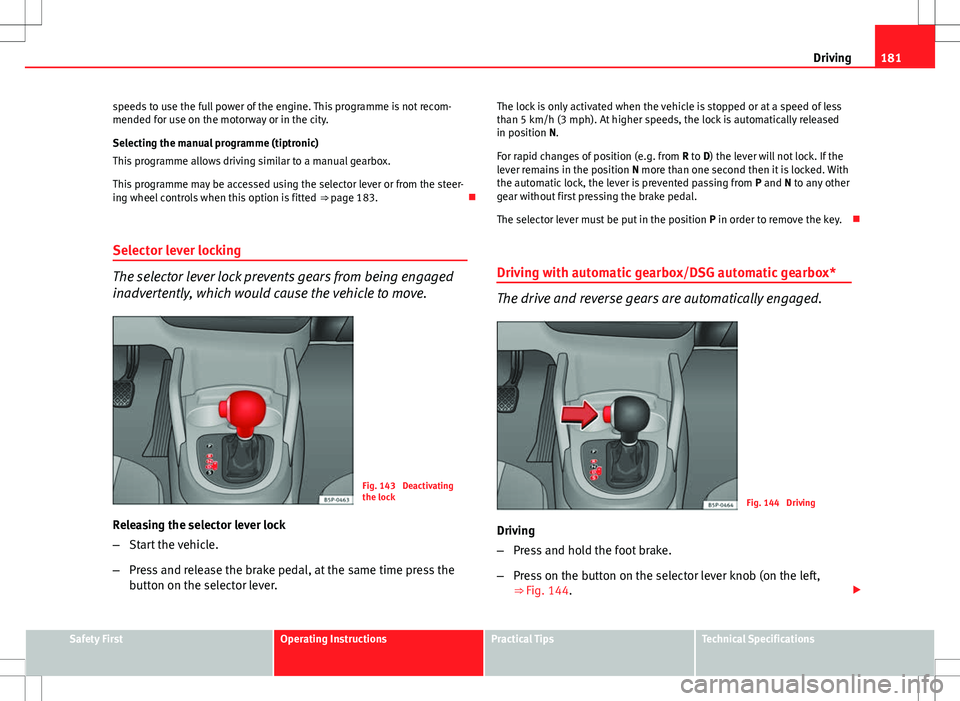
Fig. 143 Deactivating
the lock
Releasing the selector lever lock
– Start the vehicle.
– Press and release the brake pedal, at the same time press the
button on the selector lever. The lock is only activated when the vehicle is stopped or at a speed of less
than 5 km/h (3 mph). At higher speeds, the lock is automatically released
in position N.
For rapid changes of position (e.g. from
R to D) the lever will not lock. If the
lever remains in the position N more than one second then it is locked. With
the automatic lock, the lever is prevented passing from P and N to any other
gear without first pressing the brake pedal.
The selector lever must be put in the position P in order to remove the key.
Driving with automatic gearbox/DSG automatic gearbox*
The drive and reverse gears are automatically engaged.
Fig. 144 Driving
Driving
– Press and hold the foot brake.
– Press on the button on the selector lever knob (on the left,
⇒ Fig. 144.
Safety FirstOperating InstructionsPractical TipsTechnical Specifications
Page 188 of 315
186Driving
–Apply the handbrake.
– Select first gear.
– Switch the engine off and remove the key from the ignition. Turn
the steering wheel slightly to engage the steering lock.
– Always take you keys with you when you leave the vehicle ⇒
.
Additional notes on parking the vehicle on gradients:
Turn the steering wheel so that the vehicle rolls against the kerb if it started
to roll.
● If the vehicle is parked facing downhill, turn the front wheels so that
they point towards the kerb .
● If the vehicle is parked facing uphill, turn the front wheels so that they
point away from the kerb .
● Secure the vehicle as normal by applying the handbrake firmly and se-
lecting first gear.
WARNING
● Take measures to reduce the risk of injury when you leave your vehi-
cle unattended.
● Never park where the hot exhaust system could ignite inflammable
materials, such as dry grass, low bushes, spilt fuel etc.
● Never allow vehicle occupants to remain in the vehicle when it is
locked. They would be unable to open the vehicle from the inside, and
could become trapped in the vehicle in an emergency. In the event of an
emergency, locked doors will delay assistance to vehicle occupants.
● Never leave children alone in the vehicle. They could set the vehicle
in motion, for example, by releasing the handbrake or the gearbox lever.
● Depending on weather conditions, it may become extremely hot or
cold inside the vehicle. This can be fatal.
Hill-start aid*
This function is only included in vehicles with ESC.
This device helps when starting uphill.
These are the basic operation conditions: doors closed, brake pedal press-
ed down and vehicle in neutral. The system gets activated on engaging
gear.
After removing your foot from the brake pedal, the braking force is main-
tained for a few seconds to prevent the vehicle from moving backward when
putting into gear. This short space of time is enough to start the vehicle
with ease.
This system also works when reversing uphill.
WARNING
● If you do not start the vehicle immediately after taking your foot off
the brake pedal, the vehicle may start to roll back under certain condi-
tions. Depress the brake pedal or use the handbrake immediately.
● If the engine stalls, depress the brake pedal or use the handbrake im-
mediately.
● When following a line of traffic uphill, if you want to prevent the vehi-
cle from rolling back accidentally when starting off, hold the brake pedal
down for a few seconds before starting off.
Note
The Official Service or a specialised workshop can tell you if your vehicle is
equipped with this system.
Page 197 of 315
195
Intelligent technology
WARNING
● The risk of accident is higher if you drive too fast, if you do not keep
your distance to the vehicle in front, and when the road surface is slip-
pery or wet. The increased accident risk cannot be reduced by the brake
assist system.
● The brake assist system cannot defy the laws of physics. Slippery
and wet roads are dangerous even with the brake assist system! There-
fore, it is essential that you adjust your speed to suit the road and traffic
conditions. Do not let the extra safety features tempt you into taking any
risks when driving.
Anti-lock brake and traction control systems
M-ABS (ABS and ASR) Anti-lock brake system (ABS)
The anti-lock brake system prevents the wheels locking dur-
ing braking.
The anti-lock brake system (ABS) is an important part of the vehicle's active
safety system.
How the ABS works
If one of the wheels is turns too slowly in relation to the road speed, and is
close to locking, the system will reduce the braking pressure for this wheel.
The driver is made aware of this control process by a pulsating of the brake
pedal and audible noise. This is a deliberate warning to the driver that one
or more of the wheels is tending to lock and the ABS control function has
intervened. In this situation it is important to keep the brake pedal fully de-
pressed so the ABS can regulate the brake application. Do not “pump”. If you brake hard on a slippery road surface, the best possible control is re-
tained as the wheels do not lock.
However, ABS will not necessarily guarantee shorter braking distances in
all
conditions. The braking distance could even be longer if you brake on gravel
or on fresh snow covering a slippery surface.
WARNING
● The anti-lock brake system cannot defy the laws of physics. Slippery
and wet roads are dangerous even with ABS! If you notice that the ABS is
working (to counteract locked wheels under braking), you should reduce
speed immediately to suit the road and traffic conditions. Do not let the
extra safety features tempt you into taking any risks when driving.
● The effectiveness of ABS is also determined by the tyres fitted
⇒ page 250.
● If the running gear or brake system is modified, the effectiveness of
the ABS could be severely limited.
Drive wheel traction control system (ASR)
The traction control system prevents the driven wheels from
spinning when the vehicle is accelerating. Description and operation of the traction control system during
acceleration (ASR
On front-wheel drive vehicles, the ASR system intervenes, reducing engine
power and preventing the driven wheels from slipping during acceleration.
The system works in the entire speed range in conjunction with ABS. If a
failure occurs in the ABS, the ASR will also stop working.
The ASR helps the car to start moving, accelerate and climb a gradient in
slippery conditions, where this may otherwise be difficult or even impossi-
ble.
Safety FirstOperating InstructionsPractical TipsTechnical Specifications
Page 199 of 315
197
Intelligent technology
Electronic Stability Control (ESC)*
The ESC reduces the risk of skidding by braking the wheels individually.
The system uses the steering wheel angle and road speed to calculate the
changes of direction desired by the driver, and constantly compares them
with the actual behaviour of the vehicle. When irregularities occur, for exam-
ple, if the vehicle begins to skid, the ESC brakes the appropriate wheel au-
tomatically.
The forces acting on the braked wheel bring the vehicle back to a stable
condition. If the vehicle tends to oversteer, the system will act on the front
wheel on the outside of the turn.
Steering manoeuvre recommendations
This is a complementary safety function included in the ESC. This function
aids the driver to better stabilize the vehicle in a critical situation. For exam-
ple, in case of sudden braking surface with varied adherence, the vehicle
will tend to destabilise its trajectory to the right or to the left. In this case,
the ESC recognises the situation and assists the driver with a counter steer-
ing manoeuvre from the power steering.
This function simply provides the driver with a recommended manoeuvre in
critical situations.
The vehicle does not steer itself with this function, the driver has full control
of the vehicle at all times.
WARNING
● Remember that not even the ESC can defy the laws of physics. This
should be kept in mind, particularly on slippery and wet roads and when
towing a trailer.
● Always adapt your driving style to suit the condition of the roads and
the traffic situation. The greater safety provided by the ESC should not
encourage you to run any risks.
CAUTION
● To ensure that the ESC works correctly, all four wheels must be fitted
with the same tyres. Any differences in the rolling radius of the tyres can
cause the system to reduce engine power when this is not desired.
● Any modifications made to the vehicle (for example, to the engine,
brake system, running gear or to the combination of wheels and tyres) may
affect the operation of the ABS, EDL, ESC and ASR.
Anti-lock brake system (ABS)
The anti-lock brake system prevents the wheels locking during braking
⇒ page 195.
Electronic differential lock (EDL)*
The electronic differential lock helps prevent the loss of trac-
tion caused if one of the driven wheels starts spinning.
EDL helps the vehicle to start moving, accelerate and climb a gradient in
slippery conditions where this may otherwise be difficult or even impossi-
ble.
The system will control the revolutions of the driven wheels using the ABS
sensors (in case of an EDL fault the warning lamp for ABS lights up)
⇒ page 84.
At speeds of up to approximately 80 km/h, it is able to balance out differen-
ces in the speed of the driven wheels of approximately 100 rpm caused by a
slippery road surface on one side of the vehicle. It does this by braking the
wheel which has lost traction and distributing more driving force to the oth-
er driven wheel via the differential.
Safety FirstOperating InstructionsPractical TipsTechnical Specifications