navigation Seat Altea 2013 Owner's Manual
[x] Cancel search | Manufacturer: SEAT, Model Year: 2013, Model line: Altea, Model: Seat Altea 2013Pages: 315, PDF Size: 4.66 MB
Page 5 of 315
Table of Contents
Manual structure . . . . . . . . . . . . . . . . . . . . 5
Content . . . . . . . . . . . . . . . . . . . . . . . . . . . . . . . . 6
Safety First . . . . . . . . . . . . . . . . . . . . . . . . . . . . 7
Safe driving . . . . . . . . . . . . . . . . . . . . . . . . . . . . . . . 7
Brief introduction . . . . . . . . . . . . . . . . . . . . . . . . . 7
Proper sitting position for occupants . . . . . . . . . 10
Pedal area . . . . . . . . . . . . . . . . . . . . . . . . . . . . . . . 16
Storing objects . . . . . . . . . . . . . . . . . . . . . . . . . . . 17
Seat belts . . . . . . . . . . . . . . . . . . . . . . . . . . . . . . . . . 19
Brief introduction . . . . . . . . . . . . . . . . . . . . . . . . . 19
Why wear seat belts? . . . . . . . . . . . . . . . . . . . . . . 21
Seat belts . . . . . . . . . . . . . . . . . . . . . . . . . . . . . . . 25
Seat belt tensioners . . . . . . . . . . . . . . . . . . . . . . . 29
Airbag system . . . . . . . . . . . . . . . . . . . . . . . . . . . . . 30
Brief introduction . . . . . . . . . . . . . . . . . . . . . . . . . 30
Front airbags . . . . . . . . . . . . . . . . . . . . . . . . . . . . . 34
Side airbags* . . . . . . . . . . . . . . . . . . . . . . . . . . . . 38
Curtain airbags . . . . . . . . . . . . . . . . . . . . . . . . . . . 41
Deactivating airbags* . . . . . . . . . . . . . . . . . . . . . . 44
Child safety . . . . . . . . . . . . . . . . . . . . . . . . . . . . . . . 46
Brief introduction . . . . . . . . . . . . . . . . . . . . . . . . . 46
Child seats . . . . . . . . . . . . . . . . . . . . . . . . . . . . . . . 48
Securing child seats . . . . . . . . . . . . . . . . . . . . . . . 51 Operating Instructions
. . . . . . . . . . . . . 55
Cockpit . . . . . . . . . . . . . . . . . . . . . . . . . . . . . . . . . . . 55
Overview . . . . . . . . . . . . . . . . . . . . . . . . . . . . . . . . 55
Instruments . . . . . . . . . . . . . . . . . . . . . . . . . . . . . . 57
LPG system* . . . . . . . . . . . . . . . . . . . . . . . . . . . . . 60
Digital instrument panel display . . . . . . . . . . . . . 61
Instrument panel menus* . . . . . . . . . . . . . . . . . . . 68
Warning lamps . . . . . . . . . . . . . . . . . . . . . . . . . . . 77
Steering wheel controls . . . . . . . . . . . . . . . . . . . . 91
General information . . . . . . . . . . . . . . . . . . . . . . . 91
Audio system . . . . . . . . . . . . . . . . . . . . . . . . . . . . . 92
Radio navigation system . . . . . . . . . . . . . . . . . . . 95
Opening and closing . . . . . . . . . . . . . . . . . . . . . . 97
Central locking . . . . . . . . . . . . . . . . . . . . . . . . . . . 97
Keys . . . . . . . . . . . . . . . . . . . . . . . . . . . . . . . . . . . . 103
Radio frequency remote control . . . . . . . . . . . . . . 105
Anti-theft alarm system* . . . . . . . . . . . . . . . . . . . 107
Rear lid . . . . . . . . . . . . . . . . . . . . . . . . . . . . . . . . . . 109
Windows . . . . . . . . . . . . . . . . . . . . . . . . . . . . . . . . 111
Sliding/tilting sunroof* . . . . . . . . . . . . . . . . . . . . 113
Lights and visibility . . . . . . . . . . . . . . . . . . . . . . . . 116
Lights . . . . . . . . . . . . . . . . . . . . . . . . . . . . . . . . . . . 116
Interior lights . . . . . . . . . . . . . . . . . . . . . . . . . . . . . 124
Visibility . . . . . . . . . . . . . . . . . . . . . . . . . . . . . . . . . 127
Windscreen wipers . . . . . . . . . . . . . . . . . . . . . . . . 128
Rear vision mirrors . . . . . . . . . . . . . . . . . . . . . . . . 132
Seats and storage . . . . . . . . . . . . . . . . . . . . . . . . . 135
The importance of correct seat adjustment . . . . . 135
Head restraints . . . . . . . . . . . . . . . . . . . . . . . . . . . 136
Front seats . . . . . . . . . . . . . . . . . . . . . . . . . . . . . . . 138
Rear seats . . . . . . . . . . . . . . . . . . . . . . . . . . . . . . . 140
Storage compartment . . . . . . . . . . . . . . . . . . . . . . 142
Ashtray*, cigarette lighter* and power sockets . 150 First-aid kit, warning triangle, fire extinguisher . 153
Luggage compartment . . . . . . . . . . . . . . . . . . . . . 154
Air conditioning . . . . . . . . . . . . . . . . . . . . . . . . . . . 157
Heating . . . . . . . . . . . . . . . . . . . . . . . . . . . . . . . . . 157
Climatic* . . . . . . . . . . . . . . . . . . . . . . . . . . . . . . . . 159
2C-Climatronic* . . . . . . . . . . . . . . . . . . . . . . . . . . . 162
General notes . . . . . . . . . . . . . . . . . . . . . . . . . . . . 167
Driving . . . . . . . . . . . . . . . . . . . . . . . . . . . . . . . . . . . . 169
Steering . . . . . . . . . . . . . . . . . . . . . . . . . . . . . . . . . 169
Safety . . . . . . . . . . . . . . . . . . . . . . . . . . . . . . . . . . . 170
Ignition lock . . . . . . . . . . . . . . . . . . . . . . . . . . . . . . 171
Starting and stopping the engine . . . . . . . . . . . . 172
Start-Stop function* . . . . . . . . . . . . . . . . . . . . . . . 176
Manual gearbox . . . . . . . . . . . . . . . . . . . . . . . . . . 179
Automatic gearbox/DSG automatic gearbox* . . . 180
Handbrake . . . . . . . . . . . . . . . . . . . . . . . . . . . . . . . 185
Parking aid acoustic system* . . . . . . . . . . . . . . . . 187
Cruise speed* (Cruise control system) . . . . . . . . 190
Practical Tips . . . . . . . . . . . . . . . . . . . . . . . . . 194
Intelligent technology . . . . . . . . . . . . . . . . . . . . . 194
Brakes . . . . . . . . . . . . . . . . . . . . . . . . . . . . . . . . . . 194
Anti-lock brake and traction control systems M-
ABS (ABS and ASR) . . . . . . . . . . . . . . . . . . . . . . . . 195
Electronic Stability Control (ESC)* . . . . . . . . . . . . 196
Driving and the environment . . . . . . . . . . . . . . . 202
Running-in . . . . . . . . . . . . . . . . . . . . . . . . . . . . . . . 202
Exhaust gas purification system . . . . . . . . . . . . . 203
Economical and environmentally friendly driving 204
Driving abroad . . . . . . . . . . . . . . . . . . . . . . . . . . . . 206
3
Table of Contents
Page 72 of 315
70Cockpit
Main menu
The menu provides access to the different display functions
(only with the MFI lever).
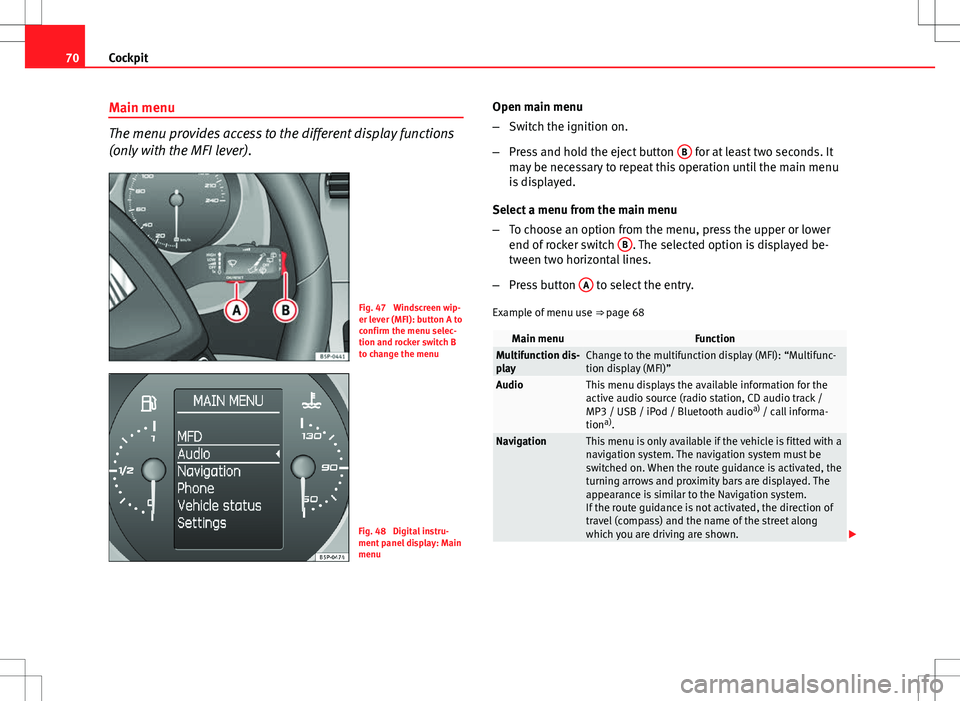
Fig. 47 Windscreen wip-
er lever (MFI): button A to
confirm the menu selec-
tion and rocker switch B
to change the menu
Fig. 48 Digital instru-
ment panel display: Main
menu Open main menu
–
Switch the ignition on.
– Press and hold the eject button B
for at least two seconds. It
may be necessary to repeat this operation until the main menu
is displayed.
Select a menu from the main menu
– To choose an option from the menu, press the upper or lower
end of rocker switch B
. The selected option is displayed be-
tween two horizontal lines.
– Press button A
to select the entry.
Example of menu use ⇒ page 68
Main menuFunctionMultifunction dis-
playChange to the multifunction display (MFI): “Multifunc-
tion display (MFI)”
AudioThis menu displays the available information for the
active audio source (radio station, CD audio track /
MP3 / USB / iPod / Bluetooth audio a)
/ call informa-
tion a)
.
NavigationThis menu is only available if the vehicle is fitted with a
navigation system. The navigation system must be
switched on. When the route guidance is activated, the
turning arrows and proximity bars are displayed. The
appearance is similar to the Navigation system.
If the route guidance is not activated, the direction of
travel (compass) and the name of the street along
which you are driving are shown.
Page 73 of 315
71
Cockpit
TelephoneThis menu is only available in vehicles with radio unit if
the vehicle is fitted with the telephone function. In ve-
hicles fitted with a radio navigation system, this menu
is available in the central unit (navigator) ⇒ Book-
let SEAT Media System 2.1.
Vehicle conditionThis menu displays current warning or information
texts: “Vehicle status menu”
This option flashes when one of these texts is dis-
played.
ConfigurationThis option allows the time, the speed warning when
using winter tyres, units, language, independent heat-
ing, the Light and visibility menu and the Convenience
menu to be reset.
a) Only in vehicles fitted with a radio navigation system.
Note
For electronic and vehicle equipment one or more of these menus will be
displayed. Multifunction display menu (MFI)
The multifunction display (MFI) shows you information on
the journey and fuel consumption.
Fig. 49 Multifunction
display (MFI) instrument
panel display.
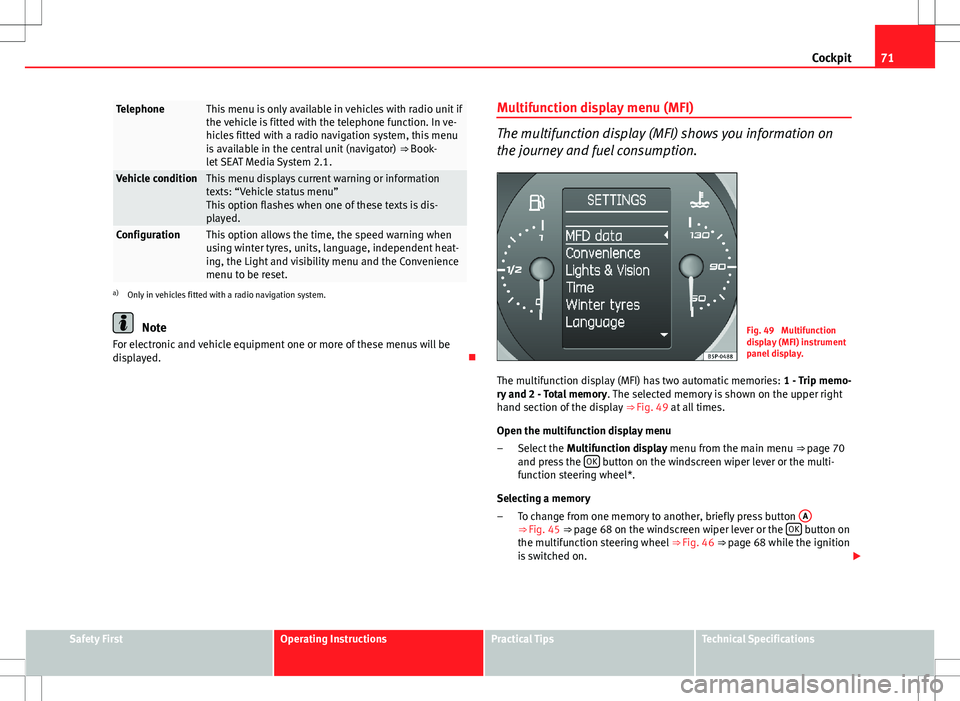
The multifunction display (MFI) has two automatic memories: 1 - Trip memo-
ry and 2 - Total memory . The selected memory is shown on the upper right
hand section of the display ⇒ Fig. 49 at all times.
Open the multifunction display menu Select the Multifunction display menu from the main menu
⇒ page 70
and press the OK
button on the windscreen wiper lever or the multi-
function steering wheel*.
Selecting a memory To change from one memory to another, briefly press button A
⇒
Fig. 45
⇒ page 68 on the windscreen wiper lever or the OK button on
the multifunction steering wheel ⇒ Fig. 46
⇒ page 68 while the ignition
is switched on.
–
–
Safety FirstOperating InstructionsPractical TipsTechnical Specifications
Page 76 of 315
74Cockpit
Displayed on the
screenFunction
Multifunction display
data.This menu is used to establish the data in the mul-
tifunction display menu to be displayed on the in-
strument panel ⇒ page 71
ConvenienceThis menu allows you to make the settings for the
convenience functions in the vehicle.
Lights and visibilityFrom this menu it is it possible to alter the vehicle
lighting settings.
TimeThe hours and minutes of the clock and the naviga-
tion system can be changed. Choose between 12
and 24-hour format and change to summer time.
Winter tyresThe menu allows the setting of a speed at which an
optical and acoustic warning will be given by the
system. You can use this function, for example, if
you have fitted winter tyres which are not suited for
the top speed of your vehicle. Please see the sec-
tion “Wheels and tyres”.
LanguageThe display texts and the navigation system texts
can be seen in different languages.
UnitsThis option allows you to select the units for dis-
playing temperature, fuel consumption values and
distances.
sel. speedThe instrument panel also displays the speed in
another different unit of measurement (mph or km/
h) to that given on the speedometer.
Inter ServiceConsult service messages and reset service interval
display here.
Factory settingsThe manufacturer's predefined values for the func-
tions of this menu are restored.
Backa)This returns to the main menua)
Only if the windscreen wiper lever is used (MFI).
Note
● For electronic and vehicle equipment one or more of these menus will be
displayed.
● SEAT dealerships are able to programme other functions or change the
existing functions depending upon the vehicle equipment.
● The Configuration menu is only accessible when the vehicle is at a
standstill.
Convenience menu
From this menu it is it possible to alter the vehicle conven-
ience settings.
Open menu Convenience
– Choose the option Configuration from the main menu and press
the button OK
A ⇒ Fig. 45 on the windscreen wiper lever.
– Press button
or on the multifunction steering wheel*
⇒ Fig. 46 until the Configuration menu is displayed.
– Choose the option Convenience from the main menu and press
the button A
on the windscreen wiper lever.
Example of menu use ⇒ page 68
Page 93 of 315
91
Steering wheel controls
Steering wheel controls
General information
The steering wheel includes a multifunction module from where it is possi-
ble to control the audio, telephone and radio navigation functions, and the
automatic gearbox*, without requiring the driver to be distracted from driv-
ing.
There are three versions of the multifunction module:
● Audio version, to control the available audio functions from the steering
wheel.
● Audio + Telephone version, to control the available audio functions and
the telephone system from the steering wheel.
Both versions may be used to control the Audio system (Radio, Audio CD,
mp3 CD, iPod 1)
/USB 1)
/SD 1)
) and the Radio navigation system, in which
case they also control the Navigation system.
● Version for automatic gearbox* ⇒ page 183.
1)
If fitted in the vehicle.
Safety FirstOperating InstructionsPractical TipsTechnical Specifications
Page 97 of 315
95
Steering wheel controls
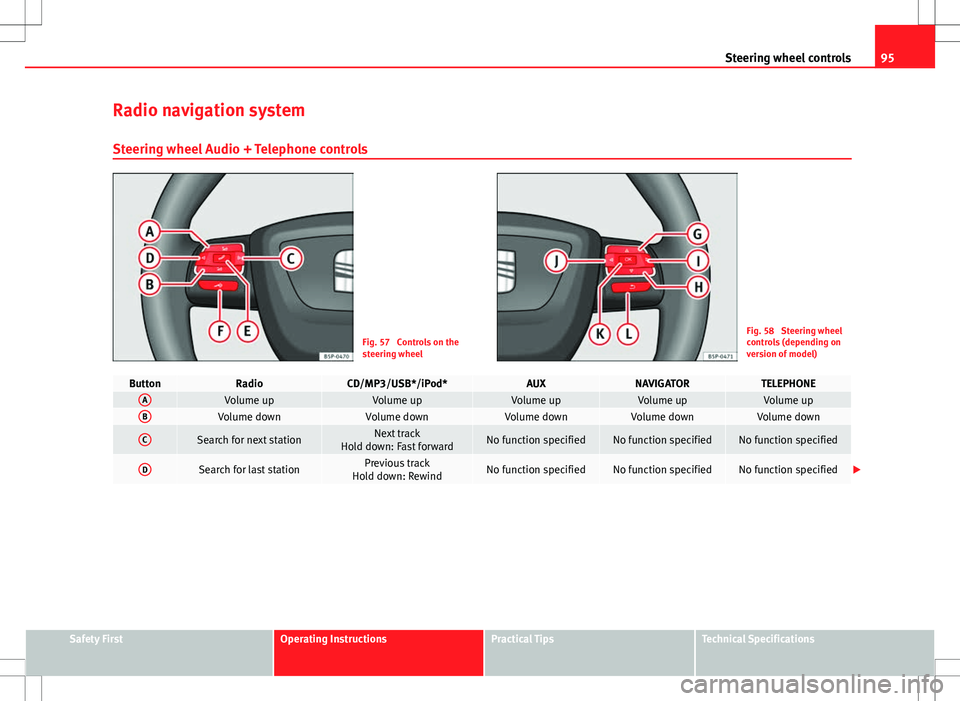
Radio navigation system Steering wheel Audio + Telephone controls
Fig. 57 Controls on the
steering wheelFig. 58 Steering wheel
controls (depending on
version of model)
ButtonRadioCD/MP3/USB*/iPod*AUXNAVIGATORTELEPHONEAVolume upVolume upVolume upVolume upVolume upBVolume downVolume downVolume downVolume downVolume down
CSearch for next stationNext track
Hold down: Fast forwardNo function specifiedNo function specifiedNo function specified
DSearch for last stationPrevious track
Hold down: RewindNo function specifiedNo function specifiedNo function specified
Safety FirstOperating InstructionsPractical TipsTechnical Specifications
Page 98 of 315
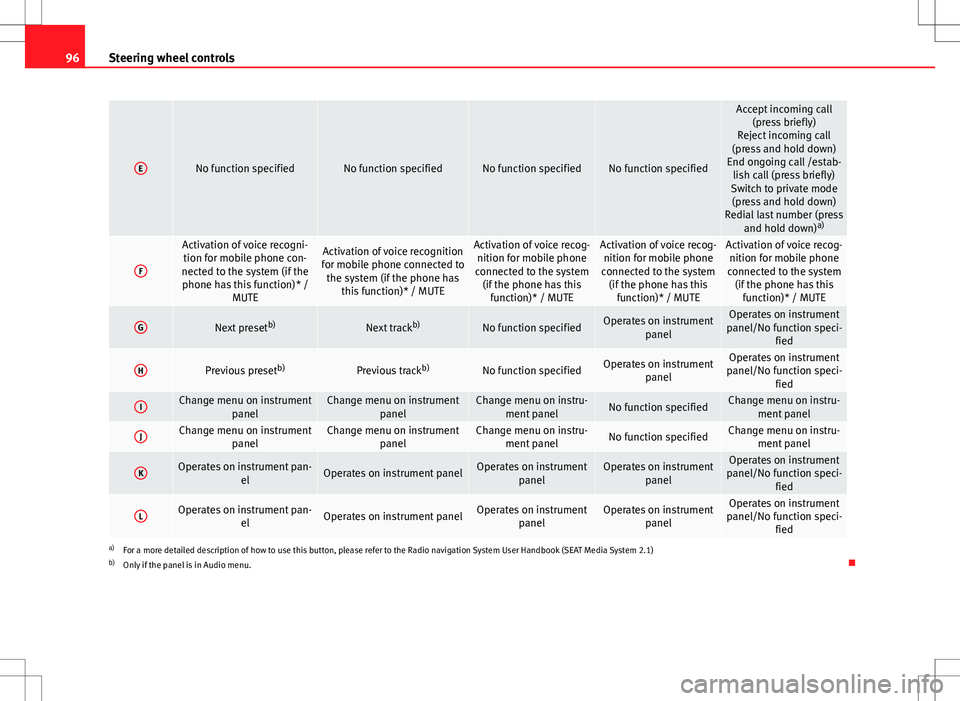
96Steering wheel controls
ENo function specifiedNo function specifiedNo function specifiedNo function specified
Accept incoming call
(press briefly)
Reject incoming call
(press and hold down)
End ongoing call /estab- lish call (press briefly)
Switch to private mode (press and hold down)
Redial last number (press and hold down) a)
F
Activation of voice recogni-
tion for mobile phone con-
nected to the system (if the phone has this function)* / MUTEActivation of voice recognition
for mobile phone connected to the system (if the phone has this function)* / MUTEActivation of voice recog-nition for mobile phone
connected to the system (if the phone has this function)* / MUTEActivation of voice recog-nition for mobile phone
connected to the system (if the phone has this function)* / MUTEActivation of voice recog-nition for mobile phone
connected to the system (if the phone has this function)* / MUTE
GNext preset b)Next trackb)No function specifiedOperates on instrument
panelOperates on instrument
panel/No function speci- fied
HPrevious preset b)Previous trackb)No function specifiedOperates on instrument
panelOperates on instrument
panel/No function speci- fied
IChange menu on instrument panelChange menu on instrumentpanelChange menu on instru-ment panelNo function specifiedChange menu on instru- ment panel
JChange menu on instrument panelChange menu on instrumentpanelChange menu on instru-ment panelNo function specifiedChange menu on instru- ment panel
KOperates on instrument pan- elOperates on instrument panelOperates on instrumentpanelOperates on instrumentpanelOperates on instrument
panel/No function speci- fied
LOperates on instrument pan- elOperates on instrument panelOperates on instrumentpanelOperates on instrumentpanelOperates on instrument
panel/No function speci- fied
a)For a more detailed description of how to use this button, please refer to the Radio navigation System User Handbook (SEAT Media System 2.1)
b) Only if the panel is in Audio menu.
Page 166 of 315
164Air conditioning
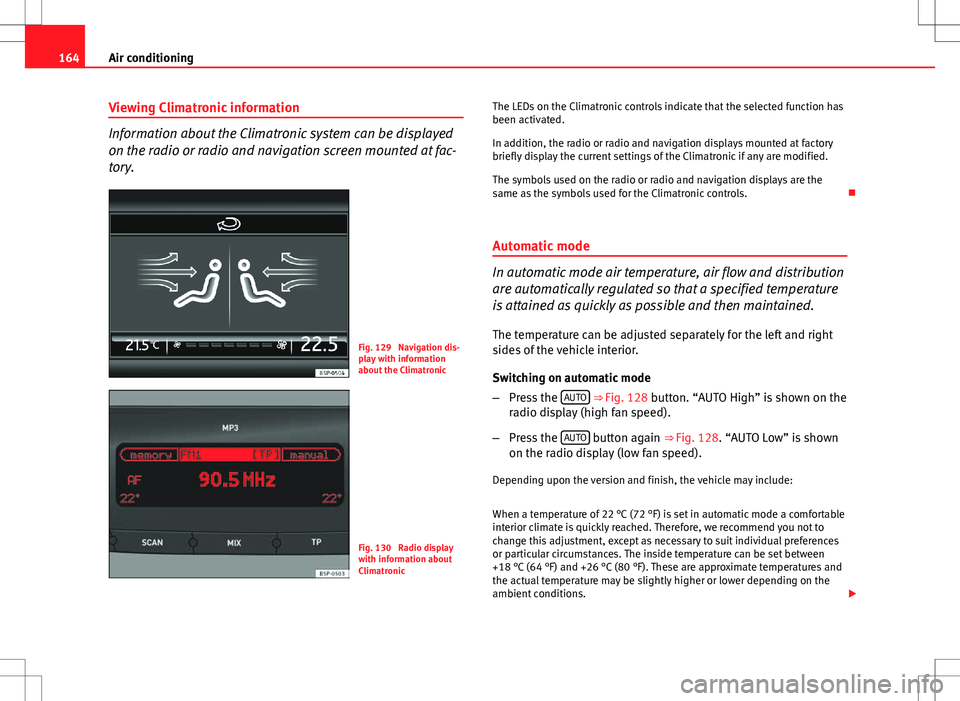
Viewing Climatronic information
Information about the Climatronic system can be displayed
on the radio or radio and navigation screen mounted at fac-
tory.
Fig. 129 Navigation dis-
play with information
about the Climatronic
Fig. 130 Radio display
with information about
Climatronic The LEDs on the Climatronic controls indicate that the selected function has
been activated.
In addition, the radio or radio and navigation displays mounted at factory
briefly display the current settings of the Climatronic if any are modified.
The symbols used on the radio or radio and navigation displays are the
same as the symbols used for the Climatronic controls.
Automatic mode
In automatic mode air temperature, air flow and distribution
are automatically regulated so that a specified temperature
is attained as quickly as possible and then maintained. The temperature can be adjusted separately for the left and right
sides of the vehicle interior.
Switching on automatic mode
– Press the AUTO
⇒
Fig. 128 button. “AUTO High” is shown on the
radio display (high fan speed).
– Press the AUTO
button again ⇒ Fig. 128. “AUTO Low” is shown
on the radio display (low fan speed).
Depending upon the version and finish, the vehicle may include:
When a temperature of 22 °C (72 °F) is set in automatic mode a comfortable
interior climate is quickly reached. Therefore, we recommend you not to
change this adjustment, except as necessary to suit individual preferences
or particular circumstances. The inside temperature can be set between
+18 °C (64 °F) and +26 °C (80 °F). These are approximate temperatures and
the actual temperature may be slightly higher or lower depending on the
ambient conditions.
Page 189 of 315
187
Driving
Parking aid acoustic system*
General notes
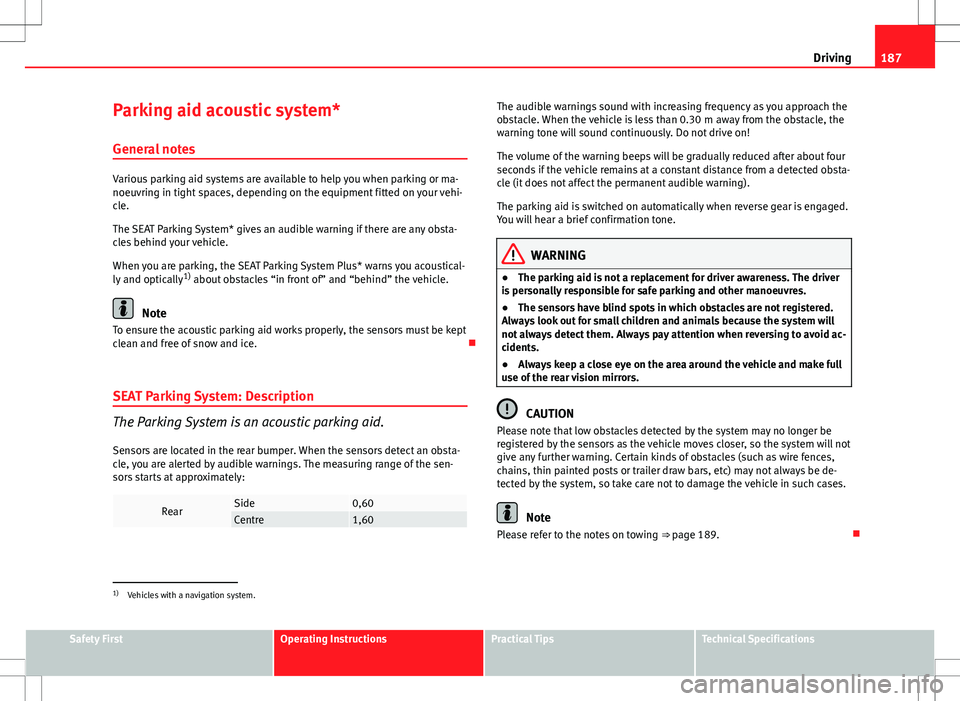
Various parking aid systems are available to help you when parking or ma-
noeuvring in tight spaces, depending on the equipment fitted on your vehi-
cle.
The SEAT Parking System* gives an audible warning if there are any obsta-
cles behind your vehicle.
When you are parking, the SEAT Parking System Plus* warns you acoustical-
ly and optically 1)
about obstacles “in front of” and “behind” the vehicle.
Note
To ensure the acoustic parking aid works properly, the sensors must be kept
clean and free of snow and ice.
SEAT Parking System: Description
The Parking System is an acoustic parking aid.
Sensors are located in the rear bumper. When the sensors detect an obsta-
cle, you are alerted by audible warnings. The measuring range of the sen-
sors starts at approximately:
RearSide0,60Centre1,60
The audible warnings sound with increasing frequency as you approach the
obstacle. When the vehicle is less than 0.30 m away from the obstacle, the
warning tone will sound continuously. Do not drive on!
The volume of the warning beeps will be gradually reduced after about four
seconds if the vehicle remains at a constant distance from a detected obsta-
cle (it does not affect the permanent audible warning).
The parking aid is switched on automatically when reverse gear is engaged.
You will hear a brief confirmation tone.
WARNING
● The parking aid is not a replacement for driver awareness. The driver
is personally responsible for safe parking and other manoeuvres.
● The sensors have blind spots in which obstacles are not registered.
Always look out for small children and animals because the system will
not always detect them. Always pay attention when reversing to avoid ac-
cidents.
● Always keep a close eye on the area around the vehicle and make full
use of the rear vision mirrors.
CAUTION
Please note that low obstacles detected by the system may no longer be
registered by the sensors as the vehicle moves closer, so the system will not
give any further warning. Certain kinds of obstacles (such as wire fences,
chains, thin painted posts or trailer draw bars, etc) may not always be de-
tected by the system, so take care not to damage the vehicle in such cases.
Note
Please refer to the notes on towing ⇒ page 189.
1)
Vehicles with a navigation system.
Safety FirstOperating InstructionsPractical TipsTechnical Specifications
Page 272 of 315
270If and when
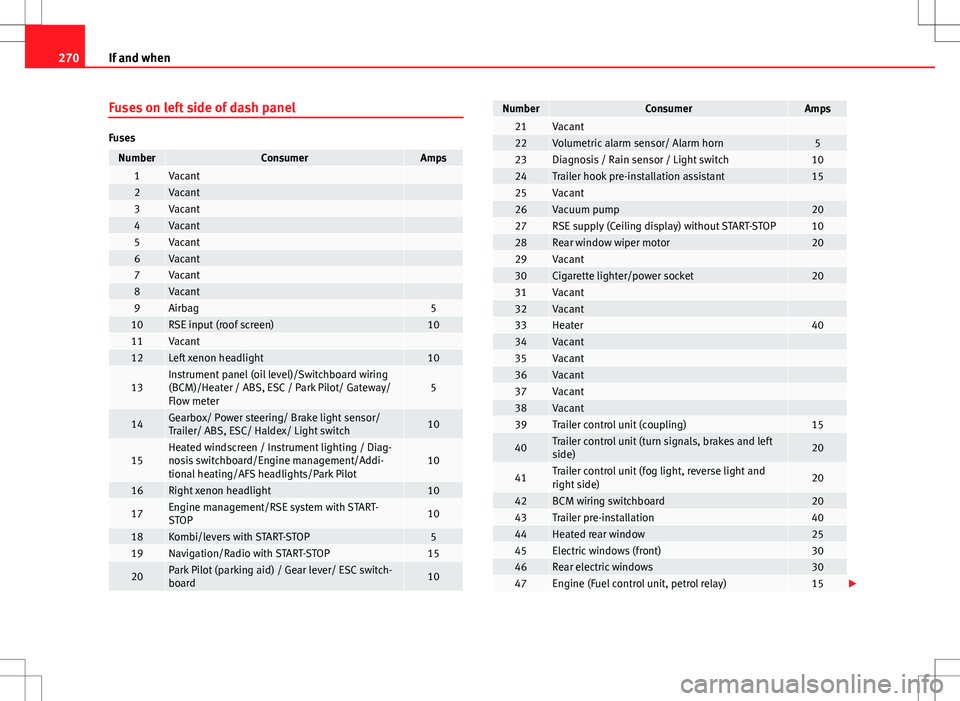
Fuses on left side of dash panel
Fuses
NumberConsumerAmps1Vacant 2Vacant 3Vacant 4Vacant 5Vacant 6Vacant 7Vacant 8Vacant 9Airbag510RSE input (roof screen)1011Vacant 12Left xenon headlight10
13Instrument panel (oil level)/Switchboard wiring
(BCM)/Heater / ABS, ESC / Park Pilot/ Gateway/
Flow meter5
14Gearbox/ Power steering/ Brake light sensor/
Trailer/ ABS, ESC/ Haldex/ Light switch10
15Heated windscreen / Instrument lighting / Diag-
nosis switchboard/Engine management/Addi-
tional heating/AFS headlights/Park Pilot10
16Right xenon headlight10
17Engine management/RSE system with START-
STOP10
18Kombi/levers with START-STOP519Navigation/Radio with START-STOP15
20Park Pilot (parking aid) / Gear lever/ ESC switch-
board10
NumberConsumerAmps21Vacant 22Volumetric alarm sensor/ Alarm horn523Diagnosis / Rain sensor / Light switch1024Trailer hook pre-installation assistant1525Vacant 26Vacuum pump2027RSE supply (Ceiling display) without START-STOP1028Rear window wiper motor2029Vacant 30Cigarette lighter/power socket2031Vacant 32Vacant 33Heater4034Vacant 35Vacant 36Vacant 37Vacant 38Vacant 39Trailer control unit (coupling)15
40Trailer control unit (turn signals, brakes and left
side)20
41Trailer control unit (fog light, reverse light and
right side)20
42BCM wiring switchboard2043Trailer pre-installation4044Heated rear window2545Electric windows (front)3046Rear electric windows3047Engine (Fuel control unit, petrol relay)15