steering Seat Altea Freetrack 2009 User Guide
[x] Cancel search | Manufacturer: SEAT, Model Year: 2009, Model line: Altea Freetrack, Model: Seat Altea Freetrack 2009Pages: 291, PDF Size: 7.67 MB
Page 56 of 291
Cockpit55
Safety First
Operating instructions
Practical tips
Te c h n i c a l D a t a
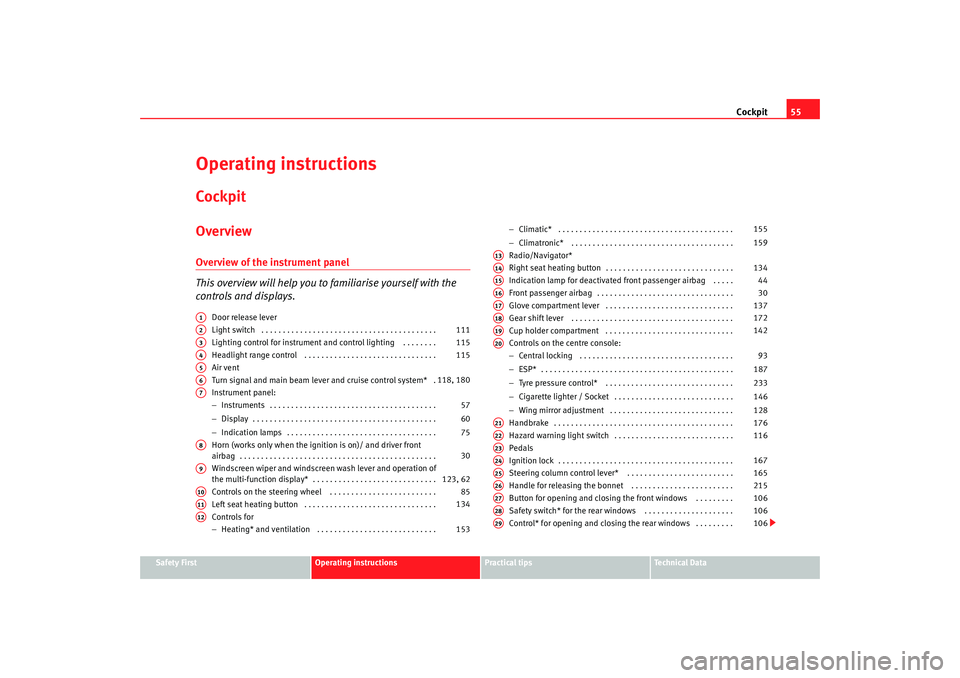
Operating instructionsCockpitOverviewOverview of the instrument panel
This overview will help you to familiarise yourself with the
controls and displays.
Door release lever
Light switch . . . . . . . . . . . . . . . . . . . . . . . . . . . . . . . . . . . . . . . . .
Lighting control for instrument and control lighting . . . . . . . .
Headlight range control . . . . . . . . . . . . . . . . . . . . . . . . . . . . . . .
Air vent
Turn signal and main beam lever and cruise control system* .
Instrument panel:
−Instruments . . . . . . . . . . . . . . . . . . . . . . . . . . . . . . . . . . . . . . .
− Display . . . . . . . . . . . . . . . . . . . . . . . . . . . . . . . . . . . . . . . . . . .
− Indication lamps . . . . . . . . . . . . . . . . . . . . . . . . . . . . . . . . . . .
Horn (works only when the ignition is on)/ and driver front
airbag . . . . . . . . . . . . . . . . . . . . . . . . . . . . . . . . . . . . . . . . . . . . . .
Windscreen wiper and windscreen wash lever and operation of
the multi-function display* . . . . . . . . . . . . . . . . . . . . . . . . . . . . .
Controls on the steering wheel . . . . . . . . . . . . . . . . . . . . . . . . .
Left seat heating button . . . . . . . . . . . . . . . . . . . . . . . . . . . . . . .
Controls for
− Heating* and ventilation . . . . . . . . . . . . . . . . . . . . . . . . . . . . −
Climatic* . . . . . . . . . . . . . . . . . . . . . . . . . . . . . . . . . . . . . . . . .
− Climatronic* . . . . . . . . . . . . . . . . . . . . . . . . . . . . . . . . . . . . . .
Radio/Navigator*
Right seat heating button . . . . . . . . . . . . . . . . . . . . . . . . . . . . . .
Indication lamp for deactivated front passenger airbag . . . . .
Front passenger airbag . . . . . . . . . . . . . . . . . . . . . . . . . . . . . . . .
Glove compartment lever . . . . . . . . . . . . . . . . . . . . . . . . . . . . . .
Gear shift lever . . . . . . . . . . . . . . . . . . . . . . . . . . . . . . . . . . . . . .
Cup holder compartment . . . . . . . . . . . . . . . . . . . . . . . . . . . . . .
Controls on the centre console:
− Central locking . . . . . . . . . . . . . . . . . . . . . . . . . . . . . . . . . . . .
− ESP* . . . . . . . . . . . . . . . . . . . . . . . . . . . . . . . . . . . . . . . . . . . . .
− Tyre pressure control* . . . . . . . . . . . . . . . . . . . . . . . . . . . . . .
− Cigarette lighter / Socket . . . . . . . . . . . . . . . . . . . . . . . . . . . .
− Wing mirror adjustment . . . . . . . . . . . . . . . . . . . . . . . . . . . . .
Handbrake . . . . . . . . . . . . . . . . . . . . . . . . . . . . . . . . . . . . . . . . . .
Hazard warning light switch . . . . . . . . . . . . . . . . . . . . . . . . . . . .
Pedals
Ignition lock . . . . . . . . . . . . . . . . . . . . . . . . . . . . . . . . . . . . . . . . .
Steering column control lever* . . . . . . . . . . . . . . . . . . . . . . . . .
Handle for releasing the bonnet . . . . . . . . . . . . . . . . . . . . . . . .
Button for opening and closing the front windows . . . . . . . . .
Safety switch* for the rear windows . . . . . . . . . . . . . . . . . . . . .
Control* for opening and closing the rear windows . . . . . . . . .
A1A2
111
A3
115
A4
115
A5A6
118, 180
A7
57
60
75
A8
30
A9
123, 62
A10
85
A11
134
A12
153 155
159
A13A14
134
A15
44
A16
30
A17
137
A18
172
A19
142
A20
93
187
233
146
128
A21
176
A22
116
A23A24
167
A25
165
A26
215
A27
106
A28
106
A29
106
altea_freetrack_ingles.book Seite 55 Montag, 16. Februar 2009 10:48 10
Page 63 of 291
Cockpit
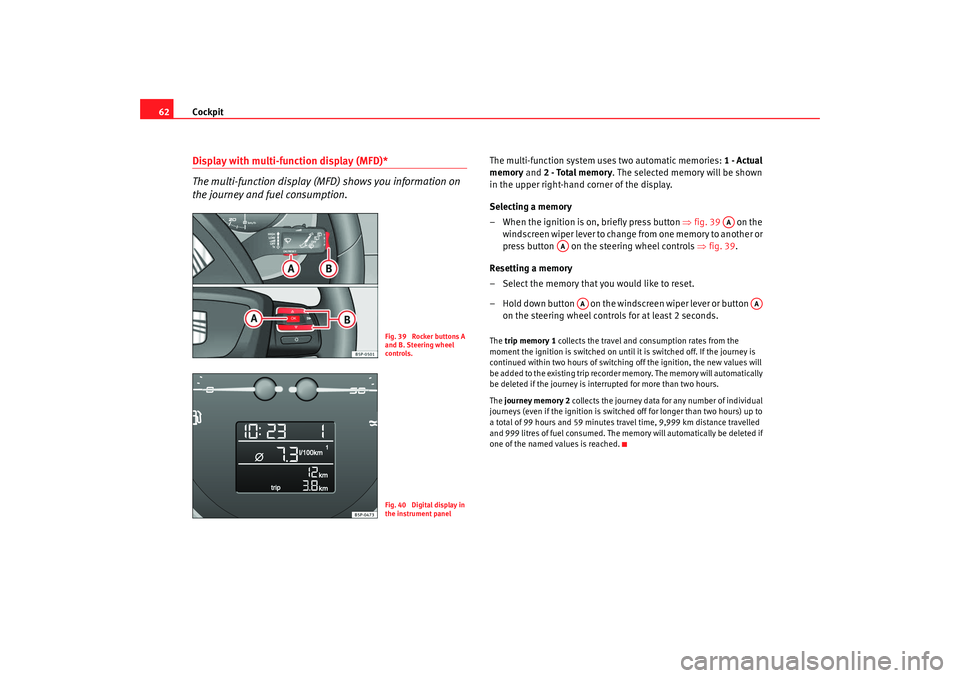
62Display with multi-function display (MFD)*
The multi-function display (MFD) shows you information on
the journey and fuel consumption.
The multi-function system uses two automatic memories: 1 - Actual
memory and 2 - Total memory . The selected memory will be shown
in the upper right-hand corner of the display.
Selecting a memory
– When the ignition is on, briefly press button ⇒ fig. 39 on the
windscreen wiper lever to change from one memory to another or
press button on the steering wheel controls ⇒fig. 39 .
Resetting a memory
– Select the memory that you would like to reset.
– Hold down button on the windscreen wiper lever or button on the steering wheel controls for at least 2 seconds.The trip memory 1 collects the travel and consumption rates from the
moment the ignition is switched on until it is switched off. If the journey is
continued within two hours of switching off the ignition, the new values will
be added to the existing trip recorder memory. The memory will automatically
be deleted if the journey is interrupted for more than two hours.
The journey memory 2 collects the journey data for any number of individual
journeys (even if the ignition is switched off for longer than two hours) up to
a total of 99 hours and 59 minutes travel time, 9,999 km distance travelled
and 999 litres of fuel consumed. The memory will automatically be deleted if
one of the named values is reached.
Fig. 39 Rocker buttons A
and B. Steering wheel
controls.Fig. 40 Digital display in
the instrument panel
AA
AA
AA
AA
altea_freetrack_ingles.book Seite 62 Montag, 16. Februar 2009 10:48 10
Page 64 of 291

Cockpit63
Safety First
Operating instructions
Practical tips
Te c h n i c a l D a t a
Displays in the multi-function display (MFD)* You can switch between the following displays in the multi-function display
(MFD) by operating the rocker switch ⇒fig. 41 on the windscreen wiper
lever. Memory displays
•
Driving speed
•
Journey duration
•
Average speed
•
Distance
•
Distance to empty (the distance you can travel with the remaining fuel)
•
Average fuel consumption
•
Current fuel consumption
•
Ambient temperature display
•
Speed warning
Km/h - Driving speed
Driving speed is digitally shown on the display.
min - Journey duration
The display shows the amount of time which has elapsed since the ignition
was switched on.
The maximum display value in both memories is 99 hours and 59 minutes.
The memory will automatically be deleted once this value has been reached.
Økm/h - Average speed
The average speed will be shown after running a distance of approximately
100 metres. Dashes will appear in the display until that time. The display will
be updated every 5 seconds while the vehicle is in motion.
km - Distance travelled
The display shows the distance travelled since the ignition was switched on.
The maximum display value in both memories is 9999 km. The memory will
automatically be deleted once this value has been reached.
Fig. 41 Rocker buttons A
and B. Steering wheel
controls.Fig. 42 Digital instru-
ment panel display:
average fuel consumption
indicator.
AB
altea_freetrack_ingles.book Seite 63 Montag, 16. Februar 2009 10:48 10
Page 67 of 291
Cockpit
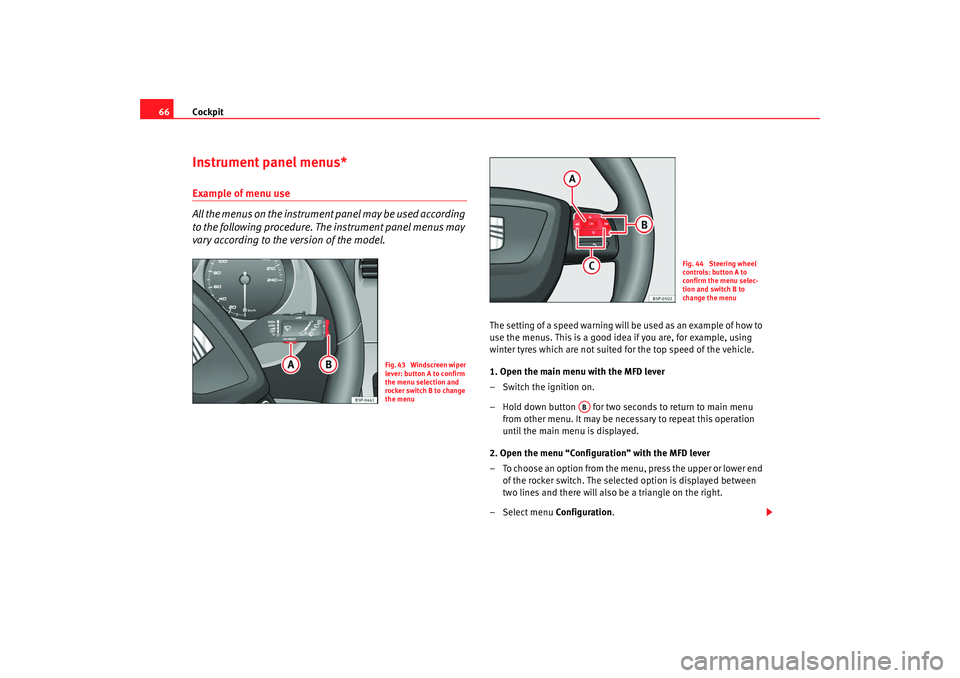
66Instrument panel menus*Example of menu use
All the menus on the instrument panel may be used according
to the following procedure. The instrument panel menus may
vary according to the version of the model.
The setting of a speed warning will be used as an example of how to
use the menus. This is a good idea if you are, for example, using
winter tyres which are not suited for the top speed of the vehicle.
1. Open the main menu with the MFD lever
– Switch the ignition on.
– Hold down button for two seconds to return to main menu
from other menu. It may be nece ssary to repeat this operation
until the main menu is displayed.
2. Open the menu “Configuration” with the MFD lever
– To choose an option from the menu, press the upper or lower end of the rocker switch. The selected option is displayed between
two lines and there will also be a triangle on the right.
– Select menu Configuration.
Fig. 43 Windscreen wiper
lever: button A to confirm
the menu selection and
rocker switch B to change
the menu
Fig. 44 Steering wheel
controls: button A to
confirm the menu selec-
tion and switch B to
change the menu
AB
altea_freetrack_ingles.book Seite 66 Montag, 16. Februar 2009 10:48 10
Page 68 of 291
Cockpit67
Safety First
Operating instructions
Practical tips
Te c h n i c a l D a t a
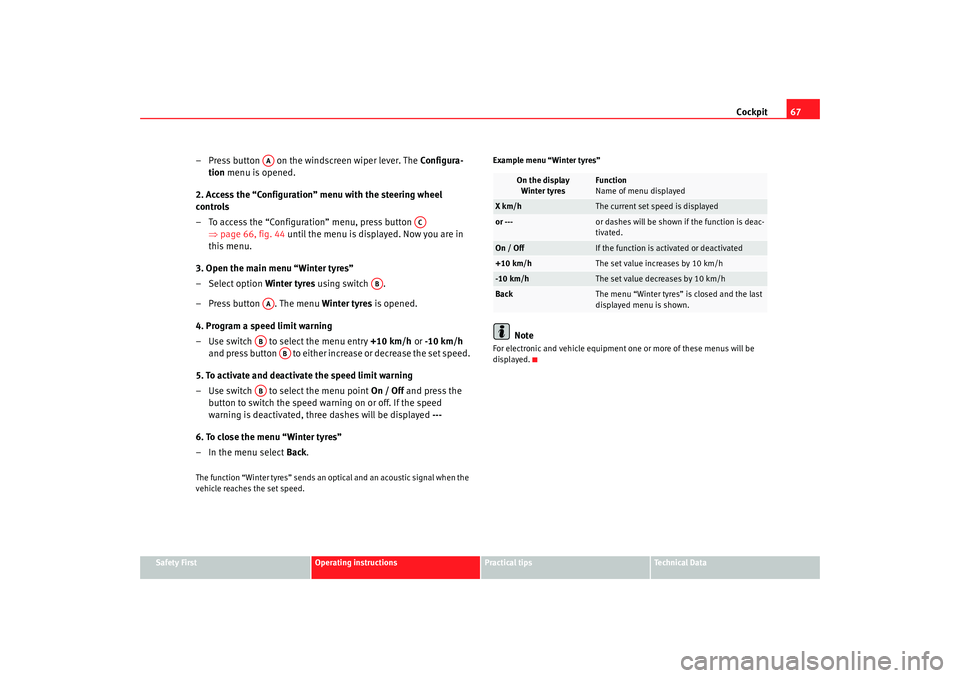
– Press button on the windscreen wiper lever. The Configura -
tion menu is opened.
2. Access the “Configuration” menu with the steering wheel
controls
– To access the “Configuration” menu, press button ⇒page 66, fig. 44 until the menu is displayed. Now you are in
this menu.
3. Open the main menu “Winter tyres”
– Select option Winter tyres using switch .
– Press button . The menu Winter tyres is opened.
4. Program a speed limit warning
– Use switch to select the menu entry +10 km/h or -10 km/h
and press button to either increase or decrease the set speed.
5. To activate and deactivate the speed limit warning
– Use switch to select the menu point On / Off and press the
button to switch the speed warning on or off. If the speed
warning is deactivated, three dashes will be displayed ---
6. To close the menu “Winter tyres”
– In the menu select Back.The function “Winter tyres” sends an optical and an acoustic signal when the
vehicle reaches the set speed. Example menu “Winter tyres”
Note
For electronic and vehicle equipment one or more of these menus will be
displayed.
AA
AC
AB
AA
AB
AB
AB
On the display
Winter tyres
Function
Name of menu displayed
X km/h
The current set speed is displayed
or ---
or dashes will be shown if the function is deac-
tivated.
On / Off
If the function is activated or deactivated
+10 km/h
The set value increases by 10 km/h
-10 km/h
The set value decreases by 10 km/h
Back
The menu “Winter tyres” is closed and the last
displayed menu is shown.
altea_freetrack_ingles.book Seite 67 Montag, 16. Februar 2009 10:48 10
Page 71 of 291

Cockpit
70Resetting a memory
– Select the memory where you wish to erase the values.
– H o ld d ow n b u tto n on th e win d scr e en wip e r l e v e r o r th e b u tto n o n
the multifunction* steering wheel for at least 2 seconds.
The journey memory 1 collects the travel and consumption data from the
moment the ignition is switched on until it is switched off. If the journey is
continued within two hours of switching off the ignition, the new values will
be added to the existing trip recorder memory. The memory will automatically
be deleted if the journey is interrupted for more than two hours.
The total journey memory 2 collects the journey data for any number of indi-
vidual journeys (even if the ignition is switched off for longer than two hours)
up to a total of 99 hours and 59 minutes travel time or 9999 miles distance
travelled. The memory will automatically be deleted if one of the named
values is reached.
Memory indications
The following data can be viewed on the multifunction display using the
rocker switch ⇒page 66, fig. 43 ⇒page 66 on the windscreen wiper
lever or by pressing button or ⇒page 66, fig. 44 on the multifunction
steering wheel*.•
Duration
•
Current fuel consumption
•
Average fuel consumption
•
Distance to empty (the distance you can travel with the remaining fuel)
•
Distance
•
Average speed
•
Digital display of speed
7)
•
Speed warning to --- km/h Personal selection of display
The driver can establish which displays are shown on the instrument panel
display as required:
•
Select the submenu
Multifunction Display Data from the Configuration
menu ⇒page 72.
•
The displays can be activated or deactivated individually by marking the
required option and pressing the button on the windscreen wiper lever or
the multifunction steering wheel*.
Duration in h and min
The display shows the amount of time which has elapsed since the ignition
was switched on.
The maximum display value in both memories is 99 hours and 59 minutes.
The memory will automatically be deleted once this value has been reached.
Current fuel consumption in l/100km or l/h
The display will show the current fuel consumption in mpg whilst the vehicle
is in motion or in litres/hour when the vehicle is in a stationary position with
the engine running.
Using this display you can see how your driving style affects fuel consump-
tion.
Average consumption in l/100km
The average fuel consumption will be shown after a distance of approximately
100 metres has been travelled. Dashes will appear in the display until that
time. The display will be updated every 5 seconds while the vehicle is in
motion. The amount of fuel used will not be shown.
Fuel range in km
The fuel range is calculated using the figures for tank content and current fuel
consumption. It shows how far the vehicle can travel using the same condi-
tions as a reference.
7)It is not possible to see whether the alternative speed display is activated.
AA
OK
AB
OK
altea_freetrack_ingles.book Seite 70 Montag, 16. Februar 2009 10:48 10
Page 72 of 291

Cockpit71
Safety First
Operating instructions
Practical tips
Te c h n i c a l D a t a
Distance travelled in km
The display shows the distance travelled since the ignition was switched on.
The maximum display value in both memories is 9999 miles. The memory will
automatically be deleted once this value has been reached.
Average speed in km/h
The average speed will be shown after a distance of approximately 100
metres has been travelled. Dashes will appear in the display until that time.
The display will be updated every 5 seconds while the vehicle is in motion.
Digital display of speed
The instrument panel display gives the speed in digital format
7).
Speed warning to --- km/h
This function may help you to keep within the speed limits. Press the
button on the windscreen wiper lever or the multifunction steering wheel*
to select the current speed. The instrument panel display gives the selected
speed, for example, Speed warning 120 km/h . You have five seconds to reset
the speed between 30 km/hand 250 km/h using rocker switch or buttons or on the multifunction steering wheel*. Press the button or wait
five seconds until the speed is stored and the warning is activated. If the set
speed is exceeded, an acoustic signal is heard and a warning message is
displayed until the speed is reduced to at least 4 km/h below the stored
speed. The function is switched off by pressing the button again. Speed
warning --- km/h is now displayed on the instrument panel.
Ambient temperature display
The measurement margin ranges from -40°C (-40°F) to +50°C (+125°F). At
outside temperatures below +4°C (+39.2°F), “a snowflake symbol” (ice
warning) appears in addition to the outside temperature display. This symbol
flashes for a few seconds and remains lit until the outside temperature rises
above +6°C (+42.8°F).
WARNING
There could be black ice on the road surface even if the “snowflake symbol”
is not shown. You should, for this reason, not rely exclusively on this
display - Risk of accident!
Note
•
There are different instrument panels; therefore the multifunction display
may vary.
•
When the vehicle is stationary or travelling at very low speeds, the
temperature displayed may be slightly higher than the actual ambient
temperature as a result of the heat radiated from the engine.
•
Vehicles with a multifunction steering wheel* do not have buttons on the
windscreen wiper lever. The multifunction display can only be controlled from
the buttons on the multifunction steering wheel*.
Vehicle status menu
This menu shows warning or information textsOpen Vehicle Condition menu
– Select the option Vehicle sta tus from the main menu: “Main
menu” and press button on the windscreen wiper lever
⇒ page 68, fig. 45. or
– Press button or on the multifunction steering wheel* ⇒page 66, fig. 44 until the Vehicle Status menu is displayed.Priority 2 warning messages and information texts: “Information and warning
messages on the screen” will automatically disappear from the screen after a
time and will be stored in the Ve hicle s ta tus menu.
OK
AA
AB
OK
OK
OK
AA
altea_freetrack_ingles.book Seite 71 Montag, 16. Februar 2009 10:48 10
Page 73 of 291

Cockpit
72The warning and information texts may be viewed in this menu. If there is no
warning or information message, the option Ve hicle s ta tus is not displayed.
If there are several messages, each one is shown for a few seconds.
Example of menu use ⇒page 66
Note
If there are no warning messages, this menu is not available.Configuration menu
This menu is used to make the settings for the vehicle func-
tions.Open Configuration menu
– Select the option Configuration from the main menu: “Main
menu” and press button ⇒page 66, fig. 43 on the wind-
screen wiper lever. or
– Press button or on the multifunction steering wheel* ⇒page 66, fig. 44 until the Configuration menu is displayed.Example of menu use ⇒page 66
Note
•
For electronic and vehicle equipment one or more of these menus will be
displayed.
Displayed on the screen
Function
Multifunction display
data
This menu is used to establish the data in the
multifunction display menu to be displayed on
the instrument panel ⇒page 69
Convenience
This menu allows you to make the settings for
the convenience functions in the vehicle.
OK
AA
Lights and visibility
From this menu it is it possible to alter the vehi-
cle lighting settings.
Time
The hours and minutes of the clock and the navi-
gation system can be changed. Choose between
12 or 24-hour format and change to summer
time.
Winter tyres
The menu allows the setting of a speed at which
an optical and acoustic warning will be given by
the system. You can use this function, for exam-
ple, if you have fitted winter tyres which are not
suited for the top speed of your vehicle. Please
see the section “Wheels and tyres”.
Settings: Language
The display texts and the navigation system texts
can be seen in different languages.
Units
This option allows you to select the units for dis-
playing temperature, fuel consumption values
and distances.
Aux. Speed
The instrument panel also displays the speed in
another different unit of measurement (mph or
km/h) to that given on the speedometer.
Inter Service
Consult service messages and reset service inter-
val display here.
Manufacturer's settings
The manufacturer's predefined values for the
functions of this menu are restored.
Back
a)
This returns to the main menu
a)Only of the windscreen wiper lever is used (MFD).
altea_freetrack_ingles.book Seite 72 Montag, 16. Februar 2009 10:48 10
Page 74 of 291

Cockpit73
Safety First
Operating instructions
Practical tips
Te c h n i c a l D a t a
•
SEAT dealers are able to programme other functions or change the
existing functions depending upon the vehicle equipment.
•
The Configuration menu is only accessible when the vehicle is at a
standstill.
Convenience menu
From this menu it is it possible to alter the vehicle conven-
ience settings.Open menu Convenience
– Choose the option Configuration from the main menu and press
the button ⇒page 66, fig. 43 on the windscreen wiper
lever.
– Press button or on the multifunction steering wheel* ⇒page 66, fig. 44 until the Configuration menu is displayed.
– Choose the option Convenience from the main menu and press
the button on the windscreen wiper lever.Example of menu use ⇒page 66
Note
For electronic and vehicle equipment one or more of these menus will be
displayed.
OK
AA
AA
Displayed on the
screen
Function
Open door
One door: Individual unlocking activated.
Auto. locking: the doors are automatically locked
when the vehicle is travelling at more than approx
15 km/h.
Auto unlock: the doors are unlocked when the key
is removed from the ignition.
Elec. window control
Opening and closing electric windows: this deter-
mines whether to open or close all the windows
when the vehicle is unlocked or locked. The open
function can also be activated for the driver's door
only.
Wing mirror adjust.
If synchronised adjustment is selected, when the
driver's side wing mirror is adjusted, the passen-
ger wing mirror is also moved.
Manufacturer's set-
tings
The manufacturer's predefined values for the func-
tions of this menu are restored.
Back
This returns to the Configuration menu
altea_freetrack_ingles.book Seite 73 Montag, 16. Februar 2009 10:48 10
Page 75 of 291
Cockpit
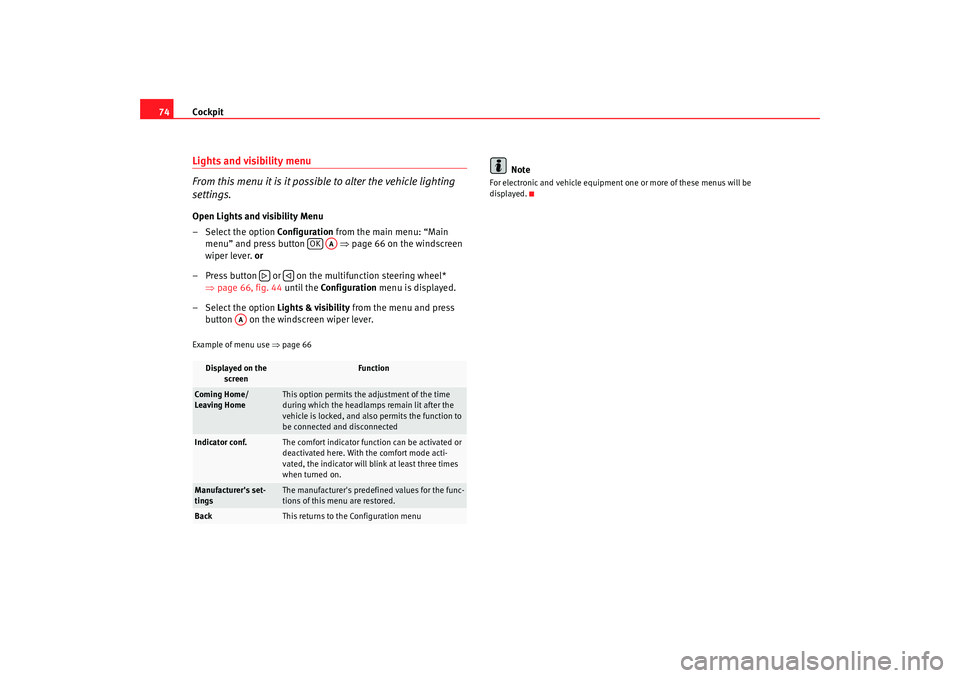
74Lights and visibility menu
From this menu it is it possible to alter the vehicle lighting
settings.Open Lights and visibility Menu
– Select the option Configuration from the main menu: “Main
menu” and press button ⇒ page 66 on the windscreen
wiper lever. or
– Press button or on the multifunction steering wheel* ⇒page 66, fig. 44 until the Configuration menu is displayed.
– Select the option Lights & visibility from the menu and press
button on the windscreen wiper lever.Example of menu use ⇒page 66
Note
For electronic and vehicle equipment one or more of these menus will be
displayed.
Displayed on the
screen
Function
Coming Home/
Leaving Home
This option permits the adjustment of the time
during which the headlamps remain lit after the
vehicle is locked, and also permits the function to
be connected and disconnected
Indicator conf.
The comfort indicator function can be activated or
deactivated here. With the comfort mode acti-
vated, the indicator will blink at least three times
when turned on.
Manufacturer's set-
tings
The manufacturer's predefined values for the func-
tions of this menu are restored.
Back
This returns to the Configuration menu
OK
AA
AA
altea_freetrack_ingles.book Seite 74 Montag, 16. Februar 2009 10:48 10