ECO mode Seat Altea XL 2007 User Guide
[x] Cancel search | Manufacturer: SEAT, Model Year: 2007, Model line: Altea XL, Model: Seat Altea XL 2007Pages: 298, PDF Size: 8.87 MB
Page 84 of 298
Cockpit
82•
It will light up continuously if the ESP is switched off.
•
It will also come on if a fault should occur in the ABS because the ESP
operates in conjunction with the ABS.
If the ESP warning lamp
lights up and stays on after the engine is started,
this may mean that the control system has temporarily switched off the ESP.
In this case the ESP can be reactivated by switching the ignition off and then
on again. If the warning lamp goes out, this means the system is fully
functional.
Operating the foot brake
The footbrake must be depressed when this warning lamp lights up. This is
necessary when the automatic gearbox* selector lever is moved out of the
positions P or N.Power steering system*
For vehicles with power steering, the level of steering assistance depends on
the vehicle’s speed and on the steering angle.
The warning lamp should light up for a few seconds when the ignition is
switched on. It should go out when the engine has started running.
If the battery is disconnected, the indicator remains lit, even with the engine
running. The warning light only goes off after a distance of approx. 50 m.
There is a fault in the electromechanica l steering system if the lamp does not
go out or light up whilst the vehicle is in motion. The indicator may appear in
two different colours to indicate faults. If it lights yellow, this indicates a
minor fault. If it lights red, seek wo rkshop assistance immediately, if no
assistance is available stop driving. Stop the vehicle and seek technical
assistance. The power steering does not work if the battery is flat or if the engine is off (for example, for towing). You should take into account that you
will need considerably more power than normal to steer the vehicle if the
steering assistance is reduced
or has failed completely.
For those vehicles fitted with ESP* the function “Recommended steering
manoeuvre” is included See ⇒page 181.
Brake pad wear indicator*
As the brake pad wear indicator only monitors the front brake pads, it is advis-
able to have the rear brake pads inspected at the same time.
The information text displayed in the instrument panel display is
17): CHECK
BRAKE PADS .
WARNING
Have the brake pads inspected immediately by a qualified dealership if the
warning display
lights up.
Indicator for open doors or tailgate
This indicator lights if one of th e doors or the tailgate is open.The warning light
should go off when all the doors are closed correctly.
The system also works when the ignition is switched off. It should go off
about 15 seconds after the vehicle is locked.
17)Depending on the model version
AlteaXL_DEF_ingles Seite 82 Freitag, 25. August 2006 2:19 14
Page 93 of 298
Steering wheel controls91
Safety First
Operating instructions
Tips and Maintenance
Te c h n i c a l D a t a
b)
Cyclic change of source
Radio - CD / CDC - Radio - ...
When in Navigation mode the system leaves the navigation screen. Repeat the last Navigation instruction
Only if the Navigation function is activated.
Voice recognition activation Press to speak No specified function
Make a call or
Direct access to the phone book or
Accept a call No specified function
Terminate call or
Refuse call or
Quit telephone menu No specified function
a)Only for those Radio-Navigation Systems compatible with the MP3 formatb)Use a short press with button E: depending on the equipment, you may select the radio frequency band.AEAFAGAH
AlteaXL_DEF_ingles Seite 91 Freitag, 25. August 2006 2:19 14
Page 157 of 298
Air conditioning155
Safety First
Operating instructions
Tips and Maintenance
Te c h n i c a l D a t a
The air conditioning system only works when the engine is running
and the blower is switched on.
– Press the temperature control buttons ⇒page 154, fig. 126
or in order to adjust the temperature on the left hand side or
the right hand side respectively.
– The functions will be switched on when the buttons are pressed. When these functions are activated, they are indicated in the
display. Also, the de-icing and re ar heated window functions will
turn on along with their corres ponding yellow symbol. Press the
button again to switch off the function.The temperature can be adjusted separately for the left and right sides of the
vehicle interior.
Display of the selected interior temperature for the left side.
Button – Manual air recirculation mode
Button – Central air distribution
Button – Downward air distribution
Button – Upward air distribution
Display of the selected interior temperature for the right side.
Button – defrost function for the windscreen. The air drawn in from
outside the vehicle is directed at the windscreen. The air recirculation
mode, if switched on, will be switched off as soon as the defrost function
is switched on. At temperatures over 3°C, the air conditioning system will
be switched on automatically and the blower speed will be increased by
one level in order to dry the air. The button lights up yellow and the
symbol appears in the display.
Button – Rear window heating. The heating will be switched off auto-
matically approximately 20 minutes after switching on. However, it may
be turned off by pushing the button. The button lights up yellow and the
symbol appears in the display.
Temperature selector for the left side ⇒page 155 Blower control
⇒page 156
Button – Switches the 2C-Climatronic on and off ⇒page 156
Button – Automatic temperature, ventilation and air distribution
control ⇒page 155
Button – Switches heating, ventilation and air-conditioning
system off
Temperature selector for the right side ⇒page 155
WARNING
For road safety all windows must be clear of ice, snow, and condensation.
This is essential to ensure good visibility. Please familiarise yourself with
the correct operation of the heating and ventilation system, including the
anti-fog/defrost functions for the windows.
Note
Please observe the general notes ⇒page 158.Automatic mode
In automatic mode air temperature, airflow and distribution
are automatically regulated so that a specified temperature is
attained as quickly as possible and then maintained.The temperature can be adjusted separately for the left and right
sides of the vehicle interior.
Switching on automatic mode
– Press the button ⇒page 154, fig. 126 . “AUTO” is shown
on the display.
A9
A14
A1A2
A3
A4
A5
A6A7
A8
A9
A10A11
OFF
A12
AUTO
A13
ECON
A14
AUTO
AlteaXL_DEF_ingles Seite 155 Freitag, 25. August 2006 2:19 14
Page 158 of 298
Air conditioning
156
– Press the temperature selectors to set the desired temperatures
for the left and right sides of the interior. We recommend 22°C
(72°F).A comfortable interior climate is quickly reached when a temperature of
+22°C (72°F) is set in automatic mode. It can be changed as necessary to suit
individual preferences or particular ci rcumstances. It is possible to select
interior temperatures from +16°C (61° F) to +29.5°C (86F). These are approxi-
mate temperatures and the actual temperature may be slightly higher or
lower depending on the ambient conditions. Climatronic maintains a constant temperature level. The temperature of the
air supplied to the interior, the blower speed and the air distribution are regu-
lated automatically. The system also allows for the effect of strong sunlight,
so there is no need for manual adjustment. Therefore,
automatic mode
provides the best comfort for the vehicle occupants in virtually all conditions
throughout the year.
Automatic mode is switched off whenever an adjustment is made using the
buttons for the air distribution, airflow or . The temperature will
continue to be regulated within the parameters manually selected by the
user.Manual mode
In manual mode you can adjust the air temper ature, airflow and distribution as required.Switching on manual mode
– To enter manual mode, press one of the buttons ⇒fig. 127 to , or press the airflow control . The symbol will
disappear from the display.
ECON
Fig. 127 On the dash panel: 2C Climatronic controls
A3
A5
ECON
A10
AUTO
AlteaXL_DEF_ingles Seite 156 Freitag, 25. August 2006 2:19 14
Page 159 of 298
Air conditioning157
Safety First
Operating instructions
Tips and Maintenance
Te c h n i c a l D a t a
Temperature
There are separate temperature selectors for the left and right sides of the
vehicle interior. The selected temperature is displayed above the selector. It
is possible to select interior tem
peratures from +16°C (61°F) to +29.5°C
(86°F). These are approximate temperat ures and the actual temperature may
be slightly higher or lower depending on the ambient conditions.
If a temperature below 16°C (61°F) is selected, the display switches to LO. In
this setting the system runs at maximum cooling output and the temperature
is not regulated.
If a temperature above 29.5°C (86°F) is selected the display switches to HI. In
this setting the system runs at maximum heating output and the temperature
is not regulated.
Blower
The airflow may be adjusted freely using the control . Always have the
blower running at a low setting to ensure a constant flow of fresh air into the
vehicle. Pushing the button
to the minimum -1, tu rns the Climatronic off.
Air distribution
The air distribution is adjusted using the buttons , and . It is also
possible to open and close some of the air vents separately.
Switching the air conditioning system on and off
Pressing the button switches off the air conditioning system to save
fuel. The temperature continues to be regulated. The set temperature can
then only be reached if it is higher than the ambient temperature.
Air recirculation mode
Air recirculation mode prevents fumes or unpleasant smells
from entering the vehicle.– Press the button ⇒page 156, fig. 127 to switch air recir-
culation mode on or off. It is switched on if the following symbol
appears in the display
.
Air recirculation mode prevents strong odours in the ambient air from
entering the vehicle interior, for example when passing through a tunnel or in
queuing traffic.
With low ambient temperatures, the air recirculation increases the effective-
ness of the heating system by heating the air inside the passenger compart-
ment rather than the ambient air.
With high ambient temperatures, the air recirculation increases the effective-
ness of the air conditioning system by cooling the air inside the passenger
compartment rather than the ambient air.
For reasons of safety, air recirculation is not possible when the control for air
distribution is set to the windscreen setting
.
WARNING
In air recirculation mode, no ambient air enters the vehicle interior. If the
air conditioning system is switched off, the windows can quickly mist over.
Therefore, you should never leave the air recirculation mode switched on
for longer periods, as this increases the risk of an accident.
A10
ECON
A2
AlteaXL_DEF_ingles Seite 157 Freitag, 25. August 2006 2:19 14
Page 160 of 298
Air conditioning
158General notesThe pollen filter
The pollution filter (a combined part iculate filter and active carbon filter)
serves as a barrier against impurities in the outside air, including dust and
pollen.
For the air conditioning system to work with maximum efficiency, the pollen
filter must be replaced at the intervals specified in the Service Schedule.
If the filter loses efficiency prematurely due to use in areas with very high
levels of air pollution, the pollen filte r must be changed more frequently than
stated in the Service Schedule.
Caution
•
If you suspect that the air conditioner is damaged, switch off the air condi-
tioner with button to prevent further damage and have it checked by a
qualified workshop.
•
Repairs to the air conditioning system require specialist knowledge and
special tools. Therefore, we recommend that you take the vehicle to a quali-
fied workshop should problems occur.Note
•
If the humidity and temperature outside the vehicle are high, condensa-
tion can drip off the evaporator in the cooling system and form a pool under-
neath the vehicle, this is completely normal and there is no need to suspect
a leak.
•
Keep the air intake slots in front of the windscreen free of snow, ice and
leaves to ensure heating and cooling is not impaired, and to prevent the
windows misting over.
•
The air from the vents flows through the passenger compartment and is
extracted by slots designed for this purpose. Do not cover these slots with
articles of clothing or other objects.
•
The air conditioning system operates most effectively with the windows
and the sliding/tilting roof* closed. Howe ver, if the sun has heated up the
vehicle, the air inside can be cooled more quickly by opening the windows for
a short period.
•
Do not smoke while air recirculation mode is on, as smoke drawn into the
air conditioning system leaves a r esidue on the evaporator, producing a
permanent unpleasant odour.
•
The air conditioning should be turned on at least once a month, to lubri-
cate the system gaskets and prevent leaks. If a decrease in the cooling
capacity is detected, an Authorised Service Centre should be consulted to
check the system.
ECON
AlteaXL_DEF_ingles Seite 158 Freitag, 25. August 2006 2:19 14
Page 169 of 298
Driving167
Safety First
Operating instructions
Tips and Maintenance
Te c h n i c a l D a t a
Driving programmes
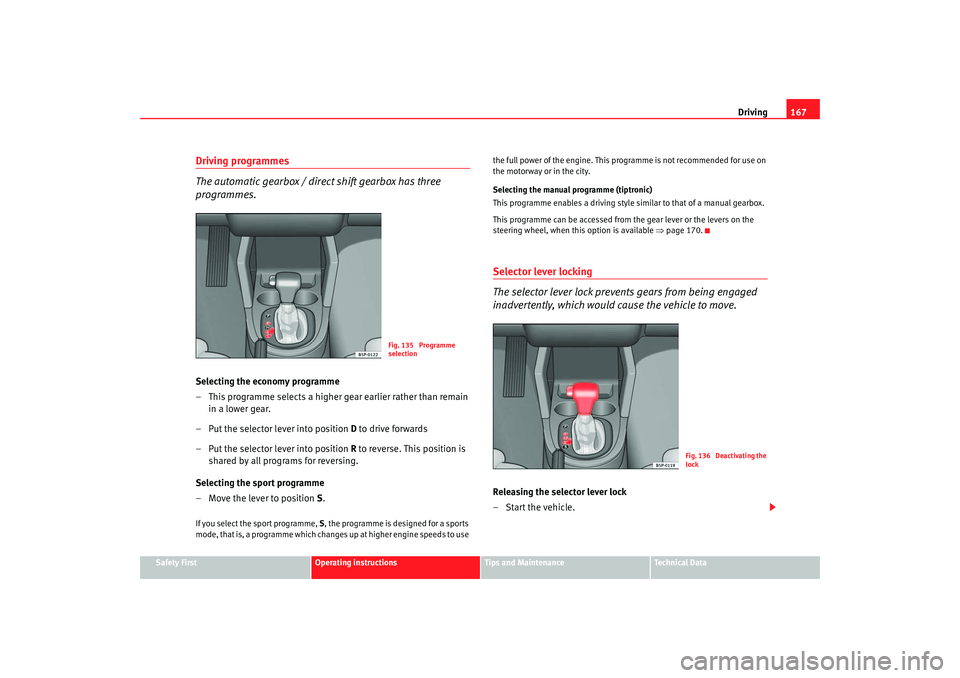
The automatic gearbox / direct shift gearbox has three
programmes.Selecting the economy programme
– This programme selects a higher gear earlier rather than remain
in a lower gear.
– Put the selector lever into position D to drive forwards
– Put the selector lever into position R to reverse. This position is
shared by all programs for reversing.
Selecting the sport programme
– Move the lever to position S .If you select the sport programme, S, the programme is designed for a sports
mode, that is, a programme which changes up at higher engine speeds to use the full power of the engine. This pr
ogramme is not recommended for use on
the motorway or in the city.
Selecting the manual programme (tiptronic)
This programme enables a driving style similar to that of a manual gearbox.
This programme can be accessed from the gear lever or the levers on the
steering wheel, when this option is available ⇒page 170.
Selector lever locking
The selector lever lock prevents gears from being engaged
inadvertently, which would cause the vehicle to move.Releasing the selector lever lock
–Start the vehicle.
Fig. 135 Programme
selection
Fig. 136 Deactivating the
lock
AlteaXL_DEF_ingles Seite 167 Freitag, 25. August 2006 2:19 14
Page 170 of 298
Driving
168
– Press and release the brake pedal, at the same time press the button on the selector lever.The lock is only activated when the vehicle is stopped or at a speed of less
than 5 km/h. At higher speeds, the lock is automatically released in position
N.
For rapid changes of position (e.g. from R to D) the lever will not lock. If the
lever remains in the position N more than one second then it is locked. With
the automatic lock, the lever is prevented passing from P and N to any other
gear without first pressing the brake pedal.
The selector lever must be put in the position P in order to remove the key.Driving with an automatic gearbox* / DSG automatic gearbox*
The drive and reverse gears are automatically engaged.
Driving
– Press and hold the foot brake.
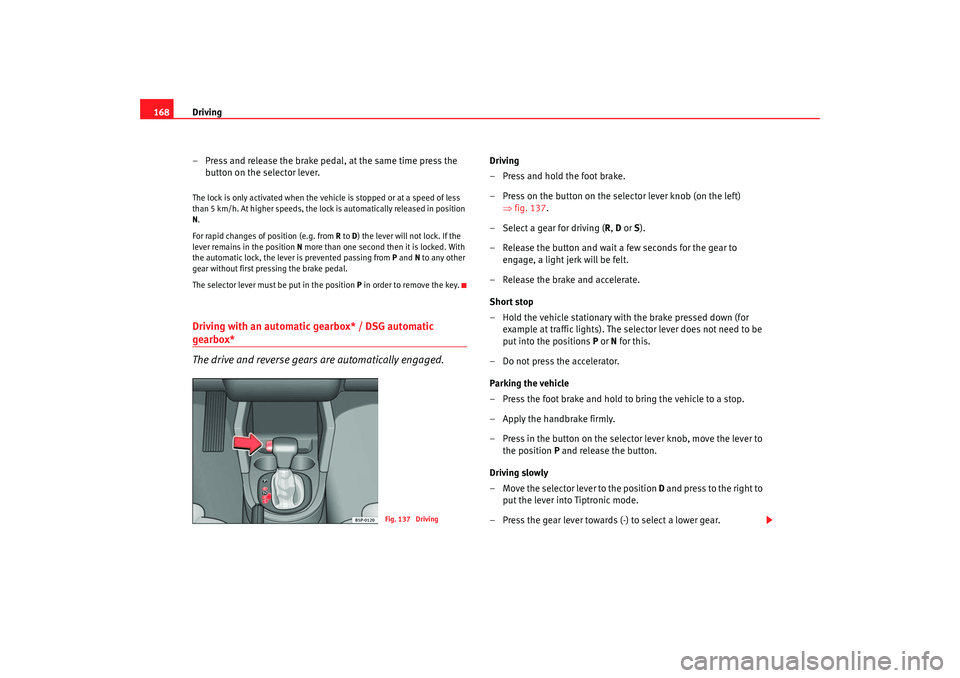
– Press on the button on the se lector lever knob (on the left)
⇒ fig. 137.
– Select a gear for driving ( R, D or S).
– Release the button and wait a few seconds for the gear to engage, a light jerk will be felt.
– Release the brake and accelerate.
Short stop
– Hold the vehicle stationary with the brake pressed down (for example at traffic lights). The sele ctor lever does not need to be
put into the positions P or N for this.
– Do not press the accelerator.
Parking the vehicle
– Press the foot brake and hold to bring the vehicle to a stop.
–Apply the handbrake firmly.
– Press in the button on the selector lever knob, move the lever to the position P and release the button.
Driving slowly
– Move the selector lever to the position D and press to the right to
put the lever into Tiptronic mode.
– Press the gear lever towards (-) to select a lower gear.
Fig. 137 Driving
AlteaXL_DEF_ingles Seite 168 Freitag, 25. August 2006 2:19 14
Page 191 of 298
Driving and the environment189
Safety First
Operating instructions
Tips and Maintenance
Te c h n i c a l D a t a
Connectors
Your vehicle is fitted with a 12-pin co
nnector for the electrical connection
between the trailer and the vehicle.
If the trailer has a 7-pin plug you will need to use an adapter cable. This is
available from any SEAT dealer.
Trailer weight / draw bar loading
Never exceed the authorised towing limit. If you do not load the trailer up to
the maximum permitted trailer weight , you can then climb correspondingly
steeper gradients.
The maximum trailer weights listed are only applicable for altitudes up to
1,000 m above sea level. With increasing altitude the engine power and
therefore the vehicle’s climbing ability are impaired because of the reduced
air density. The maximum trailer weight has to be reduced accordingly. The
weight of the vehicle and trailer co mbination must be reduced by 10% for
every further 1,000 m (or part thereof). The gross combination weight is the
actual weight of the laden vehicle plus the actual weight of the laden trailer.
Where possible, operate the trailer with the maximum permitted draw bar
weight on the ball joint of the towing bracket, but do not exceed the specified
limit.
The figures for trailer weights and draw bar weights that are given on the
data plate of the towing bracket are for certification purposes only. The
correct figures for your sp ecific model, which may be lower than these figures
for the towing bracket, are give n in the registration documents ⇒Section
“Technical data”.
Distributing the load
Distribute loads in the trailer so that heavy objects are as near to the axle as
possible. Loads carried in the trailer must be secured to prevent them
moving. Tyre pressure
Set tyre pressure to the maximum permissible pressure shown on the sticker
on the inside of the fuel tank flap. Set the tyre pressure of the trailer tyres in
accordance with the trailer manufacturer’s recommendations.
Exterior mirrors
Check whether you can see enough of the road behind the trailer with the
standard mirrors. If this is not the case you should have additional mirrors
fitted. Both exterior mirrors should be mounted on hinged extension
brackets. Adjust the mirrors to give sufficient vision to the rear.
WARNING
Never transport people in a trailer. This could result in fatal accidents.
Note
•
Towing a trailer places additional demands on the vehicle. We recom-
mend additional services between the normal inspection intervals if the
vehicle is used frequently for towing a trailer.
•
Find out whether special regulations apply to towing a trailer in your
country.
Ball coupling of towing bracket*Depending on the model version, the spherical head on the trailer hook may
be stored in the tool box.
The ball coupling is provided with in structions on fitting and removing the
ball coupling of the towing bracket.
AlteaXL_DEF_ingles Seite 189 Freitag, 25. August 2006 2:19 14
Page 230 of 298

Checking and refilling levels
228
Driving with puncture-proof tyres (emergency driving)
– Leave the ESP/TCS (electric stability program) on, or turn it on ⇒page 181.
– Drive carefully and at moderate speed (80km/h maximum).
– Avoid sudden manoeuvers and turns.
– Avoid driving over obstacles (for example, kerbs) or potholes.
– Pay attention when the ESP/TCS is frequently used, if the tyres smoke or there is a smell of rubber, or if the vehicle vibrates or
there are rattling noises. If any of these circumstances appear,
stop the vehicle.Puncture-proof tyres have a special marking on the side with the following
denominations: “DSST”, “Eufonia”, “RFT”, “ROF”, “RSC”, “SSR” o “ZP”.
The side walls of these tyres are reinforced. When the tyres lose air they are
supported by the sides (emergency driving).
The instrument panel warns of the loss of air pressure in the tyre. It is possible
to travel at least another 80 km, and in favourable conditions (eg, a light load)
even more.
The damaged tyre should be replaced as soon as possible. The rim should be
checked in a specialized workshop to detect possible damage, and replaced
if required. We recommend that you contact your technical service. If there is
more than one tyre in emergency conditio n, the distance that can be travelled
is reduced.
Starting emergency driving
Once the tyre pressure loss warning light is on in the instrument panel, at
least one of the tyres is in emergency condition ⇒. Ending emergency driving
Do not drive on if:
•
- smoke is coming from one of the tyres,
•
- there is a smell of rubber,
•
- the vehicle vibrates,
•
- there is a rattling noise.
WARNING
When driving in emergency conditions,
the driving quality of the vehicle is
considerably impaired.•
Drive carefully and at moderate speed (80km/h maximum).
•
Avoid sharp turns and rapid manoeuvres, and brake earlier than usual.
•
Avoid driving over obstacles (for example, kerbs) or potholes.
•
One or more tyres in emergency conditions reduces the driving
performance and increases the risk of accident.Note
•
Puncture-proof tyres will not “deflate” when air pressure is lost because
the side walls will give support The defects in the tyre are therfore not notice-
able when they are visually inspected.
•
Do not fit chains onto front wheels that are in emergency condition
New tyres and wheels
New tyres and wheels have to be run-in.The tyres and wheel rims are an essenti al part of the vehicle’s design. The
tyres and rims approved by SEAT are specially matched to the characteristics
AlteaXL_DEF_ingles Seite 228 Freitag, 25. August 2006 2:19 14