steering wheel Seat Altea XL 2009 Owner's Guide
[x] Cancel search | Manufacturer: SEAT, Model Year: 2009, Model line: Altea XL, Model: Seat Altea XL 2009Pages: 297, PDF Size: 9.36 MB
Page 84 of 297
Steering wheel controls*83
Safety First
Operating instructions
Practical tips
Te c h n i c a l D a t a
Steering wheel controls*General informationThe steering wheel includes a multifunction module from where it is possible
to control the audio, telephone and radi o navigation functions, and the auto-
matic gearbox*, without needing to distract the driver's attention.
There are two versions of the multifunction module:
•
Audio version, to control the available audio functions from the steering
wheel.
•
Audio + Telephone version, to control the available audio functions and
the telephone system from the steering wheel.
Both versions may be used to control the Audio system (Radio, CD Audio, CD
mp3, CD Changer) and the radio / naviga tion System, in which case they also
control the Navigation system.
•
Version for automatic gearbox* ⇒page 173.
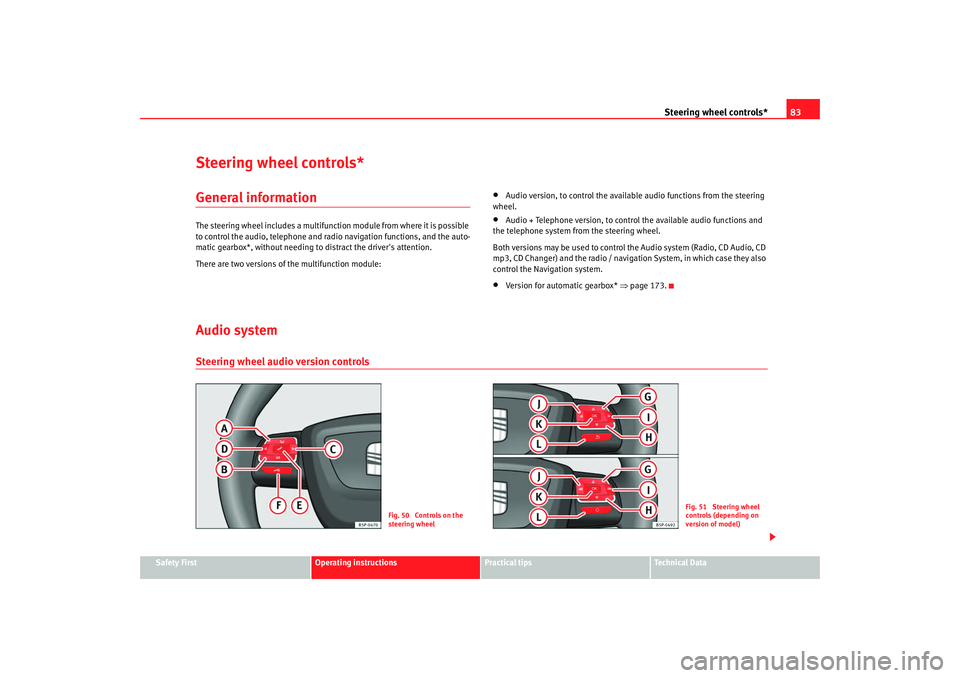
Audio systemSteering wheel audio version controls
Fig. 50 Controls on the
steering wheel
Fig. 51 Steering wheel
controls (depending on
version of model)
AlteaXL_EN.book Seite 83 M ontag, 2. Februar 2009 12:26 12
Page 85 of 297
Steering wheel controls*
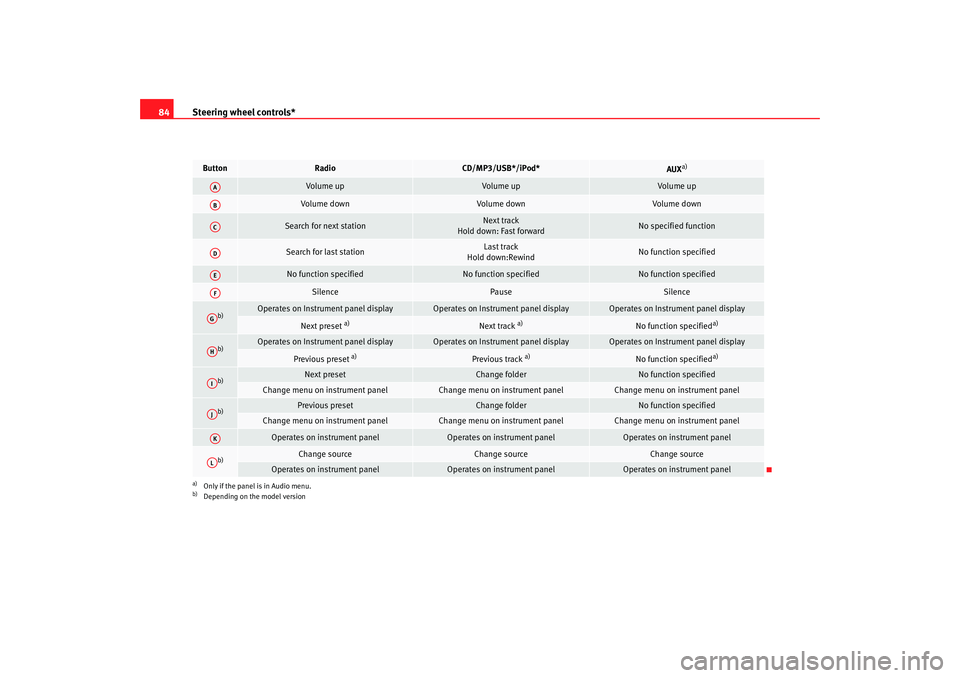
84Button
Radio
CD/MP3/USB*/iPod*
AUX
a)
a)Only if the panel is in Audio menu.
Vol ume up
Volume up
Volume up
Vol ume down
Volume down
Volume down
Search for next station
Next track
Hold down: Fast forward
No specified function
Search for last station
Last track
Hold down:Rewind
No function specified
No function specified
No function specified
No function specified
Silence
Pause
Silence
b)
b)Depending on the model version
Operates on Instrument panel display
Operates on Instrument panel display
Operates on Instrument panel display
Next preset
a)
Next track
a)
No function specified
a)
b)
Operates on Instrument panel display
Operates on Instrument panel display
Operates on Instrument panel display
Previous preset
a)
Previous track
a)
No function specified
a)
b)
Next preset
Change folder
No function specified
Change menu on instrument panel
Change menu on instrument panel
Change menu on instrument panel
b)
Previous preset
Change folder
No function specified
Change menu on instrument panel
Change menu on instrument panel
Change menu on instrument panel
Operates on instrument panel
Operates on instrument panel
Operates on instrument panel
b)
Change source
Change source
Change source
Operates on instrument panel
Operates on instrument panel
Operates on instrument panel
AAABACADAEAFAGAHAIAJAKAL
AlteaXL_EN.book Seite 84 M ontag, 2. Februar 2009 12:26 12
Page 86 of 297
Steering wheel controls*85
Safety First
Operating instructions
Practical tips
Te c h n i c a l D a t a
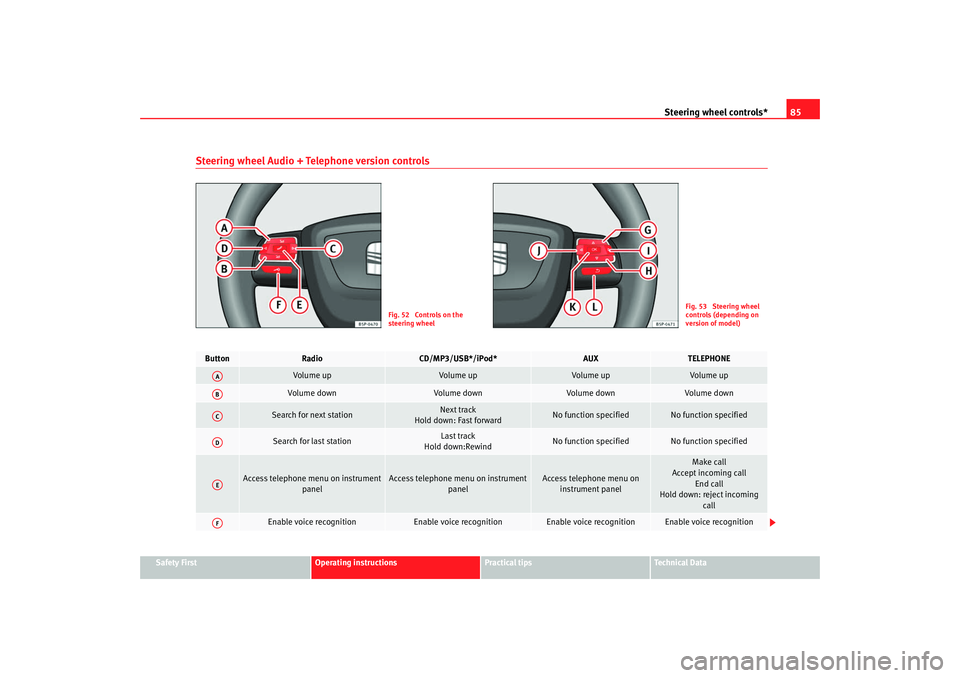
Steering wheel Audio + Telephone version controls
Fig. 52 Controls on the
steering wheel
Fig. 53 Steering wheel
controls (depending on
version of model)
Button
Radio
CD/MP3/USB*/iPod*
AUX
TELEPHONE
Volume up
Volume up
Volume up
Volume up
Volume down
Volume down
Volume down
Volume down
Search for next station
Next track
Hold down: Fast forward
No function specified
No function specified
Search for last station
Last track
Hold down:Rewind
No function specified
No function specified
Access telephone menu on instrument
panel
Access telephone menu on instrument panel
Access telephone menu on instrument panel
Make call
Accept incoming call
End call
Hold down: reject incoming call
Enable voice recognition
Enable voice recognition
Enable voice recognition
Enable voice recognition
AAABACADAEAF
AlteaXL_EN.book Seite 85 M ontag, 2. Februar 2009 12:26 12
Page 87 of 297
Steering wheel controls*
86
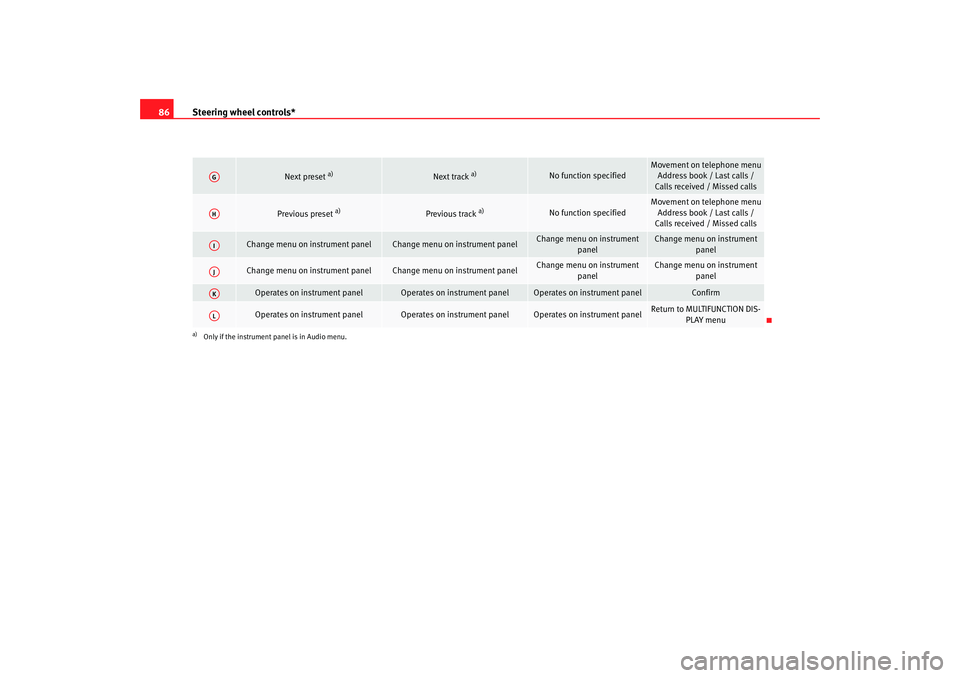
Next preset
a)
Next track
a)
No function specified
Movement on telephone menu
Address book / Last calls /
Calls received / Missed calls
Previous preset
a)
Previous track
a)
No function specified
Movement on telephone menu Address book / Last calls /
Calls received / Missed calls
Change menu on instrument panel
Change menu on instrument panel
Change menu on instrument
panel
Change menu on instrument panel
Change menu on instrument panel
Change menu on instrument panel
Change menu on instrument panel
Change menu on instrument panel
Operates on instrument panel
Operates on instrument panel
Operates on instrument panel
Confirm
Operates on instrument panel
Operates on instrument panel
Operates on instrument panel
Return to MULTIFUNCTION DIS-PLAY menu
a)Only if the instrument panel is in Audio menu.AGAHAIAJAKAL
AlteaXL_EN.book Seite 86 M ontag, 2. Februar 2009 12:26 12
Page 88 of 297
Steering wheel controls*87
Safety First
Operating instructions
Practical tips
Te c h n i c a l D a t a
Radio navigation systemSteering wheel audio version controls
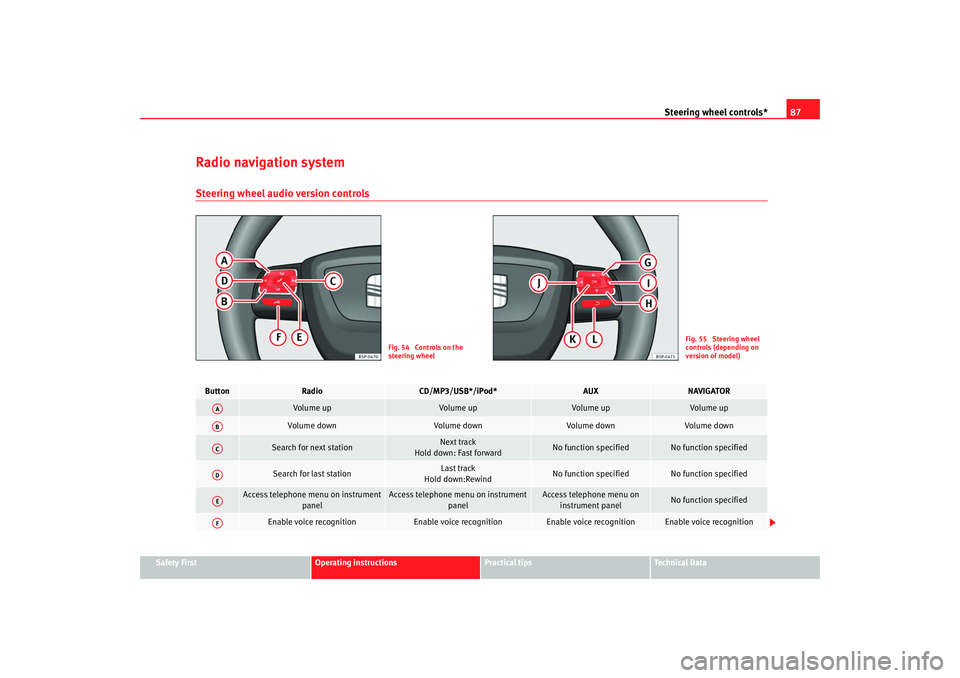
Fig. 54 Controls on the
steering wheel
Fig. 55 Steering wheel
controls (depending on
version of model)
Button
Radio
CD/MP3/USB*/iPod*
AUX
NAVIGATOR
Volume up
Volume up
Volume up
Volume up
Volume down
Volume down
Volume down
Volume down
Search for next station
Next track
Hold down: Fast forward
No function specified
No function specified
Search for last station
Last track
Hold down:Rewind
No function specified
No function specified
Access telephone menu on instrument panel
Access telephone menu on instrument panel
Access telephone menu on instrument panel
No function specified
Enable voice recognition
Enable voice recognition
Enable voice recognition
Enable voice recognition
AAABACADAEAF
AlteaXL_EN.book Seite 87 M ontag, 2. Februar 2009 12:26 12
Page 89 of 297
Steering wheel controls*
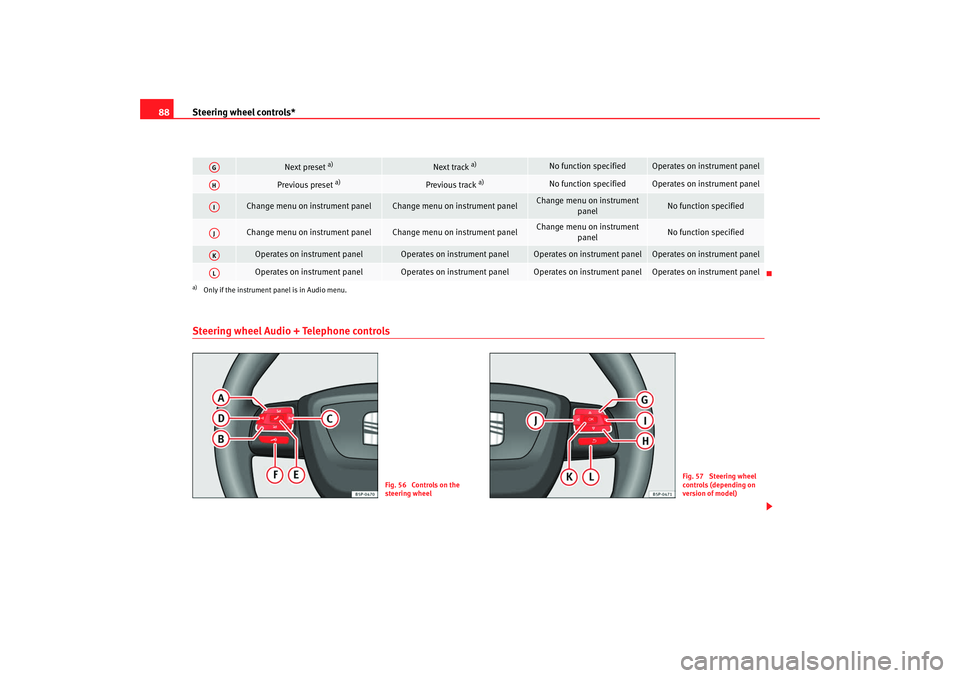
88Steering wheel Audio + Telephone controls
Next preset
a)
Next track
a)
No function specified
Operates on instrument panel
Previous preset
a)
Previous track
a)
No function specified
Operates on instrument panel
Change menu on instrument panel
Change menu on instrument panel
Change menu on instrument
panel
No function specified
Change menu on instrument panel
Change menu on instrument panel
Change menu on instrument
panel
No function specified
Operates on instrument panel
Operates on instrument panel
Operates on instrument panel
Operates on instrument panel
Operates on instrument panel
Operates on instrument panel
Operates on instrument panel
Operates on instrument panel
a)Only if the instrument panel is in Audio menu.AGAHAIAJAKAL
Fig. 56 Controls on the
steering wheel
Fig. 57 Steering wheel
controls (depending on
version of model)
AlteaXL_EN.book Seite 88 M ontag, 2. Februar 2009 12:26 12
Page 90 of 297
Steering wheel controls*89
Safety First
Operating instructions
Practical tips
Te c h n i c a l D a t a
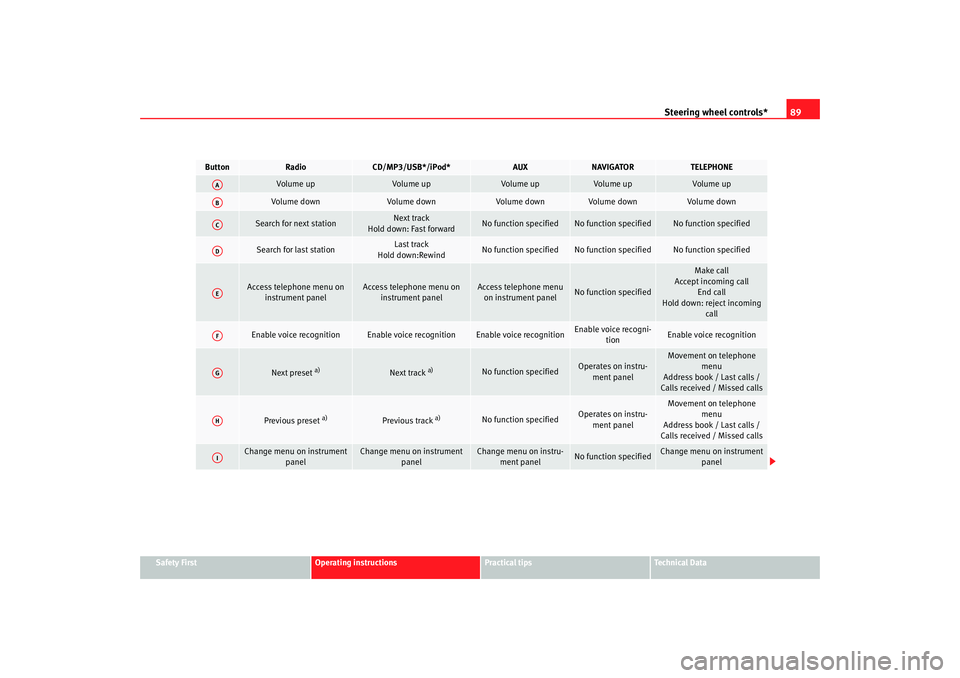
Button
Radio
CD/MP3/USB*/iPod*
AUX
NAVIGATOR
TELEPHONE
Vol ume up
Volume up
Volume up
Volume up
Vol ume up
Volume down
Volume down
Volume down
Volume down
Volume down
Search for next station
Next track
Hold down: Fast forward
No function specified
No function specified
No function specified
Search for last station
Last track
Hold down:Rewind
No function specified
No function specified
No function specified
Access telephone menu on instrument panel
Access telephone menu on instrument panel
Access telephone menu on instrument panel
No function specified
Make call
Accept incoming call
End call
Hold down: reject incoming call
Enable voice recognition
Enable voice recognition
Enable voice recognition
Enable voice recogni-tion
Enable voice recognition
Next preset
a)
Next track
a)
No function specified
Operates on instru-
ment panel
Movement on telephone menu
Address book / Last calls /
Calls received / Missed calls
Previous preset
a)
Previous track
a)
No function specified
Operates on instru-
ment panel
Movement on telephone menu
Address book / Last calls /
Calls received / Missed calls
Change menu on instrument panel
Change menu on instrument panel
Change menu on instru-ment panel
No function specified
Change menu on instrument panel
AAABACADAEAFAGAHAI
AlteaXL_EN.book Seite 89 M ontag, 2. Februar 2009 12:26 12
Page 91 of 297
Steering wheel controls*
90
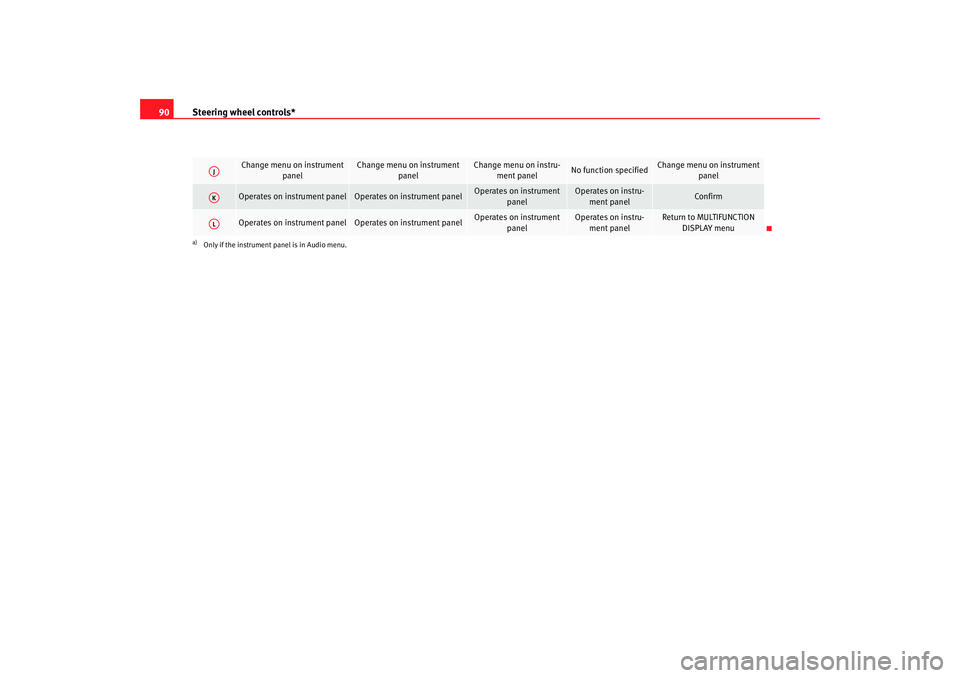
Change menu on instrument
panel
Change menu on instrument panel
Change menu on instru-ment panel
No function specified
Change menu on instrument panel
Operates on instrument panel
Operates on instrument panel
Operates on instrument
panel
Operates on instru-ment panel
Confirm
Operates on instrument panel
Operates on instrument panel
Operates on instrument panel
Operates on instru-ment panel
Return to MULTIFUNCTION DISPLAY menu
a)Only if the instrument panel is in Audio menu.AJAKAL
AlteaXL_EN.book Seite 90 M ontag, 2. Februar 2009 12:26 12
Page 117 of 297
Lights and visibility
116Indicator and main beam headlight lever
The turn signal and main beam lever also operates the
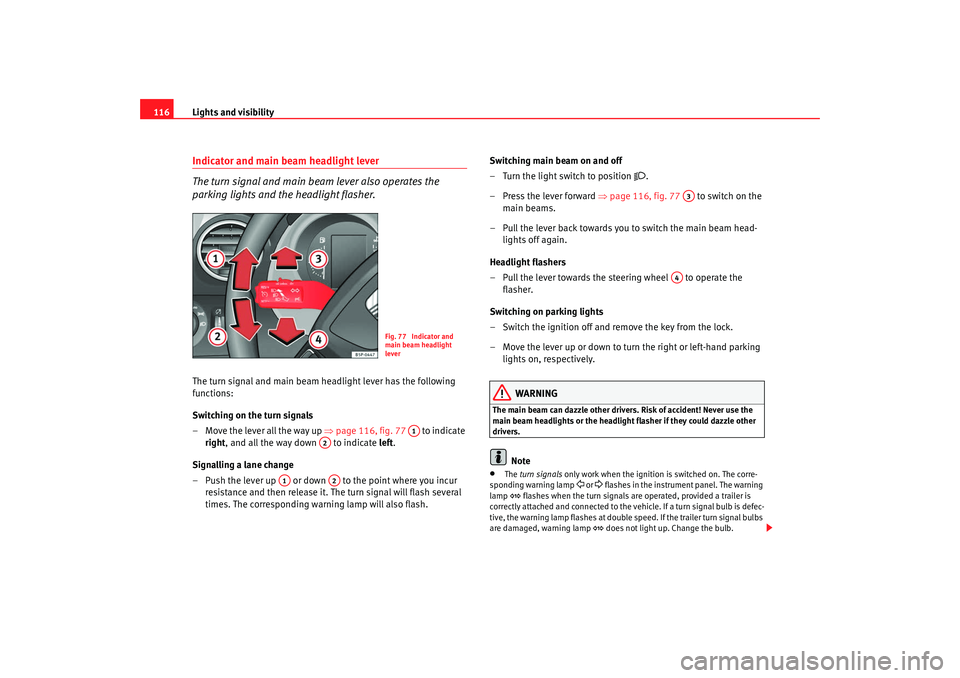
parking lights and the headlight flasher.The turn signal and main beam headlight lever has the following
functions:
Switching on the turn signals
– Move the lever all the way up ⇒page 116, fig. 77 to indicate
right , and all the way down to indicate left.
Signalling a lane change
– Push the lever up or down to the point where you incur resistance and then release it. The turn signal will flash several
times. The corresponding warning lamp will also flash. Switching main beam on and off
– Turn the light switch to position
.
–Press the lever forward ⇒ page 116, fig. 77 to switch on the
main beams.
– Pull the lever back towards you to switch the main beam head- lights off again.
Headlight flashers
– Pull the lever towards the steering wheel to operate the flasher.
Switching on parking lights
– Switch the ignition off and remove the key from the lock.
– Move the lever up or down to turn the right or left-hand parking lights on, respectively.
WARNING
The main beam can dazzle other driver s. Risk of accident! Never use the
main beam headlights or the headligh t flasher if they could dazzle other
drivers.
Note
•
The turn signals only work when the ignition is switched on. The corre-
sponding warning lamp
or flashes in the instrume nt panel. The warning
lamp
flashes when the turn signals are operated, provided a trailer is
correctly attached and connected to the vehicle. If a turn signal bulb is defec-
tive, the warning lamp flashes at double speed. If the trailer turn signal bulbs
are damaged, warning lamp
does not light up. Change the bulb.
Fig. 77 Indicator and
main beam headlight
lever
A1
A2
A1
A2
A3
A4
AlteaXL_EN.book Seite 116 M ontag, 2. Februar 2009 12:26 12
Page 122 of 297
Lights and visibility121
Safety First
Operating instructions
Practical tips
Te c h n i c a l D a t a
Sun visors on the rear side windows*
– Pull out the visor and hook it onto the hooks at the top of the door
frame ⇒fig. 84.Windscreen wipersFront windscreen wipers
The windscreen wiper lever controls the windscreen wipers
and the automatic wash and wipe.
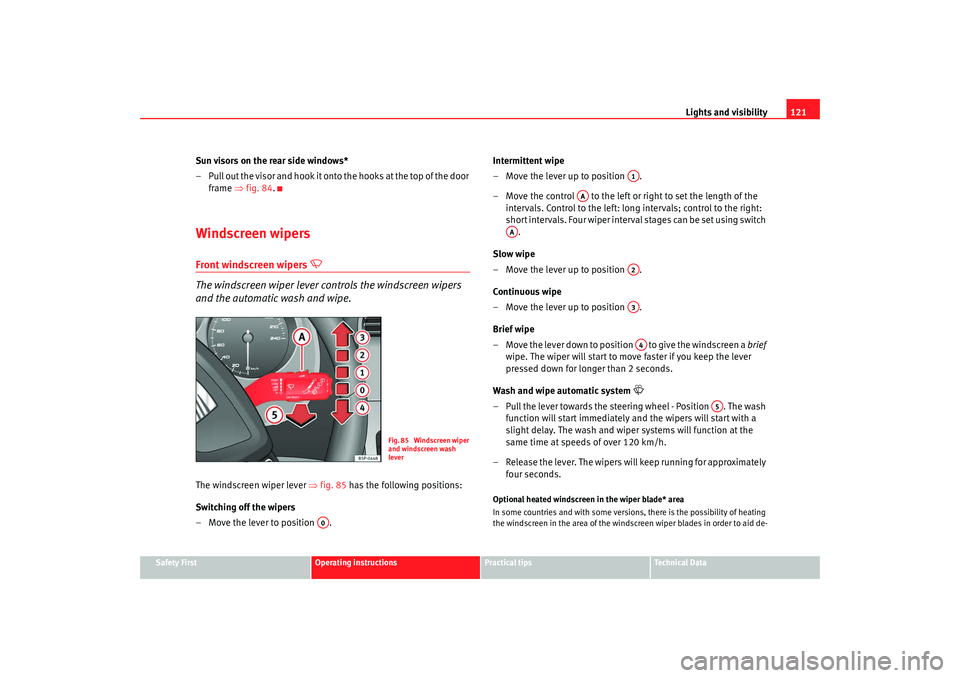
The windscreen wiper lever ⇒fig. 85 has the following positions:
Switching off the wipers
– Move the lever to position . Intermittent wipe
– Move the lever up to position .
– Move the control to the left or right to set the length of the
intervals. Control to the left: long intervals; control to the right:
short intervals. Four wiper interval stages can be set using switch .
Slow wipe
– Move the lever up to position .
Continuous wipe
– Move the lever up to position .
Brief wipe
– Move the lever down to position to give the windscreen a brief
wipe. The wiper will start to move faster if you keep the lever
pressed down for longer than 2 seconds.
Wash and wipe automatic system
– Pull the lever towards the steering wheel - Position . The wash function will start immediately and the wipers will start with a
slight delay. The wash and wiper systems will function at the
same time at speeds of over 120 km/h.
– Release the lever. The wipers will keep running for approximately four seconds.Optional heated windscreen in the wiper blade* area
In some countries and with some versions, there is the possibility of heating
the windscreen in the area of the windscreen wiper blades in order to aid de-
Fig. 85 Windscreen wiper
and windscreen wash
lever
A0
A1
AA
AA
A2A3A4
A5
AlteaXL_EN.book Seite 121 M ontag, 2. Februar 2009 12:26 12