Knob Seat Altea XL 2009 Owner's Manual
[x] Cancel search | Manufacturer: SEAT, Model Year: 2009, Model line: Altea XL, Model: Seat Altea XL 2009Pages: 297, PDF Size: 9.36 MB
Page 58 of 297
Cockpit57
Safety First
Operating instructions
Practical tips
Te c h n i c a l D a t a
display
4).
Stop the car and switch off the engine. Check the coolant level
⇒ page 220 ⇒.
Even if the coolant level is correct do not continue driving. You should obtain
technical assistance.WARNING
When working in the engine compartment, always observe the safety warn-
ings ⇒page 213.
Caution
Accessories in front of the air inlet reduce the cooling effect of the coolant. At
high outside temperatures and high engine loads, there is a risk of the
engine overheating.Rev counter
The rev. counter displays the engine speed in revolutions per
minute.The start of the red zone ⇒page 55, fig. 33 indicates the maximum
engine speed operating at service temperature. However, it is advisable to
change up a into a higher gear, move the selector lever to D or lift your foot
off the accelerator before the needle reaches the red zone.
Caution
The rev counter needle must never enter the red zone on the scale. Risk of
engine damage.
For the sake of the environment
Changing up into higher gears early will help you to save fuel and minimise
engine noise.SpeedometerThe speedometer is equipped with a digital odometer and a trip counter, in
addition to a service intervals display.
During the running-in period, the instructions shown on ⇒page 190 should
be followed.Setting the digital clock*
The digital clock is located in the instrument panel display.– Turn the setting knob ⇒page 55, fig. 33 clockwise until the
first “click” to set the hour. The hour will flash. To change the
hour, press the button.
– Turn the setting knob clockwise to the second “click” to set the
minutes. The minutes will flash. To change the minutes, press the
button.
4)Depending on the model version
A4
A5
AlteaXL_EN.book Seite 57 M ontag, 2. Februar 2009 12:26 12
Page 60 of 297
Cockpit59
Safety First
Operating instructions
Practical tips
Te c h n i c a l D a t a
Recommended gear display*
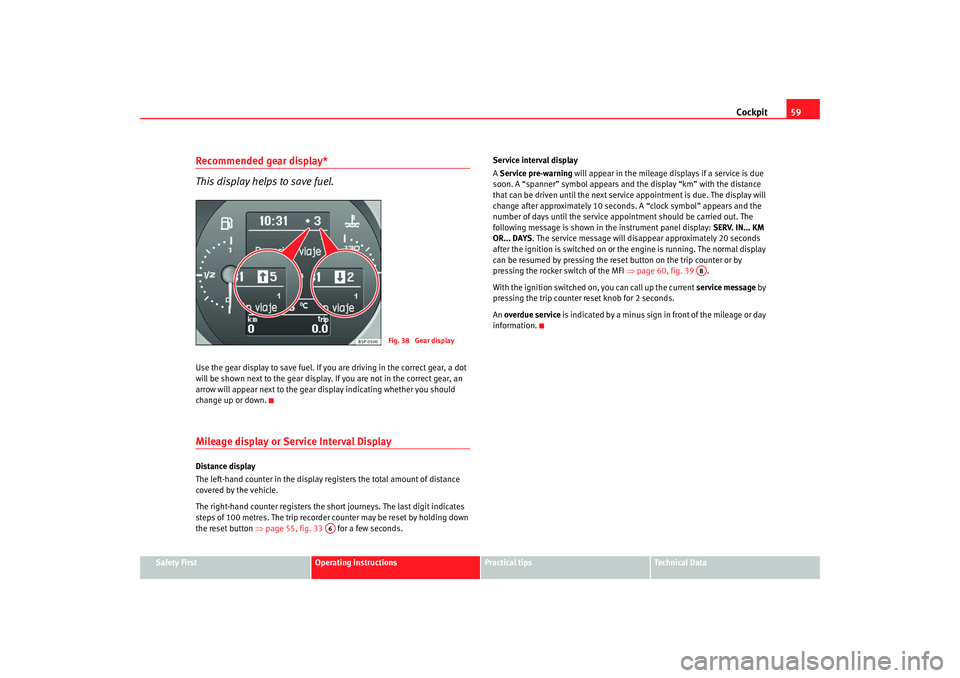
This display helps to save fuel.Use the gear display to save fuel. If you are driving in the correct gear, a dot
will be shown next to the gear display. If you are not in the correct gear, an
arrow will appear next to the gear display indicating whether you should
change up or down.Mileage display or Service Interval DisplayDistance display
The left-hand counter in the display registers the total amount of distance
covered by the vehicle.
The right-hand counter registers the sh ort journeys. The last digit indicates
steps of 100 metres. The trip recorder counter may be reset by holding down
the reset button ⇒page 55, fig. 33 for a few seconds. Service interval display
A
Service pre-warning will appear in the mileage displays if a service is due
soon. A “spanner” symbol appears and the display “km” with the distance
that can be driven until the next service appointment is due. The display will
change after approximately 10 seconds. A “clock symbol” appears and the
number of days until the service appointment should be carried out. The
following message is shown in the instrument panel display: SERV. IN... KM
OR... DAYS . The service message will disappear approximately 20 seconds
after the ignition is switched on or th e engine is running. The normal display
can be resumed by pressing the reset button on the trip counter or by
pressing the rocker switch of the MFI ⇒page 60, fig. 39 .
With the ignition switched on, you can call up the current service message by
pressing the trip counter reset knob for 2 seconds.
An overdue service is indicated by a minus sign in front of the mileage or day
information.
Fig. 38 Gear display
A6
AB
AlteaXL_EN.book Seite 59 M ontag, 2. Februar 2009 12:26 12
Page 127 of 297
Lights and visibility
126
Note•
The automatic anti-dazzle function will only work properly if the sun
blind* for the rear window is retracted and there are no other objects
preventing light from reac hing the interior mirror.
•
If you have to stick any type of sticker on the windscreen, do not do so in
front of the sensors. Doing so could pr event the anti-dazzle function from
working well or even from working at all.
Exterior mirrors
The exterior mirrors can be adjusted using the rotary knob in
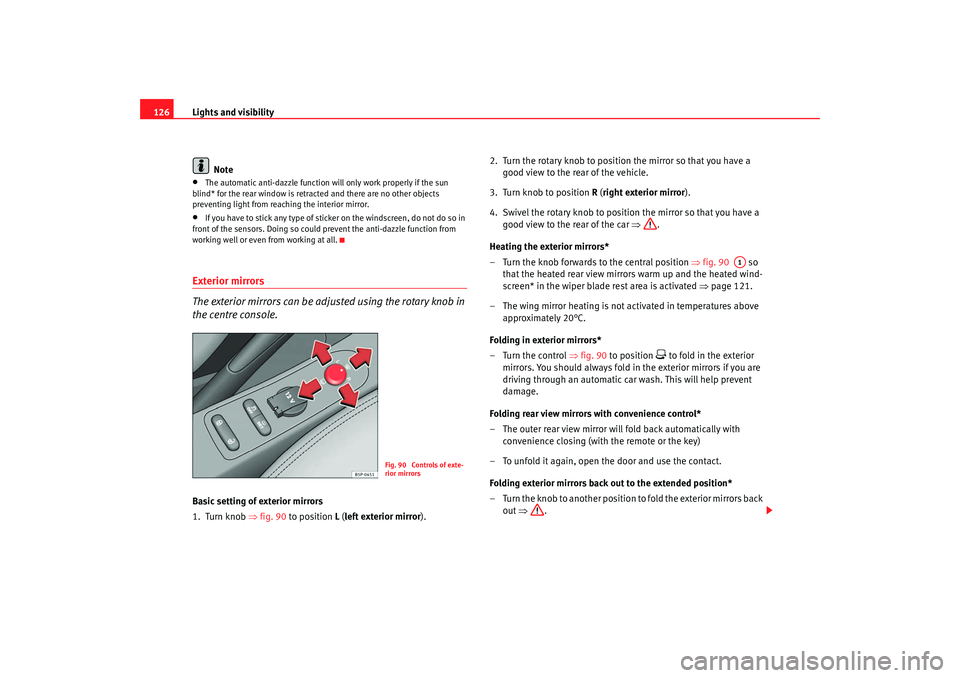
the centre console.Basic setting of exterior mirrors
1. Turn knob ⇒fig. 90 to position L ( left exterior mirror). 2. Turn the rotary knob to position the mirror so that you have a
good view to the rear of the vehicle.
3. Turn knob to position R (right exterior mirror ).
4. Swivel the rotary knob to position the mirror so that you have a good view to the rear of the car ⇒.
Heating the exterior mirrors*
– Turn the knob forwards to the central position ⇒fig. 90 so
that the heated rear view mirrors warm up and the heated wind-
screen* in the wiper blade rest area is activated ⇒page 121.
– The wing mirror heating is not activated in temperatures above approximately 20°C.
Folding in exterior mirrors*
– Turn the control ⇒fig. 90 to position
to fold in the exterior
mirrors. You should always fold in the exterior mirrors if you are
driving through an automatic car wash. This will help prevent
damage.
Folding rear view mirrors with convenience control*
– The outer rear view mirror will fold back automatically with convenience closing (with the remote or the key)
– To unfold it again, open the door and use the contact.
Folding exterior mirrors back out to the extended position*
– Turn the knob to another position to fold the exterior mirrors back out ⇒ .
Fig. 90 Controls of exte-
rior mirrors
A1
AlteaXL_EN.book Seite 126 M ontag, 2. Februar 2009 12:26 12
Page 128 of 297
Lights and visibility127
Safety First
Operating instructions
Practical tips
Te c h n i c a l D a t a
Synchronised mirror adjustment
1. Turn the control to the position L ( left exterior mirror ).
2. Turn the rotary knob to position the mirror so that you have a good view to the rear of the vehicle. The right exterior mirror will
be adjusted at the same time (synchronised).
WARNING
•
The rear view convex or aspheric mirror increase the field of vision
however the objects appear smaller and further away in the mirrors. If you
use these mirrors to estimate the distance to vehicles behind you when
changing lane, you could make a mistake. Risk of accident.
•
If possible, use the interior mirror to estimate distances to vehicles
behind you.
•
Make sure that you do not get your finger trapped between the mirror
and the mirror base when folding back the mirrors. Risk of injury!For the sake of the environment
The exterior mirror heating should be switched off when it is no longer
needed. Otherwise, it is an unnecessary fuel waste.
Note
•
If the electrical adjustment ever fa ils to operate, the mirrors can be
adjusted by hand by lightly pressing the edge of the mirror glass.
•
In vehicles with electric wing mirro rs, the following points should be
observed: if, due to an external forc e (e.g. a knock while manoeuvring), the
adjustment of the mirror housing is altered, the mirror will have to be
completely folded electrically . Do not readjust the mirror housing by hand, as
this will interfere with the mirror adjuster function.
•
The rear view mirrors can be adjusted separately or simultaneously, as
described before.
•
The wing mirrors folding function does not activate with speeds higher
than 40km/h.
AlteaXL_EN.book Seite 127 M ontag, 2. Februar 2009 12:26 12
Page 158 of 297
Heating, Ventilation and Air conditioning 157
Safety First
Operating instructions
Practical tips
Te c h n i c a l D a t a
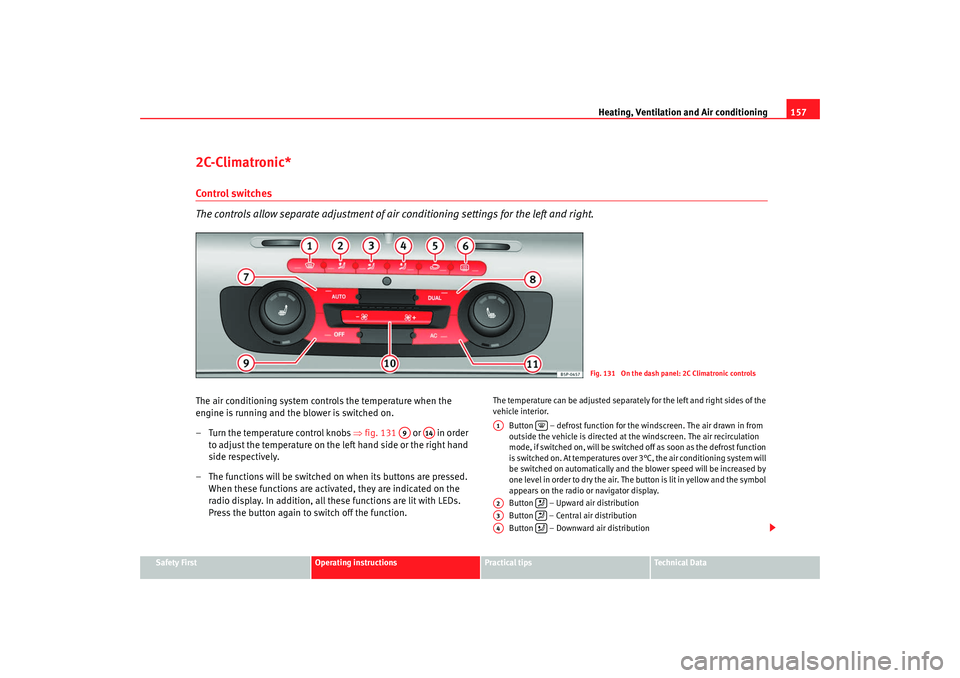
2C-Climatronic*Control switches
The controls allow separate adjustment of air conditioning settings for the left and right.The air conditioning system controls the temperature when the
engine is running and the blower is switched on.
– Turn the temperature control knobs ⇒fig. 131 or in order
to adjust the temperature on the left hand side or the right hand
side respectively.
– The functions will be switched on when its buttons are pressed. When these functions are activated, they are indicated on the
radio display. In addition, all these functions are lit with LEDs.
Press the button again to switch off the function.
The temperature can be adjusted separately for the left and right sides of the
vehicle interior.
Button – defrost function for the windscreen. The air drawn in from
outside the vehicle is directed at the windscreen. The air recirculation
mode, if switched on, will be switched off as soon as the defrost function
is switched on. At temperatures over 3°C, the air conditioning system will
be switched on automatically and the blower speed will be increased by
one level in order to dry the air. The button is lit in yellow and the symbol
appears on the radio or navigator display.
Button – Upward air distribution
Button – Central air distribution
Button – Downward air distribution
Fig. 131 On the dash panel: 2C Climatronic controls
A9
A14
A1
A2
A3
A4
AlteaXL_EN.book Seite 157 M ontag, 2. Februar 2009 12:26 12
Page 173 of 297
Driving
172
Driving
– Press and hold the foot brake.
– Press the button on the selector lever knob (on the left) ⇒page 171, fig. 144 .
– Select a gear for driving ( R, D or S).
– Release the button and wait a few seconds for the gear to engage, a light jerk will be felt.
– Release the brake and accelerate.
Short stop
– Hold the vehicle stationary with the brake pressed down (for example at traffic lights). The selector lever does not need to be
put into the positions P or N for this.
– Do not press the accelerator.
Parking the vehicle
– Press the foot brake and hold to bring the vehicle to a stop.
–Apply the handbrake firmly.
– Press in the button on the selector lever knob, move the lever to the position P and release the button.
Driving slowly
– Move the selector lever to the position D and press to the right to
put the lever into Tiptronic mode.
– Press the gear lever towards (-) to select a lower gear. Hill stop
– Hold the vehicle, in all cases, using the foot brake to prevent
rolling back.
– Do not try to slow the vehicle using another forward gear (engine braking).
Descending gradients
– With the gear engaged, release the brake and accelerate.
The steeper the gradient the lower the gear must be for effective engine
braking. For example, if 3rd gear is used on a very steep gradient, the engine
braking is insufficient and vehicle accelerates. So that the engine speed does
not become excessive, the gearbox changes to the next highest gear. Depress
the brake pedal and move the selector lever to the Tiptronic gate to return to
3rd gear.
WARNING
•
The driver should never leave the ve hicle while the engine is running or
with any gear selected. If for any reason you must leave the vehicle with the
engine running, apply the handbrake and move the selector lever to posi-
tion P.
•
When the engine is running and the positions D, S or R are selected, it
is necessary to hold the vehicle with the foot brake because the vehicle will
creep at a low speed.
•
Never accelerate while changing the position of the selector lever (risk
of an accident).
•
The selector lever must never be mo ved into the positions R or P while
moving (risk of an accident).
•
Before descending a steep gradient, reduce speed and use the Tiptronic
programme to select a lower gear.
AlteaXL_EN.book Seite 172 M ontag, 2. Februar 2009 12:26 12
Page 176 of 297
Driving175
Safety First
Operating instructions
Practical tips
Te c h n i c a l D a t a
Applying the handbrake
– Pull the handbrake lever up firmly ⇒ page 174, fig. 147.
Releasing the handbrake
– Pull the lever up slightly and press the release knob in the direc- tion of the arrow ⇒ page 174, fig. 147 and guide the handbrake
lever down fully ⇒.Always apply the handbrake firmly . This prevents you driving with the hand-
brake applied ⇒.
The handbrake warning lamp
lights up when the handbrake is applied
and the ignition switched on. The warning turns off when the handbrake is
released.
If you drive faster than 6 km/h with the handbrake on, the following
message* will appear on the instrument panel display: HANDBRAKE ON. Also,
an audible warning is given.
WARNING
•
Never use the handbrake to stop the vehicle when it is in motion. The
braking distance is considerably longer, because braking is only applied to
the rear wheels. Risk of accident!
•
If it is only partially released, this will cause rear brakes overheating,
which can impair the function of the brake system and could lead to an acci-
dent. This also causes premature wear on the rear brake pads.Caution
Always apply the handbrake before you leave the vehicle. The first gear
should also be selected.
Parking
The handbrake should always be firmly applied when the
vehicle is parked.Always note the following points when parking the vehicle:
– Use the foot brake to stop the vehicle.
–Apply the handbrake.
– The first gear should also be selected.
– Switch the engine off and remove the key from the ignition lock. Turn the steering wheel slightly to engage the steering lock.
– Always take you car keys with you when you leave the vehicle ⇒ .Additional notes on parking the vehicle on gradients:
Turn the steering wheel so that the vehicle rolls against the kerb if it started
to roll.•
If the vehicle is parked facing downhill , turn the front wheels so that they
point towards the kerb.
•
If the vehicle is parked facing uphill, turn the front wheels so that they
point away from the kerb .
•
Secure the vehicle as normal by applying the handbrake firmly and
engaging first gear.
WARNING
•
Take measures to reduce the risk of injury when you leave your vehicle
unattended.
AlteaXL_EN.book Seite 175 M ontag, 2. Februar 2009 12:26 12