Windscreen Seat Altea XL 2013 User Guide
[x] Cancel search | Manufacturer: SEAT, Model Year: 2013, Model line: Altea XL, Model: Seat Altea XL 2013Pages: 317, PDF Size: 4.69 MB
Page 75 of 317
73
Cockpit
stored and the warning is activated. If the set speed is exceeded, an audible
warning is heard and a warning message is displayed until the speed is re-
duced to at least 4 km/h (2 mph) below the stored speed. The function is
switched off by pressing the OK
button again. Speed warning --- km/h
(miles) is now displayed on the instrument panel.
WARNING
There could be black ice on the road surface even if the “snowflake sym-
bol” is not shown. For this reason you should not rely exclusively on this
display - Risk of accident!
Note
● There are different instrument panels; therefore the multifunction dis-
play may vary.
● When the vehicle is stationary or travelling at very low speeds, the tem-
perature displayed may be slightly higher than the actual outside tempera-
ture as a result of the heat radiated from the engine.
● Vehicles with a multifunction steering wheel* do not have buttons on
the windscreen wiper lever. The multifunction display can only be controlled
from the buttons on the multifunction steering wheel*.
Vehicle status menu
This menu shows warning or information texts
Open Vehicle Condition menu
– Select the option Vehicle status from the main menu: “Main
menu” and press button OK
on the windscreen wiper lever
A⇒
Fig. 47. Or –
Press button
or on the multifunction steering wheel*
⇒ Fig. 46 until the Vehicle Status menu is displayed.
Priority 2 warning messages and information texts: “Information and warn-
ing messages on the screen” will automatically disappear from the screen
after a time and will be stored in the Vehicle status menu.
The warning and information texts may be viewed in this menu. If there is
no warning or information message, the option Vehicle status is not dis-
played. If there are several messages, each one is shown for a few seconds.
Example of menu use ⇒ page 68
Note
If there are no warning messages, this menu is not available.
Configuration menu
This menu is used to make the settings for the vehicle func-
tions. Open Configuration menu
– Select the option Configuration from the main menu: “Main
menu” and press button OK
A ⇒ Fig. 45 on the windscreen
wiper lever. Or
– Press button
or on the multifunction steering wheel*
⇒ Fig. 46 until the Configuration menu is displayed.
Example of menu use ⇒ page 68
Safety FirstOperating InstructionsPractical TipsTechnical Specifications
Page 76 of 317
74Cockpit
Displayed on the screenFunctionMultifunction display
data.This menu is used to establish the data in the
multifunction display menu to be displayed on
the instrument panel ⇒ page 71
ConvenienceThe convenience set-up mode is used to make
the settings for the convenience functions in the
vehicle.
Lights and visibilityFrom this menu it is it possible to alter the vehi-
cle lighting settings.
TimeThe hours and minutes of the clock and the navi-
gation system can be changed. Choose between
12 and 24-hour format and change to summer
time.
Winter tyresThe menu allows the setting of a speed at which
an optical and acoustic warning will be given by
the system. You can use this function, for exam-
ple, if you have fitted winter tyres which are not
suited for the top speed of your vehicle. Please
see the section “Wheels and tyres”.
LanguageThe display texts and the navigation system
texts can be seen in different languages.
UnitsThis option allows you to select the units for dis-
playing temperature, fuel consumption values
and distances.
sel. speedThe instrument panel also displays the speed in
another different unit of measurement (mph or
km/h) to that given on the speedometer.
Inter ServiceConsult service messages and reset service in-
terval display here.
Factory settingsThe manufacturer's predefined values for the
functions of this menu are restored.
Backa)This returns to the main menua)
Only if the windscreen wiper lever is used (MFI).
Note
● For electronic and vehicle equipment one or more of these menus will be
displayed.
● SEAT dealerships are able to programme other functions or change the
existing functions depending upon the vehicle equipment.
● The Configuration menu is only accessible when the vehicle is at a
standstill.
Convenience menu
From this menu it is it possible to alter the vehicle conven-
ience settings.
Open menu Convenience
– Choose the option Configuration from the main menu and press
the button OK
A ⇒ Fig. 45 on the windscreen wiper lever.
– Press button
or on the multifunction steering wheel*
⇒ Fig. 46 until the Configuration menu is displayed.
– Choose the option Convenience from the main menu and press
the button A
on the windscreen wiper lever.
Example of menu use ⇒ page 68
Page 77 of 317
75
Cockpit
Displayed on the
screenFunction
Central locking.One door: individual unlocking activated.
Auto lock: The doors are automatically locked
when the vehicle is travelling at more than approx
15 km/h (10 mph).
Auto unlock: the doors are unlocked when the key
is removed from the ignition.
Elec. window controlOpening and closing electric windows: this deter-
mines whether to open or close all the windows
when the vehicle is unlocked or locked. The open
function can also be activated for the driver door
only.
Exterior mirror adjust.If synchronised adjustment is selected, when the
driver side exterior mirror is adjusted, the passen-
ger exterior mirror is also moved.
Factory settingsThe predefined factory values for the functions of
this menu are restored.
BackThis returns to the Configuration menu
Note
For electronic and vehicle equipment one or more of these menus will be
displayed. Lights and visibility menu
From this menu it is it possible to alter the vehicle lighting
settings.
Open Lights and visibility Menu
– Select the option Configuration from the main menu: “Main
menu” and press button OK
A ⇒ page 68 on the windscreen
wiper lever. Or
– Press button
or on the multifunction steering wheel*
⇒ Fig. 46 until the Configuration menu is displayed.
– Select the option Lights & visibil. from the menu and press but-
ton A
on the windscreen wiper lever.
Example of menu use ⇒ page 68
Displayed on the
screenFunction
Coming Home/
Leaving HomeThis option permits the adjustment of the time
during which the headlamps remain lit after the
vehicle is locked, as well as connecting and dis-
connecting this function.
Indicator conf.The convenience turn signal function can be acti-
vated or deactivated here. With the convenience
mode activated, the turn signal will blink at least
three times when turned on.
Factory settingsThe predefined factory values for the functions of
this menu are restored.
BackThis returns to the Configuration menu.
Safety FirstOperating InstructionsPractical TipsTechnical Specifications
Page 80 of 317
78Cockpit
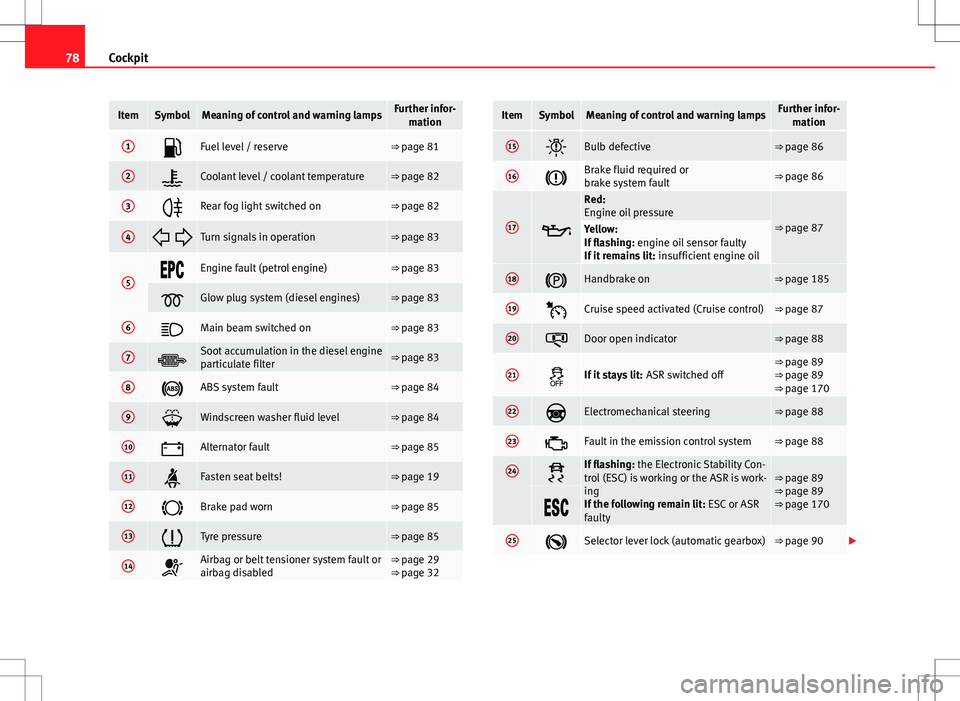
ItemSymbolMeaning of control and warning lampsFurther infor-
mation
1Fuel level / reserve⇒ page 81
2Coolant level / coolant temperature⇒ page 82
3Rear fog light switched on⇒ page 82
4 Turn signals in operation⇒ page 83
5Engine fault (petrol engine)⇒ page 83
Glow plug system (diesel engines)⇒ page 83
6Main beam switched on⇒ page 83
7Soot accumulation in the diesel engine
particulate filter⇒ page 83
8ABS system fault⇒ page 84
9Windscreen washer fluid level⇒ page 84
10Alternator fault⇒ page 85
11Fasten seat belts!⇒ page 19
12Brake pad worn⇒ page 85
13Tyre pressure⇒ page 85
14Airbag or belt tensioner system fault or
airbag disabled⇒ page 29
⇒ page 32
ItemSymbolMeaning of control and warning lampsFurther infor-
mation
15Bulb defective⇒ page 86
16Brake fluid required or
brake system fault⇒ page 86
17
Red:
Engine oil pressure
⇒ page 87Yellow:
If flashing: engine oil sensor faulty
If it remains lit: insufficient engine oil
18Handbrake on⇒ page 185
19Cruise speed activated (Cruise control)⇒ page 87
20Door open indicator⇒ page 88
21If it stays lit: ASR switched off⇒ page 89
⇒ page 89
⇒ page 170
22Electromechanical steering⇒ page 88
23Fault in the emission control system⇒ page 88
24If flashing: the Electronic Stability Con-
trol (ESC) is working or the ASR is work-
ing
If the following remain lit: ESC or ASR
faulty⇒ page 89
⇒ page 89
⇒ page 170
25Selector lever lock (automatic gearbox)⇒ page 90
Page 82 of 317
80Cockpit
WARNING
● Failure to observe control lamps and warning messages can result in
serious personal injury or damage to your vehicle.
● The risk of an accident increases if your vehicle breaks down. Use a
warning triangle to draw the attention of other road users in order to pre-
vent danger to third parties.
● The engine compartment is a dangerous area. Before you open the
bonnet to work on the engine or in the engine compartment, you must
switch the engine off and allow it to cool to reduce the risk of scalding or
other injuries. Read and observe the relevant warnings ⇒ page 233.
Note
● The appropriate control lamp for a fault will light up in vehicles without
warning or information messages in the display.
● In vehicles with warning or information messages on the screen, the ap-
propriate control lamp for a fault will light up and a warning or information
message will also appear on the screen.
Warning symbols
There are red warning symbols (priority 1) and yellow warning sym-
bols (priority 2).
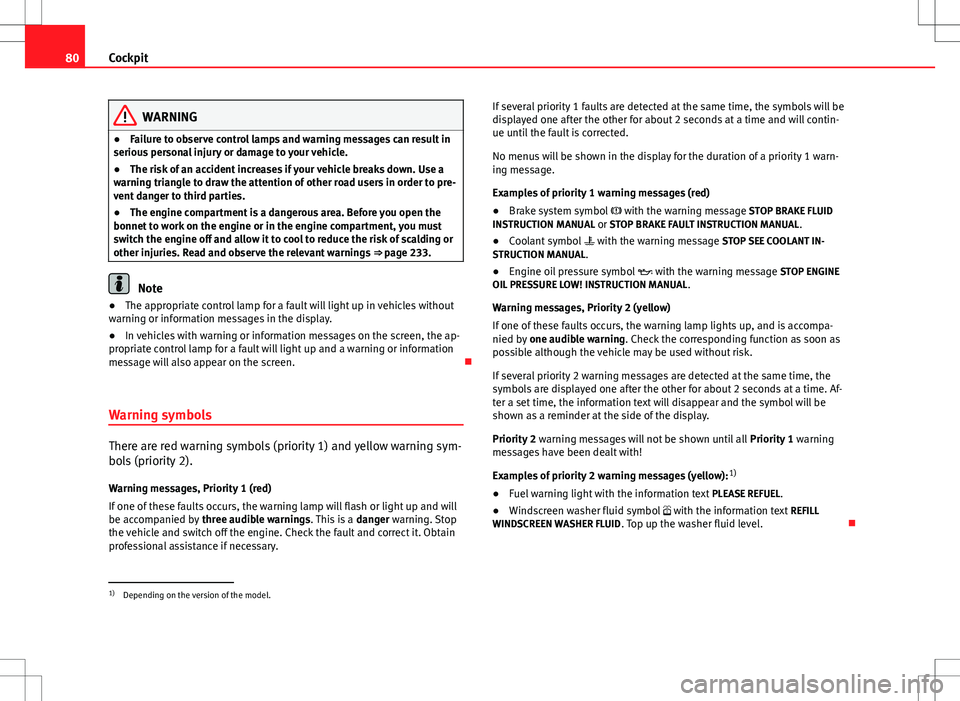
Warning messages, Priority 1 (red)
If one of these faults occurs, the warning lamp will flash or light up and will
be accompanied by three audible warnings. This is a danger warning. Stop
the vehicle and switch off the engine. Check the fault and correct it. Obtain
professional assistance if necessary. If several priority 1 faults are detected at the same time, the symbols will be
displayed one after the other for about 2 seconds at a time and will contin-
ue until the fault is corrected.
No menus will be shown in the display for the duration of a priority 1 warn-
ing message.
Examples of priority 1 warning messages (red)
●
Brake system symbol with the warning message STOP BRAKE FLUID
INSTRUCTION MANUAL or STOP BRAKE FAULT INSTRUCTION MANUAL .
● Coolant symbol with the warning message STOP SEE COOLANT IN-
STRUCTION MANUAL.
● Engine oil pressure symbol with the warning message STOP ENGINE
OIL PRESSURE LOW! INSTRUCTION MANUAL .
Warning messages, Priority 2 (yellow)
If one of these faults occurs, the warning lamp lights up, and is accompa-
nied by one audible warning. Check the corresponding function as soon as
possible although the vehicle may be used without risk.
If several priority 2 warning messages are detected at the same time, the
symbols are displayed one after the other for about 2 seconds at a time. Af-
ter a set time, the information text will disappear and the symbol will be
shown as a reminder at the side of the display.
Priority 2 warning messages will not be shown until all Priority 1 warning
messages have been dealt with!
Examples of priority 2 warning messages (yellow): 1)
● Fuel warning light with the information text PLEASE REFUEL.
● Windscreen washer fluid symbol with the information text REFILL
WINDSCREEN WASHER FLUID . Top up the washer fluid level.
1)
Depending on the version of the model.
Page 86 of 317
84Cockpit
To do this, drive about 15 minutes in fourth or fifth gear (automatic gear-
box: S gear range) at a speed of 60 km/h (40 mph), with the engine running
at approximately 2000 rpm. In this way, the pollen build up in the filter is
burned. When cleaning is successful, the lamp turns off.
If the lamp does not turn off, or the three lamps turn on (particulate filter
, emission control system fault and glow plugs ), take the vehicle to
a specialised workshop to repair the fault.
WARNING
● Always drive according to the road weather conditions, the terrain
and traffic. Driving recommendations should never lead to illegal ma-
noeuvres in surrounding traffic.
● The diesel engine particulate filter may reach extremely high temper-
atures; it should not enter into contact with flammable materials under-
neath the vehicle. Otherwise there is a risk of fire.
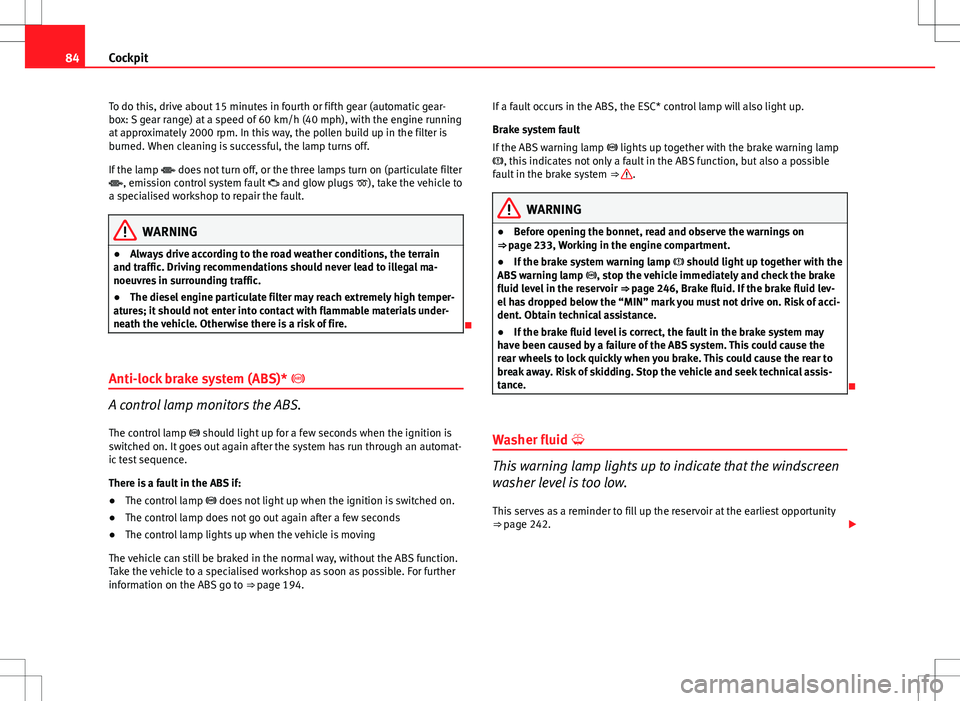
Anti-lock brake system (ABS)*
A control lamp monitors the ABS.
The control lamp should light up for a few seconds when the ignition is
switched on. It goes out again after the system has run through an automat-
ic test sequence.
There is a fault in the ABS if:
● The control lamp does not light up when the ignition is switched on.
● The control lamp does not go out again after a few seconds
● The control lamp lights up when the vehicle is moving
The vehicle can still be braked in the normal way, without the ABS function.
Take the vehicle to a specialised workshop as soon as possible. For further
information on the ABS go to ⇒ page 194. If a fault occurs in the ABS, the ESC* control lamp will also light up.
Brake system fault
If the ABS warning lamp
lights up together with the brake warning lamp
, this indicates not only a fault in the ABS function, but also a possible
fault in the brake system ⇒
.
WARNING
● Before opening the bonnet, read and observe the warnings on
⇒ page 233, Working in the engine compartment.
● If the brake system warning lamp should light up together with the
ABS warning lamp , stop the vehicle immediately and check the brake
fluid level in the reservoir ⇒ page 246, Brake fluid. If the brake fluid lev-
el has dropped below the “MIN” mark you must not drive on. Risk of acci-
dent. Obtain technical assistance.
● If the brake fluid level is correct, the fault in the brake system may
have been caused by a failure of the ABS system. This could cause the
rear wheels to lock quickly when you brake. This could cause the rear to
break away. Risk of skidding. Stop the vehicle and seek technical assis-
tance.
Washer fluid
This warning lamp lights up to indicate that the windscreen
washer level is too low. This serves as a reminder to fill up the reservoir at the earliest opportunity
⇒ page 242.
Page 87 of 317
85
Cockpit
The following message is shown on the instrument panel display* 1)
: REFILL
WINDSCREEN WASHER FLUID .
Alternator
This warning lamp signals a fault in the alternator.
The warning lamp lights up when the ignition is switched on. It should
go out when the engine has started running.
If the warning lamp lights up while driving, the alternator is no longer
charging the battery. You should immediately drive to the nearest special-
ised workshop.
You should avoid using electrical equipment that is not absolutely necessa-
ry because this will drain the battery.
Worn brake pads
If the symbol lights up, have the front brake pads (and, for safety rea-
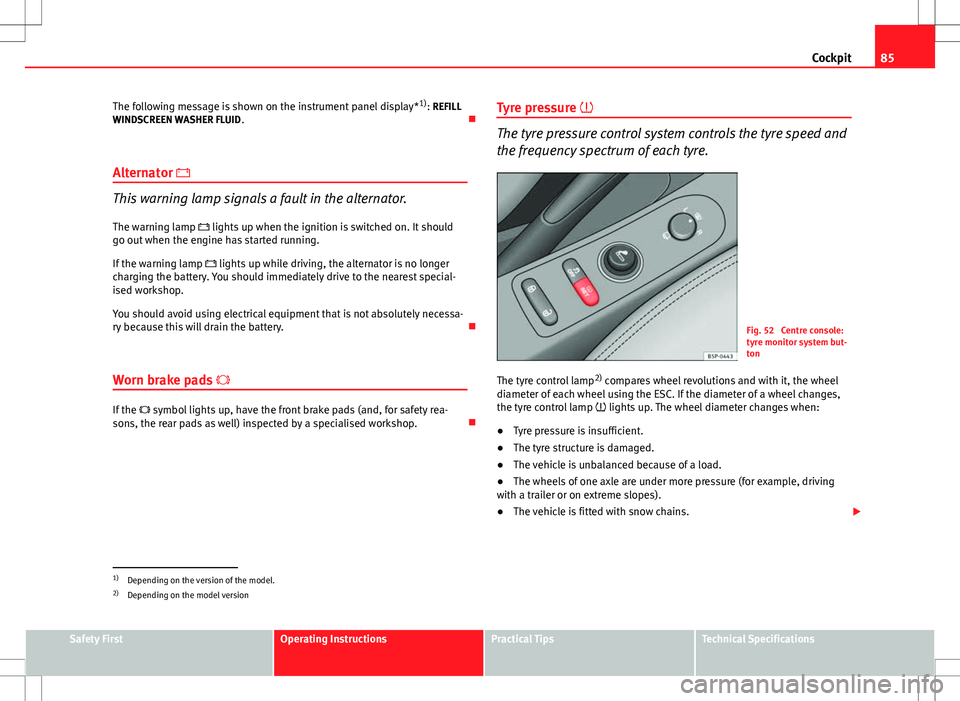
sons, the rear pads as well) inspected by a specialised workshop. Tyre pressure
The tyre pressure control system controls the tyre speed and
the frequency spectrum of each tyre.
Fig. 52 Centre console:
tyre monitor system but-
ton
The tyre control lamp 2)
compares wheel revolutions and with it, the wheel
diameter of each wheel using the ESC. If the diameter of a wheel changes,
the tyre control lamp lights up. The wheel diameter changes when:
● Tyre pressure is insufficient.
● The tyre structure is damaged.
● The vehicle is unbalanced because of a load.
● The wheels of one axle are under more pressure (for example, driving
with a trailer or on extreme slopes).
● The vehicle is fitted with snow chains.
1)
Depending on the version of the model.
2) Depending on the model version
Safety FirstOperating InstructionsPractical TipsTechnical Specifications
Page 118 of 317
116Lights and visibility
● If you are towing a trailer equipped with a rear fog light on a vehicle with
a factory-fitted towing bracket, the rear fog light on the vehicle will automat-
ically be switched off.
● The use of the lighting described here is subject to the relevant statutory
requirements.
● Depending on weather conditions (very cold or wet), the front and tail
lights and the turn signals may be temporarily misted. This has no influence
on the useful life of the lighting system. The lights will soon demist when
they are switched on.
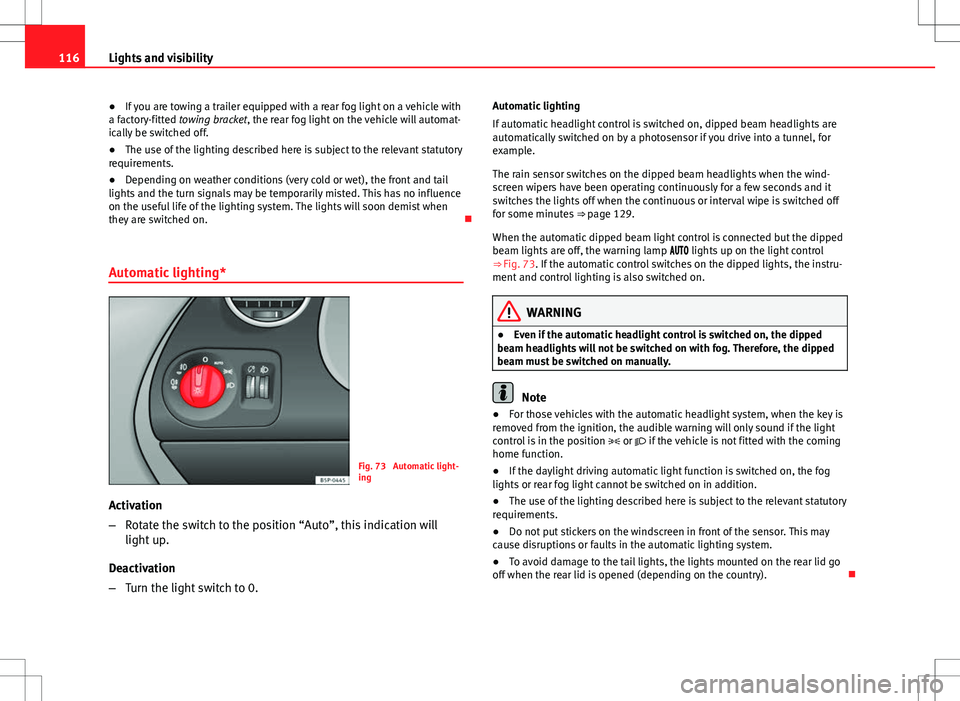
Automatic lighting*
Fig. 73 Automatic light-
ing
Activation
– Rotate the switch to the position “Auto”, this indication will
light up.
Deactivation
– Turn the light switch to 0. Automatic lighting
If automatic headlight control is switched on, dipped beam headlights are
automatically switched on by a photosensor if you drive into a tunnel, for
example.
The rain sensor switches on the dipped beam headlights when the wind-
screen wipers have been operating continuously for a few seconds and it
switches the lights off when the continuous or interval wipe is switched off
for some minutes
⇒ page 129.
When the automatic dipped beam light control is connected but the dipped
beam lights are off, the warning lamp lights up on the light control
⇒ Fig. 73. If the automatic control switches on the dipped lights, the instru-
ment and control lighting is also switched on.
WARNING
● Even if the automatic headlight control is switched on, the dipped
beam headlights will not be switched on with fog. Therefore, the dipped
beam must be switched on manually.
Note
● For those vehicles with the automatic headlight system, when the key is
removed from the ignition, the audible warning will only sound if the light
control is in the position or if the vehicle is not fitted with the coming
home function.
● If the daylight driving automatic light function is switched on, the fog
lights or rear fog light cannot be switched on in addition.
● The use of the lighting described here is subject to the relevant statutory
requirements.
● Do not put stickers on the windscreen in front of the sensor. This may
cause disruptions or faults in the automatic lighting system.
● To avoid damage to the tail lights, the lights mounted on the rear lid go
off when the rear lid is opened (depending on the country).
Page 129 of 317
127
Lights and visibility
Rear door sun blind*
– Pull out the visor and hook it onto the hooks at the top of the
door frame ⇒ Fig. 84.
Windscreen wipers
Front windscreen wipers
The window wiper lever controls the windscreen wipers and
the automatic wash and wipe.
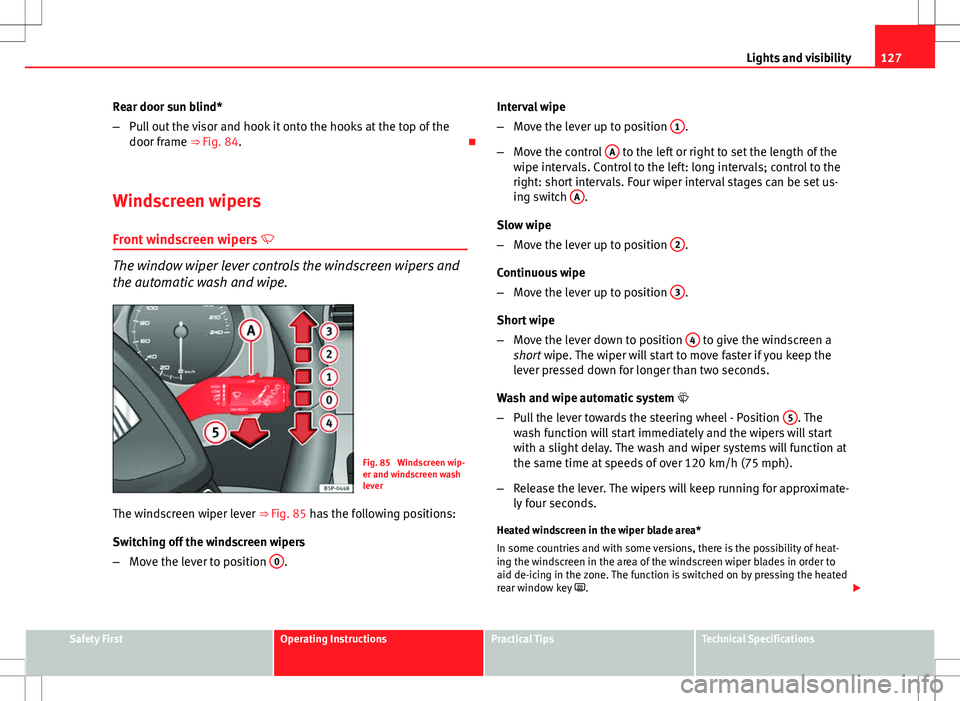
Fig. 85 Windscreen wip-
er and windscreen wash
lever
The windscreen wiper lever ⇒ Fig. 85 has the following positions:
Switching off the windscreen wipers
– Move the lever to position 0
. Interval wipe
–
Move the lever up to position 1
.
– Move the control A
to the left or right to set the length of the
wipe intervals. Control to the left: long intervals; control to the
right: short intervals. Four wiper interval stages can be set us-
ing switch A
.
Slow wipe
– Move the lever up to position 2
.
Continuous wipe
– Move the lever up to position 3
.
Short wipe
– Move the lever down to position 4
to give the windscreen a
short wipe. The wiper will start to move faster if you keep the
lever pressed down for longer than two seconds.
Wash and wipe automatic system
– Pull the lever towards the steering wheel - Position 5
. The
wash function will start immediately and the wipers will start
with a slight delay. The wash and wiper systems will function at
the same time at speeds of over 120 km/h (75 mph).
– Release the lever. The wipers will keep running for approximate-
ly four seconds.
Heated windscreen in the wiper blade area*
In some countries and with some versions, there is the possibility of heat-
ing the windscreen in the area of the windscreen wiper blades in order to
aid de-icing in the zone. The function is switched on by pressing the heated
rear window key .
Safety FirstOperating InstructionsPractical TipsTechnical Specifications
Page 130 of 317
128Lights and visibility
WARNING
● Worn and dirty wiper blades reduce visibility and safety levels while
driving.
● In cold conditions, you should not use the wash/wipe system unless
you have warmed the windscreen with the heating and ventilation sys-
tem. The windscreen washer fluid could otherwise freeze on the wind-
screen and obscure your view of the road.
● Always note the corresponding warnings on ⇒ page 243, Changing
windscreen wiper blades.
CAUTION
In icy conditions, always check that the wiper blades are not frozen to the
glass before using the wipers for the first time. If you switch on the wind-
screen wipers when the wiper blades are frozen to the windscreen, you
could damage both the wiper blades and the wiper motor.
Note
● The windscreen wipers will only work when the ignition is switched on.
● In certain versions of vehicles with alarms, the windscreen wiper will on-
ly work when the ignition is on and the bonnet closed.
● When in use, the wipers do not go as far as the rest position. When the
lever is moved to position 0, they are totally hidden.
● The next speed down will automatically be selected if speed ⇒ Fig. 85
2
or 3 is selected when the vehicle stops. The set speed will be resumed
when the vehicle starts again
● The windscreen will be wiped again after approximately five seconds
once the “automatic wipe/wash system” has been operated, provided the
vehicle is in transit (drip function). If you activate the wipers less than three
seconds after the drip function, a new wash sequence will begin without the
last wipe. For the “drip” function to work again, you have to turn the ignition
off and then on again. ●
When the “interval wipe function” is on, the intervals are directly propor-
tional to the speed. This way, the higher the vehicle speed the shorter the
intervals.
● The wiper will try to wipe away any obstacles that are on the windscreen.
The wiper will stop moving if the obstacle blocks its path. Remove the ob-
stacle and switch the wiper back on again.
● Before removing any objects that may be trapped in the side areas of
the windscreen, always move the wiper arms to the service position (hori-
zontal).
● The heat output of the heated jets is controlled automatically when the
ignition is switched on, depending upon the outside temperature.