low beam Seat Altea XL 2013 Owner's Manual
[x] Cancel search | Manufacturer: SEAT, Model Year: 2013, Model line: Altea XL, Model: Seat Altea XL 2013Pages: 317, PDF Size: 4.69 MB
Page 80 of 317
78Cockpit
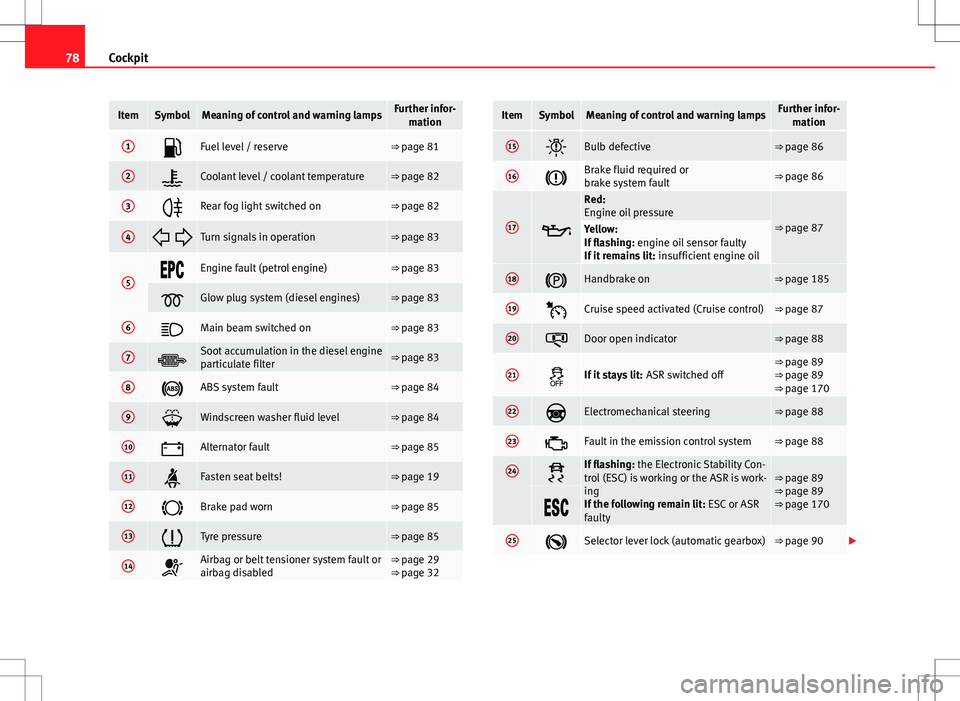
ItemSymbolMeaning of control and warning lampsFurther infor-
mation
1Fuel level / reserve⇒ page 81
2Coolant level / coolant temperature⇒ page 82
3Rear fog light switched on⇒ page 82
4 Turn signals in operation⇒ page 83
5Engine fault (petrol engine)⇒ page 83
Glow plug system (diesel engines)⇒ page 83
6Main beam switched on⇒ page 83
7Soot accumulation in the diesel engine
particulate filter⇒ page 83
8ABS system fault⇒ page 84
9Windscreen washer fluid level⇒ page 84
10Alternator fault⇒ page 85
11Fasten seat belts!⇒ page 19
12Brake pad worn⇒ page 85
13Tyre pressure⇒ page 85
14Airbag or belt tensioner system fault or
airbag disabled⇒ page 29
⇒ page 32
ItemSymbolMeaning of control and warning lampsFurther infor-
mation
15Bulb defective⇒ page 86
16Brake fluid required or
brake system fault⇒ page 86
17
Red:
Engine oil pressure
⇒ page 87Yellow:
If flashing: engine oil sensor faulty
If it remains lit: insufficient engine oil
18Handbrake on⇒ page 185
19Cruise speed activated (Cruise control)⇒ page 87
20Door open indicator⇒ page 88
21If it stays lit: ASR switched off⇒ page 89
⇒ page 89
⇒ page 170
22Electromechanical steering⇒ page 88
23Fault in the emission control system⇒ page 88
24If flashing: the Electronic Stability Con-
trol (ESC) is working or the ASR is work-
ing
If the following remain lit: ESC or ASR
faulty⇒ page 89
⇒ page 89
⇒ page 170
25Selector lever lock (automatic gearbox)⇒ page 90
Page 85 of 317
83
Cockpit
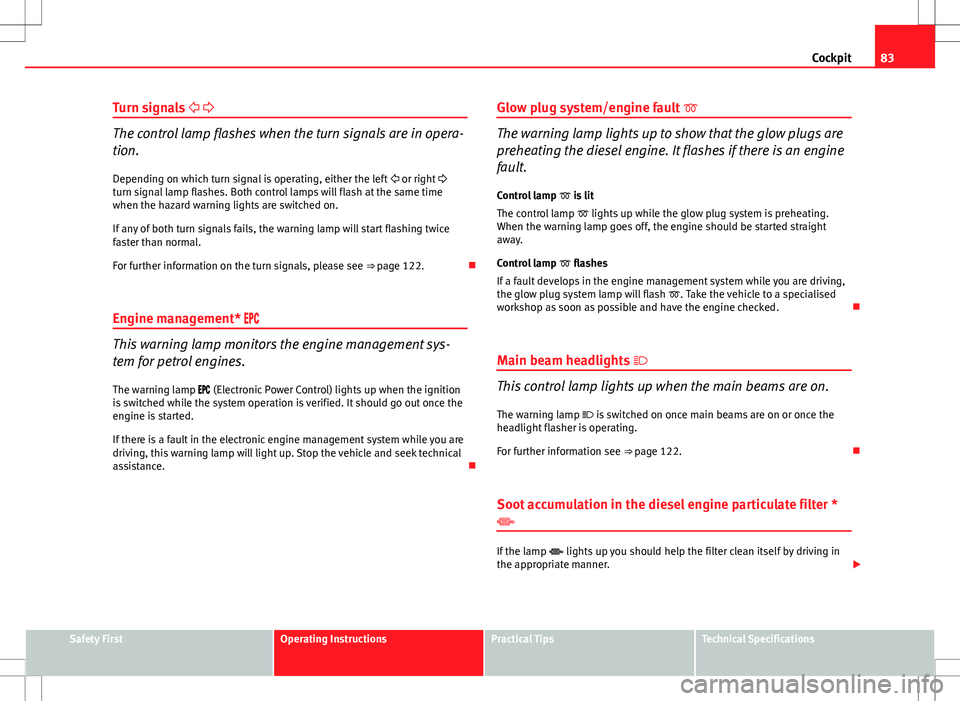
Turn signals
The control lamp flashes when the turn signals are in opera-
tion.
Depending on which turn signal is operating, either the left or right
turn signal lamp flashes. Both control lamps will flash at the same time
when the hazard warning lights are switched on.
If any of both turn signals fails, the warning lamp will start flashing twice
faster than normal.
For further information on the turn signals, please see ⇒ page 122.
Engine management*
This warning lamp monitors the engine management sys-
tem for petrol engines.
The warning lamp (Electronic Power Control) lights up when the ignition
is switched while the system operation is verified. It should go out once the
engine is started.
If there is a fault in the electronic engine management system while you are
driving, this warning lamp will light up. Stop the vehicle and seek technical
assistance. Glow plug system/engine fault
The warning lamp lights up to show that the glow plugs are
preheating the diesel engine. It flashes if there is an engine
fault.
Control lamp is lit
The control lamp lights up while the glow plug system is preheating.
When the warning lamp goes off, the engine should be started straight
away.
Control lamp flashes
If a fault develops in the engine management system while you are driving,
the glow plug system lamp will flash . Take the vehicle to a specialised
workshop as soon as possible and have the engine checked.
Main beam headlights
This control lamp lights up when the main beams are on.
The warning lamp is switched on once main beams are on or once the
headlight flasher is operating.
For further information see ⇒ page 122.
Soot accumulation in the diesel engine particulate filter *
If the lamp lights up you should help the filter clean itself by driving in
the appropriate manner.
Safety FirstOperating InstructionsPractical TipsTechnical Specifications
Page 88 of 317
86Cockpit
● The temporary spare wheel is fitted.
● The wheel on one axle is changed.
Tyre pressure adjustment
Following the modification to tyre pressure or after changing one or more
wheels, the button ⇒ Fig. 52 must be kept pressed while the ignition is on
until an audible warning is heard and the warning lamp goes out.
If the wheels are under excessive load (for example, driving with a trailer or
heavy load), the tyre pressure must be increased to the recommended value
for a full load (see the sticker on the inside of the fuel flap). If the tyre moni-
tor system button is pressed down, the new tyre pressures are confirmed.
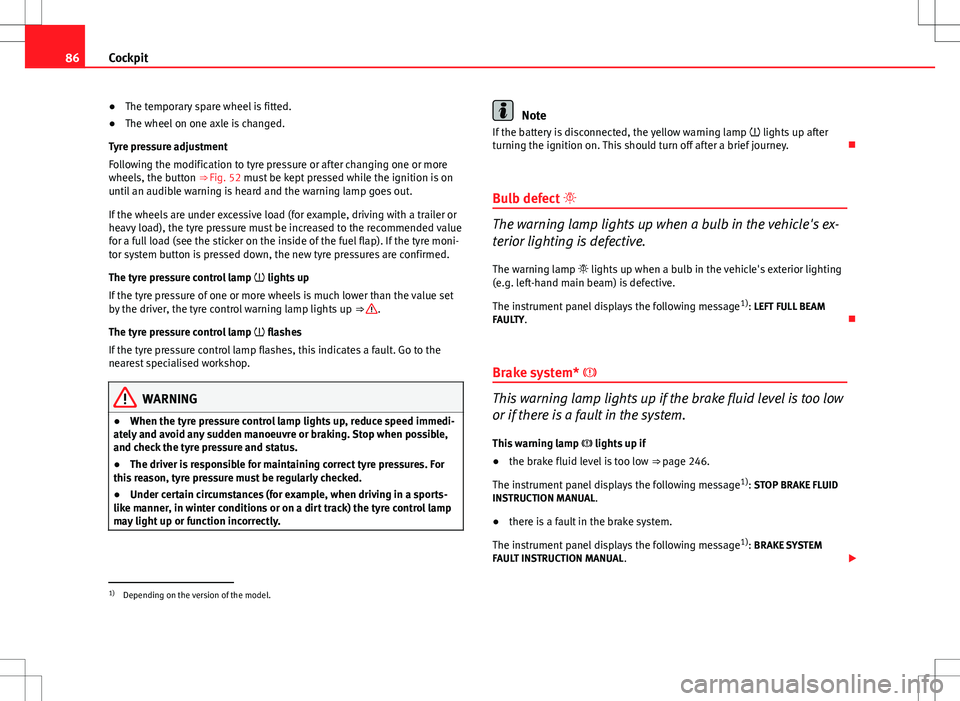
The tyre pressure control lamp lights up
If the tyre pressure of one or more wheels is much lower than the value set
by the driver, the tyre control warning lamp lights up ⇒
.
The tyre pressure control lamp flashes
If the tyre pressure control lamp flashes, this indicates a fault. Go to the
nearest specialised workshop.
WARNING
● When the tyre pressure control lamp lights up, reduce speed immedi-
ately and avoid any sudden manoeuvre or braking. Stop when possible,
and check the tyre pressure and status.
● The driver is responsible for maintaining correct tyre pressures. For
this reason, tyre pressure must be regularly checked.
● Under certain circumstances (for example, when driving in a sports-
like manner, in winter conditions or on a dirt track) the tyre control lamp
may light up or function incorrectly.
Note
If the battery is disconnected, the yellow warning lamp lights up after
turning the ignition on. This should turn off after a brief journey.
Bulb defect
The warning lamp lights up when a bulb in the vehicle's ex-
terior lighting is defective.
The warning lamp lights up when a bulb in the vehicle's exterior lighting
(e.g. left-hand main beam) is defective.
The instrument panel displays the following message 1)
: LEFT FULL BEAM
FAULTY.
Brake system*
This warning lamp lights up if the brake fluid level is too low
or if there is a fault in the system.
This warning lamp lights up if
● the brake fluid level is too low ⇒ page 246.
The instrument panel displays the following message 1)
: STOP BRAKE FLUID
INSTRUCTION MANUAL.
● there is a fault in the brake system.
The instrument panel displays the following message 1)
: BRAKE SYSTEM
FAULT INSTRUCTION MANUAL.
1)
Depending on the version of the model.
Page 121 of 317
119
Lights and visibility
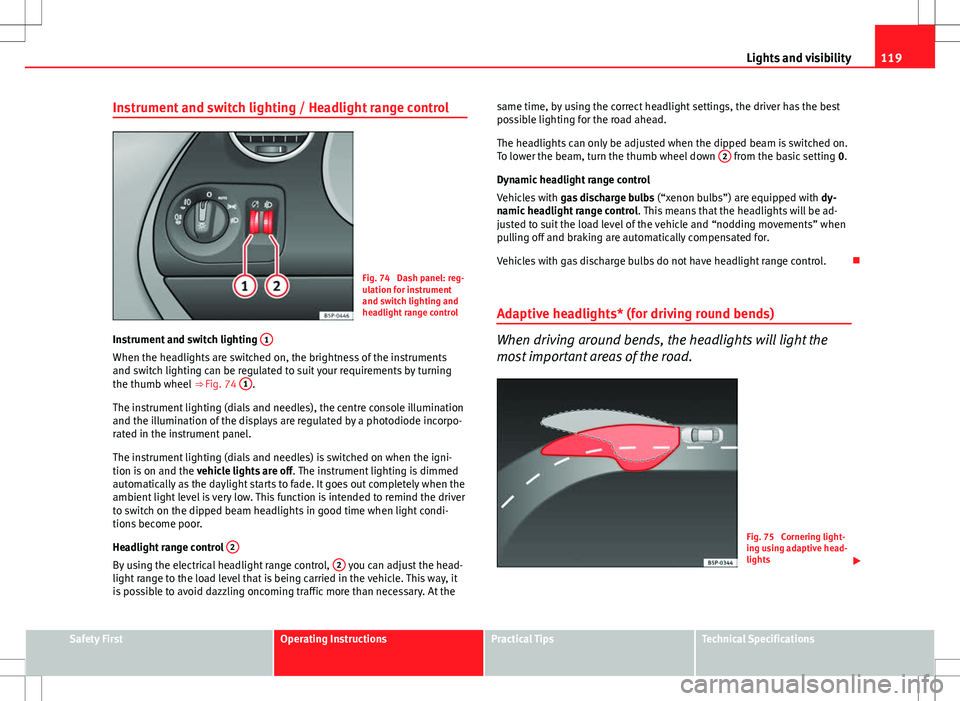
Instrument and switch lighting / Headlight range control
Fig. 74 Dash panel: reg-
ulation for instrument
and switch lighting and
headlight range control
Instrument and switch lighting 1
When the headlights are switched on, the brightness of the instruments
and switch lighting can be regulated to suit your requirements by turning
the thumb wheel
⇒ Fig. 74 1
.
The instrument lighting (dials and needles), the centre console illumination
and the illumination of the displays are regulated by a photodiode incorpo-
rated in the instrument panel.
The instrument lighting (dials and needles) is switched on when the igni-
tion is on and the vehicle lights are off . The instrument lighting is dimmed
automatically as the daylight starts to fade. It goes out completely when the
ambient light level is very low. This function is intended to remind the driver
to switch on the dipped beam headlights in good time when light condi-
tions become poor.
Headlight range control 2
By using the electrical headlight range control, 2 you can adjust the head-
light range to the load level that is being carried in the vehicle. This way, it
is possible to avoid dazzling oncoming traffic more than necessary. At the same time, by using the correct headlight settings, the driver has the best
possible lighting for the road ahead.
The headlights can only be adjusted when the dipped beam is switched on.
To lower the beam, turn the thumb wheel down
2
from the basic setting
0.
Dynamic headlight range control
Vehicles with gas discharge bulbs (“xenon bulbs”) are equipped with dy-
namic headlight range control . This means that the headlights will be ad-
justed to suit the load level of the vehicle and “nodding movements” when
pulling off and braking are automatically compensated for.
Vehicles with gas discharge bulbs do not have headlight range control.
Adaptive headlights* (for driving round bends)
When driving around bends, the headlights will light the
most important areas of the road.
Fig. 75 Cornering light-
ing using adaptive head-
lights
Safety FirstOperating InstructionsPractical TipsTechnical Specifications
Page 124 of 317
122Lights and visibility
Turn signal and main beam headlight lever
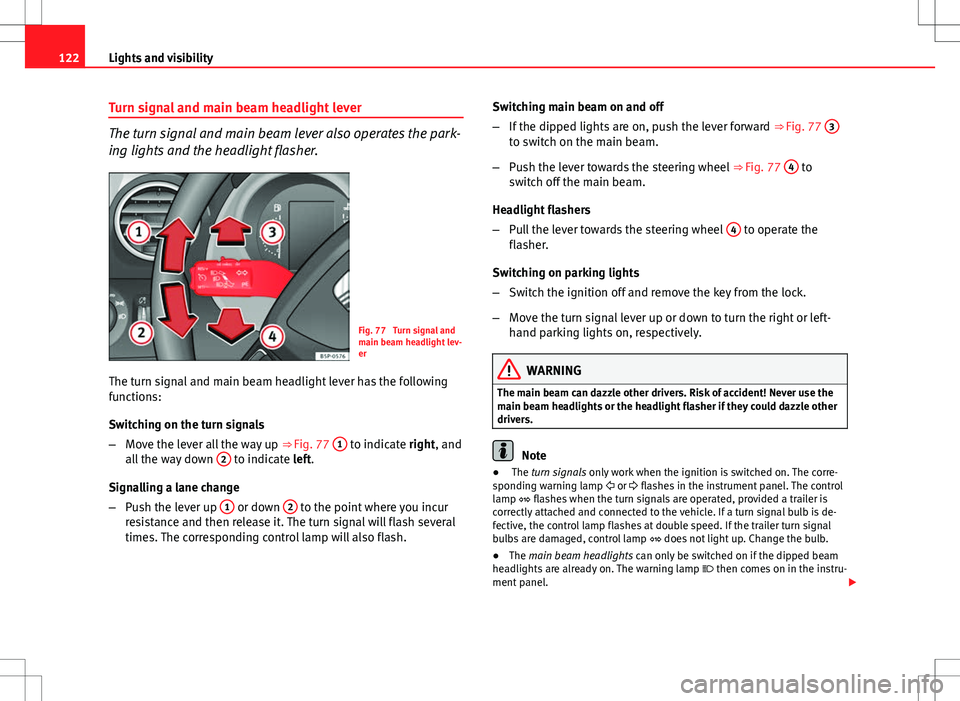
The turn signal and main beam lever also operates the park-
ing lights and the headlight flasher.
Fig. 77 Turn signal and
main beam headlight lev-
er
The turn signal and main beam headlight lever has the following
functions:
Switching on the turn signals
– Move the lever all the way up ⇒ Fig. 77 1
to indicate right, and
all the way down 2 to indicate left.
Signalling a lane change
– Push the lever up 1
or down 2 to the point where you incur
resistance and then release it. The turn signal will flash several
times. The corresponding control lamp will also flash. Switching main beam on and off
–
If the dipped lights are on, push the lever forward ⇒ Fig. 77 3
to switch on the main beam.
– Push the lever towards the steering wheel ⇒ Fig. 77 4
to
switch off the main beam.
Headlight flashers
– Pull the lever towards the steering wheel 4
to operate the
flasher.
Switching on parking lights
– Switch the ignition off and remove the key from the lock.
– Move the turn signal lever up or down to turn the right or left-
hand parking lights on, respectively.
WARNING
The main beam can dazzle other drivers. Risk of accident! Never use the
main beam headlights or the headlight flasher if they could dazzle other
drivers.
Note
● The turn signals only work when the ignition is switched on. The corre-
sponding warning lamp or flashes in the instrument panel. The control
lamp flashes when the turn signals are operated, provided a trailer is
correctly attached and connected to the vehicle. If a turn signal bulb is de-
fective, the control lamp flashes at double speed. If the trailer turn signal
bulbs are damaged, control lamp does not light up. Change the bulb.
● The main beam headlights can only be switched on if the dipped beam
headlights are already on. The warning lamp then comes on in the instru-
ment panel.
Page 192 of 317
190Driving
Cruise speed* (Cruise control system)
Description
The cruise control system is able to maintain the set speed
in the range of 30 km/h (20 mph) to 180 km/h (110 mph).
Once the speed setting has been saved, you may take your foot off the ac-
celerator.
WARNING
It could be dangerous to use the cruise control system if it is not possible
to drive at constant speed.
● Do not use the cruise control system when driving in dense traffic, on
roads with lots of bends or on roads with poor conditions (with ice, slip-
pery surfaces, loose grit or gravel), as this could cause an accident.
● Always switch the cruise control system off after using it in order to
avoid involuntary use.
● It is dangerous to use a set speed which is too high for the current
road, traffic or weather conditions. Risk of accident.
Note
The cruise control cannot maintain a constant speed when descending
downhill. The vehicle will accelerate due to its own weight. Use the foot
brake to slow the vehicle. Switching the cruise control system on and off
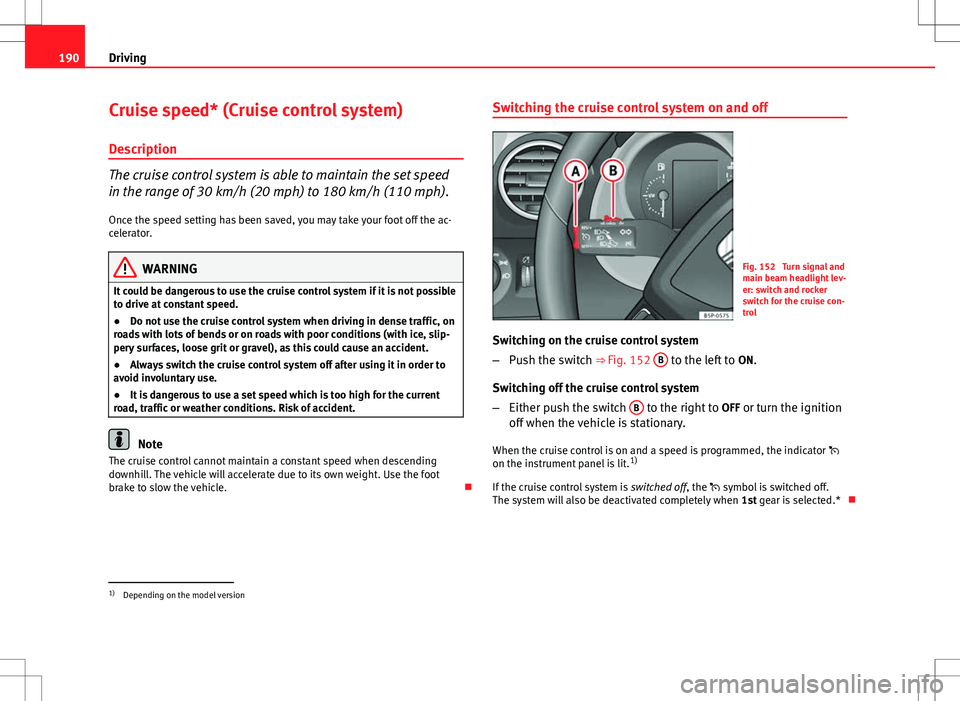
Fig. 152 Turn signal and
main beam headlight lev-
er: switch and rocker
switch for the cruise con-
trol
Switching on the cruise control system
– Push the switch ⇒ Fig. 152 B
to the left to
ON.
Switching off the cruise control system
– Either push the switch B
to the right to
OFF or turn the ignition
off when the vehicle is stationary.
When the cruise control is on and a speed is programmed, the indicator
on the instrument panel is lit. 1)
If the cruise control system is switched off, the symbol is switched off.
The system will also be deactivated completely when 1st gear is selected.*
1)
Depending on the model version
Page 193 of 317
191
Driving
Setting speed*
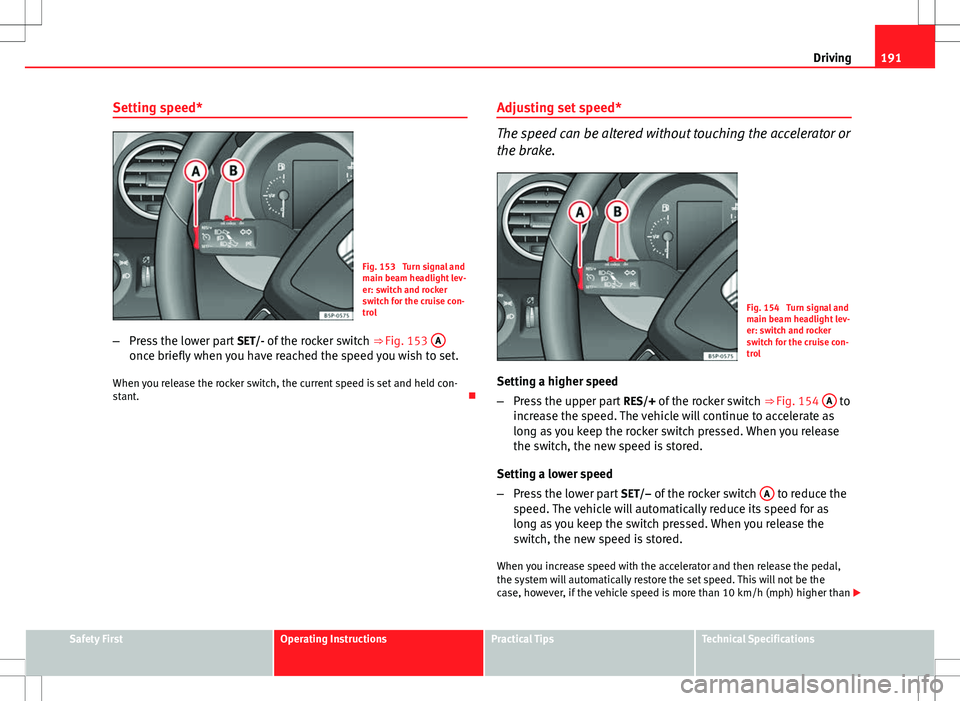
Fig. 153 Turn signal and
main beam headlight lev-
er: switch and rocker
switch for the cruise con-
trol
– Press the lower part SET/- of the rocker switch ⇒ Fig. 153 A
once briefly when you have reached the speed you wish to set.
When you release the rocker switch, the current speed is set and held con-
stant. Adjusting set speed*
The speed can be altered without touching the accelerator or
the brake.
Fig. 154 Turn signal and
main beam headlight lev-
er: switch and rocker
switch for the cruise con-
trol
Setting a higher speed
– Press the upper part RES/+ of the rocker switch ⇒ Fig. 154 A
to
increase the speed. The vehicle will continue to accelerate as
long as you keep the rocker switch pressed. When you release
the switch, the new speed is stored.
Setting a lower speed
– Press the lower part SET/– of the rocker switch A
to reduce the
speed. The vehicle will automatically reduce its speed for as
long as you keep the switch pressed. When you release the
switch, the new speed is stored.
When you increase speed with the accelerator and then release the pedal,
the system will automatically restore the set speed. This will not be the
case, however, if the vehicle speed is more than 10 km/h (mph) higher than
Safety FirstOperating InstructionsPractical TipsTechnical Specifications
Page 194 of 317
192Driving
the stored speed for longer than 5 minutes. The speed will have to be stor-
ed again.
Cruise control is switched off if you reduce speed by depressing the brake
pedal. You can reactivate the control by pressing once on the upper part of
the rocker switch RES/+ ⇒ Fig. 154 A
.
WARNING
It is dangerous to use a set speed which is too high for the current road,
traffic or weather conditions. Risk of accident.
Switching off cruise control temporarily*
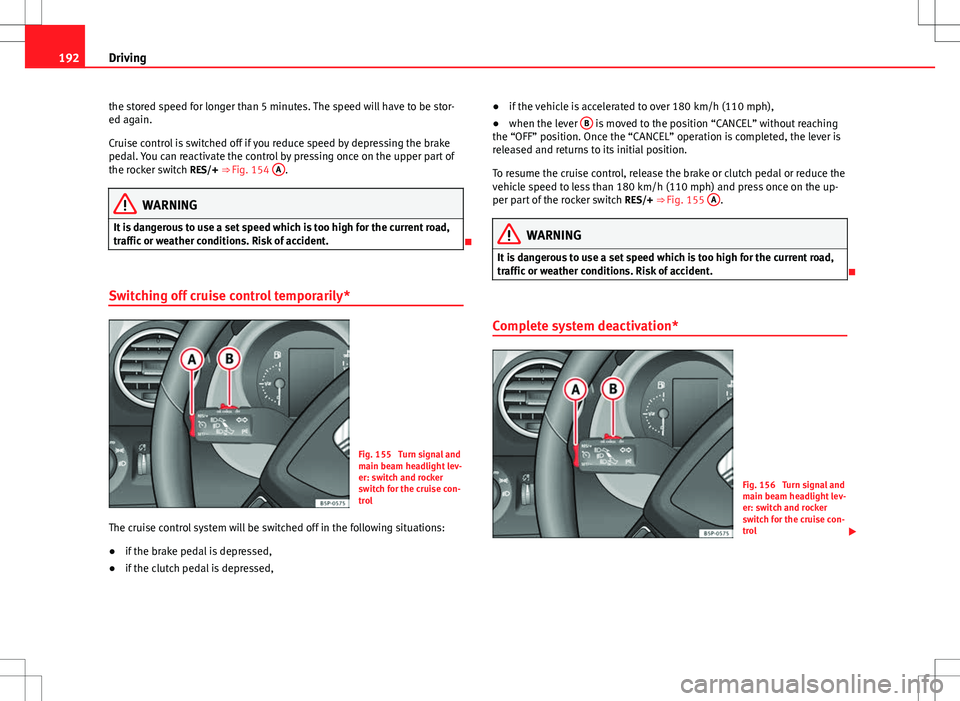
Fig. 155 Turn signal and
main beam headlight lev-
er: switch and rocker
switch for the cruise con-
trol
The cruise control system will be switched off in the following situations:
● if the brake pedal is depressed,
● if the clutch pedal is depressed, ●
if the vehicle is accelerated to over 180 km/h (110 mph),
● when the lever B
is moved to the position “CANCEL” without reaching
the “OFF” position. Once the “CANCEL” operation is completed, the lever is
released and returns to its initial position.
To resume the cruise control, release the brake or clutch pedal or reduce the
vehicle speed to less than 180 km/h (110 mph) and press once on the up-
per part of the rocker switch RES/+ ⇒ Fig. 155 A
.
WARNING
It is dangerous to use a set speed which is too high for the current road,
traffic or weather conditions. Risk of accident.
Complete system deactivation*
Fig. 156 Turn signal and
main beam headlight lev-
er: switch and rocker
switch for the cruise con-
trol
Page 275 of 317
273
If and when
NumberConsumerAmps
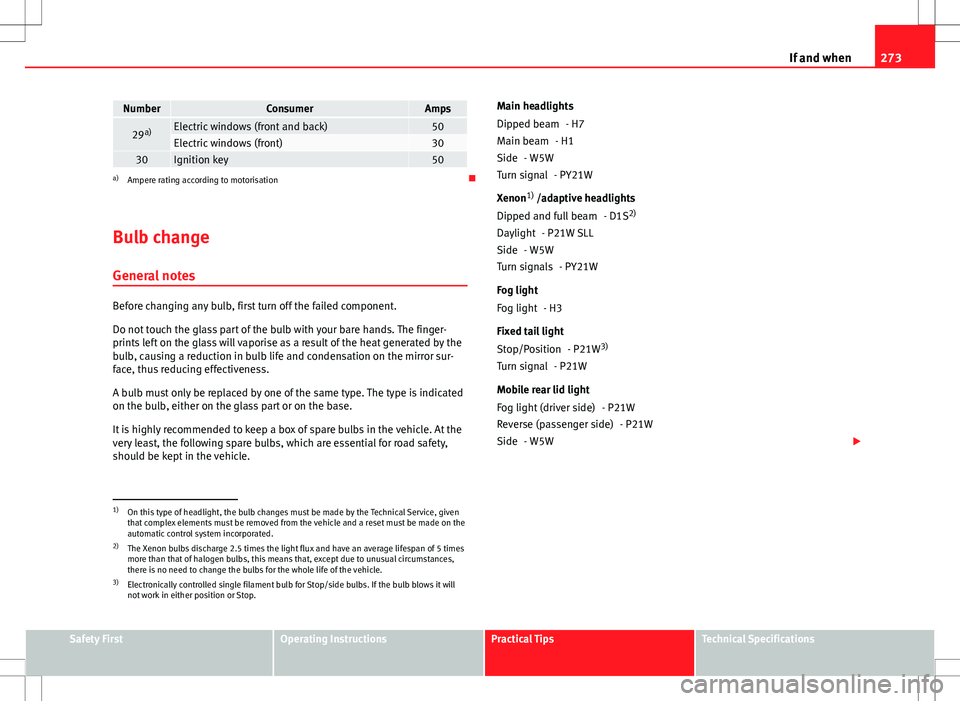
29 a)Electric windows (front and back)50Electric windows (front)3030Ignition key50a)
Ampere rating according to motorisation
Bulb change General notes
Before changing any bulb, first turn off the failed component.
Do not touch the glass part of the bulb with your bare hands. The finger-
prints left on the glass will vaporise as a result of the heat generated by the
bulb, causing a reduction in bulb life and condensation on the mirror sur-
face, thus reducing effectiveness.
A bulb must only be replaced by one of the same type. The type is indicated
on the bulb, either on the glass part or on the base.
It is highly recommended to keep a box of spare bulbs in the vehicle. At the
very least, the following spare bulbs, which are essential for road safety,
should be kept in the vehicle. Main headlights
- H7
- H1
- W5W - PY21W
Xenon 1)
/adaptive headlights
- D1S2)
- P21W SLL
- W5W - PY21W
Fog light - H3
Fixed tail light - P21W3)
- P21W
Mobile rear lid light - P21W- P21W
- W5W
Dipped beam
Main beam
Side
Turn signal
Dipped and full beam
Daylight
Side
Turn signals
Fog light
Stop/Position
Turn signal
Fog light (driver side)
Reverse (passenger side)
Side
1)
On this type of headlight, the bulb changes must be made by the Technical Service, given
that complex elements must be removed from the vehicle and a reset must be made on the
automatic control system incorporated.
2) The Xenon bulbs discharge 2.5 times the light flux and have an average lifespan of 5 times
more than that of halogen bulbs, this means that, except due to unusual circumstances,
there is no need to change the bulbs for the whole life of the vehicle.
3) Electronically controlled single filament bulb for Stop/side bulbs. If the bulb blows it will
not work in either position or Stop.
Safety FirstOperating InstructionsPractical TipsTechnical Specifications
Page 276 of 317
274If and when
Side turn signal - W5W
Number plate light - C5W
Note
● Depending on weather conditions (cold or wet), the front lights, the fog
lights, the tail lights and the turn signals may be temporarily misted. This
has no influence on the useful life of the lighting system. By switching on
the lights, the area through which the beam of light is projected will quickly
be demisted. However, the edges may continue to be misted.
● Please check at regular intervals that all lighting (especially the exterior
lighting) on your vehicle is functioning properly. This is not only in the inter-
est of your own safety, but also that of all other road users.
● Due to the difficulty in accessing some of the bulbs, any replacement
work should be done by a Technical Service. However, the following is a de-
scription of how to change the lamps except for the fog lights* and interior
lamps.
Side turn signal
Number plate light
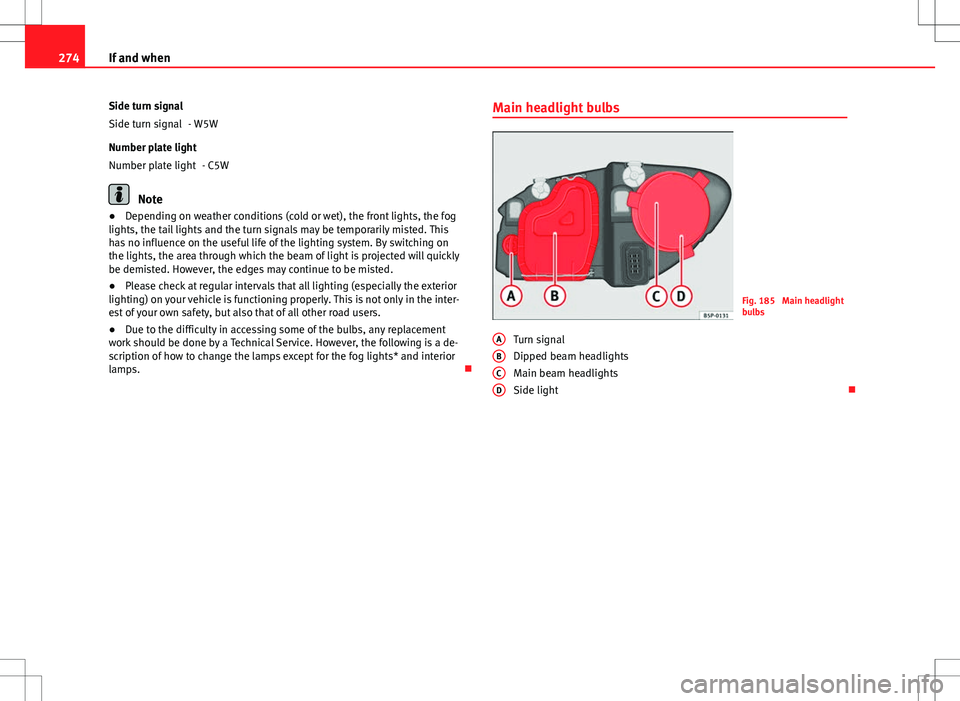
Main headlight bulbs
Fig. 185 Main headlight
bulbs
Turn signal
Dipped beam headlights
Main beam headlights
Side light
A
BCD