change time Seat Altea XL 2015 User Guide
[x] Cancel search | Manufacturer: SEAT, Model Year: 2015, Model line: Altea XL, Model: Seat Altea XL 2015Pages: 236, PDF Size: 4.23 MB
Page 81 of 236

Lights and visibility
Deactivation of the Nordic country solution
● Remove the key from the ignition, press the
turn signal lever down (left turn signal), press
it back to flash position and hold it here.
● Insert the key and switch on the ignition,
holding it in this position for 3 seconds.
Then, switch off the ignition. The Nordic
country solution is now deactivated and the
corresponding lights will not come on.
Coming Home/Leaving Home
function* The Coming Home function is controlled man-
ually. The Leaving Home function is control-
led with a photosensor.
If the Coming Home or Leaving Home func-
tion is connected, the front side and dipped
lights, the tail lights and the number plate
light will light up to provide assistance.
Coming home function
The Coming Home function is activated by
switching off the ignition and briefly flashing
the lights. When the driver door is opened,
the Coming Home lighting comes on. If the
driver door is already open when the lights
are flashed briefly, the Coming Home lighting
comes on
immediately .
When the l a
st door of the vehicle or the rear
lid is closed, the Coming Home function starts and the switching off the headlights is
delayed.
The Coming Home lighting switches off in the
following cases:
● On completion of the time period establish-
ed for the delay in switching off the lights af-
ter all the vehicle doors and the rear lid have
been closed.
● If, 30 seconds after being connected, any
doors or the rear lid remain open.
● If the light switch is turned to position
.
● If the ignition is switched on.
Leaving home function
The Leaving Home function is activated when
the vehicle is unlocked if:
● the light control is in position and
● the photosensor detects “darkness”.
The Leaving Home lighting switches off in the
following cases:
● If the time period for the delay in switching
off the headlights has ended
● If the vehicle is locked again.
● If the light switch is turned to position .
● If the ignition is switched on. Note
The setting for the delay in switching off the
headlights in the Coming Home and Leaving
Home function can be changed or the func-
tion can be connected or disconnected in the
menu Lights and visibility › ›
› page 56.
● If the ignition key is removed while the
lights are on, the lights flash briefly and the
driver door opens, no audible warning is
heard, since with the Coming Home function
on, the lights are automatically switched off
after a period of time (except when the light
switch is in position or . Instrument and switch lighting /
Headlight range control
Fig. 61
Dash panel: Instrument panel and
control dimmers and headlight range control. » 79
Technical specifications
Advice
Operation
Safety
Page 118 of 236
Operation
If the windscreen air output is on and air re-
circulation mode is pressed, this remains ac-
tive. When the recirculation mode is on, if the
air distribution towards the windscreen mode
is selected, the recirculation mode is deacti-
vated. For safety reasons, the air recirculation
mode should not be connected. WARNING
In air recirculation mode, no cold air from the
outside enters the vehicle interior. If the air
conditioning system is switched off, the win-
dows can quickly mist over. Therefore, never
leave the air recirculation mode switched on
for a long time (risk of accident). General notes
Pollution filter
The pollution filter (a combined particulate
filter and active carbon filter) serves as a bar-
rier against impurities in the outside air, in-
cluding dust and pollen.
For the climate control system to work with
maximum efficiency, the pollution filter must
be replaced at the specified intervals in the
Maintenance Programme.
If the filter loses efficiency prematurely due
to use in areas reaching very high pollution
levels, the pollen filter must be changed
more frequently than stated in the Service
Schedule. Air conditioner
When the air conditioning system is switched
on, not only the temperature, but also the air
humidity in the vehicle interior is reduced.
This improves comfort for the vehicle occu-
pants and prevents misting of the windows
when the ambient air humidity is high.
If the air conditioning system cannot be
switched on this may be caused by the fol-
lowing reasons:
● The engine is not running.
● The A/C button is switched off.
● The outside temperature is lower than ap-
proximately +3 °C (+37 °F).
● The air conditioning system compressor
has been temporarily switched off because
the engine coolant temperature is too high.
● The air conditioner fuse is faulty.
● Another fault in the vehicle. Have the air
conditioner checked by a specialised work-
shop. CAUTION
● If you suspect that the air conditioner is
damaged, switch it off with the A/C button to
prevent further damage and have it checked
by a specialised workshop.
● Repairs to the air conditioner require spe-
cialist knowledge and special tools. There-
fore, we recommend you to take the vehicle
to a specialised workshop. Note
● If the humidity and temperature outside the
vehicle are high, condensation can drip off
the evaporator in the cooling system and
form a pool underneath the vehicle. This is
normal and does not indicate a leak.
● Keep the air intake slots in front of the
windscreen free of snow, ice and leaves to en-
sure heating and cooling are not impaired,
and to prevent the windows from misting
over.
● The air from the vents flows through the ve-
hicle interior and is extracted by slots de-
signed for this purpose. Therefore, do not
cover these slots with items of clothing or
other objects.
● The air conditioner operates most effective-
ly with the windows and the sliding/tilting
sunroof* closed. However, if the temperature
inside the vehicle is excessive because of the
sun, the air inside can be cooled faster by
opening the windows for a short time.
● Do not smoke while air recirculation mode
is on, as smoke drawn into the air condition-
ing system leaves residue on the evaporator,
producing a permanent unpleasant odour.
● It is advisable to turn on the air condition-
ing at least once a month, to lubricate the
system gaskets and prevent leaks. If a de-
crease in the cooling capacity is detected, a
Technical Service should be consulted to
check the system. 116
Page 127 of 236
Driving
●
If the handbrake is only partially released,
this will cause the rear brakes to overheat,
which can impair the function of the brake
system and could lead to an accident. This al-
so causes premature wear on the rear brake
pads. CAUTION
Always apply the handbrake before you leave
the vehicle. Put it in 1st gear as well. Parking
The handbrake should always be firmly ap-
plied when the vehicle is parked.
Always note the following points when park-
ing the vehicle:
– Use the brake pedal to stop the vehicle.
– Apply the handbrake.
– Put it in 1st gear.
– Switch the engine off and remove the key
from the ignition. Turn the steering wheel
slightly to engage the steering lock.
– Always take you keys with you when you
leave the vehicle ››› .Additional notes on parking the vehicle on
gradients:
Turn the steering wheel so that the vehicle
rolls against the kerb if it started to roll.
●
If the vehicle is parked facing downhill,
turn the front wheels so that they point to-
wards the kerb .
● If the vehicle is parked facing uphill, turn
the fr ont
wheels so that they point away from
the kerb
.
● Secure the vehicle as usual by applying the
handbrake firmly and putting it in 1st gear. WARNING
● Take measures to reduce the risk of injury
when you leave your vehicle unattended.
● Never park where the hot exhaust system
could ignite inflammable materials, such as
dry grass, low bushes, spilt fuel etc.
● Never allow vehicle occupants to remain in
the vehicle when it is locked. They would be
unable to open the vehicle from the inside,
and could become trapped in the vehicle in
an emergency. In the event of an emergency,
locked doors will delay assistance to vehicle
occupants.
● Never leave children alone in the vehicle.
They could set the vehicle in motion, for ex-
ample, by releasing the handbrake or the
gearbox lever. ●
Depending on weather conditions, it may
become extremely hot or cold inside the vehi-
cle. This can be fatal. Hill driving assistant*
This function is only included in vehicles with
ESC.
The hill driving assistant helps the driver to
move off and upward on a hill without rolling
backward.
The system maintains brake pressure for ap-
proximately 2 seconds after the driver takes
his foot off the brake pedal to prevent the ve-
hicle from rolling backward when starting off.
During these 2 seconds, the driver has
enough time to release the clutch pedal and
accelerate without the vehicle moving and
without having to use the handbrake, making
starting off easier, more comfortable and saf-
er.
These are the basic operation conditions:
● being on a ramp or hill/slope,
● closed doors,
● vehicle completely stationary,
● engine running and foot on the brake,
● besides having a gear engaged or being in
neutral for manual gear change and with the
selector lever at position S,
D
or R for an au-
tomatic gearbox. »
125
Technical specifications
Advice
Operation
Safety
Page 129 of 236
Driving
Automatic gearbox/DSG
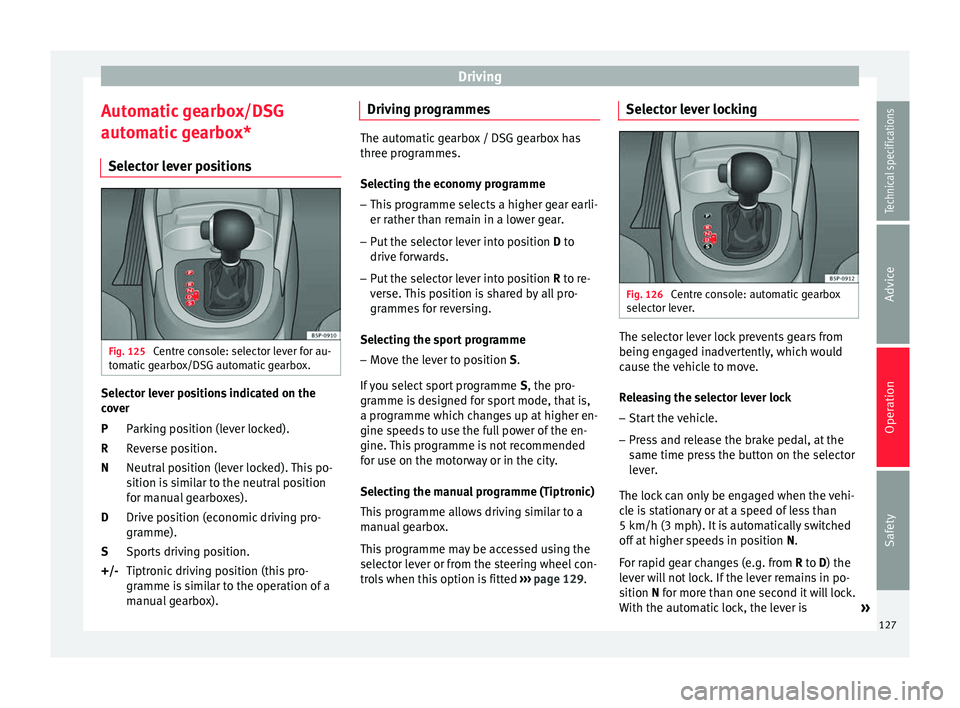
automatic gearbox* Selector lever positions Fig. 125
Centre console: selector lever for au-
tomatic gearbox/DSG automatic gearbox. Selector lever positions indicated on the
cover
Parking position (lever locked).
Reverse position.
Neutral position (lever locked). This po-
sition is similar to the neutral position
for manual gearboxes).
Drive position (economic driving pro-
gramme).
Sports driving position.
Tiptronic driving position (this pro-
gramme is similar to the operation of a
manual gearbox).
P
R
N
D
S
+/- Driving programmes The automatic gearbox / DSG gearbox has
three programmes.
Selecting the economy programme
– This programme selects a higher gear earli-
er rather than remain in a lower gear.
– Put the selector lever into position D to
driv e f
orwards.
– Put the selector lever into position R to re-
ver
se. This position is shared by all pro-
grammes for reversing.
Selecting the sport programme – Move the lever to position S.
If you select sport programme S, the pro-
gr amme i
s designed for sport mode, that is,
a programme which changes up at higher en-
gine speeds to use the full power of the en-
gine. This programme is not recommended
for use on the motorway or in the city.
Selecting the manual programme (Tiptronic)
This programme allows driving similar to a
manual gearbox.
This programme may be accessed using the
selector lever or from the steering wheel con-
trols when this option is fitted ›››
page 129. Selector lever locking
Fig. 126
Centre console: automatic gearbox
selector lever. The selector lever lock prevents gears from
being engaged inadvertently, which would
cause the vehicle to move.
Releasing the selector lever lock
– Start the vehicle.
– Press and release the brake pedal, at the
same time press the button on the selector
lever.
The lock can only be engaged when the vehi-
cle is stationary or at a speed of less than
5 km/h (3 mph). It is automatically switched
off at higher speeds in position N.
F or r
apid gear changes (e.g. from R
to D) the
lever will not lock. If the lever remains in po-
sition
N for more than one second it will lock.
With the automatic lock, the lever is »
127
Technical specifications
Advice
Operation
Safety
Page 130 of 236
Operation
prevented from passing from P
and N to any
other gear without first pressing the brake
pedal.
The selector lever must be put in the position
P
in order to remove the key.
Driving with automatic gearbox/DSG
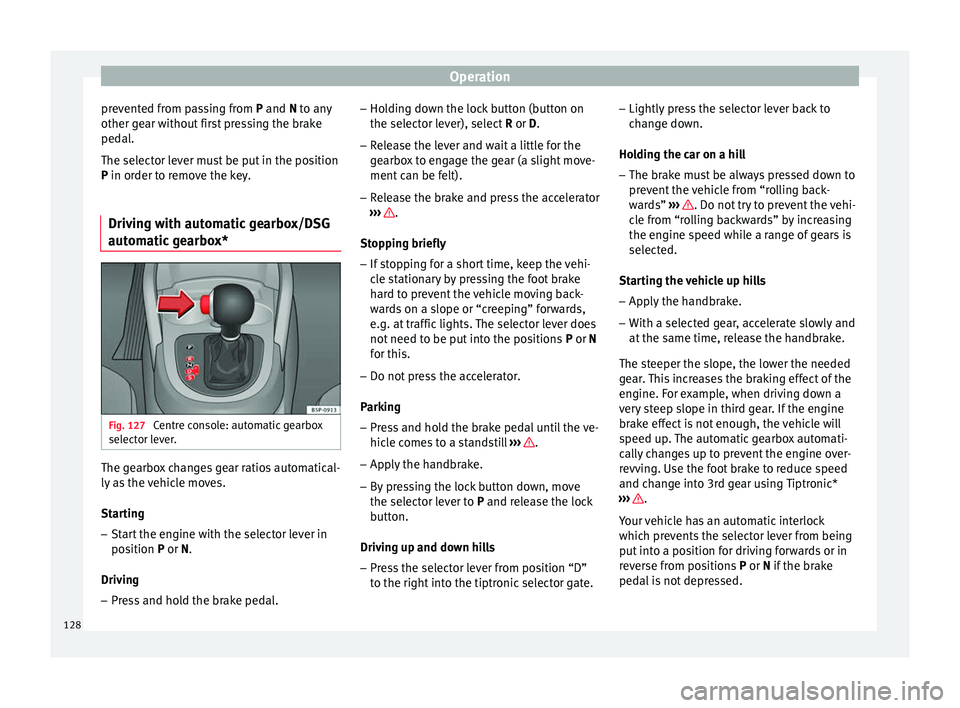
automatic gearbox* Fig. 127
Centre console: automatic gearbox
selector lever. The gearbox changes gear ratios automatical-
ly as the vehicle moves.
Starting
– Start the engine with the selector lever in
position P
or
N.
Driving – Press and hold the brake pedal. –
Holding down the lock button (button on
the selector lever), select R or D.
– Rel
ease the lever and wait a little for the
gearbox to engage the gear (a slight move-
ment can be felt).
– Release the brake and press the accelerator
››› .
Stopping briefly – If stopping for a short time, keep the vehi-
cle stationary by pressing the foot brake
hard to prevent the vehicle moving back-
wards on a slope or “creeping” forwards,
e.g. at traffic lights. The selector lever does
not need to be put into the positions P or N
f or thi
s.
– Do not press the accelerator.
Parking
– Press and hold the brake pedal until the ve-
hicle comes to a standstill ››› .
– Apply the handbrake.
– By pressing the lock button down, move
the selector lever to P
and release the lock
b
utton.
Driving up and down hills
– Press the selector lever from position “D”
to the right into the tiptronic selector gate. –
Lightly press the selector lever back to
change down.
Holding the car on a hill – The brake must be always pressed down to
prevent the vehicle from “rolling back-
wards” ››› . Do not try to prevent the vehi-
cle from “rolling backwards” by increasing
the engine speed while a range of gears is
selected.
Starting the vehicle up hills
– Apply the handbrake.
– With a selected gear, accelerate slowly and
at the same time, release the handbrake.
The steeper the slope, the lower the needed
gear. This increases the braking effect of the
engine. For example, when driving down a
very steep slope in third gear. If the engine
brake effect is not enough, the vehicle will
speed up. The automatic gearbox automati-
cally changes up to prevent the engine over-
revving. Use the foot brake to reduce speed
and change into 3rd gear using Tiptronic*
››› .
Your vehicle has an automatic interlock
which prevents the selector lever from being
put into a position for driving forwards or in
reverse from positions P or N
if the brake
ped
al is not depressed.
128
Page 132 of 236
Operation
– Lightly press the selector lever forward
››› Fig. 128 + to change up to a higher
gear.
– Lightly press the selector lever backward
››› Fig. 128 - to change down to a lower
gear.
Changing gear with the steering wheel
paddle levers* – Press the right paddle lever + towards the
steering wheel to change up ››› Fig. 129 .
– Pr e
ss the left paddle – towards the steer-
ing wheel to change down ››› Fig. 129 .
U s
ing the paddle levers on the steering
wheel, you can access manual driving mode
regardless of the pre-selected driving mode.
General information about driving in
tiptronic mode
When accelerating, the automatic gearbox /
DSG automatic gearbox goes into a higher
gear a little before the engine reaches its
maximum permitted revolutions.
If a lower gear is selected, the automatic
gearbox / DSG automatic gearbox will only
change down when the engine cannot go
over its maximum permitted revolutions.
If “tiptronic” is selected whilst the vehicle is
in motion and the automatic gearbox / DSG
automatic gearbox is in third gear and selec- tor lever position D, “tiptronic” mode will
then also be in third gear.
Changing gears in the normal or sport
programme using the steering wheel paddle
levers
If the paddle levers
››› Fig. 129 are used in
the normal
or sport programme, the system
switches temporarily to “tiptronic” mode. To
exit “Tiptronic” mode again, press the right
paddle shifter +OFF toward the steering
wheel for approximately one second. You will
also leave “Tiptronic” mode if the paddle lev-
ers are not moved for a certain time. Note
● The gearbox controls on the steering wheel
can operate with the selector lever in any po-
sition and with the vehicle in motion. Kick-down feature
This feature allows maximum acceleration.
If you press the accelerator down thoroughly,
the gearbox automatically changes down, de-
pending on speed and engine speed, into a
lower gear to take full advantage of give the
vehicle maximum acceleration.
The gearbox does not change gear until the
engine reaches the maximum determined en-
gine speed for the gear. WARNING
You could lose control of the vehicle if you ac-
celerate on slippery road surfaces. Risk of se-
rious injury.
● Be particularly careful when using the kick-
down features on slippery road surfaces. With
a fast acceleration, the vehicle could lose
traction and skid.
● You should use the kick-down feature only
when traffic and weather conditions allow it
to be used safely. Run-in and economical driving
Running in a new engine The engine needs to be run in over the first
1,500 km.
Up to 1,000 kilometres
– Do not drive at speeds of more than 2/3
the maximum speed.
– Do not accelerate hard.
– Avoid high engine revolutions.
– Do not tow a trailer.
130
Page 135 of 236
Driving
Some tips on how to help you reduce pollu-
tion while saving money are listed below.
Drive anticipating the traffic situation
A vehicle uses most fuel when accelerating.
When you anticipate situations, you have to
brake less often and, thus, accelerate less. If
it is possible, let the vehicle roll with a gear
engaged , for example, if you see a red light
ahe a
d. The braking effect achieved in this
way helps to reduce the wear of brakes and
tyres; emissions and fuel consumption are
reduced to zero (disconnection due to iner-
tia).
Change gear early to save energy
An effective way of saving fuel is to change
up
quickly through the gears. Running the
engine at high rpm in the lower gears uses
an unnecessary amount of fuel.
Manual gearbox: shift up from first to second
gear as soon as possible. We recommend
that, whenever possible, you change to a
higher gear upon reaching 2000 rpm. Follow
the “recommended gear” indication that ap-
pears on the instrument panel ››› page 47.
Avoid driving at high speed
We advise you not to drive at the top speed
permitted by the vehicle. Fuel consumption,
exhaust emissions and noise levels all in- crease very rapidly at higher speeds. Driving
at moderate speeds will help to save fuel.
Avoid idling
It is worthwhile switching off the engine
when waiting in a traffic jam, at level cross-
ings or at traffic lights with a long red phase.
The fuel saved after only 30 - 40 seconds is
greater than the amount of fuel needed to re-
start the engine.
The engine takes a long time to warm up
when it is idling. Mechanical wear and pollu-
tant emissions are also especially high dur-
ing this initial warm-up phase. It is therefore
best to drive off immediately after starting
the engine. Avoid running the engine at high
speed.
Periodic maintenance
Periodic maintenance work guarantees that,
before beginning a journey, you will not con-
sume more than the required amount of fuel.
A well-serviced engine gives you the benefit
of
improved fuel efficiency as well as maxi-
mum reliability and an enhanced resale val-
ue.
A badly serviced engine can consume up to
10% more fuel than necessary.
Avoid short journeys
To reduce the consumption and emission of
polluting exhaust gases, the engine and the exhaust gas filtration systems should reach
the optimum operating temperature.
With the en
gine cold, fuel consumption is
proportionally higher. The engine does not
warm up and fuel consumption does not nor-
malise until having driven approximately four
kilometres. This is why we recommend avoid-
ing short trips whenever possible.
Maintain the correct tyre pressures
Bear in mind that keeping the tyres at an ad-
equate pressure saves fuel. If the tyre pres-
sure is just one bar (14.5 psi / 100 kPa) too
low, fuel consumption can increase by as
much as 5%. Due to the greater rolling resist-
ance, under-inflation also increases tyre wear
and impairs handling.
The tyre pressures should always be checked
when the tyres are cold.
Do not u
se winter tyres
all year round as they
increase fuel consumption by up to 10%.
Avoid unnecessary weight
Given that every kilo of extra weight
will in-
crease the fuel consumption, it is advisable
to always check the luggage compartment to
make sure that no unnecessary loads are be-
ing transported.
A roof rack is often left in place for the sake
of convenience, even when it is no longer
needed. At a speed of 100 km/h (62 mph) »
133
Technical specifications
Advice
Operation
Safety
Page 137 of 236
Driver assistance systems
The ESC system is always active and cannot
be switched off. The ESC switch only switches
the ASR off.
The ASR can be deactivated when wheel spin
is desirable.
For example:
● When driving with snow chains.
● When driving in deep snow or on loose sur-
faces.
● When the vehicle is stuck, to rock it back-
wards and forwards.
Press the button to switch the ASR back on
when you no longer need wheel spin.
Electronic Stability Control (ESC)*
The ESC reduces the risk of skidding by brak-
ing the wheels individually.
The system uses the steering wheel angle
and road speed to calculate the changes of
direction desired by the driver, and constant-
ly compares them with the actual behaviour
of the vehicle. When irregularities occur, for
example, if the vehicle begins to skid, the
ESC brakes the appropriate wheel automati-
cally.
The forces acting on the braked wheel bring
the vehicle back to a stable condition. If the
vehicle tends to oversteer (the rear end
slides out), the system will act on the front
wheel on the outside of the turn. Steering manoeuvre recommendations
This is a complementary safety function in-
cluded in the ESC. This function aids the driv-
er to better stabilize the vehicle in a critical
situation. For example, in case of sudden
braking on a surface with varied adherence,
the vehicle will tend to destabilise its trajec-
tory to the right or to the left. In this case, the
ESC recognises the situation and assists the
driver with a counter steering manoeuvre
from the power steering.
This function simply provides the driver with
a recommended manoeuvre in critical situa-
tions.
The vehicle does not steer itself with this
function, the driver has full control of the ve-
hicle at all times.
WARNING
● Remember that not even the ESC can defy
the laws of physics. This should be kept in
mind, particularly on slippery and wet roads
and when towing a trailer.
● Always adapt your driving style to suit the
condition of the roads and the traffic situa-
tion. The greater safety provided by the ESC
should not encourage you to run any risks. CAUTION
● To ensure that the ESC works correctly, all
four wheels must be fitted with the same
tyres. Any differences in the rolling radius of the tyres can cause the system to reduce en-
gine power when this is not desired.
● Any modifications made to the vehicle (for
example, to the engine, brake system, run-
ning gear or to the combination of wheels
and tyres) may affect the operation of the
ABS, EDL, ESC and ASR. Electronic differential lock (EDL)*
EDL helps the vehicle to start moving, accel-
erate and climb a gradient in slippery condi-
tions where this may otherwise be difficult or
even impossible.
It uses the ABS sensors to monitor the speed
of the driven wheels. In case of an EDL fault,
the warning light for ABS lights up
››› page 41 .
At s
peeds of up to approximately 80 km/h
(50 mph), it is able to balance out differences
in the speed of the driven wheels of approxi-
mately 100 rpm/min caused by a partially
slippery road surface. It does this by braking
the wheel which has lost traction and distrib-
uting more driving force to the other driven
wheel via the differential.
To prevent the disc brake of the braking
wheel from overheating, the EDL cuts out au-
tomatically if subjected to excessive loads.
The vehicle will continue to function normally »
135
Technical specifications
Advice
Operation
Safety
Page 144 of 236
Operation
detected while driving forward. The optical
display changes to towing mode.
Fault messages If you hear a long beep for a few seconds and
the LED on the switch
* starts flashing
when
you switch on the parking aid, a system
fault has occurred. Contact a SEAT official
service or specialised workshop. Note
If the fault is not corrected before you switch
off the ignition, it will only be indicated by
the flashing LED on the switch the next
time y
ou switch on the parking aid. Cruise speed* (cruise control
system - CCS)
Description The CCS is able to maintain the set speed in
the range from approx. 30 km/h (19 mph) to
180 km/h (112 mph).
Once the speed setting has been saved, you
may take your foot off the accelerator. WARNING
It could be dangerous to use the cruise con-
trol system if it is not possible to drive at con-
stant speed.
● Do not use the cruise control system when
driving in dense traffic, on roads with lots of
bends or on roads with poor conditions (with
ice, slippery surfaces, loose grit or gravel), as
this could cause an accident.
● Always switch the cruise control system off
after using it in order to avoid involuntary
use.
● It is dangerous to use a set speed which is
too high for the current road, traffic or weath-
er conditions. Risk of accident. Note
The cruise control cannot maintain a constant
speed when descending downhill. It will in-
crease due to its own weight. Use the foot
brake to slow the vehicle. Switching the cruise control system
on and off
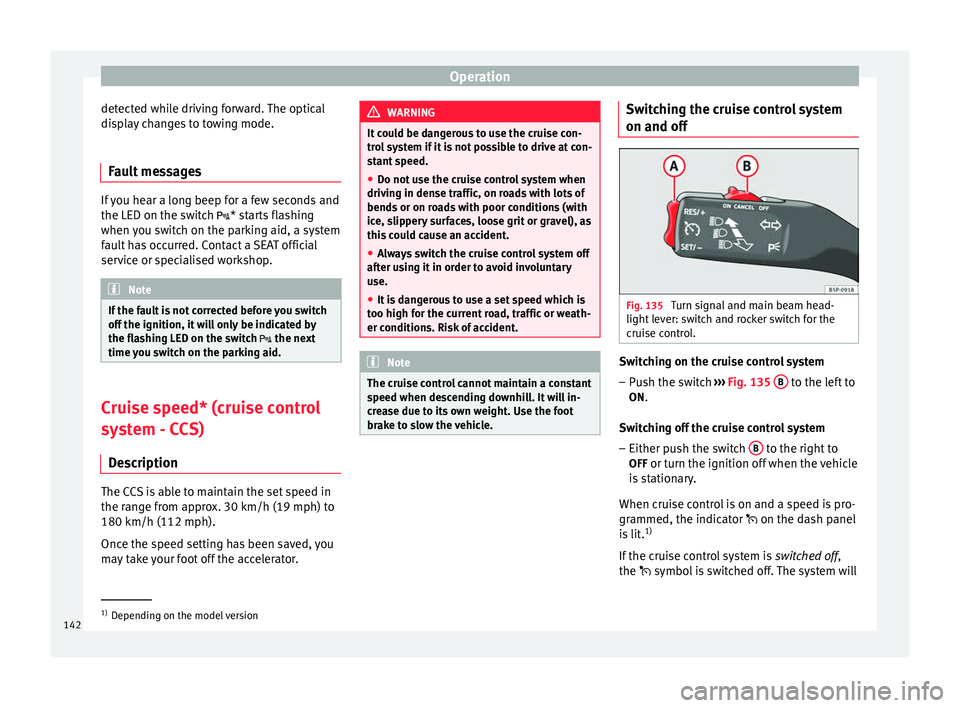
Fig. 135
Turn signal and main beam head-
light lever: switch and rocker switch for the
cruise control. Switching on the cruise control system
– Push the switch ››› Fig. 135 B to the left to
ON.
Switching off the cruise control system
– Either push the switch B to the right to
OFF or turn the ignition off when the vehicle
is stationary.
When cruise control is on and a speed is pro-
grammed, the indicator on the dash panel
is lit. 1)
If the cruise control system is switched off,
the symbo l
is switched off. The system will 1)
Depending on the model version
142
Page 168 of 236
Advice
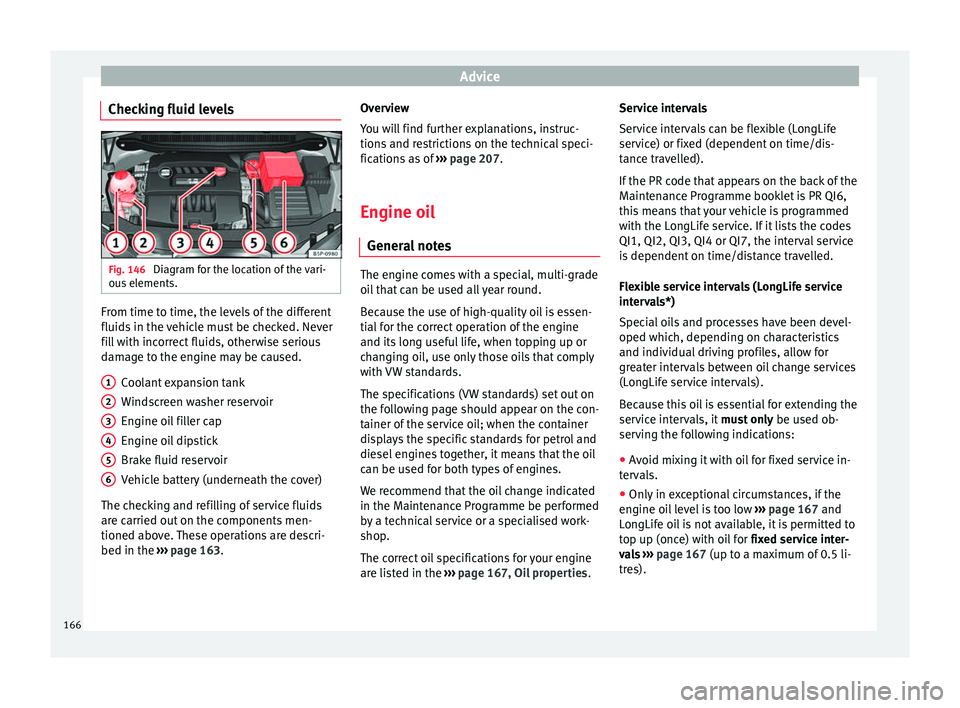
Checking fluid levels Fig. 146
Diagram for the location of the vari-
ous elements. From time to time, the levels of the different
fluids in the vehicle must be checked. Never
fill with incorrect fluids, otherwise serious
damage to the engine may be caused.
Coolant expansion tank
Windscreen washer reservoir
Engine oil filler cap
Engine oil dipstick
Brake fluid reservoir
Vehicle battery (underneath the cover)
The checking and refilling of service fluids
are carried out on the components men-
tioned above. These operations are descri-
bed in the ››› page 163 .
1 2
3
4
5
6 Overview
You will find further explanations, instruc-
tions and restrictions on the technical speci-
fications as of
››› page 207 .
En gine oi
l
General notes The engine comes with a special, multi-grade
oil that can be used all year round.
Because the use of high-quality oil is essen-
tial for the correct operation of the engine
and its long useful life, when topping up or
changing oil, use only those oils that comply
with VW standards.
The specifications (VW standards) set out on
the following page should appear on the con-
tainer of the service oil; when the container
displays the specific standards for petrol and
diesel engines together, it means that the oil
can be used for both types of engines.
We recommend that the oil change indicated
in the Maintenance Programme be performed
by a technical service or a specialised work-
shop.
The correct oil specifications for your engine
are listed in the
›››
page 167, Oil properties .Service intervals
Service intervals can be flexible (LongLife
service) or fixed (dependent on time/dis-
tance travelled).
If the PR code that appears on the back of the
Maintenance Programme booklet is PR QI6,
this means that your vehicle is programmed
with the LongLife service. If it lists the codes
QI1, QI2, QI3, QI4 or QI7, the interval service
is dependent on time/distance travelled.
Flexible service intervals (LongLife service
intervals*)
Special oils and processes have been devel-
oped which, depending on characteristics
and individual driving profiles, allow for
greater intervals between oil change services
(LongLife service intervals).
Because this oil is essential for extending the
service intervals, it
must only be used ob-
serving the following indications:
● Avoid mixing it with oil for fixed service in-
tervals.
● Only in exceptional circumstances, if the
engine oil level is too low ››› page 167 and
LongLife oil is not available, it is permitted to
top up (once) with oil for fixed service inter-
vals › ›
›
page 167 (up to a maximum of 0.5 li-
tres).
166