instrument panel Seat Arona 2017 Repair Manual
[x] Cancel search | Manufacturer: SEAT, Model Year: 2017, Model line: Arona, Model: Seat Arona 2017Pages: 308, PDF Size: 6.66 MB
Page 230 of 308
Operation
making a calculation of tiredness. This is
c on
s
tantly compared with the current driving
behaviour. If the system detects that the driv-
er is tired, an audible warning is given with a
sound and an optic warning is shown with a
symbol and complementary message on the
instrument panel display ››› Fig. 208. The
message on the instrument panel display is
shown for approximately 5 seconds, and de-
pending on the case, is repeated. The system
stores the last message displayed.
The message on the instrument panel display
can be switched off by pressing the button on the windscreen wiper lever or the
b
utt
on on the multi function steering
wheel
›
›
› page 35.
The message can be recalled to the instru-
ment panel display using the multifunction
display ›››
page 35.
Conditions of operation
Driving behaviour is only calculated on
speeds above about 65 km/h (40 mph) up to
around 200 km/h (125 mph).
Switching on and off
Fatigue detection can be activated or deacti-
vated in the Easy Connect system with the button and the
S
ET
TINGS function button
› ›
›
page 118. A mark indicates that the ad-
justment has been activated. System limitations
The Fatigue detection h
as certain limitations
inherent to the system. The following condi-
tions can limit the Fatigue detection or pre-
vent it from functioning.
● At speeds below 65 km/h (40 mph)
● At speeds above 200 km/h (125 mph)
● When cornering
● On roads in poor condition
● In unfavourable weather conditions
● When a sporty driving style is employed
● In the event of a serious distraction to the
driver
Fatigue det
ection will be restored when the
vehicle is stopped for more than 15 minutes,
when the ignition is switched off or when the
driver has unbuckled their seat belt and
opened the door.
In the event of slow driving during a long pe-
riod of time (below 65 km/h, 40 mph) the
system automatically re-establishes the tired-
ness calculation. When driving at a faster
speed the driving behaviour will be recalcula-
ted. Park Assist*
Introduction The Park Assist system is an additional func-
tion of P
arkPi
lot ››› page 236 and helps the
driver to:
● find a suitable parking space,
● select a parking mode,
● park driving in reverse in suitable perpen-
dicul
ar and parallel spaces,
● park driving forwards in suitable perpen-
dicu l
ar spaces,
● exit a parking space driving forwards from
a paral
lel space.
In vehicles with a Park Assist system and fac-
tory radio the front, rear and side areas are
represented, and the position of obstacles is
shown relative to the vehicle.
The Park Assist system is subject to certain
limitations inherent to the system and its use
requires special attention by the driver ››› .
WARNING
The smart technology incorporated into the
Park As
sist system cannot overcome the lim-
its imposed by the laws of physics; it only
works within the limits of the system. The
greater convenience provided by Park Assist
should never tempt you to take any risk that 228
Page 232 of 308
Operation
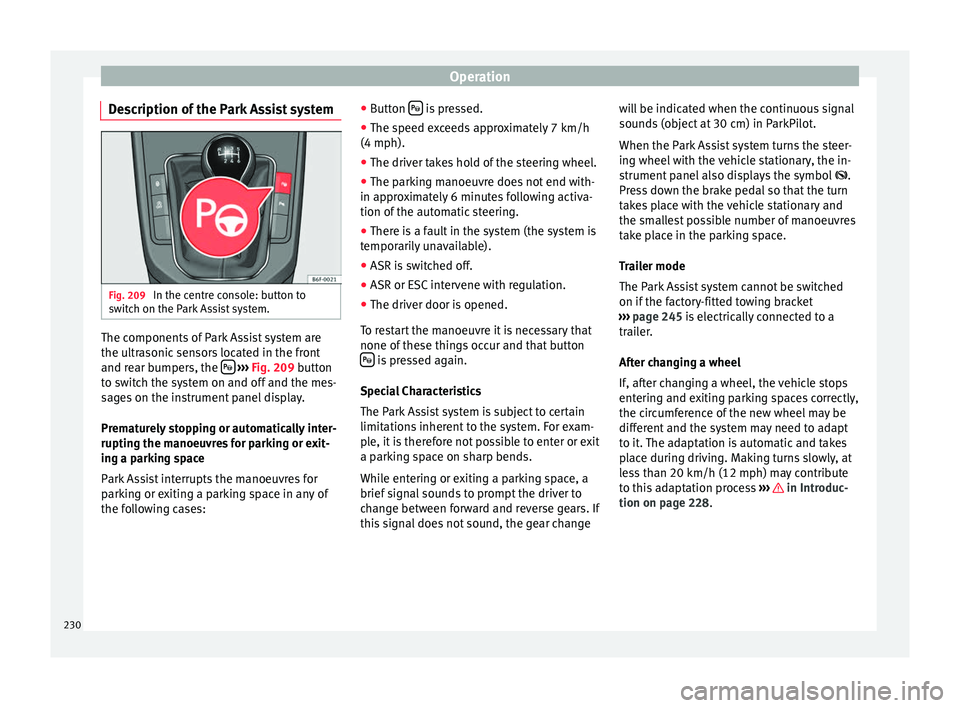
Description of the Park Assist system Fig. 209
In the centre console: button to
sw it
c
h on the Park Assist system. The components of Park Assist system are
the u
ltr
a
sonic sensors located in the front
and rear bumpers, the
› ›
› Fig. 209
button
to switch the system on and off and the mes-
sages on the instrument panel display.
Prematurely stopping or automatically inter-
rupting the manoeuvres for parking or exit-
ing a parking space
Park Assist interrupts the manoeuvres for
parking or exiting a parking space in any of
the following cases: ●
Button is pressed.
● The speed exceeds approximately 7 km/h
(4 mph).
● The driver takes hold of the steering wheel.
● The parking manoeuvre does not end with-
in ap pr
o
ximately 6 minutes following activa-
tion of the automatic steering.
● There is a fault in the system (the system is
temporari
ly unavailable).
● ASR is switched off.
● ASR or ESC intervene with regulation.
● The driver door is opened.
To re
start the manoeuvre it is necessary that
none of these things occur and that button is pressed again.
S pec
i
al Characteristics
The Park Assist system is subject to certain
limitations inherent to the system. For exam-
ple, it is therefore not possible to enter or exit
a parking space on sharp bends.
While entering or exiting a parking space, a
brief signal sounds to prompt the driver to
change between forward and reverse gears. If
this signal does not sound, the gear change will be indicated when the continuous signal
sounds
(object at 30 cm) in ParkPilot.
When the Park Assist system turns the steer-
ing wheel with the vehicle stationary, the in-
strument panel also displays the symbol .
Press down the brake pedal so that the turn
takes place with the vehicle stationary and
the smallest possible number of manoeuvres
take place in the parking space.
Trailer mode
The Park Assist system cannot be switched
on if the factory-fitted towing bracket
››› page 245 is electrically connected to a
trailer.
After changing a wheel
If, after changing a wheel, the vehicle stops
entering and exiting parking spaces correctly,
the circumference of the new wheel may be
different and the system may need to adapt
to it. The adaptation is automatic and takes
place during driving. Making turns slowly, at
less than 20 km/h (12 mph) may contribute
to this adaptation process ››› in Introduc-
tion on p ag
e 228
.
230
Page 233 of 308

Driver assistance systems
Selecting a parking mode Fig. 210
Overview of reduced displays for park-
ing mode s:
Parallel parking in reverse. Per-
pendicular parking in reverse. Perpendicular
parking forwards. Fig. 211
On the instrument panel display:
dis p
laying the Park Assist system with re-
duced display. Selecting a parking mode with Park Assist
w
ith prior s
t
ep in front of the space
After activating the Park Assist system and
after detecting a parking space, the display
on the instrument panel proposes a parking
mode. The Park Assist system selects the
parking mode automatically. The selected mode is shown on the instrument panel dis-
pla
y ››› Fig. 211. The reduced display of other
possible parking modes is also shown
››› Fig. 210. If the mode selected by the sys-
tem does not correspond to the desired
mode, you can select another mode by press-
ing button
› ››
Fig. 209
.
Action
1.The necessary conditions to park with Park Assist
have to be met ››› page 233.
2.
Press button .
A control lamp on the button lights up when
the system is switched on. Additionally, the se-
lected parking mode is shown on the instrument
panel display and the reduced display shows an-
other parking mode it can be changed to.
Action
3.
Turn on the corresponding turn signal towards
the side of the road where you are parking. The
instrument panel displays the side correspond-
ing to the road. By default, if the turn signal is
not on, it parks on the right in the direction of
traffic.
4.
If necessary, press the button again to
change parking mode.
Once you have switched to all possible parking
modes, if the button is pressed again, the
system switches off.
5.Press the button again to switch the system
back on.
6.Follow the instructions displayed on the instru-
ment panel while paying attention to traffic and
drive the vehicle past the parking space.
» 231
Technical data
Advice
Operation
Emergencies
Safety
Page 234 of 308
Operation
Special case of perpendicular parking space
t o p
ark
forwards without driving past first
Action
1.The necessary conditions to park with Park Assist
have to be met ››› page 233.
2.Drive forward towards the parking space while
paying attention to traffic and stop the vehicle.
Action
3.
Press the button once.
A control lamp on the button lights up when
the system is switched on. Additionally, the se-
lected parking mode is shown on the instrument
panel display without reduced display.
4.Release the steering wheel ››› in Introduction
on page 229. 232
Page 235 of 308
Driver assistance systems
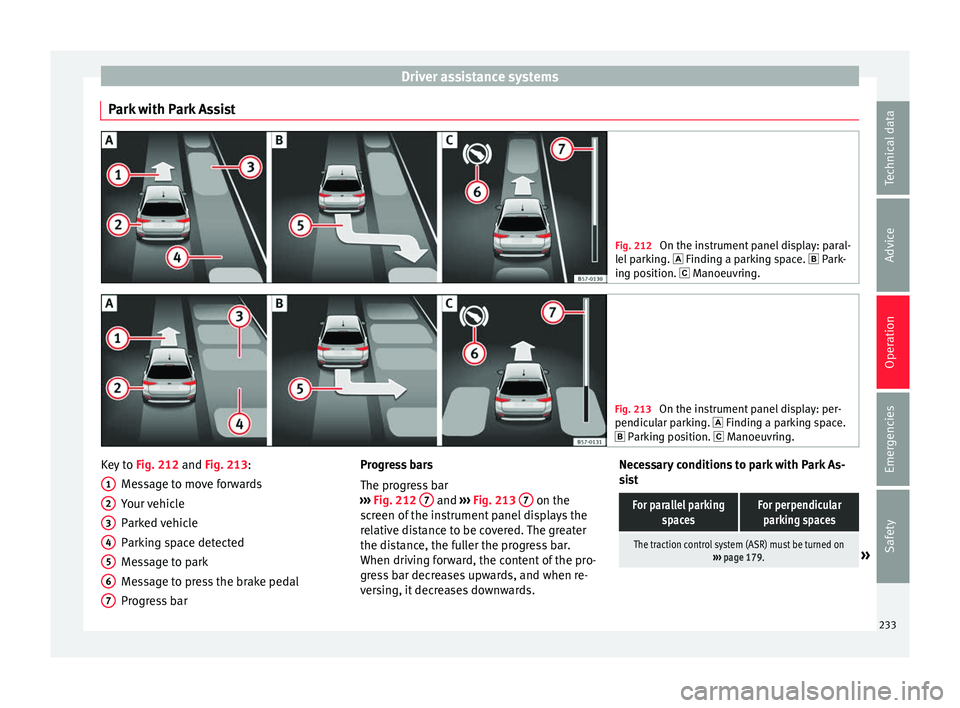
Park with Park Assist Fig. 212
On the instrument panel display: paral-
lel p
arking. Finding a parking space. Park-
ing position. Manoeuvring. Fig. 213
On the instrument panel display: per-
pendicu l
ar parking. Finding a parking space.
Parking position. Manoeuvring. Key to
Fig. 212 and Fig. 213:
M e
s
sage to move forwards
Your vehicle
Parked vehicle
Parking space detected
Message to park
Message to press the brake pedal
Progress bar
1 2
3
4
5
6
7 Progress bars
The pr
ogr
e
ss bar
››› Fig. 212 7 and
›››
Fig. 213 7 on the
s c
r
een of the instrument panel displays the
relative distance to be covered. The greater
the distance, the fuller the progress bar.
When driving forward, the content of the pro-
gress bar decreases upwards, and when re-
versing, it decreases downwards. Necessary conditions to park with Park As-
sis
t
For parallel parking spacesFor perpendicularparking spaces
The traction control system (ASR) must be turned on ››› page 179.» 233
Technical data
Advice
Operation
Emergencies
Safety
Page 236 of 308
OperationFor parallel parking
spacesFor perpendicularparking spaces
Do not exceed approxi-
mately 40 km/h (25 mph)
when driving past the parking space.Do not exceed approxi-
mately 20 km/h (12 mph)
when driving past the parking space.
Keep a distance between 0.5 and 2.0 metres when driv- ing past the parking space.
Length of the space:
length of the vehicle + 0.8 metresWidth of the space: width
of the vehicle + 0.8 me- tres
Do not exceed approximately 7 km/h (4 mph) when
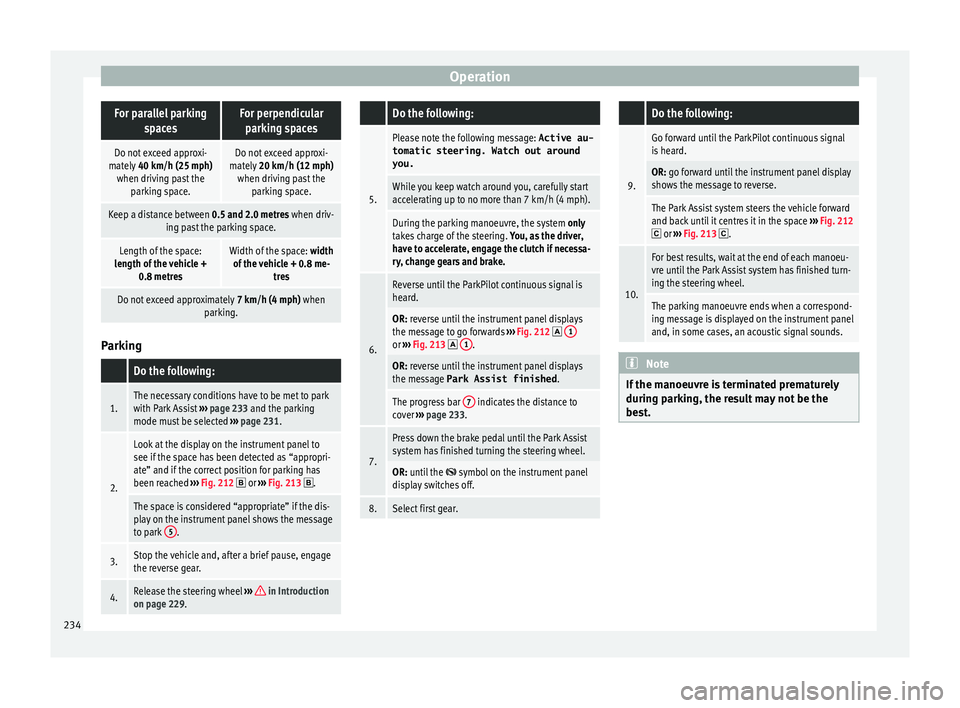
parking. Parking
Do the following:
1.The necessary conditions have to be met to park
with Park Assist
››› page 233 and the parking
mode must be selected ››› page 231.
2.
Look at the display on the instrument panel to
see if the space has been detected as “appropri-
ate” and if the correct position for parking has
been reached ››› Fig. 212
or ››› Fig. 213 .
The space is considered “appropriate” if the dis-
play on the instrument panel shows the message
to park 5
.
3.Stop the vehicle and, after a brief pause, engage
the reverse gear.
4.Release the steering wheel
››› in Introduction
on page 229.
Do the following:
5.
Please note the following message: Active au-
tomatic steering. Watch out around
you.
While you keep watch around you, carefully start
accelerating up to no more than 7 km/h (4 mph).
During the parking manoeuvre, the system only
takes charge of the steering. You, as the driver,
have to accelerate, engage the clutch if necessa-
ry, change gears and brake.
6.
Reverse until the ParkPilot continuous signal is
heard.
OR: reverse until the instrument panel displays
the message to go forwards ››› Fig. 212 1or
››› Fig. 213 1.
OR: reverse until the instrument panel displays
the message Park Assist finished
.
The progress bar 7 indicates the distance to
cover ››› page 233.
7.
Press down the brake pedal until the Park Assist
system has finished turning the steering wheel.
OR: until the symbol on the instrument panel
display switches off.
8.Select first gear.
Do the following:
9.
Go forward until the ParkPilot continuous signal
is heard.
OR: go forward until the instrument panel display
shows the message to reverse.
The Park Assist system steers the vehicle forward
and back until it centres it in the space ››› Fig. 212
or ››› Fig. 213 .
10.
For best results, wait at the end of each manoeu-
vre until the Park Assist system has finished turn-
ing the steering wheel.
The parking manoeuvre ends when a correspond-
ing message is displayed on the instrument panel
and, in some cases, an acoustic signal sounds. Note
If the manoeuvre is terminated prematurely
during p ark
ing, the result may not be the
best. 234
Page 237 of 308
Driver assistance systems
Exiting a parking space with Park As-
s i
s
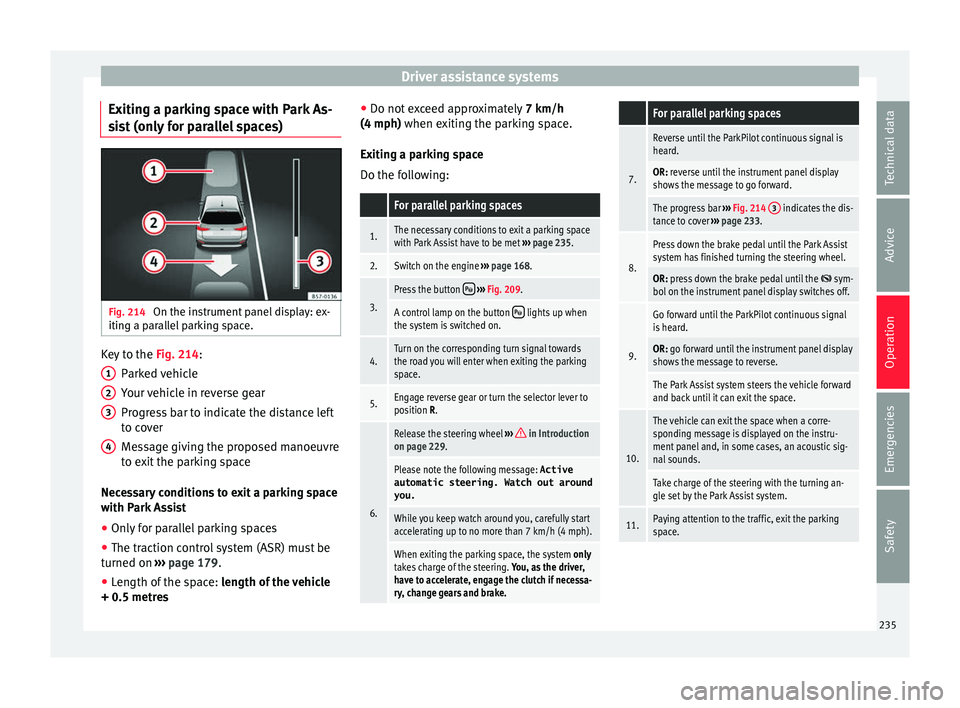
t (only for parallel spaces) Fig. 214
On the instrument panel display: ex-
itin g a p
ar
allel parking space. Key to the
Fig. 214:
P ark
ed
vehicle
Your vehicle in reverse gear
Progress bar to indicate the distance left
to cover
Message giving the proposed manoeuvre
to exit the parking space
Necessary conditions to exit a parking space
with Park Assist
● Only for parallel parking spaces
● The traction control system (ASR) must be
turned on ››
› page 179.
● Length of the space: leng
th of the vehicle
+ 0.5 metres 1 2
3
4 ●
Do not e
x
ceed approximately 7 km/h
(4 mph) when exiting the parking space.
Exiting a parking space
Do the following:
For parallel parking spaces
1.The necessary conditions to exit a parking space
with Park Assist have to be met ››› page 235.
2.Switch on the engine ››› page 168.
3.
Press the button ››› Fig. 209.
A control lamp on the button lights up when
the system is switched on.
4.Turn on the corresponding turn signal towards
the road you will enter when exiting the parking
space.
5.Engage reverse gear or turn the selector lever to
position R.
6.
Release the steering wheel ››› in Introduction
on page 229.
Please note the following message: Active
automatic steering. Watch out around
you.
While you keep watch around you, carefully start
accelerating up to no more than 7 km/h (4 mph).
When exiting the parking space, the system only
takes charge of the steering. You, as the driver,
have to accelerate, engage the clutch if necessa-
ry, change gears and brake.
For parallel parking spaces
7.
Reverse until the ParkPilot continuous signal is
heard.
OR: reverse until the instrument panel display
shows the message to go forward.
The progress bar ››› Fig. 214 3 indicates the dis-
tance to cover ››› page 233.
8.
Press down the brake pedal until the Park Assist
system has finished turning the steering wheel.
OR: press down the brake pedal until the sym-
bol on the instrument panel display switches off.
9.
Go forward until the ParkPilot continuous signal
is heard.
OR: go forward until the instrument panel display
shows the message to reverse.
The Park Assist system steers the vehicle forward
and back until it can exit the space.
10.
The vehicle can exit the space when a corre-
sponding message is displayed on the instru-
ment panel and, in some cases, an acoustic sig-
nal sounds.
Take charge of the steering with the turning an-
gle set by the Park Assist system.
11.Paying attention to the traffic, exit the parking
space. 235
Technical data
Advice
Operation
Emergencies
Safety
Page 243 of 308

Driver assistance systems
Error messages When the Parking Aid is activated or when it
is
sw
itched on, if a message reporting a Park-
ing aid error is displayed on the instrument
panel, there is a fault in the system.
If the fault doesn't disappear before discon-
necting the ignition, next time that parking
aid is engaged in reverse, it will not be indi-
cated.
Parking System Plus*
If there is a fault in the parking aid system a
message will appear on the instrument panel
indicating the error. In addition the key
LED will blink.
If there is a fault in a sensor, the symbol is
displayed on the Easy Connect display in
front of/behind the vehicle. If a rear sensor is
faulty, only the obstacles in the areas A and
B are displayed
››
›
Fig. 215. If a front sensor
is faulty, only the obstacles in the areas Cand
D are displayed.
Hav e the f
au
lt corrected by a specialised
workshop without delay.
Towing bracket In vehicles equipped with a towing bracket
dev
ic
e fr
om the factory, when the trailer is
connected electrically, the Parking Aid rear sensors will not be activated when reverse
gear i
s engaged, when the selector lever is
turned to position R or when the button is
pressed.
Parking System Plus
The distance to possible obstacles at the rear
of the vehicle will not be displayed on the
screen and nor will it be indicated by means
of audible sound signals.
The Easy Connect system screen will only dis-
play objects detected at the front, and the ve-
hicle's trajectory will be hidden.
Braking while manoeuvring function* 3 Only
valid with Parking System Plus
The emer
gency braking function is used to
minimise damage in the event of a collision.
Depending on the equipment, if the Parking
Aid is active, the braking while manoeuvring
function activates emergency braking when it
detects an obstacle in the vehicle’s path that
could cause a collision, driving forwards or in
reverse.
The function will not brake if the Parking Aid
is activated automatically. For the system to
operate, manoeuvring speed must be greater
than 2.5 km/h and less than 10 km/h.
Following an intervention, the braking while
manoeuvring function will be inactive in the same direction of travel for 5 metres. Once
the ge
ar i
s changed, or the selector lever’s
position is changed, the function will be ac-
tive again. The Parking Aid’s limitations ap-
ply.
The braking while manoeuvring function is
controlled in the Easy Connect system with
the menu and the
S
ET
TINGS and
P ark
and m
anoeuvre function buttons.
● on
– permits
the u
se of the braking
while manoeuvring function.
● off – does not
permit the use of the
braking while manoeuvring function.
Temporary suppression of emergency brak-
ing
● When the function is deactivated with the
Brak in
g while manoeuvring button that appears
on the P ark
in
g System screen of the Easy
Connect system.
● Whenever any of the car doors, rear lid or
bonnet are opened.
241
Technical data
Advice
Operation
Emergencies
Safety
Page 254 of 308
Operation
WARNING
The towing bracket ball coupling must be
st or
ed securely in the luggage compartment
to prevent them being flung through the vehi-
cle and causing injury. Note
● By l
aw, the ball coupling must be removed
if a trailer is not being towed if it obscures
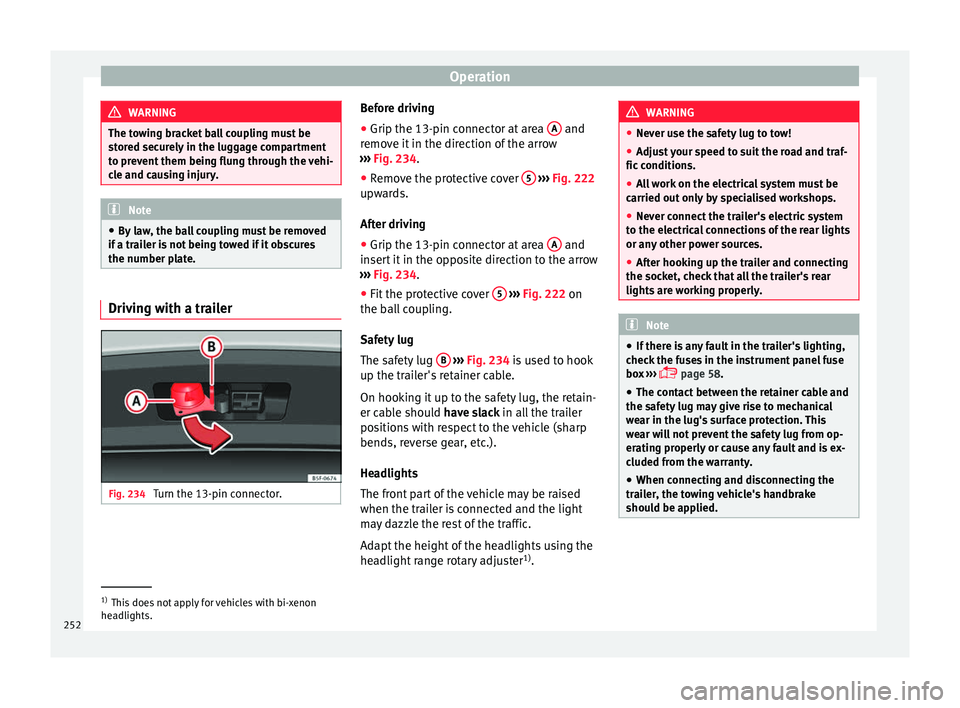
the number plate. Driving with a trailer
Fig. 234
Turn the 13-pin connector. Before driving
●
Grip the 13-pin connector at area A and
r emo
v
e it in the direction of the arrow
››› Fig. 234.
● Remove the protective cover 5
› ››
Fig. 222
up w
ards.
After driving
● Grip the 13-pin connector at area A and
in ser
t
it in the opposite direction to the arrow
››› Fig. 234.
● Fit the protective cover 5
› ›
› Fig. 222
on
the ball coupling.
Safety lug
The safety lug B
› ›
› Fig. 234
is used to hook
up the trailer's retainer cable.
On hooking it up to the safety lug, the retain-
er cable should have slack in all the trailer
positions with respect to the vehicle (sharp
bends, reverse gear, etc.).
Headlights
The front part of the vehicle may be raised
when the trailer is connected and the light
may dazzle the rest of the traffic.
Adapt the height of the headlights using the
headlight range rotary adjuster 1)
. WARNING
● Never u se the s
afety lug to tow!
● Adjust your speed to suit the road and traf-
fic condition
s.
● All work on the electrical system must be
carried out on
ly by specialised workshops.
● Never connect the trailer's electric system
to the electric
al connections of the rear lights
or any other power sources.
● After hooking up the trailer and connecting
the socket, c
heck that all the trailer's rear
lights are working properly. Note
● If ther e i
s any fault in the trailer's lighting,
check the fuses in the instrument panel fuse
box ›››
page 58.
● The contact between the retainer cable and
the safety
lug may give rise to mechanical
wear in the lug's surface protection. This
wear will not prevent the safety lug from op-
erating properly or cause any fault and is ex-
cluded from the warranty.
● When connecting and disconnecting the
trail
er, the towing vehicle's handbrake
should be applied. 1)
This does not apply for vehicles with bi-xenon
hea dlights.
252
Page 277 of 308
Checking and refilling levels
CAUTION
The original additives should never be mixed
with c oo
lants which are not approved by
SEAT. Otherwise, you run the risk of causing
severe damage to the engine and the engine
cooling system.
● If the fluid in the expansion tank is not pur-
ple b
ut is, for example, brown, this indicates
that the G13 additive has been mixed with an
inadequate coolant. The coolant must be
changed as soon as possible if this is the
case! This could result in serious faults and
engine damage. For the sake of the environment
Coolants and additives can contaminate the
env ir
onment. If any fluids are spilled, they
should be collected and correctly disposed
of, with respect to the environment. Brake fluid
Chec k
in
g the brake fluid levelRead the additional information carefully
› ›
›
page 57
The position of the brake fluid reservoir is
shown in the corresponding engine compart-
ment image ›››
page 270. The brake fluid res-
ervoir has a black and yellow cap. The brake fluid level drops slightly when the
vehicl
e is being used as the brake pads are
automatically adjusted as they wear.
However, if the level goes down noticeably in
a short time, or drops below the “MIN” mark,
there may be a leak in the brake system. A
display on the instrument panel will warn you
if the brake fluid level is too low ››› page 117. WARNING
Before opening the bonnet to check the brake
fluid lev el, r
ead and observe the warnings
››› page 267. Changing the brake fluid
The Maintenance Programme indicates brake
fluid c
h
an
ge intervals.
We recommend that you have the brake fluid
changed by a Technical Service.
Before opening the bonnet, please read and
follow the warnings ››› in safety notes for
w ork
in the en
gine compartment on
page 267 in section “Safety notes for work-
ing in the engine compartment”.
In the course of time, brake fluid becomes
hygroscopic and absorbs water from the am-
bient air. If the water content in the brake flu-
id is too high, the brake system could cor-
rode. This also considerably reduces the boil-
ing point of the brake fluid. Heavy use of the brakes may then cause a vapour lock which
coul
d impair the braking effect.
Be sure to always use the correct brake fluid.
Only use brake fluid that expressly meets the
VW 501 14 standard.
You can buy VW 501 14 standard brake fluid
in a SEAT dealership or a SEAT Official Serv-
ice. If none is available, use only high-quality
brake fluid that meets DIN ISO 4925 CLASS 4
standards, or USA Standards FMVSS 116 DOT
4.
Using any other kind of brake fluid or one
that is not of a high quality may affect opera-
tion of the brake system and reduce its effec-
tiveness. Never use a brake fluid if the con-
tainer does not state that it complies with VW
501 14, DIN ISO 4925 CLASS 4 standards, or
USA standards FMVSS 116 DOT 4. WARNING
Brake fluid is poisonous. Old brake fluid im-
pair s
the braking effect.
● Before opening the bonnet to check the
brake fluid l
evel, read and observe the warn-
ings ››› page 267.
● Brake fluid should be stored in the closed
original
container in a safe place out of reach
of children. There is a toxic risk.
● Perform the brake fluid change according to
the Mainten
ance Programme. Heavy use of
the brakes may cause a vapour lock if the
brake fluid is left in the brake system for too » 275
Technical data
Advice
Operation
Emergencies
Safety