phone Seat Arona 2018 User Guide
[x] Cancel search | Manufacturer: SEAT, Model Year: 2018, Model line: Arona, Model: Seat Arona 2018Pages: 316, PDF Size: 6.77 MB
Page 129 of 316
Communications and multimedia
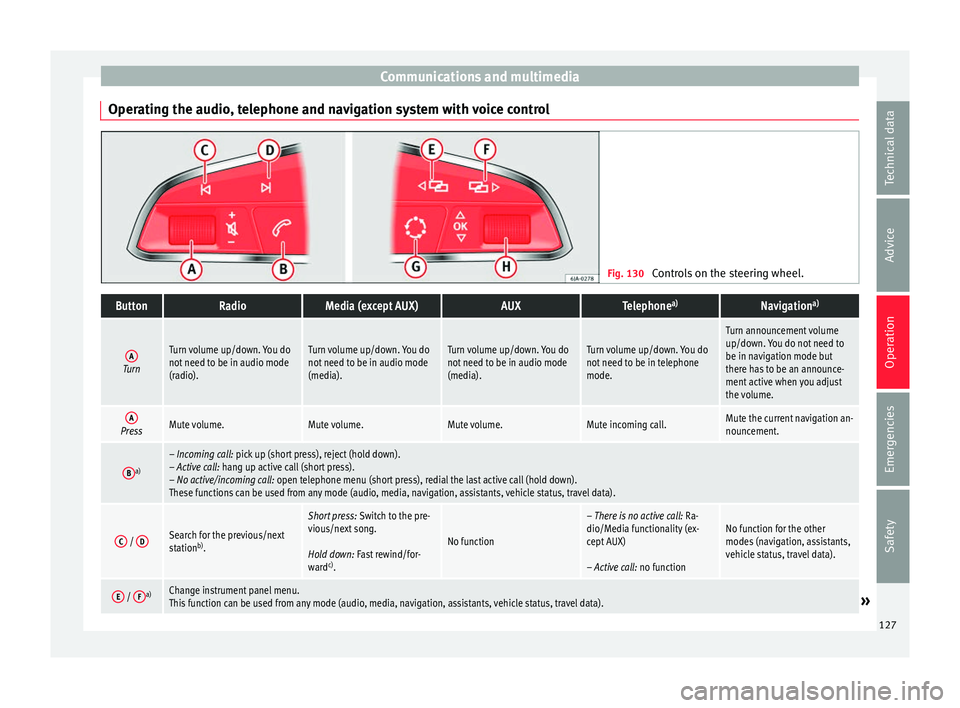
Operating the audio, telephone and navigation system with voice control Fig. 130
Controls on the steering wheel.ButtonRadioMedia (except AUX)AUXTelephone a)Navigation a)
ATurn
Turn volume up/down. You do
not need to be in audio mode
(radio).Turn volume up/down. You do
not need to be in audio mode
(media).Turn volume up/down. You do
not need to be in audio mode
(media).Turn volume up/down. You do
not need to be in telephone
mode.
Turn announcement volume
up/down. You do not need to
be in navigation mode but
there has to be an announce-
ment active when you adjust
the volume.
APressMute volume.Mute volume.Mute volume.Mute incoming call.Mute the current navigation an-
nouncement.
Ba)– Incoming call: pick up (short press), reject (hold down).
– Active call: hang up active call (short press).
– No active/incoming call: open telephone menu (short press), redial the last active call (hold down).
These functions can be used from any mode (audio, media, navigation, assistants, vehicle status, travel data).
C /
DSearch for the previous/next
station b)
.
Short press: Switch to the pre-
vious/next song.
Hold down: Fast rewind/for-
ward c)
.
No function
– There is no active call: Ra-
dio/Media functionality (ex-
cept AUX)
– Active call: no functionNo function for the other
modes (navigation, assistants,
vehicle status, travel data).
E / Fa)Change instrument panel menu.
This function can be used from any mode (audio, media, navigation, assistants, vehicle status, travel data).» 127
Technical data
Advice
Operation
Emergencies
Safety
Page 130 of 316
OperationButtonRadioMedia (except AUX)AUXTelephone
a)Navigation a)
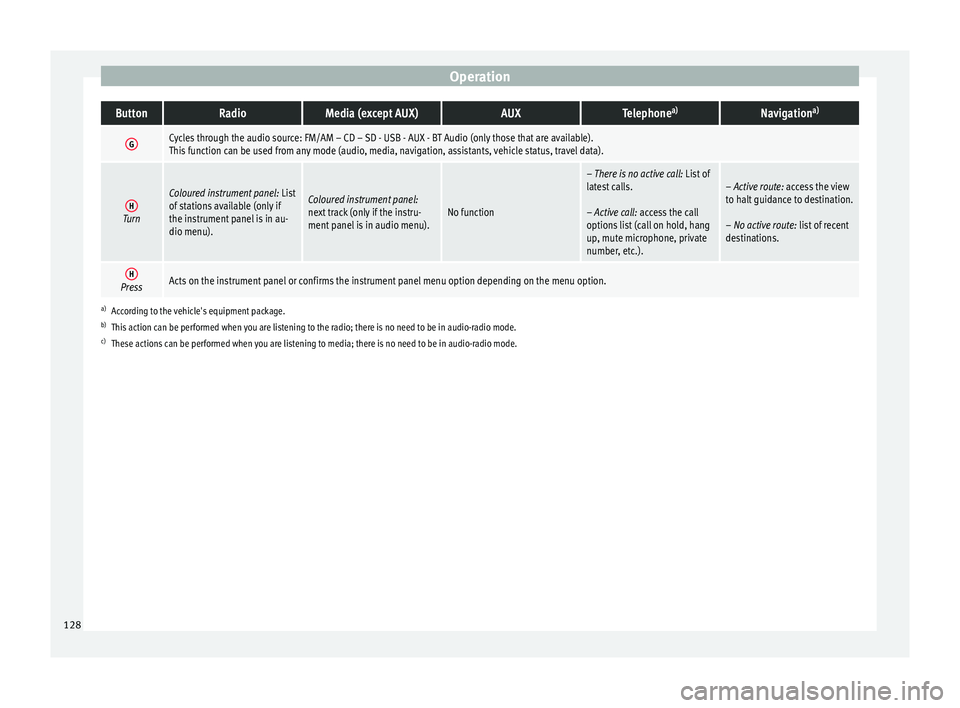
GCycles through the audio source: FM/AM – CD – SD - USB - AUX - BT Audio (only those that are available).
This function can be used from any mode (audio, media, navigation, assistants, vehicle status, travel data).
HTurn
Coloured instrument panel:
List
of stations available (only if
the instrument panel is in au-
dio menu).Coloured instrument panel:
next track (only if the instru-
ment panel is in audio menu).No function
– There is no active call: List of
latest calls.
– Active call: access the call
options list (call on hold, hang
up, mute microphone, private
number, etc.).– Active route: access the view
to halt guidance to destination.
– No active route: list of recent
destinations.
HPressActs on the instrument panel or confirms the instrument panel menu option depending on the menu option.
a) According to the vehicle's equipment package.
b) This action can be performed when you are listening to the radio; there is no need to be in audio-radio mode.
c) These actions can be performed when you are listening to media; there is no need to be in audio-radio mode. 128
Page 131 of 316
Communications and multimedia
Multimedia USB/A UX
-INP
ortFig. 131
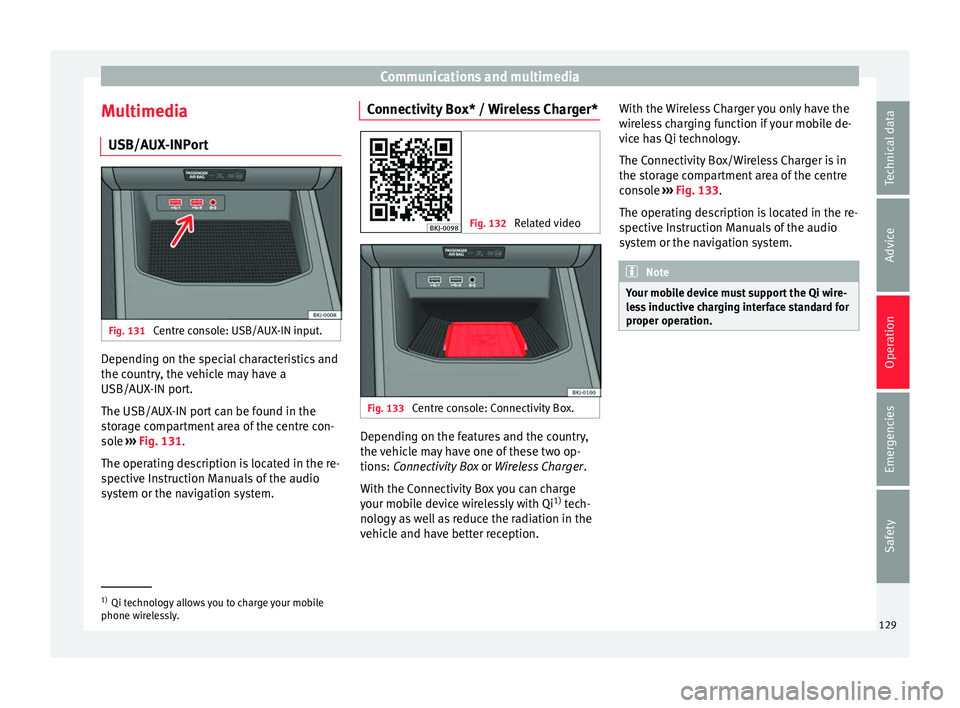
Centre console: USB/AUX-IN input. Depending on the special characteristics and
the c
ou
ntr
y, the vehicle may have a
USB/AUX-IN port.
The USB/AUX-IN port can be found in the
storage compartment area of the centre con-
sole ››› Fig. 131.
The operating description is located in the re-
spective Instruction Manuals of the audio
system or the navigation system. Connectivity Box* / Wireless Charger* Fig. 132
Related video Fig. 133
Centre console: Connectivity Box. Depending on the features and the country,
the
v
ehic
le may have one of these two op-
tions: Connectivity Box or Wireless Charger.
With the Connectivity Box you can charge
your mobile device wirelessly with Qi 1)
tech-
nology as well as reduce the radiation in the
vehicle and have better reception. With the Wireless Charger you only have the
wirel
ess charging function if your mobile de-
vice has Qi technology.
The Connectivity Box/Wireless Charger is in
the storage compartment area of the centre
console ››› Fig. 133.
The operating description is located in the re-
spective Instruction Manuals of the audio
system or the navigation system. Note
Your mobile device must support the Qi wire-
le s
s inductive charging interface standard for
proper operation. 1)
Qi technology allows you to charge your mobile
phone wir el
essly. 129
Technical data
Advice
Operation
Emergencies
Safety
Page 142 of 316
Operation
mechanically, the time period from when
the door i s
opened u
ntil the key is inserted
into the contact should not exceed 15 sec-
onds, otherwise the alarm will be triggered.
– Press the button on the remote c
ontrol
twice. The volumetric sensor and tilt sen-
sors will be deactivated. The alarm system
remains activated.
The vehicle interior monitoring and the anti-
tow system are automatically switched on
again next time the vehicle is locked.
The vehicle interior monitoring and anti-tow
sensor (tilt sensor) are automatically switch-
ed on when the anti-theft alarm is switched
on. In order to activate it, all the doors and
the rear lid must be closed.
If you wish to switch off the vehicle interior
monitoring and the anti-tow system, it must
be done each time that the vehicle is locked;
if not, they will be automatically switched on.
The vehicle interior monitoring and the anti-
tow system should be switched off if animals
are left inside the locked vehicle (otherwise,
their movements will trigger the alarm) or
when, for example, the vehicle is transported
or has to be towed with only one axle on the
ground. False alarms
Interior monitorin
g will only operate correctly
if the vehicle is completely closed. Please ob-
serve related legal requirements.
The following cases may cause a false alarm:
● Open windows (partially or fully),
● Movement of objects inside the vehicle,
such a
s loose papers, items hanging from
the rear vision mirror (air fresheners), etc. Note
● If the v
ehicle is relocked and the alarm is
activated without the volumetric sensor func-
tion, relocking will activate the alarm with all
its functions, except the volumetric sensor.
This function is reactivated when the alarm is
switched on again, unless it is deliberately
switched off.
● If the alarm has been triggered by the volu-
metric sensor
, this will be indicated by a
flashing of the warning lamp on the driver
door when the vehicle is opened. The flash is
different to the flash indicating the alarm is
activated.
● The vibration of a mobile phone left inside
the vehic
le may cause the vehicle interior
monitoring alarm to trigger, as both sensors
react to movements and shakes inside the ve-
hicle.
● If on activating the alarm, any door or the
rear lid i
s open, only the alarm will be activa-
ted. The vehicle interior monitoring and the anti-tow system will only be activated once
al
l
the doors are closed (including the rear
lid). Deactivating the vehicle interior moni-
torin
g and anti-t
ow system* When the vehicle is locked, the alarm will be
trigg
er
ed if movements are detected in the
interior (e.g. by animals) or if the vehicle's in-
clination is changed (e.g. during transport).
You can prevent the alarm from being trig-
gered accidentally by switching off the vehi-
cle interior monitoring and/or tow-away pro-
tection.
– To switch off the interior monitoring and
to w-
away protection, switch off the ignition
and, using the Infotainment system, select: button >
S
ET
TINGS function button >
Openin g and c
lo
sing > Central locking >
Switch off alarm.
– When the vehicle is locked now, the vehicle
interior monitorin
g and the tow-away pro-
tection are switched off until the next time
the door is opened.
If the anti-theft security system (Safelock)*
››› page 133 is switched off, the vehicle interi-
or monitoring and the tow-away protection
are automatically switched off.
140
Page 261 of 316
Care and maintenance
Advice
C ar
e and m
aintenance
Accessories and modifications to the vehicle
Accessories, replacement of parts and
modifications Your vehicle is designed to offer a high
s
t
and
ard of active and passive safety.
Before purchasing accessories and parts,
and before making technical changes to your
vehicle, we recommend that you consult your
Technical Service.
SEAT dealerships will be happy to provide
you with the latest information about the
use, legal requirements and recommenda-
tions from the manufacturer regarding acces-
sories and spare parts.
We recommend you use only SEAT Approved
Accessories ®
and SEAT Approved Spare
Parts ®
. This way, SEAT can guarantee that
the product in question is suitable, reliable
and safe. SEAT Technical Services have the
necessary experience and facilities to ensure
that parts are correctly and professionally in-
stalled. Despite a continuous observation of the mar-
ket, S
EAT is not able to assess the reliability,
safety and suitability of parts that SEAT has
not approved . For this reason, SEAT cannot
assume responsibility for any non-genuine
parts used, even if these parts have been ap-
proved by an official testing agency or are
covered by an official approval certificate.
Any retro-fitted equipment which has a direct
impact on the driver's control of the vehicle,
such as a cruise control system or electroni-
cally-controlled suspension, must be ap-
proved by SEAT for use in your vehicle and
bear the e mark (the European Union's au-
thorisation symbol).
If any additional electrical devices are fitted
which do not serve to control the vehicle it-
self, such as refrigerator boxes, laptops or
ventilator fans, they must bear the CE mark
(European Union manufacturer conformity
declaration). WARNING
Accessories, for example telephone holders
or cup ho l
ders, should never be fitted on the
covers, or within the working range, of the
airbags. Otherwise, there is a danger of in-
jury if the airbag is triggered in an accident. Technical modifications
Modifications must always be carried out ac-
cor
din
g to our specifications. Unauthorised
modifications to the electronic components
or software in the vehicle may cause malfunc-
tions. Due to the way the electronic compo-
nents are linked together in networks, other
indirect systems may be affected by the
faults. This can seriously impair safety, lead
to excessive wear of components, and also
invalidate your vehicle registration docu-
ments.
SEAT Technical Services cannot be held liable
for any damage caused by modifications
and/or work incorrectly performed. For this
reason, we recommend having all work per-
formed by a SEAT Technical Service using
SEAT ®
Original Spare Parts. WARNING
Any type of work or modification performed
incorr ectly
on your vehicle can lead to mal-
functions and can cause accidents. Radio transmitters and office equip-
ment
Radio transmitters (fixed installation)
An
y
r
etrofit installations of radio transmitters
in the vehicle require prior approval. SEAT
generally authorises in-vehicle installations »
259
Technical data
Advice
Operation
Emergencies
Safety
Page 262 of 316
Advice
of approved types of radio transmitters provi-
ded th at:
● The aeri al
is installed correctly.
● The aerial is installed on the exterior of the
vehicl
e (and shielded cables are used togeth-
er with non-reflective aerial trimming).
● The effective transmitting power does not
exc
eed 10 Watts at the aerial base.
A SEAT Official Service and specialised work-
shop will be able to inform you about options
for installing and operating radio transmitters
with a higher transmitting power.
Mobile radio transmitters
Commercial mobile telephones or radio
equipment might interfere with the electron-
ics of your vehicle and cause malfunctions.
This may be due to:
● No external aerial.
● External aerial incorrectly installed.
● Transmitting power more than 10 W.
You mus
t, therefore, do not operate portable
mobile telephones or radio equipment inside
the vehicle without a properly installed exter-
nal aerial ››› .
Pl e
a
se note also that the maximum range of
the equipment can only be achieved with an
external aerial. Business equipment
Retrofit
installation of business or private
equipment in the vehicle is permitted, provi-
ded the equipment cannot interfere with the
driver's immediate control of the vehicle and
that any such equipment carries the mark.
Any retrofit equipment that could influence
the driver's control of the vehicle must have a
type approval for your vehicle and must carry
the e mark. WARNING
Mobile telephones or radio equipment which
is oper
ated inside the vehicle without a prop-
erly installed external aerial can create exces-
sive magnetic fields that could cause a health
hazard. Note
● The pos t
erior fitting of electric and elec-
tronic equipment in this vehicle affects its li-
cence and could lead to the withdrawal of the
vehicle registration document under certain
circumstances.
● Please use the mobile telephone/radio op-
erating in
structions. Care and cleaning
Gener a
l
notes Vehicle maintenance
Re
gu
lar care and washing help to maintain
the value of the vehicle. This may also be one
of the requirements for acknowledging war-
ranty claims in the event of bodywork corro-
sion or paint defects.
The best way to protect your vehicle against
the harmful effects of the environment is
through correct maintenance and frequent
washing. The longer substances such as in-
sect remains, bird droppings, resinous tree
sap, road dirt, industrial deposits, tar, soot or
road salt and other aggressive materials re-
main on the vehicle, the more damage they
do to the paintwork. High temperatures, for
instance in strong sunlight, further intensify
the corrosive effect.
After winter, a period when salt is put on the
roads, it is important to have the underside
of the vehicle washed thoroughly.
Products for vehicle maintenance
Car-care products are available in your Tech-
nical Services. Keep the product instructions
until you have used them up.
260
Page 310 of 316
Index
emergency braking assistance system (Front As s
i
st) . . . . . . . . . . . . . . . . . . . . . . . . . . . . . . 212
gearbox . . . . . . . . . . . . . . . . . . . . . . . . . . . . . . . 194
Manual air conditioning . . . . . . . . . . . . . . . . . . . 169
Manual gearbox . . . . . . . . . . . . . . . . . . . . . . . . . . 187
MFD see Driver information system . . . . . . . . . . . . . . 37
Mobile . . . . . . . . . . . . . . . . . . . . . . . . . . . . . . . . . . 259
Mobile telephones . . . . . . . . . . . . . . . . . . . . . . . . 259
Multi-collision Brake . . . . . . . . . . . . . . . . . . . . . . 186
Multi-function display (MFD) . . . . . . . . . . . . . . . . . 37
Multimedia . . . . . . . . . . . . . . . . . . . . . . . . . . . . . . 129
My Beat . . . . . . . . . . . . . . . . . . . . . . . . . . . . . . . . . 178
N Noises adaptive cruise control . . . . . . . . . . . . . . . . . . . 216
tyres . . . . . . . . . . . . . . . . . . . . . . . . . . . . . . . . . . . 69
Number of seats . . . . . . . . . . . . . . . . . . . . . . . . . . . 81
O
Odometer . . . . . . . . . . . . . . . . . . . . . . . . . . . . . . . 120 reset button . . . . . . . . . . . . . . . . . . . . . . . . . . . 120
total . . . . . . . . . . . . . . . . . . . . . . . . . . . . . . . . . . 117
trip recorder . . . . . . . . . . . . . . . . . . . . . . . . . . . 117
Oil change . . . . . . . . . . . . . . . . . . . . . . . . . . . . . . . 278
Oil properties . . . . . . . . . . . . . . . . . . . . . . . . . . . . . 58
On-board computer see Driver information system . . . . . . . . . . . . . . 37
One-touch opening and closing electric windows . . . . . . . . . . . . . . . . . . . . . . . . 143
Open and close . . . . . . . . . . . . . . . . . . . . . . . . . . 130 rear lid . . . . . . . . . . . . . . . . . . . . . . . . . . . . . . . . 141
Opening . . . . . . . . . . . . . . . . . . . . . . . . . . . . . . . . 130 bonnet . . . . . . . . . . . . . . . . . . . . . . . . . . . . . . . . . 17
the fuel tank flap . . . . . . . . . . . . . . . . . . . . . . . 269
windows . . . . . . . . . . . . . . . . . . . . . . . . . . . . . . 141 Opening and closing
bonnet . . . . . . . . . . . . . . . . . . . . . . . . . . . . . . . . . 17
by
remote control . . . . . . . . . . . . . . . . . . . . . . . 130
fuel cap . . . . . . . . . . . . . . . . . . . . . . . . . . . . . . . . 57
in the door cylinder . . . . . . . . . . . . . . . . . . . . . . 15
in the lock cylinder . . . . . . . . . . . . . . . . . . . . . . . 15
rear lid . . . . . . . . . . . . . . . . . . . . . . . . . . . . 16, 141
windows . . . . . . . . . . . . . . . . . . . . . . . . . . . . . . 141
with the central lock button . . . . . . . . . . . . . . . 134
Operating malfunction Park Assist . . . . . . . . . . . . . . . . . . . . . . . . . . . . 232
Outside temperature . . . . . . . . . . . . . . . . . . . . . . . 41
P Park Assist . . . . . . . . . . . . . . . . . . . . . . . . . . . . . . 232 automatic braking intervention . . . . . . . . . . . . 240
automatic interruption . . . . . . . . . . . . . . . . . . . 234
conditions for exiting a parking space . . . . . . 239
exiting a parking space (only for parallelspaces) . . . . . . . . . . . . . . . . . . . . . . . . . . . . . 239
operating malfunction . . . . . . . . . . . . . . . . . . . 232
parallel parking . . . . . . . . . . . . . . . . . . . . . . . . 237
parking conditions . . . . . . . . . . . . . . . . . . . . . . 237
perpendicular parking . . . . . . . . . . . . . . . . . . . 237
see Park Assist . . . . . . . . . . . . . . . . . . . . . . . . . 232
stopping prematurely . . . . . . . . . . . . . . . . . . . . 234
Parking . . . . . . . . . . . . . . . . . . . . . . . . . . . . 180, 191 with Park Assist . . . . . . . . . . . . . . . . . . . . . . . . 237
Parking aid . . . . . . . . . . . . . . . . . . . . . . . . . . . . . . 240 adjusting the display and audible warnings . 244
parking aid plus . . . . . . . . . . . . . . . . . . . . . . . . 242
sensors and camera: cleaning . . . . . . . . . . . . . 263
towing bracket . . . . . . . . . . . . . . . . . . . . . . . . . 245
Parking Aid automatic activation . . . . . . . . . . . . . . . . . . . . 243
braking while manoeuvring . . . . . . . . . . . . . . . 245
malfunction . . . . . . . . . . . . . . . . . . . . . . . . . . . . 245 rear parking aid . . . . . . . . . . . . . . . . . . . . . . . . 241
vis
ual indication . . . . . . . . . . . . . . . . . . . . . . . . 244
Parking aid system see Parking aid . . . . . . . . . . . . . . . . . . . . 240, 242
Parking assistant . . . . . . . . . . . . . . . . . . . . . . . . . 228 see Park Assist . . . . . . . . . . . . . . . . . . . . . . . . . 232
Parking assistant (RCTA) . . . . . . . . . . . . . . 224, 228 control lamp . . . . . . . . . . . . . . . . . . . . . . . . . . . 224
Parking distance warning system see Parking aid . . . . . . . . . . . . . . . . . . . . 240, 242
Parking (automatic gearbox) . . . . . . . . . . . . . . . . 191
ParkPilot see Parking aid . . . . . . . . . . . . . . . . . . . . 240, 242
Particulate filter (diesel) . . . . . . . . . . . . . . . . . . . 200
Parts . . . . . . . . . . . . . . . . . . . . . . . . . . . . . . . . . . . 259
Passenger see Correct sitting position . . . . . . . . . 76, 77, 78
Passenger-side instrument panel left-hand drive . . . . . . . . . . . . . . . . . . . . . . . . . . 12
right-hand drive . . . . . . . . . . . . . . . . . . . . . . . . . 13
Pedals . . . . . . . . . . . . . . . . . . . . . . . . . . . . . . . . . . . 80
Petrol additives . . . . . . . . . . . . . . . . . . . . . . . . . . . . . . 269
refuelling . . . . . . . . . . . . . . . . . . . . . . . . . . . . . . 269
Plastic parts: cleaning . . . . . . . . . . . . . . . . 263, 266
Pollution filter . . . . . . . . . . . . . . . . . . . . . . . . . . . . 164
Positioning seat belts during pregnancy . . . . . . . . . . . . . . . . . . . . . . . . 85
seat belts . . . . . . . . . . . . . . . . . . . . . . . . . . . . . . 85
Power-assisted steering . . . . . . . . . . . . . . . . . . . . 197
Power steering . . . . . . . . . . . . . . . . . . . . . . . . . . . 195
Pre-heating system control lamp . . . . . . . . . . . . . . . . . . . . . . . . . . . 201
Preheating the engine . . . . . . . . . . . . . . . . . . . . . 177
Press & Drive starter button . . . . . . . . . . . . . . . . . . . . . . . . . . 176
starting the engine . . . . . . . . . . . . . . . . . . . . . . 177
308