warning Seat Ateca 2016 Owners Manual
[x] Cancel search | Manufacturer: SEAT, Model Year: 2016, Model line: Ateca, Model: Seat Ateca 2016Pages: 328, PDF Size: 6.32 MB
Page 154 of 328
Operation
●
Ob
jects in the luggage compartment that
are unsecured could move suddenly and
modify the handling of the vehicle.
● Secure all objects, little and large.
● Never exceed the maximum tensile load of
the fa
stening ring when securing objects.
● Never secure a child seat to the fastening
ring
s. Note
● The m ax
imum tensile load that the fasten-
ing rings can support is 3.5 kN.
● Belts and securing systems for the appro-
priat
e load can be obtained from specialised
dealerships. SEAT recommends visiting a
SEAT dealership for this.
● The fastening rings are rendered unusable
for
versions with a spare wheel. Retaining hooks
Fig. 155
In the luggage compartment: retain-
in g hook
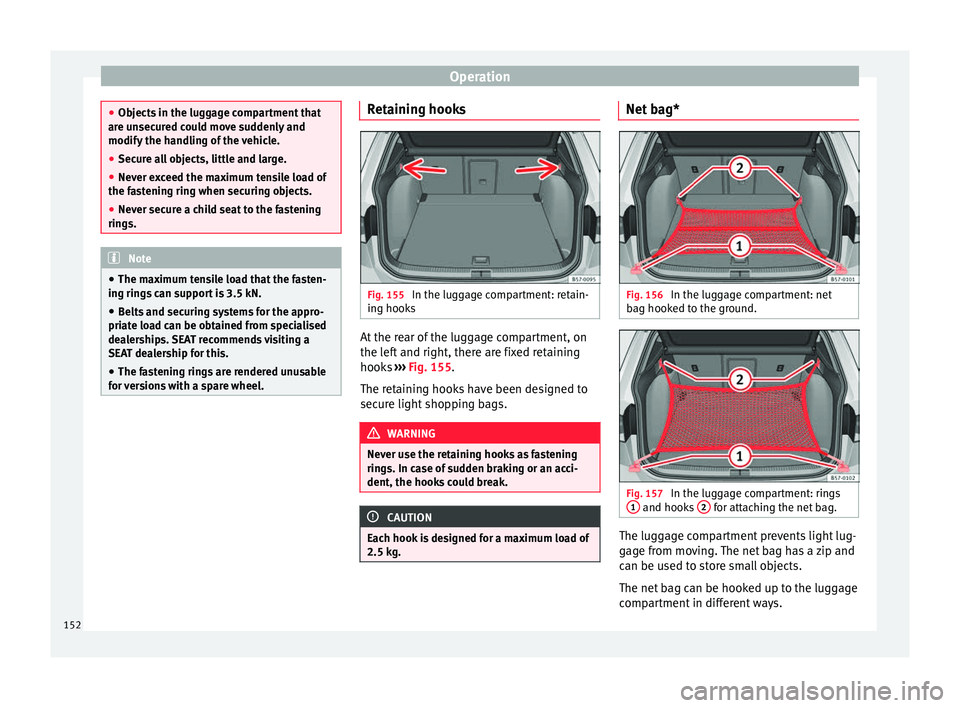
s At the rear of the luggage compartment, on
the l
ef
t and right, there are fixed retaining
hooks ››› Fig. 155.
The retaining hooks have been designed to
secure light shopping bags. WARNING
Never use the retaining hooks as fastening
rin g
s. In case of sudden braking or an acci-
dent, the hooks could break. CAUTION
Each hook is designed for a maximum load of
2.5 k g. Net bag*
Fig. 156
In the luggage compartment: net
b ag hook
ed to the ground. Fig. 157
In the luggage compartment: rings
1 and hooks
2 for attaching the net bag.
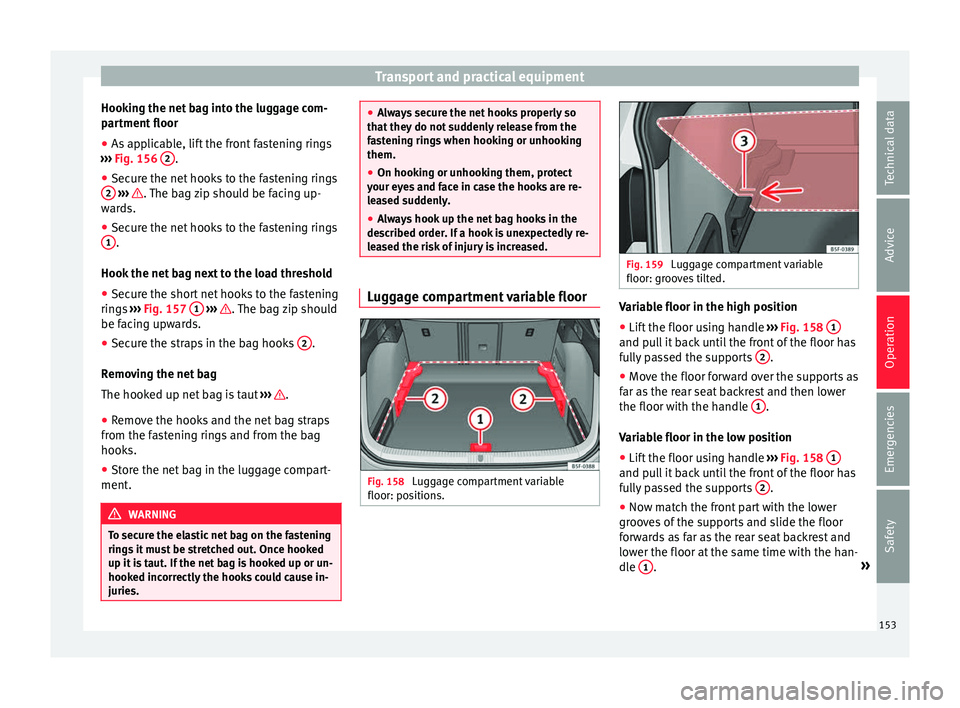
The luggage compartment prevents light lug-
g
ag
e from moving. The net bag has a zip and
can be used to store small objects.
The net bag can be hooked up to the luggage
compartment in different ways.
152
Page 155 of 328
Transport and practical equipment
Hooking the net bag into the luggage com-
p ar
tment floor
● As applicable, lift the front fastening rings
››
› Fig. 156 2 .
● Secure the net hooks to the fastening rings
2
› ›› . The bag zip should be facing up-
w ar
ds.
● Secure the net hooks to the fastening rings
1 .
Hook the net
bag next to the load threshold
● Secure the short net hooks to the fastening
ring
s ››› Fig. 157 1
› ›› . The bag zip should
be f ac
ing upwards.
● Secure the straps in the bag hooks 2 .
R emo
ving the net bag
The hooked up net bag is taut ››› .
● Remove the hooks and the net bag straps
fr om the f
astening rings and from the bag
hooks.
● Store the net bag in the luggage compart-
ment. WARNING
To secure the elastic net bag on the fastening
rin g
s it must be stretched out. Once hooked
up it is taut. If the net bag is hooked up or un-
hooked incorrectly the hooks could cause in-
juries. ●
Alw
ays secure the net hooks properly so
that they do not suddenly release from the
fastening rings when hooking or unhooking
them.
● On hooking or unhooking them, protect
your ey
es and face in case the hooks are re-
leased suddenly.
● Always hook up the net bag hooks in the
des
cribed order. If a hook is unexpectedly re-
leased the risk of injury is increased. Luggage compartment variable floor
Fig. 158
Luggage compartment variable
floor: po s
itions. Fig. 159
Luggage compartment variable
floor: gr oo
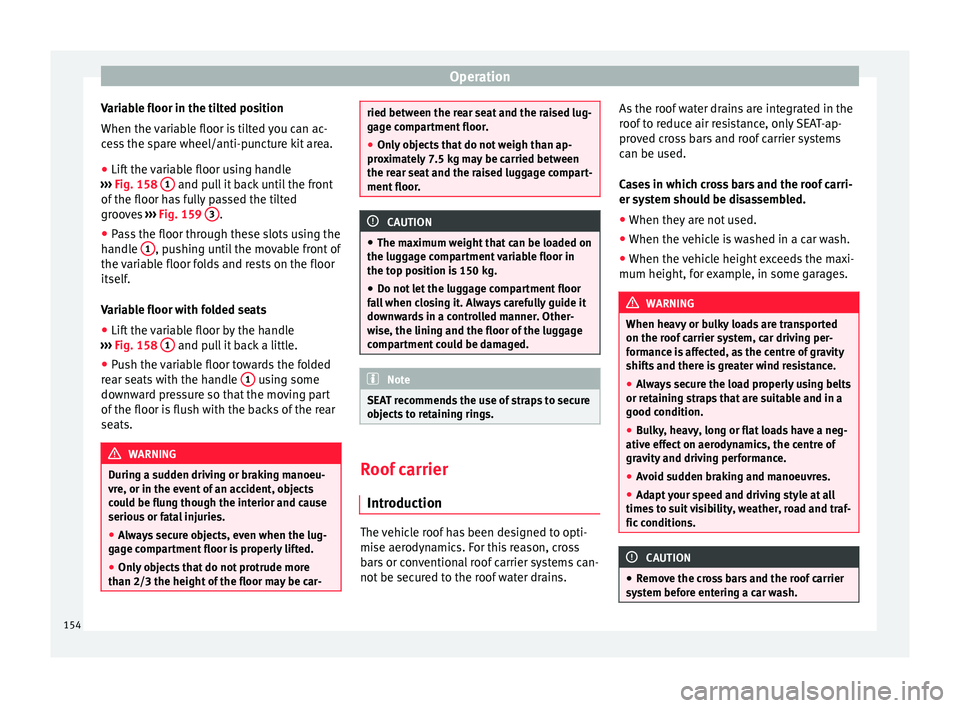
ves tilted. Variable floor in the high position
● Lift the floor using handle ››
› Fig. 158 1 and pull it back until the front of the floor has
f
u
lly passed the supports 2 .
● Move the floor forward over the supports as
f ar a
s the rear seat backrest and then lower
the floor with the handle 1 .
V ari
able floor in the low position
● Lift the floor using handle ››
› Fig. 158 1 and pull it back until the front of the floor has
f
u
lly passed the supports 2 .
● Now match the front part with the lower
gr oo
ves of the supports and slide the floor
forwards as far as the rear seat backrest and
lower the floor at the same time with the han-
dle 1 .
»
153
Technical data
Advice
Operation
Emergencies
Safety
Page 156 of 328
Operation
Variable floor in the tilted position
When the v
ariable floor is tilted you can ac-
cess the spare wheel/anti-puncture kit area.
● Lift the variable floor using handle
››
› Fig. 158 1 and pull it back until the front
of the floor h
as fully passed the tilted
grooves ››› Fig. 159 3 .
● Pass the floor through these slots using the
h andl
e 1 , pushing until the movable front of
the v
ariable floor folds and rests on the floor
itself.
Variable floor with folded seats
● Lift the variable floor by the handle
››
› Fig. 158 1 and pull it back a little.
● Push the variable floor towards the folded
r e
ar seats with the handle 1 using some
do wn
ward pressure so that the moving part
of the floor is flush with the backs of the rear
seats. WARNING
During a sudden driving or braking manoeu-
vr e, or in the ev
ent of an accident, objects
could be flung though the interior and cause
serious or fatal injuries.
● Always secure objects, even when the lug-
gag
e compartment floor is properly lifted.
● Only objects that do not protrude more
than 2/3 the height
of the floor may be car- ried between the rear seat and the raised lug-
g
ag
e compartment floor.
● Only objects that do not weigh than ap-
pro
ximately 7.5 kg may be carried between
the rear seat and the raised luggage compart-
ment floor. CAUTION
● The m ax
imum weight that can be loaded on
the luggage compartment variable floor in
the top position is 150 kg.
● Do not let the luggage compartment floor
fa
ll when closing it. Always carefully guide it
downwards in a controlled manner. Other-
wise, the lining and the floor of the luggage
compartment could be damaged. Note
SEAT recommends the use of straps to secure
o b
jects to retaining rings. Roof carrier
Intr oduction The vehicle roof has been designed to opti-
mi
se aer
odynamics. For this reason, cross
bars or conventional roof carrier systems can-
not be secured to the roof water drains. As the roof water drains are integrated in the
roof
to reduce air resistance, only SEAT-ap-
proved cross bars and roof carrier systems
can be used.
Cases in which cross bars and the roof carri-
er system should be disassembled.
● When they are not used.
● When the vehicle is washed in a car wash.
● When the vehicle height exceeds the maxi-
mum height, for e
xample, in some garages. WARNING
When heavy or bulky loads are transported
on the r oof
carrier system, car driving per-
formance is affected, as the centre of gravity
shifts and there is greater wind resistance.
● Always secure the load properly using belts
or ret
aining straps that are suitable and in a
good condition.
● Bulky, heavy, long or flat loads have a neg-
ative eff
ect on aerodynamics, the centre of
gravity and driving performance.
● Avoid sudden braking and manoeuvres.
● Adapt your speed and driving style at all
times
to suit visibility, weather, road and traf-
fic conditions. CAUTION
● Remo
ve the cross bars and the roof carrier
system before entering a car wash. 154
Page 157 of 328
Transport and practical equipment
●
Vehic
le height is increased by the installa-
tion of cross bars or a roof carrier system and
the load secured on them. For this purpose,
check that your vehicle's height does not sur-
pass the headspace limit, for example, for un-
derpasses or for entering garage doors.
● Cross bars, the roof carrier system and the
loa
d secured on them should not interfere
with the roof aerial or hamper the path of the
panoramic sun roof and the rear lid.
● On opening the rear lid make sure that it
does
not knock into the roof load. For the sake of the environment
When cross bars and a roof carrier system are
in s
talled, the increased air resistance means
that the vehicle uses more fuel. Attach the cross bars of the roof carri-
er sy
s
tem Fig. 160
Attachment points for the roof rail-
in g
s for the roof carrier system. The crossbars are the basis of a series of spe-
c
i
al roof carrier systems. For safety reasons,
special fixtures must be used to safely trans-
port luggage, bicycles, skis, surf boards or
boats on the roof. Suitable accessories can
be acquired at SEAT dealerships.
Always secure the crossbars and the roof car-
rier system properly. Always take the assem-
bly instructions that come with the crossbars
and the roof carrier system in question into
account.
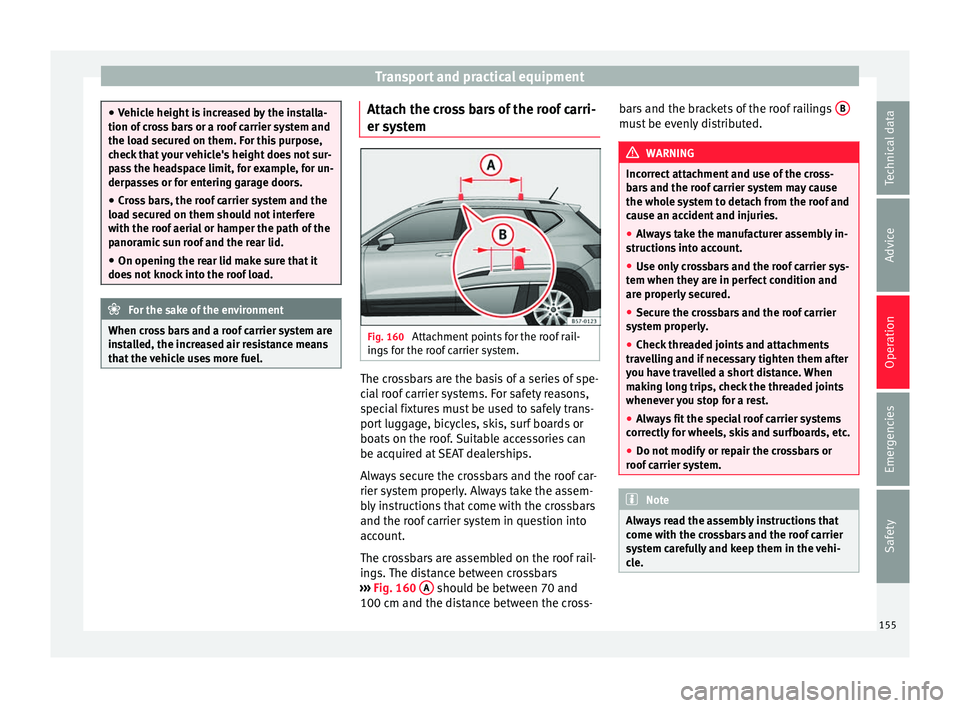
The crossbars are assembled on the roof rail-
ings. The distance between crossbars
››› Fig. 160 A should be between 70 and
100 c m and the di
stance between the cross- bars and the brackets of the roof railings
B must be evenly distributed.
WARNING
Incorrect attachment and use of the cross-
b ar
s and the roof carrier system may cause
the whole system to detach from the roof and
cause an accident and injuries.
● Always take the manufacturer assembly in-
struction
s into account.
● Use only crossbars and the roof carrier sys-
tem when they
are in perfect condition and
are properly secured.
● Secure the crossbars and the roof carrier
sys
tem properly.
● Check threaded joints and attachments
trav
elling and if necessary tighten them after
you have travelled a short distance. When
making long trips, check the threaded joints
whenever you stop for a rest.
● Always fit the special roof carrier systems
corr
ectly for wheels, skis and surfboards, etc.
● Do not modify or repair the crossbars or
roof
carrier system. Note
Always read the assembly instructions that
c ome w
ith the crossbars and the roof carrier
system carefully and keep them in the vehi-
cle. 155
Technical data
Advice
Operation
Emergencies
Safety
Page 158 of 328
Operation
Loading the roof carrier system The load can only be secured if the crossbars
and the r
oof
carrier system are properly in-
stalled ››› .
M ax
imum authorised roof load
The maximum permissible roof load is 75 kg.
This figure comes from the combined weight
of the roof carrier, the cross bars and the load
itself on the roof ››› .
A lw
ays check the weight of the roof carrier
system, the cross bars and the weight of the
load to be transported and weigh them if
necessary. Never exceed the maximum au-
thorised roof load.
If you are using cross bars and a roof carrier
with a lower weight rating, you will not be
able to carry the maximum authorised roof
load. In this case, do not exceed the maxi-
mum weight limit for the roof carrier which is
listed in the fitting instructions.
Distributing a load
Distribute loads uniformly and secure them
correctly ››› .
Chec k
attachments
Once the cross bars and roof carrier system
have been installed, check the bolted con-
nections and attachments after a short jour- ney and subsequently with a certain frequen-
cy. WARNING
Exceeding the maximum authorised roof load
c an r
esult in accidents and considerable vehi-
cle damage.
● Never exceed the maximum authorised
loa
d on the roof and on the axles or the vehi-
cle's maximum authorised weight.
● Never exceed the load capacity of the cross
bar
s and the roof carrier system, even if the
maximum authorised roof load has not been
reached.
● Secure heavy items as far forward as possi-
bl
e and distribute the vehicle load uniformly. WARNING
If the load is loose or not secured, it could fall
fr om the r
oof carrier system or cause acci-
dents and injuries.
● Always use belts or retaining straps that
are s
uitable and in a good condition.
● Secure the load properly. Air conditioning
He atin
g, ventilation and cool-
ing
Introduction Read the additional information carefully
› ›
› page 42
Viewing Climatronic information
On the screen of Climatronic control unit and
on the screen of the factory-fitted Easy Con-
nect system, the theoretical values of the
temperature zones are shown.
The unit of temperature measurement can be
changed in the Easy Connect system.
Dust and pollen filter
The dust and pollen filter with its activated
charcoal cartridge serves as a barrier against
impurities in the air taken into the vehicle in-
terior.
The dust and pollen filter must be changed
regularly so that air conditioner performance
is not adversely affected.
If the filter loses efficiency prematurely due
to use in areas with very high levels of air
pollution, the filter must be changed more
frequently than stated in the Service Sched-
ule.
156
Page 159 of 328
Air conditioning
WARNING
Reduced visibility through the windows in-
c r
eases the risk of serious accidents.
● Always ensure that all windows are free of
ice and s
now, and that they are not fogged,
so as to maintain good visibility of everything
outside.
● The maximum heat output required to de-
fro
st windows as quickly as possible is only
available when the engine has reached its
normal running temperature. Only drive when
you have good visibility.
● Always ensure that you use the heating
sys
tem, fresh air system, air conditioner and
the heated rear window to maintain good visi-
bility to the outside.
● Never leave the air recirculation on for a
long period of
time. If the cooling system is
switched off and air recirculation mode
switched on, the windows can mist over very
quickly, considerably limiting visibility.
● Switch air recirculation mode off when it is
not r
equired. WARNING
Stuffy or used air will increase fatigue and re-
duc e driv
er concentration possibly resulting
in a serious accident.
● Never leave the fresh air fan turned off or
use the air r
ecirculation for long periods of
time; the air in the vehicle interior will not be
refreshed. CAUTION
● To r
eplace the pollen filter, always visit a
service centre.
● Switch the air conditioner off if you think it
ma
y be broken. This will avoid additional
damage. Have the air conditioner checked by
a specialised workshop.
● Repairs to the air conditioner require spe-
ci
alist knowledge and special tools. SEAT rec-
ommends visiting a SEAT Official Service. Note
● When the c oo
ling system is turned off, air
coming from the outside will not be dried. To
prevent fogging of the windows, SEAT recom-
mends leaving the cooling system (compres-
sor) turned on. To do this, press the button . The button lamp should light up.
● The maximum heat output required to de-
fr o
st windows as quickly as possible is only
available when the engine has reached its
normal running temperature.
● Keep the air intake slots in front of the
wind
screen free of snow, ice and leaves to en-
sure heating and cooling are not impaired,
and to prevent the windows from misting
over. Adjust using the Easy Connect sys-
t
em* 3 Ap
plies to vehicles with a Touch/Colour Media
S
ystem.
In the Easy Connect system it is also possible
to perform various adjustments to the Clima-
tronic.
Open the air conditioner menu
● Press the Setup button.
● OR: pr ess the MENU button in Easy Con-
nect .
With the rotating switch select the air
conditioner menu and open it.
On the touch screen you can see and change
the current settings, for example, the temper-
ature set for the driver and passenger sides,
the air distribution and the fan speed. With
button the driver and passenger side
t emper
atures are synchronised ›››
Book-
let Media System Touch/Colour, chapter Air
conditioning.
To switch a function on or off, or to select a
submenu, you must press the corresponding
function button.
For more information about functions
››› page 108. »
157
Technical data
Advice
Operation
Emergencies
Safety
Page 162 of 328
Operation
Air recirculation mode Basic pointsAir recirculation:
Manual recirculation
Air recirculation mode prevents the ambient
air fr
om ent
ering the interior.
When the outside temperature is very high,
selecting manual air recirculation mode for a
short period refreshes the vehicle interior
more quickly.
For safety reasons, air recirculation mode is
switched off when the button is press-
ed or the air distributor turned to .
Switching the manual air recirculation mode
on and off
To switch system on: press the button un-
til the warning lamp lights up.
To switch system off: press the button un-
til the warning lamp goes off.
Functioning mode of automatic air recircula-
tion (air conditioning menu)
With the automatic air recirculation mode ac-
tivated, the entry of fresh air into the cabin
interior is enabled. If the system detects a
high concentration of hazardous substances
in the ambient air, air recirculation mode is
switched on automatically. When the level of impurities drops to within a normal range, re-
c
ir
culation mode is switched off.
The system is unable to detect unpleasant
smells.
The air recirculation will not connect auto-
matically in versions without humidity sensor
and in the following external conditions:
● The outside temperature is lower than +3°C
(+38°F).
● The cooling system is switched off and the
outside t
emperature is below +10°C (+50°F).
● The cooling system is switched off, the out-
side t
emperature is below +15°C (+59°F) and
the windscreen wipers are switched on.
Activation/deactivation of automatic air recir-
culation is done in the air conditioner menu,
under Configuration. WARNING
Observe the safety warnings ››
› in Intro-
duction on p ag
e 157.
● If the cooling system is switched off and air
rec
irculation mode switched on, the windows
can mist over very quickly, considerably limit-
ing visibility.
● Switch air recirculation mode off when it is
not r
equired. CAUTION
Do not smoke when air recirculation is
sw it
ched on in vehicles with an air condition-
er. The smoke taken in could lie on the cool-
ing system vaporiser and on the activated
charcoal cartridge of the dust and pollen fil-
ter, leading to a permanently unpleasant
smell. Note
Climatronic: air recirculation mode is activa-
t ed t
o prevent exhaust gas or unpleasant
odours from entering the vehicle interior
when it is in reverse and while the automatic
windscreen wiper is working. 160
Page 163 of 328
Air conditioning
Auxiliary heater (additional
he at
er)
Introduction The auxiliary heater runs on fuel from the ve-
hic
l
e's tank and can be used while you are
driving and when the vehicle is stationary.
The auxiliary heater can be switched on using
the fast heating button of the air condition-
ing controls, with the remote control or by
previously programming a departure time in
the auxiliary heater menu of the infotainment
system.
In winter, with the auxiliary heater switched
on, you can defog the windscreen and leave
it free of ice and snow (if it is a thin layer) be-
fore you start driving.
If the outside temperature is very high, the
vehicle interior can be ventilated with the en-
gine off using the auxiliary heater. WARNING
Swallowing a battery with a 20 mm diameter
or an y
other button battery can cause serious
and even fatal injuries within a very short
time.
● Always keep the remote control, keyrings
with b
atteries, the spare batteries, button
batteries and all other batteries over 20 mm
out of reach of children. ●
If
you suspect that someone may have
swallowed a battery, seek immediate medical
attention. WARNING
The auxiliary heater exhaust fumes contain
c arbon mono
xide, an odourless and colour-
less toxic gas. Carbon monoxide can cause
people to lose consciousness. It can also
cause death.
● Never switch on the auxiliary heater or
le
ave it running in enclosed spaces or areas
with no ventilation.
● Never programme the auxiliary heater so
that
it switches itself on and is running in an
enclosed space or an area with no ventila-
tion. WARNING
The components of the auxiliary heater are
e xtr
emely hot and could cause a fire.
● Always park your vehicle so that no part of
the exh
aust system can come in contact with
easily flammable materials that might be be-
low the vehicle, such as dried grass. CAUTION
Never place food, medicines or other temper-
at ur
e-sensitive objects close to the air vents.
Food, medicines and other objects sensitive
to heat or cold may be damaged or made un- suitable for use by the air coming from the
v
ent
s. Note
After switching the engine on with a 12-volt
b att
ery that is heavily discharged or newly
changed or after a jump start some system
settings (such as the time, the date, the per-
sonalised comfort settings and the program-
ming) might be altered or deleted. Check and
correct these settings once the battery is suf-
ficiently charged. Switching on and off the auxiliary
he
at
er
Switching the auxiliary heater on:
Manually with the fast heating button of the air
conditioner controls. The control lamp of the
button will light up
››› page 156.
Manually with the remote control
››› page 162.
Automatically by programming and activating a
departure time ››› page 163.
Switching the auxiliary heater off:
Manually with the fast heating button of the air
conditioner controls. The control lamp of the
button goes off
››› page 156.
Manually with the remote control
››› page 162.» 161
Technical data
Advice
Operation
Emergencies
Safety
Page 166 of 328
Operation
WARNING
Never programme the auxiliary heater so that
it sw
itches itself on and is running in an en-
closed space or an area with no ventilation.
The auxiliary heater exhaust fumes contain
carbon monoxide, an odourless and colour-
less toxic gas. Carbon monoxide can cause
people to lose consciousness. It can also
cause death. Operating instructions
The auxiliary heater exhaust system located
belo
w the
vehicle must be kept clear of snow,
mud and other objects. The exhaust fumes
must be able to exit freely. The emissions
generated by the auxiliary heater are re-
moved via an exhaust pipe fitted underneath
the vehicle.
On heating the vehicle interior, depending on
the outside temperature, the warm air is first
directed at the windscreen and then to the
rest of the vehicle interior through the air
vents. Directing the diffusers – towards the
windows for example – can affect air distribu-
tion.
When will the auxiliary heater not be activa-
ted?
● The auxiliary heater requires about as
muc h po
wer as the dipped beam headlights.
If the 12-volt battery charge is too low, the auxiliary heater switches off automatically
and c
annot
be switched on. This avoids prob-
lems when starting the engine.
● The heating must be activated every time
you w
ant to set off. Similarly, the departure
time must reactivate each time.
● The control lamp (fuel
level indicator)
lights up. Note
● Noi se
s will be heard while the auxiliary
heater is running.
● When the air humidity is high and the in-
side t
emperature low, condensation from the
heating and ventilating system may evapo-
rate when the auxiliary heater is switched on.
In this case, steam may be released from un-
derneath the vehicle. This does not mean
that there is a vehicle malfunction.
● If the vehicle is tilted, e.g. if parked on a
slope, the oper
ation of the auxiliary heater
may be restricted if the fuel tank level is low
(just above the reserve level).
● If the auxiliary heater is used a number of
times
for a long period of time, the 12-volt
battery will lose its charge. To recharge the
battery, the vehicle must be driven for a num-
ber of kilometres from time to time. As a
guideline: The journey should last approxi-
mately as long as the heater was connected.
● At temperatures below +5°C (+41°F), the
auxi
liary heater may switch itself on automat-
ically when the engine is switched on. The auxiliary heater is switched off again after a
c
er
tain time.164
Page 167 of 328
Driving
Driving St ar
t and stop the engine
Switching the ignition on and starting
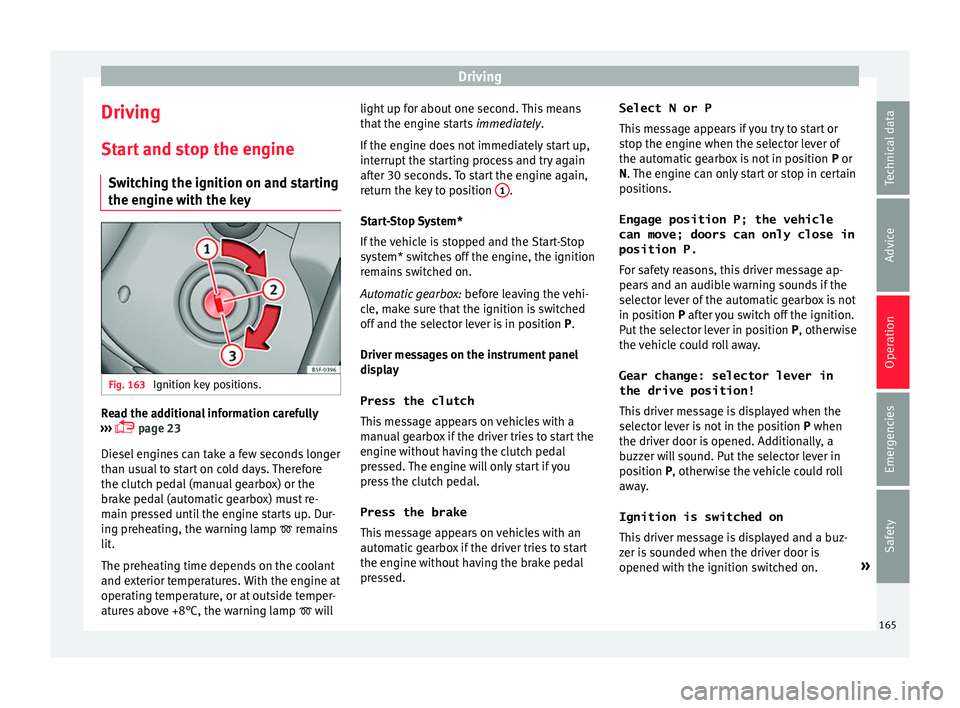
the engine with the key Fig. 163
Ignition key positions. Read the additional information carefully
› ›
› page 23
Diesel engines can take a few seconds longer
than usual to start on cold days. Therefore
the clutch pedal (manual gearbox) or the
brake pedal (automatic gearbox) must re-
main pressed until the engine starts up. Dur-
ing preheating, the warning lamp remains
lit.
The preheating time depends on the coolant
and exterior temperatures. With the engine at
operating temperature, or at outside temper-
atures above +8°C, the warning lamp will light up for about one second. This means
that
the engine starts immediately.
If the engine does not immediately start up,
interrupt the starting process and try again
after 30 seconds. To start the engine again,
return the key to position 1 .
St ar
t-Stop System*
If the vehicle is stopped and the Start-Stop
system* switches off the engine, the ignition
remains switched on.
Automatic gearbox: before leaving the vehi-
cle, make sure that the ignition is switched
off and the selector lever is in position P.
Driver messages on the instrument panel
display
Press the clutch
This message appears on vehicles with a
manual gearbox if the driver tries to start the
engine without having the clutch pedal
pressed. The engine will only start if you
press the clutch pedal.
Press the brake This message appears on vehicles with an
automatic gearbox if the driver tries to start
the engine without having the brake pedal
pressed. Select N or P
This
message appears if you try to start or
stop the engine when the selector lever of
the automatic gearbox is not in position P or
N. The engine can only start or stop in certain
positions.
Engage position P; the vehicle
can move; doors can only close in
position P.For safety reasons, this driver message ap-
pears and an audible warning sounds if the
selector lever of the automatic gearbox is not
in position P after you switch off the ignition.
Put the selector lever in position P, otherwise
the vehicle could roll away.
Gear change: selector lever in
the drive position! This driver message is displayed when the
selector lever is not in the position P when
the driver door is opened. Additionally, a
buzzer will sound. Put the selector lever in
position P, otherwise the vehicle could roll
away.
Ignition is switched on
This driver message is displayed and a buz-
zer is sounded when the driver door is
opened with the ignition switched on. »
165
Technical data
Advice
Operation
Emergencies
Safety