battery Seat Ateca 2016 User Guide
[x] Cancel search | Manufacturer: SEAT, Model Year: 2016, Model line: Ateca, Model: Seat Ateca 2016Pages: 328, PDF Size: 6.32 MB
Page 115 of 328
Opening and closing
Note
● Nev er l
eave any valuable items in the vehi-
cle unattended. Even a locked vehicle is not a
safe.
● If the diode on the driver door sill lights up
for about
30 seconds when the vehicle is
locked, the central locking system or anti-
theft alarm* is not working properly. You
should have the fault repaired at a SEAT Offi-
cial Service or specialised workshop.
● The vehicle interior monitoring of the anti-
theft
alarm* system will only function as in-
tended if the windows and the sunroof* are
closed. Car key
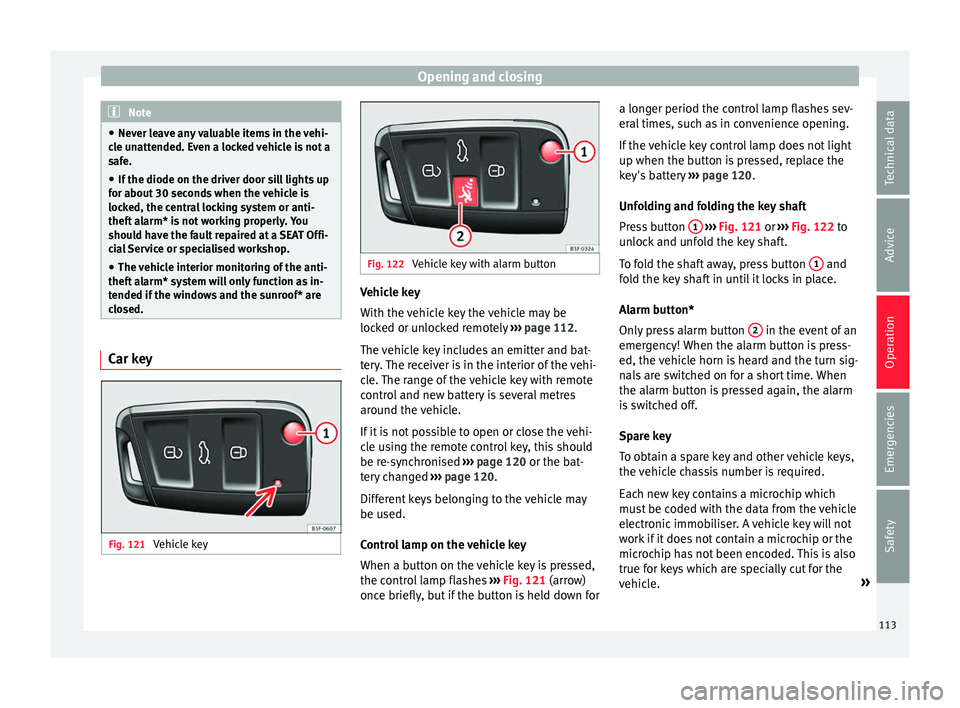
Fig. 121
Vehicle key Fig. 122
Vehicle key with alarm button Vehicle key
W
ith the
vehicle key the vehicle may be
locked or unlocked remotely ››› page 112.
The vehicle key includes an emitter and bat-
tery. The receiver is in the interior of the vehi-
cle. The range of the vehicle key with remote
control and new battery is several metres around the vehicle.
If it is not possible to open or close the vehi-
cle using the remote control key, this should
be re-synchronised ››› page 120 or the bat-
tery changed ››› page 120.
Different keys belonging to the vehicle may
be used.
Control lamp on the vehicle key
When a button on the vehicle key is pressed,
the control lamp flashes ››› Fig. 121 (arrow)
once briefly, but if the button is held down for a longer period the control lamp flashes sev-
eral
times, such as in convenience opening.
If the vehicle key control lamp does not light
up when the button is pressed, replace the
key's battery ››› page 120.
Unfolding and folding the key shaft
Press button 1
› ››
Fig. 121
or ››› Fig. 122 to
unlock and unfold the key shaft.
To fold the shaft away, press button 1 and
f o
ld the key shaft in until it locks in place.
Alarm button*
Only press alarm button 2 in the event of an
emer g
ency! When the alarm button is press-
ed, the vehicle horn is heard and the turn sig-
nals are switched on for a short time. When
the alarm button is pressed again, the alarm
is switched off.
Spare key
To obtain a spare key and other vehicle keys,
the vehicle chassis number is required.
Each new key contains a microchip which
must be coded with the data from the vehicle
electronic immobiliser. A vehicle key will not
work if it does not contain a microchip or the
microchip has not been encoded. This is also
true for keys which are specially cut for the
vehicle. »
113
Technical data
Advice
Operation
Emergencies
Safety
Page 121 of 328
Opening and closing
CAUTION
The sensor surfaces on the door handles
c ou
ld engage if hit with a water jet or high
pressure steam if there is a valid vehicle key
in the proximity. If at least one of the win-
dows is open and the sensor surface B on
one of the h
andles permanently activates, all
windows will close. If the water jet or steam
is briefly moved away from the sensor surface A (arrow) on one of the handles and then
point ed at
it again, all the windows will prob-
ably open ››› page 118. Note
● If the
vehicle battery has little or no charge,
or the vehicle key battery is almost or entire-
ly out of charge, you will probably not be able
to lock or unlock the vehicle with the Keyless
Access system. The vehicle can be unlocked
or locked manually ››› page 85.
● To control the proper locking of the vehicle,
the rel
ease function is disabled for approx. 2
seconds.
● If the message Keyless access system
faulty is
displayed on the screen of the
dash panel, abnormalities may occur in the
operation of the Keyless Access system. Con-
tact a specialised workshop. SEAT recom-
mends visiting a SEAT dealership for this.
● Depending on the function set on the info-
tainment
system for the mirrors, the exterior
mirrors will unfold and the surround lighting
will come on when unlocking the vehicle us- ing the sensor surface on the driver and pas-
sen
g
er door handles ››› page 141.
● If there is no valid key inside the vehicle or
the sys
tem fails to detect one, a warning will
display on the dash panel screen. This could
happen if any other radio frequency signal in-
terferes with the key signal (e.g. from a mo-
bile device accessory) or if the key is covered
by another object (e.g. an aluminium case).
● If the sensors are very dirty, e.g. have a lay-
er of s
alt, how the sensors on the door han-
dles operate may be affected. In this case,
clean the vehicle.
● If the vehicle is equipped with an automatic
ge
arbox, it may only be locked in the gear
stick is in position P. Anti-theft security system (Safelock)*
The following message is displayed on the in-
s
trument
panel to remind the driver that
when the vehicle is closed from the outside,
the anti-theft security system is switched on. Do not forget the Safelock.
Please see Instruction Manual . The
vehicle cannot be opened from inside. This
makes it more difficult for unauthorised per-
sons to break into the vehicle ››› in De-
s c
ription on page 112.
The anti-theft security system can be switch-
ed off each time the vehicle is locked: ●
Turn the k
ey a second time to the lock posi-
tion, in the door lock, within two seconds. If
necessary, remove the protective cover on
the driver door handle ›››
page 9 or else
● Press on the remote control key for a
sec ond time
within 2 seconds.
The flashing frequency of the diode in the
door sill immediately confirms the process.
Initially, the diode flashes in a fast sequence
for a brief period, then it stops for approxi-
mately 30 seconds and, lastly continues
flashing slowly.
119Technical data
Advice
Operation
Emergencies
Safety
Page 122 of 328
Operation
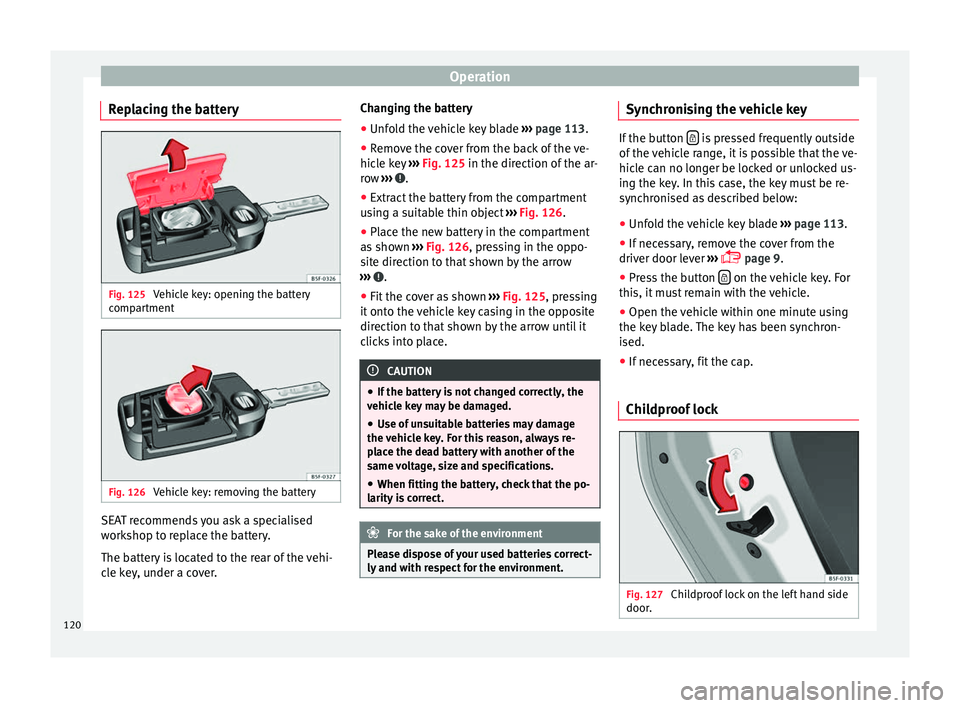
Replacing the battery Fig. 125
Vehicle key: opening the battery
c omp
artment Fig. 126
Vehicle key: removing the battery SEAT recommends you ask a specialised
w
ork
shop to replace the battery.
The battery is located to the rear of the vehi-
cle key, under a cover. Changing the battery
● Unfold the vehicle key blade ››
› page 113.
● Remove the cover from the back of the ve-
hicl
e key ››› Fig. 125 in the direction of the ar-
row ››› .
● Extract the battery from the compartment
u s
ing a suitable thin object ››› Fig. 126.
● Place the new battery in the compartment
as
shown ››› Fig. 126, pressing in the oppo-
site direction to that shown by the arrow
››› .
● Fit the cover as shown ››
› Fig. 125 , pressing
it onto the vehicle key casing in the opposite
direction to that shown by the arrow until it
clicks into place. CAUTION
● If the b
attery is not changed correctly, the
vehicle key may be damaged.
● Use of unsuitable batteries may damage
the v
ehicle key. For this reason, always re-
place the dead battery with another of the
same voltage, size and specifications.
● When fitting the battery, check that the po-
larity
is correct. For the sake of the environment
Please dispose of your used batteries correct-
ly and w
ith respect for the environment. Synchronising the vehicle key
If the button
is pressed frequently outside
of the
vehicle range, it is possible that the ve-
hicle can no longer be locked or unlocked us-
ing the key. In this case, the key must be re-
synchronised as described below:
● Unfold the vehicle key blade ››
› page 113.
● If necessary, remove the cover from the
driver door l
ever ›››
page 9.
● Press the button on the vehicle key. For
thi s, it
must remain with the vehicle.
● Open the vehicle within one minute using
the k ey
blade. The key has been synchron-
ised.
● If necessary, fit the cap.
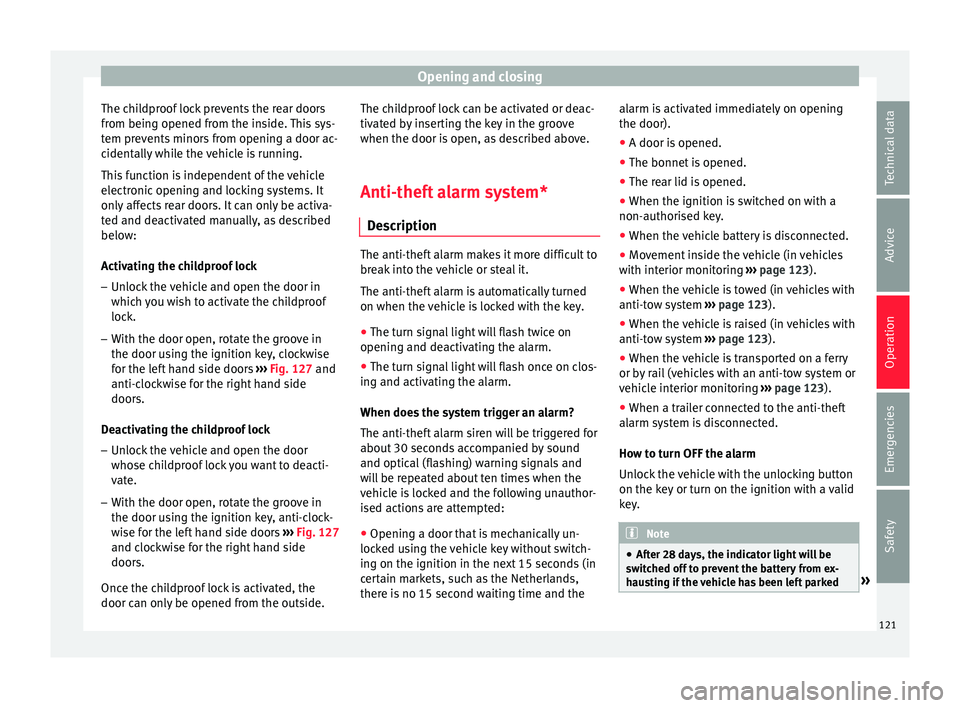
Childproof lock Fig. 127
Childproof lock on the left hand side
door .120
Page 123 of 328
Opening and closing
The childproof lock prevents the rear doors
fr om bein
g opened from the inside. This sys-
tem prevents minors from opening a door ac-
cidentally while the vehicle is running.
This function is independent of the vehicle
electronic opening and locking systems. It
only affects rear doors. It can only be activa-
ted and deactivated manually, as described
below:
Activating the childproof lock
– Unlock the vehicle and open the door in
which
you wish to activate the childproof
lock.
– With the door open, rotate the groove in
the door us
ing the ignition key, clockwise
for the left hand side doors ››› Fig. 127 and
anti-clockwise for the right hand side
doors.
Deactivating the childproof lock
– Unlock the vehicle and open the door
whose c
hildproof lock you want to deacti-
vate.
– With the door open, rotate the groove in
the door us
ing the ignition key, anti-clock-
wise for the left hand side doors ››› Fig. 127
and clockwise for the right hand side
doors.
Once the childproof lock is activated, the
door can only be opened from the outside. The childproof lock can be activated or deac-
tivat
ed by inserting the key in the groove
when the door is open, as described above.
Anti-theft alarm system* De
scription The anti-theft alarm makes it more difficult to
br
e
ak into the vehicle or steal it.
The anti-theft alarm is automatically turned
on when the vehicle is locked with the key.
● The turn signal light will flash twice on
openin g and de
activating the alarm.
● The turn signal light will flash once on clos-
ing and activ
ating the alarm.
When does the system trigger an alarm?
The anti-theft alarm siren will be triggered for
about 30 seconds accompanied by sound
and optical (flashing) warning signals and
will be repeated about ten times when the
vehicle is locked and the following unauthor-
ised actions are attempted:
● Opening a door that is mechanically un-
lock
ed using the vehicle key without switch-
ing on the ignition in the next 15 seconds (in
certain markets, such as the Netherlands,
there is no 15 second waiting time and the alarm is activated immediately on opening
the door).
●
A door is opened.
● The bonnet is opened.
● The rear lid is opened.
● When the ignition is switched on with a
non-authori
sed key.
● When the vehicle battery is disconnected.
● Movement inside the vehicle (in vehicles
with int
erior monitoring ››› page 123).
● When the vehicle is towed (in vehicles with
anti-to
w system ››› page 123).
● When the vehicle is raised (in vehicles with
anti-to
w system ››› page 123).
● When the vehicle is transported on a ferry
or by
rail (vehicles with an anti-tow system or
vehicle interior monitoring ››› page 123).
● When a trailer connected to the anti-theft
alarm sy
stem is disconnected.
How to turn OFF the alarm
Unlock the vehicle with the unlocking button
on the key or turn on the ignition with a valid
key. Note
● Af t
er 28 days, the indicator light will be
switched off to prevent the battery from ex-
hausting if the vehicle has been left parked » 121
Technical data
Advice
Operation
Emergencies
Safety
Page 124 of 328
Operation
for a long period of time. The alarm system
r
em
ains activated.
● If, after the audible warning goes off, an-
other monitor
ed area is accessed (e.g. the
rear lid is opened after a door has been
opened), the alarm is triggered again.
● The anti-theft alarm is not activated when
the v
ehicle is locked from within using the
central locking button .
● If the driver door is unlocked mechanically
w ith the k
ey, only the driver door is unlocked,
the rest of the doors remain locked. Only
when the ignition has been turned on will the
other doors be available - but not unlocked -
and the central locking button will be activa-
ted.
● If the vehicle battery is run down or flat
then the anti-theft
alarm will not operate cor-
rectly.
● Vehicle monitoring remains active even if
the batt
ery is disconnected or not working for
any reason.
● The alarm is triggered immediately if one of
the batt
ery cables is disconnected while the
alarm system is active. Vehicle interior monitoring and anti-
t
o
w system* It is a monitoring or control function incorpo-
r
at
ed in the anti-theft alarm* which detects
unauthorised vehicle entry by means of ultra-
sound. Activation
– It is automatically switched on when the
anti-theft
alarm is activated.
Deactivation – Open the vehicle with the key, either me-
ch
anically or by pressing the button on
the r emot
e control. The time period from
when the door is opened until the key is in-
serted in the contact should not exceed 15
seconds, otherwise the alarm will be trig-
gered.
– Press the button on the remote control
tw ic
e. The volumetric sensor and tilt sen-
sors will be deactivated. The alarm system
remains activated.
The vehicle interior monitoring and the anti-
tow system are automatically switched on
again next time the vehicle is locked.
The vehicle interior monitoring and anti-tow
sensor (tilt sensor) are automatically switch-
ed on when the anti-theft alarm is switched
on. In order to activate it, all the doors and
the rear lid must be closed.
If you wish to switch off the vehicle interior
monitoring and the anti-tow system, it must
be done each time that the vehicle is locked;
if not, they will be automatically switched on.
The vehicle interior monitoring and the anti-
tow system should be switched off if animals
are left inside the locked vehicle (otherwise, their movements will trigger the alarm) or
when, for e
xample, the vehicle is transported
or has to be towed with only one axle on the
ground.
False alarms
Interior monitoring will only operate correctly
if the vehicle is completely closed. Please ob-
serve related legal requirements.
The following cases may cause a false alarm:
● Open windows (partially or fully).
● Panoramic/tilting sunroof open (partially or
comp
letely).
● Movement of objects inside the vehicle,
suc
h as loose papers, items hanging from
the rear vision mirror (air fresheners), etc. Note
● If the
vehicle is relocked and the alarm is
activated without the volumetric sensor func-
tion, relocking will activate the alarm with all
its functions, except the volumetric sensor.
This function is reactivated when the alarm is
switched on again, unless it is deliberately
switched off.
● If the alarm has been triggered by the volu-
metric sen
sor, this will be indicated by a
flashing of the warning lamp on the driver
door when the vehicle is opened. The flash is
different to the flash indicating the alarm is
activated. 122
Page 127 of 328
Opening and closing
The opening angle is memorised. Memorisa-
tion i s
indicated by blinking of the hazard
warning lights and an audible warning.
Resetting and memorising the opening angle
For the rear lid to reopen completely, the
opening angle must be reset and memorised
again.
● Release the rear lid and open it to the
memorised height
.
● Lift the rear lid by hand until it stops. To do
this, some f
orce will have to be used.
● Press the ››
› Fig. 129 button available in
the rear lid for at least 3 seconds.
● This resets and memorises the factory-set
opening an
gle. Memorisation is indicated by
blinking of the hazard warning lights and an
audible warning.
Automatic protection against overheating
If the system is operated repeatedly in a
short space of time, it automatically switches
off to prevent overheating.
Once the system is cool again, the function
can be reused. Until then the rear lid can only
be opened and closed by hand using reason-
able force.
If with the rear lid open the vehicle battery is
disconnected ››› page 289 or the corre-
sponding fuse burns out ››› page 90, the sys- tem will have to be reset. This requires clos-
ing the r
ear lid completely once.
Emergency unlocking
››› page 11 WARNING
If a lot of snow builds up on the rear lid or it
i s
heavily loaded, the rear lid may not open
or, after opening, it may lower by itself due to
the extra weight and cause serious injury.
● Never open the rear lid when there is a lot
of s
now on it or when carrying a load (e.g. on
a rack).
● Before opening the rear lid, remove the
sno
w or the load. WARNING
If the rear lid is closed incorrectly or without
due c ar
e, it could result in serious injury.
● Never leave the vehicle unattended or allow
chi
ldren to play inside or next to it, especially
if the rear lid is open. Children could enter
the luggage compartment, close the rear lid
and become trapped. A locked vehicle can
reach extremely high and low temperatures,
depending on the time of year, thus causing
serious injuries, illness or even death. CAUTION
Before opening or closing the rear lid, make
s ur
e that there is enough space to open or close it, e.g. when pulling a trailer or in a ga-
r
ag
e. Tailgate automatic lock
Where the vehicle has been locked by press-
in
g the button on the remote control with
the r e
ar lid open, the rear lid will lock auto-
matically when closed.
The automatic tailgate locking time extension
function can be activated. Where this func-
tion is activated and once the rear lid has
been unlocked by pressing the button on
the r emot
e control key ››› page 114, the rear
lid can be re-opened for a certain length of
time.
Where required, the automatic tailgate lock-
ing time extension function can be activated
or deactivated at an Authorised SEAT Service,
which will provide all the necessary informa-
tion.
Before the vehicle locks automatically, there
is a risk of intruders getting into the vehicle.
Therefore, we recommend you always lock
the vehicle by pressing the button on the
r emot
e control or by using the central locking
button. WARNING
Observe the safety warnings ››
› in Intro-
duction on p ag
e 85. » 125
Technical data
Advice
Operation
Emergencies
Safety
Page 130 of 328
Operation
One-touch opening and closing One-touch opening and closing means you
do not
h
ave to hold down the button.
Buttons ››› Fig. 131 1 ,
2 ,
3 and
4 have
tw o po
sitions for opening windows and two
for closing them. This makes it easier to open
and close windows to the desired position.
One-touch closing
– Pull up the window button briefly up to the
second po
sition. The window closes fully.
One-touch opening
– Push down the window button briefly up to
the sec ond po
sition. The window opens
fully.
Resetting one-touch opening and closing
The automatic open and close function will
not work if the battery has been temporarily
disconnected. The function can be restored
as follows:
– Close the window as far as it will go by lift-
ing and ho
lding the electric window switch.
– Release the switch and then lift it again for
1 second.
This will re-enable the automatic
function.
If you push (or pull) a button to the first
stage, the window will open (or close) until
you release the button. If you push or lift the button briefly to the second stage, the win-
dow w
ill open (one-touch opening) or close
(one-touch closing) automatically. If you op-
erate the button while the window is opening
or closing, it stops at this position.
Sunroof*
Introduction The sunroof consists of two glass parts. The
r
e
ar part is fixed and cannot be opened. It al-
so has a sun blind. WARNING
If the sunroof is used negligently or without
p a
ying due attention, it can cause serious in-
jury.
● Open or close the sunroof and the sun blind
only
when no one is in their path of move-
ment.
● Never leave any key inside the vehicle
when ex
iting.
● Never leave a child or any other person who
ma
y need help in the vehicle, especially if
they have access to the vehicle key. If using
they key unattended, they could lock the ve-
hicle, start the engine, switch on the ignition
and activate the sunroof.
● After switching off, it is still possible to
open or clo
se the sunroof during a short space of time provided that neither the driver
nor p
a
ssenger door is opened. CAUTION
● To pr
event damage, during winter tempera-
tures remove any ice or snow that might be
on the car roof before opening the sunroof or
adjusting the tilt position.
● Before leaving the vehicle or in case of rain-
fa
ll, always close the sunroof. With the sun-
roof open or in a tilted position, water can en-
ter the interior and can cause considerable
damage to the electrical system. As a result,
other damage can occur in the vehicle. Note
● Le
aves and other loose objects that accu-
mulate on the sunroof rails should be regular-
ly cleaned away either by hand or with a vac-
uum.
● If the sunroof does not work correctly, the
anti-trap f
unction will not work either. Con-
tact a specialised workshop.
● Some settings can be saved in user ac-
cou
nts of the personalisation function
››› page 26.128
Page 140 of 328
Operation
Interior and reading lights 1)
› › ›
table on page 2
Read the additional information carefully
››› page 24
Glove compartment and luggage compart-
ment lighting*
When opening and closing the glove com-
partment on the front passenger side and the
rear lid, the respective light will automatically
switch on and off.
Footwell lighting*
The lights in the footwell area below the dash
(driver and front passenger sides) will switch
on when the doors are opened and will de-
crease in intensity while driving. The intensity
of these lights can be adjusted using the ra-
dio menu (see Easy Connect > Light
Settings > Interior lighting
››› page 26).
Ambient light*
The ambient lighting in the door panels may
change colour. The intensity of these lights
can be adjusted using the radio menu (see Easy Connect > Light Settings >
Interior lighting
› ›
› page 26). Note
The reading lights switch off when the vehi-
c l
e is locked using a key or after several mi-
nutes if the key is removed from the ignition.
This prevents the battery from discharging. Visibility
S u
n visors Fig. 137
Sun visor Options for adjusting driver and front pas-
sen
g
er sun visors:
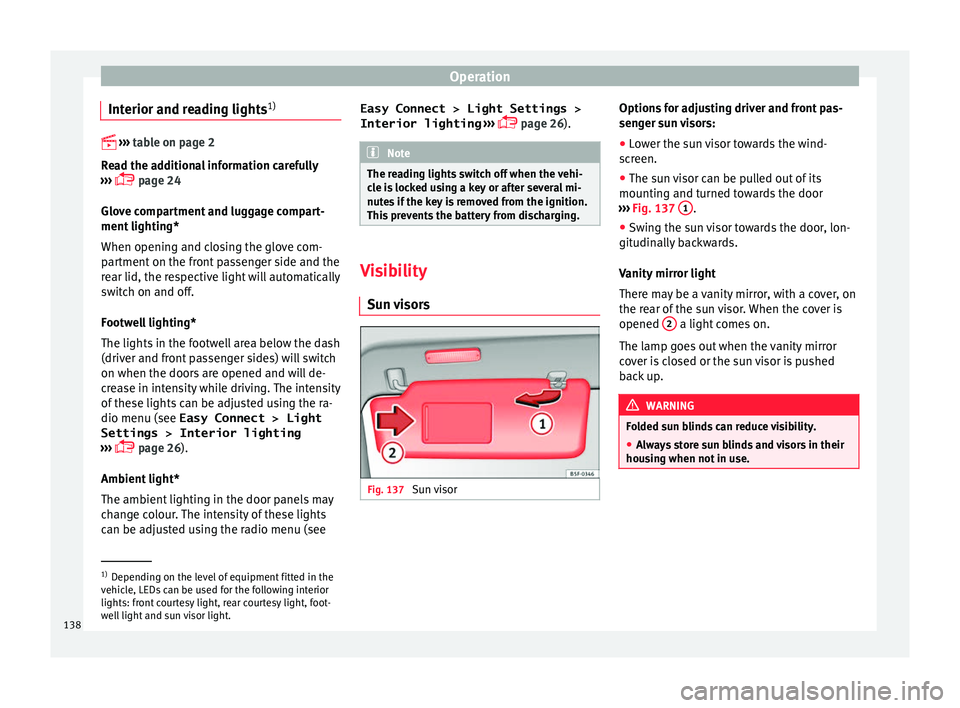
● Lower the sun visor towards the wind-
sc
reen.
● The sun visor can be pulled out of its
mountin
g and turned towards the door
››› Fig. 137 1 .
● Swing the sun visor towards the door, lon-
git udin
ally backwards.
Vanity mirror light
There may be a vanity mirror, with a cover, on
the rear of the sun visor. When the cover is
opened 2 a light comes on.
The l amp g
oes out when the vanity mirror
cover is closed or the sun visor is pushed
back up. WARNING
Folded sun blinds can reduce visibility.
● Always store sun blinds and visors in their
hou s
ing when not in use. 1)
Depending on the level of equipment fitted in the
v ehic
le, LEDs can be used for the following interior
lights: front courtesy light, rear courtesy light, foot-
well light and sun visor light.
138
Page 141 of 328
Lights and visibility
Note
The light above the sun visor automatically
sw it
ches off after a few minutes in certain
conditions. This prevents the battery from
discharging. Windscreen wiper and window
w
iper sy
stems
Window wiper lever Read the additional information carefully
› ›
› page 25 CAUTION
If the ignition is switched off with the wind-
s c
reen wipers active, they complete their
wipe before returning to the rest position.
When switching the ignition back on, the
windscreen wiper will continue to operate at
the same wiping level. Ice, snow and other
obstacles on the windscreen may damage the
wiper and the windscreen wiper motor.
● If necessary, remove snow and ice from the
wind
screen wipers before starting your jour-
ney.
● Carefully lift the frozen windscreen wipers
from the gl
ass. SEAT recommends a de-icer
spray for this operation.
● Do not switch on the windscreen wipers if
the wind
screen is dry. Cleaning with the windscreen wipers while dry can cause dam-
ag
e.
● In icy
conditions, always check that the
wiper b
lades are not frozen to the glass be-
fore using the wipers. In cold weather, it may
help to leave the vehicle parked with the wip-
ers in service position ›››
page 60. Note
● The w ind
screen and window wipers only
function when the ignition is switched on and
the bonnet or rear lid, respectively, are
closed.
● The interval wipe speed varies according to
the v
ehicle speed. The faster the vehicle is
moving, the more often the windscreen is
cleaned.
● The rear wiper is automatically switched on
when the wind
screen wiper is on and the car
is in reverse gear. Windscreen wiper functions
Windscreen wiper performance in different sit-
uations
If the vehicle is at a
standstillThe activated position provision-
ally changes to the previous posi-
tion.
Windscreen wiper performance in different sit-
uations
During automatic
wipe
The air conditioner comes on for
approximately 30 seconds in air
recirculation mode to prevent the
smell of the windscreen washer
fluid entering the inside the vehi-
cle.
For the interval wipe
Intervals between wipes depend
on the vehicle's speed. The high-
er the vehicle speed the shorter
the intervals. Heated windscreen washer jets
The he
atin
g only thaws the frozen jets, it
does not thaw the water in the washer hoses.
When the ignition is switched on the heated
windscreen washer jets automatically adjust
the heat depending on the ambient tempera-
ture.
Headlight wash/wipe system
The headlight washers/wipers clean the
headlight lenses.
After the ignition is switched on, the first and
every fifth time the windscreen washer is
switched on, the headlights are also washed.
Therefore, the windscreen wiper lever should
be pulled towards the steering wheel when
the dipped beam or main beam are on. Any
incrusted dirt (such as insects) should be
cleaned regularly (e.g. when refuelling). »
139
Technical data
Advice
Operation
Emergencies
Safety
Page 145 of 328
Seats and head restraints
Seats and head restraints
Adju s
ting the seats and headr-
ests
Manual adjustment of seats Read the additional information carefully
› ›
› page 12 WARNING
The safe driving chapter contains important
inf orm
ation, tips, suggestions and warnings
that you should read and observe for your
own safety and the safety of your passengers
››› page 62. WARNING
● Adju s
t the front seats only when the vehi-
cle is stationary. Failure to follow this instruc-
tion could result in an accident.
● Be careful when adjusting the seat height.
Car
eless or uncontrolled adjustment can
cause injuries.
● The front seat backrests must not be re-
clined f
or driving. Otherwise, seat belts and
the airbag system might not protect as they
should, with the subsequent danger of injury. Electric driver's seat adjustment*
Read the additional information carefully
› ›
› page 13 WARNING
● If the el
ectric front seats are used negli-
gently or without paying due attention, it can
cause serious injury.
● The front seats can also be electrically ad-
jus
ted when the ignition is switched off. Nev-
er leave a child or any other person who may
need help in the vehicle.
● In the event of an emergency, electrical ad-
jus
tment can be stopped by pressing any
control. CAUTION
To avoid damaging the electrical components
of the fr
ont seats, please refrain from kneel-
ing on the seat or applying sharp pressure at
a single point to the seat cushion and back-
rest. Note
● It m
ay not be possible to electrically adjust
the seat if the vehicle battery is very low.
● If the engine is started while the seats are
being el
ectrically adjusted, the adjustment
will stop. Adjusting the front head restraints
Read the additional information carefully
› ›
› page 13
Adjust the head restraint ›››
page 13 so
that as far as possible the top of the head re-
straint is level with the top of your head.
When this is not possible, try to get as close
as possible to this position.
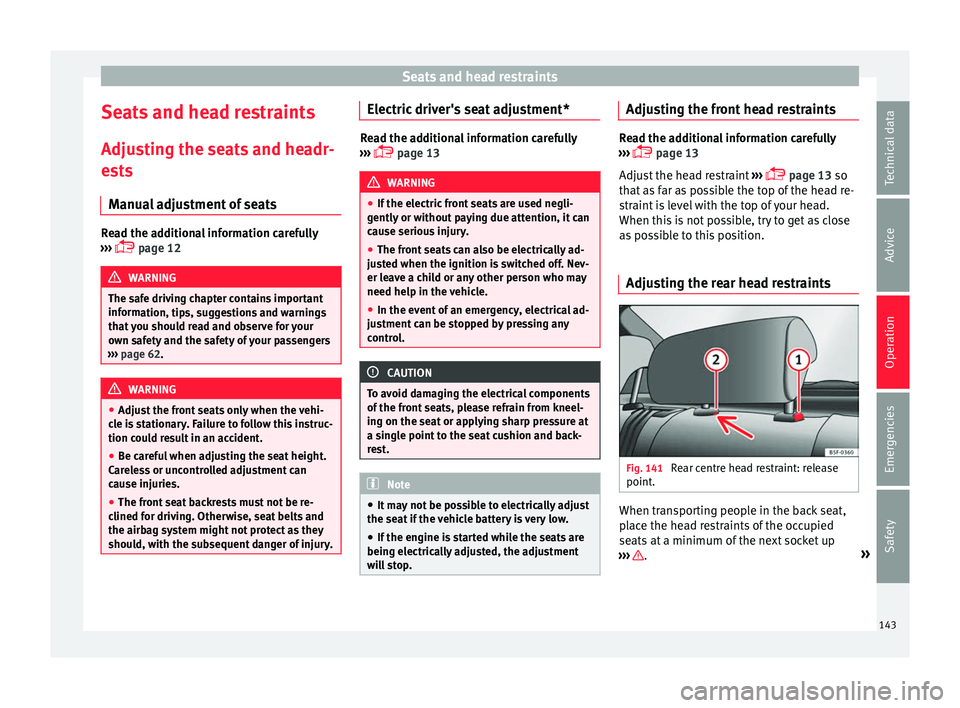
Adjusting the rear head restraints Fig. 141
Rear centre head restraint: release
point . When transporting people in the back seat,
p
l
ace the head restraints of the occupied
seats at a minimum of the next socket up
››› .
»
143
Technical data
Advice
Operation
Emergencies
Safety