mirror Seat Ateca 2016 User Guide
[x] Cancel search | Manufacturer: SEAT, Model Year: 2016, Model line: Ateca, Model: Seat Ateca 2016Pages: 328, PDF Size: 6.32 MB
Page 144 of 328
Operation
● If nec
essary the right exterior mirror adjust-
ment may need correcting. turn the control to
position R 1)
.
● In the Easy Connect system the exterior mir-
ror
s can be adjusted using the CAR button
and the f u
nction button SETUP .
Ti lt
function for front passenger exterior mir-
ror*
When parking backwards, and in order to be
able to see the kerb, the passenger side mir-
ror can be automatically tilted towards the
passenger to provide a better view of the
kerb. The control must be in the position R1)
for this feature to be operational.
The mirror returns to its original position as
soon as you drive forward at over 15 km/h
(9 mph) or switch off the ignition. It also re-
turns to its original position if the position of
the control is adjusted.
Storing the rear view mirror settings for the
tilt function
● Switch the ignition on.
● Access the Easy Connect system, Menu
CAR , function “Rear view mirrors and wind-
s c
reen wipers” and select “lower while re-
versing” ›››
page 108. ●
Select
the R1)
position on the control.
● Select reverse gear.
● Adjust the front passenger exterior mirror
so that
you can see, for example, the kerb
area well.
● Release the reverse gear.
● The adjusted position for the rear view mir-
ror i
s stored.
Fold in the exterior mirrors after parking
(convenience function)*
The Easy Connect system, Menu CAR , func-
tion “R e
ar view mirrors and windscreen wip-
ers” can be used to have the exterior mirrors
fold in when the vehicle is parked
››› page 108.
When the vehicle is locked with the remote
control, by pressing for more than approxi-
mately 1 second the exterior mirrors are fol-
ded in automatically. When the vehicle is
opened with the remote control, the exterior
mirrors are deployed automatically. WARNING
Convex or wide-angle* exterior mirrors give a
l ar
ger field of vision. However, they make ob-
jects look smaller and further away than they
really are. If you use these mirrors to esti- mate the distance to vehicles behind you
when c
h
anging lane, you could misjudge the
distance. Risk of accident! CAUTION
● If one of
the mirror housings is knocked out
of position (e.g. when parking), the mirrors
must first be fully retracted with the electric
control. Do not readjust the mirror housing by
hand, as this will interfere with the mirror ad-
juster function.
● Before washing the vehicle in an automatic
car w
ash, please make sure to retract the ex-
terior mirrors to prevent them from being
damaged. Electrically retractable exterior
mirrors must not be folded in or out by hand.
Always use the electrical power control. Note
If the electrical adjustment should fail to op-
er at
e, both of the mirrors can be adjusted by
hand by lightly pressing the edge of the mir-
ror glass. 1)
Regulation in right-hand drive vehicles is symmet-
ric al
.
142
Page 222 of 328
Operation
Blind spot detector (BSD) with
p ark
ing assistance (RCTA)*
Introduction
› ›
›
table on page 2
The blind spot detector (BSD) helps to detect
the traffic situation behind the vehicle.
The integrated parking assistant (RTA) helps
the driver when backing out of a parallel
parking spot and in manoeuvring.
The blind spot detector has been developed
for driving on paved roads. WARNING
The smart technology incorporated into the
b lind s
pot detector (BSD) with parking assis-
tance (RCTA) included cannot overcome the
limits imposed by the laws of physics; it only
works within the limits of the system. Acci-
dents and severe injury may occur if the blind
spot detection system or the rear cross traffic
alert are used negligently or involuntarily.
The system is not a replacement for driver
awareness.
● Adapt your speed and safe distance to the
vehic
le in front of you at all times to suit visi-
bility, weather, road and traffic conditions.
● Keep your hands on the wheel at all times
to be r
eady to intervene in the steering at any
time. ●
Pa
y attention to the control lamps that may
come on in the external rear view mirrors and
on the instrument panel, and follow any in-
structions they may give.
● The blind spot assistant could react to any
spec
ial constructions that might be present
on the sides of the vehicle: e.g. high or irreg-
ular dividers. This may cause erroneous warn-
ings.
● Never use the blind spot detector with rear
cr
oss traffic alert on unpaved roads. The blind
spot detector with rear cross traffic alert has
been designed for use on paved roads.
● Always pay attention to the vehicle's sur-
rou
ndings.
● Never use the blind spot detector or the
park
ing assistant if the radar sensors are
dirty.
● The external rear view mirror control lamps
ma
y have limited functionality due to solar
radiation. CAUTION
● The r a
dar sensors on the rear bumper may
be damaged or shifted in the event of a colli-
sion, for example, when entering or exiting a
parking space. This may result in the system
disconnecting itself, or at least possibly hav-
ing its functionality diminished.
● In order to ensure that the radar sensors
work
properly, keep the rear bumper free of
snow and ice and do not cover it. ●
The r e
ar bumper should only be painted
with paint authorised by SEAT. The blind spot
detector's functions may be limited or work
incorrectly if other paints are used. Note
If the blind spot detector with parking assis-
t ant
does not work as described in this chap-
ter, do not use it and contact a specialised
workshop. Control lamps
Control lamp in external rear view mirrors:
Lights up
Lights up once briefly: the blind spot detector is activa-
ted and ready to operate.
Lights up: blind spot detector has detected a vehicle in
the blind spot.
Flashes
The blind spot detector has detected a vehicle in the
blind spot and the turn signal has been turned on in the
direction of the detected vehicle
›››
.
For vehicles that are also equipped with Lane Assist
››› page 213, a warning to switch lanes will also appear
even though the turn signal has not been engaged
(blind spot detector “Plus”). 220
Page 223 of 328
Driver assistance systems
Some warning and control lamps will light up
briefly when the ignition i
s switched on to
check certain functions. They will switch off
after a few seconds.
If there are no indications from the control
lamp in the external rear view mirror, this
means that the blind spot detector has not
detected any other vehicles in the area ››› .
If the dip
ped beam is on, then the control
lamps in the external rear view mirrors will be
dimmed (night mode). WARNING
If the warning lamps and the corresponding
me s
sages are ignored when they light up, the
vehicle may stall in traffic and cause acci-
dents and severe injuries.
● Never ignore the warning lamps or messag-
es.
● C
arry out the necessary operations. CAUTION
Failure to heed the control lamps and corre-
s pondin
g text messages when they light up
may result in damage to the vehicle. Blind spot detector (BSD)
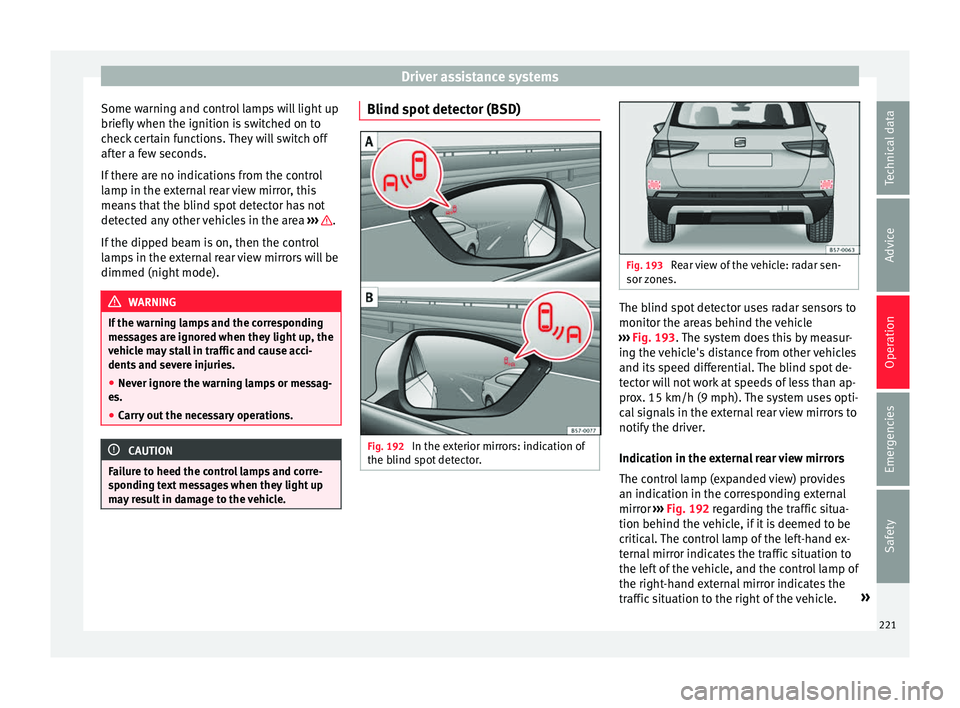
Fig. 192
In the exterior mirrors: indication of
the b lind s
pot detector. Fig. 193
Rear view of the vehicle: radar sen-
sor z
ones. The blind spot detector uses radar sensors to
monit
or the ar
eas behind the vehicle
››› Fig. 193. The system does this by measur-
ing the vehicle's distance from other vehicles
and its speed differential. The blind spot de-
tector will not work at speeds of less than ap-
prox. 15 km/h (9 mph). The system uses opti-
cal signals in the external rear view mirrors to
notify the driver.
Indication in the external rear view mirrors
The control lamp (expanded view) provides
an indication in the corresponding external
mirror ››› Fig. 192 regarding the traffic situa-
tion behind the vehicle, if it is deemed to be
critical. The control lamp of the left-hand ex-
ternal mirror indicates the traffic situation to
the left of the vehicle, and the control lamp of
the right-hand external mirror indicates the
traffic situation to the right of the vehicle. »
221
Technical data
Advice
Operation
Emergencies
Safety
Page 224 of 328
Operation
In the case of retrofitted tinted windows or
w indo
ws with tinted film, the indications of
the external mirrors may not be seen clearly
or correctly.
Keep the external mirrors clean and free of
snow and ice, and do not cover them with ad-
hesives or other similar materials.
Radar sensors
The radar sensors are located on the left and
right of the bumper and are not visible from the outside
››› Fig. 193 . The sensors have a
range of approx. 20 metres behind the vehi-
cle, including the blind spots to the left and
right of the vehicle. The range to the sides of
the vehicle is a bit larger than the width of a
lane.
The lane width is not detected individually,
but is rather pre-configured in the system.
Thus if you are driving in wide lanes or in be-
tween two lanes, the indications may be in-
correct. Furthermore, the system can detect vehicles driving in the lane next to you (if
there ar
e any), and can also detect stationary
objects such as dividers, and thus give an in-
correct indication.
222
Page 225 of 328
Driver assistance systems
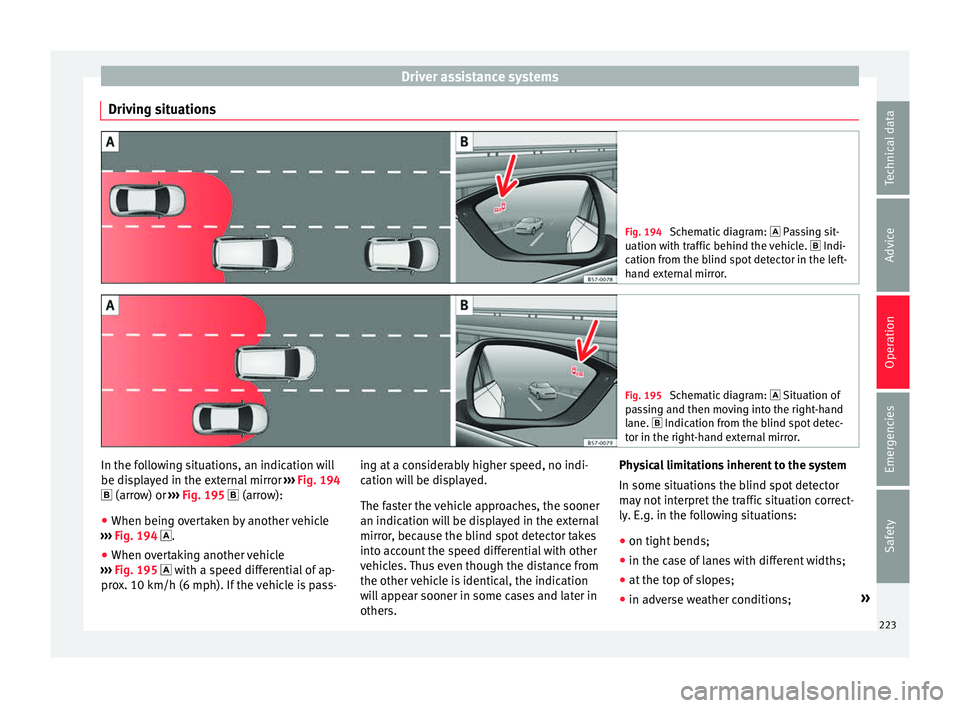
Driving situations Fig. 194
Schematic diagram: Pa ssing sit-
uation with traffic behind the vehicle. Indi-
cation from the blind spot detector in the left-
hand external mirror. Fig. 195
Schematic diagram: Situation of
p
assing and then moving into the right-hand
lane. Indication from the blind spot detec- tor in the right-hand external mirror. In the following situations, an indication will
be di
s
played in the external mirror ››› Fig. 194
(arrow) or ››› Fig. 195 (arrow):
● When being overtaken by another vehicle
››
› Fig. 194 .
● When overtaking another vehicle
››
› Fig. 195 with a speed differential of ap-
prox. 10 km/h (6 mph). If the vehicle is pass- ing at a considerably higher speed, no indi-
cation w
ill be displayed.
The faster the vehicle approaches, the sooner
an indication will be displayed in the external
mirror, because the blind spot detector takes
into account the speed differential with other
vehicles. Thus even though the distance from
the other vehicle is identical, the indication
will appear sooner in some cases and later in
others. Physical limitations inherent to the system
In some sit
uations the blind spot detector
may not interpret the traffic situation correct-
ly. E.g. in the following situations:
● on tight bends;
● in the case of lanes with different widths;
● at the top of slopes;
● in adverse weather conditions; »
223
Technical data
Advice
Operation
Emergencies
Safety
Page 227 of 328
Driver assistance systems
Open the Assistants menu.
● BSD
● P arking Assist.
If
the verification box on the control panel is
checked , the functionality will be automat-
ically activated at ignition.
When the blind spot detector is ready to op-
erate, the indications in the external mirrors
will turn on briefly as confirmation.
When the vehicle is restarted, the last adjust-
ment in the system will remain active.
If the blind spot detector was automatically
deactivated, it will only be possible to restart
the system after turning the vehicle off and
restarting it.
Automatic deactivation of the blind spot de-
tector (BSD)
The radar sensors of the blind spot detector
with rear cross traffic alert will be automati-
cally deactivated when, among other rea-
sons, one of the sensors is detected to be
permanently covered. This may be the case if,
for example, there is a layer of snow or ice in
front of one of the sensors.
The relevant text message will appear in the
dash panel display. Trailer mode
The Blind spot
detector and the rear cross
traffic alert will be automatically deactivated
and it will be impossible to activate them if
the tow hitch is electrically connected to a
trailer or other similar object.
As soon as the driver starts to drive with a
trailer connected electrically to the vehicle, a
message will appear on the instrument panel
display indicating that the blind spot detec-
tor and the rear cross traffic alert are deacti-
vated. Once the trailer has been unhitched
from the vehicle, if you want to use the blind
spot detector and the rear cross traffic alert,
you will have to reactivate them in the corre-
sponding menu.
If the towing hitch is not factory equipped,
then the blind spot detector and the rear
cross traffic alert will have to be deactivated
manually when driving with a trailer.
SEAT Drive Profile*
Introduction The SEAT Drive Profile enables the driver to
c
hoo
se between four profiles or modes, Eco,
Normal , Sport and Individual , that
modify the behaviour of various vehicle func-
tions, providing different driving experiences. In addition, the 4Drive version features the
Offroad and Snow profi
les.
The Individual profile can be configured
according to personal preferences. The other
profiles have a fixed configuration.
Description Depending on the equipment fitted in the ve-
hic
l
e, SEAT Drive Profile can operate on the
following functions:
Engine
Depending on the profile selected, the en-
gine responds more spontaneously or more
in harmony with the movements of the accel-
erator. Additionally, when the Eco profile is
selected, the Start-Stop function is automati-
cally activated.
In vehicles with automatic transmission, the
gear change points are modified to position
them in lower or higher engine speed ranges.
Additionally, the Eco profile activates the in-
ertia function, enabling consumption to be
further reduced.
In manual gearbox vehicles, the Eco profile
causes the gear change recommendation in-
dications that appear on the dash panel to
vary, facilitating more efficient driving. »
225
Technical data
Advice
Operation
Emergencies
Safety
Page 230 of 328
Operation
Traffic sign detection system* Intr oduction The traffic sign detection system records the
s
t
andard traffic signs in front of the vehicle
with a camera located on the base of the in-
terior mirror and provides information about
speed limits and overtaking prohibitions.
Within its limitations, the system also dis-
plays additional signals, such as time-specif-
ic prohibitions, signs for vehicles towing trail-
ers ›››
page 255 or limitations that only apply
in the event of rain. Even on journeys without signs, the system may display any applicable
speed limits.
In Germany, on motorways and vehicle roads,
besides speed limits and overtaking provi-
sions the system also displays the end of
prohibition signs. The valid speed limit at the
time in other countries is always shown.
Countries in which it works
When this instruction manual went to print,
the traffic sign detection system was operat-
ing in the following countries:
Andorra, Austria, Belgium, Bulgaria, Croatia,
Cyprus, Czech Republic, Denmark, Estonia,
Finland, France, Germany, Greece, Hungary,
Iceland, Ireland, Italy, Latvia, Liechtenstein,
Lithuania, Luxembourg, Malta, Monaco, the
Netherlands, Northern Ireland, Norway, Po-
land, Portugal, Romania, San Marino, Slova- kia, Slovenia, Spain, Sweden, Switzerland,
T
urk
ey, the United Kingdom and the Vatican
City. WARNING
The technology in the traffic sign detection
sy s
tem cannot change the limits imposed by
the laws of physics and only works within the
system's limits. Do not let the extra conven-
ience afforded by the traffic sign detection
system tempt you into taking any risks when
driving. The system is not a replacement for
driver awareness.
● Adapt your speed and driving style to suit
vi
sibility, weather, road and traffic condi-
tions.
● Poor visibility, darkness, snow, rain and fog
ma
y lead to the system failing to display traf-
fic signs or not displaying them correctly.
● If the camera's field of vision is dirty, cov-
ered or d
amaged, system operation may be
impaired. WARNING
The driving recommendations and traffic indi-
c ation
s shown on the traffic sign detection
system may differ from the actual current
traffic situation.
● The system may not detect or correctly
show a
ll the traffic signs.
● Traffic signs and traffic regulations have
priority o
ver the recommendations and dis-
plays provided by the system. Note
In order not to compromise the system's op-
er ation, p
lease take the following points into
account:
● Regularly clean the area of vision of the
camer
a and keep it in a clean state, without
snow or ice.
● Do not cover the field of vision of the cam-
era.
● A
lways replace damaged or worn blades
when requir
ed to avoid lines on the camera's
field of vision.
● Check that the windscreen is not damaged
in the are
a of the camera's field of vision. Note
● The u se of
outdated maps on the naviga-
tion system may cause the system to show
traffic signs incorrectly.
● In the waypoints mode of the navigation
sys
tem, the traffic sign detection system is
only partly available. 228
Page 232 of 328
Operation
interior rear-view mirror records the traffic
s ign
s in front of the vehicle. After checking
and evaluating the information from the cam-
era, the navigation system and the current
vehicle data, up to three valid traffic signs
are displayed ››› Fig. 198 B in conjunction
with their corresponding additional signs.
The sign that is currently valid for the
driver is shown in the left side of the
screen For example, a maximum speed
limit of 130 km/h (100 mph)
››› Fig. 198 A.
A sign valid only in certain circum-
stances, e.g. 100 km/h (60 mph) is
shown second, together with the addi-
tional rain sign.
If the windscreen wiper is
working while you are driving, the signal
with the additional rain sign will be
shown first, on the left, as it is the one
that is applicable at the time.
A sign valid only with restrictions, e.g.
No overtaking at certain times, will be
displayed third ››› Fig. 198 C.
Speed warning
If the system detects that the permitted
speed is exceeded, it may warn the driver
with a “gong” and visually with a message
on the dash panel display.
The speed warning can be adjusted or deacti-
vated completely on the infotainment system First:
Second:
Additional sign:
Third: using the
button and the
Set
up and
Driv er As
sistance function buttons
› ›
› page 26. The speed is adjusted in
steps of 5 km/h (3 mph) within a range of be-
tween 0 km/h (mph) and 20 km (12 mph)
above the maximum speed permitted.
Trailer mode
In vehicles equipped with a towing bracket
device from the factory and a trailer that is
electrically connected to the vehicle, it is pos-
sible to activate or deactivate the display of
specific traffic signs for vehicles with trailer,
such as speed limits or overtaking prohibi-
tions. Activation or deactivation is performed
on the infotainment system by means of the
button and the function buttons
Set
up and
Driv
er As
sistance
› ››
page 26.
For trailer mode, the display of speed limits
applicable to the type of trailer or to the legal
provisions can be adjusted. The speed is ad-
justed in steps of 10 km/h (5 mph) within a
range of between 60 km/h (40 mph) and
130 km (80 mph). If it is adjusted to a speed
greater than that which is permitted in the
country in question for driving with a trailer,
the system automatically displays the usual
speed limits, e.g. in Germany 80 km/h
(50 mph).
If the speed warning for the trailer is deacti-
vated, the system displays the speed limits
as if there were no trailer hitched. Limited operation
The traffic
sign detection system has certain
limitations. The following cases may lead the
system to operate with limitations or not at
all:
● In the case of poor visibility, e.g. in snow,
rain, f
og or intense mist.
● In cases of dazzling, e.g. caused by head-
on traffic
or by the sun.
● When driving at high speeds.
● If the camera is covered or dirty.
● If the traffic signs are out of the camera's
field of
vision.
● If the traffic signs are partially or totally
co
vered, e.g. by trees, snow, dirt or other ve-
hicles.
● In the case of traffic signs that do not fulfil
the re
gulations.
● In the case of damaged or bent traffic
sign
s.
● In the case of variable messages on over-
hea
d or gantry signs (LED-based variable traf-
fic signs or other lighting units).
● If the maps on the navigation system are
not up-t
o-date.
● In the case of adhesives affixed to vehicles
that
depict traffic signs, e.g. speed limits on
lorries.
230
Page 242 of 328
Operation
after four seconds (does not affect the tone
of the c
onstant warning).
In order to view the entire periphery of the ve-
hicle, the vehicle must be moved a few me-
tres forwards and backwards. Thus the miss-
ing areas are screened and the periphery of
the vehicle is calculated.
Special features of ParkPilot with Area View
In the following situations the screened area
on the side of the vehicle is automatically
hidden:
● When a vehicle door is opened.
● When the ASR is switched off.
● When there is ASR or ESC regulation.
● If the vehicle remains stationary for more
than ap
proximately 3 minutes. WARNING
● Alw
ays pay attention, also when looking
straight ahead, to traffic and the vehicle sur-
roundings. The assistance systems are not a
replacement for driver awareness. When in-
serting or removing the vehicle from a park-
ing space, or when performing similar ma-
noeuvres the driver always assumes the re-
sponsibility.
● Adapt your speed and driving style at all
times
to suit visibility, weather, road and traf-
fic conditions. ●
The u ltr
asound sensors have blind spots in
which obstacles and people are not regis-
tered. Pay special attention to children and
animals.
● Always keep visual control of the vehicle
surr
oundings: use the mirrors for additional
help. CAUTION
Parking Aid functions may be negatively af-
f ect
ed by different factors that may lead to
damage to the vehicle or its immediate sur-
rounds:
● Under certain circumstances, the system
does
not detect or display certain objects:
– Objects such as chains, trailer draw bars,
fences, posts and thin trees.
– Objects that are located above the sen-
sors, such as protrusions in a wall.
– Objects with certain surfaces or struc-
tures, such as wire mesh fences or pow-
der snow.
● Certain surfaces of objects and garments
do not r
eflect the ultrasound sensors' sig-
nals. The system cannot detect these objects
or people wearing such clothes correctly.
● Ultrasound sensor signals may be affected
by
external sound sources. In certain circum-
stances this may prevent them from detect-
ing people or objects.
● Please note that low obstacles detected by
the sys
tem may no longer be registered by the sensors as the car moves closer, so the
sy
s
tem will not give any further warning. In
certain circumstances, objects such as high
kerbs that could damage the bottom of the
vehicle are not detected either.
● If the first warning from the ParkPilot is ig-
nored, the
vehicle could suffer considerable
damage.
● The knocks or damage on the radiator
gril
le, bumper, wheel arch and vehicle under-
body can adjust the orientation of the sen-
sors. This can affect the parking aid function.
In this case, have the function checked by a
specialised workshop.
● A registration plate or plate holder on the
front
with larger than the space for the regis-
tration plate, or a registration plate that is
curved or warped can cause:
– false detections,
– loss of sensor visibility. Note
● In c er
tain situations, the system can give a
warning even though there is no obstacle in
the detected area, e.g:
–with rough or cobbled floors or ground
with long grass;
– with external ultrasound sources, such as
cleaning vehicles or other vehicles equip-
ped with ultrasound systems;
– in downpours, intense snow, hail or
dense exhaust gases, 240
Page 247 of 328
Driver assistance systems
●
The u ltr
asound sensors have blind spots in
which obstacles and people are not regis-
tered. Pay special attention to children and
animals.
● Always keep visual control of the vehicle
surr
oundings: use the mirrors for additional
help. CAUTION
Parking Aid functions may be negatively af-
f ect
ed by different factors that may lead to
damage to the vehicle or its immediate sur-
rounds:
● Under certain circumstances, the system
does
not detect or display certain objects:
– Objects such as chains, trailer draw bars,
fences, posts and thin trees.
– Objects that are located above the sen-
sors, such as protrusions in a wall.
– Objects with certain surfaces or struc-
tures, such as wire mesh fences or pow-
der snow.
● Certain surfaces of objects and garments
do not r
eflect the ultrasound sensors' sig-
nals. The system cannot detect these objects
or people wearing such clothes correctly.
● Ultrasound sensor signals may be affected
by
external sound sources. In certain circum-
stances this may prevent them from detect-
ing people or objects.
● Please note that low obstacles detected by
the sys
tem may no longer be registered by the sensors as the car moves closer, so the
sy
s
tem will not give any further warning. In
certain circumstances, objects such as high
kerbs that could damage the bottom of the
vehicle are not detected either.
● If the first warning from the ParkPilot is ig-
nored, the
vehicle could suffer considerable
damage.
● The knocks or damage on the radiator
gril
le, bumper, wheel arch and vehicle under-
body can adjust the orientation of the sen-
sors. This can affect the parking aid function.
In this case, have the function checked by a
specialised workshop. Note
● In c er
tain situations, the system can give a
warning even though there is no obstacle in
the detected area, e.g:
–with rough or cobbled floors or ground
with long grass;
– with external ultrasound sources, such as
cleaning vehicles or other vehicles equip-
ped with ultrasound systems;
– in downpours, intense snow, hail or
dense exhaust gases,
– if the number plate is not perfectly se-
cured to the bumper surface,
– or in locations such as the brow of a hill.
● In order to guarantee good system opera-
tion, keep the u
ltrasound sensors clean, free of snow or ice, and do not cover them with
a
dhe
sives or other objects.
● If you use high-pressure or vapour equip-
ment t
o clean the ultrasound sensors, apply
it directly only very briefly and always from a
distance of more than 10 cm.
● Retrofitting of accessories to the vehicle,
suc
h as a bicycle rack, may interfere with the
operation of the Parking Aid.
● In order to familiarise yourself with the sys-
tem, it
is advised that you practice parking in
an area or car park that is free from traffic.
There must be good weather and light condi-
tions.
● The volume and tone of the warnings can
be modified, in ad
dition to the indications
››› page 246.
● In vehicles without
an infotainment system,
these parameters can be modified in a SEAT
Official Service or in a specialised workshop.
● Please observe information on towing a
trai
ler ››› page 247.
● The display on the Easy Connect screen
show
s a slight time delay. Parking Aid operation
Manual disconnection of Parking Aid display
(the audib
l
e sounds remain active)
● Press a button on the main menu of the fac-
t or
y-assembled infotainment system.
● OR: Pr ess the BACK f
unction button. »
245
Technical data
Advice
Operation
Emergencies
Safety