wheel Seat Ateca 2016 User Guide
[x] Cancel search | Manufacturer: SEAT, Model Year: 2016, Model line: Ateca, Model: Seat Ateca 2016Pages: 328, PDF Size: 6.32 MB
Page 37 of 328
The essentials
If you wish to hide a saving tip immediately
af t
er it appears, press any button on the
windscreen wiper lever*/multifunction steer-
ing wheel*. Note
● If
you hide a saving tip, it will reappear af-
ter you switch the ignition on again.
● The saving tips do not appear in all situa-
tions, b
ut rather with a large separation of
time. Speed warning device
The speed warning device warns the driver
when they
h
ave exceeded the pre-set speed
limit by 3 km/h (2 mph). An audible warning
signal sounds, and the warning lamp and
the driver message Speed limit excee-
ded! will be displayed simultaneously on the
instrument panel. The warning lamp
switches off when reducing speed below the
stored maximum limit.
Speed warning programming is recommen-
ded if you wish to be reminded of a maxi-
mum speed, such as when travelling in a
country with different speed limits or for a
maximum speed for winter tyres.
Setting speed limit warning
You can use the radio or the Easy Connect* to
set, alter or cancel the speed limit warning. ●
Vehicle
s with radio : press the button SETUP > control button
Driver Assistant >
Speed warning .
● Vehicles with Easy Connect : pre
ss the but-
ton Systems or else Vehicle systems >
Driver assistant > Speed warning.
The warning limit can be set from 30 to
240 km/h (20 to 149 mph). The adjustment
is made at 10 km/h (5 mph) intervals. Note
● Ple
ase bear in mind that, even with the
speed warning function, it is still important
to keep an eye on the vehicle speed with the
speedometer and to observe the legal speed
limits.
● The speed limit warning function in the ver-
sion f
or some countries warns you at a speed
of 120 km/h (75 mph). This is a factory-set
speed limit. Service intervals
The service interval indication appears on the
in
s
trument panel display ›››
Fig. 115
3 .
S EA
T distinguishes between services with en-
gine oil change (e.g. Oil change service) and
services without engine oil change (e.g. In-
spection). In vehicles with
Serv
ices established by time
or mileage, the service intervals are already
pre-defined.
In vehicles with LongLife Service , the inter-
vals are determined individually. Thanks to
technological progress, maintenance work
has been greatly reduced. Because of the
technology used by SEAT, with this service
you only need to change the oil when the ve-
hicle so requires. To calculate this change
(max. 2 years), the vehicle's conditions of
use and individual driving styles are consid-
ered. The advance warning first appears 20
days before the date established for the cor-
responding service. The kilometres (miles)
remaining until the next service are always
rounded up to the nearest 100 km (miles)
and the time is given in complete days. The
current service message cannot be viewed
until 500 km after the last service. Prior to
this, only lines are visible on the display.
Inspection reminder
When the Service date is approaching, when
the ignition is switched on a Service remind-
er is displayed.
Vehicles without text messages : a span-
ner will be displayed on the instrument
panel plus an indication in km.
The kilometres indicated are the maximum
number of kilometres that can be travelled
until the next service. After a few seconds, » 35
Page 38 of 328
The essentials
the display mode changes. A clock symbol
ap pe
ars and the number of days until the
next service is due.
Vehicles with text messages : Service in
--- km or --- days will be shown on the
instrument panel display.
Service due
When the service date is due , an audible
warning is given when the ignition is switch-
ed on and the spanner displayed on the
screen flashes for a few seconds .
Vehicles with text messages : Service now
will be shown on the instrument panel dis-
play.
Reading a service notification
With the ignition switched on, the engine off
and the vehicle at a standstill, the current
service notification can be read:
Press and hold the button ›››
Fig. 115
4 for more than 5 seconds to consult the serv-
ic
e me
ssage.
When the service date has passed , a minus
sign is displayed in front of the number of kil-
ometres or days.
Vehicles with text messages : the following
message is displayed: Service --- km
(miles) or --- days ago .The time can also be set via the
key and
Set up function button in the Easy Connect
sy s
tem ›››
page 108.
Resetting service interval display
If the service was not carried out by a SEAT
dealership, the display can be reset as fol-
lows: ● Switch off the ignition, press and hold but-
ton ›
›› Fig. 115
4 .
● Switch ignition back on.
● Release THE 4
› ›
›
Fig. 115 button and
press it again for the next 20 seconds. Note
● The ser v
ice message disappears after a few
seconds, when the engine is started or when OK/RESET is pressed on the windscreen wiper
l ev
er, or OK on the multifunction steering
wheel .
● In
vehicles with the LongLife system in
which the b
attery has been disconnected for
a long period of time, it is not possible to cal-
culate the date of the next service. Therefore
the service interval display may not be cor- rect. In this case, bear in mind the maximum
service intervals permitted in the ››› Book-
let Maintenance Programme.
● If you reset the display manually, the next
serv
ice interval will be indicated as in vehi-
cles with fixed service intervals. For this rea-
son we recommend that the service interval
display be reset by a SEAT authorised Dealer. Cruise control
Oper atin
g the cruise control system
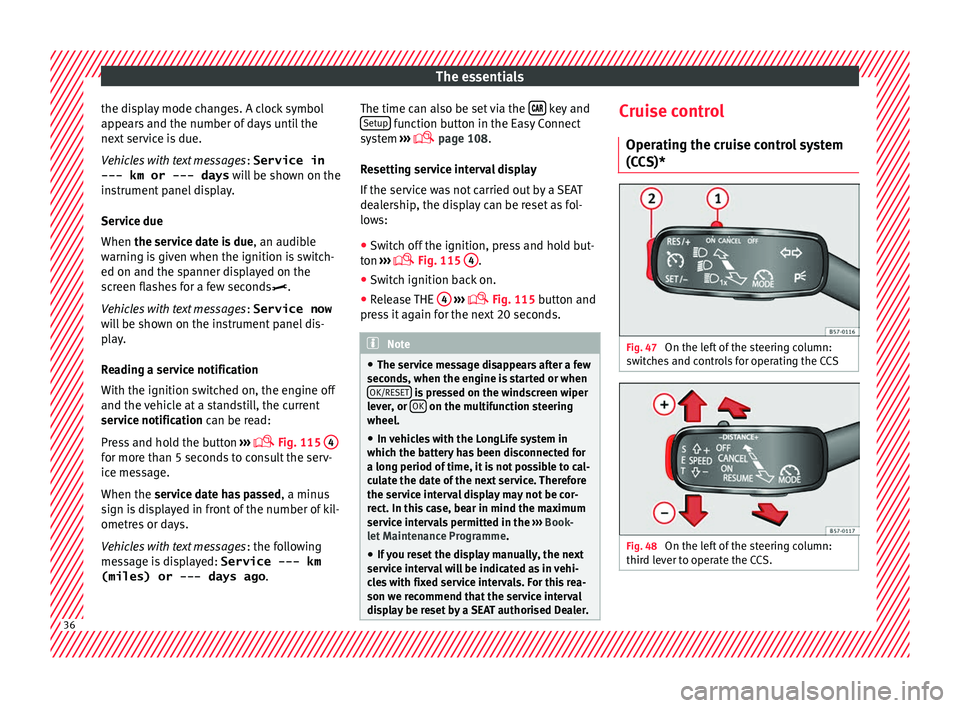
(CCS)* Fig. 47
On the left of the steering column:
sw it
ches and controls for operating the CCS Fig. 48
On the left of the steering column:
thir d l
ever to operate the CCS. 36
Page 50 of 328
The essentials
Fluid Level control Fi l
ling capacities
Tank level
Petrol and diesel
engines50 l, of which, approx. 7 l reserve
Four-wheel drive vehicles :
55 l, of which approx. 8.5 l reserve
Capacity of the windscreen washer fluid container
Versions without
headlight washer
systemapprox. 3 litres
Versions with
headlight washer
systemapprox. 5 litres Fuel
Fig. 58
Fuel tank flap with tank cap attached. The flap that covers the tank cap is unlocked
and loc
k
ed automatically using the central
locking.
Opening the fuel tank cap
● Open the fuel tank flap by pressing on the
lef
t side.
● Unscrew the cap by turning it to the left.
● Place it in the space on the hinge of the
open flap ›
›› Fig. 58.
Closing the fuel tank cap
● Unscrew the cap by turning it to the right as
far a
s it will go.
● Close the lid.
››› in Filling up on page 276
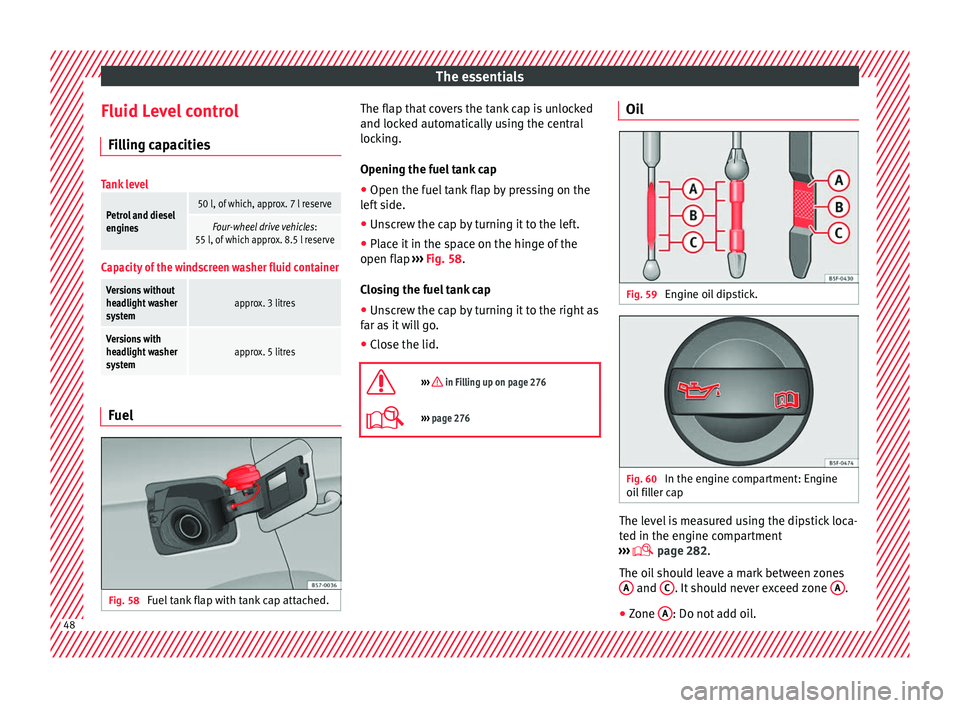
››› page 276 Oil
Fig. 59
Engine oil dipstick. Fig. 60
In the engine compartment: Engine
oi l
filler cap The level is measured using the dipstick loca-
t
ed in the en
gine compartment
››› page 282.
The oil should leave a mark between zones A and
C . It should never exceed zone
A .
● Zone A : Do not add oil.
48
Page 54 of 328
The essentials
● Rep
lace the cover again or close the fuse
box lid.
Bulbs Bu
lbs (12 V)
Light source used for each function
Halogen headlightsType
Daytime running light/side
lightLED (it cannot be re-
placed)
Dipped beam headlightsH7 LL
Main beam headlightsH7 LL
Turn signalPY21W
Full-LED main headlights
No bulbs may be replaced. All functions are with LEDs
Front fog lightType
Fog/cornering lights*H8
Rear lightsType
Brake light/tail lightP21W LL
Side lightsP21W LL
Turn signalPY21W LL
Rear lightsType
Retro fog lightP21W LL
Reverse lightsW16W
LED rear lightsType
Turn signalPY21W LL
Reverse lightsW16W
The remaining functions work with LEDs
›››
page 93 Action in the event of a punc-
t
ur
e
What to do first ●
Park the vehicle on a horizontal surface
and in a s af
e place as far away from traffic as
possible.
● Apply the handbrake.
● Switch on the hazard warning lights.
● Manual gearbox: select
the 1st gear.
● Automatic gearbox: Mov
e the selector lever
to position P.
● If you are towing a trailer, unhitch it from
your
vehicle. ●
Have the
vehicle tool kit ›››
page 83
and the spare wheel* ready
››› page 298.
● Observe the applicable legislation for each
cou
ntry (reflective vest, warning triangles,
etc.).
● All occupants should leave the vehicle and
wait
in a safe place (for instance behind the
roadside crash barrier). WARNING
● Alw
ays observe the above steps and pro-
tect yourself and other road users.
● If you change the wheel on a slope, block
the wheel on the op
posite side of the car with
a stone or similar to prevent the vehicle from
moving. 52
Page 56 of 328
The essentials
Changing a wheel V ehic
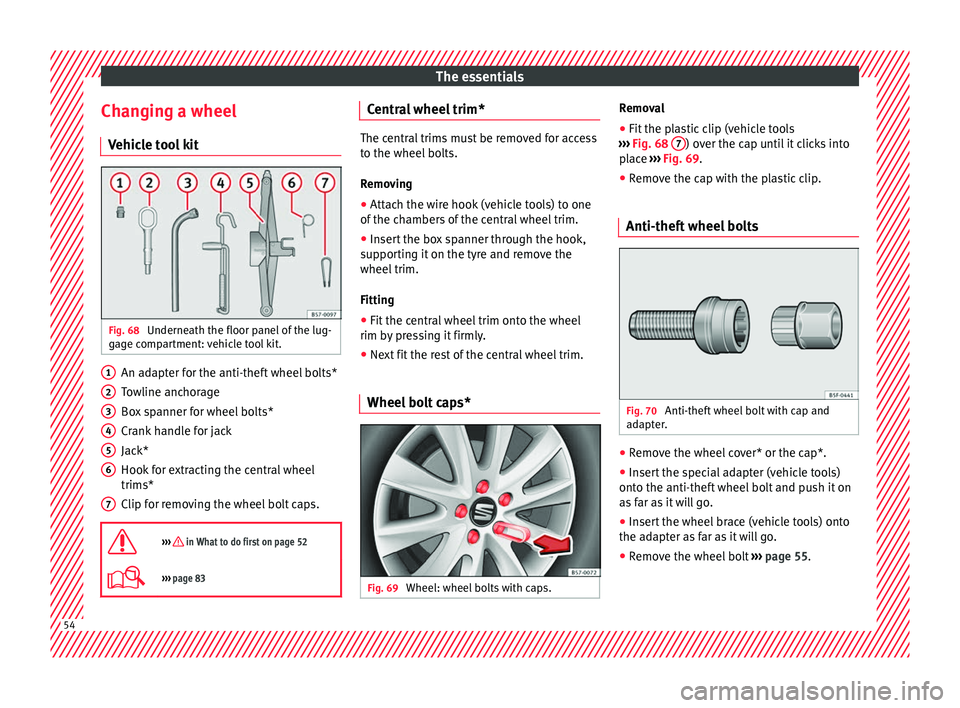
le tool kit Fig. 68
Underneath the floor panel of the lug-
g ag
e compartment: vehicle tool kit. An adapter for the anti-theft wheel bolts*
T
o
wline anchorage
Box spanner for wheel bolts*
Crank handle for jack
Jack*
Hook for extracting the central wheel
trims*
Clip for removing the wheel bolt caps.
››› in What to do first on page 52
››› page 83 1
2
3
4
5
6
7 Central wheel trim*
The central trims must be removed for access
t
o the wheel
bolts.
Removing
● Attach the wire hook (vehicle tools) to one
of the c
hambers of the central wheel trim.
● Insert the box spanner through the hook,
sup
porting it on the tyre and remove the
wheel trim.
Fitting
● Fit the central wheel trim onto the wheel
rim b y
pressing it firmly.
● Next fit the rest of the central wheel trim.
Wheel bolt caps* Fig. 69
Wheel: wheel bolts with caps. Removal
● Fit the plastic clip (vehicle tools
› ›
› Fig. 68 7 ) over the cap until it clicks into
p l
ace ››› Fig. 69.
● Remove the cap with the plastic clip.
Anti-theft wheel bolts Fig. 70
Anti-theft wheel bolt with cap and
a d
apter. ●
Remove the wheel cover* or the cap*.
● Insert the special adapter (vehicle tools)
ont o the anti-thef
t wheel bolt and push it on
as far as it will go.
● Insert the wheel brace (vehicle tools) onto
the ad
apter as far as it will go.
● Remove the wheel bolt ››
› page 55 .54
Page 57 of 328
The essentials
Note
Make a note of the code number of the anti-
thef t
wheel bolt and keep it in a safe place,
but not in your vehicle. If you need a new
adapter, you can obtain it from the SEAT Offi-
cial Service, indicating the code number. Loosening the wheel bolts
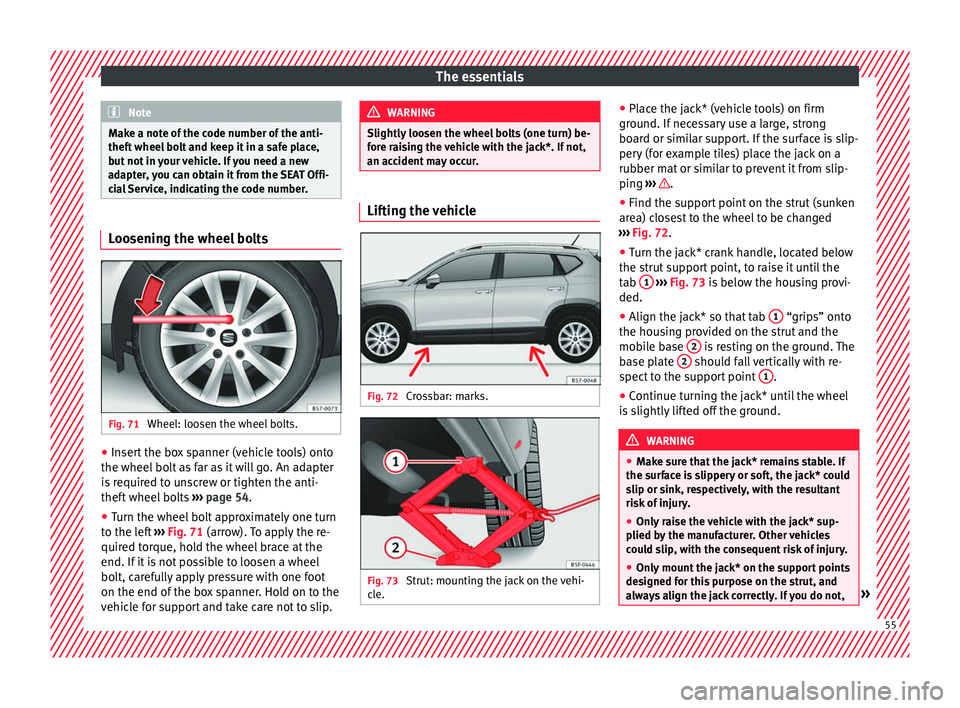
Fig. 71
Wheel: loosen the wheel bolts. ●
Insert the box spanner (vehicle tools) onto
the wheel bo
lt as far as it will go. An adapter
is required to unscrew or tighten the anti-
theft wheel bolts ›››
page 54.
● Turn the wheel bolt approximately one turn
to the l
eft ›››
Fig. 71 (arrow). To apply the re-
quired torque, hold the wheel brace at the
end. If it is not possible to loosen a wheel
bolt, carefully apply pressure with one foot
on the end of the box spanner. Hold on to the
vehicle for support and take care not to slip. WARNING
Slightly loosen the wheel bolts (one turn) be-
f or
e raising the vehicle with the jack*. If not,
an accident may occur. Lifting the vehicle
Fig. 72
Crossbar: marks. Fig. 73
Strut: mounting the jack on the vehi-
c l
e. ●
Plac
e the jack* (vehicle tools) on firm
ground. If necessary use a large, strong
board or similar support. If the surface is slip-
pery (for example tiles) place the jack on a
rubber mat or similar to prevent it from slip-
ping ››› .
● Find the support point on the strut (sunken
ar e
a) closest to the wheel to be changed
››› Fig. 72.
● Turn the jack* crank handle, located below
the strut
support point, to raise it until the
tab 1
› ››
Fig. 73
is below the housing provi-
ded.
● Align the jack* so that tab 1 “grips” onto
the hou s
ing provided on the strut and the
mobile base 2 is resting on the ground. The
b a
se plate 2 should fall vertically with re-
s pect
to the support point 1 .
● Continue turning the jack* until the wheel
i s
slightly lifted off the ground. WARNING
● Mak
e sure that the jack* remains stable. If
the surface is slippery or soft, the jack* could
slip or sink, respectively, with the resultant
risk of injury.
● Only raise the vehicle with the jack* sup-
plied b
y the manufacturer. Other vehicles
could slip, with the consequent risk of injury.
● Only mount the jack* on the support points
des
igned for this purpose on the strut, and
always align the jack correctly. If you do not, » 55
Page 58 of 328
The essentials
the jack* could slip as it does not have an
a
dequat
e grip on the vehicle: risk of injury!
● The height of the parked vehicle can
ch
ange as a result of variations in tempera-
ture and loading. CAUTION
The vehicle must not be raised on the cross-
b ar
. Only place the jack* on the points de-
signed for this purpose on the strut. Other-
wise, the vehicle may be damaged. Removing and fitting a wheel
Change the wheel after loosening the wheel
bo
lts
and raising the vehicle with the jack.
Taking off the wheel ● Unscrew the wheel bolts using the box
sp
anner and place them on a clean surface.
● Take off the wheel.
Puttin
g on the spare wheel
When fitting tyres with a compulsory rotation
direction, observe the instructions in
››› page 56.
● Mount the wheel.
● Screw on the wheel bolts in position and
tight en them loo
sely with a box spanner.
● Carefully lower the vehicle using the jack*. ●
Tight en the wheel
bolts in diagonal pairs
using the wheel brace.
The wheel bolts should be clean and turn
easily. Before fitting the spare wheel, inspect
the wheel condition and hub mounting surfa-
ces. These surfaces must be clean before fit-
ting the wheel.
Tyres with compulsory direction of ro-
tation A directional tread pattern can be identified
b
y
the arrows on the sidewall that point in
the direction of rotation. Always observe the
direction of rotation indicated when fitting
the wheel to guarantee optimum properties
of this type of tyres with regard to grip,
noises, wear and aquaplaning.
If it is absolutely necessary to fit the spare
tyre* against the direction of rotation, drive
with care as this means the tyre does not of-
fer optimum driving properties. This is of par-
ticular importance when the road surface is
wet.
To return to directional tread tires, replace
the punctured tyre as soon as possible and
restore the obligatory direction of rotation of
all tyres. Subsequent work ●
Alloy wheels: rep
lace the wheel bolt caps.
● Plate wheels: fit the c
entral wheel rim again
››› page 54.
● Return all tools to their proper storing loca-
tion.
● If the replaced wheel does not fit in the
sp
are wheel housing, store it safely in the
luggage compartment ›››
page 149.
● Check the tyre pressure of the newly moun-
ted ty
re as soon as possible.
● In vehicles fitted with a tyre pressure indi-
c at
or, adjust the pressure and store the read-
ing in the radio/Easy Connect system*
››› page 295.
● Have the tightening torque of the wheel
bolts
checked as soon as possible with a tor-
que wrench (it should be 140 Nm). Mean-
while, drive carefully.
● Have the flat tyre replaced as quickly as
pos
sible.
Snow chains Use Snow chains should only be used on the
fr
on
t wheels.56
Page 59 of 328
The essentials
Check that they are correctly seated after
driv in
g for a few yards; correct the position if
necessary, in accordance with the manufac-
turer's fitting instructions. Keep your speed
below 50 km/h (30 mph).
If there is a danger of being trapped despite
having mounted the chains, it is best to disa-
ble the driving wheels (ASR) in the ESC
››› page 174, Switching on/off the ESC
and ASR.
Snow chains will improve braking ability as
well as traction in winter conditions.
For technical reasons snow chains may only
be used with the following wheel rim/tyre
combination.
215/60 R16Chains with links of maximum 15 mm
215/55 R17Chains with links of maximum 15 mm
215/50 R18Chains with links of maximum 15 mm
Other dimensions do not allow chains Remove any central wheel trims and the rim
rin
g bef
ore fitting snow chains.
Remove the chains when roads are free of
snow. Driving characteristics worsen, and the
wheels become damaged quickly and may
even be rendered unusable. Emergency towing of the vehi-
cl
e
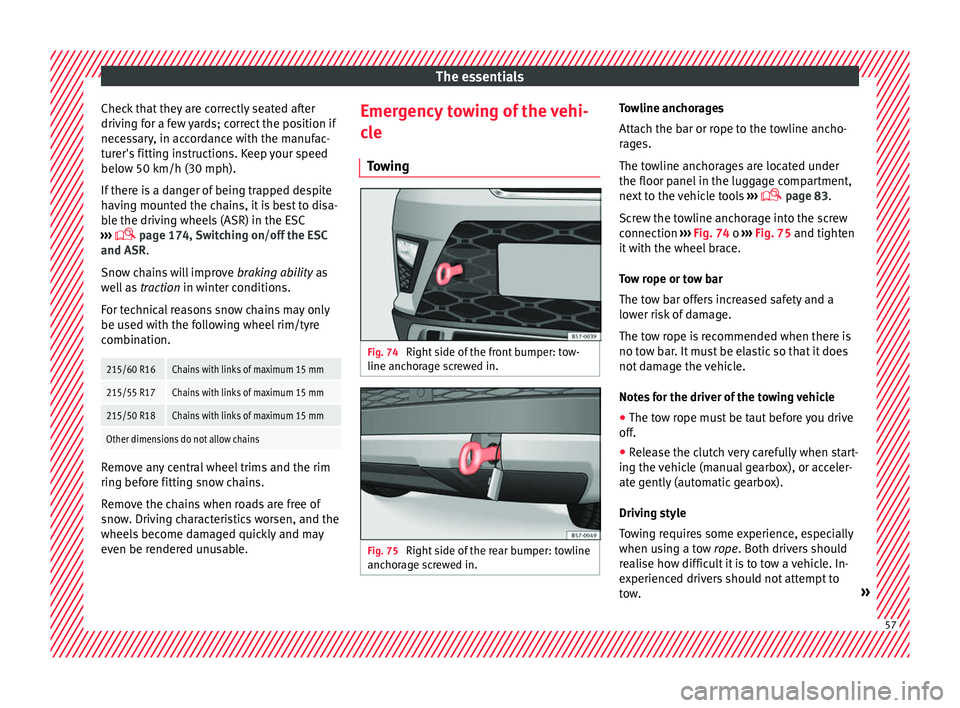
Towing Fig. 74
Right side of the front bumper: tow-
line anc hor
age screwed in. Fig. 75
Right side of the rear bumper: towline
anc hor
age screwed in. Towline anchorages
Att
ac
h the bar or rope to the towline ancho-
rages.
The towline anchorages are located under
the floor panel in the luggage compartment,
next to the vehicle tools ›››
page 83.
Screw the towline anchorage into the screw
connection ››› Fig. 74 o ››› Fig. 75 and tighten
it with the wheel brace.
Tow rope or tow bar
The tow bar offers increased safety and a
lower risk of damage.
The tow rope is recommended when there is
no tow bar. It must be elastic so that it does
not damage the vehicle.
Notes for the driver of the towing vehicle
● The tow rope must be taut before you drive
off.
● R
elease the clutch very carefully when start-
ing the
vehicle (manual gearbox), or acceler-
ate gently (automatic gearbox).
Driving style
Towing requires some experience, especially
when using a tow rope. Both drivers should
realise how difficult it is to tow a vehicle. In-
experienced drivers should not attempt to
tow. » 57
Page 60 of 328
The essentials
Do not pull too hard with the towing vehicle
and t ak
e care to avoid jerking the tow rope.
When towing on an unpaved road, there is al-
ways a risk of overloading and damaging the
anchorage points.
Switch on the ignition so that the turn sig-
nals, windscreen wipers and windscreen
washer can work. Ensure that the steering
wheel is unlocked and moves freely.
Place the gear lever in neutral on vehicles
with a manual gearbox. With an automatic
gearbox, place the lever in N.
To brake, press the brake pedal firmly. The
brake servo does not work when the engine
is switched off.
The power steering only works when the igni-
tion is switched on and the vehicle is moving,
provided that the battery is sufficiently charg-
ed. Otherwise, it will need more force.
Ensure that the tow rope remains taut at all
times.
››› in Introduction on page 86
››› page 86 Tow-starting
If the engine will not start, first try starting it
u
s
ing the battery of another vehicle
››› page 58. You should only attempt to tow-
start a vehicle if charging the battery does
not work. This is done by leveraging wheel
movement.
When tow-starting a vehicle with a petrol en-
gine, do not tow it more than a short dis-
tance, otherwise unburned fuel can enter the
catalytic converter.
● Engage 2nd or 3rd gear before moving off.
● Press the clutch and hold the pedal down.
● Switch the ignition on.
● Once both vehicles are moving, release the
c lut
ch.
● As soon as the engine has started, press
the clut
ch and move the gear lever to neutral.
How to jump start Jump le
ads The jump lead must have a sufficient wire
c
r
oss section.
If the engine fails to start because of a dis-
charged battery, the battery can be connec-
ted to the battery of another vehicle to start
the engine. Jump leads must comply with standard
DIN
72553 (see cab
le manufacturer's instruc-
tions). The wire cross section must be at least
25 mm 2
for petrol engines and at least
35 mm 2
for diesel engines. Note
● The v
ehicles must not touch each other,
otherwise electricity could flow as soon as
the positive terminals are connected.
● The discharged battery must be properly
connect
ed to the on-board network.58
Page 65 of 328
Safe driving
● Belt
tensioners for the front seats
● Front airbags
● knee airbags,
● Side airbags in the front seat backrests
● Head-protection airbags
● “ISOFIX” anchor points for child seats in
the re
ar side seats with the “ISOFIX” system,
● Height-adjustable front head restraints
● Rear head restraints with in-use position
and non-use po
sition
● Adjustable steering column
The saf
ety equipment mentioned above
works together to provide you and your pas-
sengers with the best possible protection in
the event of an accident. However, these
safety systems can only be effective if you
and your passengers are sitting in a correct
position and use this equipment properly.
Safety is everyone's business! Correct position for passengers
Corr
ect sitting position for driver Fig. 81
The proper distance between driver
and s t
eering wheel Fig. 82
Correct head restraint position for the
driv er
. For your own safety and to reduce the risk of
injur
y
in the event of an accident, we recom- mend the following adjustments for the driv-
er:
– Adjust the steering wheel so that there is a
dis
tance of at least 25 cm between the
steering wheel and the centre of your chest
››› Fig. 81.
– Move the driver's seat forwards or back-
war
ds so that you are able to press the ac-
celerator, brake and clutch pedals to the
floor with your knees still slightly angled
››› .
– Ensure that you can reach the highest point
of the s
teering wheel.
– Adjust the head restraint so that its upper
edge i
s at the same level as the top of your
head, or as close as possible to the same
level as the top of your head ››› Fig. 82.
– Move the seat backrest to an upright posi-
tion so that
your back rests completely
against it.
– Fasten your seat belt securely ››
› page 68.
– Keep both feet in the footwell so that you
hav
e the vehicle under control at all times.
Adjustment of the driver's seat ››› page 143. WARNING
● An inc orr
ect sitting position of the driver
can lead to severe injuries. » 63
Technical data
Advice
Operation
Emergencies
Safety