buttons Seat Ateca 2016 Owner's Guide
[x] Cancel search | Manufacturer: SEAT, Model Year: 2016, Model line: Ateca, Model: Seat Ateca 2016Pages: 328, PDF Size: 6.32 MB
Page 219 of 328
Driver assistance systems
Traffic Jam Assist is designed only for use on
mot or
ways and wide roads. Therefore, never
use it in city traffic.
Switching Traffic Jam Assist on and off
If Lane Assist is on, ››› page 213 Traffic Jam
Assist is switched on and off in the infotain-
ment system using the button and the
Set up and
Driv
er a
ssistance function buttons
› ›
› page 26.
It is activated by switching on Lane Assist
and the lane centring guide in the infotain-
ment system. If the lane centring guide is not
active, the Traffic Jam Assist system is not ac-
tive
Traffic Jam Assist may be disconnected using
the button for driver assistance systems to-
gether with Lane Assist ›››
page 30.
Technical requirements for using Traffic Jam
Assist
● Lane Assist must be activated ››
› page 213,
Lane Assist system*.
● Adaptive Cruise Control (ACC) must be con-
nected and activ
e ››› page 197.
● The selector lever must be in the D/S pos
i-
tion or in the Tiptronic selection track.
● The speed must be below 60 km/h
(38 mph).
● The lane centring guide must be active
››
› page 215. Traffic Jam Assist is not active (the Lane As-
si
st control light turns yellow)
● If any of the conditions mentioned on
pag
e 217, Technical requirements for using
Traffic Jam Assist are no longer met.
● If any of the conditions required for opera-
tion of the Lane As
sist are not met
››› page 213.
● If any of the conditions necessary for the
ad
aptive cruise control (ACC) to work are no
longer fulfilled ››› page 197.
Situations in which Traffic Jam Assist must
be switched off
Due to the limitations of the system, Traffic
Jam Assist must always be switched off in the
following situations:
● When more attention is required by the
driver
.
● When driving in a very sporty style.
● In adverse weather conditions, e.g. in case
of s
now or heavy rain.
● When driving on roads in poor condition.
● In sections with roadworks.
● In city journeys. WARNING
The smart technology incorporated into Traf-
fic Jam As
sist cannot defy the laws of phys-
ics; it only works within the limits of the sys- tem. Accidents and severe injury may occur if
T
r
affic Jam Assist is used negligently or invol-
untarily. The system is not a replacement for
driver awareness.
● Adapt your speed and safe distance to the
vehic
le in front of you at all times to suit the
visibility, weather, road and traffic condi-
tions.
● Do not use Traffic Jam Assist in city jour-
neys.
● Do not
use Traffic Jam Assist if there is poor
vi
sibility, for example, in case of snow, ice,
rain or loose gravel, or on steep or slippery
sections or flooded roads.
● Do not use Traffic Jam Assist offroad or on
ro
ads where the surface is not firm. Traffic
Jam Assist has been designed for use on
paved roads only.
● Traffic Jam Assist does not react to people
or anima
ls or vehicles crossing your path or
that approach you head-on down the same
lane.
● If Traffic Jam Assist does not reduce speed
suffic
iently, brake the vehicle immediately by
applying the pedal.
● If the vehicle continues to move when you
wi
sh it to stop after a driver intervention
prompt, brake the vehicle by applying the
pedal.
● If driver intervention is requested on the
d
ash panel display, immediately resume con-
trol of the vehicle.
● Keep your hands on the wheel at all times
to be r
eady to intervene in the steering at any » 217
Technical data
Advice
Operation
Emergencies
Safety
Page 231 of 328
Driver assistance systems
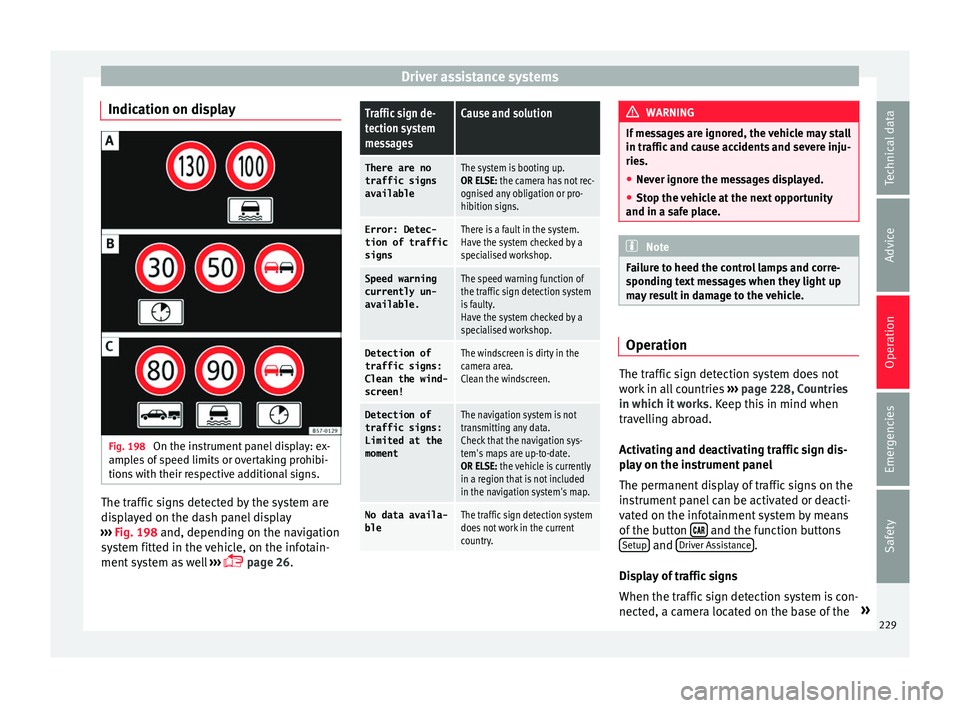
Indication on display Fig. 198
On the instrument panel display: ex-
amp l
es of speed limits or overtaking prohibi-
tions with their respective additional signs. The traffic signs detected by the system are
di
s
played on the dash panel display
››› Fig. 198 and, depending on the navigation
system fitted in the vehicle, on the infotain-
ment system as well ›››
page 26.
Traffic sign de-
tection system
messagesCause and solution
There are no
traffic signs
availableThe system is booting up.
OR ELSE: the camera has not rec-
ognised any obligation or pro-
hibition signs.
Error: Detec- tion of traffic
signsThere is a fault in the system.
Have the system checked by a
specialised workshop.
Speed warningcurrently un-
available.The speed warning function of
the traffic sign detection system
is faulty.
Have the system checked by a
specialised workshop.
Detection oftraffic signs:
Clean the wind-
screen!The windscreen is dirty in the
camera area.
Clean the windscreen.
Detection of
traffic signs:
Limited at the
momentThe navigation system is not
transmitting any data.
Check that the navigation sys-
tem's maps are up-to-date.
OR ELSE: the vehicle is currently
in a region that is not included
in the navigation system's map.
No data availa- bleThe traffic sign detection system
does not work in the current
country. WARNING
If messages are ignored, the vehicle may stall
in tr affic
and cause accidents and severe inju-
ries.
● Never ignore the messages displayed.
● Stop the vehicle at the next opportunity
and in a saf
e place. Note
Failure to heed the control lamps and corre-
s pondin
g text messages when they light up
may result in damage to the vehicle. Operation
The traffic sign detection system does not
w
ork
in all countries ›››
page 228, Countries
in which it works . Keep this in mind when
travelling abroad.
Activating and deactivating traffic sign dis-
play on the instrument panel
The permanent display of traffic signs on the
instrument panel can be activated or deacti-
vated on the infotainment system by means
of the button and the function buttons
Set up and
Driv
er As
sistance .
Di s
play of traffic signs
When the traffic sign detection system is con-
nected, a camera located on the base of the »
229
Technical data
Advice
Operation
Emergencies
Safety
Page 232 of 328
Operation
interior rear-view mirror records the traffic
s ign
s in front of the vehicle. After checking
and evaluating the information from the cam-
era, the navigation system and the current
vehicle data, up to three valid traffic signs
are displayed ››› Fig. 198 B in conjunction
with their corresponding additional signs.
The sign that is currently valid for the
driver is shown in the left side of the
screen For example, a maximum speed
limit of 130 km/h (100 mph)
››› Fig. 198 A.
A sign valid only in certain circum-
stances, e.g. 100 km/h (60 mph) is
shown second, together with the addi-
tional rain sign.
If the windscreen wiper is
working while you are driving, the signal
with the additional rain sign will be
shown first, on the left, as it is the one
that is applicable at the time.
A sign valid only with restrictions, e.g.
No overtaking at certain times, will be
displayed third ››› Fig. 198 C.
Speed warning
If the system detects that the permitted
speed is exceeded, it may warn the driver
with a “gong” and visually with a message
on the dash panel display.
The speed warning can be adjusted or deacti-
vated completely on the infotainment system First:
Second:
Additional sign:
Third: using the
button and the
Set
up and
Driv er As
sistance function buttons
› ›
› page 26. The speed is adjusted in
steps of 5 km/h (3 mph) within a range of be-
tween 0 km/h (mph) and 20 km (12 mph)
above the maximum speed permitted.
Trailer mode
In vehicles equipped with a towing bracket
device from the factory and a trailer that is
electrically connected to the vehicle, it is pos-
sible to activate or deactivate the display of
specific traffic signs for vehicles with trailer,
such as speed limits or overtaking prohibi-
tions. Activation or deactivation is performed
on the infotainment system by means of the
button and the function buttons
Set
up and
Driv
er As
sistance
› ››
page 26.
For trailer mode, the display of speed limits
applicable to the type of trailer or to the legal
provisions can be adjusted. The speed is ad-
justed in steps of 10 km/h (5 mph) within a
range of between 60 km/h (40 mph) and
130 km (80 mph). If it is adjusted to a speed
greater than that which is permitted in the
country in question for driving with a trailer,
the system automatically displays the usual
speed limits, e.g. in Germany 80 km/h
(50 mph).
If the speed warning for the trailer is deacti-
vated, the system displays the speed limits
as if there were no trailer hitched. Limited operation
The traffic
sign detection system has certain
limitations. The following cases may lead the
system to operate with limitations or not at
all:
● In the case of poor visibility, e.g. in snow,
rain, f
og or intense mist.
● In cases of dazzling, e.g. caused by head-
on traffic
or by the sun.
● When driving at high speeds.
● If the camera is covered or dirty.
● If the traffic signs are out of the camera's
field of
vision.
● If the traffic signs are partially or totally
co
vered, e.g. by trees, snow, dirt or other ve-
hicles.
● In the case of traffic signs that do not fulfil
the re
gulations.
● In the case of damaged or bent traffic
sign
s.
● In the case of variable messages on over-
hea
d or gantry signs (LED-based variable traf-
fic signs or other lighting units).
● If the maps on the navigation system are
not up-t
o-date.
● In the case of adhesives affixed to vehicles
that
depict traffic signs, e.g. speed limits on
lorries.
230
Page 255 of 328
Driver assistance systems
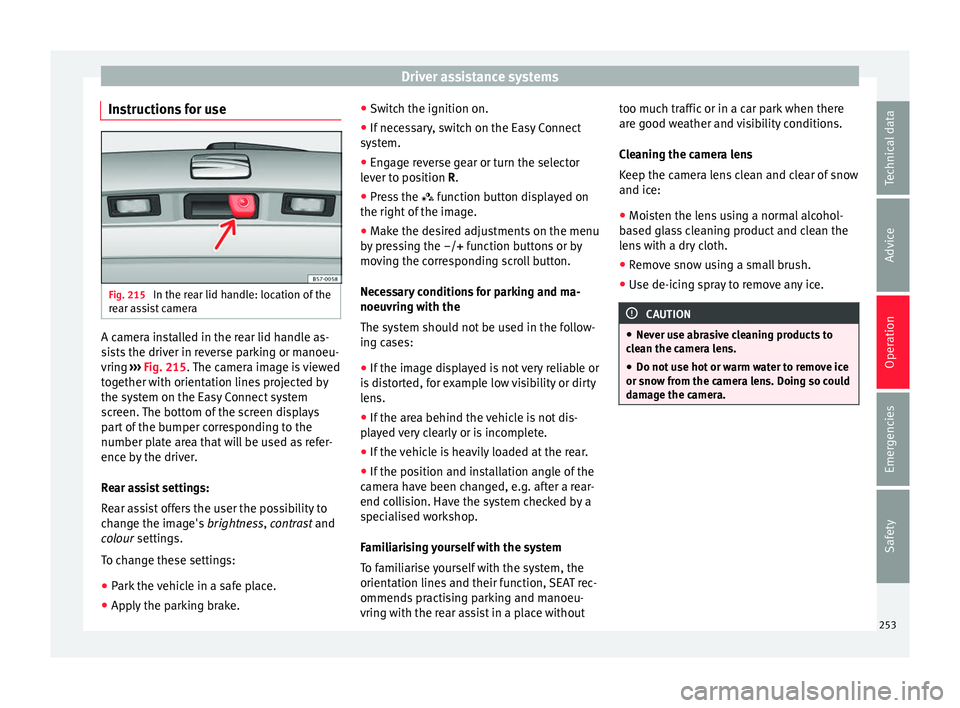
Instructions for use Fig. 215
In the rear lid handle: location of the
r e
ar assist camera A camera installed in the rear lid handle as-
s
i
sts the driver in reverse parking or manoeu-
vring ››› Fig. 215. The camera image is viewed
together with orientation lines projected by
the system on the Easy Connect system
screen. The bottom of the screen displays
part of the bumper corresponding to the
number plate area that will be used as refer-
ence by the driver.
Rear assist settings:
Rear assist offers the user the possibility to
change the image's brightness, contrast and
colour settings.
To change these settings:
● Park the vehicle in a safe place.
● Apply the parking brake. ●
Swit
ch the ignition on.
● If necessary, switch on the Easy Connect
sys
tem.
● Engage reverse gear or turn the selector
lev
er to position R.
● Press the fu
nction button displayed on
the right of the image.
● Make the desired adjustments on the menu
by
pressing the –/+ function buttons or by
moving the corresponding scroll button.
Necessary conditions for parking and ma-
noeuvring with the
The system should not be used in the follow-
ing cases:
● If the image displayed is not very reliable or
is
distorted, for example low visibility or dirty
lens.
● If the area behind the vehicle is not dis-
pl
ayed very clearly or is incomplete.
● If the vehicle is heavily loaded at the rear.
● If the position and installation angle of the
camer
a have been changed, e.g. after a rear-
end collision. Have the system checked by a
specialised workshop.
Familiarising yourself with the system
To familiarise yourself with the system, the
orientation lines and their function, SEAT rec-
ommends practising parking and manoeu-
vring with the rear assist in a place without too much traffic or in a car park when there
are g
ood weather and visibility conditions.
Cleaning the camera lens
Keep the camera lens clean and clear of snow
and ice:
● Moisten the lens using a normal alcohol-
ba
sed glass cleaning product and clean the
lens with a dry cloth.
● Remove snow using a small brush.
● Use de-icing spray to remove any ice. CAUTION
● Nev er u
se abrasive cleaning products to
clean the camera lens.
● Do not use hot or warm water to remove ice
or sno
w from the camera lens. Doing so could
damage the camera. 253
Technical data
Advice
Operation
Emergencies
Safety