parking brake Seat Ateca 2016 Owner's Guide
[x] Cancel search | Manufacturer: SEAT, Model Year: 2016, Model line: Ateca, Model: Seat Ateca 2016Pages: 328, PDF Size: 6.32 MB
Page 193 of 328
Driver assistance systems
● The s lope of
the descent is at least 10%
when driving forward and 9% when driving in
reverse.
● The brake and the accelerator are not
pre
ssed.
Hill Descent Control is deactivated on press-
ing the brake and the accelerator or if the
slope is below 5%. The function may be dis-
connected manually in the Easy Connect sys-
tem by pressing the button and the
HDCfunction button
››
›
Fig. 41.
Control lamps
››› in Warning and control lamps on
p ag
e 107.
It lights up white
Hill Descent Control is active.
It lights up grey
Hill Descent Control is not active. The system is switched
on, but is not adjusting.
Some warning and control lamps will light up
briefly
when the ignition i
s switched on to
check certain functions. They will switch off
after a few seconds. WARNING
Observe the safety warnings ››
› in Warning
and c ontr
ol lamps on page 107. WARNING
Always be ready to brake. Otherwise, an acci-
dent c
ould occur and cause injury.
● Hill Descent Control is only an auxiliary
sys
tem that in some situations may not suffi-
ciently brake the vehicle when going down a
slope.
● The speed of the vehicle may increase de-
spit
e the intervention of Hill Descent Control. Auto Hold Function
D e
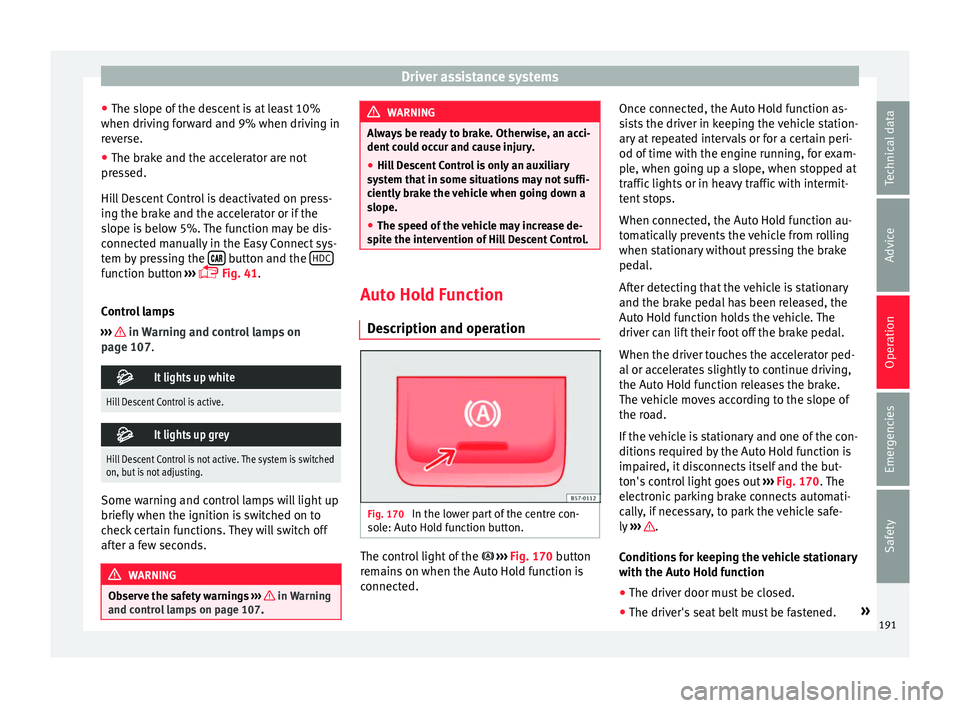
scription and operation Fig. 170
In the lower part of the centre con-
so l
e: Auto Hold function button. The control light of the
› ›
›
Fig. 170 button
remains on when the Auto Hold function is
connected. Once connected, the Auto Hold function as-
si
sts the driver in keeping the vehicle station-
ary at repeated intervals or for a certain peri-
od of time with the engine running, for exam-
ple, when going up a slope, when stopped at
traffic lights or in heavy traffic with intermit-
tent stops.
When connected, the Auto Hold function au-
tomatically prevents the vehicle from rolling
when stationary without pressing the brake
pedal.
After detecting that the vehicle is stationary
and the brake pedal has been released, the
Auto Hold function holds the vehicle. The
driver can lift their foot off the brake pedal.
When the driver touches the accelerator ped-
al or accelerates slightly to continue driving,
the Auto Hold function releases the brake.
The vehicle moves according to the slope of
the road.
If the vehicle is stationary and one of the con-
ditions required by the Auto Hold function is
impaired, it disconnects itself and the but-
ton's control light goes out ››› Fig. 170. The
electronic parking brake connects automati-
cally, if necessary, to park the vehicle safe-
ly ››› .
C ondition
s for keeping the vehicle stationary
with the Auto Hold function
● The driver door must be closed.
● The driver's seat belt must be fastened. »
191
Technical data
Advice
Operation
Emergencies
Safety
Page 194 of 328
Operation
● The en gine i
s running.
Switching the Auto Hold function on and off
Press the button ››› . The control lamp on
the b utt
on goes out when the Auto Hold func-
tion is switched off.
Automatically engaging and disengaging the
Auto Hold function
If the Auto Hold function was switched on
with the button before disengaging the ig-
nition, the function will remain on after the
ignition is re-engaged.
If the Auto Hold function was not switched
on, it will automatically remain off next time
the ignition is engaged.
The Auto Hold function is automatically
switched on if the following conditions are
met:
All conditions must be met at the same time
››› :
Manual gearboxAutomatic gearbox
1.The vehicle is kept stationary with the brake ped-
al on a flat surface or on a slope.
2.The engine rotates “correctly”.
All conditions must be met at the same time
››› :
Manual gearboxAutomatic gearbox
Upon pressing the
clutch and accelerating
at the same time, the
brake releases gradu-
ally.Upon accelerating, the
brake releases gradu-
ally. The Auto Hold function is automatically
t
urned off
if the following conditions are
met:
Manual gearboxAutomatic gearbox
1.
If any of the conditions mentioned on
››› page 191, Conditions for keeping the vehicle
stationary with the Auto Hold function are no lon- ger met.
2.If the engine is running irregularly or an anomalyis detected.
3.If the engine is turnedoff or stalls.If the engine is switch- ed off.
4.The clutch and the ac-
celerator are pressed at the same time.If the accelerator is pressed.
5.
If any of the tyres hasonly minimal contact
with the ground, e.g. in the case of axle articu- lation. WARNING
The smart technology incorporated into the
Aut o Ho
ld function cannot defy the laws of
physics; it only works within the limits of the
system. The greater convenience provided by
the Auto Hold function should never tempt
you to take any risk that may compromise
safety.
● Never leave the vehicle running and with
the Auto Ho
ld function switched on.
● The Auto Hold function cannot always keep
the v
ehicle stationary uphill or downhill or
stop it sufficiently, for example, on slippery
or frozen surfaces. Note
Before entering a car wash, always switch off
the Aut o Ho
ld function, because if the elec-
tronic parking brake is automatically connec-
ted, it may cause damage. 192
Page 206 of 328
Operation
speed accordingly and then controls the ad-
ju s
ted distance. If the vehicle detected in
front accelerates, the adaptive cruise control
will also accelerate up to the target speed
programmed at most.
The greater the speed, the greater the dis-
tance in metres should be ››› . We recom-
mend the settin g
Distance 3. WARNING
With regard to distance setting, the driver is
r e
sponsible for observing country-specific
legislation. Driver messages
A
C
C not available
The system can no longer continue to guar-
antee safe vehicle detection and will be de-
activated. The sensor has lost its setting or is
damaged. Take the vehicle to a specialised
workshop and have the fault repaired.
ACC: currently not available. No sensor vi-
sion
ACC and Front Assist: currently not availa-
ble. No sensor vision
This message will be displayed to the driver if
the radar sensor's vision is impaired due, for example, to leaves, snow, heavy fog or dirt.
C
l
ean the SEAT badge ››› Fig. 177.
ACC: currently not available. Gradient too
steep
The maximum road slope has been excee-
ded, hence safe ACC operation cannot be
guaranteed. The ACC cannot be switched on.
ACC: only available in D, S or M
Select the D/S or M position on the selector
lever.
ACC: parking brake applied
The ACC is deactivated if the parking brake is
applied. The ACC is available once again after
the parking brake is released.
ACC: currently not available. Intervention
of stability control
The message for the driver is displayed when
the electronic stability control (ESC) inter-
venes. In this case, the ACC is automatically
switched off.
ACC: Take action!
The message for the driver is displayed if,
when the vehicle starts up on a hill with a
mild slope, the vehicle rolls back even al-
though the ACC is activated. Apply the brake
to stop the vehicle from moving/colliding
with another vehicle.
ACC: speed limit
The me ssage for the driver is displayed if, in
vehicles with manual gearbox, the current
speed is too low for the ACC mode.
The speed to be stored must be at least
30 km/h (18 mph). The speed limiter
switches off if the speed falls below 20 km/h (12 mph).
ACC: available as of the 2nd gear
The ACC is operational as of the 2nd gear
(manual gearbox).
ACC: engine speed
The message for the driver is displayed if, when the ACC accelerates or brakes, the driv-
er does not shift up or down a gear in time,
which means exceeding or not reaching the
permissible engine speed. The ACC switches
itself off. A buzzer warning is heard.
ACC: clutch pressed
Vehicles with a manual gearbox: pressing the
clutch pedal for longer abandons control
mode.
Door open
Vehicles with automatic gearbox: the ACC
cannot be activated with the vehicle station-
ary and the door open.
204
Page 220 of 328
Operation
time. The driver is always responsible for
k
eepin
g the vehicle in its own lane.
● Always be prepared to take charge of driv-
ing (ac
celerating or braking) yourself. Note
● If
Traffic Jam Assist does not work as de-
scribed in this chapter, stop using it and con-
tact a specialised workshop.
● If the system is faulty, take it to a special-
ised w
orkshop and have it checked. Emergency Assist
D e
scription and operation Emergency Assist detects whether there is in-
activ
ity
by the driver and can automatically
keep the car within the lane and stop it alto-
gether if necessary. This way the system can
actively help avoid an accident.
Emergency Assist is an additional function of
Lane Assist ››› page 213 and combines Lane
Assist functions with Adaptive Cruise Control
(ACC) ››› page 197. Therefore, it is essential
that you read these two chapters carefully
and note the limitations of the systems and
the information about them. Operation of Emergency Assist
Emerg
ency Assist detects when the driver
ceases to perform any activity and repeatedly
requests that he/she regain active control of
the vehicle, through the use of optical and
acoustic warnings and by applying the
brakes.
If the driver continues to do nothing, the sys-
tem automatically takes over the accelerator,
brakes and steering in order to brake the ve-
hicle and keep it in its lane ››› . If the re-
m ainin
g braking distance is sufficient, if nec-
essary the system slows down the vehicle un-
til it stops completely and automatically
switches on the electronic parking brake
››› page 170.
When the Emergency Assist is actively adjust-
ing, the hazard warning lights come on
››› page 135 and the vehicle makes slight zig-
zag movements in the lane in order to warn
other drivers.
Switching the Emergency Assist on and off
The Emergency Assist is switched on auto-
matically when the Lane Assist is switched on
››› page 213.
Technical requirements for using the Emer-
gency Assist ● The adaptive cruise control (ACC) must be
swit
ched on ››› page 197. ●
The Lane Ass
ist must be switched on
››› page 213.
● The selector lever must be at the D/S pos
i-
tion or in the Tiptronic selection track.
● The system must have detected a lane sep-
aration line on both s
ides of the vehicle
››› Fig. 190.
The following conditions may cause the
Emergency Assist not to react or to switch off
automatically:
● If the driver accelerates, brakes or moves
the st
eering wheel.
● If any of the conditions mentioned in
››
› page 218, Technical requirements for us-
ing the Emergency Assist are not fulfilled.
● If any of the conditions required for opera-
tion of the Lane As
sist are not met
››› page 213.
● If any of the conditions necessary for the
ad
aptive cruise control (ACC) to work are no
longer fulfilled ››› page 197. WARNING
The smart technology incorporated into the
Emer g
ency Assist cannot overcome the limits
imposed by the laws of physics; it only works
within the limits of the system. The driver is
responsible for driving the vehicle.
● Adapt your speed and safe distance to the
vehic
le in front of you at all times to suit the218
Page 226 of 328
Operation
● in the c a
se of special constructions to the
side of the vehicle, e.g., high or irregular di-
viders.
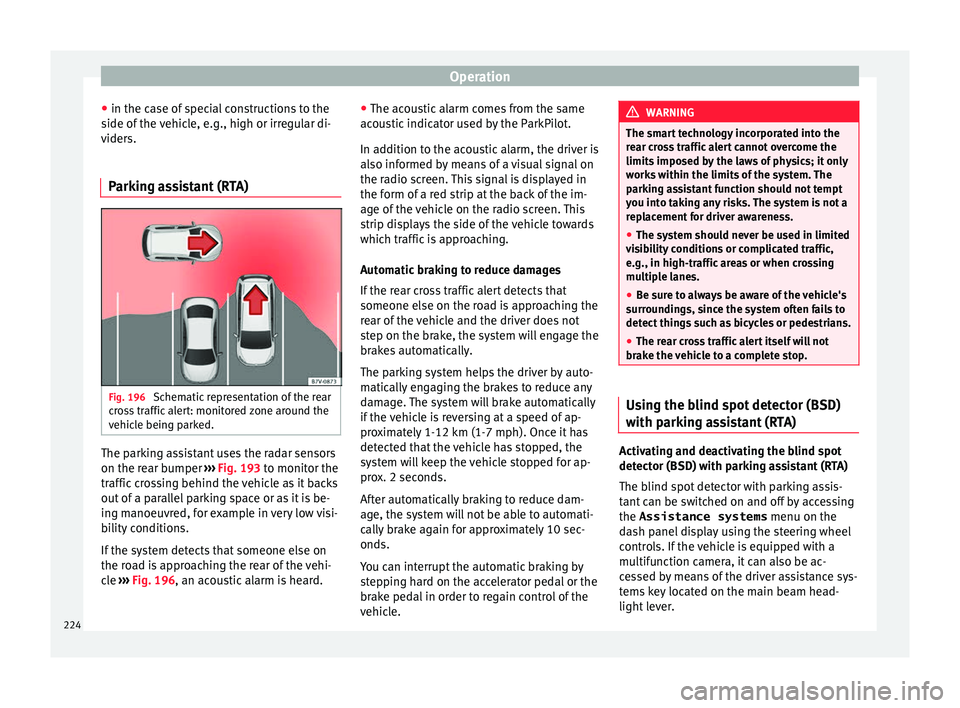
Parking assistant (RTA) Fig. 196
Schematic representation of the rear
c r
oss traffic alert: monitored zone around the
vehicle being parked. The parking assistant uses the radar sensors
on the r
e
ar bumper ››› Fig. 193 to monitor the
traffic crossing behind the vehicle as it backs
out of a parallel parking space or as it is be-
ing manoeuvred, for example in very low visi-
bility conditions.
If the system detects that someone else on
the road is approaching the rear of the vehi-
cle ››› Fig. 196, an acoustic alarm is heard. ●
The acou
stic alarm comes from the same
acoustic indicator used by the ParkPilot.
In addition to the acoustic alarm, the driver is
also informed by means of a visual signal on
the radio screen. This signal is displayed in
the form of a red strip at the back of the im-
age of the vehicle on the radio screen. This
strip displays the side of the vehicle towards
which traffic is approaching.
Automatic braking to reduce damages
If the rear cross traffic alert detects that
someone else on the road is approaching the
rear of the vehicle and the driver does not
step on the brake, the system will engage the
brakes automatically.
The parking system helps the driver by auto-
matically engaging the brakes to reduce any
damage. The system will brake automatically
if the vehicle is reversing at a speed of ap-
proximately 1-12 km (1-7 mph). Once it has
detected that the vehicle has stopped, the
system will keep the vehicle stopped for ap-
prox. 2 seconds.
After automatically braking to reduce dam-
age, the system will not be able to automati-
cally brake again for approximately 10 sec-
onds.
You can interrupt the automatic braking by
stepping hard on the accelerator pedal or the
brake pedal in order to regain control of the
vehicle. WARNING
The smart technology incorporated into the
r e
ar cross traffic alert cannot overcome the
limits imposed by the laws of physics; it only
works within the limits of the system. The
parking assistant function should not tempt
you into taking any risks. The system is not a
replacement for driver awareness.
● The system should never be used in limited
vi
sibility conditions or complicated traffic,
e.g., in high-traffic areas or when crossing
multiple lanes.
● Be sure to always be aware of the vehicle's
surr
oundings, since the system often fails to
detect things such as bicycles or pedestrians.
● The rear cross traffic alert itself will not
brak
e the vehicle to a complete stop. Using the blind spot detector (BSD)
w
ith p
arking assistant (RTA) Activating and deactivating the blind spot
det
ect
or (BSD) with parking assistant (RTA)
The blind spot detector with parking assis-
tant can be switched on and off by accessing
the Assistance systems menu on the
dash panel display using the steering wheel
controls. If the vehicle is equipped with a
multifunction camera, it can also be ac-
cessed by means of the driver assistance sys-
tems key located on the main beam head-
light lever.
224
Page 236 of 328
Operation
Special Characteristics
The P ark
Assist system is subject to certain
limitations inherent to the system. For exam-
ple, it is therefore not possible to enter or exit
a parking space on sharp bends.
While entering or exiting a parking space, a
brief signal sounds to prompt the driver to
change between forward and reverse gears. If
this signal does not sound, the gear change
will be indicated when the continuous signal
sounds (object at 30 cm) in ParkPilot.
When the Park Assist system turns the steer-
ing wheel with the vehicle stationary, the in- strument panel also displays the symbol
.
Pre ss down the brake pedal so that the turn
takes place with the vehicle stationary and
the smallest possible number of manoeuvres
take place in the parking space.
Trailer mode
The Park Assist system cannot be switched
on if the factory-fitted towing bracket
››› page 255 is electrically connected to a
trailer. After changing a wheel
If, af
ter changing a wheel, the vehicle stops
entering and exiting parking spaces correctly,
the circumference of the new wheel may be
different and the system may need to adapt
to it. The adaptation is automatic and takes
place during driving. Making turns slowly, at
less than 20 km/h (12 mph) may contribute
to this adaptation process ››› in Introduc-
tion on p ag
e 232.
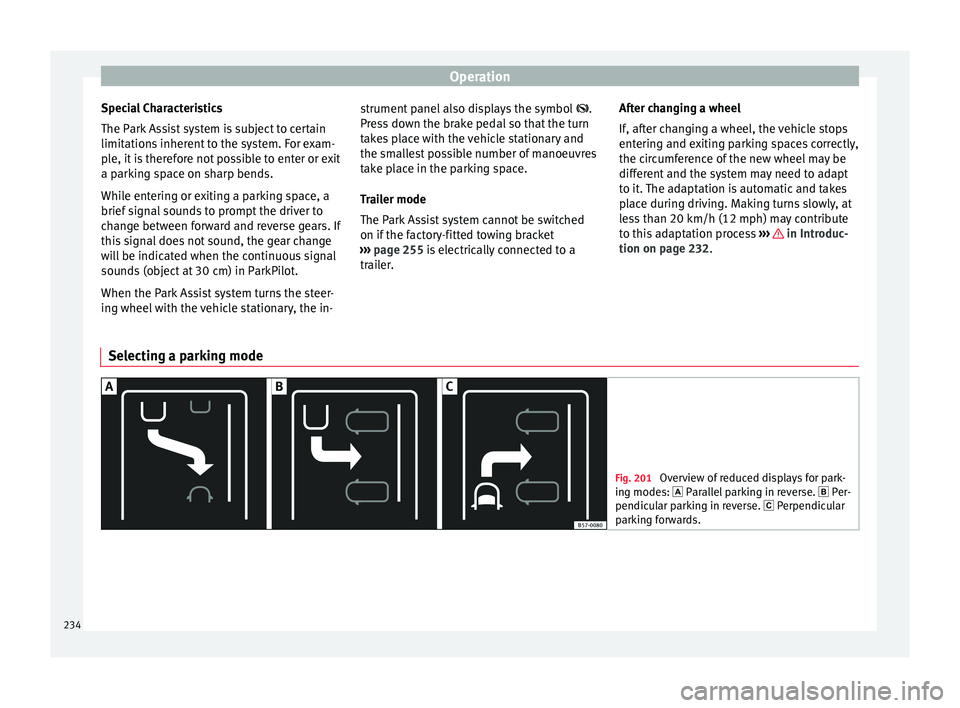
Selecting a parking mode Fig. 201
Overview of reduced displays for park-
in g mode
s: Parallel parking in reverse. Per-
pendicular parking in reverse. Perpendicular
parking forwards. 234
Page 238 of 328
Operation
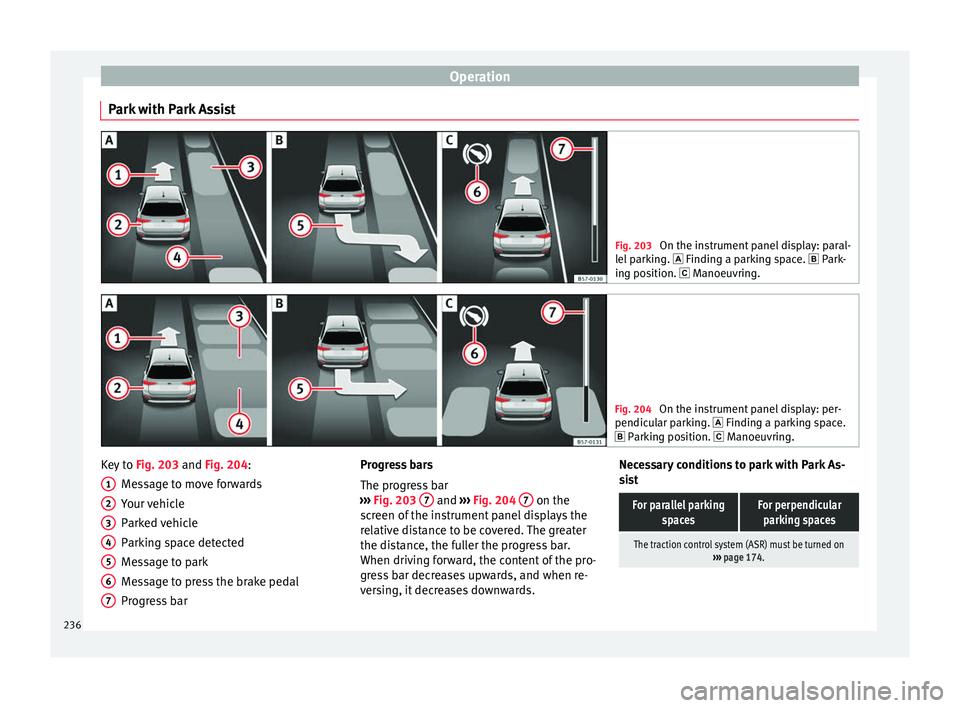
Park with Park Assist Fig. 203
On the instrument panel display: paral-
l el
parking. Finding a parking space. Park-
ing position. Manoeuvring. Fig. 204
On the instrument panel display: per-
pendic u
lar parking. Finding a parking space.
Parking position. Manoeuvring. Key to
Fig. 203 and Fig. 204:
M e
ssage to move forwards
Your vehicle
Parked vehicle
Parking space detected
Message to park
Message to press the brake pedal
Progress bar
1 2
3
4
5
6
7 Progress bars
The pr
ogr
ess bar
››› Fig. 203 7 and
›››
Fig. 204 7 on the
s c
reen of the instrument panel displays the
relative distance to be covered. The greater
the distance, the fuller the progress bar.
When driving forward, the content of the pro-
gress bar decreases upwards, and when re-
versing, it decreases downwards. Necessary conditions to park with Park As-
si
st
For parallel parking spacesFor perpendicularparking spaces
The traction control system (ASR) must be turned on ››› page 174. 236
Page 239 of 328
Driver assistance systemsFor parallel parking
spacesFor perpendicularparking spaces
Do not exceed approxi-
mately 40 km/h (25 mph)
when driving past the parking space.Do not exceed approxi-
mately 20 km/h (12 mph)
when driving past the parking space.
Keep a distance between 0.5 and 2.0 metres when driv- ing past the parking space.
Length of the space:
length of the vehicle + 0.8 metresWidth of the space: width
of the vehicle + 0.8 me- tres
Do not exceed approximately 7 km/h (4 mph) when
parking. Parking
Do the following:
1.The necessary conditions have to be met to park
with Park Assist
››› page 236 and the parking
mode must be selected ››› page 234.
2.
Look at the display on the instrument panel to
see if the space has been detected as “appropri-
ate” and if the correct position for parking has
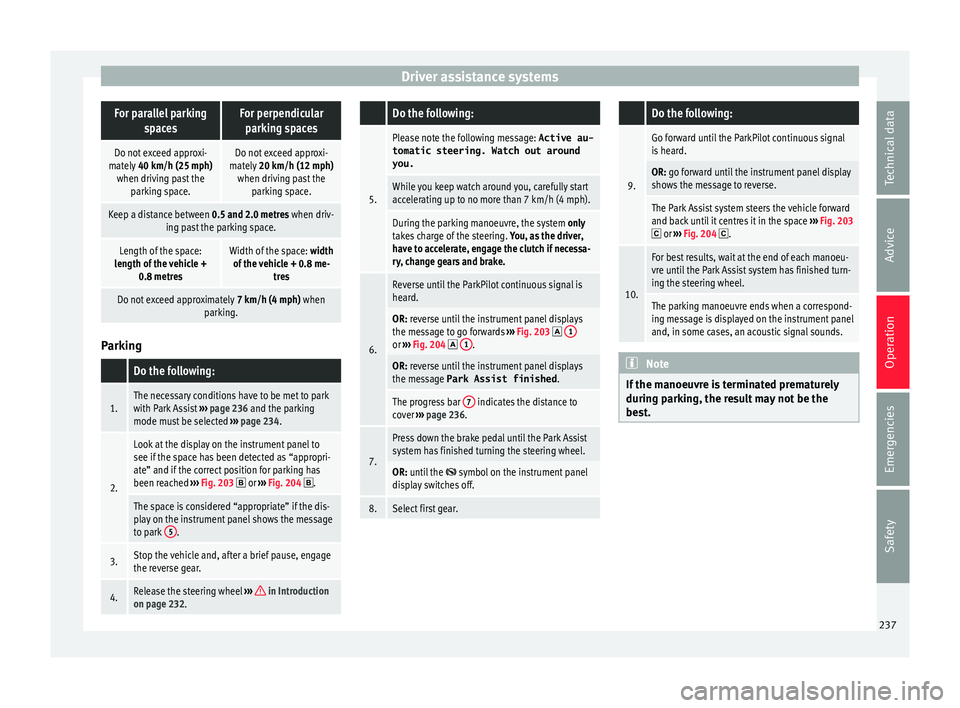
been reached ››› Fig. 203
or ››› Fig. 204 .
The space is considered “appropriate” if the dis-
play on the instrument panel shows the message
to park 5
.
3.Stop the vehicle and, after a brief pause, engage
the reverse gear.
4.Release the steering wheel
››› in Introduction
on page 232.
Do the following:
5.
Please note the following message: Active au-
tomatic steering. Watch out around
you.
While you keep watch around you, carefully start
accelerating up to no more than 7 km/h (4 mph).
During the parking manoeuvre, the system only
takes charge of the steering. You, as the driver,
have to accelerate, engage the clutch if necessa-
ry, change gears and brake.
6.
Reverse until the ParkPilot continuous signal is
heard.
OR: reverse until the instrument panel displays
the message to go forwards ››› Fig. 203 1or
››› Fig. 204 1.
OR: reverse until the instrument panel displays
the message Park Assist finished
.
The progress bar 7 indicates the distance to
cover ››› page 236.
7.
Press down the brake pedal until the Park Assist
system has finished turning the steering wheel.
OR: until the symbol on the instrument panel
display switches off.
8.Select first gear.
Do the following:
9.
Go forward until the ParkPilot continuous signal
is heard.
OR: go forward until the instrument panel display
shows the message to reverse.
The Park Assist system steers the vehicle forward
and back until it centres it in the space ››› Fig. 203
or ››› Fig. 204 .
10.
For best results, wait at the end of each manoeu-
vre until the Park Assist system has finished turn-
ing the steering wheel.
The parking manoeuvre ends when a correspond-
ing message is displayed on the instrument panel
and, in some cases, an acoustic signal sounds. Note
If the manoeuvre is terminated prematurely
durin g p
arking, the result may not be the
best. 237
Technical data
Advice
Operation
Emergencies
Safety
Page 240 of 328
Operation
Exiting a parking space with Park As-
s i
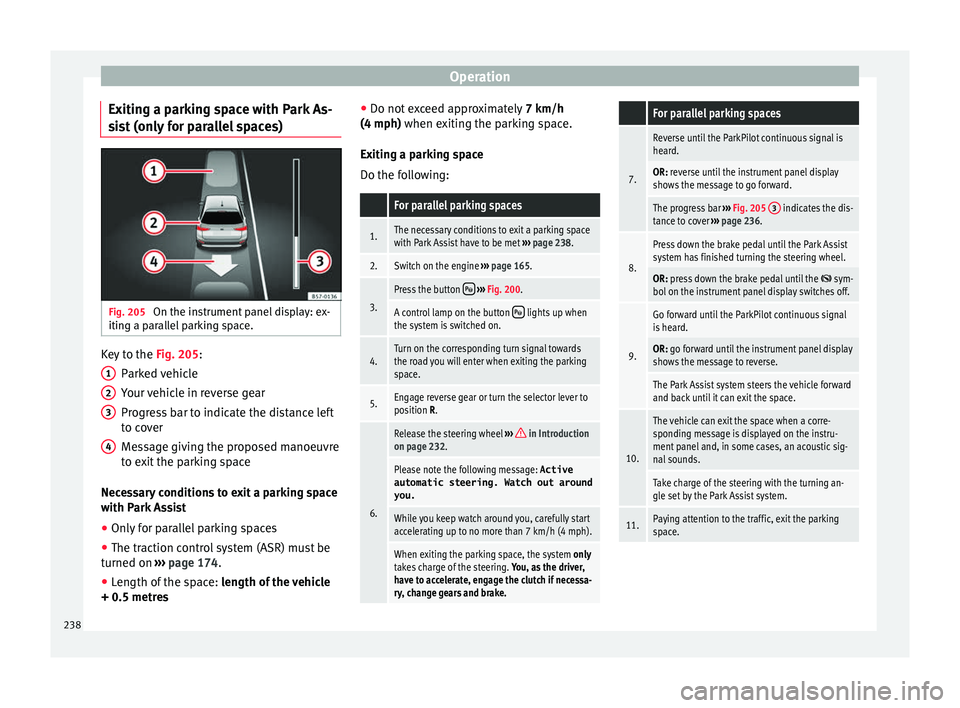
st (only for parallel spaces) Fig. 205
On the instrument panel display: ex-
itin g a p
arallel parking space. Key to the
Fig. 205:
P ark
ed vehicle
Your vehicle in reverse gear
Progress bar to indicate the distance left
to cover
Message giving the proposed manoeuvre
to exit the parking space
Necessary conditions to exit a parking space
with Park Assist
● Only for parallel parking spaces
● The traction control system (ASR) must be
turned on ›
›› page 174.
● Length of the space: len
gth of the vehicle
+ 0.5 metres 1 2
3
4 ●
Do not e
xceed approximately 7 km/h
(4 mph) when exiting the parking space.
Exiting a parking space
Do the following:
For parallel parking spaces
1.The necessary conditions to exit a parking space
with Park Assist have to be met ››› page 238.
2.Switch on the engine ››› page 165.
3.
Press the button ››› Fig. 200.
A control lamp on the button lights up when
the system is switched on.
4.Turn on the corresponding turn signal towards
the road you will enter when exiting the parking
space.
5.Engage reverse gear or turn the selector lever to
position R.
6.
Release the steering wheel ››› in Introduction
on page 232.
Please note the following message: Active
automatic steering. Watch out around
you.
While you keep watch around you, carefully start
accelerating up to no more than 7 km/h (4 mph).
When exiting the parking space, the system only
takes charge of the steering. You, as the driver,
have to accelerate, engage the clutch if necessa-
ry, change gears and brake.
For parallel parking spaces
7.
Reverse until the ParkPilot continuous signal is
heard.
OR: reverse until the instrument panel display
shows the message to go forward.
The progress bar ››› Fig. 205 3 indicates the dis-
tance to cover ››› page 236.
8.
Press down the brake pedal until the Park Assist
system has finished turning the steering wheel.
OR: press down the brake pedal until the sym-
bol on the instrument panel display switches off.
9.
Go forward until the ParkPilot continuous signal
is heard.
OR: go forward until the instrument panel display
shows the message to reverse.
The Park Assist system steers the vehicle forward
and back until it can exit the space.
10.
The vehicle can exit the space when a corre-
sponding message is displayed on the instru-
ment panel and, in some cases, an acoustic sig-
nal sounds.
Take charge of the steering with the turning an-
gle set by the Park Assist system.
11.Paying attention to the traffic, exit the parking
space. 238
Page 241 of 328
Driver assistance systems
Automatic braking intervention by
P ark
Assist Park Assist helps the driver by automatically
br
ak
ing in certain situations.
The driver is always responsible for braking
in time ››› .
Aut om
atic braking intervention to avoid ex-
ceeding the speed limit
To avoid exceeding the speed limit of approx-
imately 7 km/h (4 mph) when entering or
leaving a parking space, the brakes may acti-
vate automatically. After automatically acti-
vating the brakes, the manoeuvres to enter or
exit a parking space may continue.
The brakes are only automatically activated
once for each attempt to enter or exit a park-
ing space. If the speed of approximately
7 km/h (4 mph) is exceeded again, the corre-
sponding operation is halted.
Automatic braking to reduce damages
Depending on certain conditions, the Park
Assist system can automatically brake the ve-
hicle when faced with an obstacle, briefly ac-
tioning and holding down the brake ped-
al ››› . Following this the driver must press
the br ak
e pedal.
Automatic braking intervention to reduce
damage leads to the parking manoeuvre fin-
ishing. WARNING
The automatic braking intervention by Park
As s
ist should never tempt you to take any
risk that may compromise safety. The system
is not a replacement for driver awareness.
● The Park Assist system is subject to certain
limitation
s inherent to the system. In certain
situations, the automatic braking interven-
tion may only work in a limited way or not
work at all.
● Always be ready to use the brakes yourself!
● The automatic braking intervention will end
aft
er approximately 1.5 seconds. Following
this, brake the vehicle yourself. Parking System Plus (ParkPi-
lot)*
D e
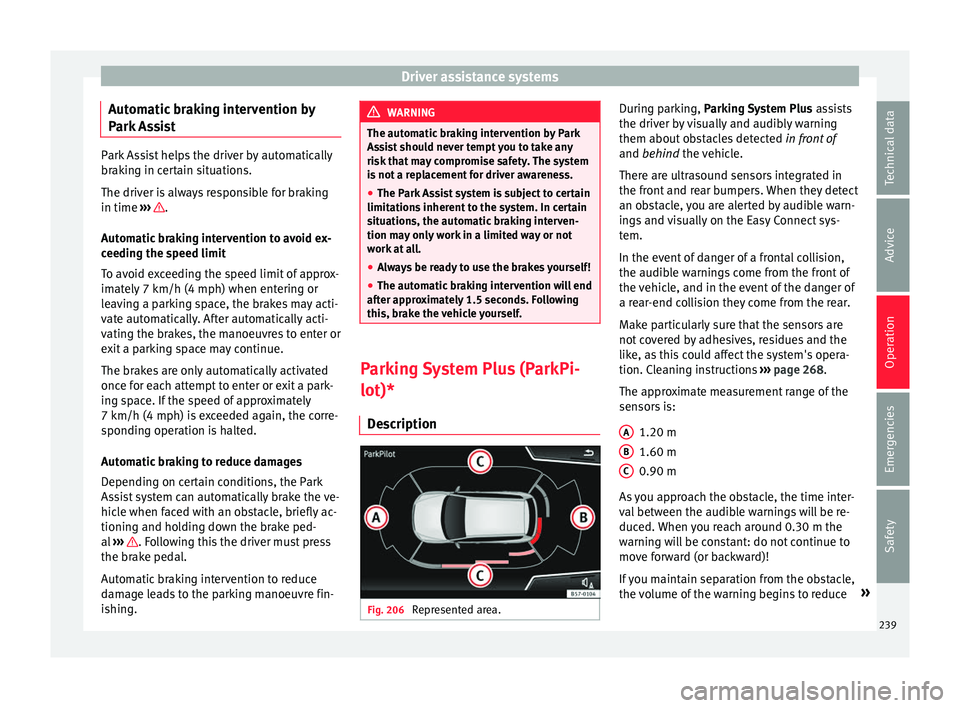
scription Fig. 206
Represented area. During parking, P
ark
ing System Plus assists
the driver by visually and audibly warning
them about obstacles detected in front of
and behind the vehicle.
There are ultrasound sensors integrated in
the front and rear bumpers. When they detect
an obstacle, you are alerted by audible warn-
ings and visually on the Easy Connect sys-
tem.
In the event of danger of a frontal collision,
the audible warnings come from the front of
the vehicle, and in the event of the danger of
a rear-end collision they come from the rear.
Make particularly sure that the sensors are
not covered by adhesives, residues and the
like, as this could affect the system's opera-
tion. Cleaning instructions ››› page 268.
The approximate measurement range of the
sensors is:
1.20 m
1.60 m
0.90 m
As you approach the obstacle, the time inter-
val between the audible warnings will be re-
duced. When you reach around 0.30 m the
warning will be constant: do not continue to
move forward (or backward)!
If you maintain separation from the obstacle,
the volume of the warning begins to reduce »
A B
C
239
Technical data
Advice
Operation
Emergencies
Safety